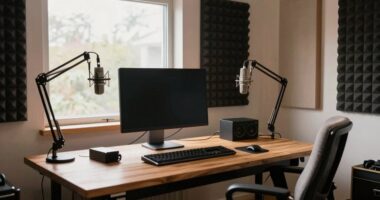
The biggest mistake that makes good gear look average is neglecting audio quality and camera work. Poor sound, background noise, or muffled audio instantly reduce your stream’s professionalism and turn viewers away, no matter how nice your equipment is. Likewise, awkward camera angles or shaky shots make your stream appear unpolished. Focusing on clear audio and thoughtful camera placement keeps your setup looking impressive. If you keep going, you’ll discover how to avoid these pitfalls and boost your stream’s appeal.

Get the latest gadgets delivered free with Prime
- Fast, free delivery on millions of items
- Prime Video, Amazon Music and more included
- Member-only deals all year
Key Takeaways
- Poor audio quality, such as background noise or muffled sound, diminishes the perceived professionalism of a stream.
- Static or awkward camera angles create an unpolished look despite good equipment.
- Inconsistent or poorly framed visuals can make high-end gear appear amateurish.
- Neglecting audio and visual calibration leads to a disjointed, unprofessional viewer experience.
- Lack of smooth camera transitions and visual variety reduces engagement, undermining quality gear.

Have you ever watched a live stream and wondered what went wrong? Maybe the video looks crisp, but something feels off. More often than not, it’s not about the quality of your gear but how you’re using it. One of the biggest mistakes streamers make is neglecting the importance of audio quality and camera angles. Even with high-end equipment, poor sound or awkward framing can make your stream look amateurish and drive viewers away.
Good equipment isn’t enough; focus on audio clarity and camera framing to keep your stream professional and engaging.
Let’s start with audio quality. You might have invested in a fancy camera and lighting, but if your microphone picks up background noise or produces muffled sound, it’s a major turn-off. Viewers need clear, crisp audio to stay engaged. When audio is inconsistent or hard to understand, they tune out faster than you can say “buffering.” To avoid this, use a dedicated microphone rather than relying on built-in device mics. Test your audio beforehand and adjust the settings to eliminate echoes, static, or background noise. It’s also wise to monitor your sound levels during the stream, ensuring they stay balanced and don’t spike unexpectedly. Remember, poor audio quality can overshadow even the most visually appealing stream, making your content seem unprofessional. Additionally, understanding the importance of audio calibration can help you achieve consistent sound quality.
Next, consider your camera angles. Even with a top-tier camera, if you don’t pay attention to framing, your stream can look disorganized or distracting. You want your camera to focus on the most important part of your content, whether that’s your face, your hands, or the game. Avoid the mistake of leaving the camera static or positioning it at awkward angles. Instead, experiment with different shots—close-ups, wide views, or multiple angles—and switch between them smoothly if possible. Good camera angles help viewers feel more engaged and make your content visually appealing. They also communicate confidence and professionalism, showing that you’ve put thought into the presentation. Incorporating camera framing techniques can significantly elevate the overall quality of your stream. Additionally, paying attention to visual consistency can help create a more cohesive and professional look for your stream.
USB condenser microphone for streaming
As an affiliate, we earn on qualifying purchases.
As an affiliate, we earn on qualifying purchases.
Frequently Asked Questions
How Does Lighting Affect Live Stream Quality?
Lighting dramatically impacts your live stream quality by setting the mood and clarity. Using effective lighting techniques, like softboxes or ring lights, helps eliminate shadows and highlights your face. Proper lighting also enhances color grading, making your video look more professional and vibrant. When you control lighting well, your gear appears first-rate, and viewers stay engaged. Poor lighting, however, makes even high-quality equipment look average and distracts your audience.
What Common Audio Mistakes Degrade Stream Professionalism?
You might think your audio quality is fine, but poor audio balancing and incorrect microphone placement can hurt your stream’s professionalism. If your mic is too close, it causes harsh sounds; too far, and your voice fades. Properly balancing audio levels and positioning the microphone correctly guarantees clear, consistent sound. This makes your stream sound more professional and engaging, preventing distracting audio issues that can detract viewers.
How Can Background Clutter Impact Viewer Perception?
Background clutter can considerably impact your viewer’s perception by creating visual noise and distraction. When your background is cluttered, viewers focus less on your message and more on the chaos behind you. This distraction undermines your professionalism and makes even good gear look average. To improve perception, keep your background simple, organized, and free of visual noise, so your content stands out and maintains viewers’ attention.
What Camera Settings Optimize Live Stream Clarity?
To optimize live stream clarity, you should adjust your camera settings for sharpness, ISO, and exposure. Use stable camera angles to avoid shaky footage, and frame your shot with proper framing techniques—center your subject and eliminate distractions. Keep lighting consistent, and test different angles to find the most flattering view. These adjustments guarantee your gear looks professional and your viewers stay engaged with clear, well-composed visuals.
How Does Internet Speed Influence Stream Stability?
Your internet speed directly affects stream stability by preventing bandwidth bottlenecks that cause buffering and lag. When your connection is fast enough, it reduces latency issues, ensuring smooth live streaming. If your upload speeds are slow, you’ll experience interruptions, making your stream look unprofessional. To avoid this, use a wired connection and prioritize your streaming device to maintain consistent internet performance and keep your stream steady and clear.
adjustable camera tripod for live streaming
As an affiliate, we earn on qualifying purchases.
As an affiliate, we earn on qualifying purchases.
Conclusion
Remember, even the brightest stars can fade if their light isn’t properly directed. Like Icarus soaring too close to the sun, a simple mistake in your live stream can diminish the brilliance of your gear and message. Focus on clarity, stability, and authenticity—these are your wings to soar. Stay grounded, yet aim high, for in the domain of live streaming, it’s not just the gear that shines, but how you wield it.
As an affiliate, we earn on qualifying purchases.
camera switcher for multiple angles
As an affiliate, we earn on qualifying purchases.
As an affiliate, we earn on qualifying purchases.
Fall Picks
fall essentials
As an affiliate, we earn on qualifying purchases.