
The best PS5 accessories solve a specific annoyance, whether that is managing controllers, improving comfort, or playing away from the TV. My best overall pick is the PlayStation DualSense Charging Station for straightforward, purpose-built controller charging; the PlayStation 5 Portal Remote Player stands out for remote play, while the Monzlteck Under-Desk Mount helps reclaim shelf space. The main tradeoffs are choosing official simplicity over extra features, or a multifunction stand over a smaller accessory that does one job. Read on for how all 14 options compare and which fits your setup.

Get the latest gadgets delivered free with Prime
- Fast, free delivery on millions of items
- Prime Video, Amazon Music and more included
- Member-only deals all year
Complete the kit



Key Takeaways
- Purpose-built charging beats feature stacking for simplicity: the official DualSense Charging Station focuses on charging, while cooling-and-charging stands add more functions but take up more space and introduce more parts.
- Remote play is a separate use case, not a controller upgrade: PlayStation Portal is the standout for playing away from the console’s display, but it does not replace a standard local gaming setup.
- Small comfort changes have different levels of commitment: silicone thumb grips are inexpensive to swap and share, while KontrolFreek thumbsticks and the Aim Boost Kit alter stick height or resistance more directly.
- Console placement matters more than adding another stand: the Monzlteck mount prioritizes under-desk storage, while the OIVO base and multifunction stands suit players who want the console displayed horizontally.
- The DualSense Edge is the premium control choice, not a universal upgrade: its advanced controls suit players who will use customization, while the standard controller accessories serve simpler charging or comfort needs.
| Rysker PS5, PS5 Slim, and PS5 Pro Cooling and Charging Stand |  | Best All-in-One Station | Compatibility: PS5, PS5 Slim, PS5 Pro | Fan Count: 1 Adjustable Fan | USB Ports: 3 USB Hubs | VIEW LATEST PRICE | See Our Full Breakdown |
| PowerA Twin Charging Station for PlayStation 5 DualSense Wireless Controllers |  | Best Official License Value | Brand: PowerA | Capacity: 2 Controllers | Power Source: AC Adapter | VIEW LATEST PRICE | See Our Full Breakdown |
| Newdery PS5 Controller Charger Station – DualSense Edge Compatible Fast Charging Dock |  | Best Fast Charging Dock | Connector Type: USB-C | Output Current: 3 A | Input Voltage: 5 V | VIEW LATEST PRICE | See Our Full Breakdown |
| Monzlteck Under-Desk Mount for PlayStation 5, PS5 Slim, and PS5 Pro |  | Best Space-Saving Mount | Mounting Type: Under-Desk | Material: Metal | Fastening: 6 Screws + Security Screw | VIEW LATEST PRICE | See Our Full Breakdown |
| KontrolFreek Aim Boost Kit for PlayStation 5 (PS5) and PlayStation 4 (PS4) Controller |  | Best Performance Upgrade | Brand: KontrolFreek | Platform: PS5 / PS4 | Material: Rubber | VIEW LATEST PRICE | See Our Full Breakdown |
| PlayStation 5 Portal Remote Player | 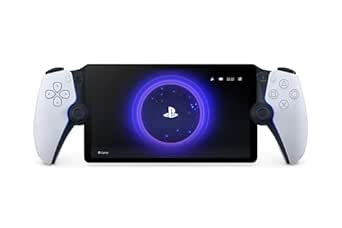 | Best for Off-TV Gaming | Screen: 8-inch LCD, 1080p | Refresh Rate: Up to 60fps | Connectivity: Wi-Fi (5Mbps min, 15Mbps recommended) | VIEW LATEST PRICE | See Our Full Breakdown |
| Remotto5 Wireless Charger for PS5 DualSense Controller |  | Best Portable Charger | Battery Capacity: 3000 mAh | Output Voltage: 3.7 V | Input Voltage: 4.2 V | VIEW LATEST PRICE | See Our Full Breakdown |
| OIVO PS5/Slim/Pro Horizontal Stand |  | Best Horizontal Stand | Compatibility: PS5, PS5 Slim, PS5 Pro (disc and digital) | Material: ABS plastic | Weight: 350 g | VIEW LATEST PRICE | See Our Full Breakdown |
| 24 PCS Premium Silicone Thumb Grips for PS4/PS5/Xbox Controllers |  | Best Budget Thumb Grips | Count: 24 caps (12 color pairs) | Material: Silicone | Compatibility: PS4, PS5, Xbox controllers | VIEW LATEST PRICE | See Our Full Breakdown |
| KontrolFreek FPS Freek Galaxy Thumbsticks for PS4/PS5 |  | Best Performance Thumbsticks | High-Rise Height: 10.0 mm | Mid-Rise Height: 6.5 mm | Shape: Concave | VIEW LATEST PRICE | See Our Full Breakdown |
| PlayStation DualSense Charging Station |  | Best Official Charging Dock | Compatible devices: PlayStation 5, DualSense controllers | Charging capacity: 2 controllers simultaneously | Connectivity: Dock contacts, no cable needed | VIEW LATEST PRICE | See Our Full Breakdown |
| PS5, PS5 Slim, and PS5 Pro Stand with Cooling Fan and Dual Controller Charging |  | Best All-in-One Stand | Compatible consoles: PS5, PS5 Slim, PS5 Pro | Cooling fan: 3 speeds, 3100–3500 RPM, touch switch | Controller charging: 2 controllers, ~2.5 hours | VIEW LATEST PRICE | See Our Full Breakdown |
| PlayStation DualSense Edge Wireless Controller – Midnight Black |  | Best Pro Controller | Compatible devices: PS5, PC, Mac | Controller type: Gamepad with back buttons | Connectivity: Wireless (Bluetooth/USB) | VIEW LATEST PRICE | See Our Full Breakdown |
| PlayStation Media Remote |  | Best Media Companion | Brand: PlayStation (Sony) | Model: 3005727 | Color: White | VIEW LATEST PRICE | See Our Full Breakdown |
More Details on Our Top Picks
Rysker PS5, PS5 Slim, and PS5 Pro Cooling and Charging Stand
This unit stands out by consolidating cooling, charging, and cable management into a single footprint. Unlike the PowerA Twin Charging Station, which focuses solely on controller power, the Rysker adds an active cooling fan and three USB hubs, making it ideal for setups where the console sits on a desk. The adjustable fan helps mitigate heat during extended sessions, a feature absent in simpler docks. However, the charging speed for original DualSense controllers takes about 3.5 hours, which is slower than dedicated fast-chargers. It also occupies more desk space than the Monzlteck Under-Desk Mount, which hides the console entirely. This is a robust solution for players who want a tidy, functional hub rather than separate accessories.
Pros:- Combines active cooling, controller charging, and USB data hubs in one unit.
- Compatible with all PS5 models including the Slim and Pro.
- Includes safety protections for overcharge and overheating.
- Adjustable fan allows for customized cooling intensity.
Cons:- Original DualSense controllers take up to 3.5 hours to charge.
- Larger footprint than dedicated charging docks or simple stands.
- Only includes one cooling fan, which may be insufficient for heavy overclocking.
Best for: Players who want a centralized hub for cooling, controller charging, and peripheral data connections.
Not ideal for: Minimalists who prefer separate, low-profile components or those with very limited desk space.
- Compatibility:PS5, PS5 Slim, PS5 Pro
- Fan Count:1 Adjustable Fan
- USB Ports:3 USB Hubs
- Charging Time (Original):~3.5 Hours
- Charging Time (Edge):~2.5 Hours
- Warranty:2 Years
Our verdict“Choose this if you want a single, multifunctional base that handles heat and power without cluttering your setup with multiple bricks.”
PowerA Twin Charging Station for PlayStation 5 DualSense Wireless Controllers
The PowerA Twin Charging Station is the most straightforward option for keeping two controllers ready. It lacks the extra bells and whistles of the Rysker Cooling Stand, such as active fans or USB data ports, but it excels in simplicity and reliability. Because it is officially licensed, you get guaranteed compatibility and a clean aesthetic that matches the console’s design language. The LED indicators provide clear status updates, whereas some third-party docks have less obvious signals. It requires a dedicated AC outlet, unlike the Newdery station which can draw power from the console’s USB port. This is the pick for players who prioritize a guaranteed fit and official support over multifunctionality.
Pros:- Officially licensed for guaranteed compatibility with PS5 DualSense controllers.
- Clear LED indicators on each slot show charging status.
- Compact tabletop design that displays controllers vertically.
- Includes a two-year limited warranty.
Cons:- Requires a dedicated AC power outlet rather than USB power.
- No cooling fans or additional USB ports for other peripherals.
- Plastic build feels less premium than some metal alternatives.
Best for: Official license enthusiasts who want a reliable, no-nonsense charging solution for two controllers.
Not ideal for: Users who need to charge controllers via USB without occupying an AC outlet, or those wanting cooling features.
- Brand:PowerA
- Capacity:2 Controllers
- Power Source:AC Adapter
- Input Voltage:240 V
- Output Current:1.5 A
- Warranty:2-Year Limited
Our verdict“Buy this for a simple, officially supported way to keep two controllers charged and displayed neatly.”
Newdery PS5 Controller Charger Station – DualSense Edge Compatible Fast Charging Dock
If speed is your priority, the Newdery Charger Station outperforms the PowerA Twin Charging Station by completing a full charge in roughly 2.5 hours. It achieves this through a higher amperage output, making it suitable for players who rotate between controllers frequently. Unlike the PowerA, this unit draws power via USB, allowing you to plug it into the console or a computer, though you will need a high-output adapter for best results. The anti-slip mats keep controllers steady, a small but practical detail compared to slicker plastic surfaces. However, you must remove controller skins or cases to ensure proper contact, a limitation not present in all competitors. It is a focused tool for fast turnaround times.
Pros:- Fast charging completes in approximately 2.5 hours.
- USB-powered flexibility allows connection to consoles or PCs.
- Anti-slip mats prevent controllers from sliding off during charging.
- Includes a 3.3-foot USB-C cable for flexible placement.
Cons:- Controller skins and cases must be removed for charging.
- Requires a specific 5V/3A power adapter for optimal speed.
- Only one USB port, limiting expansion for other devices.
Best for: Competitive players or households with multiple gamers who need rapid controller turnaround.
Not ideal for: Users who use thick controller skins or cases that interfere with the charging contacts.
- Connector Type:USB-C
- Output Current:3 A
- Input Voltage:5 V
- Charging Speed:~2.5 Hours
- Power Source:USB Corded Electric
- Warranty:12 Months
Our verdict“Select this if you need the fastest possible charge time and have a compatible power source available.”
Monzlteck Under-Desk Mount for PlayStation 5, PS5 Slim, and PS5 Pro
For gamers with limited desk real estate, the Monzlteck Under-Desk Mount offers a radically different approach than the tabletop Rysker Stand. By suspending the console beneath your desk, it completely frees up surface area for other accessories or monitors. The metal construction and six-screw attachment provide a secure hold that plastic stands cannot match, while the open design ensures adequate airflow without active fans. This is a permanent installation solution; unlike the portable charging docks, you cannot move the console easily. It also does not charge controllers, requiring a separate solution like the Newdery Charger. This is strictly for those who prioritize a clean, cable-managed aesthetic over convenience features.
Pros:- Frees up significant desk surface area by mounting console underneath.
- Sturdy metal construction with six screws for secure attachment.
- Open design promotes natural airflow around the console.
- Includes silicone covers to prevent scratching the console.
Cons:- Requires drilling into the underside of a compatible desk.
- No charging or cooling features included.
- Installation is permanent and not easily reversible.
Best for: Users with wooden or compatible desk undersides who want to maximize desk space.
Not ideal for: Renters or users with glass/metal desks where drilling is not possible, or those who move their console often.
- Mounting Type:Under-Desk
- Material:Metal
- Fastening:6 Screws + Security Screw
- Item Weight:1.6 Pounds
- Protective Covers:4 Silicone Covers
- Finish:Black
Our verdict“Choose this if you want to hide your console completely and have a suitable desk surface for mounting.”
KontrolFreek Aim Boost Kit for PlayStation 5 (PS5) and PlayStation 4 (PS4) Controller
This kit targets a different aspect of the PS5 experience: input precision. Unlike the Rysker Stand or PowerA Dock, which manage hardware logistics, the KontrolFreek Aim Boost Kit modifies the controller itself. The performance thumbsticks add height and texture, which can improve comfort and visibility during long sessions. The included precision rings add resistance, allowing for finer aim control in shooters. This is a subjective upgrade; what helps one player’s accuracy might hinder another’s speed. It does not replace the need for charging solutions like the Newdery Charger, but it complements them by enhancing gameplay feel. It is a low-cost entry point for players looking to tweak their handling without buying a new controller.
Pros:- Adds height and texture to thumbsticks for better visibility and grip.
- Precision rings create resistance for finer aiming control.
- Ergonomic design helps reduce wrist and thumb fatigue.
- Compatible with both PS5 and PS4 DualSense controllers.
Cons:- Altered thumbstick height may require an adjustment period.
- Rubber material can wear down over time with heavy use.
- Subjective comfort change; not universally preferred by all players.
Best for: Competitive shooter players seeking to improve aim precision and reduce thumb fatigue.
Not ideal for: Players who prefer the stock, low-profile feel of the original DualSense thumbsticks.
- Brand:KontrolFreek
- Platform:PS5 / PS4
- Material:Rubber
- Color:Black Galaxy
- Components:Thumbsticks & Precision Rings
- Ring Strengths:3 Levels
Our verdict“Pick this if you want to enhance your aiming precision and comfort without replacing your controller.”
PlayStation 5 Portal Remote Player
The PlayStation Portal is a dedicated remote play handheld that streams games from your PS5 over Wi-Fi. Unlike the DualSense Edge, which is just a controller, the Portal bundles an 8-inch 1080p screen with full DualSense haptics and adaptive triggers. That makes it the best way to play PS5 games away from the TV, whether you’re in bed or on a hotel network. But it’s not a standalone console—it requires your PS5 to be powered on and a stable connection of at least 15Mbps for smooth play. The lack of Bluetooth audio is a letdown, and you’ll need to use PlayStation Link or a 3.5mm jack. If you have strong Wi-Fi and want the full DualSense experience without a TV, this is the pick.
Pros:- 8-inch 1080p LCD screen with 60fps capability
- Full DualSense haptic feedback and adaptive triggers
- Cloud streaming of PS Plus Game Catalog and Classics with Premium
- PlayStation Link and 3.5mm audio options
Cons:- Requires a PS5 console and a strong Wi-Fi connection (15Mbps+ recommended)
- No Bluetooth audio support
- Only streams PS5 and PS4 games—no native game library
Best for: PS5 owners who want to play their library in bed, on the couch, or while traveling with reliable high-speed Wi-Fi.
Not ideal for: Players with weak or inconsistent internet connections, or those expecting a standalone handheld that doesn’t depend on a PS5 console.
- Screen:8-inch LCD, 1080p
- Refresh Rate:Up to 60fps
- Connectivity:Wi-Fi (5Mbps min, 15Mbps recommended)
- Audio:PlayStation Link, 3.5mm jack
- Weight:2.6 pounds
- Compatibility:PS5 console required
Our verdict“For PS5 owners with solid home networks who want to play anywhere in the house without a TV, the Portal delivers the full DualSense experience in your hands.”
Remotto5 Wireless Charger for PS5 DualSense Controller
The Remotto5 is a portable battery pack that snaps onto your DualSense, giving you over 12 hours of playtime on a single 90-minute charge. Compared with the PowerA Twin Charging Station, which keeps two controllers docked at your desk, the Remotto5 is built for mobility—you can charge while you play without a cable. The LED indicators show charge at 25%, 50%, 75%, and 100%, so you always know how much juice is left. The tradeoff is that it adds a bit of bulk to the controller, and you’ll need to supply your own USB-C cable since one isn’t included. For travelers or players who hate being tethered to a wall outlet, this is the best portable option.
Pros:- Over 12 hours of extra playtime on a single charge
- 90-minute fast recharge
- LED indicators at 25%, 50%, 75%, and 100%
- Portable, lightweight design with USB-C connection
Cons:- No USB-C cable included
- Only one USB-C port limits simultaneous charging
- Adds noticeable bulk to the controller
Best for: Travelers and players who want to extend DualSense playtime on the go without hunting for a wall outlet.
Not ideal for: Players who prefer a stationary charging dock for multiple controllers or want a cable included in the box.
- Battery Capacity:3000 mAh
- Output Voltage:3.7 V
- Input Voltage:4.2 V
- Charging Time:90 minutes
- Playtime:12+ hours
- Charging Indicator:LED (25%, 50%, 75%, 100%)
- Connectivity:USB Type-C
Our verdict“For PS5 players who need a portable battery solution to keep gaming away from a power source, the Remotto5 is the top pick.”
OIVO PS5/Slim/Pro Horizontal Stand
The OIVO horizontal stand is a sturdy base that lets you lay your PS5, Slim, or Pro flat on any surface. Unlike the Rysker cooling and charging stand, which holds the console vertically and adds fans, the OIVO focuses on stability and space-saving. Its support rods and anti-slip pads keep the console secure, and the scalable design fits all three versions, including digital editions with the included EVA foam. Assembly is quick with the screw and rods. The downside is that it doesn’t provide any cooling or charging—it’s purely a stand. If you want to free up vertical space and keep your PS5 flat without wobble, this is the pick.
Pros:- Compatible with PS5, PS5 Slim, and PS5 Pro (disc and digital)
- Support rods on the bottom improve stability
- Anti-slip pads prevent scratching and wobbling
- Fast assembly with screw and included EVA foam for digital editions
Cons:- No cooling fan or charging functionality
- Horizontal orientation only—not convertible to vertical
- May not fit very narrow shelves due to the stand’s width
Best for: Players who want to lay their PS5 flat in an entertainment center or on a shelf without taking up vertical space.
Not ideal for: Those who prefer a vertical stand with integrated cooling fans or controller charging capabilities.
- Compatibility:PS5, PS5 Slim, PS5 Pro (disc and digital)
- Material:ABS plastic
- Weight:350 g
- Includes:2 stands, 3 support rods, EVA foam, screw
- Form Factor:Horizontal
Our verdict“For PS5 owners who want a stable, space-saving horizontal stand that works across all console versions, the OIVO delivers.”
24 PCS Premium Silicone Thumb Grips for PS4/PS5/Xbox Controllers
These 24 silicone thumb grips from CCFREELIFE are the budget way to add grip and color to your PS4, PS5, or Xbox controller. Compared with the KontrolFreek FPS Freek Galaxy, which changes stick height for precision aiming, these caps simply snap on for a non-slip surface and a splash of color. The 12 color pairs let you mix and match, and the silicone protects your sticks from wear. However, the added layer can feel bulkier and may slightly reduce precision for competitive play. If you want a cheap, fun way to personalize your controller without changing its feel, these are the choice.
Pros:- 24 caps in 12 color pairs for customization
- Non-slip silicone improves grip
- Protects original thumbsticks from scratches and wear
- Snap-on installation with no residue
Cons:- Added silicone layer can feel bulky
- May reduce precision for players who rely on subtle stick movements
- No height adjustment—purely grip and protection
Best for: Casual players who want to personalize their controller with colorful grips and protect the sticks from wear without spending much.
Not ideal for: Competitive gamers who need adjustable stick height or precise aiming performance—these don’t change stick geometry.
- Count:24 caps (12 color pairs)
- Material:Silicone
- Compatibility:PS4, PS5, Xbox controllers
- Installation:Snap-on, no adhesive
- Weight:1 g (per set)
Our verdict“For budget-conscious players who want a colorful, non-slip upgrade to their controller, this 24-pack is the best value.”
KontrolFreek FPS Freek Galaxy Thumbsticks for PS4/PS5
The KontrolFreek FPS Freek Galaxy thumbsticks are built for competitive shooters. The set includes a 10mm high-rise stick for the right analog and a 6.5mm mid-rise for the left, which gives you finer control over aiming while maintaining movement speed. Compared with the simple silicone caps from CCFREELIFE, these actually change the stick geometry, reducing the force needed for precise adjustments. The non-slip rubber compound keeps your thumbs planted during intense matches. The tradeoff is that the added height takes time to get used to, and they’re only compatible with PS4 and PS5. If you’re serious about FPS accuracy, these are worth the adjustment period.
Pros:- Mixed-height design (10mm high-rise, 6.5mm mid-rise) for aiming and movement control
- Non-slip rubber compound for a secure grip
- Reduces the force needed for precise stick adjustments
- Protects original thumbsticks from wear
Cons:- Compatible only with PS4 and PS5 controllers
- Added height requires an adjustment period
- May feel too tall for players with smaller hands
Best for: Competitive FPS players who want improved aiming precision and a more responsive stick feel on PS4 or PS5.
Not ideal for: Casual players who prefer the standard stick height or play on Xbox—these are PlayStation-only.
- High-Rise Height:10.0 mm
- Mid-Rise Height:6.5 mm
- Shape:Concave
- Material:Proprietary rubber compound
- Compatibility:PS4, PS5
- Color:Black
Our verdict“For competitive PlayStation players who want a real performance upgrade in aiming, the FPS Freek Galaxy is the definitive choice.”
PlayStation DualSense Charging Station
When you want the simplest, most reliable way to keep two DualSense controllers topped up, the official PlayStation charging station is the reference point. Its click-in design makes docking effortless — you don’t have to fiddle with alignment, and the controllers snap in with a satisfying click. Compared with the PowerA Twin Charging Station, this one uses the same charging contacts as the console’s USB ports, so it delivers identical charging speed without occupying any of your PS5’s front USB slots. The tradeoff is that it’s purely a charger — it won’t cool your console or store game discs like the OIVO stand does. If you already have a good stand and just need clean, official charging, this is the pick. It also keeps your controllers in a neat, upright display rather than leaving them scattered on a shelf.
Pros:- Official Sony product with a perfect fit and finish
- Charges two controllers simultaneously at full speed
- Click-in docking is fast and foolproof
- Frees up both front USB ports on the console
Cons:- No extra USB passthrough or accessory storage
- Controllers must be placed in the dock — no cable charging option
- Only works with standard DualSense, not the Edge’s larger shape
Best for: PS5 owners who want a compact, official charging solution that matches the console’s aesthetic and frees up USB ports without adding extra bulk.
Not ideal for: Gamers who need additional features like cooling, disc storage, or headset holders — those should look at the all-in-one stand instead.
- Compatible devices:PlayStation 5, DualSense controllers
- Charging capacity:2 controllers simultaneously
- Connectivity:Dock contacts, no cable needed
- Charging speed:Same as connecting to PS5 USB
- Weight:360 g
- Dimensions:7.5″D x 5″W x 3″H
- Power source:AC adapter (included)
- Color:White (matches PS5)
Our verdict“If you want the cleanest, most dependable way to charge two standard DualSense controllers, this official dock is the no-fuss choice.”
PS5, PS5 Slim, and PS5 Pro Stand with Cooling Fan and Dual Controller Charging
If your gaming setup is short on space, this stand consolidates everything into one vertical tower. It cools your console with a three-speed fan, charges two controllers, and even stores up to 14 game discs plus a headset — a level of consolidation that the official DualSense Charging Station simply can’t match. The fan runs at 3100–3500 RPM and can be switched off entirely via a touch control, which is useful when you’re playing quieter titles. Compared with the OIVO horizontal stand, this one adds active cooling and controller charging, but it does come with a caveat: the controller charging may not kick in if the battery is above 70%, so you can’t rely on it for a full top-up. The built-in protection against overcharge, overheat, overvoltage, and short circuits is a nice safety net, though the listed dimensions seem to describe only the base, not the full assembled height — measure your shelf before committing.
Pros:- Three-in-one design: cooling, charging, and storage
- Fan has three speeds and can be turned off for quiet play
- Stores up to 14 discs and includes a headset holder
- Multiple electrical protection features for peace of mind
Cons:- Controller charging may not start when battery is above 70%
- Dimensions listed may not reflect the full assembled height
- Fan adds a subtle hum even at low speed
Best for: Gamers with a single shelf or desk who want to combine console cooling, controller charging, and media storage in one tidy vertical footprint.
Not ideal for: Players who prefer a horizontal console orientation or who want a charging dock that works reliably regardless of battery level — the 70% threshold may frustrate.
- Compatible consoles:PS5, PS5 Slim, PS5 Pro
- Cooling fan:3 speeds, 3100–3500 RPM, touch switch
- Controller charging:2 controllers, ~2.5 hours
- USB ports:3 extra ports
- Game disc storage:Up to 14 discs
- Indicators:LED charging status
- Protection:Overcharge, overheat, overvoltage, short-circuit
- Dimensions:4.02″ x 1.02″ x 4.33″ (base)
- Color:All white
Our verdict“For a tidy all-in-one setup that handles cooling, charging, and disc storage, this stand is the most space-efficient option — just accept the charging quirk.”
PlayStation DualSense Edge Wireless Controller – Midnight Black
The DualSense Edge is the only controller on this list that’s built for competitive play. Its mappable back buttons let you assign actions like jump or reload without moving your thumbs off the sticks, and the replaceable stick modules and caps mean you can swap out worn or damaged sticks instead of buying a whole new controller. Compared with the standard DualSense, the Edge adds adjustable trigger travel, custom stick sensitivity curves, and on-controller profile switching — a level of fine-tuning that the official charging station can’t even begin to address. The tradeoff is weight and cost: at 2.6 pounds, it’s noticeably heavier than a standard controller, and the battery life is shorter because of the extra features. It also doesn’t fit the official DualSense Charging Station’s dock, so you’ll need a separate charging solution like the Newdery Edge-compatible dock. This is a precision tool for players who take their aim and reaction times seriously.
Pros:- Mappable back buttons give a real competitive advantage
- Replaceable stick modules extend the controller’s lifespan
- Adjustable trigger travel and stick sensitivity curves
- On-controller profile switching for different games
Cons:- Heavier than standard DualSense (2.6 lbs)
- Shorter battery life due to added features
- Does not fit the official DualSense charging dock
Best for: Competitive and enthusiast gamers who want remappable back buttons, adjustable triggers, and the ability to replace stick modules without buying a new controller.
Not ideal for: Casual players who are happy with the standard DualSense’s features and don’t need pro-level customization — the extra weight and cost won’t pay off.
- Compatible devices:PS5, PC, Mac
- Controller type:Gamepad with back buttons
- Connectivity:Wireless (Bluetooth/USB)
- Button count:21 (including back buttons)
- Weight:2.6 lbs
- Dimensions:7.8″D x 7.8″W x 4″H
- Stick modules:Replaceable with caps
- Profile slots:Multiple custom profiles
Our verdict“If you’re chasing every millisecond of response time and want a controller that adapts to your grip, the DualSense Edge is the definitive pro pick.”
PlayStation Media Remote
If your PS5 is your primary streaming box, the official Media Remote turns the console into a proper home theater device. It offers dedicated playback buttons for Netflix, YouTube, and other apps, and it can power on your PS5 and navigate its menus without needing a controller. The built-in infrared transmitter also adjusts volume and power on compatible TVs, so you can ditch your TV remote for most media sessions. Compared with the Monzlteck under-desk mount or the DualSense Edge, this remote is the only accessory that directly addresses media playback — the Edge’s back buttons are useless for scrolling through Disney+. The tradeoffs are modest: it requires a system software update to function fully, its IR range tops out at 10 meters, and it only controls one device at a time. It also uses two AA batteries, which are included, but you’ll need to replace them eventually. For a dedicated media room or a living room where the PS5 is the hub, this remote is a clean, purpose-built addition.
Pros:- Dedicated media playback buttons for quick control
- Can power on PS5 and navigate menus directly
- IR transmitter controls volume and power on compatible TVs
- AA batteries included, so it works out of the box
Cons:- Requires a PS5 system software update to function fully
- IR range limited to 10 meters
- Only controls one device at a time
Best for: Streaming enthusiasts who want to control playback, power, and volume without juggling two remotes or reaching for a gamepad.
Not ideal for: Gamers who rarely watch media on their PS5 — the remote adds little value if you only play titles and use a soundbar with its own remote.
- Brand:PlayStation (Sony)
- Model:3005727
- Color:White
- Connectivity:Infrared (IR)
- Button count:15
- Maximum range:10 meters
- Compatible devices:PS5, compatible TVs
- Batteries:2 AA (included)
- Dimensions:7.44″L x 3.29″W x 1.54″H
Our verdict“For turning your PS5 into a true media center, this remote is the most convenient way to control playback and TV volume from the couch.”
How We Picked
I compared these accessories by the job they solve for a PS5 owner: charging, console placement, controller feel, remote play, or media control. I gave more weight to clear everyday usefulness, compatibility, and ease of setup than to the number of features listed. For charging and storage products, the ranking reflects how directly they address clutter and whether their added functions justify their footprint. For controller add-ons, I looked at how much they change grip or input feel and whether that change suits a particular player rather than everyone.
The order favors accessories with broad usefulness and a clear purpose, then moves toward specialist upgrades and preference-dependent add-ons. Official accessories rank well when they offer a direct fit or distinct PlayStation use, while third-party options stand out when they offer a different placement or control approach. I also considered overlap: buyers rarely need multiple charging solutions or several thumbstick modifications at once. Because needs vary, the ranking is a starting point, not a claim that every player should buy every item.
Factors to Consider When Choosing Best PS5 Accessories
Before choosing from the best PS5 accessories, I would start with the problem in your setup rather than the product category. These factors help avoid buying overlapping gear or adding features that will not change how you play.
Start With the Problem You Want to Fix
Make a short list of the recurring friction in your setup: dead controllers, limited shelf space, discomfort, or not having access to the TV. That list helps separate useful upgrades from accessories that merely look convenient. A charging dock will not solve a placement problem, and a console mount will not improve controller comfort. If you have several frustrations, tackle the one that interrupts play most often. One well-matched accessory can be more useful than a bundle of overlapping add-ons. Revisit the list before buying a second product for the same job.
Check Compatibility Beyond the PS5 Label
Accessory listings may group the original PS5, Slim, and Pro together, but console shape, orientation, and included components can affect fit. Check whether the product is made for your exact model and whether a stand or mount supports the way you plan to place it. Controller accessories also differ: DualSense Edge compatibility is not automatic just because an item fits a standard DualSense. Confirm the specific console and controller model before ordering. For add-ons that sit on thumbsticks, check whether they can remain attached during storage or transport. This small check can prevent a fit issue that a general compatibility claim does not resolve.
Avoid Paying for Features You Will Not Use
Multifunction stands can combine charging, cooling, and storage, but every added function can mean a larger footprint and more setup. If you only need a reliable place to charge two controllers, a dedicated dock may be a cleaner choice. If you want to display the console horizontally, a simple base may be enough without extra electronics. Pay for added functions only when they replace something you already need, rather than treating a longer feature list as automatic value. Think about where cables will run and whether the accessory will make the area easier to maintain. A compact single-purpose product can suit a small desk better than an all-in-one unit.
Treat Controller Feel as Personal Fit
Thumb grips, taller thumbsticks, precision rings, and an advanced controller change different parts of the control experience. A grippier cap can help with feel without making a major change to stick height, while taller sticks or resistance rings are more noticeable and may take adjustment. That means an add-on favored by a shooter player may not suit someone who plays a mix of genres. Start with the least disruptive change if you are unsure, and avoid stacking several modifications before you know what helps. Check whether the accessory comes in a configuration you can use on both sticks or only one. Comfort is personal, so a more adjustable option is useful only if you plan to tune it.
Think Through Where and How You Play
Remote play, couch play, and desk play call for different accessories, even when all three involve the same PS5. A remote player makes sense when access to the main display is the obstacle, but it adds another device to charge and manage. An under-desk mount can clear a work area, while a horizontal stand suits a visible entertainment center. Match the accessory to your actual play location, including available outlets, cable reach, and storage space. If you play mostly in one room, portable charging may solve less than a permanent dock. If you regularly share the TV, a remote-play device may change access more than another controller attachment.
Account for Maintenance and Replacement
Accessories with fans, moving parts, or multiple charging contacts can require more cleaning and troubleshooting than a simple stand or grip. Before choosing a multifunction product, think about dust around the console and how easily you can reach its ports and cables. Small silicone caps are easy to replace, while a specialty controller or remote-play device represents a more involved piece of equipment to keep charged and stored. Consider the ongoing setup, not just installation. Keep ventilation paths clear when positioning the console, and avoid a mount that makes routine access awkward. A product that is easy to maintain is more likely to stay useful after the novelty fades.
Frequently Asked Questions
Should I choose the official DualSense Charging Station or a multifunction charging stand?
Choose the official DualSense Charging Station if your main need is a straightforward place to charge controllers and you do not want a larger console accessory. A multifunction stand may suit you better if you also want a horizontal base, cooling features, or extra organization in one footprint. Those added functions can also mean more parts and a more involved setup. Check whether the stand matches your PS5 model and where its cables will sit. If you already have a stable console placement, a dedicated charger avoids paying for functions you may not use.
Does PlayStation Portal replace playing on a PS5 TV?
PlayStation Portal is for remote play, so it is most useful when the television is unavailable or you want to play elsewhere on your local network. It does not replace the PS5 console; the console remains part of the setup. Your experience also depends on network conditions, so think about where you intend to use it and how reliable the connection is there. If you usually have access to the main screen, a charging or comfort accessory may have a more direct effect on your daily play. Portal makes the most sense when access to the TV is the problem you are trying to solve.
Can I use DualSense accessories with a DualSense Edge controller?
Do not assume every DualSense accessory fits the DualSense Edge. Charging docks, thumbstick caps, and controller grips can differ in shape or clearance, so check the accessory’s stated compatibility with the exact controller. The Newdery dock in this roundup specifically identifies DualSense Edge compatibility, which makes that detail relevant for charging. Thumbstick accessories may also change how the stick feels or whether it fits securely. If you own both controller types, confirm which one the accessory is designed for before choosing it.
Is a cooling stand worth choosing over a simple PS5 stand?
A cooling stand makes sense if its extra features fit your setup and you have room for its larger footprint. It is not automatically a better choice than a simple horizontal base, especially if your console already has an open, well-ventilated position. Added fans and charging functions also create more components to connect and keep clear of dust. Compare the stand’s compatibility with your PS5 model and the way you want to orient the console. If you mainly need stable placement, a simpler base can address that need with less added hardware.
Which controller upgrade should I try first if I am unsure what feels comfortable?
If you are unsure, start with a small, reversible grip change rather than buying an advanced controller or combining several stick modifications. Silicone thumb grips change surface feel, while taller thumbsticks and precision rings affect reach and resistance more noticeably. Players who already know they want deeper control customization may prefer the DualSense Edge, but it is a more specialized choice. Try one change at a time so you can tell what helps. The right pick depends on your preferred games, hand comfort, and whether you want a subtle grip change or a more substantial control adjustment.
Conclusion
For most players, I would start with the PlayStation DualSense Charging Station as the best overall: it addresses a common controller-management need without adding unrelated functions. The PowerA Twin Charging Station is my best value-style pick for buyers focused on charging two controllers, while the DualSense Edge is the best premium choice for players who want advanced control customization. For beginners, the official charging station is the simplest add-on to understand and use. Choose PlayStation Portal for remote play, the Monzlteck mount for a tidier desk, or the OIVO base for horizontal console support. I would skip buying several accessories that solve the same problem; choose the one that fits your setup first.