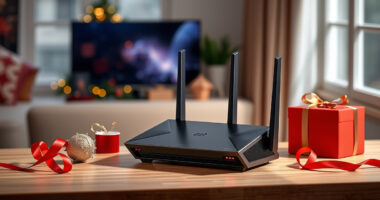
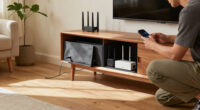
Smart home hubs, routers, bridges, speakers, and streaming boxes are easier to manage when they have a deliberate home. The practical choice is usually between open shelving and racks, which leave devices accessible, and enclosed cabinets or media consoles, which conceal the collection. The tension is straightforward: visibility and airflow versus a calmer-looking room and less exposed equipment.

Get the latest gadgets delivered free with Prime
- Fast, free delivery on millions of items
- Prime Video, Amazon Music and more included
- Member-only deals all year

Amazon Echo Hub (newest model), 8", Redesigned with customizable control and Alexa+, Smart home hub compatible with thousands of…
- ✔ Display: 8-inch touchscreen; 1280 × 800 resolution
- ✔ Connectivity: Dual-band Wi-Fi, Bluetooth, Zigbee, Thread, Matter as a controller, and Sidewalk
- ✔ Dimensions: 7.9 × 5.4 × 0.6 inches

Amazon Smart Home Starter Kit with Echo Hub, Smart Plug, and 4 Smart Bulbs
- ✔ Included items: Echo Hub, Amazon Smart Plug, and four Amazon Basics smart bulbs
- ✔ Display: 8-inch touchscreen; 1280 × 800 resolution
- ✔ Connectivity: Dual-band Wi-Fi, Bluetooth, Zigbee, Thread, and Matter
Neither format is automatically better for every setup. Open shelving tends to suit people with several devices, frequent troubleshooting, or equipment that needs clear ventilation. A cabinet can make more sense when the gear is modest, the room is shared with guests, or visual clutter is the main concern. The best choice depends on device heat, wireless connections, cable routes, and how often you need to reach the equipment.
At a Glance
| Criteria | Open shelving and racks | Enclosed cabinets and media consoles | Winner |
|---|---|---|---|
| Airflow and heat | Open air circulation; devices remain visible | Airflow varies; vents and clearance matter | A |
| Device access | Quick access for pairing, resets, and ports | Doors and shelves add steps when troubleshooting | A |
| Cable appearance | Cables remain exposed unless routed behind the rack | Can conceal power strips and cable slack | B |
| Wireless signal | Usually fewer barriers around radios and antennas | Cabinet materials, doors, and placement may weaken some signals | A |
| Protection and security | Devices are easy to reach and more exposed to dust or accidental contact | Reduces casual contact and hides gear, but is not necessarily lockable or secure | Depends |
| Room appearance | Visible equipment can look busy, but purpose-built racks can be neat | Conceals equipment and blends with furniture | B |
| Cost and flexibility | Often inexpensive and easy to expand with shelves or brackets | Can cost more; built-in cable management may reduce extra purchases | Depends |
Amazon Echo Hub (newest model), 8", Redesigned with customizable control and Alexa+, Smart home hub compatible with thousands of…
The Amazon Echo Hub is the stronger all-purpose choice when our main goal is to bring existing smart home controls together. Its 8-inch touchscreen lets us arrange devices into dashboard sections and resize them, so the screen can prioritize the lights, cameras, routines, or security controls we use most. That customization is more directly relevant to organizing a mixed setup than simply adding a few new devices in a bundle.Connectivity is a meaningful part of its role. The built-in hub supports Wi-Fi, Bluetooth, Zigbee, Thread, and Matter, giving compatible devices across several standards a place in an Alexa-based control setup. Compared with the Starter Kit, this standalone model leaves us free to choose the bulbs and plug that fit our existing home rather than adding Amazon Basics bulbs by default. Buyers should still check that their specific devices and desired functions are compatible; broad standard support does not guarantee every product works in every way.Its fixed-home format is also a tradeoff. The Hub is designed for wall mounting or stand placement, not handheld use, and the stand is sold separately. Hiding cables may require separately sold accessories or an installation with in-wall pass-throughs. An included power adapter and wall-mount hardware make a wall installation possible, but this is a control panel to place thoughtfully, not a screen we move from room to room.The Starter Kit is the better fit if we want a few ready-to-control devices alongside the organizer. The standalone Hub wins for households that already have smart devices, want a more tailored dashboard, or do not need the bundled plug and bulbs. Alexa features such as routines and security controls can make frequent household actions easier to surface, though the experience depends on compatible products, internet access, and available services. Choose this model for organization first; choose the bundle when its accessories solve a real setup need.
Pros:
- Customizable dashboard with sections and resizable controls
- Built-in support for Wi-Fi, Bluetooth, Zigbee, Thread, and Matter devices
- Wall-mount hardware and 12.5 W power adapter are included
- Can bring compatible routines, cameras, media, and security controls onto one screen
Cons:
- Requires internet access through Wi-Fi or Ethernet
- Not intended for handheld or portable use
- Tabletop stand and cable-concealment accessories are sold separately
Best for: Households with compatible smart devices that want a customizable, centrally placed Alexa control panel.
Not ideal for: Buyers who need a portable screen, want bulbs and a plug included, or do not want a control setup that depends on internet access.
Bottom line: For organizing a varied set of compatible devices without buying a predefined bundle, the standalone Echo Hub is our most flexible pick.
“For organizing a varied set of compatible devices without buying a predefined bundle, the standalone Echo Hub is our most flexible pick.”
Amazon Smart Home Starter Kit with Echo Hub, Smart Plug, and 4 Smart Bulbs
The Amazon Smart Home Starter Kit pairs an Echo Hub with an Amazon Smart Plug and four Amazon Basics smart bulbs. For someone building a first connected setup, that changes the purchase from a screen-only organizer into a bundle with several devices ready to add and manage. We can use the Hub’s touchscreen and Alexa routines to bring those lights and the plug into a shared control point, instead of beginning with an empty dashboard.The organizing interface is the same as the standalone Echo Hub: an 8-inch customizable touchscreen backed by Wi-Fi, Bluetooth, Zigbee, Thread, and Matter support. The bundle therefore does not offer a larger screen or broader stated connectivity than our top pick. Its advantage is practical completeness. If we need all four bulbs and the plug, the kit gives a new household more to organize at once; if we already own those items, the additions may duplicate what is in place.That makes this less universal than the standalone model. The bundled devices are specific to Amazon’s lineup, while the standalone Hub lets us select accessories around our existing brands and needs. Compatibility still matters: the Hub’s support for common standards is useful, but we should confirm that each device works with the features we want. The kit also shares the same placement limits as the other pick. It needs an internet connection and is designed for a wall or separate stand, so it will not suit buyers looking for a portable touchscreen organizer.For a first Alexa-based setup, the kit offers a more concrete starting point than buying the Hub alone. Compared with the standalone option, however, its value depends on using the included plug and bulbs rather than simply preferring a bundle. We should also plan the installation: the Echo Hub’s stand is sold separately, though wall-mounting hardware is included. Pick the kit when its accessories fit our rooms and plans; otherwise, the standalone Hub is the more adaptable organizer.
Pros:
- Includes an Echo Hub, Amazon Smart Plug, and four Amazon Basics smart bulbs
- Same customizable 8-inch screen as the standalone Hub
- Supports Wi-Fi, Bluetooth, Zigbee, Thread, and Matter devices
- Provides several devices to add to routines and dashboard controls from the start
Cons:
- Bundled plug and bulbs may be redundant for established smart homes
- Requires an internet connection through Wi-Fi or Ethernet
- Designed for wall mounting or separate stand placement; stand is sold separately
Best for: New smart home owners who want an Echo Hub plus a smart plug and four bulbs to begin organizing.
Not ideal for: Households that already have enough smart bulbs and plugs, prefer another accessory ecosystem, or need a portable display.
Bottom line: The Starter Kit is the more complete first step when we will use its plug and bulbs, but those same extras make it a less flexible fit for homes with established devices.
“The Starter Kit is the more complete first step when we will use its plug and bulbs, but those same extras make it a less flexible fit for homes with established devices.”
As an Amazon Associate we earn from qualifying purchases.
Key Differences
The most consequential difference is how easily devices can breathe and be reached. Routers, switches, hubs, and other always-on electronics may produce heat, and some need unobstructed space around vents. Open shelving makes that condition easier to achieve and makes status lights, ports, and reset buttons immediately available. A closed cabinet can still work, but only if its interior dimensions, ventilation, and cable openings suit the actual devices. A crowded console with its doors shut can turn a simple organizer into a source of heat and troubleshooting friction.
The visual tradeoff runs the other way. A cabinet can hide power bricks, adapters, and loose cable loops, which matters in a living room or other shared space. But hiding hardware does not automatically improve wireless performance or simplify maintenance. Dense materials, metal panels, and poor placement can affect signals; doors also make occasional resets less convenient. Open racks show more, but let the owner label connections, inspect status, and adjust the layout with less effort.
Value depends on what the organizer must solve. A basic shelf or rack can be the better buy for a growing, frequently adjusted setup. A cabinet earns its added cost when its furniture finish, storage, and cable concealment are useful every day, provided that it has adequate ventilation and openings. Paying extra just to hide equipment is hard to justify if the cabinet traps heat or makes routine access awkward.
Detailed Comparison
Airflow and heat (Open shelving and racks wins — major)
Open shelving wins by a clear, major margin for airflow because devices are not enclosed by default. That can reduce heat buildup and makes it easier to leave clearance around vents. Cabinets can perform well when they include ventilation openings, sufficient interior space, and a sensible arrangement, but buyers need to check those details instead of assuming the doors are harmless. If equipment runs warm or operates continuously, the open format is the safer, simpler choice.
Device access (Open shelving and racks wins — moderate)
Open racks make it easier to reach buttons, ports, labels, and indicator lights, so they win by a moderate margin for frequent setup or troubleshooting. Cabinet doors and shelves are a small inconvenience for equipment that rarely needs attention, but become a repeated annoyance when you often restart a hub, swap a cable, or pair a device. Choose the cabinet format only if its concealment benefit outweighs that extra step for your routine.
Cable appearance (Enclosed cabinets and media consoles wins — major)
Enclosed cabinets win by a major margin when the goal is to hide adapters, power strips, and spare cable length. A well-planned rack can still look organized with cable trays, labels, and routes along its back, but those additions take planning and leave at least some equipment visible. For a shared living room, concealed storage can have a meaningful daily benefit. For a utility area, visible and labeled connections may be perfectly acceptable.
Wireless signal (Open shelving and racks wins — moderate)
Open shelving has a moderate practical advantage because it avoids placing radios and antennas behind cabinet doors or dense panels. The actual impact depends on the device, cabinet construction, and location; many smart home devices will work fine inside a suitable cabinet. Still, a metal enclosure or a cabinet tucked into a corner can create avoidable signal problems. Keep routers and wireless hubs in the open when coverage matters, even if other equipment is concealed.
Protection and security (minor difference)
This is a depends result. A cabinet can reduce casual handling, pet contact, and visible dust, while open shelves make inspection and cleaning easy. Ordinary furniture doors do not make a secure enclosure, and neither option alone solves ventilation, child safety, or access control. If the main concern is accidental contact, a cabinet with a secure latch may help; if you need actual security, choose purpose-built locking storage rather than relying on a decorative console.
Room appearance (Enclosed cabinets and media consoles wins — moderate)
Enclosed cabinets win by a moderate margin in rooms where exposed technology looks out of place. They can match existing furniture and leave a cleaner sightline. Open shelving can still look deliberate, especially when devices are grouped, cables are routed, and the rack has a consistent finish. The difference is less important in a home office or utility room, where access and organization may matter more than hiding every device.
Cost and flexibility (moderate difference)
There is no universal winner. Simple open shelves are often cheaper and easier to reconfigure as the setup grows. A cabinet may cost more, though it can combine equipment storage and everyday furniture in one purchase and reduce the need for separate cable covers. Compare the usable space, ventilation, cable access, and likely future devices—not just the sticker price. The least expensive organizer is poor value if it cannot fit the equipment safely.
Open shelving and racks: Pros and Cons
Pros:
- Strong default airflow for always-on equipment
- Easy access to ports, reset buttons, and status lights
- Usually simple to expand or rearrange
- Keeps wireless devices out from behind cabinet panels
Cons:
- Devices and cables remain visible
- May collect dust and invite casual handling
- A tidy result can require cable trays, labels, or extra planning
Enclosed cabinets and media consoles: Pros and Cons
Pros:
- Conceals devices, adapters, and cable slack
- Can fit the room’s furniture and reduce visible clutter
- May reduce casual contact with equipment
Cons:
- Ventilation and device clearance require attention
- Doors and shelves slow access during troubleshooting
- Some cabinet materials or placement can affect wireless signals
- Often costs more than basic shelving
Who Should Choose What
Choose Open shelving and racks if:
- You have several always-on devices or equipment that runs warm.
- You often reset, reconfigure, or inspect hubs, routers, and connections.
- Your setup changes frequently and you want room to add shelves or devices.
- Wireless coverage and clear access matter more than hiding every cable.
Choose Enclosed cabinets and media consoles if:
- The organizer will sit in a living room where visible hardware feels distracting.
- You have a small, stable device collection and only occasional need to reach it.
- The cabinet provides vents, useful cable openings, and enough clearance for your equipment.
- You value furniture that conceals adapters and fits the room, and the extra cost is justified by that daily benefit.
Skip both if: Skip standard furniture organizers if you need a lockable, ventilated equipment enclosure, have high-heat networking gear, or need rack-standard mounting; look for a purpose-built ventilated rack or secure cabinet.
Value for Money
Open shelving is usually the better value when the main job is holding equipment: basic units are often affordable, adjustable, and easy to adapt as a setup changes. The savings are less meaningful if the exposed cables bother you enough to buy several add-ons or replace the shelf later. A cabinet costs more, but the premium can be worthwhile when it serves as room furniture and hides clutter every day. Pay more only when the cabinet also meets the practical requirements: airflow, clearance, power access, and signal-friendly placement. Otherwise, the added finish buys appearance at the expense of usability.
Final Verdict
For most multi-device smart home setups, choose open shelving or a rack. It is the more dependable default for airflow, access, and changing equipment, especially when routers, hubs, and switches need attention. Choose an enclosed cabinet when visual calm matters more than instant access and you have confirmed that its vents, openings, and interior space suit your devices. The biggest deciding factor is whether the equipment needs frequent access or ventilation: if it does, keep it open; if not, a properly designed cabinet can be worth the added cost and cleaner look.
Frequently Asked Questions
Can I put a Wi-Fi router inside a cabinet?
You can, but performance depends on the router, cabinet materials, and placement. Wood or other relatively open materials may cause little trouble, while metal panels and tucked-away corners can weaken coverage. Test signal where you use it, and keep the router in the open if coverage drops.
Do smart home hubs need ventilation?
Follow each device maker’s placement guidance and keep vents clear. Many small hubs produce modest heat, but routers, switches, and other continuously running equipment can benefit from open space. A closed cabinet needs enough clearance and ventilation to avoid trapping heat.
How do I make open smart home shelving look tidy?
Group devices by function, label both ends of important cables, route cords behind the shelf, and secure excess length with reusable ties. Keep power bricks from blocking vents. A small cable tray or rear panel can hide much of the wiring while preserving access.
Is a media console a good organizer for smart home devices?
It can be a good fit for a modest collection in a shared room if it has ventilation, practical cable openings, and enough room around each device. Check that doors do not block wireless signals or remote controls, and that you can reach power and reset controls when needed.