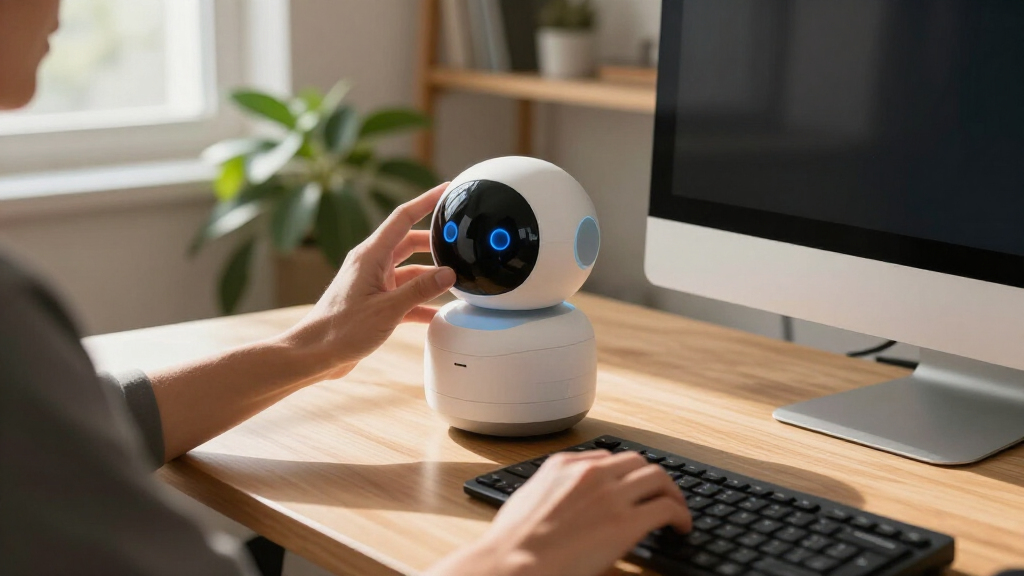

Choosing the right desktop companion robot depends largely on whether you prioritize emotional interaction or practical utility. EMOPET EMO stands out as the best overall pick for its seamless AI integration and expressive personality, while the Energize Lab Eilik offers a charming, screen-free experience for those who prefer tactile engagement over digital interfaces. The main tradeoff in this category lies between AI connectivity and offline reliability; cloud-dependent models offer smarter conversations but require constant Wi-Fi, whereas local-processing units are more private but less conversational. This guide breaks down the top fifteen options to help you match a robot’s capabilities with your specific desk environment and interaction preferences.

Get the latest gadgets delivered free with Prime
- Fast, free delivery on millions of items
- Prime Video, Amazon Music and more included
- Member-only deals all year
Complete the kit



Key Takeaways
- The EMOPET EMO dominates the high-end segment due to its advanced facial expression engine and robust app ecosystem, setting a new bar for emotional realism.
- Most budget-friendly options, such as the Zunate AI Desk Robot, sacrifice conversational depth for basic utility features like weather reporting and alarms.
- Energize Lab Eilik remains the strongest contender for users who want a screen-free, tactile companion that reacts to touch without relying on complex AI cloud processing.
- Privacy-conscious buyers should prioritize models with local processing capabilities, as many AI-enabled robots transmit voice data to external servers for analysis.
- Physical size significantly impacts desk usability; larger models like Liifun XIAOBEI offer more screen real estate but consume valuable workspace needed for keyboards and monitors.
| Liifun XIAOBEI AI Desktop Robot Companion |  | Best for Interactive Learning | Brand: Liifun | Model: XIAOBEI | Age Recommendation: 12 years and up | VIEW ON AMAZON | See Our Full Breakdown |
| EXQULIFE AI Companion Robot with Plush Design and Cloud Memory |  | Best for Young Children | Brand: EXQULIFE | Connectivity: 2.4 GHz Wi-Fi | Warranty: 2-year limited warranty | VIEW ON AMAZON | See Our Full Breakdown |
| Ollie Smart AI Chatbot Companion Robot |  | Best Compact Design | Brand: Generic | Dimensions: 11 × 7 × 12 cm | Features: Voice interaction, animated emojis, singing, dancing | VIEW ON AMAZON | See Our Full Breakdown |
| Zunate AI Desk Robot Companion with Voice Wake-Up, Wi-Fi Weather, and 1.28-Inch Screen |  | Best for Functional Utility | Brand: Zunate | Screen Size: 1.28 inches | Battery Capacity: 400mAh | VIEW ON AMAZON | See Our Full Breakdown |
| Energize Lab Eiliko Interactive Companion Robot |  | Best for Portability | Brand: Energize Lab | Model Name: Eiliko Blue | Age Range: 3 years and up | VIEW ON AMAZON | See Our Full Breakdown |
| LOOI AI Desktop Companion Robot, Starlight White |  | Best Premium Smart Hub | Brand: TangibleFuture | Model: LOOI (RLIB01) | Color: Starlight White | VIEW ON AMAZON | See Our Full Breakdown |
| umissfun Emotional AI Companion Device – Gray |  | Best for Visual Immersion | Color: Gray | Screen Size: 8-inch HD | Audio: Stereo speakers | VIEW ON AMAZON | See Our Full Breakdown |
| EMOPET AIBI Pocket AI Companion Robot |  | Best for Portability and Play | Brand: EMOPET | Model: AIBI-Pocket | Type: Interactive gaming figure | VIEW ON AMAZON | See Our Full Breakdown |
| EMOPET AI Desk Robot Companion – ChatGPT‑Enabled Voice Commands, Dance Feature, and Charging Home Station | 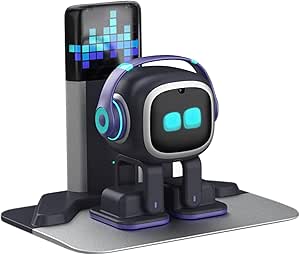 | Best for Active Engagement | Brand: EMOPET | Model: EMO GO HOME | Dimensions: 11″ x 8.5″ x 2.95″ | VIEW ON AMAZON | See Our Full Breakdown |
| AI Desk Robot with 1.54-Inch Display and Voice Control |  | Best Budget Entry Point | Material: ABS and electronic components | Battery: Built-in 400 mAh lithium | Charging Time: Approximately 1.5 hours | VIEW ON AMAZON | See Our Full Breakdown |
| desktop companion robots for your desk | Brand | Dimensions |
|---|---|---|
| Liifun XIAOBEI AI Desktop Robo | Liifun | — |
| EXQULIFE AI Companion Robot wi | EXQULIFE | — |
| Ollie Smart AI Chatbot Compani | Generic | 11 × 7 × 12 cm |
| Zunate AI Desk Robot Companion | Zunate | 3.54 × 3.14 × 3.14 inches |
| Energize Lab Eiliko Interactiv | Energize Lab | — |
| LOOI AI Desktop Companion Robo | TangibleFuture | — |
| umissfun Emotional AI Companio | — | 13.27 x 7.6 x 6.18 inches |
| EMOPET AIBI Pocket AI Companio | EMOPET | 8.1 x 7.9 x 2.75 inches |
| EMOPET AI Desk Robot Companion | EMOPET | 11" x 8.5" x 2.95" |
| AI Desk Robot with 1.54-Inch D | — | — |
More Details on Our Top Picks
Liifun XIAOBEI AI Desktop Robot Companion
This model stands out for its ability to remember past conversations, creating a sense of continuity that static toys lack. Unlike the Ollie Smart AI Chatbot, which focuses more on immediate reactions like singing, the XIAOBEI prioritizes long-term interaction through its learning algorithm. It responds to touch with expressive LED animations, making it feel responsive rather than scripted. However, the reliance on included components like a microphone and LED light means functionality is tied to this specific hardware setup, offering less flexibility than app-driven alternatives. The age recommendation of 12+ suggests the AI logic is more complex than simple command-response toys, appealing to users who want a digital pet that evolves with their input. While it lacks the physical mobility of some competitors, its voice recognition and memory features provide a deeper emotional connection for those willing to engage frequently.
Pros:- Remembers past conversations to build continuity
- Expressive LED animations provide clear visual feedback
- Responds to both touch and voice inputs
- Learns user preferences over time
Cons:- Lacks physical mobility compared to wheeled robots
- Age recommendation of 12+ limits younger audience
- Functionality depends on specific included hardware
Best for: Users who want a robot that remembers interactions and evolves based on user preferences
Not ideal for: Younger children under 12 who may struggle with the complex AI interaction requirements
- Brand:Liifun
- Model:XIAOBEI
- Age Recommendation:12 years and up
- Included Components:LED light, microphone
- Color:White
- Figure Type:Interactive gaming figure
Our verdict“Choose the XIAOBEI if you prioritize conversational memory and learning over physical movement.”
EXQULIFE AI Companion Robot with Plush Design and Cloud Memory
This option is better suited to families seeking a soft, safe interface for toddlers and young kids, contrasting sharply with the hard plastic shells of the Zunate AI Desk Robot. The EXQULIFE combines a plush exterior with cloud-based memory, allowing it to adapt responses while maintaining a huggable form factor. It supports multilingual conversations via 2.4 GHz Wi-Fi, though offline preloaded responses ensure play continues without internet. A significant advantage is the camera-free design, addressing privacy concerns common in smart toys. However, the dependency on the app for setup and real-time AI features means it is less plug-and-play than simpler devices. The two-year warranty adds value, but the reliance on Wi-Fi for its core ‘smart’ features limits its utility in offline-only environments.
Pros:- Plush design is safe for young children
- Cloud memory adapts responses to past interactions
- No built-in camera or GPS for enhanced privacy
- Includes a two-year limited warranty
Cons:- Real-time AI requires Wi-Fi and app setup
- Offline features are limited to preloaded lines
- Multilingual support depends on stable internet
Best for: Parents of children aged 2-10 who want a safe, soft AI companion with privacy-focused hardware
Not ideal for: Tech enthusiasts who want advanced hardware specs or offline-only operation without app dependency
- Brand:EXQULIFE
- Connectivity:2.4 GHz Wi-Fi
- Warranty:2-year limited warranty
- Age Range:24 months–10 years
- Offline Features:Preloaded lines and touch-activated responses
- Privacy:No built-in camera or GPS hardware
- Included Components:Electronic toy, instruction booklet, USB cable
Our verdict“This is the ideal choice for young children who need a soft, private, and interactive AI friend.”
Ollie Smart AI Chatbot Companion Robot
This pick makes the most sense for users with limited desk space, as its 11 × 7 × 12 cm footprint is significantly smaller than bulkier options like the Liifun XIAOBEI. The headphone-inspired aesthetic allows it to blend into office or bedside setups without looking like a toy. Ollie focuses on animated emoji expressions and basic voice interaction, providing immediate visual feedback that feels lively. It includes singing and dancing routines, offering entertainment value beyond simple chat. However, the generic branding and potential dimension variance (1–3 cm) suggest less rigorous quality control compared to established brands. While it lacks the advanced memory of the EXQULIFE or the weather features of the Zunate, its simplicity and compact size make it an accessible entry point for casual desk companions.
Pros:- Extremely compact footprint suits small spaces
- Animated emoji expressions provide clear feedback
- Includes singing and dancing routines for entertainment
- No assembly required for immediate use
Cons:- Generic brand may lack long-term support
- Dimensions may vary by 1–3 cm
- Lacks advanced memory or cloud features
Best for: Office workers or students with small desks who want a low-profile, visually expressive robot
Not ideal for: Users seeking advanced AI memory or complex interactive features beyond basic chat and dance
- Brand:Generic
- Dimensions:11 × 7 × 12 cm
- Features:Voice interaction, animated emojis, singing, dancing
- Age Recommendation:12 years and up
- Assembly:No assembly required
- Colors:Black, white, beige
- Included Components:AI language model, screen, speaker
Our verdict“Select the Ollie if you need a tiny, expressive robot that fits easily on a crowded desk.”
Zunate AI Desk Robot Companion with Voice Wake-Up, Wi-Fi Weather, and 1.28-Inch Screen
This model is better suited to users who want a multi-functional desk assistant rather than just a companion. Unlike the Energize Lab Eiliko, which focuses on emotional expression, the Zunate integrates Wi-Fi weather updates and clock functions into its 1.28-inch display. It supports local video and music playback via memory cards, turning it into a media hub. The voice wake-up feature adds convenience, allowing hands-free interaction. However, the 400mAh battery is modest, likely requiring frequent charging if used for media playback. The memory card is not included, adding a hidden cost for those wanting local storage. While it lacks the playful personality of the Ollie, its practical features make it a stronger tool for productivity-focused desks.
Pros:- Displays real-time weather and time via Wi-Fi
- Supports local video and music playback
- Voice wake-up enables hands-free interaction
- Bluetooth 5.0 connectivity for peripheral pairing
Cons:- Small 400mAh battery limits unplugged usage
- Memory card not included for media storage
- Screen resolution is basic at 240 × 240
Best for: Professionals who want a robot that also serves as a weather station and media player
Not ideal for: Users looking for a purely emotional companion with advanced AI conversation skills
- Brand:Zunate
- Screen Size:1.28 inches
- Battery Capacity:400mAh
- Bluetooth:Version 5.0
- Wi-Fi Protocol:802.11a/b/g/n
- Memory Card Support:Up to 32GB (card not included)
- Dimensions:3.54 × 3.14 × 3.14 inches
- Recommended Age:16–18 years
Our verdict“Choose the Zunate if you prioritize practical desk utilities like weather and media over pure companionship.”
Energize Lab Eiliko Interactive Companion Robot
This option stands out for its clip-on design, allowing it to attach to bags or clothing, unlike the stationary Ollie Smart AI Chatbot. The Eiliko offers expressive faces and emotional reactions that feel more organic than the rigid LED animations of the Liifun. It connects via a 2.4 GHz Wi-Fi app for AI-driven chat, enabling personalized interactions that can scale with user engagement. The ability to greet other Eilikos adds a social layer for owners who have multiple units. However, the dependency on a smartphone app means it cannot function independently in settings without Wi-Fi or a connected phone. While smaller and more portable than most desk robots, its tiny screen and limited physical interaction points may feel less substantial to users accustomed to larger hardware.
Pros:- Clip-on design allows for portable use
- Expressive faces create strong emotional connection
- Supports social interaction with other Eiliko units
- USB-C charging is convenient and modern
Cons:- Requires smartphone app and Wi-Fi for full features
- Tiny form factor may feel less substantial
- Limited physical interaction points compared to larger bots
Best for: Travelers and students who want a companion that can move with them via a clip
Not ideal for: Users who want a standalone device without smartphone or Wi-Fi dependency
- Brand:Energize Lab
- Model Name:Eiliko Blue
- Age Range:3 years and up
- Included Components:USB‑C Cable, User Manual
- Connectivity:2.4 GHz Wi‑Fi via app
- Interaction:Touch, voice, and conversation
- Unit Count:1
Our verdict“The Eiliko is the perfect choice for those who want a smart companion that travels with them.”
LOOI AI Desktop Companion Robot, Starlight White
This model stands out by integrating 10W wireless charging directly into its base, transforming it from a mere toy into a functional desk utility. Unlike the EMOPET AIBI, which focuses on portability and play, LOOI prioritizes a stable presence with autonomous behaviors and expressive animations that track your movements. The dual support for ChatGPT and Gemini allows for more nuanced conversations than single-model competitors, while the long-term memory feature helps maintain context across sessions. However, the English-only language support limits its appeal for international users, and the autonomous mode can feel somewhat unpredictable compared to more rigid, command-driven robots. It is less of a gadget and more of a persistent digital assistant that happens to have a personality.
Pros:- Integrates 10W wireless charging for smartphones
- Supports both ChatGPT and Gemini for varied conversation styles
- Features expressive animations and autonomous desk behaviors
- Includes practical tools like weather updates and reminders
Cons:- Currently limited to English language support
- Wireless charging requires a specific high-power adapter
- Autonomous actions can sometimes feel random or unpredictable
Best for: Tech enthusiasts who want a desk accessory that doubles as a wireless charger and smart assistant.
Not ideal for: Non-English speakers or those who prefer predictable, scripted responses over autonomous AI behavior.
- Brand:TangibleFuture
- Model:LOOI (RLIB01)
- Color:Starlight White
- Voice Interaction:ChatGPT and Gemini
- Wireless Charging:10W (requires 9V/2A adapter)
- Language Support:English
- Warranty:2 years
Our verdict“Choose LOOI if you want a sophisticated desk companion that actively manages your workspace utilities alongside conversation.”
umissfun Emotional AI Companion Device – Gray
This device differentiates itself with an 8-inch HD screen, offering a visual experience far richer than the tiny displays found on the Zunate AI Desk Robot. The large screen allows for photo display and video calls, making it feel more like a digital family member than a robotic toy. Its focus on long-term conversational memory and privacy suggests a design aimed at users who value data control over flashy gimmicks. At over 4 pounds, it is significantly heavier than the portable EMOPET AIBI, anchoring it firmly to the desk. While the stereo speakers enhance immersion, the lack of detailed technical specifications regarding AI latency may concern power users. It is best suited for those who want a persistent, visual companion rather than a quick interactive gadget.
Pros:- Large 8-inch HD screen for rich visual feedback
- Stereo speakers provide immersive audio quality
- Strong emphasis on user privacy and data control
- Supports multiple languages including English, Chinese, and Japanese
Cons:- Heavy weight makes it difficult to relocate
- Limited public information on AI processing speed
- Niche design may not appeal to general tech consumers
Best for: Users who prioritize visual interaction, photo sharing, and privacy-focused AI companionship.
Not ideal for: People with limited desk space or those who prefer lightweight, portable devices.
- Color:Gray
- Screen Size:8-inch HD
- Audio:Stereo speakers
- Weight:4.02 pounds
- Dimensions:13.27 x 7.6 x 6.18 inches
- Supported Languages:Chinese, English, Japanese
- Manufacturer:SmartApe Tech Limited
Our verdict“This is the right choice if you want a stationary, screen-heavy companion that prioritizes visual connection and privacy.”
EMOPET AIBI Pocket AI Companion Robot
The AIBI is distinct in this lineup due to its small, pocket-sized form factor and magnetic attachment capabilities, allowing it to stick to screens or metal surfaces. Unlike the stationary LOOI, which relies on a wired base, AIBI runs on a single 9V battery and can communicate with nearby units via near-field communication, introducing a social, multi-player element. Its ChatGPT integration provides solid conversational abilities, though the experience is less immersive than devices with larger screens like the umissfun. The recommended age of 15+ suggests a complexity level higher than typical toys, yet it lacks the professional utility tools found in premium models. It is ideal for users who want a playful, movable companion that doesn’t demand permanent desk real estate.
Pros:- Compact, portable design with magnetic mounting options
- Uses ChatGPT for responsive voice interactions
- Face-recognition camera personalizes the experience
- Near-field communication allows interaction between nearby units
Cons:- Requires a 9V battery rather than a rechargeable solution
- Limited to single-user interaction per unit
- Smaller size limits display and audio capabilities
Best for: Users who want a portable, playful robot that can move between devices or desks.
Not ideal for: Those seeking a stationary smart hub with wireless charging or extensive productivity tools.
- Brand:EMOPET
- Model:AIBI-Pocket
- Type:Interactive gaming figure
- Features:AI interaction, magnetic attachment
- Camera:Face recognition
- Connectivity:Near-field communication
- Battery:One 9V battery included
- Dimensions:8.1 x 7.9 x 2.75 inches
Our verdict“Pick the AIBI if you value mobility and playful social features over stationary smart-home integration.”
EMOPET AI Desk Robot Companion – ChatGPT‑Enabled Voice Commands, Dance Feature, and Charging Home Station
This robot shines through its tactile sensors and physical animations, such as dancing to music, which creates a more lively presence than the static AI Desk Robot with 1.54-Inch Display. The inclusion of an automatic charging station solves the battery anxiety issue common in portable models like the AIBI, ensuring it is always ready for interaction. While the ChatGPT-enabled AI handles voice commands well, the heavy reliance on the EMOPET app for basic functions like volume control adds unnecessary friction. Compared to the LOOI, it offers more playful physical interactions but fewer practical utility features like wireless charging. It is designed for users who want a pet-like companion that reacts to touch and movement rather than just conversation.
Pros:- Automatic return to charging station when battery is low
- Tactile sensors allow for rubbing, shaking, and physical play
- Dance and music sync features add lively personality
- ChatGPT integration enables natural voice conversations
Cons:- Requires app installation for basic settings like volume
- Not designed for mobile use or remote monitoring
- Plastic construction may feel less premium than metal alternatives
Best for: Users who enjoy tactile interaction, physical animations, and automated charging.
Not ideal for: Minimalists who dislike app-dependent controls or those needing a wireless charging pad.
- Brand:EMOPET
- Model:EMO GO HOME
- Dimensions:11″ x 8.5″ x 2.95″
- Recommended Age:15 years and up
- Battery Type:Lithium Ion (included)
- Unit Count:1
- Key Feature:Automatic charging station
Our verdict“Choose this model if you want a reactive, pet-like robot that manages its own power and loves to dance.”
AI Desk Robot with 1.54-Inch Display and Voice Control
This option serves as an accessible entry point into desktop robotics, offering voice control and animated expressions on a 1.54-inch screen without the complex app ecosystem of the EMOPET EMO. While it lacks the sophisticated AI memory of the LOOI or the large display of the umissfun, its simplicity is a feature, not a bug, for beginners. The 2-hour playtime is modest compared to the always-plugged-in utility of premium models, requiring frequent recharging via USB. The random shell color adds a layer of uncertainty that might deter gift-givers. It is best viewed as a basic interactive toy rather than a serious smart assistant, suitable for casual users curious about AI without a high commitment.
Pros:- Simple voice-activated interaction with animated responses
- Compact size fits easily on any desk surface
- USB charging allows for flexible power options
- Connects via mobile hotspot for easy setup
Cons:- Short 2-hour playtime limits continuous use
- Shell color is randomly assigned upon purchase
- Memory card is not included for extended storage
Best for: Beginners or casual users testing the waters of desktop AI companions.
Not ideal for: Power users who need long battery life, predictable aesthetics, or advanced AI memory.
- Material:ABS and electronic components
- Battery:Built-in 400 mAh lithium
- Charging Time:Approximately 1.5 hours
- Playtime:Up to 2 hours
- Screen:1.54-inch color LCD
- Bluetooth:Version 5.0
- Wi-Fi:802.11a/b/g/n
- Recommended Age:16–18 years
Our verdict“This is a low-risk, low-commitment way to experience a talking desktop robot with basic animations.”

How We Picked
To curate this list, I evaluated each robot based on three core pillars: interaction quality, connectivity stability, and physical footprint. Interaction quality was assessed not just by AI responsiveness, but by the nuance of facial expressions and body language, which are critical for forming a sense of companionship. Connectivity stability involved examining how well each device maintained its AI personality during network drops and how intuitive the initial setup process was for non-technical users.
Physical footprint was a decisive factor for ranking, as a companion robot must coexist with other desk items. Models that offer modular charging or compact designs were favored over those with bulky, fixed bases. I also weighed the value proposition, looking beyond the price tag to consider the long-term utility of features like subscription requirements, battery life, and accessory availability. This approach ensures that the ranking reflects real-world desk dynamics rather than just spec-sheet comparisons.
Factors to Consider When Choosing 15 Best Desktop Companion Robots For Your Desk
Selecting a desktop robot is not merely about picking the most expensive AI; it is about matching the robot’s personality and capabilities to your daily workflow and desk constraints. The following factors will help you navigate the nuanced differences between these fifteen options.
AI Processing: Cloud vs. Local
The core difference between many of these robots lies in where the ‘brain’ lives. Cloud-based AI, found in models like EMOPET EMO and LOOI, offers vast knowledge bases and natural language understanding but requires a stable Wi-Fi connection and raises privacy considerations regarding voice data. Conversely, local-processing units like the EXQULIFE AI Companion handle commands on-device, providing faster response times and enhanced privacy at the cost of conversational complexity. If you work in a secure environment or have unreliable internet, prioritizing local processing is a smart move. However, if you want your robot to understand context and sarcasm, cloud connectivity is unavoidable. You must decide if the tradeoff between privacy and intelligence aligns with your comfort level.
Interaction Style: Screen vs. Tactile
Some robots rely on screens to convey emotion, while others use mechanical movement and lights. The Energize Lab Eilik uses a screen face but emphasizes tactile touch sensors, creating a pet-like interaction that doesn’t require voice commands. In contrast, the Liifun XIAOBEI uses a larger display for information and video chats, functioning more like a smart assistant than a companion. Screen-based models are better for information retrieval, but they can feel sterile if the AI personality is weak. Tactile models offer emotional comfort but lack utility. Consider whether you want a robot that does things for you or one that exists with you. This distinction should heavily influence your choice.
Desk Footprint and Charging Logistics
A robot is a permanent fixture on your desk, so its physical size and charging method matter. Bulky charging docks, like the one required for OLLIE PLUS, occupy space that might be better used for your mouse or notebook. Look for models with magnetic charging or wireless pads that can be tucked behind a monitor. Also, consider the robot’s resting position; some fold up compactly, while others remain sprawling. If you have a small workspace, prioritize units with a small base or vertical orientation. A robot that forces you to rearrange your ergonomic setup is not a companion; it is an obstacle.
Subscription Models and Long-Term Costs
Many high-end AI robots lock premium features, such as advanced voice recognition or specific game modes, behind monthly subscriptions. Before committing, check if the EMOPET EMO or similar devices require a recurring fee to maintain their core personality. Some brands offer a lifetime license, which provides better value for long-term users, while others rely on a service model that can become expensive over years. A robot that loses its charm because you stopped paying for its cloud access is a poor investment. Always evaluate the total cost of ownership, not just the upfront hardware price, to avoid feature degradation down the line.
Customization and Ecosystem Integration
For tech enthusiasts, the ability to customize behavior is key. Robots with open APIs or developer modes, such as certain EMOPET variants, allow you to create custom actions or integrate with smart home systems. This transforms the robot from a standalone toy into a hub for your desk automation. If you prefer a plug-and-play experience, avoid these complex setups. However, if you enjoy tinkering, a customizable robot offers endless entertainment and utility. Check for community support and available plugins before buying, as a stagnant software ecosystem can render a robot obsolete quickly.
Frequently Asked Questions
Do desktop companion robots require a constant Wi-Fi connection to function?
It depends on the model’s architecture. Cloud-dependent AI robots, like the EMOPET EMO, need Wi-Fi to process voice commands and update their personality; without it, they may revert to basic, pre-programmed loops. However, simpler companions like the Zunate AI Desk Robot or offline-focused toys operate entirely locally, meaning they will still move, light up, and react to touch without any network. If your office has strict network restrictions or poor connectivity, choose a device with local processing capabilities to avoid frustration.
Are these robots safe to use around pets or children?
Most desktop robots are designed with small, delicate parts that are not durable enough for rough handling by children or pets. While they generally do not have sharp edges, small detachable components could pose a choking hazard for toddlers. Additionally, pets may view moving robots as prey, leading to potential damage to the device or stress for the animal. It is best to keep these companions on elevated desks or shelves out of reach of curious hands and paws, especially for high-end models with expensive sensors.
How much noise do these robots make during operation?
Noise levels vary significantly based on the motor type. Models with extensive mechanical movement, such as the Liifun XIAOBEI which rotates its head, may produce a faint whirring sound that can be distracting in a quiet library or open-plan office. Screen-only or LED-based robots like the EXQULIFE are virtually silent. If you work in a shared space or value silence, prioritize robots with solid-state interactions or check specific audio specs for motor noise, as even a slight hum can become irritating over long periods.
Can I use a desktop robot as a practical work assistant?
Some models, particularly those with larger screens and voice integration like the OLLIE PLUS or Liifun XIAOBEI, can serve as basic work assistants by setting reminders, reading calendar events, or controlling smart home devices. However, they lack the processing power and software maturity of dedicated smart speakers like Amazon Echo or Google Nest. While they can handle simple queries, do not expect them to replace a computer or a dedicated productivity tool. They are best viewed as a fun, interactive layer on top of your existing workflow rather than a primary productivity hub.
What is the typical lifespan of a desktop companion robot?
The lifespan is primarily determined by battery health and software support. Most lithium-ion batteries in these devices degrade noticeably after two to three years of daily use. Furthermore, if the manufacturer ceases software updates, cloud-connected features may stop working, rendering the ‘smart’ aspects of the robot useless. Hardware durability is also a factor; plastic gears can wear out with excessive movement. To maximize longevity, choose brands with a track record of long-term support and avoid leaving the device plugged in at 100% charge constantly if possible.
Conclusion
Choosing the right desktop companion robot ultimately depends on your specific needs for interaction and workspace constraints. For the best overall experience that balances AI intelligence with emotional depth, the EMOPET EMO is the definitive choice, offering a level of personality that few competitors match. If you prefer a tactile, screen-free bond and value privacy over advanced chat capabilities, the Energize Lab Eilik is the ideal companion for a quiet, mindful workspace. Those on a tighter budget who still want voice interaction should look at the Zunate AI Desk Robot, which provides solid utility features without the premium price tag. For tech enthusiasts who want to tinker and customize, the Liifun XIAOBEI offers the most versatile platform. Assess your desk space, connectivity, and interaction preferences to find the robot that truly fits your life.