
The best Xbox gaming accessories depend on what your setup needs most: clearer chat, more immersive controls, or a tidier play space. My best overall pick is the Logitech G920 Racing Wheel and Pedals for players who want a substantial change to how racing games feel; the Xbox Wireless Gaming Headset is a strong all-round choice for wireless play, while the Razer BlackShark V2 X suits players who prefer a straightforward wired headset. The main tradeoffs are immersion versus everyday versatility, wireless convenience versus a cable, and useful features versus extra desk space. This roundup also includes controller keyboards, stands, grip add-ons, and a console cooling kit for more targeted needs. Read on for the full breakdown and a guide to choosing accessories that fit your games and setup.

Get the latest gadgets delivered free with Prime
- Fast, free delivery on millions of items
- Prime Video, Amazon Music and more included
- Member-only deals all year
Complete the kit


Key Takeaways
The G920 is the biggest gameplay change in this group, but it is purpose-built for racing and needs more room than a headset or stand.
The two wireless headsets serve different priorities: Xbox’s own headset is the natural fit for a wireless Xbox setup, while Turtle Beach’s Stealth 600 adds another dedicated wireless option to compare.
Wired headsets keep the decision simpler. The Razer BlackShark V2 X connects through a 3.5 mm jack; the BENGOO G9000 is a budget-style alternative whose broad platform claims merit checking against your exact Xbox setup.
Controller keyboards are niche tools, not universal upgrades. The TiMOVO and MoKo models make most sense for text entry or compatible games, and buyers should confirm controller and console compatibility before choosing.
Several stands overlap in purpose. KDD offers charging or RGB-focused designs, while the UPERGO adds a wood finish and storage; choose based on charging needs, desk space, and appearance rather than lighting alone.
| Xbox Wireless Gaming Headset, Carbon Black |  | Best Overall Headset | Color: Carbon Black | Speaker size: 40 mm | Frequency response: 20 Hz–20 kHz | VIEW LATEST PRICE | See Our Full Breakdown |
| KDD Headphone and Controller Stand with Wireless Charging |  | Best Charging and Storage Hub | Brand and model: KDD KDD-752 | Color: Black | Material: ABS | VIEW LATEST PRICE | See Our Full Breakdown |
| TiMOVO Wireless Backlit Keyboard for Xbox Controllers with 3.5 mm Audio Jack |  | Best for In-Game Messaging | Key count and layout: 47-key QWERTY | Connectivity: 2.4 GHz wireless receiver | Backlight: Green; turns off after 10 seconds of inactivity | VIEW LATEST PRICE | See Our Full Breakdown |
| KontrolFreek Aim Boost Kit for Xbox One and Xbox Series X Controllers, Black Galaxy |  | Best for Adjustable Aim Resistance | Brand and model: KontrolFreek 6204-XBX | Compatible controllers: Xbox One and Xbox Series X | Included components: Performance thumbsticks and precision rings in three strengths | VIEW LATEST PRICE | See Our Full Breakdown |
| UPERGO Walnut Headphone Stand with Controller Holder & Storage Base |  | Best Premium Desk Organizer | Form factor: Tower | Material: Solid walnut wood | Color: Wood Theme | VIEW LATEST PRICE | See Our Full Breakdown |
| KDD RGB Headphone & Controller Stand with 9 Light Modes – Foldable Controller Hanger, Earphone Stand with Cable Organizer |  | Best for a Tidy, Colorful Desk | Form factor: Tower | Mounting type: Tabletop | Storage: Headphone holder, two controller hooks, and cable organizer | VIEW LATEST PRICE | See Our Full Breakdown |
| Exquisite Gaming Call of Duty Monkeybomb Phone and Controller Holder |  | Best Collectible Controller Stand | Character: Monkey Bomb | License: Officially licensed by Activision | Material: PVC | VIEW LATEST PRICE | See Our Full Breakdown |
| MENEEA Cooling Fan and Dust Protection Kit for Xbox Series X |  | Best Xbox Series X Console Add-On | Compatible console: Xbox Series X | Fan speeds: Three: low, medium, and high | USB ports: One USB 3.0 data port and one USB 2.0 charging port | VIEW LATEST PRICE | See Our Full Breakdown |
| Turtle Beach Stealth 600 Wireless Gaming Headset |  | Best Wireless Headset for Long Sessions | Connectivity: 2.4GHz wireless and Bluetooth | Bluetooth version: 5.2 in detailed specifications; feature summary lists 5.4 | Drivers: 50mm Nanoclear | VIEW LATEST PRICE | See Our Full Breakdown |
| BENGOO G9000 Stereo Gaming Headset for PS4 PC Xbox One PS5 Controller, Noise Cancelling Over Ear Headphones with Mic, LED Light, 7.1 Surround Sound, Soft Memory Earmuffs for Nintendo Xbox Series X|S | 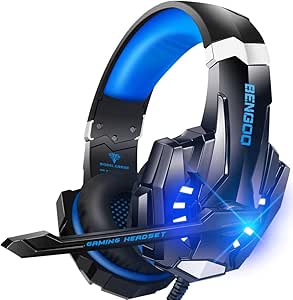 | Best Wired Multi-Platform Headset | Model: G9000 | Listed compatibility: Xbox Series X|S, Xbox One, PS4, PS5, PC, and Nintendo devices | Audio: 7.1 virtual surround sound | VIEW LATEST PRICE | See Our Full Breakdown |
| Logitech G920 Racing Wheel and Pedals for Xbox Series X|S, Xbox One, PC |  | Best for Racing Simulation | Compatibility: Xbox Series X|S, Xbox One, PC | Controls: Steering wheel, pedals, paddle shifters | Connectivity: Cable | VIEW LATEST PRICE | See Our Full Breakdown |
| MoKo RGB Backlight Keyboard for Xbox One Controller |  | Best for Messaging and Text Entry | Key layout: 47-key QWERTY | Wireless connection: 2.4 GHz with detachable receiver | Backlighting: RGB with three modes | VIEW LATEST PRICE | See Our Full Breakdown |
| Razer BlackShark V2 X Xbox Gaming Headset, 3.5mm Audio Jack, Black |  | Best Wired Headset for Xbox | Compatibility: Xbox Series X|S, PS5, PC, Switch | Driver size: 50 mm | Microphone: HyperClear cardioid | VIEW LATEST PRICE | See Our Full Breakdown |
| KDD RGB Headset Stand with 9 Light Modes – Rotatable Headphone Stand and Detachable Controller Hook (Black) |  | Best for a Tidy, Illuminated Setup | Brand: KDD | Model: KDD-728B | Lighting: Nine RGB modes with memory function | VIEW LATEST PRICE | See Our Full Breakdown |
More Details on Our Top Picks
Xbox Wireless Gaming Headset, Carbon Black
The Xbox Wireless Gaming Headset is my most versatile audio pick here because it connects directly to Xbox while also pairing with a Bluetooth device, so game audio and a phone connection can coexist. Its support for Dolby Atmos, Windows Sonic, and DTS Headphone:X gives players several spatial-audio options, while the earcup dials make quick volume and game/chat adjustments easier than reaching for console menus. Compared with the TiMOVO chatpad’s basic 3.5 mm headset connection, this is a more complete wireless setup, though it is a larger purchase in capability and still needs recharging after up to 20 hours. The plush earcups and adjustable headband suit longer sessions, but buyers relying on Bluetooth LE Audio should check device compatibility before choosing it.
Pros:- Works with Xbox Wireless and Bluetooth 5.3, including simultaneous console and Bluetooth-device pairing.
- Supports Dolby Atmos, Windows Sonic, and DTS Headphone:X spatial audio.
- Earcup dials provide direct volume and game/chat balance adjustment.
- Adjustable headband and plush earcups are designed for extended wear.
Cons:- Battery life is up to 20 hours, so regular recharging is part of ownership.
- Bluetooth LE Audio features depend on compatible devices.
Best for: Xbox players who want wireless game audio, spatial sound options, and a simultaneous Bluetooth connection to a phone or other compatible device.
Not ideal for: Players who prefer a wired headset that never needs charging, or who need Bluetooth LE Audio features on devices that do not support them.
- Color:Carbon Black
- Speaker size:40 mm
- Frequency response:20 Hz–20 kHz
- Connectivity:Xbox Wireless, Bluetooth 5.3, Bluetooth LE Audio
- Microphones:Dual boom microphones with illuminated LED indicator
- Battery life:Up to 20 hours
- Spatial audio:Dolby Atmos, Windows Sonic, DTS Headphone:X
- Compatibility:Xbox consoles, PC, mobile devices, and compatible handhelds
Our verdict“Choose this headset if you want one wireless audio setup for Xbox gaming and compatible Bluetooth devices, and can live with periodic charging.”
KDD Headphone and Controller Stand with Wireless Charging
The KDD stand earns its place for players who want their desk to do more than hold a headset: it stores one headset and up to four controllers, with wireless charging and extra ports built in. Its rotating headset holder includes cable storage, while the detachable hook gives the layout some flexibility. That makes it a more functional charging station than the UPERGO Walnut Headphone Stand, which focuses on stable, low-clutter storage rather than ports and lighting. The tradeoff is that KDD does not specify wireless charging compatibility or output, so I would verify that the intended device works before relying on it. Its Type-C port also does not charge iPhones, and the lighting modes may be unnecessary for a setup that favors a quieter look.
Pros:- Stores one headset and up to four controllers in one tabletop unit.
- Rotating headset holder includes cable storage, and the controller hook detaches.
- Includes wireless charging, two USB ports, and one Type-C port.
- Offers multiple lighting modes with a memory function.
Cons:- Wireless charging compatibility and output are not specified.
- The Type-C port does not charge iPhones.
- Lighting features may be distracting for buyers who prefer a plain desk setup.
Best for: Xbox households with several controllers and a headset who want a single tabletop station for storage, device charging, and lighting.
Not ideal for: Buyers who need confirmed wireless-charging performance for a specific device, or iPhone users expecting the Type-C port to charge their phone.
- Brand and model:KDD KDD-752
- Color:Black
- Material:ABS
- Mounting type:Tabletop
- Capacity:One headset and up to four controllers
- Rotation:360° headset holder
- Charging:Wireless charging, two USB ports, and one Type-C port
- Lighting modes:7-color blinking, 7-color breathing, and 7 monochrome colors
- Assembly:Three parts
Our verdict“Pick this stand for a multi-controller Xbox setup that benefits from integrated charging and storage, but check device compatibility first.”
TiMOVO Wireless Backlit Keyboard for Xbox Controllers with 3.5 mm Audio Jack
For players who send frequent messages or enter codes, the TiMOVO chatpad adds a 47-key QWERTY keyboard directly to a compatible Xbox controller. It is a more focused communication tool than the Xbox Wireless Gaming Headset: it will not improve audio, but its built-in 3.5 mm jack gives a wired headset a connection point while the keyboard handles typing. The controller powers the unit, so there is no separate battery to manage; the green backlight also switches off after 10 seconds of inactivity. That power-saving behavior can mean the keys are dark when a message starts. Compatibility needs careful checking too: it supports several Xbox One and Series models but specifically excludes Xbox One X, making it a poor fit for buyers who have not confirmed their controller and console setup.
Pros:- 47-key QWERTY layout makes messages and text entry easier than using controller menus.
- Powered by the connected controller, so it needs no separate keyboard battery.
- Built-in 3.5 mm audio jack supports headphones and headsets.
- Green backlight includes an automatic power-saving shutoff.
Cons:- Not compatible with Xbox One X.
- The backlight turns off after 10 seconds of inactivity.
- Adds a keyboard attachment to the controller, which may not suit players who prefer an uncluttered grip.
Best for: Xbox players who regularly use text chat, enter search terms, or message friends and own one of the listed compatible controllers.
Not ideal for: Xbox One X owners, or players who rarely type and would rather keep their controller compact and unobstructed.
- Key count and layout:47-key QWERTY
- Connectivity:2.4 GHz wireless receiver
- Backlight:Green; turns off after 10 seconds of inactivity
- Power source:Connected controller
- Audio jack:3.5 mm
- Compatibility:Xbox One, Xbox One S, Xbox One Elite, Xbox One Elite 2, Xbox Series X and S, Windows 10
- Incompatible device:Xbox One X
- Dimensions:5.79 x 2.09 x 1.57 in
- Weight:2.5 oz
Our verdict“Choose the TiMOVO chatpad if you type often on a compatible Xbox controller and accept its model-specific compatibility limits.”
KontrolFreek Aim Boost Kit for Xbox One and Xbox Series X Controllers, Black Galaxy
The KontrolFreek Aim Boost Kit is the most gameplay-focused accessory in this group: its mixed-height performance thumbsticks change the feel of aiming, while three strengths of precision rings let players tune stick resistance. The rings cushion movement and add resistance, which may help players who want more controlled inputs; they also make the sticks feel less free-moving than stock. Unlike the TiMOVO chatpad, this kit does not add messaging or audio functions—it is for players seeking a different control feel. The three ring strengths offer more adjustment than a fixed thumbstick accessory, but the stated compatibility covers Xbox One and Xbox Series X controllers, so I would not assume it fits every Xbox controller. It makes the most sense for aim-focused players willing to adapt to added resistance.
Pros:- Mixed-height thumbsticks offer different leverage and control across the two sticks.
- Includes precision rings in three strengths for adjustable resistance.
- Ergonomic design is intended to reduce hand, wrist, and thumb fatigue.
- A focused control upgrade rather than a desk or charging accessory.
Cons:- Precision rings add resistance to the controller’s stock thumbsticks.
- Compatibility is specified for Xbox One and Xbox Series X controllers.
Best for: Xbox One and Xbox Series X players who want mixed-height thumbsticks and adjustable resistance for more controlled aiming.
Not ideal for: Players who prefer the stock thumbstick feel, dislike added resistance, or need compatibility beyond the specified controller models.
- Brand and model:KontrolFreek 6204-XBX
- Compatible controllers:Xbox One and Xbox Series X
- Included components:Performance thumbsticks and precision rings in three strengths
- Material:Rubber
- Color:Black
- Number of items:One kit
Our verdict“Choose this kit if you want to tune thumbstick resistance for aiming and are comfortable changing the feel of your controller.”
UPERGO Walnut Headphone Stand with Controller Holder & Storage Base
The UPERGO stand is the restrained desk choice: its solid walnut construction, weighted non-slip base, and dual-holder layout give a headset and controller a dedicated place without adding lighting or charging electronics. A hollow storage base also keeps small accessories out of sight. Compared with the KDD stand, it trades capacity and charging ports for a simpler wood finish and a smaller footprint; it holds a controller and headphones rather than up to four controllers. Tool-free snap-together assembly is straightforward, but the compact design has limits: very wide headset arches may not fit comfortably, and the storage tray is only suited to small items. This is a better match for a tidy, minimal Xbox desk than for a shared setup with several controllers to store.
Pros:- Dual-holder design stores headphones and a controller together.
- Solid walnut wood and a weighted anti-slip base provide stable support.
- Hollow base conceals small items such as cables and earpads.
- Tool-free snap-together assembly.
Cons:- May not fit extremely large over-ear headsets with very wide arches.
- Storage tray is limited to small accessories.
- Does not offer the multi-controller capacity or charging ports of the KDD stand.
Best for: Xbox players building a tidy desktop setup who want a stable wood stand for one controller, over-ear headphones, and small accessories.
Not ideal for: Households storing multiple controllers, owners of very wide-arched headsets, or buyers who want built-in charging and lighting.
- Form factor:Tower
- Material:Solid walnut wood
- Color:Wood Theme
- Mounting type:Tabletop
- Compatible controllers:Xbox, PS5, and Switch controllers
- Dimensions:4.72 x 8.27 x 6.3 in
- Weight capacity:Supports heavy gaming headsets
- Assembly:Tool-free snap-together construction
Our verdict“Pick the UPERGO if you want a stable, understated stand for one headset and controller, not a multi-device charging station.”
KDD RGB Headphone & Controller Stand with 9 Light Modes – Foldable Controller Hanger, Earphone Stand with Cable Organizer
I’d pick the KDD RGB stand for an Xbox desk that needs room for a headset and two controllers without scattering cables across the surface. Its three-in-one storage gives it more utility than the Monkeybomb holder, which offers a character display but is described as holding a controller or handheld device rather than organizing several items. Nine lighting modes with memory add customization, while the anti-slip base helps keep the stand steady. Setup is plug-and-play, so there’s no software to manage. The tradeoff is fit: larger headsets or unusually shaped controllers may not sit securely, and turning off the lights requires using the power button. Choose this over a simple headset stand if you’ll use the controller hooks and cable organizer; skip it if you want a compact, unlit holder.
Pros:- Stores a headset and two controllers in one tabletop unit.
- Cable organizer helps keep a gaming desk less cluttered.
- Nine RGB modes include a memory function.
- Anti-slip base with rubber pads helps stabilize the stand and protect the desk.
Cons:- May not securely fit larger headsets or non-standard controller shapes.
- The lights require a manual power-button press to turn off.
Best for: Xbox players who want one tabletop stand to store a headset, two controllers, and loose cables while adding RGB lighting to a desk setup.
Not ideal for: Players with oversized headsets or non-standard controllers, and anyone who wants lights that switch off without using a manual button.
- Form factor:Tower
- Mounting type:Tabletop
- Storage:Headphone holder, two controller hooks, and cable organizer
- Lighting:Nine RGB modes with memory function
- Base:Anti-slip base with rubber pads
- Setup:Plug-and-play; no drivers or software required
- Enclosure material:Acrylonitrile butadiene styrene (ABS)
Our verdict“Choose this stand if you want multi-device storage and RGB on your Xbox desk; pick a simpler holder if lighting and cable management are unnecessary.”
Exquisite Gaming Call of Duty Monkeybomb Phone and Controller Holder
The Monkeybomb holder is the display-first pick: its officially licensed Call of Duty figure gives an Xbox desk a character piece that can also support a controller, phone, remote, or other handheld device. Its weighted base and 1.3-pound build are intended to keep it stable, a useful contrast with the KDD RGB stand, which prioritizes storing a headset, two controllers, and cables. That makes this a better fit for a player who wants one controller within reach and values the collectible design more than multi-item organization. The tradeoff is its footprint: the figure is about 8.5 inches tall and the listed dimensions take up meaningful desk space. Compatibility is described as fitting most controllers, so I wouldn’t choose it if an exact fit for a particular controller shape is essential.
Pros:- Officially licensed Call of Duty Monkeybomb character design.
- Can hold controllers, smartphones, remotes, and other handheld devices.
- Weighted base is designed to provide stability.
- PVC construction and a multicolor finish suit a display-oriented setup.
Cons:- The figurine’s footprint may be too large for a compact desk.
- Fit may vary because compatibility is described as fitting most controllers.
Best for: Call of Duty fans who want a licensed Monkeybomb display piece that can hold an Xbox controller or phone on a tabletop.
Not ideal for: Players with crowded desks, or anyone seeking a stand that stores a headset and multiple controllers together like the KDD RGB model.
- Character:Monkey Bomb
- License:Officially licensed by Activision
- Material:PVC
- Height:About 8.5 inches
- Item dimensions:5.43 x 5.71 x 9.25 inches
- Weight:1.3 pounds
- Compatible devices:PlayStation and Xbox controllers, smartphones, TV remotes, and eBook readers
- Mounting type:Tabletop
Our verdict“Pick the Monkeybomb if collectible display appeal matters as much as holding a controller, but choose a multi-hook stand for broader storage.”
MENEEA Cooling Fan and Dust Protection Kit for Xbox Series X
Unlike the headset and controller accessories elsewhere in this roundup, the MENEEA kit attaches directly to the Xbox Series X and combines a three-speed top fan with dust covers, silicone port plugs, lighting, and two USB ports. That makes it a practical fit for owners who want several console-side extras in one accessory rather than another desk stand like the KDD RGB model. The separate touch controls let you operate the fan and lights independently, and the USB 3.0 data port differs from the USB 2.0 port intended for charging. There are real operating limits: the kit draws power from the console, so it won’t run when USB power is unavailable, and the dust cover should be removed while the console is running to help heat escape. Lighting also resets when USB power is disconnected.
Pros:- Combines a three-speed fan with dust covers and silicone port plugs.
- Includes separate USB 3.0 data and USB 2.0 charging ports.
- Fan and lighting have independent touch switches.
- Lighting offers six monochrome colors and one mixed-color option.
Cons:- Fan and lights operate only while the console supplies USB power.
- Dust cover should be removed while the console is running to improve heat dissipation.
- Light settings reset when USB power is disconnected.
Best for: Xbox Series X owners who want a console-powered fan, port dust protection, lighting, and extra USB connectivity in one accessory.
Not ideal for: Players who need an accessory to run while the console is in standby, or who want dust protection left in place during gameplay.
- Compatible console:Xbox Series X
- Fan speeds:Three: low, medium, and high
- USB ports:One USB 3.0 data port and one USB 2.0 charging port
- Lighting:Six monochrome colors and one mixed-color option
- Included dust protection:Two dust cover sets and one set of silicone dust plugs
- Power source:Xbox Series X USB port
- Model number:XSX34
Our verdict“Choose this console-specific kit if you want fan, dust protection, and USB extras together, but skip it if standby operation or uninterrupted light settings matter.”
Turtle Beach Stealth 600 Wireless Gaming Headset
The Turtle Beach Stealth 600 is the most flexible headset choice in this group for players who want wireless Xbox audio alongside Bluetooth connectivity. Its up to 80-hour battery life reduces charging interruptions, while QuickSwitch supports moving between 2.4GHz wireless and Bluetooth. That broader wireless setup contrasts with the wired BENGOO G9000, which emphasizes multi-platform compatibility and LED styling but doesn’t list Bluetooth or a battery-life figure. The Stealth 600 also has glasses-friendly memory foam cushions and a flip-to-mute microphone with AI noise reduction. Its tradeoffs are that some advanced audio and mic adjustments require the Swarm II app, and the product information gives conflicting Bluetooth versions—5.2 in the detailed specs and 5.4 in the feature summary. I’d favor it for wireless convenience, not app-free simplicity.
Pros:- Up to 80 hours of battery life with quick charge.
- QuickSwitch supports switching between 2.4GHz wireless and Bluetooth.
- Memory foam cushions include glasses-friendly relief.
- Flip-to-mute microphone has AI noise reduction and customizable controls.
Cons:- Some advanced audio and microphone settings require the Swarm II app.
- Product details conflict on whether Bluetooth is version 5.2 or 5.4.
Best for: Xbox players who want a wireless headset for long sessions and also plan to connect it to Bluetooth devices such as a phone or tablet.
Not ideal for: Buyers who want all audio and microphone adjustments available without an app, or who need an unambiguous Bluetooth-version specification before purchase.
- Connectivity:2.4GHz wireless and Bluetooth
- Bluetooth version:5.2 in detailed specifications; feature summary lists 5.4
- Drivers:50mm Nanoclear
- Battery life:Up to 80 hours
- Microphone:Unidirectional flip-to-mute with AI noise reduction
- Audio customization:Four EQ presets and customizable 10-band EQ via Swarm II
- Compatibility:Xbox, PlayStation, Windows PC, Steam Deck, and mobile devices
- Design:Adjustable, lay-flat design with memory foam cushions and glasses relief
Our verdict“Choose the Stealth 600 for long-lasting wireless use and Bluetooth flexibility; favor the BENGOO G9000 if wired, multi-platform use is the priority.”
BENGOO G9000 Stereo Gaming Headset for PS4 PC Xbox One PS5 Controller, Noise Cancelling Over Ear Headphones with Mic, LED Light, 7.1 Surround Sound, Soft Memory Earmuffs for Nintendo Xbox Series X|S
The BENGOO G9000 suits players who want a wired headset that can move between Xbox, PlayStation, PC, and Nintendo setups. Its 7.1 virtual surround sound, flexible noise-cancelling microphone, and memory-foam ear pads cover the core gaming needs, while the LED-lit ear cups give it a more conspicuous look than the wireless Turtle Beach Stealth 600. That comparison also clarifies the tradeoff: the Stealth 600 adds Bluetooth and up to 80 hours of battery life, whereas the G9000’s appeal is its listed range of platform compatibility and wired operation. Xbox One owners should check their controller connection, since older controllers require a separate Microsoft adapter that isn’t included. The LEDs may also distract in a dark room. I’d choose it for a wired, multi-platform setup, not for wireless freedom.
Pros:- Listed compatibility includes Xbox Series X|S, Xbox One, PlayStation, PC, and Nintendo devices.
- 7.1 virtual surround sound adds a spatial-audio mode for games.
- Flexible omnidirectional microphone is described as noise-cancelling.
- Memory-foam ear pads use breathable protein material.
Cons:- Older Xbox One controllers require a separate Microsoft adapter that is not included.
- LED ear-cup lighting may be distracting in low-light rooms.
Best for: Players who use several listed platforms and want one wired headset with a microphone, virtual surround sound, and LED ear cups.
Not ideal for: Xbox One players with older controllers who don’t have the required Microsoft adapter, and anyone seeking Bluetooth or wireless play.
- Model:G9000
- Listed compatibility:Xbox Series X|S, Xbox One, PS4, PS5, PC, and Nintendo devices
- Audio:7.1 virtual surround sound
- Microphone:Omnidirectional, noise-cancelling, flexible-position microphone
- Ear cushions:Memory foam with breathable protein material
- Lighting:LED-lit ear cups
- Warranty:Two years
Our verdict“Pick the G9000 if wired multi-platform compatibility and LED styling matter more than the Stealth 600’s wireless convenience.”
Logitech G920 Racing Wheel and Pedals for Xbox Series X|S, Xbox One, PC
For Xbox players who want steering-wheel control rather than another standard controller, the Logitech G920 is the most immersive pick in this group. Its dual-motor force feedback and 900° rotation make steering feel more nuanced than using the thumbsticks, while the leather-wrapped wheel, metal paddle shifters, and pressure-sensitive pedals give the setup a more substantial feel. That focus makes it a different kind of upgrade from the Razer BlackShark V2 X, which improves game audio and chat rather than driving control.
The tradeoff is commitment: the wheel and pedals need a dedicated place to set up, and the 6-speed shifter is optional. It also connects by cable and does not support PlayStation consoles. I’d choose it for players who regularly play racing games, not as a general-purpose Xbox accessory.
Pros:- Dual-motor force feedback adds steering cues that a standard controller cannot provide.
- 900° rotation supports broader, more natural steering inputs.
- Leather-wrapped wheel and stainless steel paddle shifters give the controls a more substantial feel.
- Adjustable pedal faces and pressure-sensitive braking allow more controlled inputs.
Cons:- Wheel and pedals require more setup space than a headset or chatpad.
- The 6-speed manual shifter is sold separately.
- Not compatible with PlayStation consoles.
Best for: Xbox or PC players who spend substantial time in racing games and have room for a wheel-and-pedal setup.
Not ideal for: Players seeking a compact, multipurpose accessory, or anyone who needs PlayStation compatibility or a manual shifter included.
- Compatibility:Xbox Series X|S, Xbox One, PC
- Controls:Steering wheel, pedals, paddle shifters
- Connectivity:Cable
- Wheel rotation:900° lock-to-lock
- Additional controls:16 ergonomic buttons; stainless steel paddle shifters
- Pedals:Pressure-sensitive with adjustable faces
- Weight:5 pounds
- Color:Black
Our verdict“Choose the G920 if racing games are a regular part of your Xbox play and you can make room for a dedicated wheel setup.”
MoKo RGB Backlight Keyboard for Xbox One Controller
The MoKo chatpad is a practical pick for players who frequently type messages, search, or enter text on an Xbox controller. Its 47-key QWERTY layout attaches to the controller, so typing is more direct than entering letters one at a time with thumbsticks. Three RGB lighting modes can also help make the keys easier to see in a dim room. Unlike the Logitech G920, this is a small convenience upgrade rather than a specialized gaming control; it earns its place through everyday text entry.
The fit and setup details deserve attention: the supplied description excludes Xbox One X, and operation depends on a controller battery above 20%. The detachable receiver must be connected to the console, with limited pairing distance during setup. I’d pick it over a larger keyboard only if controller-mounted typing is the priority.
Pros:- 47-key QWERTY layout makes short messages and text entry easier than using controller menus.
- Three RGB backlight modes improve visibility in darker rooms.
- Compact controller-mounted design is easy to keep with the gamepad.
- Integrated 3.5 mm audio jack supports a wired headset connection.
Cons:- Product compatibility information excludes Xbox One X.
- Requires the controller battery to be above 20%.
- The receiver needs to be plugged into the console, and pairing distance is limited during setup.
Best for: Xbox controller users who often message friends or enter text and want a compact keyboard attached to the controller.
Not ideal for: Xbox One X owners, players with low controller battery levels, or anyone who prefers typing at a full-size keyboard.
- Key layout:47-key QWERTY
- Wireless connection:2.4 GHz with detachable receiver
- Backlighting:RGB with three modes
- Audio connection:Integrated 3.5 mm jack
- Power:Powered by controller
- Compatibility listed:Xbox One, Xbox Series X|S controllers, Elite controllers, Windows 11
- Dimensions:5.59 × 2.13 × 1.65 inches
- Material:ABS
Our verdict“Pick the MoKo if you regularly type on Xbox and have a compatible controller, but skip it if your console is an Xbox One X.”
Razer BlackShark V2 X Xbox Gaming Headset, 3.5mm Audio Jack, Black
The Razer BlackShark V2 X is the clearest choice here for players who want one headset for Xbox gaming and voice chat. Its 50 mm tri-tuned drivers are designed to bring out both bright highs and fuller lows, while the cardioid microphone helps reduce background noise picked up during chat. At 240 g, it is lighter than a bulky desk accessory, and closed earcups with memory foam help limit outside noise during longer sessions. Compared with the MoKo chatpad, this improves listening and communication rather than making typed messages easier.
Its main compromise is the wired 3.5 mm connection: it avoids reliance on a wireless headset link, but the cable restricts movement. The listed compatibility spans Xbox, PlayStation, PC, and Switch, making it more versatile than the Xbox-focused Logitech G920. I’d skip it if cable-free play matters more than a straightforward wired connection.
Pros:- 50 mm tri-tuned drivers are designed for clear highs and strong low frequencies.
- Cardioid microphone helps reduce background noise in voice chat.
- Closed earcups and memory foam provide passive noise isolation and cushioning.
- 240 g weight and multi-platform compatibility suit longer sessions across devices.
Cons:- Wired-only 3.5 mm connection limits movement compared with wireless headsets.
- Passive noise isolation can make it harder to hear surrounding room sounds.
Best for: Xbox players who want a lightweight wired headset for game audio and clearer voice chat, with the option to use it on other listed platforms.
Not ideal for: Players who want wireless freedom or dislike having a cable connected to their controller or device.
- Compatibility:Xbox Series X|S, PS5, PC, Switch
- Driver size:50 mm
- Microphone:HyperClear cardioid
- Connection:3.5 mm audio jack
- Weight:240 g
- Earcup design:Closed earcups with memory foam cushions
- Color:Black
- Manufacturer warranty:2 years
Our verdict“Choose the BlackShark V2 X if you want a light, multi-platform wired headset with a noise-reducing mic and do not need wireless freedom.”
KDD RGB Headset Stand with 9 Light Modes – Rotatable Headphone Stand and Detachable Controller Hook (Black)
The KDD RGB headset stand is for players who want a home for headphones and controllers as much as a lighting accent. Its rotatable headphone holder and detachable controller hook help clear gear from the desk, while built-in cable organizers keep wires from pooling around the stand. The nine RGB modes with memory let the lighting retain a preferred setting, giving it a more customizable look than a plain storage stand. Unlike the Razer BlackShark V2 X, it does not improve audio; its value is in keeping accessories accessible and the play area neater.
The pedestal base has rubber pads, and the three-piece assembly is designed to be straightforward. Still, this is a plastic desk accessory, not a charging station, and the single black color option limits how well it may match other setups. I’d choose it over the MoKo chatpad only when desk organization and display matter more than controller typing.
Pros:- Rotatable headphone holder and detachable hook provide storage for multiple accessories.
- Nine RGB lighting modes include a memory function for retaining a preferred setting.
- Pedestal base and rubber pads help keep the stand stable and protect the desk.
- Built-in cable organizers and three-piece assembly support a tidier setup.
Cons:- Does not provide wireless charging for a controller.
- Available only in black.
- Plastic construction may feel less substantial than a dedicated wood or metal stand.
Best for: Xbox players with a desk setup who want to store a headset and multiple controllers together while adding configurable RGB lighting.
Not ideal for: Players who need wireless charging, want a stand in a different color, or do not have space for a dedicated desktop accessory.
- Brand:KDD
- Model:KDD-728B
- Lighting:Nine RGB modes with memory function
- Storage features:Rotatable headphone holder and detachable controller hook
- Base:Pedestal with rubber pads
- Material:Plastic
- Weight:0.53 kg
- Color:Black
Our verdict“Choose the KDD stand if you want a lit, organized place for a headset and controllers, not a charging solution.”
How We Picked
I compared these accessories by the problem they solve for an Xbox player: improving audio, changing game controls, making text entry easier, organizing a desk, or supporting console care. For each type, I weighed practical usability, fit with Xbox consoles and controllers, build and setup demands, and whether the feature set offered a clear benefit beyond appearance. Compatibility mattered especially for controller-mounted keyboards, wired headsets, wireless headsets, and accessories with broad platform claims.
The order reflects usefulness across common Xbox setups, not a claim that every accessory serves the same job. The G920 ranks first for the distinct, substantial change it offers racing fans, while the Xbox Wireless Gaming Headset and Razer BlackShark V2 X provide more general audio upgrades. Specialized stands, keyboards, grip add-ons, and the cooling kit rank lower because their value depends on a narrower need; among similar stands, charging, storage, foldability, and desk footprint separate the options. I also account for tradeoffs: accessories that demand more space, rely on a cable, or need careful compatibility checks are not universal picks.
Factors to Consider When Choosing Best Xbox Gaming Accessories
Before choosing, start with the limitation you want to fix—not the accessory category that looks most exciting. A headset, wheel, keyboard, and stand affect different parts of the Xbox experience, so comparing them by feature count alone can lead to a poor fit. These factors can help narrow the options before you check individual models.
Match the accessory to the games you actually play
Choose gear around your regular play, not the occasional game that might benefit from it. A racing wheel can change the feel of compatible driving games, but it adds little to a shooter or platform game and takes more space than a controller. A headset has broader use across multiplayer and solo play, while a controller keyboard is most useful when frequent text entry is part of your routine. Think about how often the accessory will leave its box and how many games can use it. If that list is short, favor a compact or easily stored option.
Check Xbox and controller compatibility before buying
Accessory descriptions can name several consoles or platforms without clarifying which features work on each one. Check whether a headset connects to Xbox wirelessly, through a controller’s 3.5 mm jack, or by another method, and verify that your controller has the required connection. Controller keyboards can be specific to controller shape or generation, so confirm fit rather than relying on a broad Xbox label. For stands with charging features, check what they charge and whether the needed cable or power source is included. When compatibility details are unclear, treat that as a reason to verify before purchase, not a minor footnote.
Choose headset connection and comfort for your play sessions
Wireless headsets reduce cable clutter and make it easier to move around, but buyers should check how the headset connects to Xbox and what charging routine it requires. A wired model avoids headset battery management and can be a practical choice for a fixed setup, though the cable may restrict movement. For either type, fit and comfort can matter more over a long session than extra sound claims. Consider where the cable will run, whether you share the room, and how often you play away from the console. The simplest connection that suits your routine is often a better match than a longer feature list.
Budget for the space and setup a larger accessory needs
Desk accessories are not free of practical costs: they occupy surfaces, need cable routing, and may compete with controllers or other devices for room. A racing wheel and pedals ask for a stable mounting position and a place to store them when play is over. Multi-device stands can reduce clutter, but a charging base or RGB lighting only helps if you will use those features. Measure the available area and check how the accessory is meant to sit before choosing. In a compact setup, a simple hanger may be more useful than a larger stand with extra functions.
Pay for function before appearance or extra claims
RGB lighting, decorative finishes, and themed designs can make a setup feel personal, but they do not improve compatibility or solve every storage problem. Decide first whether you need charging, a headphone holder, controller storage, or a cable organizer; then compare appearance among products that meet that need. Likewise, claims such as noise cancellation or surround sound should not replace checking connection type, comfort, and platform support. For a focused accessory, a clear benefit usually matters more than a list of extras. This approach also helps avoid paying for features that will stay unused.
Treat cooling accessories as a fit and airflow question
A cooling fan or dust cover may sound like straightforward console protection, but added hardware is not automatically useful for every setup. First check the console maker’s ventilation guidance and leave clear space around the Xbox’s built-in air intakes and exhaust. Avoid accessories that block airflow or make routine cleaning harder. Consider whether your room, console placement, or dust exposure creates a specific problem before adding a fan kit. If you cannot identify that problem, improving placement and keeping vents clear may be the more practical first step.
Frequently Asked Questions
Which accessory is the best first upgrade for a new Xbox owner?
Start with the part of play that feels limiting. If you play multiplayer or want private audio, a headset is more broadly useful than a stand or controller keyboard; the Xbox Wireless Gaming Headset is the wireless pick here, while the Razer BlackShark V2 X offers a wired alternative. If you mostly play racing games, the G920 can make a bigger difference, but it asks for more space and setup. A stand is a practical first purchase only if clutter or storage is already a problem. Check your console and controller connections before selecting any headset or keyboard.
Should I choose a wireless headset or a 3.5 mm wired headset for Xbox?
Choose wireless if avoiding a cable is worth adding headset charging and connection checks to your routine. A 3.5 mm wired headset can suit a fixed seat and avoids keeping another battery charged, but the cable may limit movement and depends on a compatible controller connection. The Xbox Wireless Gaming Headset and Turtle Beach Stealth 600 are the wireless options in this roundup; the Razer BlackShark V2 X and BENGOO G9000 are wired choices. Compare how each model connects on your particular Xbox rather than assuming all wireless headsets pair the same way. Comfort and fit should also guide the choice, especially for long sessions.
Are controller keyboards worth buying for Xbox?
They make sense when you often enter messages, search, or use text-heavy features from the couch. They are less compelling if you mainly play games that rarely ask for typing, since the attachment can add bulk without changing your core controls. The TiMOVO and MoKo keyboards should be compared on fit, connection, and any audio features you actually need, not just backlighting. Check the exact controller generation and game or app compatibility before buying. If you only type occasionally, using the console’s existing text-entry options may be enough.
Do I need a cooling fan accessory for an Xbox Series X?
Not necessarily. Start by placing the console where its vents have open space and following Xbox guidance for ventilation; an add-on should not obstruct airflow. A cooling and dust kit may appeal if your setup has a clear dust-management or placement concern, but extra hardware is not a substitute for suitable ventilation. Check how the kit attaches and whether it makes cleaning or access more difficult. If the console is already well placed and kept clear, you may get more value from an accessory that directly improves your regular play.
Which kind of controller or headset stand should I choose?
Choose by the job the stand needs to do, then by its appearance. If charging is the priority, inspect the KDD wireless-charging stand’s supported devices and power requirements; if storage and a wood finish matter more, the UPERGO combines a headphone holder with a base. The RGB KDD models focus on lighting and different forms of controller storage, while the Exquisite Gaming holder is a themed display option. Check desk footprint, stability, and cable routing before choosing a larger stand. A simple hanger may be the better fit if you have limited space or do not need charging.
Conclusion
For the broadest upgrade to a racing setup, my best overall pick is the Logitech G920, provided you play racing games and have room for the wheel and pedals. For a more everyday audio upgrade, choose the Xbox Wireless Gaming Headset; the Razer BlackShark V2 X is a practical wired alternative. My best value direction is to pick a focused accessory that solves a real problem—such as a wired headset or a simple stand—rather than paying for lighting or features you will not use. For beginners, a headset is the easiest broad-use starting point, with connection type and comfort as the deciding factors. For specific needs, racing fans should look at the G920, frequent typists at the TiMOVO or MoKo after checking fit, and desk organizers at the KDD or UPERGO stands; skip specialized gear if that need does not come up often.
Evergreen bestsellers Picks

Roborock Q7 M5+ Robot Vacuum and Mop with Self-Emptying Dock

TCL 55-Inch F7D Series QLED 4K UHD Smart Fire TV (2026)

De'Longhi Magnifica Duo Fully Automatic Espresso Machine with Milk Frother, Silver
As an affiliate, we earn on qualifying purchases.