

The best desktop companion robots in 2026 range from genuinely intelligent AI companions to simple animated desk toys, and the gap between them is wider than most buyers expect. The Loona Deskmate stands out as my top overall pick thanks to its context-aware interaction and a built-in 165W GaN charging dock that doubles as a real desk hub — something no other model here offers. Close behind, the LOOI AI impresses with visual recognition and long-term memory, while the budget-friendly Eilik lineup proves you don’t need cloud AI to get a charming, expressive companion. The main tradeoffs to weigh are subscription dependence versus offline personality, whether a camera on your desk is acceptable, and whether the robot should charge your phone or just entertain you. Keep reading for the full breakdown of all fifteen models and which one fits your desk best.

Get the latest gadgets delivered free with Prime
- Fast, free delivery on millions of items
- Prime Video, Amazon Music and more included
- Member-only deals all year
Complete the kit



Key Takeaways
- The Loona Deskmate wins overall because it’s the only model that merges a genuine AI companion with a 165W GaN charging dock, making it earn its desk space functionally as well as emotionally.
- The Eilik family appears four times in this roundup (DQ, Energize Lab, and two expressive-animation variants), and the differences between them are mostly cosmetic — buyers should pick on price and character design, not features.
- Several ultra-budget entries (PanniOhye, Oiumhru, ciciglow, OVAQUIXI) are closer to animated voice toys than true robots; their tiny screens and canned responses limit long-term engagement.
- Cloud-connected models like the EMOPET EMO with ChatGPT deliver the most conversational depth, but that capability depends entirely on the company keeping its servers and app alive.
- Legacy Anki Vector 2.0 hardware still holds up on autonomy and personality, but its history of discontinued support is a real risk buyers need to weigh before purchasing.
| Loona Deskmate AI Desktop Companion with Context-Aware Interaction and 165W GaN Charging |  | Best Overall | Brand: Loona | Material: Aluminum | Color: Obsidian Black | VIEW LATEST PRICE | See Our Full Breakdown |
| LOOI AI Desktop Companion Robot with Voice Interaction, Visual Recognition, Memory, and 10W Wireless Charging |  | Best for Conversational AI | Color: Space Black | Voice Interaction: ChatGPT and Gemini | Language Support: English only | VIEW LATEST PRICE | See Our Full Breakdown |
| Eilik DQ (Desert Quester) Desktop Companion Robot |  | Best for Beginners and Gift-Giving | Character: Desert Quester (DQ) | Interaction Type: Touch-based with expressive animations | Included Accessories: 4 pieces of explorer gear | VIEW LATEST PRICE | See Our Full Breakdown |
| Anki Vector 2.0 Autonomous AI Robot |  | Best for Roaming Autonomy | Connectivity: 2.4 GHz Wi-Fi; Bluetooth pairing for setup | Camera: HD camera | Sensors: Mapping, facial recognition, obstacle detection | VIEW LATEST PRICE | See Our Full Breakdown |
| PanniOhye HH1801YM Interactive AI Robot Companion |  | Best Budget-Friendly Starter Pick | Brand: PanniOhye | Model: HH1801YM | Features: Memory, voice recognition, storytelling, learning helper, smart chat | VIEW LATEST PRICE | See Our Full Breakdown |
| YONBO AIPI Lite AI Robot Companion, Blue |  | Best Ultra-Compact Pick | Brand: YONBO | Model: XY006PL01 | Color: Blue | VIEW LATEST PRICE | See Our Full Breakdown |
| Oiumhru Interactive AI Desktop Robot with Bilingual Chat and 7-Color Lights |  | Best for Young Learners | Color: Yellow | Material: ABS | Dimensions: 3.74 x 2.17 x 5.12 in | VIEW LATEST PRICE | See Our Full Breakdown |
| umissfun Emotional AI Companion Device – Desktop Robot with Voice Understanding, Personality Design, and Long-Term Memory (Gray) |  | Best for Emotional Companionship | Screen: 8-inch HD display | Audio: Stereo speakers | Languages: Chinese, English, Japanese | VIEW LATEST PRICE | See Our Full Breakdown |
| OVAQUIXI AI Desktop Robot Companion with Emotion Recognition, 2.01-Inch Screen, Black |  | Best Multi-Surface Placement | Material: ABS | Dimensions: 64 x 63 x 55 mm (2.52 x 2.48 x 2.17 in) | Screen: 2.01 in, 240 x 296 resolution | VIEW LATEST PRICE | See Our Full Breakdown |
| ENERGIZE LAB Eilik Desktop Companion Robot |  | Best Out-of-the-Box Fun | Brand: ENERGIZE LAB | Model: Eilik | Type: Desktop companion robot | VIEW LATEST PRICE | See Our Full Breakdown |
| EMOPET EMO AI Desk Robot Companion with ChatGPT, Voice Commands & Dancing |  | Best for Personality-Driven Play | Brand: EMOPET | Model: EMO | AI Engine: ChatGPT-powered conversations | VIEW LATEST PRICE | See Our Full Breakdown |
| EMOPET EMO Interactive Desk Robot with Charging Station | 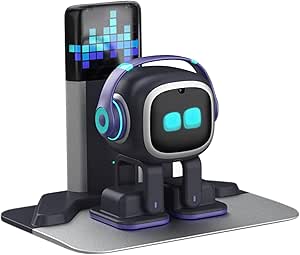 | Best Complete Package | Brand: EMOPET | Model: EMO GO HOME | Included Components: Robot, charging station | VIEW LATEST PRICE | See Our Full Breakdown |
| ciciglow AI Desktop Robot Companion with Voice Chat, Yellow |  | Best for Multilingual Users | Brand: ciciglow | Material: ABS | Battery: Built-in 1000 mAh lithium battery | VIEW LATEST PRICE | See Our Full Breakdown |
| Eilik Desktop Companion Robot with Expressive Animations and Touch-Responsive Play |  | Best Low-Friction Pick | Product Type: Desktop companion robot | Interaction: Touch-responsive reactions and animations | Setup: Ready to use out of the box | VIEW LATEST PRICE | See Our Full Breakdown |
| AI Companion Robot Plush with Cloud Memory and Real-Time Chat |  | Best Privacy-Minded Soft Companion | Connectivity: 2.4 GHz Wi-Fi | AI Models: ChatGPT, DeepSeek, and Gemini | Memory: Cloud-based conversational memory | VIEW LATEST PRICE | See Our Full Breakdown |
More Details on Our Top Picks
Loona Deskmate AI Desktop Companion with Context-Aware Interaction and 165W GaN Charging
Loona Deskmate earns the top spot because it treats a companion robot as a genuine productivity partner rather than a desk toy. It plugs into email, calendar, and connected tools, and its wake-word-free, context-aware interaction means it responds without shouting a trigger phrase across your office. The aluminum build and quiet gimbal feel more premium than plastic rivals like Eilik DQ, and unlike Vector 2.0, privacy-sensitive perception is processed on your phone rather than relying on a subscription for core smarts. The bundled 165W GaN charging hub with three USB-C ports, USB-A, and Qi2 wireless charging replaces a separate dock — real desk-space savings. The tradeoff is strict: it is tethered to an iPhone 12 or later, so Android owners should look elsewhere entirely.
Pros:- Integrates with email, calendar, and productivity tools rather than pure entertainment
- Wake-word-free, context-aware interaction feels more natural than trigger-phrase rivals
- Aluminum body and quiet gimbal movement suit shared workspaces
- Built-in 165W GaN hub with 3 USB-C, 1 USB-A, and 15W Qi2 wireless charging replaces a separate dock
Cons:- Requires an iPhone 12 or later running iOS 16+, which is not included
- Depth of features depends entirely on your phone’s connectivity and ecosystem
Best for: iPhone-owning professionals who want a desk companion that doubles as a genuine productivity hub and charging station
Not ideal for: Android users or households without a spare iPhone 12+, since the device simply will not function for them
- Brand:Loona
- Material:Aluminum
- Color:Obsidian Black
- Charging:165W GaN hub
- Ports:3 USB-C, 1 USB-A, 15W Qi2 wireless
- Compatibility:iPhone 12 or later, iOS 16+
- Dimensions:4.45 × 4.17 × 4.45 inches
- Weight:0.88 kg
- Recommended Age:14 years and up
Our verdict“If you carry an iPhone and want a companion that earns its desk space through utility and charging, this is the pick; everyone else should skip it.”
LOOI AI Desktop Companion Robot with Voice Interaction, Visual Recognition, Memory, and 10W Wireless Charging
Where Loona Deskmate leans into productivity, LOOI goes all-in on conversation and personality. With ChatGPT and Gemini integration, plus visual recognition and gesture responses, it delivers the most flexible talking experience in this lineup — unlike Eilik DQ, which is touch-driven and scripted rather than conversational. Its short- and long-term memory means it remembers details across sessions, a step above simpler chat bots like the PanniOhye unit. The face-tracking camera and expressive animations give it a sense of presence on the desk. Tradeoffs are real: it is English-only, wireless charging demands a separate 9V/2A or higher adapter, and its autonomous behavior can act up unexpectedly — charming for some, annoying in a quiet office.
Pros:- Dual ChatGPT and Gemini support gives richer conversations than single-engine rivals
- Short- and long-term memory builds continuity over time
- Visual recognition and face-tracking camera add interactive depth
- Practical extras like reminders, weather, and a standby clock round out the fun
Cons:- English-only language support limits international buyers
- 10W wireless charging requires a separate 9V/2A or higher adapter
- Autonomous behavior may be unpredictable in professional settings
Best for: Tech enthusiasts who want an evolving, memory-capable chat partner that recognizes faces and gestures
Not ideal for: Non-English speakers or buyers expecting a predictable, low-maintenance desk ornament, since autonomous behavior can be erratic
- Color:Space Black
- Voice Interaction:ChatGPT and Gemini
- Language Support:English only
- Wireless Charging:10W (requires 9V/2A or higher adapter)
- Camera:Face-tracking
- Features:Reminders, weather, standby clock, games, visual recognition, memory
Our verdict“This model makes the most sense for buyers who value deep, memory-driven conversation above all else, provided they speak English and tolerate a bit of unpredictability.”
Eilik DQ (Desert Quester) Desktop Companion Robot
Eilik DQ is the easiest entry point in this roundup because it works straight out of the box — no phone pairing, no Wi-Fi, no subscription, no language settings to fuss with. Compare that to Vector 2.0, which demands a 2.4 GHz network and a paid ChatGPT plan, or Loona Deskmate, which requires a modern iPhone. Its desert explorer theme, touch-based interactions, and the Antmeow Boss shooting mission make it feel more like a character than a gadget, which is exactly why it shines as a gift for teens. The drawback is depth: it cannot hold conversations the way LOOI can, and the full ecosystem — additional characters, the AI Station, Panxer — is sold separately, so costs grow if you want the complete play experience.
Pros:- Zero setup required — genuinely works out of the box with no app, Wi-Fi, or account
- Expressive animations and touch interactions create an endearing personality
- Interacts with other Eilik characters for expanding play value
- Included explorer gear and exclusive boss mission add tangible play content
Cons:- Additional characters and accessories are sold separately for the full experience
- No voice-based conversation or smart-assistant capability compared to AI-driven rivals
Best for: First-time robot owners and gift-givers who want zero-setup charm, especially for teens who enjoy character-driven play
Not ideal for: Buyers seeking conversational AI or productivity features, since DQ is touch-based entertainment rather than an assistant
- Character:Desert Quester (DQ)
- Interaction Type:Touch-based with expressive animations
- Included Accessories:4 pieces of explorer gear
- Setup Required:No
- Special Feature:Antmeow Boss monster shooting mission
- Compatibility:Other Eilik characters, AI Station, Panxer
Our verdict“This option stands out as the friction-free pick for character lovers and first-time buyers, as long as you are not expecting an AI assistant.”
Anki Vector 2.0 Autonomous AI Robot
Vector 2.0 is the only robot here that actually moves around your desk or room on its own, mapping surroundings and dodging obstacles with an HD camera and onboard sensors. Compared with stationary companions like Eilik DQ or LOOI, that mobility creates a genuinely different experience — it comes to you, reacts to faces it recognizes, and feels alive in a way desk-bound units cannot match. Advertised multilingual voice support also gives it broader reach than the English-only LOOI. But the strings attached matter: setup demands a 2.4 GHz Wi-Fi network (a problem on many modern 5 GHz-only routers), and its ChatGPT-powered conversations sit behind an active subscription, adding recurring cost that none of the other picks carry.
Pros:- Fully autonomous navigation with mapping and obstacle avoidance — no remote control needed
- HD camera with facial recognition greets and reacts to specific people
- Expressive animated eyes give it outsized personality for its size
- Advertised multilingual support covering Spanish, French, German, Chinese, and more
Cons:- Requires a 2.4 GHz Wi-Fi network, which many newer routers do not prioritize
- ChatGPT voice features require an active subscription
- Roaming design means it can wander off a cluttered desk or get stuck
Best for: Robot hobbyists who want a truly mobile, roaming companion that navigates and recognizes people on its own
Not ideal for: Buyers on modern 5 GHz-only networks or anyone unwilling to pay an ongoing subscription for full conversational features
- Connectivity:2.4 GHz Wi-Fi; Bluetooth pairing for setup
- Camera:HD camera
- Sensors:Mapping, facial recognition, obstacle detection
- Voice Features:ChatGPT-powered conversations; active subscription required
- Languages:Advertised support for Spanish, French, German, Chinese, and more
Our verdict“Choose this if autonomous movement is the whole point of a companion robot for you; skip it if subscription costs or router compatibility give you pause.”
PanniOhye HH1801YM Interactive AI Robot Companion
PanniOhye’s HH1801YM plays the value card: at 9.6 ounces and just 4.3 inches wide, it is the most portable option here, slipping into a bag the way bulkier units like Loona Deskmate (0.88 kg) cannot. Its feature list is respectable for the tier — voice recognition, memory, custom storytelling, and learning support — making it a reasonable first robot for a 12-year-old, whereas Eilik DQ offers charm but no learning tools and LOOI costs considerably more. The tradeoff is transparency: battery life and charging details are not specified beyond a USB-C cable, and the brand is far less established than Eilik or Anki, so long-term app support and build consistency are open questions. It is a low-commitment entry point, not a long-term companion.
Pros:- Compact 9.6-ounce body travels easily between desk, shelf, and bag
- Combines memory, voice recognition, and smart chat in one affordable package
- Custom storytelling and learning-helper modes give it genuine kid utility
- Simple USB-C charging with everything needed in the box
Cons:- Battery life and charging details are not disclosed, making runtime a gamble
- Lesser-known brand means uncertain long-term firmware and support compared to Eilik or Anki
Best for: Budget-conscious parents buying a first interactive robot for kids 12 and up who want storytelling and learning features
Not ideal for: Buyers who need dependable runtime specs or an established support ecosystem behind their device
- Brand:PanniOhye
- Model:HH1801YM
- Features:Memory, voice recognition, storytelling, learning helper, smart chat
- Recommended Age:12 years and up
- Dimensions:4.3 × 2.5 × 5.5 inches
- Weight:9.6 ounces
- Included Components:AI robot, manual, USB-C charging cable
Our verdict“A sensible low-risk starter robot for younger users, but committed buyers will be happier with the polish of LOOI or Eilik.”
YONBO AIPI Lite AI Robot Companion, Blue
At just 2.18 inches wide and a featherweight 23 grams, the AIPI Lite is the most portable option in this lineup by a wide margin — it slips into a pencil cup or laptop sleeve the way the ENERGIZE LAB Eilik simply cannot. What sets it apart is its customizable AI characters with persistent memory, meaning it remembers conversations and can answer questions using content you upload or paste, which makes it feel more like a pocket research assistant than a toy. The free tier is generous, with unlimited conversations and access to 20 AI agents. The tradeoff is a thin accessory package: battery, USB-C cable, and power adapter are all sold separately, so factor that in before checkout. Voice cloning and some advanced features also sit behind an optional paid plan.
Pros:- Customizable AI characters with long-term conversational memory
- Can answer questions using uploaded or pasted content
- Extremely compact and lightweight at 23 grams
- Free tier includes unlimited conversations and 20 AI agents
Cons:- Battery, USB-C cable, and power adapter are not included
- Voice cloning and advanced features require a paid plan
- Does not support public Wi-Fi login networks
Best for: Students and desk workers who want a barely-there AI companion that answers real questions and remembers context
Not ideal for: Buyers expecting a complete package — you’ll need to source a battery and charging gear separately, and public Wi-Fi login networks won’t work
- Brand:YONBO
- Model:XY006PL01
- Color:Blue
- Weight:23 g
- Dimensions:2.18 x 1.87 x 0.3 inches
- Connectivity:2.4 GHz Wi-Fi (password-protected)
- Material:Plastic
- Included Components:AIPI Lite AI robot, manual
Our verdict“This pick makes the most sense for anyone who wants genuine AI brains in the smallest possible footprint, provided they’re willing to buy charging accessories separately.”
Oiumhru Interactive AI Desktop Robot with Bilingual Chat and 7-Color Lights
Where most robots in this roundup target adults, the Oiumhru leans into childhood learning with bilingual conversation, study guidance, riddles, and stories — a content mix closer to a talking tutor than the entertainment-focused Eilik. The 7-color eye lights sync with music, and flexible joints let kids pose it, which adds a physical play element the YONBO AIPI Lite lacks entirely. A built-in rechargeable battery delivers up to 120 minutes of untethered use, so it can move around the house rather than living on one desk. The main constraint is connectivity: nearly everything beyond the lights depends on Wi-Fi or a 2.4G network, so it’s far less useful in homes with unstable wireless or as an offline travel toy.
Pros:- Bilingual conversation with study guidance, stories, and riddles
- Music-synchronized 7-color lights and poseable joints
- Rechargeable battery with up to 120 minutes of use
- Customizable roles and daily assistant features
Cons:- Requires Wi-Fi or a 2.4G network for connected features
- Toddler-oriented design may feel juvenile to older users
Best for: Parents of toddlers and preschoolers who want an interactive, bilingual learning companion with visual flair
Not ideal for: Adults seeking a productivity-focused desk assistant — the content and gentle voice are pitched at very young children
- Color:Yellow
- Material:ABS
- Dimensions:3.74 x 2.17 x 5.12 in
- Battery:3.7 V, 500 mAh rechargeable lithium
- Maximum Working Time:Up to 120 minutes
- Charging:USB Type-C
- Connectivity:Wi-Fi and 2.4G network
- Recommended Age:18 months – 3 years
Our verdict“This model is better suited to families with children aged 18 months to 3 years who want playful, screen-free learning support.”
umissfun Emotional AI Companion Device – Desktop Robot with Voice Understanding, Personality Design, and Long-Term Memory (Gray)
This is the only robot in this batch built around genuine long-term emotional companionship rather than novelty. Its long-term conversational memory lets it adapt to you over time, and the 8-inch HD screen with stereo speakers can display photos and play voice messages from loved ones — something no screenless option like the OVAQUIXI or the Eilik can do. That screen makes it a standout choice for elderly relatives or long-distance partners, with trilingual support in Chinese, English, and Japanese broadening its appeal. The tradeoffs are real: at 4 pounds and over 13 inches of packaging, it’s the least portable pick here, and its small track record means long-term reliability is unproven. Buyers wanting a purely functional assistant may find the emotional framing excessive.
Pros:- Long-term memory creates a genuinely personalized relationship
- 8-inch HD screen and stereo speakers for photo and voice playback
- Supports Chinese, English, and Japanese
- Privacy controls let users manage their own data
Cons:- Small review base may not reflect long-term reliability
- Bulky at 4.02 pounds compared with palm-sized rivals
- Emotional AI focus may not suit purely functional users
Best for: Families gifting an elderly relative or long-distance partner a companion that displays photos, voice messages, and remembers conversations
Not ideal for: Minimalist desk setups or buyers wanting a strictly functional voice assistant — the size and emotional focus go beyond utility
- Screen:8-inch HD display
- Audio:Stereo speakers
- Languages:Chinese, English, Japanese
- Weight:4.02 pounds
- Package Dimensions:13.27 x 7.6 x 6.18 inches
- Manufacturer:SmartApe Tech Limited
- Color:Gray
Our verdict“This option stands out for buyers prioritizing warmth and memory over portability — especially as a thoughtful gift for grandparents or distant loved ones.”
OVAQUIXI AI Desktop Robot Companion with Emotion Recognition, 2.01-Inch Screen, Black
The OVAQUIXI earns its spot through mounting flexibility: a magnetic base plus adhesive tape means it can live on a desk, a car dashboard, or a shelf, which no other pick in this roundup — not the desk-bound umissfun nor the tabletop Eilik — can claim. Its 70+ animated expressions on the 2.01-inch screen give it more visible personality range than most palm-sized rivals, and the gyroscopic tilt and tap responses make interaction feel physical rather than purely vocal. Doubling as a 3W speaker for music and hands-free calls adds genuine utility for a car setup. Be aware the magnetic car mount itself isn’t included, and some feature descriptions are vague, so expect a bit of trial and error during setup.
Pros:- 70+ animated expressions on a 2.01-inch screen
- Responds to tilts, shakes, and taps via gyroscopic sensing
- Plays music and supports hands-free calls
- Magnetic base and adhesive tape enable desk, dash, or shelf placement
Cons:- Magnetic car mount is not included
- Product description is unclear or incomplete about some features
Best for: Commuters and drivers who want an expressive, talkative companion that mounts on a dashboard and doubles as a speakerphone
Not ideal for: Buyers who want documentation they can trust — unclear feature wording and a missing car mount mean setup takes patience
- Material:ABS
- Dimensions:64 x 63 x 55 mm (2.52 x 2.48 x 2.17 in)
- Screen:2.01 in, 240 x 296 resolution
- Battery:Built-in 1000 mAh lithium-ion
- Speaker:36 mm, 3 W
- Weight:165 g (5.82 oz)
- Included Items:Robot, charging cable, double-sided tape, manual
Our verdict“Compared with similar options, this pick makes the most sense for anyone whose companion needs to travel between desk and dashboard.”
ENERGIZE LAB Eilik Desktop Companion Robot
The Eilik remains the benchmark for zero-frustration ownership: it works straight out of the box with no account setup or Wi-Fi handshaking, a contrast to the YONBO AIPI Lite, which arrives without even a charging cable. Its charm comes from touch-responsive interactions, expressive animations, and mini games rather than deep AI capability, and pairing two or more Eilik robots unlocks interactions between them — a social layer unique in this lineup. Ongoing updates continue adding animations and games, so the toy evolves without new purchases. The catch is expansion economics: the AI Station and Panxer accessories are sold separately, and without them the Eilik stays a delightful desk pet rather than a smarter assistant. Buyers wanting question-answering intelligence should look elsewhere.
Pros:- Ready to use out of the box with no complicated setup
- Expressive touch-responsive animations and mini games
- Multiple Eilik robots can interact with each other
- Updates add new animations, games, and experiences over time
Cons:- AI Station and Panxer accessories are sold separately
- Lacks voice-based question answering found in AI-focused rivals
Best for: Anyone who wants instant, setup-free desk entertainment — no accounts, no apps, just turn it on
Not ideal for: Users who want their robot to answer questions or manage tasks — the Eilik is about play, not productivity
- Brand:ENERGIZE LAB
- Model:Eilik
- Type:Desktop companion robot
- Features:Touch-responsive interactions, expressive animations, mini games
- Setup:Ready to use out of the box
- Multi-Robot Interaction:Two or more Eilik robots can interact
- Optional Accessories:AI Station and Panxer, sold separately
Our verdict“This pick makes the most sense for buyers who value immediate charm and offline simplicity over artificial intelligence.”
EMOPET EMO AI Desk Robot Companion with ChatGPT, Voice Commands & Dancing
EMO stands out as the most character-rich option in this lineup, with simulated moods, weather-based ‘illness,’ dancing, and app-tracked life events that make it feel less like a gadget and more like a small pet. Compared with the Eilik, which relies on preloaded animations, EMO’s ChatGPT integration gives it genuinely varied conversation, so interactions stay fresher over weeks of ownership. The skateboard and smart light accessories add physical play that most desk robots here don’t attempt. The tradeoff is structural: this edition ships without the charging station, so you’re managing a cable or upgrading later, and the richest features lean on the companion app.
Pros:- ChatGPT-powered conversations stay varied instead of looping canned lines
- Simulated moods and weather reactions create a genuine pet-like personality
- Skateboard and smart light add physical play beyond desk interactions
- App includes games, achievements, and life event tracking
Cons:- No charging station included in this edition
- Full feature set depends on the companion app and a network connection
Best for: Buyers who want a desk robot with evolving personality and app-based games rather than simple voice Q&A
Not ideal for: Anyone who wants zero-maintenance charging — this edition omits the auto-docking station that other EMO bundles include
- Brand:EMOPET
- Model:EMO
- AI Engine:ChatGPT-powered conversations
- Sensors:Multiple sensors respond to touch and gestures
- Included Components:Adapter, EMO Robot, Skateboard, Smart Light, User Manual
- Charging:Wall adapter (charging station not included)
- Recommended Age:15 years and up
Our verdict“This pick makes the most sense for buyers who prioritize personality and long-term engagement over charging convenience.”
EMOPET EMO Interactive Desk Robot with Charging Station
This is essentially the same EMO experience as the ChatGPT edition above, but with the one thing that version lacks: an automatic charging station that EMO locates and returns to on its own. That single difference changes daily ownership — you set it down once and the robot manages its own power, which is something the corded ciciglow and manual-charge Eilik can’t match. You still get voice commands, AI conversation, dancing, and app games. The irritations are smaller but real: volume can only be adjusted through the app rather than a physical control, and meaningful conversations demand a stable network connection, so it goes quiet when Wi-Fi drops.
Pros:- Automatically locates and returns to its charging station
- Voice commands and ChatGPT conversations in one package
- Dancing and app-based games give it variety beyond chat
- Charging station removes daily cable management
Cons:- Volume can only be adjusted through the app
- AI conversations require a constant network connection
Best for: Buyers who want the full self-managing EMO experience with hands-off charging included in the box
Not ideal for: Households with unreliable Wi-Fi — AI conversation features become very limited without a network connection
- Brand:EMOPET
- Model:EMO GO HOME
- Included Components:Robot, charging station
- Connectivity:Network connection; EMO app
- Features:Voice commands, ChatGPT conversations, dancing, games, automatic charging
- Dimensions:11 × 8.5 × 2.95 inches
- Recommended Age:15 years and up
Our verdict“If you want EMO’s personality without ever fiddling with a charging cable, this is the version worth paying extra for.”
ciciglow AI Desktop Robot Companion with Voice Chat, Yellow
Where most robots in this roundup lean on personality gimmicks, the ciciglow focuses on practical voice chat: it answers questions, offers daily motivational prompts, and — its standout trait — supports 37 languages, which nothing else here comes close to matching. That makes it the obvious choice for bilingual households or language learners that the English-centric EMO can’t serve. Its cordless design with a built-in 1000 mAh battery also means it can move between desks without a dock, unlike the EMO GO HOME, which is tethered to its station’s location. The compromises: it strictly requires 2.4 GHz Wi-Fi, and roughly 200 minutes per charge means frequent recharging if it lives on your desk all day.
Pros:- Supports 37 languages for voice chat
- Expressive LED eyes react during conversations
- Cordless operation with a built-in rechargeable battery
- Includes daily motivational prompts alongside Q&A
Cons:- Requires a 2.4 GHz Wi-Fi connection to function
- Runtime tops out around 200 minutes per charge
Best for: Multilingual users and language learners who want conversational practice in one of 37 supported languages
Not ideal for: Buyers with only 5 GHz Wi-Fi networks or those wanting all-day untethered desk presence
- Brand:ciciglow
- Material:ABS
- Battery:Built-in 1000 mAh lithium battery
- Usage Time:Up to 200 minutes
- Charging Time:120 minutes
- Languages Supported:37
- Wi-Fi Requirement:2.4 GHz
- Color:Yellow
Our verdict“A sensible pick if language support is your deciding factor, as long as your network and charging habits fit its limits.”
Eilik Desktop Companion Robot with Expressive Animations and Touch-Responsive Play
Eilik is the simplest entry point in this roundup: it works straight out of the box with no network setup, no app requirement, and no Wi-Fi troubleshooting — a stark contrast to the ciciglow, which is dead without 2.4 GHz connectivity. Its charm comes entirely from touch-responsive animations, so squeezing, poking, and moving it produce genuinely funny reactions. Pair two or more Eilik robots and they interact with each other, something no other pick here offers. The catch is that the deeper experiences — the AI Station for smarter behavior and the Panxer accessory — are sold separately, and compared with the EMO, its conversation ability is limited, so buyers wanting real chat will outgrow it faster.
Pros:- Works out of the box with no app or Wi-Fi setup
- Expressive touch-responsive animations feel genuinely alive
- Multiple Eilik robots can interact with each other
- Simple enough for younger teens to use independently
Cons:- AI Station and Panxer accessories are sold separately
- No built-in AI conversation compared with ChatGPT-equipped rivals
Best for: Gift-givers and first-time robot owners who want instant, app-free charm with zero setup friction
Not ideal for: Buyers who want AI conversation — the best interactive features require separately sold accessories
- Product Type:Desktop companion robot
- Interaction:Touch-responsive reactions and animations
- Setup:Ready to use out of the box
- Multi-Robot Interaction:Two or more Eilik robots can interact
- Connectivity Required:None for core functions
- Optional Accessories:AI Station and Panxer, sold separately
Our verdict“The easiest way into desktop companion robots — just know the richest features cost extra down the road.”
AI Companion Robot Plush with Cloud Memory and Real-Time Chat
This plush takes the opposite approach from every hard-shell robot here: it’s soft, huggable, and camera-free, with no GPS either — a meaningful privacy posture compared with camera-equipped models like the EMO or Anki Vector. Its other differentiator is flexibility: it connects to ChatGPT, DeepSeek, and Gemini, so you can pick or switch AI personalities through the app rather than being locked to one provider. Cloud-based memory lets it recall prior conversations and adapt over time, and touch triggers prerecorded lines even when offline. Those offline lines are the fallback, though — real conversation needs 2.4 GHz Wi-Fi and app setup, and all memory features live in the cloud, so an internet outage reduces it to a plain plush.
Pros:- Supports multiple AI models: ChatGPT, DeepSeek, and Gemini
- Cloud memory adapts to prior conversations over time
- No built-in camera or GPS for privacy-minded buyers
- Touch-activated offline lines and hidden Easter eggs
Cons:- Real-time AI chat requires 2.4 GHz Wi-Fi and app setup
- Cloud memory and adaptation depend entirely on internet access
Best for: Privacy-conscious buyers, especially parents, who want an adaptive conversational companion with no camera
Not ideal for: Anyone without reliable 2.4 GHz Wi-Fi — offline mode offers only prerecorded touch lines
- Connectivity:2.4 GHz Wi-Fi
- AI Models:ChatGPT, DeepSeek, and Gemini
- Memory:Cloud-based conversational memory
- Offline Features:Touch-activated prerecorded lines and Easter eggs
- Languages:Multilingual conversations
- Design:Portable plush
- Camera / GPS:None built in
- Warranty:12 months
Our verdict“The right choice if you value a huggable form factor, privacy, and AI flexibility over desktop-style animations.”

How We Picked
I ranked these robots on four factors that actually determine satisfaction over months of ownership, not just the first unboxing week. First, interaction depth: does the robot remember you, respond to context, and evolve, or does it cycle through the same reactions? Models with genuine memory and recognition ranked higher than voice-echo toys. Second, desk practicality: footprint, cable management, and — in the Loona’s case — whether the device adds utility like phone charging. Third, ecosystem longevity: companies with a track record of app updates and server support scored better than unproven brands, which matters enormously for cloud-dependent companions. Fourth, value at each tier, since a $40 desk toy can be a better buy than a $300 robot that frustrates you.
The ranking logic follows a simple principle: the more a robot justifies its presence on your desk, the higher it places. The Loona leads because it combines personality with a functional charging hub. LOOI and the EMO models follow on conversational strength. The middle tier belongs to Eilik-style expressive companions that trade intelligence for charm and reliability. Budget animated toys fill out the lower ranks — not because they’re bad, but because they serve a different, shorter-term expectation that buyers should understand before ordering.
Factors to Consider When Choosing Best Desktop Companion Robots
Before picking a specific model, it helps to understand what actually separates a satisfying desktop companion from a gadget that ends up in a drawer within a month. These are the factors I’d weigh first.Cloud AI Versus Offline Personality
The single biggest decision is whether your robot depends on cloud servers. Cloud-connected models offer richer conversation and real LLM-powered chat, but their personality dies the day the manufacturer shuts down support — a lesson Anki Vector owners learned painfully when the original company folded. Offline robots like the Eilik family have fixed but permanent personalities that will work in five years regardless of what happens to the business. A common mistake is paying a premium for cloud AI without checking whether the company charges a subscription or has a history of app abandonment. If you form quick attachments to gadgets, longevity should outweigh cleverness. Buyers who mainly want novelty can safely choose cloud models and enjoy them while the service lasts.
Cameras, Microphones, and Desk Privacy
Most AI companion robots include a camera and always-listening microphone, and many people don’t think through what that means on a work desk. If your desk hosts confidential documents, client calls, or a home office you share with others, a vision-equipped robot deserves scrutiny: check whether the camera can be physically blocked or disabled in-app, and whether voice data is processed locally or uploaded. Models with visual recognition, like the Loona and LOOI, are genuinely more interactive because they can recognize faces and react to gestures — that’s the payoff for the privacy tradeoff. Simpler touch-responsive robots like the Eilik sidestep the issue entirely. There’s no wrong answer here, but it’s a decision you want to make consciously rather than discover after setup.
Memory and Whether the Robot Evolves
Cheap desktop robots respond identically on day one and day one hundred, which is exactly why so many end up forgotten. What separates an engaging companion is persistence: recognizing your face, remembering your name, noticing when you’ve been away, or adapting its mood over time. The LOOI and umissfun models market long-term memory as a headline feature, and that’s the right instinct — novelty fades, but a robot that seems to know you keeps earning attention. Read descriptions carefully, though, because ‘memory’ sometimes just means the app stores your settings rather than the robot learning anything. If you want a companion rather than a toy, treat persistent memory as a must-have rather than a bonus. It’s the feature most correlated with still liking the purchase three months later.
Footprint, Charging, and Desk Utility
A desktop robot competes for space with your monitor, lamp, speakers, and coffee, so physical design matters more than it seems. The Loona Deskmate is the standout here because its dock doubles as a 165W GaN charger, effectively replacing another desk accessory instead of adding clutter. Models with dedicated charging stations, like the EMOPET EMO, need a permanent footprint and a spare outlet — worth planning for before purchase. Also check how the robot charges: models that need to be manually placed on a dock get forgotten when they’re dead, which quietly kills the relationship. Smaller screen-based units fit cramped setups but sacrifice the physical movement that makes robots feel alive compared to an app. Measure your available space and count your outlets before falling in love with a bigger unit.
Who the Robot Is Actually For
Match the robot to the person, not the marketing. Adults working long hours at a desk tend to prefer subtle, reactive companions — something that notices them and occasionally breaks the monotony without demanding play. Kids respond better to bold animations, dances, lights, and touch games, which is where the EMO and Eilik models shine. Gift buyers should be especially careful with language support: bilingual models like the Oiumhru handle English and Chinese chat, but several budget units have limited or awkward English responses. Office settings add another filter, since a robot that talks unprompted or dances with music can annoy coworkers quickly. When in doubt, choose the less demanding robot — a quiet companion gets kept; a needy one gets unplugged.
Realistic Budget Expectations
Desktop companion robots span a huge price range, and the honest truth is that the category has a steep diminishing-returns curve below and above the middle tier. Ultra-budget animated units deliver a fun week but rarely sustained engagement, so they’re best treated as novelty gifts rather than companions. Mid-tier expressive robots hit the sweet spot for most buyers: enough personality to feel alive, no subscriptions, and proven reliability. Premium AI models justify their cost only if you’ll actually use conversation and memory features daily — otherwise you’re paying for capabilities that sit idle. Avoid the trap of assuming the most expensive robot is automatically the best companion; character design and interaction quality matter more than raw specs. Budget for the ecosystem too: replacement docks, cases, and any subscription fees change the long-term cost.
Frequently Asked Questions
Do desktop companion robots require a subscription to keep working?
It varies by brand, and this is one of the most important questions to check before buying. Cloud-connected models like the ChatGPT-powered EMOPET EMO depend on the manufacturer’s servers, and some brands gate advanced features behind monthly plans — if the service ends, the smart features can end with it. Offline-focused robots like the Eilik family have self-contained personalities that keep working indefinitely with no fees. My rule of thumb: if a robot’s headline feature is ‘AI chat,’ verify the subscription policy and the company’s track record for supporting older hardware. Robots marketed around animations and touch play are almost always subscription-free. Buyers who hate recurring costs should prioritize offline personality over conversational depth.
What’s the actual difference between the four Eilik models in this roundup?
Honest answer: far less than the listings suggest. The Eilik DQ, the Energize Lab original, and the expressive-animation variants share the same core platform — an expressive screen face, touch sensors, desk-edge awareness, and character-driven reactions. The differences come down to character design, color scheme, bundled accessories, and which generation of animation packs ships out of the box. Because they’re so similar, choosing between them should come down to whichever character design you find most charming and which bundle offers the accessories you’ll use. Don’t pay a large premium expecting one Eilik to be dramatically smarter than another. If you like the Eilik formula, any of them delivers essentially the same experience.
Is the camera on robots like the Loona or LOOI a privacy concern on a work desk?
It can be, and it deserves a conscious decision rather than an afterthought. Vision-equipped robots use their cameras for face recognition and gesture response, which is exactly what makes them feel alive — but that means a lens pointed at your workspace, potentially during confidential calls or document handling. Check whether the model offers a physical camera cover or an in-app privacy mode that disables vision while keeping voice features active. Also research where video is processed: some units handle recognition locally, while others upload data to cloud servers. If your desk involves sensitive work, the safer route is a touch-and-animation robot like the Eilik, which has no camera at all. Plenty of buyers use camera robots happily — just know what’s recording and when.
Can these robots actually hold a conversation, or is the AI mostly a gimmick?
At the top of the category, conversation is real — models integrating modern language models can handle open-ended chat, remember context within a session, and respond in genuinely surprising ways. The Loona, LOOI, and ChatGPT-powered EMO sit in this tier, and their answers feel less scripted than anything from a few years ago. In the middle tier, robots like the Eilik deliberately skip free conversation in favor of emotional reactions, which many owners actually prefer because it feels less like talking to a chatbot. The budget end is where ‘AI’ becomes marketing filler: voice-echo toys that repeat phrases or respond with canned lines don’t improve with time. Set expectations by tier and you won’t be disappointed. A robot that reacts with personality can be more satisfying than one that talks fluently but feels generic.
Are desktop companion robots good gifts for kids, or are they really adult gadgets?
Both, but the right model differs sharply by age. Kids respond best to robots with big animated expressions, dancing, touch games, and music reactions — the EMOPET EMO and Eilik models are strong fits here because they reward physical interaction rather than conversation. Younger children may struggle with AI-chat robots, since their patience for imperfect answers is low and app setup usually requires a parent’s account and Wi-Fi configuration. Adults, by contrast, tend to prefer subtler companions that notice their presence and punctuate a workday — the Loona and LOOI fit that office-companion role better. If gifting, also confirm language support matches the child’s, since several budget models handle English poorly. A mismatch between robot and recipient is the most common reason these gifts go unused.
Conclusion
Choosing among the best desktop companion robots comes down to what you want sitting next to your keyboard. For best overall, the Loona Deskmate earns the top spot by pairing context-aware AI with a 165W GaN charging dock — it’s the only model that improves your desk while entertaining you. For best value, the Eilik family delivers reliable, subscription-free charm that won’t feel like a downgrade, and the four variants let you pick purely on style. For a premium conversational experience, the LOOI AI and the EMOPET EMO with ChatGPT offer memory, recognition, and real dialogue for buyers who want depth over decoration. Beginners should start with the Eilik DQ — simple setup, no accounts to manage, and instant payoff. For specific needs: the Anki Vector 2.0 suits autonomy enthusiasts willing to accept support risk, the plush AI companion fits younger kids, and the compact budget units like the Oiumhru or ciciglow work as low-commitment novelty gifts. Whatever you choose, match the robot to how you’ll actually use it — that’s the difference between a companion and clutter.
Halloween Picks
halloween
As an affiliate, we earn on qualifying purchases.