
The best gaming accessories add comfort or useful function without cluttering your setup. I put the SteelSeries QcK XXL in the best overall position for its broad, practical mouse coverage, while the Razer BlackShark V2 X stands out for players prioritizing a dedicated gaming headset and the Razer Tartarus V2 for those who want programmable left-hand controls. The main tradeoffs are utility versus decoration, wired simplicity versus extra features, and full-size gear versus limited desk space. This lineup ranges from mouse pads and headsets to macro controls, holders, and lighting, so the right pick depends on what your setup actually lacks. Read on for the full breakdown and a guide to choosing accessories that fit your games, devices, and available space.

Get the latest gadgets delivered free with Prime
- Fast, free delivery on millions of items
- Prime Video, Amazon Music and more included
- Member-only deals all year
Complete the kit



Key Takeaways
- The SteelSeries QcK XXL leads on everyday utility: its large play surface is a practical upgrade for players who need more room for both mouse movement and keyboard placement.
- Dedicated gear beats an all-in-one bundle when a specific need matters: the Razer BlackShark V2 X focuses on headset use, while the Orzly bundle supplies several wired basics in one package.
- Programmable controls serve a narrower purpose than standard peripherals: the Razer Tartarus V2 and VSD M18 are most relevant to players who will assign and use macros or shortcuts.
- Extended pads are not interchangeable just because their dimensions are similar: the SteelSeries, Gimars, and BladeHawks options differ in emphasis, including plain surface coverage, charging and lighting, or RGB presentation.
- Several entries prioritize desk organization or display over gameplay: headset stands, a controller holder, a phone stand, and a PlayStation-themed light can tidy or personalize a setup, but they do not replace core input or audio gear.
| SteelSeries QcK XXL Gaming Mouse Pad, Black |  | Best for Full-Desk Coverage | Brand and model: SteelSeries QcK XXL | Color: Black | Dimensions: 35 x 16 x 0.08 inches | VIEW LATEST PRICE | See Our Full Breakdown |
| BENGOO G9000 Stereo Gaming Headset with Microphone | 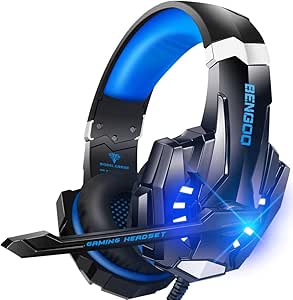 | Best Multi-Platform Headset Pick | Brand and model: BENGOO G9000 | Type: Over-ear gaming headset | Driver size: 40 mm | VIEW LATEST PRICE | See Our Full Breakdown |
| Gimars RGB Gaming Mouse Pad with 15W Qi Wireless Charging, 10 Light Modes, 31.5 x 11.8 in |  | Best Feature-Packed Mouse Pad | Brand and model: Gimars G-RGB-W03 | Dimensions: 800 x 300 x 4 mm (31.5 x 11.8 x 0.16 in) | Wireless charging: Qi, up to 15W | VIEW LATEST PRICE | See Our Full Breakdown |
| Paladone PlayStation Icons Light with 3 Light Modes |  | Best PlayStation-Themed Desk Accent | Brand and model: Paladone PP4140PSV2 | Product type: Desk light | Light modes: Standard, color phasing, sound reactive | VIEW LATEST PRICE | See Our Full Breakdown |
| VSD M18 Programmable Macro Pad with 18 Keys and RGB Light Ring |  | Best for Custom Shortcuts and Streaming | Brand and model: VSD M18 | Key configuration: 15 LCD visual keys and 3 physical buttons | Connectivity: USB-C | VIEW LATEST PRICE | See Our Full Breakdown |
| CoolGift Mart LED Acrylic Headphone Stand with USB and Type-C Charging Ports |  | Best for Desk Lighting and Simple Charging | Material: Acrylic and plastic | Dimensions: 4.7 x 4.7 x 10.4 inches | Weight: 0.48 kg | VIEW LATEST PRICE | See Our Full Breakdown |
| Exquisite Gaming Call of Duty Monkey Bomb Phone and Controller Holder |  | Best Collectible Controller Holder | Material: PVC | Height: 8.5 inches | Dimensions: 5.43 x 5.71 x 9.25 inches | VIEW LATEST PRICE | See Our Full Breakdown |
| Razer BlackShark V2 X Wired Gaming Headset with 7.1 Surround Sound |  | Best Lightweight Wired Headset | Type: Wired over-ear gaming headset | Driver size: 50 mm titanium-coated drivers | Connection: 3.5 mm audio jack | VIEW LATEST PRICE | See Our Full Breakdown |
| KDD RGB Headset Stand with Rotatable Headphone Holder and Detachable Controller Hook |  | Best for Multi-Device Desk Storage | Material: Plastic | Weight: 0.53 kg | Lighting: 9 RGB modes with memory function | VIEW LATEST PRICE | See Our Full Breakdown |
| Razer Tartarus V2 Left-Handed Gaming Keypad with 32 Programmable Keys | 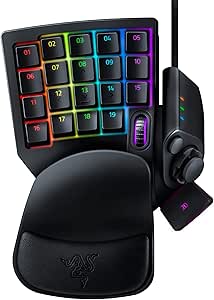 | Best for Custom One-Handed Controls | Product type: Left-handed gaming keypad | Keys: 32 programmable Mecha-Membrane keys | Controls: 8-way directional thumbpad and 3-way scroll wheel | VIEW LATEST PRICE | See Our Full Breakdown |
| Orzly Hornet RX-250 Wired RGB Gaming Keyboard, Mouse, Headset, and Mouse Pad Bundle |  | Best Starter Accessory Bundle | Bundle contents: Keyboard, mouse, headset, mouse pad | Connectivity: Wired | Keyboard: Full-size QWERTY membrane; 104 keys | VIEW LATEST PRICE | See Our Full Breakdown |
| VELENTI Gamer Chair Phone Stand for Smartphones and Kindles |  | Best Compact Desk Accessory | Mounting type: Tabletop | Holder design: Gamer chair-inspired clip | Compatible devices: Smartphones, Kindles, desktop | VIEW LATEST PRICE | See Our Full Breakdown |
| KDD Headset Stand with Charging Station and 9 Lighting Modes |  | Best Multi-Device Organizer | Model: KDD-766 | Storage capacity: 1 headset and up to 4 controllers, or 1 headset and 2 controllers | Device slots: Phone, tablet, or Nintendo Switch | VIEW LATEST PRICE | See Our Full Breakdown |
| BladeHawks RGB Extended Gaming Mouse Pad, 31.5 x 12 Inches, Black | 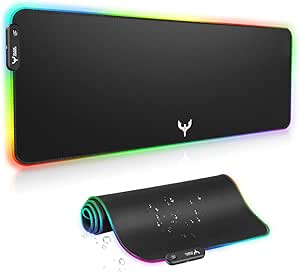 | Best Extended RGB Mouse Pad | Dimensions: 31.5 x 12 inches (800 x 300 mm) | Thickness: 4 mm | Surface: Micro-textured cloth | VIEW LATEST PRICE | See Our Full Breakdown |
| gaming accessorie | Dimensions |
|---|---|
| SteelSeries QcK XXL Gaming Mou | 35 x 16 x 0.08 inches |
| BENGOO G9000 Stereo Gaming Hea | — |
| Gimars RGB Gaming Mouse Pad wi | 800 x 300 x 4 mm (31.5 x 11.8 x 0.16 in) |
| Paladone PlayStation Icons Lig | 12 in W x 4 in H x 2.75 in D |
| VSD M18 Programmable Macro Pad | — |
| CoolGift Mart LED Acrylic Head | 4.7 x 4.7 x 10.4 inches |
| Exquisite Gaming Call of Duty | 5.43 x 5.71 x 9.25 inches |
| Razer BlackShark V2 X Wired Ga | — |
| KDD RGB Headset Stand with Rot | — |
| Razer Tartarus V2 Left-Handed | 6.02 x 2.36 x 0.8 inches |
| Orzly Hornet RX-250 Wired RGB | — |
| VELENTI Gamer Chair Phone Stan | — |
| KDD Headset Stand with Chargin | 11.42 x 7.4 x 2.94 inches |
| BladeHawks RGB Extended Gaming | 31.5 x 12 inches (800 x 300 mm) |
More Details on Our Top Picks
SteelSeries QcK XXL Gaming Mouse Pad, Black
I’d choose the SteelSeries QcK XXL when consistent mouse movement across a broad area matters more than desk space or cushioning. Its 35-by-16-inch micro-woven cloth surface can sit beneath both keyboard and mouse, giving low-sensitivity players room for wide sweeps without running off the pad. The non-slip rubber base helps keep that large surface from shifting during play, and the material is designed to track with optical and laser sensors.
Compared with the Gimars RGB pad, the QcK keeps things simple: it gives up wireless charging, lighting, and extra thickness in favor of a larger, straightforward tracking area. That makes it a less feature-packed desk accessory, but also a cleaner pick for players who want surface coverage rather than built-in extras. Its tradeoffs are real: the footprint needs a generous desk, and the thin profile adds little cushioning.
Pros:- 35-by-16-inch surface accommodates a keyboard and mouse.
- Micro-woven cloth is designed for accurate optical and laser sensor tracking.
- Non-slip rubber base helps limit movement during play.
Cons:- Large footprint can crowd smaller desks.
- Thin 0.08-inch profile provides little cushioning.
Best for: PC players who use low mouse sensitivity and have enough desk space for a full-size keyboard-and-mouse surface.
Not ideal for: Players with compact desks or anyone seeking wrist cushioning, wireless charging, or RGB effects from a mouse pad.
- Brand and model:SteelSeries QcK XXL
- Color:Black
- Dimensions:35 x 16 x 0.08 inches
- Surface material:Micro-woven cloth
- Base:Non-slip rubber
- Compatible sensors:Optical and laser
Our verdict“Choose the QcK XXL if you want a broad, no-frills tracking surface and have room for its full-desk footprint.”
BENGOO G9000 Stereo Gaming Headset with Microphone
The BENGOO G9000 suits players who want one wired headset for several consoles and everyday devices without adding separate audio gear to each setup. Its 40 mm neodymium drivers, over-ear pads, and listed 7.1 surround sound give it a gaming-focused feature set, while the flexible omnidirectional microphone and inline mute and volume controls make quick chat adjustments accessible. The broad compatibility listing also spans consoles, PC, laptops, tablets, and phones.
Compared with the Razer BlackShark V2 X in this roundup, the G9000 leans more into visible setup features such as LED earcup lights and inline controls, rather than presenting itself as a pared-back headset choice. The tradeoff is a wired connection and a 49-inch USB cable that may constrain placement. Older Xbox One controllers also need a separate Microsoft adapter, so check your controller before choosing it.
Pros:- Compatibility spans multiple consoles, PC, laptops, tablets, and phones.
- Flexible microphone includes a noise-cancelling feature.
- Inline volume and microphone-mute controls simplify quick adjustments.
- Padded over-ear design and LED earcup lighting add gaming-focused features.
Cons:- Older Xbox One controllers require a separate Microsoft adapter.
- The 49-inch cable may limit seating and device placement.
- Wired design is less convenient for players who want freedom to move.
Best for: Players who switch a wired headset among supported consoles, PC, and mobile devices and want accessible mute and volume controls.
Not ideal for: Older Xbox One controller owners without the required adapter, or players who need a longer cable or a wireless headset.
- Brand and model:BENGOO G9000
- Type:Over-ear gaming headset
- Driver size:40 mm
- Audio:7.1 surround sound
- Microphone:Flexible omnidirectional, noise-cancelling
- Cable:49-inch braided USB cable
- Controls:Inline volume control and microphone mute
- Earpad material:Protein leather
- Lighting:LED earcup lights
Our verdict“Pick the G9000 if you want a feature-rich wired headset for several supported devices and can work around its cable length.”
Gimars RGB Gaming Mouse Pad with 15W Qi Wireless Charging, 10 Light Modes, 31.5 x 11.8 in
The Gimars G-RGB-W03 is for desk setups where a mouse pad should do more than provide tracking space. Its 31.5-by-11.8-inch surface fits a keyboard and mouse, while the built-in Qi platform can charge compatible devices at up to 15W. Ten lighting modes and a water-resistant micro-textured surface bring convenience and atmosphere together; the 4 mm thickness also gives it more padding than the thinner SteelSeries QcK XXL.
That extra functionality comes with setup requirements. The charging feature needs a compatible power adapter, and one is not included, so the charging benefit depends on what you already own. The pad is also shorter and narrower than the QcK XXL, making it less suited to players who want a particularly expansive sweep area. Choose Gimars for integrated charging and lighting, not maximum surface coverage.
Pros:- Built-in Qi charging supports up to 15W with a compatible adapter.
- Surface fits a keyboard and mouse on one pad.
- Water-resistant fabric and reinforced edges support everyday desk use.
- Ten lighting modes and 4 mm thickness add visual appeal and cushioning.
Cons:- Power adapter is not included, and fast charging requires a compatible one.
- Smaller footprint than the SteelSeries QcK XXL leaves less room for broad mouse sweeps.
Best for: Desk-based PC and console players with a Qi-compatible device who want mouse space, charging, and RGB lighting in one accessory.
Not ideal for: Players without a compatible Qi device or power adapter, and low-sensitivity mouse users who need a larger tracking area.
- Brand and model:Gimars G-RGB-W03
- Dimensions:800 x 300 x 4 mm (31.5 x 11.8 x 0.16 in)
- Wireless charging:Qi, up to 15W
- Lighting modes:10 (7 static, 3 dynamic)
- Surface:Water-resistant micro-textured fabric
- Base:Non-slip natural rubber
- Interface:USB-C
- Included accessory:USB-C cable
Our verdict“Choose Gimars if Qi charging and RGB matter more to you than the largest possible mouse surface.”
Paladone PlayStation Icons Light with 3 Light Modes
The Paladone PlayStation Icons Light is a decorative accessory for players who want their setup to show their console allegiance rather than add a gaming control or audio feature. Its officially licensed controller-symbol design gives it a clear identity, and the three modes—standard, color phasing, and sound reactive—let the display shift with the room. At 12 inches wide, it can sit on a desk or shelf without taking up the footprint of a full desk mat.
Compared with the RGB-equipped Gimars mouse pad, this light is purely an atmosphere choice: it does not improve tracking, charge a device, or provide a place to hang a headset. USB power or three AAA batteries allow different placement options, but batteries are not included. I’d skip it if you want a practical gaming upgrade or need lighting that can handle moisture; this is a tabletop plastic accent, not a functional gaming peripheral.
Pros:- Officially licensed PlayStation controller-symbol design.
- Standard, color-phasing, and sound-reactive modes offer different visual effects.
- Can run from USB or three AAA batteries.
- Compact tabletop shape suits desks and shelves.
Cons:- AAA batteries are not included.
- Decorative rather than functional: it does not add gaming controls, audio, or charging.
- Not water resistant.
Best for: PlayStation fans who want a compact, officially licensed tabletop light for a desk, shelf, or gaming display.
Not ideal for: Buyers seeking a performance accessory, a charging feature, or a moisture-resistant light; AAA batteries are also sold separately.
- Brand and model:Paladone PP4140PSV2
- Product type:Desk light
- Light modes:Standard, color phasing, sound reactive
- Power source:USB or 3 AAA batteries
- Dimensions:12 in W x 4 in H x 2.75 in D
- Material:Plastic
- Mounting type:Tabletop
- Officially licensed:Yes
Our verdict“Choose this light as a PlayStation-themed display accent, not as a substitute for a functional gaming accessory.”
VSD M18 Programmable Macro Pad with 18 Keys and RGB Light Ring
The VSD M18 makes the most sense for PC players and streamers who want dedicated buttons for actions they currently trigger through menus or keyboard combinations. It combines 15 customizable LCD keys with three physical buttons, and can run single commands or multi-step actions. That gives it a different purpose from the Razer Tartarus V2 in this roundup: the M18 is a compact, visual shortcut panel, while the Tartarus is a left-handed gaming keypad with a larger programmable-key layout.
Its customizable JPG, PNG, and GIF icons make commands easier to identify at a glance, and the RGB light ring and built-in desktop tools add utility beyond gameplay. The main limitation is platform support: native Linux plug-and-play is not supported, and the listed compatibility begins with Windows 11 and macOS 11.0. Custom RGB tones also require a firmware upgrade, so it’s a better fit for supported desktop setups than for plug-and-play simplicity across systems.
Pros:- 15 customizable LCD keys can show JPG, PNG, and GIF images.
- Supports both single commands and multi-step macros.
- Three physical buttons complement the visual keys.
- Built-in clock, calendar, stopwatch, weather, and reminder tools add desktop utility.
Cons:- Native Linux plug-and-play is not supported.
- Custom RGB tones require a device firmware upgrade.
- Its USB-powered, wired setup needs a free desk and USB connection.
Best for: Windows 11 or newer and macOS 11.0 or newer users who stream, manage repeated desktop actions, or want clearly labeled shortcut controls.
Not ideal for: Linux users who need native plug-and-play support, or players seeking a standard gaming keypad rather than a configurable shortcut panel.
- Brand and model:VSD M18
- Key configuration:15 LCD visual keys and 3 physical buttons
- Connectivity:USB-C
- Power source:USB powered
- Compatible systems:Windows 11 and newer; macOS 11.0 and newer
- Linux support:Native plug-and-play not supported
- LCD image formats:JPG, PNG, GIF
- Lighting:Adjustable RGB surround light ring
- Built-in plugins:Schedule reminder, clock, stopwatch, weather, calendar
Our verdict“Pick the M18 if you want visual, programmable shortcuts for a supported Windows or macOS setup rather than a conventional gaming keypad.”
CoolGift Mart LED Acrylic Headphone Stand with USB and Type-C Charging Ports
The CoolGift Mart LED Acrylic Headphone Stand suits a gaming desk where visual flair and a place to park headphones matter more than storing several accessories. Its PCB-inspired pattern and 20 lighting modes give it a more decorative presence than the KDD RGB Headset Stand, while its USB and Type-C ports add charging convenience for compatible devices. The tradeoff is capacity: this is a single-level stand, not a combined headset-and-controller organizer like the KDD. It also needs USB power for the lights, so the placement depends on a nearby port or adapter. The two snap-together parts make assembly straightforward, but the acrylic-and-plastic build is better suited to light desk use than rough handling. I’d choose it for a compact, illuminated headphone display, not a full gear-storage solution.
Pros:- Twenty lighting modes offer more visual variety than the KDD stand’s nine modes
- USB and Type-C ports can charge compatible devices
- Snap-together, two-part assembly is straightforward
- Compact footprint suits a desk with limited room
Cons:- Holds headphones on a single level and does not provide dedicated controller storage
- Lighting requires a USB power source
- Acrylic and plastic construction may not suit buyers seeking a metal stand
Best for: Gamers who want a lit headphone display with USB and Type-C charging ports for compatible devices
Not ideal for: Players who need space for multiple controllers or want a stand that works without a USB power source
- Material:Acrylic and plastic
- Dimensions:4.7 x 4.7 x 10.4 inches
- Weight:0.48 kg
- Lighting:16 single-color modes and 4 dynamic flash modes
- Ports:1 USB and 1 Type-C
- Power:USB-powered
- Assembly:Two snap-together parts
- Included items:USB cable, remote, and user manual
Our verdict“Choose this stand for headphone display lighting and convenient device charging, but pick the KDD if you need controller storage.”
Exquisite Gaming Call of Duty Monkey Bomb Phone and Controller Holder
The Call of Duty Monkey Bomb Holder is the most character-driven choice in this group: it turns a controller or phone stand into an officially licensed desk collectible. Its weighted base and broad device compatibility make it more practical than a display figure alone, and it can hold many PlayStation and Xbox controllers as well as phones, remotes, and e-readers. Compared with the KDD RGB Headset Stand, though, it focuses on one device at a time rather than organizing a headset and several controllers together. The 8.5-inch figure also takes up more desk space than the CoolGift Mart acrylic stand, and fit may vary across controller shapes despite the broad compatibility claim. I’d pick it for Call of Duty fans who want a functional character display, not for a minimal setup or high-capacity storage.
Pros:- Officially licensed Call of Duty character design doubles as a collectible
- Weighted base is designed to help reduce tipping
- Supports many controllers, smartphones, remotes, and e-readers
- Can serve as a functional display rather than a decorative figure alone
Cons:- Large figure occupies more desk space than the CoolGift Mart headphone stand
- Controller fit may vary by device shape
- Does not organize multiple controllers and a headset like the KDD stand
Best for: Call of Duty fans who want a licensed Monkey Bomb display that can hold a controller, phone, or remote
Not ideal for: Gamers with crowded desks or several accessories to store together, since the figure is large and serves as a single tabletop holder
- Material:PVC
- Height:8.5 inches
- Dimensions:5.43 x 5.71 x 9.25 inches
- Weight:1.3 lb
- Mounting type:Tabletop
- Compatible devices:Most gaming controllers, smartphones, TV remotes, and e-readers
- Compatible consoles:PlayStation 5 and Xbox Series S/X
- License:Officially licensed by Activision
Our verdict“Pick the Monkey Bomb holder if licensed Call of Duty décor matters as much as having a place for one handheld device.”
Razer BlackShark V2 X Wired Gaming Headset with 7.1 Surround Sound
The Razer BlackShark V2 X is the only headset in this five-product group, making it the direct choice for players who want an audio upgrade rather than another desk organizer. Its 240 g over-ear design, breathable foam cushions, and closed earcups are intended to balance comfort with sound isolation during longer sessions; the cardioid microphone is designed to focus on voice pickup. Compared with the BENGOO G9000 listed elsewhere in the roundup, this model’s standout distinction is its clearly stated lightweight build and Windows software-enabled 7.1 virtual surround sound. That surround feature is limited to Windows 10 64-bit, however, and the wired 3.5 mm connection offers less freedom than a wireless headset. Xbox One players may also need a separately sold stereo adapter. I’d choose it for cross-platform wired play, not for wireless convenience.
Pros:- Light 240 g build and breathable foam cushions suit longer play sessions
- Closed earcups help limit sound leakage and provide isolation
- Cardioid microphone is designed to prioritize voice pickup
- 3.5 mm connection supports PC, Mac, PlayStation, Xbox One, and Nintendo Switch
Cons:- 7.1 virtual surround sound is software-enabled only on Windows 10 64-bit
- Wired connection limits movement compared with a wireless headset
- Xbox One may require a separately sold stereo adapter
Best for: PC and console players seeking a lightweight wired headset with a voice-focused microphone and broad platform compatibility
Not ideal for: Players who require wireless freedom or expect software-enabled 7.1 surround sound on consoles and non-Windows systems
- Type:Wired over-ear gaming headset
- Driver size:50 mm titanium-coated drivers
- Connection:3.5 mm audio jack
- Surround sound:Software-enabled 7.1 virtual surround sound on Windows 10 64-bit
- Microphone:Razer HyperClear cardioid microphone
- Weight:240 g
- Compatibility:PC, Mac, PS4, PS5, Xbox One, and Nintendo Switch
- Warranty:2 years
Our verdict“Choose the BlackShark V2 X for lightweight wired gaming across platforms, but skip it if wireless play or system-wide 7.1 is a priority.”
KDD RGB Headset Stand with Rotatable Headphone Holder and Detachable Controller Hook
The KDD RGB Headset Stand earns its place by organizing more gear than the single-headphone CoolGift Mart stand: it can hold a headset and two controllers, or up to four controllers. Its 360-degree rotating headphone holder, cable organizers, and detachable hook make it the more functional option for players who want equipment off the desk surface. Nine RGB modes and a memory function add lighting, though the CoolGift Mart offers more listed modes and charging ports that this KDD model does not provide. The KDD’s plastic construction keeps the design simple but may be less durable than a metal organizer, and its three-part assembly adds a small setup step. I’d favor it for storage capacity and cable tidiness, while buyers who mainly want illumination or charging should compare the CoolGift Mart instead.
Pros:- Stores one headset and two controllers, or up to four controllers
- Rotating headphone holder and built-in cable organizers help manage desk clutter
- Detachable controller hook adds flexibility to the layout
- Nine RGB modes include a memory function, and rubber pads help limit slipping
Cons:- Plastic construction may be less durable than a metal organizer
- Three-part assembly is required
- Unlike the CoolGift Mart stand, it has no listed USB or Type-C charging ports
Best for: Players who need one stand to store a headset and multiple controllers while keeping cables organized
Not ideal for: Buyers who want charging ports, a metal build, or a stand that requires no assembly
- Material:Plastic
- Weight:0.53 kg
- Lighting:9 RGB modes with memory function
- Headphone holder:360-degree rotating
- Capacity:1 headset and 2 controllers, or up to 4 controllers
- Controller hook:Detachable
- Cable management:Built-in cable organizers
- Assembly:Three-part assembly
Our verdict“Choose the KDD if storage for several controllers and a headset matters more than charging ports or premium materials.”
Razer Tartarus V2 Left-Handed Gaming Keypad with 32 Programmable Keys
The Razer Tartarus V2 is the most specialized accessory here: rather than adding audio or storage, it gives PC players a dedicated left-hand control surface with 32 programmable keys, an 8-way thumbpad, and a three-way scroll wheel. Macros and custom mappings can put frequent commands within reach, while the two-position palm rest lets players adjust the hand position. Compared with the VSD M18 macro pad elsewhere in this roundup, the Tartarus offers more keys and a thumb control, making it better suited to games that need many mapped actions. That extra control surface is also its main limitation: it is designed for one-handed left-hand use, not as a conventional keyboard replacement. It is wired through USB-A, and its software support differs between PC and Mac. I’d choose it for custom PC controls, not plug-and-play simplicity.
Pros:- Thirty-two programmable keys support custom commands and macros
- 8-way thumbpad and three-way scroll wheel add controls beyond the key grid
- Mecha-Membrane switches combine tactile feedback with a cushioned feel
- Two-position palm rest and individually programmable RGB lighting allow customization
Cons:- Left-handed single-hand layout is not a replacement for conventional typing
- Requires a wired USB-A connection
- Software support differs by platform, with Synapse 3 for PC and Synapse 2 for Mac
Best for: PC gamers who want extensive one-handed key mapping, macros, and thumb-controlled movement or commands
Not ideal for: Players who want a conventional full keyboard, wireless operation, or a simple accessory that needs no software setup
- Product type:Left-handed gaming keypad
- Keys:32 programmable Mecha-Membrane keys
- Controls:8-way directional thumbpad and 3-way scroll wheel
- Connectivity:Wired USB-A
- Backlighting:Individually programmable RGB, up to 16.8 million colors
- Palm rest:Adjustable, two positions
- Dimensions:6.02 x 2.36 x 0.8 inches
- Software:Razer Synapse 3 for PC; Razer Synapse 2 for Mac
Our verdict“Pick the Tartarus V2 if you want a customizable left-hand control deck with more inputs than the VSD M18, but not a standard keyboard.”
Orzly Hornet RX-250 Wired RGB Gaming Keyboard, Mouse, Headset, and Mouse Pad Bundle
The Hornet RX-250 is the clearest pick here for someone building a gaming setup from scratch: one package supplies a keyboard, mouse, headset, and mouse pad. Its full-size keyboard adds 19-key rollover and anti-ghosting, useful when several keys are pressed together, while the ambidextrous mouse offers four DPI settings for adjusting cursor speed. Compared with the standalone BladeHawks extended mouse pad, this bundle covers more setup needs but gives you a smaller, less specialized mat.
The tradeoff is that the keyboard uses membrane switches, not mechanical ones, and every component is wired, so placement is less flexible than with wireless gear. The headset’s foldable microphone and in-line controls are practical, though this is a basic stereo option rather than a feature-rich headset. I’d choose it for convenience and broad compatibility, not for premium individual components.
Pros:- Includes four coordinated accessories for a ready-to-use setup.
- Keyboard has anti-ghosting, 19-key rollover, customizable RGB lighting, and spill-resistant drainage.
- Ambidextrous mouse offers four DPI settings from 1200 to 3200.
- Headset includes a foldable microphone and in-line volume controls.
Cons:- Membrane keyboard switches lack the feel and response of mechanical switches.
- All components are wired, limiting placement flexibility.
- The bundled mouse pad is less expansive than the standalone BladeHawks extended pad.
Best for: New PC or console players who need a keyboard, mouse, headset, and mouse pad in one wired setup.
Not ideal for: Players who prioritize mechanical keyboard feel, wireless placement, or a specialized large mouse surface.
- Bundle contents:Keyboard, mouse, headset, mouse pad
- Connectivity:Wired
- Keyboard:Full-size QWERTY membrane; 104 keys
- Keyboard features:19-key rollover, anti-ghosting, customizable RGB backlighting, spill-resistant drainage
- Mouse:Ambidextrous optical; 90 g; 1200, 1600, 2400, and 3200 DPI
- Headset:Stereo; foldable microphone with 120-degree rotation; in-line volume controls
- Compatibility:PS5, PS4, Xbox Series X/S, Xbox One, Steam Deck, ROG ALLY, PC, laptops, and Mac
- Warranty:One-year replacement warranty
Our verdict“Choose the Hornet RX-250 if you want a complete, wired gaming setup in one bundle and can accept membrane keys.”
VELENTI Gamer Chair Phone Stand for Smartphones and Kindles
The VELENTI Gamer Chair stand is a small, decorative way to keep a phone or Kindle visible beside a gaming setup. Its tabletop format needs no charging connection or installation, and its compact 80 g body is easy to move when desk space is shared. Unlike the KDD headset stand, which organizes controllers and includes charging ports, this pick has one focused job: holding a compatible device upright within reach.
That simplicity is also its limit. It supports devices up to 19 cm tall, so buyers should check device dimensions, especially with a case, and it offers no charging or cable-management features. The chair-inspired shape gives it more personality than a plain holder, while the biodegradable material may appeal to buyers seeking a lower-waste accessory. I’d select it as a modest desk add-on, not as a substitute for a multi-device organizer.
Pros:- Compact tabletop design keeps a compatible device upright and within reach.
- Gamer chair styling adds a distinctive touch to a gaming desk.
- Supports smartphones and Kindles up to 19 cm tall.
- Made with biodegradable materials.
Cons:- Device height is limited to 19 cm, which can rule out larger devices or bulky cases.
- Tabletop placement offers no clamp or adjustable mounting option.
- Does not provide charging or storage for controllers and headsets like the KDD stand.
Best for: Gamers who want a lightweight tabletop holder for a phone or Kindle and enjoy playful gaming-themed desk accessories.
Not ideal for: Owners of devices taller than 19 cm or shoppers seeking charging, adjustable mounting, or multi-device storage.
- Mounting type:Tabletop
- Holder design:Gamer chair-inspired clip
- Compatible devices:Smartphones, Kindles, desktop
- Maximum device height:19 cm
- Material:100% biodegradable materials
- Color:Black
- Item weight:0.08 kg
Our verdict“Pick the VELENTI if you want a simple, themed phone or Kindle perch rather than a charging and storage hub.”
KDD Headset Stand with Charging Station and 9 Lighting Modes
The KDD-766 earns its place for gamers whose desk collects headsets, controllers, and a handheld device. It stores one headset and up to four controllers, with slots for a phone, tablet, or Nintendo Switch; the detachable controller holder gives the layout some flexibility. Compared with the simpler VELENTI phone stand, this is a genuine multi-device organizer, while the stand’s nine lighting modes add a customizable accent without changing its core storage role.
Two USB-A ports and one USB-C port can connect compatible devices, but the product data does not specify charging output, so I wouldn’t buy it as a fast-charging solution. The USB-C port is also not compatible with iPhone charging. Its widened base, rubber feet, and soft pads help limit slipping and scratches, though the 11.42-inch width takes a noticeable patch of desk space. It’s best when organization matters more than compactness.
Pros:- Stores one headset and up to four controllers, with slots for a phone, tablet, or Switch.
- Includes two USB-A ports and one USB-C port for compatible devices.
- Nine lighting modes include memory for the selected mode.
- Rubber feet and soft protective pads help stabilize the stand and protect devices.
Cons:- Charging power output is not specified, making charging performance difficult to judge.
- USB-C port is not compatible with iPhone charging.
- Its 11.42-inch width occupies more desk space than the compact VELENTI stand.
Best for: Console and PC players who regularly leave a headset, several controllers, and a handheld device on their desk.
Not ideal for: Players with very limited desk space or buyers who need confirmed charging speeds or USB-C iPhone charging.
- Model:KDD-766
- Storage capacity:1 headset and up to 4 controllers, or 1 headset and 2 controllers
- Device slots:Phone, tablet, or Nintendo Switch
- Charging ports:2 USB-A and 1 USB-C
- Lighting:9 modes with memory
- Dimensions:11.42 x 7.4 x 2.94 inches
- Base and protection:Widened base with 6 rubber pads; soft rubber pads on hangers
- Power control:Built-in circuit power switch
Our verdict“Choose the KDD-766 if you need one stable home for a headset and several gaming devices, not a compact or clearly specified charger.”
BladeHawks RGB Extended Gaming Mouse Pad, 31.5 x 12 Inches, Black
The BladeHawks BX04 is the choice here for players who want their keyboard and mouse to share one broad, illuminated surface. At 31.5 x 12 inches, it gives a mouse room to move beside a full-size keyboard, unlike the smaller mat bundled with the Orzly Hornet RX-250. Its micro-textured cloth surface is designed for controlled movement, while the natural rubber base helps keep the pad from shifting during play. Waterproofing also makes everyday spills less of a worry.
Lighting is a major part of the appeal: the pad offers 14 static and dynamic modes, remembers the last selection, and uses a single button for mode and brightness control. That means one more USB connection and a sizable footprint on the desk; the SteelSeries QcK XXL is a relevant alternative for buyers who want an extended pad without this model’s RGB emphasis. I’d pick BladeHawks when lighting and water resistance matter as much as surface area.
Pros:- Extended 31.5 x 12-inch surface fits a keyboard and mouse together.
- Micro-textured, waterproof cloth surface supports controlled mouse movement and easier spill cleanup.
- Natural rubber base is designed to grip the desktop.
- Fourteen lighting modes include power-off memory and one-button controls.
Cons:- Requires a USB connection to power the lighting.
- The extended dimensions can crowd smaller desks.
- RGB features make it less suited to buyers who prefer a simpler surface like the SteelSeries QcK XXL.
Best for: Players with enough desk space for a keyboard-and-mouse mat who want RGB lighting, a grippy base, and a water-resistant surface.
Not ideal for: Small-desk users or anyone seeking a pad that needs no USB power or takes up less space.
- Dimensions:31.5 x 12 inches (800 x 300 mm)
- Thickness:4 mm
- Surface:Micro-textured cloth
- Base:Natural rubber
- Lighting modes:14: 7 static and 7 dynamic
- Power:USB
- Controls:One-button lighting mode, brightness, and power control
- Waterproof:Yes
- Warranty:1 year
Our verdict“Choose the BladeHawks if you have room for an extended mat and want RGB lighting alongside a water-resistant gaming surface.”
How We Picked
I ranked these accessories by the job they can do for a gaming setup: improving control or comfort, providing useful audio or programmable input, organizing commonly used devices, or adding a distinct visual feature. I also weighed usability, compatibility considerations, footprint, cable dependence, and whether a product’s added features solve a real need or mainly add decoration. Because the list spans very different categories, rankings reflect practical usefulness across a broad range of players rather than treating a headset, mouse pad, and display light as direct substitutes.
The SteelSeries QcK XXL ranks first as a straightforward, broadly useful surface accessory. Dedicated options such as the Razer BlackShark V2 X and Razer Tartarus V2 rank highly for players seeking a specific audio or control upgrade, while the Orzly kit is a useful entry point for buyers starting with several peripherals at once. Charging features, RGB lighting, stands, and themed décor earn their place when they serve the reader’s setup, but I rank them below core-function picks when their value depends on personal preference or desk space.
Factors to Consider When Choosing Best Gaming Accessories
Before choosing from these gaming accessories, identify the problem you want to solve rather than buying around a feature list. A mouse pad cannot fix uncomfortable audio, a charging stand is useful only if its ports suit your devices, and decorative lighting may take space without changing how a game feels. These factors help separate an actual upgrade from another item on the desk.
Start With the Bottleneck in Your Setup
Choose the accessory that addresses the most frequent annoyance in your current setup. If the mouse runs out of usable room, a large pad may help more than a new keyboard; if voice chat or audio is the weak point, prioritize a headset. Players who repeat complex commands may benefit from programmable controls, while a stand is mainly an organization choice. A common mistake is buying an accessory because it looks gaming-oriented instead of asking what will change during a typical session. Make a short list of recurring problems before comparing features. That keeps decorative extras from taking priority over comfort or control.
Check Compatibility Before Choosing Features
Accessories can depend on the devices and connections already in your setup. Check whether the headset connection suits your console, PC, or controller, and whether the software or surround features you want work on that platform. For charging stands and pads, confirm that the device supports the relevant charging method and that the product’s listed ports meet your needs. Programmable keypads may require setup software or a configuration process, so think about whether you are willing to customize them. Do not assume that RGB, macros, or wireless charging will work the same way across every device. Compatibility checks prevent paying for functions you cannot use.
Match the Footprint to Your Desk
Large mouse pads can provide a unified surface for keyboard and mouse, but they also claim a substantial area and may cover items you want to keep accessible. Measure the desk’s usable width and depth, including room for a monitor stand, speakers, or a laptop. A compact headset stand or controller hook can reduce loose gear, though adding several holders can create a different kind of clutter. Consider cable routes and access to charging ports as part of the footprint. If your desk is shared or frequently cleared, smaller accessories may be easier to live with than a full-width mat. A product that fits comfortably is more useful than one whose size forces constant rearranging.
Separate Functional Features From Visual Extras
RGB modes, themed designs, and illuminated stands can make a setup feel personal, but they should be treated as visual benefits rather than performance upgrades. Ask whether you would still want the item if its lights were off. Charging ports or a detachable controller hook can add practical value, while a display light may serve primarily as décor. Lighting controls and extra cables can also add setup work, so check how much complexity you want on the desk. Paying more for multiple features makes sense when you will use several of them regularly. If not, a simpler accessory can be the more satisfying choice.
Decide Between a Bundle and a Dedicated Upgrade
A bundle can be a sensible starting point when you lack several basic peripherals and want them to work together out of the box. Its tradeoff is that each included item may not suit your preferences as well as a separately chosen headset, mouse, or keyboard. A dedicated upgrade is a better fit when you already know which part of your setup needs attention. Beginners should compare the bundle’s included components with the individual products they would otherwise buy, rather than assuming more pieces mean better value. Experienced players may prefer to replace one weak link at a time. This choice comes down to convenience now versus control over each component.
Think About Maintenance and Daily Use
Accessories that stay on a desk need to be easy to clean, store, and use around cables. Extended fabric surfaces may need occasional cleaning, while stands and charging accessories can gather dust around their bases and ports. Wired devices avoid charging their own batteries but add cables that need routing; lighting and programmable features may also call for extra configuration. Check whether a product’s shape makes it easy to place or remove a headset, controller, or phone without disturbing other gear. Consider where an item will go when it is not in use, especially if your gaming space doubles as a work area. Small maintenance and storage demands can matter more over time than a feature you rarely activate.
Frequently Asked Questions
Which accessory should I upgrade first if I can only choose one?
Start with the part of your setup that causes the most friction during play. The SteelSeries QcK XXL is the broadest-purpose choice here if you need more mouse and keyboard surface, while the Razer BlackShark V2 X is more relevant when audio or headset use is the priority. If your current equipment already covers those needs, a macro keypad or organizer may address a more specific problem. Think about which issue appears in nearly every session, not which feature looks most appealing. That answer is a better guide than choosing by category alone.
Is a gaming headset bundle a better choice than buying a dedicated headset?
A bundle makes more sense when you need several basic peripherals at once and prefer one purchase to choosing each component separately. A dedicated headset is the clearer route when audio is your main concern or you already own a keyboard and mouse you like. Compare the connection type, platform fit, and controls you need before deciding. Bundles can leave you with items you quickly replace, while dedicated gear can require more separate setup decisions. Choose based on how many parts of your setup actually need replacing.
Do RGB mouse pads and headset stands improve gaming performance?
RGB lighting itself does not improve aim, reaction time, or audio. A mouse pad can support consistent mouse movement if its size and surface suit your play style, and a stand may keep equipment organized and within reach. Charging features can reduce cable clutter when they match devices you already use. Treat lighting as a style preference and evaluate the underlying surface, ports, or storage function separately. That distinction helps avoid paying attention to appearance at the expense of the accessory’s practical fit.
How can I tell whether an extended mouse pad will fit my desk?
Measure the open desktop area where the pad would sit, not the full desk dimensions. Leave room for items that need to remain accessible, such as a monitor base, laptop, speakers, or a charging cable. Compare those measurements with the listed pad dimensions and account for the keyboard’s position as well as mouse movement. If you use low mouse sensitivity, extra horizontal space may be helpful, but it should not force an awkward keyboard or chair position. When the fit is uncertain, prioritize a layout you can keep in place comfortably.
Are programmable gaming keypads worth setting up?
They can be worthwhile for players who regularly use repeated commands, shortcuts, or customized control layouts. Their benefit depends on assigning keys that match a real need, so a keypad may add little for someone who is satisfied with a standard keyboard. Before buying, check platform support, software requirements, and how much time you are willing to spend configuring controls. A macro pad can suit quick shortcuts, while a larger left-hand keypad offers a different approach to game input. If you would leave the keys at their default settings, a simpler accessory may serve you better.
Conclusion
For the best overall choice, I’d start with the SteelSeries QcK XXL: its large, straightforward surface addresses a common desk and mouse-control need. The best value for a multi-item starting setup is the Orzly Hornet RX-250 bundle, while the Razer BlackShark V2 X is my best dedicated audio pick for buyers focused on a gaming headset. Beginners who need several basics can look to the Orzly kit; players seeking a more specialized control layout should compare the Razer Tartarus V2 with the VSD M18. For specific needs, the Gimars pad adds charging and lighting, while the KDD stands and VELENTI phone holder suit organization. There is no single premium choice for every setup in this mix, so I’d spend extra only when a particular feature solves a problem you have.