For Black Friday OLED gaming monitors, my best overall pick is the MSI MPG 271QRX, pairing QHD resolution with a 360Hz refresh rate for players who prioritize speed. The LG UltraGear 32GX870A-B stands out for its 4K detail and 240Hz/480Hz dual mode, while the MSI MAG 341CQP offers a more immersive ultrawide format. The main tradeoff is choosing between higher resolution, faster refresh rates, and a wider field of view, while also accounting for OLED care and your graphics card’s capabilities. This roundup compares 13 models across those priorities rather than treating every OLED screen as interchangeable. Read on for the full breakdown and advice on matching a monitor to your games, desk, and PC.

Get the latest gadgets delivered free with Prime
- Fast, free delivery on millions of items
- Prime Video, Amazon Music and more included
- Member-only deals all year
Complete the kit



Key Takeaways
- The MSI MPG 271QRX leads for speed: its QHD 360Hz specification sets it apart from the many 240Hz QHD monitors in this lineup.
- The LG UltraGear 32GX870A-B is the resolution-and-refresh outlier: it combines 4K with a 240Hz/480Hz dual-mode design, though buyers should check which mode best fits their games and system.
- Ultrawide picks serve a different purpose: the MSI MAG 341CQP and LG 34-inch UltraGear prioritize a wider, curved view rather than the standard 16:9 format.
- QHD 240Hz is the lineup’s common middle ground: models from Acer, AOC, Samsung, and ASUS offer this general class, so panel finish, features, and support become important differentiators.
- Screen size alone does not define an upgrade: the 32-inch 4K options demand more graphics output and desk space than the 27-inch QHD choices, even when both use OLED.
| Acer Predator X27U W1 26.5-Inch QHD QD-OLED 240Hz Gaming Monitor |  | Best for Matte-Screen QHD Gaming | Screen size: 26.5 inches | Resolution: 2560 × 1440 (QHD) | Panel type: QD-OLED | VIEW LATEST PRICE | See Our Full Breakdown |
| MSI MAG 341CQP QD-OLED X28 34-inch UWQHD Tandem Monitor |  | Best for Immersive Ultrawide Gaming | Screen size: 34 inches | Resolution: 3440 × 1440 (UWQHD) | Aspect ratio: 21:9 | VIEW LATEST PRICE | See Our Full Breakdown |
| AOC Q27GAZD 27-Inch QHD 240Hz QD-OLED Gaming Monitor |  | Best for Flexible Desk Setup | Screen size: 27 inches | Resolution: 2560 × 1440 (QHD) | Panel type: QD-OLED | VIEW LATEST PRICE | See Our Full Breakdown |
| ASUS ROG Strix XG32UCWG 32-Inch 4K Glossy OLED Gaming Monitor |  | Best for Dual-Mode 4K and High-Refresh Play | Screen size: 32 inches | Display type: WOLED | Resolution: 3840 × 2160 (4K UHD) | VIEW LATEST PRICE | See Our Full Breakdown |
| Samsung 27-inch Odyssey OLED G6 QHD Gaming Monitor |  | Best for Glare-Prone Rooms | Screen size: 27 inches | Panel type: QD-OLED | Resolution: 2560 × 1440 (QHD) | VIEW LATEST PRICE | See Our Full Breakdown |
| LG UltraGear 32GX870A-B 32-Inch 4K OLED Gaming Monitor, Dual Mode 240Hz/480Hz |  | Best for Dual-Mode Play | Screen size: 32 inches | Display type: OLED | Resolution and refresh rate: 4K UHD at up to 240Hz; Full HD at up to 480Hz | VIEW LATEST PRICE | See Our Full Breakdown |
| AOC 27-Inch QHD 240Hz QD-OLED Gaming Monitor |  | Best for a Straightforward QHD Upgrade | Screen size: 27 inches | Display technology: QD-OLED | Resolution: 2560 × 1440 (QHD) | VIEW LATEST PRICE | See Our Full Breakdown |
| MSI MPG 271QRX 26.5-inch QD-OLED Gaming Monitor, QHD 360Hz |  | Best for Competitive QHD Gaming | Screen size: 26.5 inches | Display type: QD-OLED | Resolution: 2560 × 1440 (QHD) | VIEW LATEST PRICE | See Our Full Breakdown |
| Samsung Odyssey OLED G5 27-Inch QHD Gaming Monitor |  | Best for Glare-Prone Rooms | Screen size: 27 inches | Display type: QD-OLED | Resolution: 2560 × 1440 (QHD) | VIEW LATEST PRICE | See Our Full Breakdown |
| ASUS ROG Strix XG27AQDMGR 27-Inch QHD 240Hz Glossy OLED Gaming Monitor |  | Best for Color-Focused QHD Gaming | Screen size: 27 inches | Resolution: 2560 × 1440 (QHD) | Display type: OLED | VIEW LATEST PRICE | See Our Full Breakdown |
| MSI MAG 272QP QD-OLED X24 26.5-Inch WQHD Gaming Monitor |  | Best Compact High-Refresh Pick | Screen size: 26.5 inches | Resolution: 2560 × 1440 (WQHD) | Panel type: Quantum Dot OLED | VIEW LATEST PRICE | See Our Full Breakdown |
| LG UltraGear 34-inch Curved OLED Gaming Monitor, WQHD 1440p, 240Hz, 0.03ms, 800R | 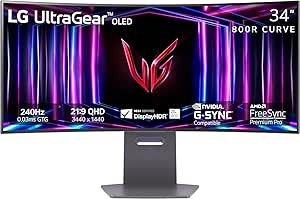 | Best for Immersive Ultrawide Gaming | Screen size: 33.9 inches | Resolution and aspect ratio: QHD Wide 1440p; 21:9 | Screen curvature: 800R | VIEW LATEST PRICE | See Our Full Breakdown |
| LG UltraGear 32GX850A-B 32-inch 4K UHD OLED Gaming Monitor |  | Best Dual-Mode 4K Pick | Display size: 32 inches | Resolution: 3840 × 2160 (4K UHD) | Panel type: OLED | VIEW LATEST PRICE | See Our Full Breakdown |
| Black Friday OLED gaming monitor | Response time | Screen size | Resolution | Refresh rate |
|---|---|---|---|---|
| Acer Predator X27U W1 26.5-Inc | 0.03ms | 26.5 inches | 2560 × 1440 (QHD) | 240Hz |
| MSI MAG 341CQP QD-OLED X28 34- | 0.03ms (GtG) | 34 inches | 3440 × 1440 (UWQHD) | 280Hz |
| AOC Q27GAZD 27-Inch QHD 240Hz | 0.03ms (GtG) | 27 inches | 2560 × 1440 (QHD) | 240Hz |
| ASUS ROG Strix XG32UCWG 32-Inc | 0.03ms | 32 inches | 3840 × 2160 (4K UHD) | — |
| Samsung 27-inch Odyssey OLED G | 0.03ms (GtG) | 27 inches | 2560 × 1440 (QHD) | 240Hz |
| LG UltraGear 32GX870A-B 32-Inc | 0.03ms GtG | 32 inches | — | — |
| AOC 27-Inch QHD 240Hz QD-OLED | 0.03ms | 27 inches | 2560 × 1440 (QHD) | 240Hz |
| MSI MPG 271QRX 26.5-inch QD-OL | 0.03ms GtG | 26.5 inches | 2560 × 1440 (QHD) | 360Hz |
| Samsung Odyssey OLED G5 27-Inc | 0.03ms GtG | 27 inches | 2560 × 1440 (QHD) | 180Hz |
| ASUS ROG Strix XG27AQDMGR 27-I | 0.03ms gray-to-gray | 27 inches | 2560 × 1440 (QHD) | 240Hz |
| MSI MAG 272QP QD-OLED X24 26.5 | 0.03 ms (GtG) | 26.5 inches | 2560 × 1440 (WQHD) | 240 Hz |
| LG UltraGear 34-inch Curved OL | 0.03ms (GtG) | 33.9 inches | — | Up to 240Hz |
| LG UltraGear 32GX850A-B 32-inc | 0.03ms (GtG) | — | 3840 × 2160 (4K UHD) | — |
More Details on Our Top Picks
Acer Predator X27U W1 26.5-Inch QHD QD-OLED 240Hz Gaming Monitor
The Acer Predator X27U W1 is a strong fit for gamers who want QD-OLED contrast and color without a glossy screen reflecting room lights. Its matte finish distinguishes it from the glossy AOC Q27GAZD, while the two share a practical QHD, 240Hz format for sharp, responsive PC gaming. The 0.03ms response time and AMD FreeSync Premium support fast play with reduced tearing, and the adjustable stand makes it easier to set a comfortable position.
The tradeoff is scale: at 26.5 inches, it offers less screen area than the Samsung Odyssey OLED G6 or the 32-inch ASUS ROG Strix XG32UCWG. Acer also lists only DisplayPort and HDMI, so buyers who need USB connectivity should look elsewhere. I’d rank it as a focused desk-gaming choice, not a feature-rich hub or large-format upgrade.
Pros:- Matte QD-OLED panel combines high contrast with fewer distracting reflections.
- 240Hz refresh rate and 0.03ms response time suit fast-paced games.
- AMD FreeSync Premium helps reduce tearing.
- Stand adjusts for height, pivot, swivel, and tilt.
Cons:- The 26.5-inch screen is smaller than 27-inch and larger options in this roundup.
- Connectivity is limited to DisplayPort and HDMI.
- HDR support is listed as HDR10, without a stated VESA True Black certification.
Best for: PC gamers with a bright or mixed-light room who want a matte QHD OLED display and a fully adjustable stand.
Not ideal for: Buyers seeking a large screen, USB connectivity, or the ASUS ROG Strix XG32UCWG’s 4K and high-refresh dual modes.
- Screen size:26.5 inches
- Resolution:2560 × 1440 (QHD)
- Panel type:QD-OLED
- Refresh rate:240Hz
- Response time:0.03ms
- Screen finish:Matte
- Adaptive sync:AMD FreeSync Premium
- Connectivity:DisplayPort, HDMI
Our verdict“Choose the Acer if you want a matte, compact QHD QD-OLED for fast PC gaming and can do without USB ports or a larger screen.”
MSI MAG 341CQP QD-OLED X28 34-inch UWQHD Tandem Monitor
For buyers who want a wider field of view rather than a conventional 16:9 screen, the MSI MAG 341CQP brings together a 34-inch, 21:9 QD-OLED panel and a 280Hz refresh rate. Its 3440 × 1440 resolution gives racing games and supported PC titles more horizontal space than the Acer Predator X27U W1 or Samsung Odyssey OLED G6, while the RGB Stripe layout is designed to improve text clarity compared with earlier OLED subpixel layouts. HDMI 2.1 also supports 4K 120Hz, VRR, and ALLM for consoles.
This is a more specialized pick than those 27-inch QHD monitors: the curved ultrawide format takes more desk space and some games or console content may not fill it naturally. The glossy surface can also reflect room lighting. Its 280Hz speed exceeds the Acer’s 240Hz, but the wider format, rather than a small refresh-rate gap, is the main reason to choose it.
Pros:- 34-inch 21:9 UWQHD panel expands the horizontal view in supported games.
- 280Hz refresh rate and 0.03ms response time target smooth, fast gameplay.
- RGB Stripe subpixel layout is designed to reduce color fringing and improve text clarity.
- HDMI 2.1 supports 4K 120Hz, VRR, and ALLM for compatible consoles.
Cons:- The glossy finish can reflect ambient light.
- Ultrawide aspect ratio and large footprint may not suit every desk or game.
- The 3440 × 1440 resolution is less suited to buyers seeking 4K detail.
Best for: PC gamers who play ultrawide-friendly racing, simulation, and immersive games and want a high-refresh QD-OLED screen.
Not ideal for: Buyers with limited desk space, a preference for matte screens, or a need for a standard 16:9 display for mixed console use.
- Screen size:34 inches
- Resolution:3440 × 1440 (UWQHD)
- Aspect ratio:21:9
- Panel type:Tandem QD-OLED
- Refresh rate:280Hz
- Response time:0.03ms (GtG)
- Screen finish:Glossy
- Connectivity:DisplayPort 1.4a, HDMI 2.1, USB Type-C
- HDR certification:VESA DisplayHDR True Black 500
Our verdict“Pick the MSI if an expansive ultrawide view matters more to you than a standard 16:9 format or 4K resolution.”
AOC Q27GAZD 27-Inch QHD 240Hz QD-OLED Gaming Monitor
The AOC Q27GAZD pairs 27-inch QHD QD-OLED with a useful range of setup options: its stand adjusts for height, tilt, swivel, and pivot, and the display supports VESA mounting. That flexibility gives it an advantage over the Acer Predator X27U W1 if you plan to use an arm or rotate the screen. Both offer 240Hz and 0.03ms response times, so the AOC’s case rests more on mounting flexibility, glossy presentation, and listed USB connectivity than on a speed advantage.
Its glossy finish can help colors look vivid, but it is a poorer match for a desk facing windows or strong lamps than the matte Acer or Samsung Odyssey OLED G6. The QHD resolution is a sensible fit at this size, though buyers wanting 4K should look at the 32-inch ASUS ROG Strix XG32UCWG instead. I’d choose AOC for an adaptable gaming setup, not a reflection-prone room.
Pros:- QD-OLED panel pairs high contrast with a wide listed color gamut.
- 240Hz refresh rate and 0.03ms response time support responsive gameplay.
- Adjustable stand and VESA compatibility allow flexible positioning.
- Listed USB 3.2 and earphone-out connections add options beyond video inputs.
Cons:- Glossy screen can reflect ambient light.
- HDMI is listed as HDMI 2.0 rather than HDMI 2.1.
- USB-C connectivity is not specified.
Best for: Gamers building a VESA-mounted or highly adjustable 27-inch QHD setup who can control reflections in their room.
Not ideal for: Players whose monitor faces windows or bright lights, or buyers seeking 4K resolution or listed USB-C support.
- Screen size:27 inches
- Resolution:2560 × 1440 (QHD)
- Panel type:QD-OLED
- Refresh rate:240Hz
- Response time:0.03ms (GtG)
- Screen finish:Glossy
- HDR:HDR400 True Black
- Connectivity:DisplayPort 1.4, HDMI 2.0, USB 3.2, earphone out
- Stand adjustments:Tilt, swivel, pivot, height
Our verdict“Choose the AOC for an adjustable or VESA-mounted QHD OLED setup if glossy-screen reflections are manageable.”
ASUS ROG Strix XG32UCWG 32-Inch 4K Glossy OLED Gaming Monitor
The ASUS ROG Strix XG32UCWG is the most flexible pick here for players who switch between detailed single-player games and competitive titles. Its 32-inch 4K mode runs at 165Hz, while a separate FHD mode reaches 330Hz; that gives it a different kind of versatility from the MSI MAG 341CQP’s fixed ultrawide format and the 240Hz QHD monitors. The glossy, zero-haze WOLED panel, 10-bit color, and 99% DCI-P3 gamut suit rich visuals, while HDMI 2.1 and USB-C add useful connection choices.
The main compromise is that 330Hz requires FHD, so it is not a way to get both maximum resolution and maximum refresh at once. USB-C supplies only 15W, too little to fully power many laptops. Its proximity sensor and stated three-year burn-in coverage may reassure OLED buyers, but the 32-inch size and glossy surface need suitable desk space and lighting.
Pros:- Dual modes offer 4K at 165Hz or FHD at 330Hz for different gaming priorities.
- 32-inch WOLED panel provides a larger 4K viewing area than the QHD options.
- HDMI 2.1, DisplayPort 1.4, and USB-C support varied setups.
- Proximity sensor can blank the screen when unattended, and the listed warranty includes burn-in coverage.
Cons:- The 330Hz mode drops resolution to FHD.
- USB-C Power Delivery is limited to 15W.
- Glossy finish can reflect room lights.
Best for: Gamers who want a large 4K OLED for visually rich games and a separate high-refresh mode for competitive play.
Not ideal for: Buyers who require 330Hz at 4K, strong USB-C laptop charging, or a matte screen for a bright room.
- Screen size:32 inches
- Display type:WOLED
- Resolution:3840 × 2160 (4K UHD)
- Refresh modes:4K at 165Hz; FHD at 330Hz
- Response time:0.03ms
- Color gamut:99% DCI-P3
- Adaptive sync:G-SYNC Compatible
- Connectivity:DisplayPort 1.4 (DSC), HDMI 2.1, USB-C
- USB-C power delivery:15W
Our verdict“Choose the ASUS if you want one large OLED for both 4K gaming and a separate, lower-resolution high-refresh mode.”
Samsung 27-inch Odyssey OLED G6 QHD Gaming Monitor
The Samsung Odyssey OLED G6 makes a clear case for itself in rooms where reflections are hard to avoid. Its Glare Free matte screen sets it apart from the glossy AOC Q27GAZD, while the 27-inch QHD resolution, 240Hz refresh rate, and 0.03ms response time keep it in the same responsive gaming class as the Acer Predator X27U W1. The ergonomic stand adjusts for height, pivot, tilt, and swivel, and AMD FreeSync Premium helps reduce tearing during play.
Samsung also lists OLED Safeguard features intended to manage heat and reduce burn-in risk, but they do not remove the general OLED care tradeoff. The listed connections include just one HDMI port, which may be limiting if you regularly switch among a PC and several consoles. Compared with the ASUS ROG Strix XG32UCWG, this is a more compact QHD choice without 4K or dual refresh modes.
Pros:- Glare Free matte finish is suited to spaces with more ambient light.
- QD-OLED, QHD resolution, and 0.99 listed color gamut support vivid gaming visuals.
- 240Hz refresh rate and 0.03ms response time target fast gameplay.
- Stand supports height, pivot, tilt, and swivel adjustments.
Cons:- Only one HDMI port is listed.
- OLED Safeguard features help manage burn-in risk but cannot eliminate it.
- Lacks the ASUS ROG Strix XG32UCWG’s 4K resolution and dual-mode refresh flexibility.
Best for: PC or console gamers who need a compact QHD OLED with a reflection-reducing screen for a bright or shared room.
Not ideal for: Buyers who need multiple HDMI connections, 4K resolution, or a refresh-rate mode above 240Hz.
- Screen size:27 inches
- Panel type:QD-OLED
- Resolution:2560 × 1440 (QHD)
- Refresh rate:240Hz
- Response time:0.03ms (GtG)
- Screen finish:Matte, Glare Free
- HDR:HDR10
- Adaptive sync:AMD FreeSync Premium
- HDMI ports:1
Our verdict“Pick the Samsung if glare control and adjustable positioning matter more than extra HDMI ports or 4K resolution.”
LG UltraGear 32GX870A-B 32-Inch 4K OLED Gaming Monitor, Dual Mode 240Hz/480Hz
The 32GX870A-B is the most flexible pick here: its 32-inch 4K OLED panel reaches 240Hz, while switching to Full HD raises the ceiling to 480Hz for competitive play. That makes it a better fit for players who move between visually rich single-player games and esports than the MSI MPG 271QRX, which keeps its QHD resolution but offers 360Hz. The LG also pairs a 0.03ms response time with G-SYNC and FreeSync Premium Pro, plus an adjustable stand and built-in speakers that simplify a desk setup. Its tradeoff is clear: 480Hz comes only at Full HD, and the listed 1300-nit peak is not its typical brightness of 275 nits. Choose it for versatility, not for maximum resolution at every refresh rate.
Pros:- Dual mode offers 4K at up to 240Hz or Full HD at up to 480Hz.
- OLED contrast, DisplayHDR True Black 400, and up to 1300-nit peak brightness support vivid highlights and dark scenes.
- 0.03ms response time with NVIDIA G-SYNC Compatible and AMD FreeSync Premium Pro.
- Height, tilt, swivel, and pivot adjustments, anti-glare coating, and built-in speakers add setup flexibility.
Cons:- The 480Hz mode requires Full HD, so it does not retain 4K detail.
- Typical brightness is listed at 275 nits, well below the specified peak figure.
- A 32-inch 4K panel may be excessive for compact desks or buyers seeking a smaller esports display.
Best for: PC gamers who want a large 4K OLED for cinematic games and a high-refresh Full HD mode for competitive sessions.
Not ideal for: Players who want QHD at 360Hz or higher without changing resolution, or buyers who need consistently high full-screen brightness.
- Screen size:32 inches
- Display type:OLED
- Resolution and refresh rate:4K UHD at up to 240Hz; Full HD at up to 480Hz
- Response time:0.03ms GtG
- HDR:VESA DisplayHDR True Black 400
- Adaptive sync:NVIDIA G-SYNC Compatible; AMD FreeSync Premium Pro
- Connectivity:DisplayPort 2.1; USB Type-C; 4-pole headphone jack
- Stand adjustments:Height, tilt, swivel, and pivot
Our verdict“Choose the LG if you want one OLED monitor to cover 4K gaming and a separate high-refresh Full HD mode.”
AOC 27-Inch QHD 240Hz QD-OLED Gaming Monitor
The AOC delivers the core QHD QD-OLED gaming combination—240Hz and 0.03ms response time—without adding a 4K panel or an ultrahigh refresh-rate mode. That makes it a straightforward alternative to the MSI MPG 271QRX: both target fast QHD play, but the MSI pushes to 360Hz, while the AOC’s adjustable stand and USB hub make everyday desk use part of its appeal. HDMI 2.1 and DisplayPort 1.4 give it room for both a PC and a console, and G-SYNC Compatible support helps reduce tearing. The main caveat is its glossy finish, which can reflect windows or lamps. Its brightness entry also has no unit, so I would not use that figure to compare it directly with other panels. Pick it for a balanced 240Hz setup, not for a glare-prone room.
Pros:- QD-OLED contrast and 0.03ms response time suit fast games with dark, detailed scenes.
- 240Hz QHD refresh rate balances sharpness and smooth motion.
- HDMI 2.1 and DisplayPort 1.4 support PC and console connections.
- Height, tilt, swivel, and pivot adjustments plus a USB 3.2 hub improve desk flexibility.
Cons:- Glossy coating can reflect ambient light.
- The listed brightness value has no unit, making direct brightness comparisons difficult.
- Its 240Hz ceiling is lower than the MSI MPG 271QRX’s 360Hz.
Best for: QHD PC and console players who want a 27-inch QD-OLED, 240Hz motion, and a stand with broad adjustments.
Not ideal for: Gamers with bright rooms or strong light sources facing the screen, and competitive players specifically seeking refresh rates above 240Hz.
- Screen size:27 inches
- Display technology:QD-OLED
- Resolution:2560 × 1440 (QHD)
- Refresh rate:240Hz
- Response time:0.03ms
- Screen finish:Glossy
- Adaptive sync:G-SYNC Compatible
- Connectivity:HDMI 2.1; DisplayPort 1.4; USB 3.2 hub
Our verdict“Pick the AOC for a flexible 27-inch QHD QD-OLED setup if 240Hz is enough and your room is not reflection-prone.”
MSI MPG 271QRX 26.5-inch QD-OLED Gaming Monitor, QHD 360Hz
For players who can make use of very high frame rates, the MSI MPG 271QRX is the speed-focused choice in this group. Its 360Hz QHD refresh rate gives it a clear motion advantage over the 240Hz AOC and ASUS ROG Strix XG27AQDMGR, while the 0.03ms response-time specification keeps pixel response in line with those rivals. HDMI 2.1 with 48Gbps bandwidth helps accommodate modern consoles, and the USB-C, USB ports, and KVM features can make switching between a gaming PC and another computer easier. It also adds DisplayHDR True Black 400 and OLED care tools. The costs are practical rather than hidden: the screen is glossy, the 26.5-inch panel is smaller than a standard 27-inch listing, and OLED care reduces rather than removes image-retention risk. Its 360Hz advantage matters most with hardware that can feed it.
Pros:- 360Hz QHD refresh rate exceeds the 240Hz ceiling of the AOC and ASUS 27-inch alternatives.
- QD-OLED panel, 0.03ms GtG response time, and DisplayHDR True Black 400 support responsive, high-contrast play.
- HDMI 2.1 with 48Gbps bandwidth plus USB-C, USB ports, and KVM features offer flexible connections.
- Adjustable height and tilt and a three-year warranty add practical support.
Cons:- Glossy finish can reflect room lighting.
- A 360Hz mode is most useful with a PC capable of producing very high frame rates.
- OLED care reduces but does not eliminate image-retention and burn-in risk.
Best for: Competitive PC gamers with a high-frame-rate system who want QHD OLED motion clarity and useful multi-device connectivity.
Not ideal for: Players whose systems rarely exceed 240 frames per second, or those who prefer a matte screen for a brightly lit room.
- Screen size:26.5 inches
- Display type:QD-OLED
- Resolution:2560 × 1440 (QHD)
- Refresh rate:360Hz
- Response time:0.03ms GtG
- HDR certification:VESA DisplayHDR True Black 400
- Ports:HDMI 2.1; DisplayPort; USB Type-C; four USB ports
- Warranty:3 years
Our verdict“Choose the MSI if you play competitive games on a powerful PC and value 360Hz more than a matte finish or a larger screen.”
Samsung Odyssey OLED G5 27-Inch QHD Gaming Monitor
The Odyssey OLED G5 trades peak speed for a more forgiving screen surface. Its matte, glare-reducing finish is the main reason to pick it over the glossy AOC and MSI QD-OLED models, especially if a window or desk lamp sits in your field of view. QHD resolution, 180Hz refresh, and 0.03ms response time still make it a capable gaming display, while G-SYNC compatibility and AMD FreeSync support help control tearing. Samsung’s OLED Safeguard tools—including thermal modulation and taskbar detection—add protection features for mixed desktop use. The compromise is refresh rate: the AOC and ASUS ROG Strix XG27AQDMGR reach 240Hz, and the MSI reaches 360Hz. It also lists just one HDMI port. This makes more sense for a mixed-use setup where reflection control matters than for a speed-first esports desk.
Pros:- Matte Glare Free finish helps reduce distracting reflections compared with the glossy AOC and MSI panels.
- QHD QD-OLED contrast with HDR10 supports detailed dark scenes.
- 180Hz refresh rate and 0.03ms GtG response time provide responsive gameplay.
- OLED Safeguard includes thermal modulation, logo and taskbar detection, and a screen saver.
Cons:- Its 180Hz refresh rate is below the 240Hz AOC and ASUS and 360Hz MSI alternatives.
- Only one HDMI port is listed.
- HDR is listed as HDR10 rather than DisplayHDR True Black certification.
Best for: QHD gamers using a room with noticeable ambient light who want OLED contrast, a matte screen, and built-in image-care features.
Not ideal for: Competitive players prioritizing 240Hz or higher, or multi-console households that need more than one HDMI connection.
- Screen size:27 inches
- Display type:QD-OLED
- Resolution:2560 × 1440 (QHD)
- Screen finish:Matte
- Refresh rate:180Hz
- Response time:0.03ms GtG
- HDR:HDR10
- Adaptive sync:G-SYNC Compatible; AMD FreeSync
Our verdict“Choose the Samsung if controlling reflections matters more to you than matching the faster refresh rates of the other QHD OLED picks.”
ASUS ROG Strix XG27AQDMGR 27-Inch QHD 240Hz Glossy OLED Gaming Monitor
The ROG Strix XG27AQDMGR suits buyers who want a compact QHD OLED with an emphasis on color and desktop protection. Its 10-bit panel and 99% DCI-P3 coverage give it a strong color-focused specification, while 240Hz and 0.03ms response time put it on similar footing to the AOC for refresh speed. Compared with the MSI MPG 271QRX, it gives up 120Hz of refresh rate but adds a Neo Proximity Sensor alongside OLED Care Pro to help limit burn-in risk when the screen is unattended. FreeSync Premium Pro and G-SYNC Compatible support cover common variable-refresh setups. The glossy surface is a real constraint in bright rooms, and its QHD resolution will not match the 4K detail of the LG 32GX870A-B. Its listed peak brightness is not a substitute for knowing typical brightness.
Pros:- QHD OLED panel with 99% DCI-P3 coverage and 10-bit color.
- 240Hz refresh rate and 0.03ms response time support fast gameplay.
- OLED Care Pro and Neo Proximity Sensor help reduce burn-in risk during desktop use.
- AMD FreeSync Premium Pro and G-SYNC Compatible support.
Cons:- Glossy screen can reflect ambient light.
- Its 240Hz ceiling is below the MSI MPG 271QRX’s 360Hz.
- QHD resolution offers less detail than the LG UltraGear 32GX870A-B’s 4K mode.
Best for: QHD gamers who value wide color coverage, 10-bit color, and extra OLED care features more than refresh rates above 240Hz.
Not ideal for: Buyers with bright rooms, those seeking a matte coating, or players who want 4K resolution or 360Hz QHD performance.
- Screen size:27 inches
- Resolution:2560 × 1440 (QHD)
- Display type:OLED
- Refresh rate:240Hz
- Response time:0.03ms gray-to-gray
- Color:99% DCI-P3; 10-bit
- HDR:VESA DisplayHDR 400 True Black
- Adaptive sync:AMD FreeSync Premium Pro; G-SYNC Compatible
Our verdict“Pick the ASUS for color-focused QHD OLED gaming and added screen-care tools, provided you can manage reflections and do not need 360Hz.”
MSI MAG 272QP QD-OLED X24 26.5-Inch WQHD Gaming Monitor
The MSI MAG 272QP QD-OLED X24 is the most straightforward fit here for competitive players who want a fast, familiar 16:9 screen rather than an ultrawide setup. Its 240Hz refresh rate, 0.03ms response time, and QD-OLED contrast suit quick games while keeping QHD resolution manageable for a wider range of graphics cards than 4K. Compared with the LG UltraGear 34-inch Curved OLED, it takes up less desk space and avoids the steep 800R curve, but gives up the LG’s wider field of view. A glossy finish can reflect windows or room lights, and the listed peak brightness of up to 400 nits may not suit a very bright room. The adjustable stand, passive heatsink, and OLED Care 2.0 features add practical appeal without adding a fan.
Pros:- QD-OLED combines deep blacks with 10-bit color and 99% DCI-P3 coverage.
- 240Hz refresh rate and 0.03ms response time suit fast-paced games.
- Stand adjusts for height, tilt, swivel, and pivot, with 100mm VESA mounting.
- Fanless graphene-coated heatsink and OLED Care 2.0 features.
Cons:- Glossy screen may reflect nearby windows and lights.
- Peak brightness is specified as up to 400 nits, which may limit comfort in bright rooms.
Best for: Competitive PC players who want a compact QHD OLED with 240Hz performance and a fully adjustable stand.
Not ideal for: Gamers who play in a sunlit room or want an ultrawide view; the glossy screen can reflect light, and its 16:9 format is less immersive than the LG 34-inch model.
- Screen size:26.5 inches
- Resolution:2560 × 1440 (WQHD)
- Panel type:Quantum Dot OLED
- Refresh rate:240 Hz
- Response time:0.03 ms (GtG)
- Color depth and gamut:10-bit; 99% DCI-P3
- Peak brightness:Up to 400 nits
- Connectivity:2 HDMI 2.1, DisplayPort 1.4a, 1 USB
- Stand adjustment:Pivot, tilt, swivel, and height adjustment
Our verdict“Choose the MSI for compact, high-refresh QHD gaming if you prefer a flat 16:9 screen and can manage reflections.”
LG UltraGear 34-inch Curved OLED Gaming Monitor, WQHD 1440p, 240Hz, 0.03ms, 800R
The LG UltraGear 34-inch Curved OLED makes the most sense for players who want games to fill more of their peripheral vision. Its 21:9 screen and 800R curve create a more enveloping setup than the flat 16:9 MSI MAG 272QP, while the 240Hz ceiling and 0.03ms response time keep the focus on speed as well as immersion. Matte coating helps reduce reflections, a practical contrast with the MSI’s glossy surface. Adaptive-sync support for both NVIDIA G-SYNC Compatible and AMD FreeSync Premium Pro also makes it flexible across gaming PCs. The tradeoffs are substantial: the curve is steep and personal, and the wider QHD image needs more graphics power than standard QHD. Some games may not support ultrawide formats well, and reaching 240Hz depends on the graphics card and connection.
Pros:- 34-inch 21:9 OLED gives supported games a broad, immersive view.
- Up to 240Hz refresh rate and 0.03ms response time support responsive play.
- Matte finish reduces reflections compared with the glossy MSI MAG 272QP.
- Supports NVIDIA G-SYNC Compatible and AMD FreeSync Premium Pro.
Cons:- The pronounced 800R curve will not suit every viewer or desk setup.
- The wide QHD format can place a heavier graphics load than standard QHD.
- Achieving 240Hz depends on compatible graphics hardware and a suitable HDMI 2.1 or DisplayPort connection.
Best for: PC gamers with a capable graphics card who prioritize ultrawide immersion, high refresh, and a matte screen.
Not ideal for: Players who prefer a flat display, have limited desk depth, or mainly play titles without reliable 21:9 support; the steep curve may also feel uncomfortable.
- Screen size:33.9 inches
- Resolution and aspect ratio:QHD Wide 1440p; 21:9
- Screen curvature:800R
- Refresh rate:Up to 240Hz
- Response time:0.03ms (GtG)
- HDR:DisplayHDR True Black 400
- Screen finish:Matte
- Adaptive sync:NVIDIA G-SYNC Compatible; AMD FreeSync Premium Pro
- Connectivity:HDMI 2.1; DisplayPort 1.4
Our verdict“Pick the LG 34-inch if you want a matte, curved ultrawide OLED and your games and graphics card can make use of its wider format.”
LG UltraGear 32GX850A-B 32-inch 4K UHD OLED Gaming Monitor
The LG UltraGear 32GX850A-B is the resolution-first option in this group, pairing a 32-inch 4K OLED panel with a Dual Mode that switches the emphasis from detail to speed. At 4K it reaches up to 165Hz; at Full HD, it can reach 330Hz, giving players a choice the QHD MSI MAG 272QP does not offer. That flexibility is useful if one display has to serve both visually rich games and high-frame-rate competitive play. G-SYNC Compatible and FreeSync Premium Pro support help keep motion smooth, while the stand adjusts in four directions. The main compromise is that the 330Hz mode runs at Full HD, not 4K, so buyers must choose which benefit matters for a given session. Its glossy finish can also reflect light, and the specified typical brightness is 275 nits.
Pros:- 4K UHD resolution delivers more detail than the QHD MSI MAG 272QP.
- Dual Mode offers up to 165Hz at 4K or up to 330Hz at Full HD.
- OLED contrast, True Black 400 HDR, and up to 98.5% DCI-P3 coverage.
- G-SYNC Compatible and FreeSync Premium Pro support, plus a height-, tilt-, swivel-, and pivot-adjustable stand.
Cons:- The 330Hz Full HD mode requires switching away from 4K resolution.
- Typical brightness is specified at 275 nits.
- Glossy finish may reflect ambient light.
Best for: Gamers who want a large 4K OLED for detailed single-player games and a separate high-refresh Full HD mode for competitive play.
Not ideal for: Buyers seeking one resolution at all refresh rates, a matte screen, or a monitor for a bright room; the fastest mode requires dropping from 4K to Full HD.
- Display size:32 inches
- Resolution:3840 × 2160 (4K UHD)
- Panel type:OLED
- Dual Mode refresh rates:Up to 165Hz at 4K UHD; up to 330Hz at Full HD
- Response time:0.03ms (GtG)
- Typical brightness:275 nits
- HDR certification:VESA DisplayHDR True Black 400
- Adaptive sync:NVIDIA G-SYNC Compatible; AMD FreeSync Premium Pro
- Stand adjustments:Height, tilt, swivel, and pivot
Our verdict“Choose the LG 32GX850A-B if you want 4K detail with a high-refresh Full HD alternative and accept switching resolution to use its fastest mode.”
How We Picked
I compared the 13 listed monitors by the decisions that matter to OLED gaming buyers: resolution, refresh rate, screen size and shape, stated response time where provided, and standout format features such as dual mode or ultrawide curvature. I also weighed how each specification affects the likely experience: QHD at high refresh rates suits competitive play more readily, while 4K and larger screens emphasize detail and immersion. The product names supplied do not establish comparable brightness, connectivity, warranty, or OLED-care terms, so I avoid treating those as confirmed advantages.
The ranking gives priority to versatility and a clear use case, then distinguishes specialist picks from broadly suitable ones. That puts the MSI MPG 271QRX first for its unusual QHD 360Hz combination, while LG’s dual-mode 4K model ranks highly for buyers wanting distinct high-detail and high-refresh options. Ultrawides and premium-size 4K screens rank lower for general use because their fit depends more on game support, desk space, and PC capability. Black Friday availability does not change the order: I judge each model by what its format and listed specifications offer, not by a temporary offer.
| Black Friday OLED gaming monitor | Screen finish | Adaptive sync |
|---|---|---|
| Acer Predator X27U W1 26.5-Inc | Matte | AMD FreeSync Premium |
| MSI MAG 341CQP QD-OLED X28 34- | Glossy | — |
| AOC Q27GAZD 27-Inch QHD 240Hz | Glossy | — |
| ASUS ROG Strix XG32UCWG 32-Inc | — | G-SYNC Compatible |
| Samsung 27-inch Odyssey OLED G | Matte, Glare Free | AMD FreeSync Premium |
| LG UltraGear 32GX870A-B 32-Inc | — | NVIDIA G-SYNC Compatible; AMD FreeSync Premium Pro |
| AOC 27-Inch QHD 240Hz QD-OLED | Glossy | G-SYNC Compatible |
| MSI MPG 271QRX 26.5-inch QD-OL | — | — |
| Samsung Odyssey OLED G5 27-Inc | Matte | G-SYNC Compatible; AMD FreeSync |
| ASUS ROG Strix XG27AQDMGR 27-I | — | AMD FreeSync Premium Pro; G-SYNC Compatible |
| MSI MAG 272QP QD-OLED X24 26.5 | — | — |
| LG UltraGear 34-inch Curved OL | Matte | NVIDIA G-SYNC Compatible; AMD FreeSync Premium Pro |
| LG UltraGear 32GX850A-B 32-inc | — | NVIDIA G-SYNC Compatible; AMD FreeSync Premium Pro |
Factors to Consider When Choosing Black Friday OLED Gaming Monitors
Before choosing among these Black Friday OLED gaming monitors, I would first match the screen to the games and hardware that will actually drive it. The same panel technology can lead to very different setups: a compact QHD screen for competitive play, a large 4K display for detail, or a curved ultrawide for supported games. These broader checks can prevent paying for a specification that your PC, desk, or daily use will not benefit from.
Choose resolution and refresh rate as a pair
Higher resolution and higher refresh both ask more of a gaming PC, so compare them as a combined target rather than shopping for the biggest numbers. QHD at 240Hz or 360Hz can be a sensible fit when fast motion and frame rate matter more than extra pixel detail. A 4K panel can make games look sharper, but reaching very high frame rates at that resolution may call for a stronger GPU or reduced graphics settings. A common mistake is buying a 4K monitor for competitive play without checking whether the system can deliver the frame rates that make the upgrade worthwhile. Dual-mode designs add flexibility, but check how switching modes works and whether each mode matches the games you play. Pick the resolution you can drive well now, not only the one you hope to use after a future PC upgrade.
Decide whether you benefit from ultrawide
An ultrawide screen changes the shape of the experience, not just the amount of screen space. It can widen supported games and give room for side-by-side windows, but some titles may not support the format cleanly or may present menus and cutscenes differently. The curved MSI and LG models in this list also need more horizontal desk space than a typical 27-inch screen. Check your preferred games, seating distance, and desk width before choosing an ultrawide on the assumption that every game will use its full width. If you play a mix of competitive titles and older games, a standard 16:9 panel is often the less fussy fit. Choose ultrawide when its viewing shape is a feature you will use regularly, not simply because the screen looks larger on paper.
Treat OLED care as part of ownership
OLED can deliver strong contrast and fast pixel response, but a gaming monitor may also display static interface elements for long sessions. Check the exact model’s manual for its pixel-care routines, panel-protection settings, and warranty coverage before purchase; these details can vary and are not established by a product name alone. Keep care features enabled unless the manufacturer advises otherwise, and avoid leaving a static desktop image on screen for long periods. Buyers who use one monitor for work with fixed taskbars or dashboards should weigh that routine alongside their gaming use. Do not assume every OLED model has identical protection tools or coverage. A clear understanding of maintenance and support is more useful than relying on broad claims about OLED durability.
Check your desk and viewing distance
Moving from 27 inches to 32 inches or ultrawide changes how much space the monitor occupies and how far away it feels comfortable. A large display can make games more immersive, yet may require a deeper desk or more head movement when the screen sits close. Before ordering, compare the monitor’s full dimensions and stand footprint with your desk, not just the diagonal measurement. Also check whether the stand offers the adjustments you need or whether your setup calls for a compatible arm. Buyers often focus on panel size and overlook the room needed for speakers, a keyboard, and comfortable viewing distance. A well-positioned smaller screen can be a better everyday choice than a larger panel that crowds the setup.
Compare the exact model and support details
Monitor names can differ by a few letters while describing meaningfully different models, so match the full model number in the listing to the manufacturer’s specifications. Verify ports and their bandwidth against your PC or console, especially if you plan to use the highest listed resolution and refresh rate. Check whether the stand, cables, and any stated OLED-care or warranty terms meet your needs instead of assuming they match a related model. During Black Friday, product pages may group variants or use abbreviated titles, which can obscure those differences. Keep a record of the exact model and the seller’s return terms before purchase. This final check can matter more than a small specification difference when the monitor must fit a specific setup.
Frequently Asked Questions
Should I choose QHD at 360Hz or 4K with a dual-mode refresh rate?
I would choose QHD at 360Hz if your main priority is competitive gaming and your PC can produce very high frame rates in your regular titles. The LG 32GX870A-B’s 4K and 240Hz/480Hz modes appeal to buyers who want a larger, sharper screen with a separate high-refresh option. Check the exact resolution and refresh behavior available in each mode before buying, since a headline dual-mode figure does not mean every mode runs at 4K. Your GPU and game settings will shape the result as much as the monitor specification. If you split time between visually rich games and esports, the dual-mode model offers a broader set of choices; for a focused competitive setup, QHD 360Hz is the clearer match.
Is an ultrawide OLED a good choice if I play competitive games?
It can work, but the answer depends on the games you play and whether you value a wide field of view over a conventional format. The MSI MAG 341CQP and LG 34-inch UltraGear provide curved ultrawide layouts, while the 27-inch models retain the familiar 16:9 shape used by many competitive games and tournaments. Some titles handle ultrawide well, but others may limit the image or make interface placement awkward. Check support for your main games and consider whether you would use the extra width for work or multitasking too. If fast, straightforward play is your only goal, a standard QHD model may be the simpler fit.
Are all 27-inch QHD 240Hz OLED monitors in this list interchangeable?
No. Several models share a QHD, 240Hz class, but their full specifications, panel finish, connectivity, care features, and support terms may differ. The product names alone do not confirm that those details match, so compare manufacturer pages for the exact model numbers before deciding. The lineup also includes a QHD 360Hz MSI option for buyers who want a faster listed refresh rate, giving competitive players a reason to look beyond the 240Hz group. If the refresh rate is already enough for your needs, prioritize the features you will use every day. Confirming ports, stand adjustments, warranty coverage, and included cables can separate otherwise similar choices.
Can my current PC run a 4K OLED gaming monitor well?
It may, but performance depends on your graphics card, the games you play, and the settings you expect to use. A 4K screen can still display a game when the PC cannot reach a high frame rate, but you may need to lower settings or use supported upscaling to improve performance. For fast competitive games, QHD may make it easier to reach high frame rates without changing as many settings. Before buying one of the 32-inch 4K models, check benchmarks for your GPU in the specific games you play and at the monitor’s intended resolution. Also confirm that your PC’s video output supports the refresh rate you want.
What should I verify before buying an OLED monitor during Black Friday?
Start with the exact model number, because similar product names can refer to different specifications or regional versions. Confirm resolution, refresh rate, ports, stand dimensions, and any OLED-care features against the manufacturer’s information. Read the warranty terms for OLED-related coverage and check the seller’s return window in case the screen does not suit your desk or use. Make sure the advertised mode and connection will work with your PC or console; a monitor’s maximum refresh rate may depend on the input and resolution. These checks help you judge the monitor itself rather than making a decision based on a seasonal listing title.
Conclusion
My best overall pick is the MSI MPG 271QRX for buyers who want QHD with a standout 360Hz refresh rate. For a best value-style choice among the listed options, I would start with the AOC Q27GAZD or AOC 27-inch QHD 240Hz model, then verify their exact differences and support terms before choosing; this is a feature-based fit, not a claim about Black Friday pricing. The best premium pick is the LG UltraGear 32GX870A-B for its 4K and dual-mode proposition, while the best beginner fit is a straightforward 27-inch QHD 240Hz model such as the Acer Predator X27U W1, provided its connections and care terms match your setup. For ultrawide gaming, compare the MSI MAG 341CQP with the LG 34-inch UltraGear based on curvature, listed features, and desk fit; for maximum screen detail, consider the 32-inch 4K LG or ASUS options. Choose by the games you play, the frame rates your PC can deliver, and the space you have—not by OLED branding alone.