
The best gaming controller upgrades depend on whether you want more control, broader device support, or a better feel without replacing your current pad. I rate the FLYDIGI Vader 5 Pro the best overall pick for players seeking a feature-rich PC controller, while the 8BitDo Ultimate 2 stands out for multi-device flexibility and the Xbox Elite Wireless Controller Series 2 for premium customization. The main tradeoff is whether to buy a whole controller or make a targeted change with grips or precision rings. Compatibility, wired versus wireless play, and how much adjustment you actually need separate useful upgrades from features you may never use. Read on for the full comparison and recommendations by player type.

Get the latest gadgets delivered free with Prime
- Fast, free delivery on millions of items
- Prime Video, Amazon Music and more included
- Member-only deals all year
Complete the kit



Key Takeaways
- The Vader 5 Pro leads as a full-featured PC upgrade, while the 8BitDo Ultimate 2 is the more natural fit for players who move between supported devices.
- Premium customization comes with setup and fit tradeoffs: the Xbox Elite Series 2 offers more ways to tailor controls than a simple replacement pad, but may be more than casual players need.
- Small accessories solve specific problems rather than replacing a controller. Thumb grips and precision rings can change feel or resistance, but they cannot add back buttons or improve device compatibility.
- Wired picks remain relevant when low fuss matters. The F310 and FLYDIGI Vader 5S avoid wireless charging and pairing, though their cables limit where and how you play.
- Platform support narrows the shortlist quickly. Xbox, PlayStation, PC, Switch, mobile, and Apple compatibility differ across the lineup, so check your main device before comparing extra features.
| FLYDIGI Vader 5 Pro PC Controller |  | Best Overall Upgrade for Multi-Platform Play | Joystick type: Hall Effect, adjustable tension from 40 gf to 100 gf | Response latency: 3 ms wired; 4 ms wireless | Trigger modes: Micro Mode and Hall Effect Linear Mode | VIEW LATEST PRICE | See Our Full Breakdown |
| 16-in-1 Performance Thumb Grips Joystick Caps for PS5/4/Xbox/Switch Pro |  | Best Value Controller Feel Upgrade | Items included: 16 items across 8 pairs | Grip styles: FPS high-rise, CQC mid-rise, and Skin low-rise, plus anti-slip grips | Compatible controllers: PS5, PS4, Xbox Series X|S, Xbox One, and Switch Pro | VIEW LATEST PRICE | See Our Full Breakdown |
| PlayStation DualSense Wireless Controller, Cosmic Red |  | Best for PS5 Immersion | Model: 1000050734 | Color: Cosmic Red | Compatible devices: PlayStation 5, PC, Mac, Android, and iOS | VIEW LATEST PRICE | See Our Full Breakdown |
| FLYDIGI VADER 5S Wired Controller for Xbox Series X|S, Xbox One, Windows |  | Best Wired Upgrade for Xbox | Compatible devices: Windows, Xbox One, Xbox Series S, and Xbox Series X | Connectivity: Wired | Stick technology: Hall Effect with adjustable tension from 40 gf to 100 gf | VIEW LATEST PRICE | See Our Full Breakdown |
| KontrolFreek Aim Boost Kit for PlayStation 4 and PlayStation 5 Controllers, Black Galaxy Edition |  | Best for Fine-Tuning Aim Resistance | Compatible devices: PlayStation 4 and PlayStation 5 controllers | Included components: Performance thumbsticks and precision rings | Precision ring strengths: 3 | VIEW LATEST PRICE | See Our Full Breakdown |
| KontrolFreek Precision Rings – Aim Assist Motion Control for PS4, PS5, Xbox One, Xbox Series X|S, Switch Pro & Scuf Controllers (Black/Purple/Green) |  | Best Low-Cost Aim-Tuning Upgrade | Brand: KontrolFreek | Model: 4005-MIX | Quantity: 6 rings | VIEW LATEST PRICE | See Our Full Breakdown |
| AceGamer Aurora II Wireless Bluetooth Game Controller | 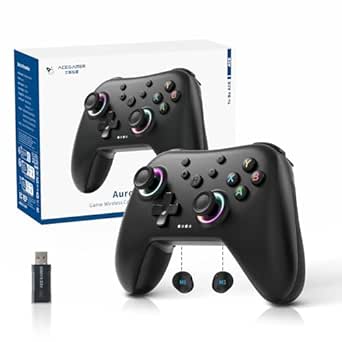 | Best Cross-Platform Wireless Starter | Connectivity: 2.4 GHz wireless and Bluetooth | Compatible platforms: PC (Windows 7 or later), Nintendo Switch, Nintendo Switch 2, iOS, Android, and Steam Deck | Joystick technology: Hall Effect sensors | VIEW LATEST PRICE | See Our Full Breakdown |
| 8BitDo Ultimate 2 Wireless Controller for PC, Apple, Steam, and Android – Black |  | Best Feature-Rich Wireless Upgrade | Joystick type: TMR | Wireless technology: 8BitDo 8Speed 2.4G | Wireless range: 10 m | VIEW LATEST PRICE | See Our Full Breakdown |
| Xbox Elite Wireless Controller Series 2, Black | 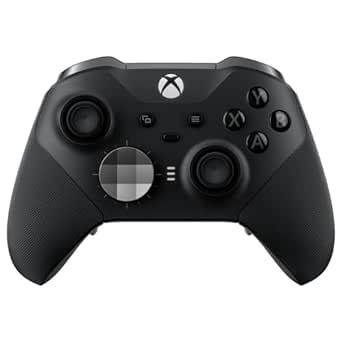 | Best Premium Xbox Customization | Connectivity: Xbox Wireless, Bluetooth, and USB-C | Battery life: Up to 40 hours | Saved profiles: Up to 3 | VIEW LATEST PRICE | See Our Full Breakdown |
| GameSir G7 Pro Controller for Xbox, PC, and Android |  | Best Multi-Platform TMR Upgrade | Connectivity: Wired for Xbox; 2.4 GHz wireless or wired for PC; Bluetooth for Android | Stick technology: Mag-Res TMR | Triggers: Hall Effect analog triggers with switchable micro-switch stops | VIEW LATEST PRICE | See Our Full Breakdown |
| Machenike G3V2 Wireless Gaming Controller with Charging Dock, Pink | 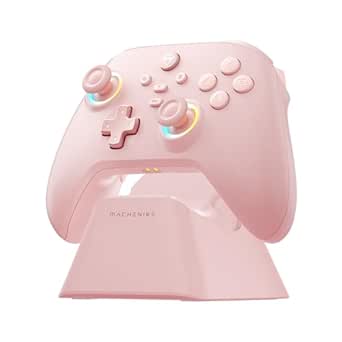 | Best for Adjustable Stick Feel | Connectivity: Bluetooth | Compatible platforms: Switch, Switch 2, iOS, Android, Windows PC | Joysticks: Dual Hall-effect with adjustable sensitivity and stick tension | VIEW LATEST PRICE | See Our Full Breakdown |
| EasySMX X05 Wireless Controller for PC, Steam, Switch, iOS, and Android |  | Best for Flexible Connectivity | Connectivity: 2.4G wireless, Bluetooth, wired | Compatible devices: Android, iOS, PC, Steam Deck, Nintendo Switch | Joysticks and triggers: Hall-effect sensors | VIEW LATEST PRICE | See Our Full Breakdown |
| Logitech G F310 Wired Gamepad Controller – Blue/Black |  | Best Simple PC Upgrade | Connectivity: USB | Compatible devices: Chromebook (certified), Android TV | Hardware platform: Desktop, PC | VIEW LATEST PRICE | See Our Full Breakdown |
| gaming controller upgrade | Connectivity |
|---|---|
| FLYDIGI Vader 5 Pro PC Control | Wired, Bluetooth, and 2.4 GHz wireless |
| 16-in-1 Performance Thumb Grip | — |
| PlayStation DualSense Wireless | Bluetooth, wireless, and USB Type-C |
| FLYDIGI VADER 5S Wired Control | Wired |
| KontrolFreek Aim Boost Kit for | — |
| KontrolFreek Precision Rings | — |
| AceGamer Aurora II Wireless Bl | 2.4 GHz wireless and Bluetooth |
| 8BitDo Ultimate 2 Wireless Con | — |
| Xbox Elite Wireless Controller | Xbox Wireless, Bluetooth, and USB-C |
| GameSir G7 Pro Controller for | Wired for Xbox; 2.4 GHz wireless or wired for PC; Bluetooth for Android |
| Machenike G3V2 Wireless Gaming | Bluetooth |
| EasySMX X05 Wireless Controlle | 2.4G wireless, Bluetooth, wired |
| Logitech G F310 Wired Gamepad | USB |
More Details on Our Top Picks
FLYDIGI Vader 5 Pro PC Controller
The Vader 5 Pro is my strongest pick for players who want a controller upgrade built around adjustable feel and flexible controls, rather than a simple replacement pad. Its Hall Effect sticks let you adjust tension from 40 gf to 100 gf, while switchable trigger modes and eight extra customizable buttons make it easier to tailor the layout to different games. Compared with the wired Vader 5S, this model adds Bluetooth and 2.4 GHz wireless options, making it more adaptable across a desk, TV, or compatible handheld setup. Four-motor vibration adds feedback across the triggers and grips. The tradeoff is compatibility: it does not work with Xbox or PlayStation, and the charging dock is optional. I’d choose it for PC and Switch players who will use its tuning options, not for someone seeking a straightforward console-specific pad.
Pros:- Adjustable-tension Hall Effect sticks suit different games and preferred control feel.
- Eight extra customizable buttons offer more control options than a standard layout.
- Wired, Bluetooth, and 2.4 GHz connections support varied compatible setups.
- Four-motor vibration provides feedback through both triggers and grips.
Cons:- Does not support Xbox or PlayStation consoles.
- Charging dock is optional rather than included.
- Its many adjustment options may be unnecessary for players who prefer a basic gamepad.
Best for: PC and Nintendo Switch players who want adjustable stick tension, extra remappable controls, and both wired and wireless connection options.
Not ideal for: Xbox or PlayStation owners, or players who want a simple controller without multiple tuning options or a separately purchased charging dock.
- Joystick type:Hall Effect, adjustable tension from 40 gf to 100 gf
- Response latency:3 ms wired; 4 ms wireless
- Trigger modes:Micro Mode and Hall Effect Linear Mode
- Customizable buttons:8 extra buttons
- Connectivity:Wired, Bluetooth, and 2.4 GHz wireless
- Vibration:Four motors across triggers and grips
- Battery capacity:1000 mAh
- Compatible devices:PC, Nintendo Switch, TV, Android, and laptops; not Xbox or PlayStation
Our verdict“Choose the Vader 5 Pro if you play on PC or Switch and want extensive control tuning without giving up wireless flexibility.”
16-in-1 Performance Thumb Grips Joystick Caps for PS5/4/Xbox/Switch Pro
This kit is the most accessible way in this group to change how a familiar controller feels without replacing the controller itself. It includes three performance grip heights—high-rise FPS, mid-rise CQC, and low-rise Skin—plus five pairs of colorful anti-slip grips. That range lets players try a taller cap for fine aiming or a lower profile for a more familiar thumb position. Unlike the KontrolFreek Aim Boost Kit, this set focuses on multiple grip styles and colors rather than adding precision rings with different resistance strengths. The caps snap onto supported sticks and can also help protect the originals from wear. The compromise is that even a small increase in height can change the feel of a stick, and compatibility does not extend to older controllers such as Xbox 360. I’d pick it for players who want low-commitment customization across supported systems.
Pros:- Multiple heights let players compare low, medium, and high-rise thumbstick profiles.
- Includes five pairs of colorful anti-slip grips alongside the performance caps.
- Snap-on design makes installation and swapping straightforward.
- Helps shield original thumbsticks from wear.
Cons:- Added height may feel unfamiliar or interfere with a preferred thumb position.
- Does not support older controllers such as Xbox 360.
- Performance grip options have limited color choices.
Best for: Players with PS5, PS4, Xbox One, Xbox Series X|S, or Switch Pro controllers who want to experiment with grip height and texture before buying a new pad.
Not ideal for: Xbox 360 owners, or players who dislike any added thumbstick height or want resistance rings rather than grip caps.
- Items included:16 items across 8 pairs
- Grip styles:FPS high-rise, CQC mid-rise, and Skin low-rise, plus anti-slip grips
- Compatible controllers:PS5, PS4, Xbox Series X|S, Xbox One, and Switch Pro
- Color options:Black, white, red, and purple
- Installation:Snap-on
- Item weight:0.86 g
- Warranty:30 days
Our verdict“Choose this kit if you want an inexpensive-feeling change to grip and stick height while keeping your existing supported controller.”
PlayStation DualSense Wireless Controller, Cosmic Red
The Cosmic Red DualSense is the most natural upgrade here for a PS5 player who wants a second controller or a fresh, feature-rich pad that preserves the console’s signature feedback. Haptic feedback and adaptive triggers can make supported games feel more tactile than a standard controller, while the built-in microphone, mute button, and headset jack keep common chat controls close at hand. Compared with the KontrolFreek Aim Boost Kit, the DualSense changes the entire control experience rather than only the thumbstick surface and resistance. It also connects to PC, Mac, Android, and iOS, though features and compatibility can vary by device and game. The main limitation is that its most distinctive features are tied to supported software, and wireless use requires a compatible Bluetooth device. I’d choose it for PS5-first players, not for someone seeking adjustable stick tension or extra rear buttons.
Pros:- Haptic feedback adds tactile detail in compatible games.
- Adaptive triggers vary resistance for supported in-game actions.
- Built-in microphone, mute button, and 3.5 mm headset jack support convenient chat.
- Bluetooth and USB-C connections extend use to compatible computers and mobile devices.
Cons:- Haptic and adaptive-trigger benefits depend on game and device support.
- Wireless use requires a compatible Bluetooth device.
- It does not offer the adjustable stick tension or extra customizable buttons found on the FLYDIGI Vader 5 Pro.
Best for: PS5 players who want a full replacement or second controller with haptics, adaptive triggers, and built-in chat controls.
Not ideal for: Players prioritizing adjustable stick tension, extra remappable buttons, or a controller upgrade limited to improving thumbstick grip.
- Model:1000050734
- Color:Cosmic Red
- Compatible devices:PlayStation 5, PC, Mac, Android, and iOS
- Connectivity:Bluetooth, wireless, and USB Type-C
- Controller type:Gamepad
- Button quantity:14
- Audio and chat:Built-in microphone, dedicated mute button, and 3.5 mm headset jack
- Dimensions:7.68 x 7.48 x 2.87 inches
Our verdict“Choose the Cosmic Red DualSense if you want a complete PS5 controller upgrade centered on immersive feedback rather than extensive stick tuning.”
FLYDIGI VADER 5S Wired Controller for Xbox Series X|S, Xbox One, Windows
For Xbox and Windows players who prefer a direct connection, the Vader 5S brings enthusiast-style tuning to a wired controller. Its Hall Effect sticks with adjustable tension address a different need than a thumb-grip kit: you can change the stick’s feel rather than just its surface. Switchable micro-click and linear triggers let players favor quick input or a more progressive press, while six remappable buttons and onboard profile switching support game-specific setups. Compared with the wireless-capable Vader 5 Pro, the 5S is the Xbox-compatible option, but it gives up wireless freedom. Its 450 g weight and wired-only connection may also be less appealing for relaxed couch play. Advanced customization requires optional FLYDIGI software. I’d put it ahead of basic wired pads for players who want control adjustments, but not for anyone who values wireless play most.
Pros:- Hall Effect sticks with adjustable tension support a more tailored control feel.
- Interchangeable micro-click and linear trigger modes suit different play styles.
- Six remappable buttons and onboard profile switching support game-specific layouts.
- Four-motor vibration adds feedback across the controller.
Cons:- Wired-only connection limits movement compared with wireless alternatives such as the Vader 5 Pro.
- At 450 g, it may feel heavy during extended sessions.
- Advanced customization requires optional FLYDIGI software.
Best for: Xbox Series X|S, Xbox One, and Windows players who want adjustable sticks, trigger choices, and remappable controls in a wired setup.
Not ideal for: Couch players who want wireless freedom, or buyers who do not want to use optional software for advanced customization.
- Compatible devices:Windows, Xbox One, Xbox Series S, and Xbox Series X
- Connectivity:Wired
- Stick technology:Hall Effect with adjustable tension from 40 gf to 100 gf
- Trigger modes:Micro-click or linear
- Remappable buttons:6
- Button quantity:17
- Weight:450 g
- Additional features:Four-motor vibration, headphone jack, and onboard profile switching
Our verdict“Choose the Vader 5S if you want a highly adjustable Xbox-compatible controller and are comfortable staying wired.”
KontrolFreek Aim Boost Kit for PlayStation 4 and PlayStation 5 Controllers, Black Galaxy Edition
The Aim Boost Kit is a focused upgrade for PS4 and PS5 players who want to alter thumbstick control without moving to a different controller. Its mixed-height performance thumbsticks offer more than one stick profile, while three strengths of precision rings let players add resistance to help manage overshooting. That resistance is the key difference from the 16-in-1 Performance Thumb Grips kit, which offers a broader mix of grip styles but no rings with varying resistance. This set suits players willing to adjust their aiming feel and keep the parts that work for them. The tradeoff is that resistance is personal: a ring that helps one player make smaller movements may feel restrictive to another, particularly if they want quick, free stick travel. I’d choose it over general grip caps for deliberate aiming adjustments, but skip it if added resistance sounds uncomfortable.
Pros:- Combines performance thumbsticks with precision rings in one kit.
- Mixed-height thumbsticks give players more than one profile for aiming and movement.
- Three ring strengths allow different levels of added resistance.
- Made for PS4 and PS5 controller compatibility.
Cons:- Precision rings may feel restrictive to players who favor fast, unrestricted stick movement.
- Compatible with PlayStation 4 and PlayStation 5 controllers, not the broader range supported by the 16-in-1 grip kit.
- The benefit depends on personal preference and the chosen ring strength.
Best for: PS4 and PS5 players who want to experiment with thumbstick height and add resistance for more controlled aiming.
Not ideal for: Players who prefer unrestricted thumbstick movement, dislike added resistance, or need an accessory compatible with Xbox or Switch controllers.
- Compatible devices:PlayStation 4 and PlayStation 5 controllers
- Included components:Performance thumbsticks and precision rings
- Precision ring strengths:3
- Thumbstick profile:Mixed height
- Color:Black
- Material:Rubber
- Model number:6204-PS5
Our verdict“Choose the Aim Boost Kit if you want PlayStation thumbstick height options and are willing to tune added resistance to your aiming style.”
KontrolFreek Precision Rings – Aim Assist Motion Control for PS4, PS5, Xbox One, Xbox Series X|S, Switch Pro & Scuf Controllers (Black/Purple/Green)
For players who want to change how their existing controller feels without replacing it, Precision Rings add adjustable thumbstick resistance rather than new buttons or connectivity. The six flexible rings come in three resistance levels, letting players choose a lighter feel or more resistance for controlled aiming at higher sensitivities. Compared with the full-controller upgrades here, such as the Xbox Elite Series 2 or 8BitDo Ultimate 2, this is a much narrower tweak: it won’t add paddles, change triggers, or improve wireless performance, but it works across many major console controllers. The moisture-wicking rubber is designed to resist oils and dampen stick noise. The tradeoff is physical feel: rings add thickness around the sticks, which can feel bulky, and heavy, prolonged use may wear them down. I’d choose these for targeted aim adjustment, not a broad controller overhaul.
Pros:- Six rings offer soft, medium, and hard resistance choices
- Compatible with many PlayStation, Xbox, Switch Pro, and Scuf controllers
- Flexible moisture-wicking rubber is designed to resist oils
- A focused way to alter stick feel without replacing a controller
Cons:- Adds thickness around thumbsticks, which may feel bulky
- Heavy use over time can reduce ring durability
Best for: Console players who like their current controller but want selectable thumbstick resistance for more controlled aiming.
Not ideal for: Players who dislike added bulk around thumbsticks or want upgrades such as back buttons, trigger adjustments, or new wireless features.
- Brand:KontrolFreek
- Model:4005-MIX
- Quantity:6 rings
- Resistance levels:Soft, medium, and hard
- Material:Flexible, moisture-wicking rubber
- Color:Black, purple, and green
- Compatibility:PS4, PS5, Xbox One, Xbox Series X|S, Nintendo Switch Pro, and Scuf controllers
Our verdict“Choose Precision Rings if you want adjustable aiming resistance on a controller you already like, and skip them if added stick bulk would bother you.”
AceGamer Aurora II Wireless Bluetooth Game Controller
The Aurora II is a practical entry into controller upgrades for players who want wireless flexibility across PC, Switch, mobile, and Steam Deck without stepping up to the more feature-dense 8BitDo Ultimate 2. Its Hall Effect joysticks are designed to deliver precise input while reducing the risk of stick drift, and two programmable rear buttons give players extra control options without adding a large paddle array. The 2.4 GHz and Bluetooth connections suit different setups, while the 1000 mAh battery is intended for extended play; the provided details don’t specify runtime. This model makes less sense for Xbox owners, since it is not Xbox compatible. Pairing over 2.4 GHz also requires a particular button sequence, so it is not the simplest option for players who want immediate, uncomplicated setup. I’d rank it as a straightforward multi-device upgrade, not a premium feature pick.
Pros:- Supports both 2.4 GHz wireless and Bluetooth
- Hall Effect joysticks are designed for precise input and reduced drift
- Two programmable back buttons add control options
- Works with PC, Switch, iOS, Android, and Steam Deck
Cons:- Not compatible with Xbox
- 2.4 GHz pairing requires a specific button sequence
- Battery runtime is not stated in the provided product details
Best for: PC, Switch, or mobile players who want one wireless controller with Hall Effect sticks and a pair of programmable back buttons.
Not ideal for: Xbox players, or buyers who want a clearly documented battery runtime and a simple 2.4 GHz pairing process.
- Connectivity:2.4 GHz wireless and Bluetooth
- Compatible platforms:PC (Windows 7 or later), Nintendo Switch, Nintendo Switch 2, iOS, Android, and Steam Deck
- Joystick technology:Hall Effect sensors
- Programmable controls:2 back buttons
- Battery capacity:1000 mAh
- Button quantity:12
- Color:Midnight Black
Our verdict“Pick the Aurora II for broad wireless use across non-Xbox platforms, but choose another option if Xbox support or straightforward pairing is a priority.”
8BitDo Ultimate 2 Wireless Controller for PC, Apple, Steam, and Android – Black
The 8BitDo Ultimate 2 stands out for players who want a wide range of controller adjustments, not just a different stick feel. TMR joysticks, switchable Hall Effect or tactile trigger modes, two back paddles, and R4/L4 bumpers give it more ways to tailor controls than the simpler AceGamer Aurora II. Its 2.4 GHz connection, 1000 Hz polling rate, and claimed sub-1 ms latency are aimed at responsive play, while motion control, rumble, Turbo, and Ultimate Software V2 add options for different games. A charging dock and USB-C adapter are included, making it a more complete setup than the GameSir G7 Pro’s listed charging station alone. The limitation is platform fit: it is specified for PC, Apple, Steam, and Android, not Xbox. Battery life and charging time are also not provided, leaving an important part of wireless ownership unclear.
Pros:- TMR joysticks and selectable Hall Effect or tactile trigger modes
- Two back paddles and R4/L4 bumpers expand control options
- 1000 Hz polling rate is listed for both 2.4 GHz and wired connections
- Includes a charging dock and USB-C adapter
Cons:- Xbox compatibility is not listed
- Battery life and charging time are not specified
- Sub-1 ms latency is a manufacturer claim in the supplied product details
Best for: PC, Steam, Apple, and Android players who want extensive control customization, extra inputs, and a docked wireless setup.
Not ideal for: Xbox owners or wireless buyers who need documented battery runtime and charging-time information before choosing.
- Joystick type:TMR
- Wireless technology:8BitDo 8Speed 2.4G
- Wireless range:10 m
- Polling rate:1000 Hz over 2.4 GHz and wired connections
- Trigger modes:Linear Hall Effect and non-linear tactile
- Additional controls:2 back paddles and R4/L4 bumpers
- Features:6-axis motion control, Turbo, rumble, and software customization
- Included accessories:Multifunctional charging dock and USB-C adapter
- Compatibility:PC, Apple, Steam, and Android
Our verdict“Choose the 8BitDo Ultimate 2 for a highly configurable wireless controller on supported platforms, provided its undocumented battery runtime is acceptable.”
Xbox Elite Wireless Controller Series 2, Black
The Elite Series 2 is the most complete choice here for Xbox players who want to reshape a controller around their preferred play style. Adjustable-tension thumbsticks, hair trigger locks, interchangeable parts, and four paddles offer a broader physical-control upgrade than the two rear buttons on the AceGamer Aurora II. It also suits players who move between Xbox and Windows PC, with Xbox Wireless, Bluetooth, and USB-C connections and up to three saved profiles for different control setups. The listed battery life of up to 40 hours and included charging dock support longer sessions without making frequent charging the central routine. Compared with the more platform-flexible 8BitDo Ultimate 2, this is a better fit for Xbox, but it doesn’t offer the same stated compatibility with Apple or Android. Some features depend on the Xbox Accessories app or supported games, and actual battery life varies with use.
Pros:- Adjustable-tension thumbsticks and hair trigger locks support different play styles
- Includes four paddles and interchangeable thumbsticks and D-pads
- Up to three saved profiles allow quick changes between setups
- Supports Xbox Wireless, Bluetooth, and USB-C, with a charging dock included
Cons:- Some features require the Xbox Accessories app, compatible devices, or supported games
- Battery life varies with use and accessories
- Its listed platform range is less broad than options that support Apple and Android
Best for: Xbox and Windows PC players who want interchangeable controls, adjustable sticks, trigger locks, and saved custom profiles.
Not ideal for: Players seeking broad Apple or Android compatibility, or those who don’t want some customization features tied to an app or supported games.
- Connectivity:Xbox Wireless, Bluetooth, and USB-C
- Battery life:Up to 40 hours
- Saved profiles:Up to 3
- Included thumbsticks:6
- Included paddles:4
- Other included components:2 D-pads, carrying case, charging dock, thumbstick-adjustment tool, and USB-C cable
- Audio jack:3.5 mm
- Compatible platforms:Xbox Series X|S, Xbox One, Windows PC, and supported cloud gaming devices
Our verdict“Choose the Elite Series 2 if Xbox or Windows customization is your main goal and you’ll use its interchangeable controls and saved profiles.”
GameSir G7 Pro Controller for Xbox, PC, and Android
The GameSir G7 Pro is a strong match for players who split time between Xbox, PC, and Android, with wired Xbox play, 2.4 GHz or wired PC connections, and Bluetooth for Android. Its Mag-Res TMR sticks pair with Hall Effect analog triggers, including switchable micro-switch stops, giving players more input options than the simpler AceGamer Aurora II. On PC, the listed up to 1000 Hz polling rate applies to wired and 2.4 GHz connections, while the GameSir Nexus app supports control customization. A charging station with a built-in 1200 mAh battery is included, although the product details don’t state runtime, so long-session planning is less certain than with the Xbox Elite Series 2, which lists up to 40 hours. Gyroscope aiming is limited to PC, and Xbox connectivity is wired rather than wireless.
Pros:- Supports Xbox, PC, and Android through different connection types
- Mag-Res TMR sticks and Hall Effect triggers offer upgraded input hardware
- Up to 1000 Hz polling rate is listed for PC over wired or 2.4 GHz connections
- Includes a charging station and supports customization through the GameSir Nexus app
Cons:- Xbox connection is wired only
- Gyroscope aiming is limited to PC
- Battery runtime is not specified
Best for: Players who use Xbox by cable, PC by cable or 2.4 GHz, and Android over Bluetooth, and want TMR sticks with customizable controls.
Not ideal for: Xbox players who require wireless play, or buyers who need a stated battery runtime and gyroscope aiming beyond PC.
- Connectivity:Wired for Xbox; 2.4 GHz wireless or wired for PC; Bluetooth for Android
- Stick technology:Mag-Res TMR
- Triggers:Hall Effect analog triggers with switchable micro-switch stops
- PC polling rate:Up to 1000 Hz over wired or 2.4 GHz connections
- Battery capacity:1200 mAh
- Controls:Gyroscope and four customizable buttons
- Audio jack:3.5 mm
- Color:Black
Our verdict“Choose the G7 Pro if you want TMR sticks and multi-device support and can accept wired-only play on Xbox.”
Machenike G3V2 Wireless Gaming Controller with Charging Dock, Pink
The Machenike G3V2 stands out as an upgrade for Switch and PC players who want to tune their stick feel rather than settle for a fixed setup. Its Hall-effect joysticks reduce reliance on traditional contact-based sensing, while adjustable tension lets players tailor resistance to their preference. A 1000Hz responsiveness claim and two programmable buttons add appeal for users who want quick inputs and extra control options. Compared with the EasySMX X05, the G3V2 adds a charging dock and adjustable stick tension, but the X05 offers more connection methods, including 2.4G wireless and wired play. This controller’s platform list is also narrow: it supports Switch, Switch 2, iOS, Android, and Windows PC, but not Xbox, PlayStation, or GeForce Now. Choose it for stick customization and dock convenience, not broad compatibility.
Pros:- Dual Hall-effect joysticks with adjustable sensitivity and stick tension
- Included USB-C charging dock makes storage and charging convenient
- Supports Switch, Switch 2, iOS, Android, and Windows PC
- Two programmable buttons and 1000Hz responsiveness
Cons:- Does not support Xbox, PlayStation, or GeForce Now
- Bluetooth is the only listed connection method
- Compatibility with platforms not explicitly listed is unclear
Best for: Switch or Windows PC players who want adjustable Hall-effect stick tension and a dedicated charging dock.
Not ideal for: Xbox, PlayStation, or GeForce Now users, and buyers who need compatibility beyond the listed platforms.
- Connectivity:Bluetooth
- Compatible platforms:Switch, Switch 2, iOS, Android, Windows PC
- Joysticks:Dual Hall-effect with adjustable sensitivity and stick tension
- Responsiveness:1000Hz
- Buttons:16, including 2 programmable buttons
- Battery:1000mAh
- Charging:USB-C charging dock
- Weight:0.3 kg
- Not compatible with:Xbox, PlayStation, GeForce Now
Our verdict“Pick the G3V2 if adjustable stick feel and a charging dock matter more to you than wired or 2.4G connectivity.”
EasySMX X05 Wireless Controller for PC, Steam, Switch, iOS, and Android
The EasySMX X05 is the more adaptable connection choice in this group: it supports Bluetooth, 2.4G wireless, and wired play, so you can match the link to your device or setup. Its Hall-effect joysticks and triggers bring sensing upgrades to both aiming and trigger inputs, while the included thumb grips offer a simple way to change the feel under your thumbs. The listed playtime is up to 10 hours, which suits shorter sessions but may call for regular charging during heavy use. Compared with the Machenike G3V2, the X05 gives you more connection options and Hall-effect triggers; the G3V2 counters with adjustable stick tension and an included charging dock. The X05 does not support Xbox, PlayStation, Luna, or GeForce Now, so its broad device list still has firm limits.
Pros:- Three connection options: 2.4G wireless, Bluetooth, and wired
- Hall-effect sensors in both joysticks and triggers
- Supports Android, iOS, PC, Steam Deck, and Nintendo Switch
- Includes thumb grips and a ceramic charging cable
Cons:- Up to 10 hours of playtime may require frequent charging for long sessions
- Not compatible with Xbox, PlayStation, Luna, or GeForce Now
- Does not include a charging dock like the Machenike G3V2
Best for: PC, Steam Deck, and Switch players who want the choice of wireless or wired connection and Hall-effect sticks and triggers.
Not ideal for: Xbox, PlayStation, Luna, or GeForce Now users, or players who routinely need more than 10 hours between charges.
- Connectivity:2.4G wireless, Bluetooth, wired
- Compatible devices:Android, iOS, PC, Steam Deck, Nintendo Switch
- Joysticks and triggers:Hall-effect sensors
- Battery capacity:750mAh
- Playtime:Up to 10 hours
- Buttons:19
- Included accessories:Pair of thumb grips, ceramic charging cable
- Weight:11.2 ounces
- Warranty:12 months
Our verdict“Choose the X05 if connection flexibility and Hall-effect triggers outweigh its limited listed compatibility and modest battery runtime.”
Logitech G F310 Wired Gamepad Controller – Blue/Black
The Logitech G F310 is the straightforward choice for PC players who want a familiar gamepad layout without adding wireless charging or multi-platform features. Its USB connection and six-foot cable keep setup simple and avoid battery management, while the floating four-switch D-pad is designed to make directional inputs feel distinct. Logitech Profiler can map keyboard and mouse commands to the controller’s buttons, which may help with games that lack native gamepad support, though it requires extra software installation. Compared with the EasySMX X05, the F310 gives up wireless options and Hall-effect controls but avoids the X05’s battery-runtime limit. It is also a more basic upgrade than the Machenike G3V2, which adds adjustable Hall-effect sticks and a charging dock. The F310 makes the most sense for PC gaming, not players seeking modern wireless features.
Pros:- USB connection requires no battery charging
- Six-foot cable allows some distance from the PC
- Floating four-switch D-pad provides a dedicated directional control design
- Logitech Profiler supports mapping keyboard and mouse commands
Cons:- Wired-only connection limits movement and setup flexibility
- Custom button mapping requires installing Logitech Profiler software
- Lacks the Hall-effect controls and multi-platform wireless options of the EasySMX X05
Best for: PC players who prefer a familiar console-style layout, a dependable wired connection, and optional button mapping for keyboard-and-mouse commands.
Not ideal for: Console or mobile players, and anyone who wants wireless freedom, Hall-effect sticks, or built-in rechargeable power.
- Connectivity:USB
- Compatible devices:Chromebook (certified), Android TV
- Hardware platform:Desktop, PC
- Buttons:10
- D-pad:Floating four-switch design
- Cable length:6 feet
- Weight:14.4 ounces
- Customization:Logitech Profiler software
- Warranty:1 Year Limited
Our verdict“Choose the F310 for simple, corded PC play and software-based mapping, but skip it if wireless or newer stick technology is a priority.”

How We Picked
I ranked these options by how directly they improve a gaming setup, weighing control and customization, connection type, supported platforms, comfort-related adjustments, and the upkeep each option may require. A complete controller can offer a broader change than an accessory, but a low-cost add-on may make more sense when the existing controller already fits well. I also considered whether each pick suits a clear buyer need, such as premium tuning, multi-device use, simple wired play, or a small change to thumb feel.
The order reflects versatility and the size of the improvement for the intended buyer, not a claim that one controller is best for every platform. Picks with broad functionality and a clearly defined use case rank ahead of more limited options; focused accessories and basic wired pads appear lower because they solve narrower needs. Compatibility and the type of upgrade matter more than feature count alone, so readers should confirm platform support and decide whether they need a new controller or just a targeted adjustment.
Factors to Consider When Choosing Best Gaming Controller Upgrades
Before choosing an upgrade, decide what is holding back your current setup. A controller with extra inputs will not help if your main issue is poor compatibility, and new thumb caps cannot replace a worn-out pad. These broader checks can help you spend on the change that will matter most to your play.
Choose a Whole Controller or a Small Add-On
Start by naming the problem, rather than shopping by feature list. If your current controller connects reliably and feels comfortable, grips or precision rings may be enough to change thumb contact or resistance. If you need different inputs, a new connection type, or support for another device, a complete controller is the more direct fix. A common mistake is treating an accessory as a cure for hardware limitations it cannot address. On the other hand, replacing a controller just to change grip texture can add bulk and setup work without solving a bigger problem. Match the size of the purchase to the size of the issue.
Verify Platform and Game Compatibility
Controller support is not universal, even when a product lists several platforms. Check compatibility for the exact device you play on, including whether wired or wireless connection is supported and whether setup software is required. Also check whether the games you care about recognize the controller’s inputs as expected. A controller that works well on PC may not offer the same functions on a console or mobile device. Cross-platform claims can be easy to overread, especially when features depend on a specific operating system. Make your main platform the deciding factor, then treat extra device support as a bonus.
Decide Which Inputs You Will Actually Use
Extra paddles, remappable buttons, and adjustable controls can help when your games benefit from assigning frequent actions to reachable inputs. They can also add a learning curve and require time to set up profiles. If you mostly play casually or use a small set of familiar controls, a simpler pad may feel more natural. Think about the actions you repeat and whether moving them would solve a real comfort or response problem. Avoid paying for a crowded feature set just because it sounds more capable. The best control layout is one you can use consistently without fighting the controller.
Compare Wired and Wireless Around Your Setup
Wireless play reduces cable clutter and makes a controller easier to move between a desk and a couch, but it brings pairing and charging to the routine. A wired model avoids battery upkeep and can be a straightforward choice for a fixed PC or console station. Check cable length and where the port sits if you tend to play far from the screen. For wireless models, look at how charging is handled and whether a dock fits your space. Do not choose solely by connection type: comfort, platform support, and the way you store the controller may matter more day to day. Pick the option that fits your actual play area, not an imagined one.
Factor in Fit, Feel, and Accessory Maintenance
Thumb caps and resistance rings change how the existing sticks feel, but they may take adjustment and may not suit every grip style. Check what controller shapes an accessory is designed to fit before buying, especially if you switch between pads. Removable pieces can also collect wear or need repositioning, so consider whether you are comfortable maintaining a small add-on. With a full controller, grip shape and button reach can matter more than a long feature list. When possible, prioritize a return policy that lets you resolve a poor fit. A control change should feel manageable during long sessions, not just appealing on paper.
Pay More Only for a Specific Benefit
Higher-end controllers make the most sense when you will use their customization, additional inputs, or broader control options regularly. If you only need a basic replacement, paying for features that stay unused is a poor trade. At the other end, the least expensive option may have limits in connection, comfort, or compatibility that matter for your setup. Compare the cost of a targeted accessory with the value of replacing the whole controller, but do not assume that more hardware automatically means better play. Write down the two features you will use most and compare options against those. That simple filter can keep both overbuying and false savings in check.
Frequently Asked Questions
Should I replace my controller or add thumb grips and precision rings?
Replace the controller if your main need is different platform support, new inputs, or a change in connection style. Choose a grip or ring accessory when the controller already works well and you only want to alter stick feel or resistance. Accessories cannot add remappable buttons or fix a controller that is incompatible with your device. Check the accessory’s fit requirements before ordering, since not every add-on suits every controller shape. If you are unsure, identify the single limitation you want to fix and choose the least complicated option that addresses it.
Which option makes the most sense if I play on more than one device?
Start with the devices you use most and confirm that the controller supports each one in the connection mode you need. The 8BitDo Ultimate 2 is positioned for several supported platforms, while other controllers in this lineup have narrower or more platform-specific roles. Do not assume that listed compatibility means every feature works identically across devices. Check how pairing, remapping, and any companion software behave on your main systems. If one device is clearly your priority, a controller built around that platform may be a better fit than a compromise pick.
Is a premium controller worthwhile if I mostly play casually?
A premium controller is worthwhile when its added controls solve a regular problem, such as needing more reachable inputs or wanting a more adjustable setup. If you mostly play games that use a standard layout, a basic replacement or small accessory may serve you just as well. Premium options can also involve more configuration, which may feel unnecessary if you prefer to plug in and play. Consider how often you would use the added features rather than counting them. If you cannot name a recurring need they address, keep your shortlist focused on simpler picks.
When should I choose a wired controller over a wireless one?
A wired controller is a sensible choice for a stationary setup where a cable will not get in the way. It avoids charging and wireless pairing, which can make everyday use simpler. Wireless is more convenient if you play away from your desk or regularly move between devices, though it adds battery and connection considerations. Cable length and routing matter: a wired pad can be frustrating if your screen or seat is far from the connection point. Choose based on your room and routine rather than assuming one connection type is always better.
What should I check before buying a controller for PC and console use?
Confirm support for each exact platform, then check whether the controller connects by cable, wireless link, or both on those devices. Look for any limits on button remapping or other features outside the controller’s primary platform. Also consider whether you are comfortable switching connection modes or maintaining separate profiles. A product can be broadly compatible without delivering the same controls everywhere. If console play is a priority, choose a model explicitly suited to that console rather than relying on general PC support.
Conclusion
For a broad PC-focused upgrade, I would start with the FLYDIGI Vader 5 Pro; for supported multi-device play, the 8BitDo Ultimate 2 is the clearest alternative. The Xbox Elite Wireless Controller Series 2 is my premium recommendation for buyers who will use its customization, while the Logitech G F310 is a straightforward beginner pick for a simple wired setup. If your current controller is still a good fit, choose a focused add-on such as thumb grips or precision rings instead of replacing the whole pad. For Xbox-focused wired play, compare the FLYDIGI Vader 5S and GameSir G7 Pro against your platform and connection needs, then confirm compatibility before you buy.
Halloween Picks

27FT Giant Inflatable Pumpkin Lighted Outdoor Halloween Decor

DomKom 6 ft Halloween Inflatable Ghosts Roasting Marshmallows

Halloween Inflatable Haunted House Maze – 20×20 ft with Removable Roof and Blower
As an affiliate, we earn on qualifying purchases.