The best PS5 accessories depend on whether you want easier charging, more comfortable controls, a tidier setup, or play away from your TV. My best overall pick is the PlayStation DualSense Charging Station for its focused, simple controller-charging role; the DualSense Edge stands out for players who want deeper control customization, while the PlayStation Portal suits remote play at home. The main tradeoffs are convenience versus extra cost, compactness versus all-in-one features, and added controller options versus a more involved setup. This roundup compares 14 accessories by what they add, what they leave out, and who is most likely to benefit. Read on for the full breakdown and help matching each pick to your needs.

Get the latest gadgets delivered free with Prime
- Fast, free delivery on millions of items
- Prime Video, Amazon Music and more included
- Member-only deals all year
Complete the kit



Key Takeaways
- The DualSense Charging Station is the clearest everyday upgrade: it focuses on charging two controllers without adding fans, storage, or other features you may not need.
- Multi-function stands trade simplicity for consolidation: the Rysker and PS5 stand with cooling fan and dual charging can tidy a setup, but buyers should check console fit and desk space before choosing one.
- The DualSense Edge is the premium control choice, not a universal upgrade: its customization matters most to players who will use its extra controls and settings.
- Charging docks and portable power solve different problems: the PowerA, Newdery, and PlayStation docks suit a home charging spot, while the Remotto5 is aimed at extending controller play away from one.
- Small control accessories are lower-commitment changes: KontrolFreek thumbsticks, the Aim Boost Kit, and silicone grips can change grip or reach without replacing a controller, but feel and fit are personal.
| PlayStation Media Remote |  | Best for PS5 Media Control | Brand: PlayStation | Manufacturer: Sony | Model number: 3005727 | VIEW LATEST PRICE | See Our Full Breakdown |
| PowerA Twin Charging Station for PlayStation 5 DualSense Wireless Controllers |  | Best Officially Licensed Twin Dock | Brand: PowerA | Compatibility: PlayStation 5 DualSense controllers | Capacity: 2 controllers | VIEW LATEST PRICE | See Our Full Breakdown |
| Remotto5 Wireless Charger for PS5 DualSense Controller – Portable Battery with 12+ Hours Playtime |  | Best for Cable-Free Play | Compatibility: DualSense PS5 controller | Battery capacity: 3000 mAh | Listed gameplay time: More than 12 hours | VIEW LATEST PRICE | See Our Full Breakdown |
| Newdery PS5 Controller Charger Station – DualSense Edge Compatible Fast Charging Dock with Cable |  | Best for DualSense Edge Owners | Compatible devices: DualSense Edge and PlayStation 5 controllers | Capacity: 2 controllers | Charging time: Approximately 2.5 hours | VIEW LATEST PRICE | See Our Full Breakdown |
| KontrolFreek FPS Freek Galaxy Thumbsticks for PlayStation 4 and PlayStation 5, Black |  | Best for FPS Aim and Grip | Compatible devices: PlayStation 4 and PlayStation 5 controllers | Configuration: 1 high-rise stick and 1 mid-rise stick | High-rise increase: 10.0 mm | VIEW LATEST PRICE | See Our Full Breakdown |
| PlayStation DualSense Edge Wireless Controller, Midnight Black |  | Best for Competitive Customization | Brand: PlayStation | Model: CFI-ZCP1 | Color: Midnight Black | VIEW LATEST PRICE | See Our Full Breakdown |
| KontrolFreek Aim Boost Kit for PlayStation 4 and PlayStation 5 Controllers, Black Galaxy |  | Best Low-Commitment Aim Tuning | Brand: KontrolFreek | Compatible devices: PlayStation 4, PlayStation 5 | Included components: Performance thumbsticks and precision rings | VIEW LATEST PRICE | See Our Full Breakdown |
| Rysker PS5, PS5 Slim, and PS5 Pro Cooling and Charging Stand |  | Best All-in-One Console Stand | Brand: Rysker | Compatibility: PS5, PS5 Slim, PS5 Pro | Number of fans: 1 | VIEW LATEST PRICE | See Our Full Breakdown |
| PlayStation DualSense Charging Station |  | Best Simple DualSense Charger | Brand: PlayStation | Model: 3005837 | Compatible console: Sony PlayStation 5 | VIEW LATEST PRICE | See Our Full Breakdown |
| PlayStation Portal Remote Player for PS5 | 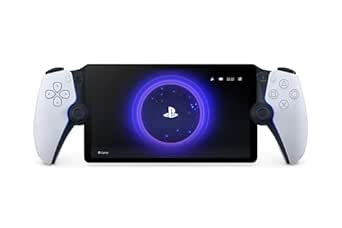 | Best for Playing Away from the TV | Compatible console: PlayStation 5 | Connectivity: Wi-Fi | Screen: 8-inch LCD | VIEW LATEST PRICE | See Our Full Breakdown |
| Monzlteck Under-Desk Mount for PlayStation 5, PS5 Slim, and PS5 Pro |  | Best for Desk Space | Brand: Monzlteck | Compatible devices: PlayStation 5, PS5 Slim, PS5 Pro | Mounting type: Under-desk | VIEW LATEST PRICE | See Our Full Breakdown |
| 24 PCS Premium Silicone Thumb Grips for PS4/PS5/Xbox Controllers – Rainbow Non-Slip Joystick Caps & Thumbstick Grips |  | Best for Customizing Controller Grip | Brand: CCFREELIFE | Model number: CC-GJM-CA24P | Compatible controllers: PS4, PS5, and Xbox | VIEW LATEST PRICE | See Our Full Breakdown |
| PS5, PS5 Slim, and PS5 Pro Stand with Cooling Fan and Dual Controller Charging |  | Best All-in-One Console Stand | Compatible consoles: PS5, PS5 Slim, PS5 Pro | Cooling fan: Three speeds, 3100–3500 RPM; adjustable or off via touch switch | Controller charging: Two controllers simultaneously; approximately 2.5 hours | VIEW LATEST PRICE | See Our Full Breakdown |
| OIVO Adjustable Horizontal Stand for PS5, PS5 Slim, and PS5 Pro |  | Best Simple Horizontal Stand | Compatible consoles: PS5, PS5 Slim, and PS5 Pro; disc and digital editions | Orientation: Horizontal | Material: ABS | VIEW LATEST PRICE | See Our Full Breakdown |
| PS5 accessorie | Brand |
|---|---|
| PlayStation Media Remote | PlayStation |
| PowerA Twin Charging Station f | PowerA |
| Remotto5 Wireless Charger for | — |
| Newdery PS5 Controller Charger | — |
| KontrolFreek FPS Freek Galaxy | — |
| PlayStation DualSense Edge Wir | PlayStation |
| KontrolFreek Aim Boost Kit for | KontrolFreek |
| Rysker PS5 | Rysker |
| PlayStation DualSense Charging | PlayStation |
| PlayStation Portal Remote Play | — |
| Monzlteck Under-Desk Mount for | Monzlteck |
| 24 PCS Premium Silicone Thumb | CCFREELIFE |
| PS5 | — |
| OIVO Adjustable Horizontal Sta | — |
More Details on Our Top Picks
PlayStation Media Remote
The PlayStation Media Remote is the clearest fit for a PS5 that also serves as a streaming and movie hub. Dedicated playback buttons make media navigation less fiddly than using a DualSense controller, and the remote can also power on the console and navigate its menus. Its infrared controls for compatible TVs add volume and power management without requiring a second remote. Compared with the PlayStation Portal Remote Player, this is a simple living-room control rather than a way to play remotely; it suits viewers, not players seeking a portable screen. The tradeoffs are its one-device-at-a-time support and a range capped at 10 meters. Full functionality also requires a PS5 system software update, so it is less useful if you want a universal remote for several devices.
Pros:- Dedicated media buttons simplify playback control
- Can power on the PS5 and navigate its menus
- Infrared controls can adjust power and volume on compatible TVs
- Two AA batteries are included
Cons:- Full functionality requires a PS5 system software update
- Supports only one device at a time
- Maximum range is 10 meters
Best for: PS5 owners who regularly stream shows or watch films and want dedicated playback and compatible TV controls
Not ideal for: Buyers seeking one remote for several entertainment devices or an accessory for portable PS5 gameplay
- Brand:PlayStation
- Manufacturer:Sony
- Model number:3005727
- Color:White
- Connectivity:Infrared
- Button quantity:15
- Maximum range:10 meters
- Batteries:2 AA batteries, included
Our verdict“Choose this remote if your PS5 handles regular TV and streaming duties, but skip it if you need multi-device control.”
PowerA Twin Charging Station for PlayStation 5 DualSense Wireless Controllers
The PowerA Twin Charging Station earns its place for households that want two DualSense controllers charged and displayed in one dedicated spot. Its AC-powered design avoids relying on a console USB port, while an LED on each controller signals when charging is complete. Compared with the Newdery PS5 Controller Charger Station, PowerA is the better match for buyers who value official PlayStation licensing; Newdery adds DualSense Edge compatibility and includes a USB-C cable, giving it more flexibility around placement. PowerA’s tradeoff is a narrower fit: it is designed for DualSense controllers and needs a corded AC connection. The tabletop station also takes up space, but its straightforward two-controller capacity makes it a tidy choice for players who keep a spare controller ready.
Pros:- Charges two DualSense controllers at once
- LED indicators show when each controller is fully charged
- Officially licensed for PlayStation 5
- Included AC adapter powers the station
Cons:- Compatible with DualSense controllers rather than a wider range of devices
- Requires a corded AC connection
- Tabletop design needs dedicated space
Best for: PS5 households with two standard DualSense controllers that want a dedicated, AC-powered charging and display station
Not ideal for: DualSense Edge owners or buyers who need a USB-powered dock they can place near a laptop or other USB source
- Brand:PowerA
- Compatibility:PlayStation 5 DualSense controllers
- Capacity:2 controllers
- Power source:Corded electric AC adapter
- Wattage:10 W
- USB ports:1
- Mounting type:Tabletop
- Warranty:Two-year limited warranty
Our verdict“Pick PowerA for a simple licensed dock for two standard DualSense controllers; choose Newdery if you need Edge support or USB-powered placement.”
Remotto5 Wireless Charger for PS5 DualSense Controller – Portable Battery with 12+ Hours Playtime
The Remotto5 Wireless Charger takes a different approach from the lineup’s charging docks: it attaches portable battery power to a DualSense controller so you can keep playing without being tethered to a charging cable. Its 3000 mAh battery is listed to provide more than 12 hours of gameplay, while four LED levels make the remaining charge easy to check. That mobility sets it apart from the stationary PowerA Twin Charging Station, which can keep two controllers organized but does not add playtime away from a power connection. The Remotto5 is a single-controller solution, though, and its built-in battery adds an accessory to the controller rather than simply returning it to a dock. You also need to supply your own USB-C charging cable, so it is less ready to use straight from the box.
Pros:- Portable battery allows play while charging without a cable tether
- Listed battery life exceeds 12 hours of gameplay
- Recharge time is listed as 90 minutes
- LED indicators show charge in 25% increments
Cons:- USB-C charging cable is not included
- Designed for one DualSense controller rather than multiple devices
- Adds a battery accessory to the controller during play
Best for: Players who want to extend a DualSense session without stopping to connect a charging cable
Not ideal for: Buyers who want to charge multiple controllers at once or prefer a simple tabletop dock between sessions
- Compatibility:DualSense PS5 controller
- Battery capacity:3000 mAh
- Listed gameplay time:More than 12 hours
- Listed recharge time:90 minutes
- Connector:USB Type-C
- Charging standard:Qi
- Charging indicator:LED at 25%, 50%, 75%, and 100%
- Power source:Battery powered
Our verdict“Choose Remotto5 to keep one DualSense controller going away from a charging dock, provided you already have a USB-C cable.”
Newdery PS5 Controller Charger Station – DualSense Edge Compatible Fast Charging Dock with Cable
The Newdery PS5 Controller Charger Station stands out for supporting both standard DualSense and DualSense Edge controllers, a useful distinction from the PowerA station, which is specified for DualSense controllers. It charges two controllers at once, and the included 3.3-foot USB-C cable allows placement near a compatible console, laptop, or adapter instead of requiring the dedicated AC adapter used by PowerA. LED indicators and anti-slip mats help keep the charging area legible and the controllers steady. Newdery’s flexibility comes with setup limits: optimal performance calls for a 5 V/3 A adapter, and controller skins or cases must be removed before charging. It also has one USB port, so this is a focused controller dock rather than a hub for charging other gear.
Pros:- Supports both DualSense and DualSense Edge controllers
- Charges two controllers simultaneously
- Includes a 3.3-foot USB-C cable for flexible placement
- LED indicators and anti-slip mats support stable, easy-to-read charging
Cons:- Controller skins or cases must be removed before charging
- Optimal performance requires a 5 V/3 A power adapter
- Single USB port cannot charge additional devices at the same time
Best for: PS5 players who own a DualSense Edge or want one dock for two supported controllers with a supplied USB-C cable
Not ideal for: Players who keep protective cases on their controllers or need a station that can charge other devices at the same time
- Compatible devices:DualSense Edge and PlayStation 5 controllers
- Capacity:2 controllers
- Charging time:Approximately 2.5 hours
- Connector:USB Type-A to USB Type-C
- Included cable length:3.3 feet
- Input:5 V / 3 A
- Mounting type:Tabletop
- Warranty:12 months
Our verdict“Choose Newdery if you need a two-controller dock that supports DualSense Edge, and skip it if your controllers stay in cases.”
KontrolFreek FPS Freek Galaxy Thumbsticks for PlayStation 4 and PlayStation 5, Black
The KontrolFreek FPS Freek Galaxy is a targeted upgrade for players who want more grip and extra stick height rather than a new controller. The set pairs a 10 mm high-rise right stick for aiming with a 6.5 mm mid-rise left stick for movement, giving it a distinct mixed-height layout instead of raising both controls equally. Its concave rubber surfaces can help keep thumbs in place, while the attachments also cover the original sticks. Compared with the KontrolFreek Aim Boost Kit, this model’s specific high-right, mid-left configuration makes its intended use clear for players focused on shooter controls. The tradeoff is that extra height changes the feel and reach of the sticks; players who prefer the stock profile may find the attachments uncomfortable. They are also limited to PS4 and PS5 controllers.
Pros:- Mixed-height layout pairs a high right stick with a mid-height left stick
- Concave rubber compound adds grip
- Added height is designed to support aiming and movement control
- Covers original thumbsticks to help reduce wear
Cons:- Added height changes the stock thumbstick feel and reach
- Compatibility is limited to PlayStation 4 and PlayStation 5 controllers
Best for: PS5 shooter players who want added thumb grip and a higher right stick for aiming while keeping a mid-height left stick
Not ideal for: Players who prefer the original DualSense stick height or want thumbstick accessories compatible with other console controllers
- Compatible devices:PlayStation 4 and PlayStation 5 controllers
- Configuration:1 high-rise stick and 1 mid-rise stick
- High-rise increase:10.0 mm
- Mid-rise increase:6.5 mm
- Shape:Concave
- Material:Proprietary rubber compound
- Color:Black
- Model number:BLA-2807-PS5
Our verdict“Choose the Galaxy set if you want a taller right stick and grippier surfaces for PS5 shooters, but avoid it if you like the stock stick profile.”
PlayStation DualSense Edge Wireless Controller, Midnight Black
The DualSense Edge is the most direct upgrade here for players who want to change how their controller handles, rather than just add a charging or storage accessory. Mappable back buttons can keep key actions within reach, while replaceable stick modules and caps give players options for tailoring controls and replacing worn parts. Compared with the KontrolFreek Aim Boost Kit, which modifies compatible stock thumbsticks with add-on grips and rings, the Edge offers built-in control customization but costs more to maintain if replacement parts are needed. Its wireless design keeps the familiar PS5 setup, though the listed compatibility is limited to PS5, Mac, and PC. The tradeoff is a specialized controller: players content with a standard DualSense may not benefit enough from its adjustable layout to justify choosing it over simpler accessories.
Pros:- Mappable back buttons let players assign actions to more reachable controls
- Replaceable stick modules and caps support adjustments and part replacement
- Wireless connectivity suits a standard PS5 play setup
- Midnight Black finish offers a darker alternative to the standard controller look
Cons:- Replacement stick modules or caps may require additional purchases
- Compatibility with platforms beyond PS5, Mac, and PC is not specified
- Its customization may be unnecessary for players who prefer a standard controller layout
Best for: PS5 players who want programmable back-button controls and the option to change stick modules or caps
Not ideal for: Casual players satisfied with a standard DualSense, or buyers who want clearly specified compatibility beyond PS5, Mac, and PC
- Brand:PlayStation
- Model:CFI-ZCP1
- Color:Midnight Black
- Connectivity:Wireless
- Controller type:Gamepad
- Features:Mappable back buttons; replaceable stick modules and caps
- Compatible devices:PlayStation 5, Mac, PC
- Warranty:1 year
Our verdict“Choose the DualSense Edge if back-button mapping and replaceable stick parts matter more to you than keeping your controller setup simple.”
KontrolFreek Aim Boost Kit for PlayStation 4 and PlayStation 5 Controllers, Black Galaxy
The KontrolFreek Aim Boost Kit is for players who want to change stick feel without replacing their controller. Its mixed-height thumbsticks offer different reach and leverage for movement and aiming, while three strengths of precision rings let players add resistance and cushioning. That makes it a smaller, more focused adjustment than the DualSense Edge, whose back-button mapping and replaceable modules suit broader control customization. The kit works with compatible PS4 and PS5 controllers, so it can follow players who use more than one generation of PlayStation hardware. The tradeoff is that the pieces must be fitted onto stock thumbsticks, and the rings’ added resistance won’t suit every sensitivity preference. Players who simply want a charging solution, such as the PlayStation DualSense Charging Station, should look elsewhere.
Pros:- Mixed-height thumbsticks provide different options for reach and stick movement
- Three precision-ring strengths let players select a resistance level
- Compatible with PlayStation 4 and PlayStation 5 controllers
- Rubber construction is intended to provide a comfortable grip
Cons:- Accessories must be fitted onto the controller’s stock thumbsticks
- Precision rings add resistance that may not match every player’s preferred feel
Best for: PS4 or PS5 players who want to experiment with stick height and aiming resistance while keeping their existing controller
Not ideal for: Players who dislike add-on pieces on thumbsticks or prefer an unmodified, low-resistance stick feel
- Brand:KontrolFreek
- Compatible devices:PlayStation 4, PlayStation 5
- Included components:Performance thumbsticks and precision rings
- Precision ring strengths:3
- Color:Black
- Material:Rubber
- Model number:6204-PS5
Our verdict“Pick this kit if you want to tune thumbstick feel on a compatible controller without moving up to the more customizable DualSense Edge.”
Rysker PS5, PS5 Slim, and PS5 Pro Cooling and Charging Stand
The Rysker cooling and charging stand consolidates several console-side jobs: it supports PS5, PS5 Slim, and PS5 Pro, charges an original DualSense or Edge controller, and adds three USB hubs. Its adjustable fan, concealed cables, media-remote slot, and safety protections make it a broader organization accessory than the PlayStation DualSense Charging Station, which focuses on docking two controllers. The Rysker is the better fit when a setup needs charging and accessory connections in one place; the official station is simpler if charging is the only goal. The tradeoffs are the stand’s extra functions and footprint, plus a single fan rather than multiple fans. Controller charging is also not immediate, taking about 2.5 to 3.5 hours depending on the model.
Pros:- Compatible with PS5, PS5 Slim, and PS5 Pro
- Charging ports support original DualSense and Edge controllers
- Three USB hubs support charging and data transfer
- Includes adjustable fan, concealed cables, and overcharge, overcurrent, and overtemperature protection
Cons:- Uses one fan, which may not suit buyers seeking a multi-fan setup
- Controller charging takes about 2.5 to 3.5 hours depending on the model
- Its multiple functions may be unnecessary for players who only need controller charging
Best for: PS5 owners who want a console stand with controller charging, extra USB connections, and basic cable organization
Not ideal for: Players who only need a compact controller charger or do not want a stand with a fan and extra features
- Brand:Rysker
- Compatibility:PS5, PS5 Slim, PS5 Pro
- Number of fans:1
- USB hubs:3
- Controller charging time:About 3.5 hours for original PS5 controller; about 2.5 hours for PS5 Edge controller
- Power sources:PS5 USB port, computer, USB hub, wall socket, or AC adapter
- Protection:Overcharge, overcurrent, and overtemperature protection
- Warranty:2 years
Our verdict“Choose the Rysker if you want one stand to combine console support, controller charging, USB hubs, and cable organization.”
PlayStation DualSense Charging Station
The PlayStation DualSense Charging Station is a focused pick for households that want two standard DualSense controllers ready without tying up the PS5’s USB ports. Its click-in slots make docking straightforward, and charging is described as fast as charging through the console. Compared with the multi-function Rysker cooling and charging stand, this official station skips cooling, hubs, and console support in favor of a dedicated two-controller dock. That narrower design makes sense if charging is the only job you need handled; it is less useful if you also want stand organization or Edge-controller support, which the Rysker listing specifies. The main limitation is clear: controllers are sold separately, and the station is listed for PS5 controllers. It also needs an AC power source rather than drawing power from the console.
Pros:- Charges up to two DualSense controllers at once
- Click-in design makes docking quick and simple
- Charging is as fast as through a PS5 console
- Frees the console’s USB ports for other accessories
Cons:- Controllers are not included
- Listed as compatible with PlayStation 5 controllers
- Requires an AC power source
Best for: PS5 households with two DualSense controllers that want an easy-to-use dock and free console USB ports
Not ideal for: Players who need charging for a DualSense Edge, want cooling or USB hubs, or do not own separate controllers
- Brand:PlayStation
- Model:3005837
- Compatible console:Sony PlayStation 5
- Charging slots:2
- Power source:AC
- Charging:Fast charging; as fast as charging through the console
- Dimensions:7.5 x 5 x 3 inches
- Included components:Charging station with 2 slots; controllers not included
Our verdict“Choose this station if you want a straightforward dock for two standard DualSense controllers rather than an all-in-one stand.”
PlayStation Portal Remote Player for PS5
The PlayStation Portal Remote Player is the most transformative accessory in this group, but it only makes sense for a particular setup: a PS5 owner who wants to play compatible games away from the television over Wi-Fi. Its 8-inch 1080p screen and support for up to 60 fps bring a dedicated handheld-style display, with DualSense haptics and adaptive triggers in supported games. Unlike the DualSense Edge, which changes controller inputs, the Portal changes where you can play; unlike either charging station, it depends on a network connection and a paired console for installed-game remote play. Select-game cloud streaming is also listed for eligible PlayStation Plus Premium members. The tradeoff is that Wi-Fi quality affects gameplay, some games are incompatible, and it is not a standalone replacement for a PS5.
Pros:- 8-inch 1080p LCD provides a dedicated screen for remote play
- Supports gameplay at up to 60 fps
- DualSense haptic feedback and adaptive triggers work in supported games
- Select-game cloud streaming is available for eligible PlayStation Plus Premium members
Cons:- Installed-game remote play requires a PS5, PlayStation Network account, and broadband Wi-Fi
- Connection quality affects gameplay
- Some games requiring VR or additional peripherals are incompatible
Best for: PS5 owners who want to play compatible installed games in another room over a dependable Wi-Fi connection
Not ideal for: Buyers without a PS5, players with unreliable broadband Wi-Fi, or anyone needing a standalone handheld for incompatible games
- Compatible console:PlayStation 5
- Connectivity:Wi-Fi
- Screen:8-inch LCD
- Resolution:1080p
- Maximum frame rate:60 fps
- Controller features:DualSense haptic feedback and adaptive triggers in supported games
- Power source:Battery
- Cloud streaming:Select games with a PlayStation Plus Premium membership
Our verdict“Choose the Portal if you already own a PS5 and want to play compatible games away from the TV on a reliable Wi-Fi network.”
Monzlteck Under-Desk Mount for PlayStation 5, PS5 Slim, and PS5 Pro
The Monzlteck Under-Desk Mount is the most useful pick here for a gaming desk where console footprint matters more than quick access. It attaches compatible PS5 models beneath a desk, freeing the surface for a monitor, speakers, or accessories. Its six-screw mounting system and security screw favor a firmly fixed setup, while silicone covers help protect the console from scratches and the open design leaves room for airflow. Compared with the OIVO Adjustable Horizontal Stand, this mount hides the console rather than simply lifting it off the surface; that saves more visible space but makes the installation less flexible. The tradeoff is a need for a desk underside suitable for screw mounting, and the console is less convenient to move or reach once installed. It is a focused space-saving accessory, not a general-purpose stand.
Pros:- Mounts the console beneath a desk to clear usable surface space.
- Six screws and a security screw support a firmly attached setup.
- Silicone covers help protect the console from scratches.
- Open design allows airflow around the console.
Cons:- Requires a desk underside suitable for screw mounting.
- Designed only for compatible PlayStation 5 consoles.
- Under-desk placement makes the console less convenient to move or reach.
Best for: PS5 owners with a sturdy desk and limited surface space who want the console mounted out of the way.
Not ideal for: Renters or anyone with a desk underside that cannot be drilled, or players who regularly move their console and need easy access.
- Brand:Monzlteck
- Compatible devices:PlayStation 5, PS5 Slim, PS5 Pro
- Mounting type:Under-desk
- Material:Metal
- Finish color:Black
- Item weight:1.6 pounds
- Fastening:Six screws and a security screw
- Protective covers:Four silicone covers
Our verdict“Choose this mount if reclaiming desk space is your priority and you can permanently screw it into a suitable desk.”
24 PCS Premium Silicone Thumb Grips for PS4/PS5/Xbox Controllers – Rainbow Non-Slip Joystick Caps & Thumbstick Grips
These CCFREELIFE silicone thumb grips are the low-commitment choice for players who want more thumbstick texture or a change of color without replacing their controller. The set supplies 24 caps in 12 color pairs, and the snap-on fit is intended for PS4, PS5, and Xbox sticks. That makes this a more customizable, wear-protective option than the KontrolFreek FPS Freek Galaxy Thumbsticks, which are aimed at changing stick height and reach for particular play styles. The CCFREELIFE caps instead add a silicone layer over the existing sticks, so they do not offer the same height adjustment and can feel bulkier to players who rely on fine, precise movement. The broad color selection is useful for personalizing or distinguishing controllers, but the extra caps matter less to anyone who only wants one functional pair.
Pros:- Includes 24 caps in 12 color pairs for a range of looks.
- Snap-on installation avoids residue or damage to the controller.
- Silicone surface adds grip and helps protect sticks from wear.
- Designed for PS4, PS5, and Xbox controllers.
Cons:- Added silicone can feel bulky and affect precise stick movement.
- Does not provide the stick-height changes offered by KontrolFreek FPS Freek Galaxy Thumbsticks.
- The large assortment may be unnecessary for someone who wants only one pair.
Best for: PS5 players who want a more textured thumbstick surface, basic stick protection, and several color options for controller customization.
Not ideal for: Competitive players sensitive to changes in stick feel, or buyers seeking taller thumbsticks rather than a silicone cover.
- Brand:CCFREELIFE
- Model number:CC-GJM-CA24P
- Compatible controllers:PS4, PS5, and Xbox
- Unit count:24
- Color selection:12 color pairs
- Material:Silicone
- Item weight:1 g
- Warranty:3 months
Our verdict“Pick these caps for affordable-feeling grip customization and stick protection, but skip them if even a small change to thumbstick feel bothers you.”
PS5, PS5 Slim, and PS5 Pro Stand with Cooling Fan and Dual Controller Charging
This all-in-one vertical stand suits players who want console organization and controller charging in one accessory. It combines a three-speed fan, charging for two controllers, three extra USB ports, a headset holder, and storage for up to 14 game discs. That is a broader setup than the PowerA Twin Charging Station, which focuses on charging controllers rather than consolidating console storage and cooling. The fan can be switched off or adjusted, giving buyers some control over noise and airflow, while listed electrical protections add reassurance when charging. The tradeoff is that the bundle takes up a dedicated spot beside the console and adds several functions in one unit. Controller charging may not start above 70% battery, and the listed dimensions may not describe the fully assembled stand, so check the available space before choosing it.
Pros:- Combines console cooling, dual-controller charging, and accessory storage.
- Three-speed fan can be adjusted or turned off.
- Stores up to 14 game discs and includes a headset holder.
- Includes three USB ports and protection against several electrical faults.
Cons:- Controller charging may not start when a battery is above 70%.
- Listed dimensions may not reflect the fully assembled stand.
- Offers more functions and takes more setup space than a dedicated charging station.
Best for: PS5 owners who want a single stand to organize discs and a headset while charging two controllers and adding adjustable fan cooling.
Not ideal for: Minimalist setups that need only controller charging, or players who do not want a larger multi-function stand beside the console.
- Compatible consoles:PS5, PS5 Slim, PS5 Pro
- Cooling fan:Three speeds, 3100–3500 RPM; adjustable or off via touch switch
- Controller charging:Two controllers simultaneously; approximately 2.5 hours
- USB ports:Three extra ports
- Game disc storage:Up to 14 discs
- Indicators:LED charging status indicators
- Protection:Overcharge, overheat, overvoltage, and short-circuit protection
- Color:All white
Our verdict“Choose this stand if you want cooling, charging, and game storage together, rather than a compact accessory dedicated to one task.”
OIVO Adjustable Horizontal Stand for PS5, PS5 Slim, and PS5 Pro
The OIVO Adjustable Horizontal Stand is a straightforward pick for players who want to lay a compatible PS5 on its side with extra support underneath. Its adjustable layout uses support rods, a screw, and anti-slip pads to help stabilize different PS5 versions, while the raised position allows airflow beneath the console. Compared with the Monzlteck Under-Desk Mount, it keeps the console accessible and avoids attaching hardware to a desk; in exchange, it still occupies surface space. It is also simpler than the multi-function vertical stand with cooling and charging, because it adds no fan, controller dock, or disc storage. That makes it a focused fit for buyers who want horizontal positioning, not a hub of extra features. Assembly is required, and the included EVA foam pads are specified for digital editions, so buyers should check their console version and setup.
Pros:- Adjustable design supports PS5, PS5 Slim, and PS5 Pro disc and digital editions.
- Support rods, screw fastening, and anti-slip pads help stabilize the console.
- Elevates the console to allow airflow underneath.
- Lightweight ABS construction is easy to reposition.
Cons:- Requires assembly with support rods and a screw.
- EVA foam pads are specified for digital editions.
- Keeps the console on the surface rather than freeing up desk space like the Monzlteck mount.
Best for: PS5 owners who prefer a horizontal console setup and want adjustable support that fits multiple generations and editions.
Not ideal for: Players who need to free up desk space, want built-in charging or cooling, or prefer an accessory requiring no assembly.
- Compatible consoles:PS5, PS5 Slim, and PS5 Pro; disc and digital editions
- Orientation:Horizontal
- Material:ABS
- Fastening:Screw
- Color:White
- Item weight:350 g
- Included stands:2
- Included support rods:3
- Included pads and hardware:2 EVA foam pads and 1 screw
Our verdict“Choose the OIVO if you want a basic, adjustable horizontal base and do not need charging, cooling, or a space-saving mount.”
How We Picked
I compared these accessories by the problem they solve: controller charging, control and comfort, console placement, media use, or remote play. The main criteria were compatibility across PS5 versions and controller types, ease of setup, how directly each product serves its role, and whether its extra features add practical value or simply add bulk. I also treated fit and maintenance as buyer concerns: stands and mounts need to suit the console and available space, while docks should match the controllers a household actually owns.
The ranking favors focused, broadly useful accessories over products that make sense only for a narrow setup. That puts the PlayStation DualSense Charging Station ahead of feature-heavy stands for buyers who mainly need a reliable charging routine, while the DualSense Edge and PlayStation Portal rank as specialist picks for specific play styles. Lower-commitment add-ons remain useful, but their value depends more on individual preference. These are editorial comparisons based on product features and intended use, not claims of hands-on testing.
| PS5 accessorie | Brand |
|---|---|
| PlayStation Media Remote | PlayStation |
| PowerA Twin Charging Station f | PowerA |
| Remotto5 Wireless Charger for | — |
| Newdery PS5 Controller Charger | — |
| KontrolFreek FPS Freek Galaxy | — |
| PlayStation DualSense Edge Wir | PlayStation |
| KontrolFreek Aim Boost Kit for | KontrolFreek |
| Rysker PS5 | Rysker |
| PlayStation DualSense Charging | PlayStation |
| PlayStation Portal Remote Play | — |
| Monzlteck Under-Desk Mount for | Monzlteck |
| 24 PCS Premium Silicone Thumb | CCFREELIFE |
| PS5 | — |
| OIVO Adjustable Horizontal Sta | — |
Factors to Consider When Choosing Best PS5 Accessories
Before choosing, start with the irritation you want to remove from your setup. A charging dock, controller grip, console stand, and remote player solve different problems, so extra functions do not automatically make one accessory a better fit. These factors can help narrow the field before you compare individual models.
Match the Accessory to a Specific Problem
Write down the task you want to make easier before shopping: keeping controllers charged, changing their feel, clearing desk space, or playing away from the television. This prevents a common mistake: buying a feature-packed stand when a small charging dock would solve the actual issue. If several accessories address the same problem, compare how much space and setup each requires, not just the number of functions listed. A controller add-on is unlikely to improve console organization, just as a console stand will not change stick feel. Choose the product category first, then compare models within it.
Check Exact Console and Controller Compatibility
Compatibility claims can cover different PS5 generations, console orientations, and controller models, so check the exact version you own. A stand made for multiple console editions still needs to fit your console’s shape and placement, while a controller dock may support DualSense but not every specialized controller. If you own a DualSense Edge, confirm that the charging accessory names it as compatible rather than assuming standard-controller support carries over. Also check whether the accessory uses a cable, a connector, or a particular port, since these choices affect where it can sit. A compatibility mismatch can turn a convenient accessory into a return or a workaround.
Decide Whether Fewer Devices Are Worth More Complexity
All-in-one stands can combine cooling, charging, and storage, which may suit a compact gaming area. Their tradeoff is that a larger unit takes up more room and gives you more features to position, connect, and keep clear. Separate accessories let you place each item where it works best and replace only the part you need, though cables and devices may spread across the desk. Avoid paying for cooling or storage functions unless your setup has a reason to use them. The right choice depends on whether you value a single organized station or a simpler collection of focused accessories.
Treat Controller Comfort as Personal Fit
Thumbsticks, grip caps, and controller upgrades change how a controller feels in your hands, and preferences vary with hand size, game genre, and play time. Taller sticks can alter reach and leverage, while silicone caps focus on surface grip; neither is a guaranteed improvement for every player. A large multi-piece grip set may offer variety, but unused pieces can become clutter. If you are unsure, start with a small, reversible accessory before replacing your controller. Choose a premium controller such as the DualSense Edge when you want its broader customization, not simply because it is the most involved option in the roundup.
Separate Home Charging from Portable Play
A charging station is designed to return controllers to a ready spot at home; a portable battery addresses power during a longer session away from that spot. Those needs overlap only partly, so decide where you expect to play and charge. For a shared household, a dock that keeps two controllers in one place may reduce cable searching. For play on the move, portability and how the battery attaches matter more than a neat home charging bay. Remote play is a separate choice again: it depends on your network and whether playing away from the TV is worth adding another screen-based device.
Plan for Placement, Cables, and Upkeep
Measure the space around your console, desk, and power outlets before buying a mount or stand. An under-desk mount can free a surface, but only if the desk construction and cable route suit the installation; a horizontal stand has different space and access needs. Keep ventilation paths clear when arranging a console, particularly if a stand includes a fan or other attached components. Consider how often you will need to move the console, reach its ports, or clean around the accessory. A tidy setup is only useful if it remains easy to access and maintain.
Frequently Asked Questions
Should I buy a charging dock or a controller with a built-in portable battery?
Choose a dock if your main frustration is finding charged controllers at home; it gives them a consistent place between sessions. A portable battery is better suited to extending a session when you cannot return to a charging spot. If you play mostly in one room, a dock is likely the more straightforward fix. If you often play away from your usual setup, portable power addresses a different need. Neither replaces the other in every situation, so base the decision on where your controller runs out of power.
Do I need a cooling stand for my PS5?
A cooling stand is not automatically necessary just because it includes a fan. Start by checking that the console has clear airflow and enough open space around it; blocked vents and cramped placement are problems a stand may not solve. A multi-function stand can still appeal if you also want controller charging or a more organized console area. If those extras do not serve your setup, a simpler stand or no added stand may be the better fit. Check the product’s console compatibility and footprint before making it part of your setup.
Is the DualSense Edge a sensible upgrade for casual PS5 players?
It makes the most sense when you expect to use its additional control options, rather than as a general replacement for a standard controller. Players who mainly want a comfortable controller for occasional sessions may get more practical value from a charging accessory or a small grip change. Think about the games you play and whether controller customization would affect how you play them. If you are unsure, a lower-commitment thumbstick or grip accessory can help you learn what feel you prefer. The Edge is a specialized choice, not a requirement for enjoying PS5 games.
Will the PlayStation Portal let me play PS5 games anywhere?
The Portal is intended for remote play from your PS5, so it is not the same as a standalone console that runs games independently. Your experience depends on the network connection and the conditions where both the PS5 and the remote player are used. It can be a useful way to play away from the main television at home, but buyers should not assume it removes network requirements. Consider where you expect to use it and whether remote play fits that routine. If you only play in front of your TV, a charging or comfort accessory may address a more frequent need.
How can I tell whether a PS5 stand or mount will fit my console?
Look for compatibility with your exact console version, including whether it is an original PS5, PS5 Slim, or PS5 Pro, and check whether the product supports your preferred orientation. Compare the listed attachment points and dimensions with the console and the area where it will sit. For an under-desk mount, also check desk thickness, mounting requirements, and how cables will reach the console. Do not rely on a broad PS5 label alone when the listing names several editions. If any fit detail is unclear, choose a setup with fewer mounting constraints.
Conclusion
For most buyers who want a straightforward everyday improvement, I recommend the PlayStation DualSense Charging Station as the best overall pick: it focuses on keeping controllers ready without asking you to adopt an all-in-one setup. The PowerA Twin Charging Station is the best value-style choice for households that want a dedicated two-controller charging spot, while the DualSense Edge is my premium pick for players who will use deeper controller customization. Beginners should start with a simple accessory that solves a clear annoyance, such as a focused charging dock or removable grip add-on, rather than a complex stand. For specific needs, choose the PlayStation Portal for remote play, the Monzlteck mount for freeing desk space, or the KontrolFreek options for a different stick feel. The best choice is the one that fits your controller, console, and play routine—not the one with the longest feature list.