This checklist is for retro gaming fans choosing gear for handheld play, arcade controls, classic consoles, and modern displays. It covers both dedicated hardware and a couple of categories where the right choice depends heavily on your setup.

Get the latest gadgets delivered free with Prime
- Fast, free delivery on millions of items
- Prime Video, Amazon Music and more included
- Member-only deals all year
The sections move from portable and arcade gear to game hardware and display options. Each one explains why the category matters, what to check before buying, and where the named pick may fit.
Use the look-for lists as a quick comparison guide, then confirm compatibility with your own games, systems, and space. Treat advice-only sections as a starting point for matching equipment to your setup.
Retro Handheld Console
A handheld console can make retro play portable, so comfort and controls matter as much as the game library. The Retroid Pocket Classic Retro Handheld Game Console is the named pick for this slot, but the product name alone does not establish which games it supports or what systems it works with. Check those details against the titles you actually want to play.
A common mistake is choosing by appearance or nostalgia before checking screen size and button layout. Think about how long you typically play, whether the controls feel comfortable in your hands, and whether the screen is easy for you to view. Also verify charging, storage, and any connection needs from the product listing. Confirm that the included controls and supported formats suit your intended use before committing.
For a shared or travel setup, consider durability and carrying needs alongside portability. Compare the console’s dimensions with your bag and check whether protective accessories are available. If you already own games or accessories, verify compatibility directly rather than assuming they will work. A little checking helps ensure this handheld matches your routine, not just your interest in retro gaming.
What to look for:
- Confirm supported systems and game formats
- Check screen dimensions and readability
- Assess button layout and grip comfort
- Verify storage, charging, and connectivity
- Compare dimensions with your carrying case
Retroid Pocket Classic Retro Handheld Game Console

The Retroid Pocket Classic is a portable Android gaming device featuring a 3.92-inch OLED touchscreen, 128GB internal storage with expandability, and a 5000mAh battery for extended gameplay. It supports WiFi 5, Bluetooth 5.1, and USB-C for versatile connectivity, running Android 14 for access to the Google Play Store.
Pros:
- Vivid OLED display with deep blacks and vibrant colors
- Expandable storage for a large game library
- Long-lasting 5000mAh battery
Cons:
- No preload games included
- Requires setup for game installation
- Potentially complex for non-technical users
Best for: Players who want a dedicated handheld for retro gaming
Not ideal for: Buyers who need confirmed support for a specific game or system before checking the listing
Bottom line: Choose the Retroid Pocket Classic after confirming its game support, controls, and screen fit your needs.
FPGA Gaming Console
An FPGA gaming console is a category to research when you want hardware-based retro play. With no named product in this slot, start by listing the systems and games you want to use, then check whether a candidate explicitly supports them. Compatibility should be confirmed in the manufacturer’s documentation rather than inferred from a broad retro label.
A common buying mistake is treating every console in this category as interchangeable. Check what is included, how controllers connect, and whether the device supports the video connections you need. Read the setup requirements and make sure they fit your TV or monitor. Also look for clear information about updates, game formats, and any required accessories before you decide.
Think through your full setup: display, controller, audio, and the space available near your screen. If you plan to use original controllers or other hardware, verify those connections individually. Compare documented support for your priorities, and avoid assuming that a feature or compatibility claim applies across every model. The best match is the one whose supported systems and connections line up with the games you plan to play.
What to look for:
- A documented list of supported systems and games
- Compatible video outputs for your display
- Controller connections that suit your setup
- Clear requirements for game formats and setup
- Included accessories and update information
Arcade Fight Stick
A fight stick makes arcade-style controls central to play, so compatibility and feel deserve close attention. The Victrix Pro FS Fight Stick Arcade Controller for PS5, PS4, and PC is the named pick. Its product name identifies those platforms, but confirm the exact games and connection requirements you care about before purchasing.
A frequent mistake is assuming that a controller supported by a platform will work with every game in the same way. Check game-level controller support and whether you need a wired connection or additional setup. Consider the stick and button layout, hand positioning, and available desk or lap space. If you share a gaming area, make sure the controller can be stored comfortably when it is not in use.
For an existing setup, check platform compatibility against your actual console or PC, including any adapters you already rely on. Review the product listing for cable, connection, and included accessory details. If you compete or practice for long sessions, prioritize a layout that feels natural to you and is easy to maintain. A fight stick is a personal control choice, so verify both the connection and ergonomics before settling on this pick.
What to look for:
- Confirm compatibility with your exact platform and games
- Check connection type and any setup requirements
- Assess stick and button layout for comfort
- Measure desk or lap space for the controller
- Review included cables and accessories
Victrix Pro FS Fight Stick Arcade Controller for PS5, PS4, and PC
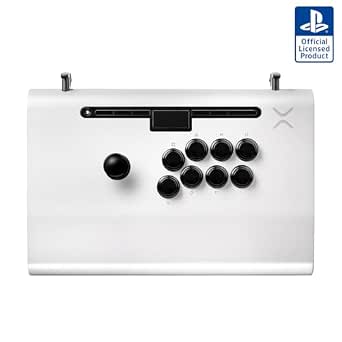
The Victrix Pro FS is a tournament‑ready arcade fight stick built from aircraft‑grade aluminum, featuring genuine Sanwa Denshi buttons and a detachable Link 2 joystick. Its ergonomic wrist slope, foam lap pad, and integrated carrying handles provide comfort and portability for long gaming sessions.
Pros:
- Aircraft‑grade aluminum construction provides exceptional durability.
- Genuine Sanwa Denshi buttons and detachable joystick deliver arcade‑grade responsiveness.
- Ergonomic design with wrist slope, foam pad, and built‑in handles ensures comfort during long sessions.
- Mod-friendly quick‑access back panel allows easy upgrades and cleaning.
Cons:
- Heavy at 7.8 lb, making it bulky to move frequently.
- Large footprint may not fit on smaller desks or gaming setups.
- Limited native compatibility (no Xbox support).
Best for: Players using PS5, PS4, or PC who prefer fight-stick controls
Not ideal for: Players whose games or adapters have unverified controller support
Bottom line: The Victrix Pro FS is a candidate for the named platforms, subject to game and connection checks.
Retro Game Cartridge
The Nintendo Super NES Classic Edition is the named pick for this slot, though its product name describes an edition rather than establishing that it is a game cartridge. Check the listing carefully to understand what is included and how the product connects to your setup. If your goal is specifically to use original cartridges, confirm that a candidate supports them before buying.
A common mistake is assuming that a classic-branded product includes the specific games or cartridge compatibility you want. Verify the included contents, supported connections, and any required accessories in the product documentation. Consider whether you want a ready-to-use console, a cartridge for hardware you already own, or a different way to play a particular title. These are different needs, and the listing should clearly match yours.
Before choosing, check that your display has a compatible input and that the needed cables are included or available. If you own original hardware or games, compare the product’s documented format and connections with those items. Focus on what the package actually contains and whether it suits your intended use. This prevents a mismatch between a nostalgic name and the specific cartridge or console experience you were seeking.
What to look for:
- Confirm whether the listing is a console or cartridge
- Check exactly which games and accessories are included
- Verify display connections and cable requirements
- Match the format to your existing hardware
- Review documentation for original cartridge support
Nintendo Super NES Classic Edition

A miniaturized version of the classic Super Nintendo Entertainment System, pre-loaded with 21 iconic 16-bit games including Super Mario Kart and the first-ever release of Star Fox 2. The console plugs in via HDMI and comes with two wired Super NES Classic Controllers, an HDMI cable, and a USB charging cable.
Pros:
- Comes pre-loaded with 21 classic games including the never-before-released Star Fox 2
- Includes two controllers for immediate two-player gaming
- Easy plug-and-play setup with HDMI output
- Supports save points for convenient gameplay
Cons:
- Short wired controller cables may limit seating distance
- Limited to the 21 pre-installed games with no easy way to add more
- Frequently out of stock due to high demand
Best for: Shoppers seeking the specific contents and setup described in the listing
Not ideal for: Buyers who need original cartridge support without documented confirmation
Bottom line: Confirm what the Nintendo Super NES Classic Edition includes before treating it as a cartridge pick.
CRT Gaming Monitor
The CRUA 49-Inch DQHD Ultrawide Curved Gaming Monitor, 240Hz, FreeSync is the named display pick, but its product name does not identify it as a CRT monitor. If you want a CRT specifically, verify the display technology in the listing and compare it with that requirement. If you are considering this monitor for retro games, check whether your source device can connect to it.
A frequent mistake is focusing on screen size or refresh-rate wording without checking resolution and inputs. Confirm the supported connections, the output from your console, and whether any adapter or scaler is required. Consider how a widescreen display will present games designed for other aspect ratios, and check the monitor’s available picture settings. Measure your desk and viewing distance to make sure the screen suits your room.
Before buying, compare the monitor’s documented inputs with your consoles and any intervening equipment. Check whether the desired image shape and scaling can be achieved with the gear you have. If you are looking for a CRT’s particular display characteristics, verify that the listed technology meets that expectation rather than relying on the category label in this checklist. A connection and image-fit check can prevent surprises when you bring older hardware to a newer display.
What to look for:
- Confirm the display technology matches your CRT requirement
- Check inputs against your console or scaler
- Verify resolution and aspect-ratio options
- Measure screen width and viewing distance
- Confirm any required adapters or cables
CRUA 49-Inch DQHD Ultrawide Curved Gaming Monitor, 240Hz, FreeSync

This 49-inch ultrawide curved gaming monitor features a DQHD 5120×1440 resolution and a 1500R curved VA panel for immersive visuals. It offers a 240Hz refresh rate, FreeSync support, and built-in speakers, making it ideal for gaming, multitasking, and professional use.
Pros:
- Large ultrawide 49-inch curved display for immersive viewing
- High 240Hz refresh rate with FreeSync support for smooth gameplay
- Rich contrast and vivid colors with VA panel and 1500R curvature
- Built-in speakers for convenient audio
Cons:
- Large size may require ample desk space
- Limited details on adjustable stand or ergonomic features
- No mention of height or tilt adjustments
Best for: Players considering this named monitor for a compatible gaming setup
Not ideal for: Buyers who specifically require a CRT without confirming display technology
Bottom line: Verify the monitor’s technology, inputs, and image fit before pairing it with retro hardware.
Console Upscaler
A console upscaler sits between older hardware and a display, so the key question is whether it supports your console and screen connections. There is no named pick here. Start with the outputs on your console and the inputs on your display, then identify what signal conversion or scaling your setup needs.
A common mistake is buying based on a general promise of improved output without checking the specific signal path. Confirm supported resolutions, input formats, output connections, and any limits documented for your console. Check whether the device handles the signal from your particular model and whether it requires separate cables or power. Make sure your display accepts the resulting output.
Consider the full chain from console to display, including any receiver or switch already in use. If you care about a particular image shape or timing, look for documentation describing those options rather than assuming they are available. Compare setup instructions and required accessories before choosing. The right upscaler is the one that fits your existing console-to-display path and gives you the controls you need.
What to look for:
- Inputs compatible with your console’s output
- Outputs accepted by your display
- Documented resolution and signal support
- Required cables, power, and setup steps
- Options that match your image and timing needs
Build your setup in priority order: first identify the games and systems you want to use, then confirm their controllers and display connections, and finally choose optional display or scaling gear. Spend attention where compatibility affects the whole chain, and check package contents before adding accessories.
Retro gear is easiest to enjoy when it fits the games you already love and the space you have. Use this checklist to compare the details that matter to your setup, verify claims in product documentation, and choose one well-matched piece at a time.