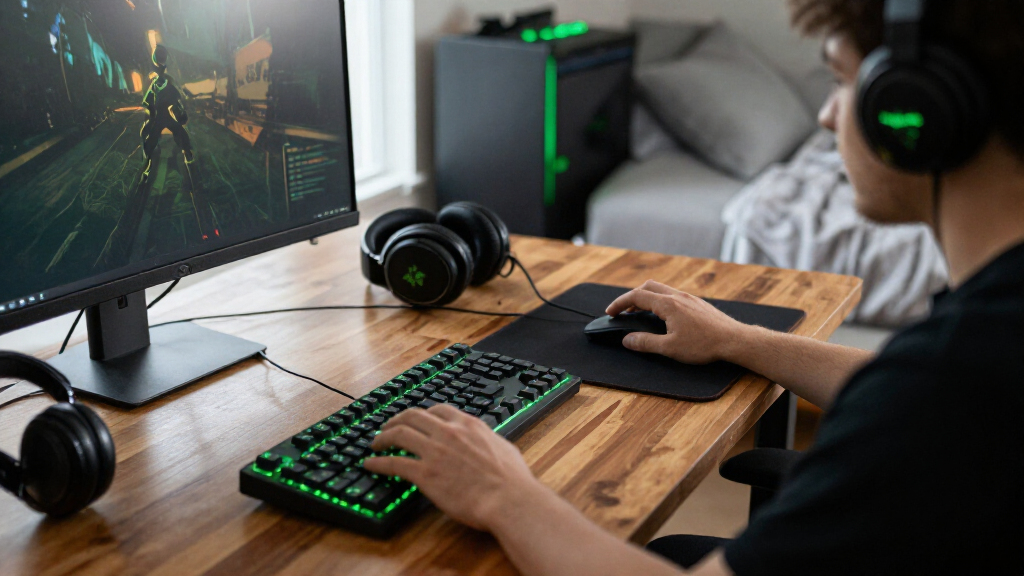

The best Razer gaming gear depends on what your setup needs most: I’d start with the Razer Basilisk V3 as the best overall mouse for its ergonomic shape and broad controls, while the BlackShark V3 Pro stands out for wireless audio and active noise cancellation. For a lighter competitive mouse, the Viper V4 Pro is a distinct alternative. The main tradeoffs across this lineup are wired simplicity versus wireless freedom, feature-rich designs versus lighter or smaller builds, and dedicated gear versus versatile peripherals. Read on for how all 15 picks compare and which combination fits your games and desk.

Get the latest gadgets delivered free with Prime
- Fast, free delivery on millions of items
- Prime Video, Amazon Music and more included
- Member-only deals all year
Complete the kit



Key Takeaways
- The Basilisk V3 is the strongest all-round mouse choice for players who value an ergonomic shape and extra controls, while the Viper V4 Pro is aimed at competitive players who prioritize a very light wireless design.
- Razer’s headset choices split by use: the BlackShark V3 Pro adds wireless operation and ANC, the BlackShark V3 X HyperSpeed offers wireless convenience in a simpler form, and the BlackShark V2 X and Kraken keep things wired.
- MMO players have a specialized option in the Naga V3 Pro, whose swappable side plates suit command-heavy games better than the more general-purpose Basilisk and Viper mice.
- The mousepad choice changes desk coverage, not mouse performance alone: the extended Goliathus Chroma adds RGB and space for keyboard and mouse, while the Gigantus V2 XXL favors a broad cloth surface without lighting.
- Compact gear involves real workflow tradeoffs: the Huntsman Mini saves desk space with a 60% layout, and the Tartarus V2 adds programmable left-hand controls, but neither is a universal replacement for a full keyboard.
| Razer Basilisk V3 X HyperSpeed Wireless Gaming Mouse |  | Best Wireless Mouse for Versatile Play | Connectivity: Bluetooth and Razer HyperSpeed Wireless | Programmable controls: 9 | Sensor: 5G Advanced optical sensor | VIEW LATEST PRICE | See Our Full Breakdown |
| Razer Goliathus Extended Chroma RGB Gaming Mousepad, Black |  | Best RGB Extended Mousepad | Surface material: Micro-textured cloth | Base material: Natural-foam rubber | Lighting: Customizable Chroma RGB edge lighting | VIEW LATEST PRICE | See Our Full Breakdown |
| Razer BlackShark V2 X Gaming Headset with 7.1 Surround Sound |  | Best Lightweight Wired Headset | Driver size: 50 mm | Connectivity: 3.5 mm audio jack | Surround sound: Software-enabled 7.1 on Windows 10 64-bit | VIEW LATEST PRICE | See Our Full Breakdown |
| Razer DeathAdder Essential Ergonomic Wired Gaming Mouse, Black | 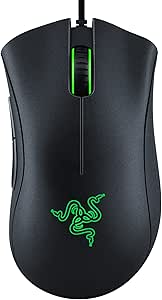 | Best Simple Wired Mouse | Connectivity: Wired | Sensor: Optical | Maximum sensitivity: 6,400 DPI | VIEW LATEST PRICE | See Our Full Breakdown |
| Razer Naga V3 Pro Wireless MMO Gaming Mouse with Swappable Side Plates |  | Best Premium MMO Mouse | Connectivity: Razer HyperSpeed Wireless, Bluetooth, USB-C wired | Side plate layouts: 12-button, 6-button, and 2-button | Programmable buttons: Up to 23 | VIEW LATEST PRICE | See Our Full Breakdown |
| Razer Basilisk V3 Ergonomic Wired Gaming Mouse |  | Best for Customizable Control | Connectivity: USB wired | Buttons: 11 programmable | Maximum sensitivity: 26,000 DPI | VIEW LATEST PRICE | See Our Full Breakdown |
| Razer Kraken Wired Gaming Headset with Retractable Microphone, Black/Blue |  | Best Wired Headset for Simple Setups | Model: Kraken for Console (RZ04-02830500-R3U1) | Driver size: 50 mm | Connectivity: Wired, 3.5 mm headphone jack | VIEW LATEST PRICE | See Our Full Breakdown |
| Razer BlackShark V3 Pro Wireless Gaming Headset with ANC, Black |  | Best Premium Wireless Headset | Driver size: 50 mm | Connectivity: 2.4 GHz wireless, Bluetooth 5.3, USB, and 3.5 mm | Microphone: Detachable HyperClear Full Band, 12 mm | VIEW LATEST PRICE | See Our Full Breakdown |
| Razer BlackShark V3 X HyperSpeed Wireless Gaming Headset, Black | 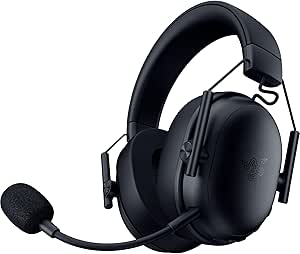 | Best Lightweight Wireless Headset | Driver size: 50 mm TriForce Gen-2 | Connectivity: 2.4 GHz wireless, Bluetooth, and USB | Microphone: Detachable HyperClear cardioid, 9.9 mm | VIEW LATEST PRICE | See Our Full Breakdown |
| Razer Viper V4 Pro Wireless Esports Gaming Mouse, 49 g, Black |  | Best for Competitive Lightweight Play | Connectivity: Wireless; USB Type-A to USB Type-C cable included | Weight: 49 g | Sensor: Razer Focus Pro 50K Optical Sensor Gen-3 | VIEW LATEST PRICE | See Our Full Breakdown |
| Razer Tartarus V2 Left-Handed Gaming Keypad with 32 Programmable Keys | 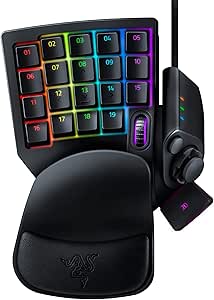 | Best for Custom Controls | Key count: 32 programmable keys | Switch type: Mecha-Membrane | Hand orientation: Left | VIEW LATEST PRICE | See Our Full Breakdown |
| Razer Basilisk V3 Wired Ergonomic Gaming Mouse | | Best for Programmable Mouse Controls | Connectivity: USB wired | Hand orientation: Right-handed | Programmable buttons: 11 | VIEW LATEST PRICE | See Our Full Breakdown |
| Razer Mamba Elite Wired Gaming Mouse with 16,000 DPI Optical Sensor |  | Best for Onboard Profiles | Connectivity: USB wired | Sensor: Optical | Maximum sensitivity: 16,000 DPI | VIEW LATEST PRICE | See Our Full Breakdown |
| Razer Huntsman Mini 60% Gaming Keyboard with Linear Optical Switches |  | Best Compact Keyboard | Form factor: 60% | Number of keys: 61 | Switch type: Linear optical | VIEW LATEST PRICE | See Our Full Breakdown |
| Razer Gigantus V2 XXL Cloth Gaming Mouse Pad, Black |  | Best XXL Desk Coverage | Size: XXL | Dimensions: 16.14 x 37.01 in | Surface: Textured micro-weave cloth | VIEW LATEST PRICE | See Our Full Breakdown |
| Razer gaming gear | Connectivity |
|---|---|
| Razer Basilisk V3 X HyperSpeed | Bluetooth and Razer HyperSpeed Wireless |
| Razer Goliathus Extended Chrom | — |
| Razer BlackShark V2 X Gaming H | 3.5 mm audio jack |
| Razer DeathAdder Essential Erg | Wired |
| Razer Naga V3 Pro Wireless MMO | Razer HyperSpeed Wireless, Bluetooth, USB-C wired |
| Razer Basilisk V3 Ergonomic Wi | USB wired |
| Razer Kraken Wired Gaming Head | Wired, 3.5 mm headphone jack |
| Razer BlackShark V3 Pro Wirele | 2.4 GHz wireless, Bluetooth 5.3, USB, and 3.5 mm |
| Razer BlackShark V3 X HyperSpe | 2.4 GHz wireless, Bluetooth, and USB |
| Razer Viper V4 Pro Wireless Es | Wireless; USB Type-A to USB Type-C cable included |
| Razer Tartarus V2 Left-Handed | Wired USB-A |
| Razer Basilisk V3 Wired Ergono | USB wired |
| Razer Mamba Elite Wired Gaming | USB wired |
| Razer Huntsman Mini 60% Gaming | Wired USB-C; detachable Type-C to Type-A cable |
| Razer Gigantus V2 XXL Cloth Ga | — |
More Details on Our Top Picks
Razer Basilisk V3 X HyperSpeed Wireless Gaming Mouse
The Basilisk V3 X HyperSpeed is my pick for players who want wireless freedom without giving up useful controls. Its nine programmable controls give it more room for remaps and macros than the DeathAdder Essential’s five buttons, while Bluetooth and HyperSpeed let you favor longer battery life or a more responsive wireless connection. The 18,000 DPI sensor and Gen-2 mechanical switches round out a capable everyday gaming setup, and Chroma RGB adds visual customization.
The tradeoff is its right-handed shape and reliance on an AA battery. It also lacks the Naga V3 Pro’s interchangeable side plates and far greater button count, so MMO players who want dense command access should look there instead. I’d choose the Basilisk for a flexible wireless mouse, not for left-handed use or extensive MMO mapping.
Pros:- HyperSpeed Wireless and Bluetooth offer a choice between gaming-focused connectivity and longer battery life
- Nine programmable controls support more remapping than the DeathAdder Essential
- Up to 285 hours on HyperSpeed or 535 hours on Bluetooth
- 18,000 DPI sensor, Gen-2 mechanical switches, and customizable Chroma RGB
Cons:- Right-handed design excludes left-handed users who need a comfortable fit
- Uses an AA battery rather than USB-C charging
- Has fewer dedicated MMO controls and less layout flexibility than the Naga V3 Pro
Best for: Right-handed PC or Mac players who want wireless connectivity, programmable controls, and long battery life for mixed gaming and everyday use
Not ideal for: Left-handed players, or MMO players who need many dedicated side buttons and interchangeable layouts
- Connectivity:Bluetooth and Razer HyperSpeed Wireless
- Programmable controls:9
- Sensor:5G Advanced optical sensor
- Maximum sensitivity:18,000 DPI
- Switches:Razer Mechanical Mouse Switches Gen-2
- Battery life:Up to 285 hours on HyperSpeed Wireless; up to 535 hours on Bluetooth
- Battery:1 included AA battery
- Hand orientation:Right-handed
Our verdict“Choose the Basilisk V3 X if you want a configurable right-handed wireless mouse, but pick the Naga V3 Pro for extensive MMO button access.”
Razer Goliathus Extended Chroma RGB Gaming Mousepad, Black
The Goliathus Extended Chroma RGB is the mousepad pick for a desk setup where a broad cloth surface and coordinated lighting matter as much as mouse control. Its micro-textured cloth is designed to balance speed and precision, while the nonslip rubber base helps keep the mat steady during play. The extended format gives the mouse room to travel and places customizable Chroma lighting along the edge, a visual feature the Gigantus V2 XXL does not offer.
That lighting is also the main reason to choose this model over a simpler cloth pad: synchronization depends on a compatible setup, so it adds little for buyers who do not use RGB software or supported devices. I’d favor the Goliathus for an illuminated desk, but buyers who prioritize a straightforward pad over lighting can skip the extra feature set.
Pros:- Large micro-textured cloth surface balances speed and precision
- Customizable Chroma RGB edge lighting supports 16.8 million colors
- Lighting can synchronize with compatible games and devices
- Nonslip natural-foam rubber base helps keep the mat in place
Cons:- Lighting synchronization requires a compatible setup to make full use of it
- Chroma edge lighting adds setup complexity compared with a plain cloth pad
- The feature set is less compelling for buyers who only need a basic mouse surface
Best for: PC gamers building an RGB-synchronized desk who want a large cloth surface for mouse movement
Not ideal for: Players who do not use compatible lighting software or want a simple mousepad without edge lighting
- Surface material:Micro-textured cloth
- Base material:Natural-foam rubber
- Lighting:Customizable Chroma RGB edge lighting
- Supported colors:16.8 million
- Shape:Rectangular
- Color:Classic Black
- Warranty:1 year
Our verdict“Pick the Goliathus Extended Chroma for a large, illuminated cloth surface, or choose the Gigantus V2 XXL if RGB lighting is not a priority.”
Razer BlackShark V2 X Gaming Headset with 7.1 Surround Sound
The BlackShark V2 X makes the most sense for players who want a lightweight, wired headset that can move between platforms. At 240 g, it is lighter than many over-ear gaming designs, and its closed earcups with breathable foam aim to combine noise isolation with comfort. The 50 mm titanium-coated drivers and cardioid HyperClear microphone make it a more complete communication setup than relying on a separate mic, while the 3.5 mm connection avoids a wireless battery to manage.
Unlike the wireless BlackShark V3 X HyperSpeed, this model keeps you tethered, and its software-enabled 7.1 surround sound is limited to Windows 10 64-bit. That makes the advertised surround feature less useful for console players. I’d pick it for straightforward cross-platform wired use, not for wireless freedom or platform-independent surround sound.
Pros:- Lightweight 240 g design with breathable foam cushions
- Closed earcups help reduce sound leakage
- 50 mm titanium-coated drivers and cardioid HyperClear microphone
- 3.5 mm connection supports PC, Mac, PlayStation, Xbox One, and Nintendo Switch
Cons:- Wired connection limits movement compared with the BlackShark V3 X HyperSpeed
- Software-enabled 7.1 surround sound is limited to Windows 10 64-bit
- Xbox One may require a separately purchased stereo adapter
Best for: Players who want a lightweight, wired over-ear headset with a built-in mic for PC and console gaming
Not ideal for: Gamers who need wireless movement or expect software-enabled 7.1 surround sound to work across platforms
- Driver size:50 mm
- Connectivity:3.5 mm audio jack
- Surround sound:Software-enabled 7.1 on Windows 10 64-bit
- Microphone:Razer HyperClear cardioid
- Design:Over-ear, closed earcups
- Weight:240 g
- Compatibility:PC, Mac, PS4, PS5, Xbox One, Nintendo Switch
- Warranty:2 years
Our verdict“Choose the BlackShark V2 X for a light, wired headset that works across platforms, but choose the BlackShark V3 X HyperSpeed if wireless play matters more.”
Razer DeathAdder Essential Ergonomic Wired Gaming Mouse, Black
The DeathAdder Essential is the straightforward choice in this lineup: a right-handed ergonomic mouse with a wired connection, five programmable buttons, and a 6,400 DPI optical sensor. Its shape is aimed at comfortable extended use, and the textured scroll wheel provides a more secure feel during routine navigation. Compared with the wireless Basilisk V3 X, it gives up Bluetooth, HyperSpeed, extra controls, and a higher maximum sensitivity in exchange for a simpler corded setup.
The five-meter cable gives room to position the mouse, but it does not remove the drag and desk-management tradeoffs of a wire. Its right-handed shape also rules it out for left-handed players. I’d choose this model for someone who wants a basic programmable Razer mouse and does not need wireless play or MMO-level button access.
Pros:- Ergonomic right-handed design intended for extended use
- Five programmable buttons support remapping and macros
- Optical sensor offers adjustable sensitivity up to 6,400 DPI
- Mechanical switches are rated for up to 10 million clicks
Cons:- Wired connection restricts movement compared with the Basilisk V3 X
- Right-handed shape is unsuitable for left-handed players
- Five buttons provide fewer control options than the Basilisk V3 X or Naga V3 Pro
Best for: Right-handed players who want an uncomplicated wired gaming mouse with a few programmable buttons
Not ideal for: Left-handed users or players who want wireless connectivity, higher sensitivity, or more controls than the Basilisk V3 X
- Connectivity:Wired
- Sensor:Optical
- Maximum sensitivity:6,400 DPI
- Programmable buttons:5
- Switch durability:Up to 10 million clicks
- Hand orientation:Right-handed
- Compatibility:Gaming console, laptop, personal computer
- Cable length:5.0 meters
Our verdict“Choose the DeathAdder Essential for a no-frills wired Razer mouse, but pay attention to the Basilisk V3 X if you want wireless connectivity and more controls.”
Razer Naga V3 Pro Wireless MMO Gaming Mouse with Swappable Side Plates
The Naga V3 Pro is the most specialized mouse here, built for MMO players and others who want commands close to the thumb. Its magnetic side plates swap among 12-, 6-, and 2-button layouts, letting the same mouse adapt from dense MMO keybinds to a less crowded arrangement. With up to 23 programmable buttons, a 50,000 DPI sensor, and a HyperScroll tilt wheel, it offers more control options than the Basilisk V3 X, which is better suited to general-purpose wireless play.
That flexibility brings a learning curve and more hardware than casual players may need. Full Razer Synapse customization is available only on Windows, limiting setup options for macOS users; USB-C wired mode is available, but wireless charging systems are sold separately. I’d choose the Naga for configurable command access, not for a minimal, uncomplicated mouse.
Pros:- Three magnetic side plates provide 12-, 6-, or 2-button layouts
- Up to 23 programmable buttons suit MMO keybinds and complex workflows
- HyperSpeed Wireless, Bluetooth, and USB-C wired connectivity
- Focus Pro 50K sensor and Gen-4 optical switches rated for over 100 million clicks
Cons:- Full Razer Synapse customization is available only on Windows
- Extensive buttons and swappable plates may be unnecessary for general gaming
- Wireless charging systems are sold separately
Best for: MMO players who want extensive thumb-button access and the ability to change mouse layouts for different games
Not ideal for: Casual players who want a simple mouse, or macOS users who need full Razer Synapse customization
- Connectivity:Razer HyperSpeed Wireless, Bluetooth, USB-C wired
- Side plate layouts:12-button, 6-button, and 2-button
- Programmable buttons:Up to 23
- Sensor:Razer Focus Pro 50K Optical Sensor Gen-3
- Maximum sensitivity:50,000 DPI
- Tracking speed and acceleration:930 IPS; 90G
- Switches:Razer Optical Mouse Switches Gen-4; over 100 million clicks
- Battery life:Up to 155 hours on HyperSpeed Wireless; up to 280 hours on Bluetooth
- Software:Razer Synapse; full customization on Windows, core functions and onboard settings on macOS
Our verdict“Choose the Naga V3 Pro if configurable side buttons are central to your MMO setup; the Basilisk V3 X is a simpler fit for general wireless gaming.”
Razer Basilisk V3 Ergonomic Wired Gaming Mouse
The Basilisk V3 is the strongest fit here for players who want more commands under their fingers, rather than the lean, lightweight feel of the Viper V4 Pro. Its 11 programmable buttons and right-handed thumb rest suit games and workflows that benefit from macros or shortcuts, while the scroll wheel can switch between tactile steps and free-spin scrolling. That flexibility makes it a more versatile everyday mouse than a purpose-built competitive model. The tradeoff is its wired connection: there is no wireless freedom for a flexible desk setup or travel. Its contoured shape also favors right-handed users, so left-handed players should skip it. With 11 Chroma zones and switches rated for up to 70 million clicks, it offers plenty of customization, but its bulkier ergonomic approach is less suited to players prioritizing minimal weight.
Pros:- Eleven programmable buttons support game commands, macros, and desktop shortcuts.
- Right-handed ergonomic shape includes a thumb rest for a supported grip.
- Scroll wheel switches between tactile scrolling and free-spin mode.
- Eleven Chroma lighting zones and Gen-2 optical switches rated for up to 70 million clicks.
Cons:- USB cable limits portability and adds wire management to the desk.
- Right-handed shape is not suited to left-handed users.
- Listed operating-system compatibility specifies Windows 10 minimum.
Best for: Right-handed PC players who want programmable shortcuts, a thumb rest, and a versatile scroll wheel for gaming and everyday use.
Not ideal for: Left-handed players, frequent travelers, or competitive users who put low weight and wireless movement ahead of extra controls.
- Connectivity:USB wired
- Buttons:11 programmable
- Maximum sensitivity:26,000 DPI
- Scroll wheel:Free-spin and tactile modes
- Lighting:11 Razer Chroma RGB zones
- Switches:Razer Optical Mouse Switches Gen-2; rated for up to 70 million clicks
- Hand orientation:Right-handed
- Operating system:Windows 10 minimum required
Our verdict“Choose the Basilisk V3 if you want a wired, right-handed mouse rich in programmable controls rather than the lighter wireless focus of the Viper V4 Pro.”
Razer Kraken Wired Gaming Headset with Retractable Microphone, Black/Blue
The Razer Kraken is the straightforward headset pick for players who want a familiar 3.5 mm connection and onboard volume and mute controls without relying on a wireless setup. Its cooling gel-infused cushions and lightweight aluminum frame are geared toward longer sessions, while the retractable noise-isolating microphone tucks away when voice chat is not needed. Compared with the BlackShark V3 X HyperSpeed, the Kraken gives up wireless connections and the listed 70-hour battery life in exchange for a cable-based setup that needs no headset charging. Its software-enabled 7.1 surround is limited to 64-bit Windows 10, so buyers on other platforms should not count on that feature. This is a less flexible choice than either BlackShark, but its wired controls and retractable mic keep the basic gaming setup uncomplicated.
Pros:- 3.5 mm connection works with devices that support a standard headphone jack.
- Cooling gel-infused cushions are designed for extended wear.
- Retractable noise-isolating microphone can be stowed when not in use.
- In-line volume and mute controls avoid reaching for software.
Cons:- Wired connection restricts movement compared with both BlackShark wireless headsets.
- Software-enabled 7.1 surround is limited to 64-bit Windows 10.
- The listing does not specify battery-free wireless options because the headset is cable-connected.
Best for: Console and PC players who prefer a 3.5 mm wired headset with easy-to-reach mute and volume controls and a retractable mic.
Not ideal for: Players who want wireless freedom, broad multi-platform surround features, or a headset without a cable.
- Model:Kraken for Console (RZ04-02830500-R3U1)
- Driver size:50 mm
- Connectivity:Wired, 3.5 mm headphone jack
- Surround sound:Software-enabled 7.1; 64-bit Windows 10 only
- Microphone:Retractable cardioid noise-isolating
- Controls:In-line volume control and microphone mute switch
- Frame:Bauxite aluminum
- Weight:11.36 ounces
Our verdict“Pick the Kraken for a simple wired gaming setup with a retractable mic, but choose a BlackShark model if wireless connectivity matters more.”
Razer BlackShark V3 Pro Wireless Gaming Headset with ANC, Black
The BlackShark V3 Pro is the most feature-rich headset in this group for buyers who want to move between gaming devices and reduce outside noise. Its hybrid active noise cancellation, four connection types, and up to 70 hours of battery life give it a broader role than the wired Razer Kraken, which relies on a 3.5 mm connection and offers no wireless modes. The Pro also adds a detachable 12 mm microphone and THX Spatial Audio on supported Windows systems. Those extras come with a meaningful tradeoff: at about 367 g, it is heavier than the 270 g BlackShark V3 X HyperSpeed, a distinction that may matter during long sessions. Spatial audio support is also platform-limited, so its feature set is less complete away from supported Windows systems.
Pros:- 2.4 GHz wireless, Bluetooth 5.3, USB, and 3.5 mm connections cover varied setups.
- Hybrid active noise cancellation helps reduce surrounding sound.
- Up to 70 hours of battery life is specified for 2.4 GHz use.
- Detachable HyperClear Full Band microphone and THX Spatial Audio on supported Windows systems.
Cons:- Approximately 367 g makes it heavier than the 270 g BlackShark V3 X HyperSpeed.
- THX Spatial Audio is limited to supported Windows systems.
- The larger feature set may be unnecessary for players who only need a basic wired headset like the Kraken.
Best for: Multi-device players who want ANC, low-latency wireless, and wired fallback options in one premium headset.
Not ideal for: Buyers who prioritize a lightweight headset for long sessions or need THX Spatial Audio across platforms.
- Driver size:50 mm
- Connectivity:2.4 GHz wireless, Bluetooth 5.3, USB, and 3.5 mm
- Microphone:Detachable HyperClear Full Band, 12 mm
- Wireless latency:As low as 10 ms
- Battery life:Up to 70 hours over 2.4 GHz
- Weight:Approximately 367 g
- Spatial audio:THX Spatial Audio with 7.1.4 surround on supported systems
- Compatibility:PC, Mac, PlayStation, Nintendo Switch, and mobile devices
Our verdict“Choose the BlackShark V3 Pro if ANC and flexible multi-device connections justify its added weight over the lighter V3 X HyperSpeed.”
Razer BlackShark V3 X HyperSpeed Wireless Gaming Headset, Black
The BlackShark V3 X HyperSpeed is the better fit for players who want wireless convenience without the added mass of the V3 Pro. At 270 g, it is substantially lighter than the roughly 367 g BlackShark V3 Pro, making weight its clearest point of distinction for extended sessions. It still covers the essentials with 2.4 GHz wireless, Bluetooth, USB connectivity, a detachable cardioid microphone, and a stated 70-hour battery life. The Pro pulls ahead if you need hybrid ANC, 3.5 mm connectivity, or its specified THX Spatial Audio; the V3 X’s 7.1 surround listing does not spell out platform support. That uncertainty makes it a less assured choice for buyers seeking a particular spatial-audio setup. Its simpler feature set is the appeal, provided lightweight comfort matters more than ANC.
Pros:- 270 g design is lighter than the BlackShark V3 Pro.
- Supports 2.4 GHz wireless, Bluetooth, and USB connections.
- Detachable cardioid microphone can be removed when not needed.
- Listed battery life is up to 70 hours.
Cons:- No active noise cancellation is listed, unlike the BlackShark V3 Pro.
- 7.1 surround sound platform support is not specified.
- Battery-life details beyond the stated 70-hour figure are not provided.
Best for: Players seeking a lightweight wireless headset for long gaming sessions across compatible consoles, computers, and mobile devices.
Not ideal for: Buyers who need active noise cancellation, a 3.5 mm fallback, or clearly stated platform support for surround sound.
- Driver size:50 mm TriForce Gen-2
- Connectivity:2.4 GHz wireless, Bluetooth, and USB
- Microphone:Detachable HyperClear cardioid, 9.9 mm
- Surround sound:7.1
- Weight:270 g
- Battery life:Up to 70 hours
- Compatible devices:Mac, PS5, Nintendo Switch, and smartphone
- Warranty:2 years
Our verdict“Choose the V3 X HyperSpeed for a lighter wireless headset, and step up to the V3 Pro if ANC or 3.5 mm connectivity is a priority.”
Razer Viper V4 Pro Wireless Esports Gaming Mouse, 49 g, Black
The Viper V4 Pro is the competitive pick for players who value low weight and fast wireless movement over a large set of extra buttons. At 49 g, its symmetrical design contrasts with the more substantial, right-handed Basilisk V3, which offers a thumb rest and 11 programmable controls instead. The Viper’s Focus Pro 50K Gen-3 sensor, up to 8000 Hz polling, and Gen-4 optical switches are aimed at fine-grained performance customization; its battery is rated for up to 180 hours at 1000 Hz. That figure falls to up to 45 hours at 8000 Hz, so running the highest polling rate means more frequent charging. Razer Synapse 4 is also part of the customization path, which may not suit buyers who want to avoid companion software.
Pros:- 49 g symmetrical wireless design is built for agile movement.
- Focus Pro 50K Gen-3 sensor supports up to 50,000 DPI and 930 IPS tracking.
- Polling rate reaches up to 8000 Hz.
- Battery life is rated for up to 180 hours at 1000 Hz.
Cons:- Battery life drops to up to 45 hours at 8000 Hz polling.
- Some performance customization requires Razer Synapse 4.
- Its streamlined design offers fewer programmable controls than the Basilisk V3.
Best for: Competitive players on PC or Mac who want a lightweight symmetrical wireless mouse and are willing to tune performance settings.
Not ideal for: Buyers who want numerous programmable controls, a thumb rest, or the longest battery life while using the highest polling rate.
- Connectivity:Wireless; USB Type-A to USB Type-C cable included
- Weight:49 g
- Sensor:Razer Focus Pro 50K Optical Sensor Gen-3
- Maximum DPI:50,000
- Maximum tracking speed:930 IPS
- Polling rate:Up to 8000 Hz
- Battery life:Up to 180 hours at 1000 Hz; up to 45 hours at 8000 Hz
- Switches:Razer Optical Mouse Switches Gen-4; rated for over 100 million clicks
- Compatibility:PC and Mac; Razer Synapse 4
Our verdict“Pick the Viper V4 Pro for lightweight, high-polling wireless play, but choose the Basilisk V3 if extra buttons and ergonomic support matter more.”
Razer Tartarus V2 Left-Handed Gaming Keypad with 32 Programmable Keys
The Razer Tartarus V2 is a specialized alternative to a standard keyboard: its 32 programmable keys, thumbpad, and scroll wheel put a wide range of commands within reach of one hand. That makes it a better fit than the Huntsman Mini for players who want dedicated macros and game-specific layouts, rather than a compact QWERTY keyboard. The adjustable palm rest and Mecha-Membrane keys add comfort and tactile feedback, while Chroma lighting helps distinguish custom key groups. The tradeoff is its focused design: it is intended for left-handed, single-hand operation, not as a general replacement for a keyboard. It also needs a wired USB-A connection, so it is less convenient for setups built around wireless peripherals.
Pros:- 32 programmable keys support custom commands and macros.
- 8-way thumbpad and 3-way scroll wheel provide extra controls without reaching for a mouse.
- Two-position adjustable palm rest supports different hand positions.
- Customizable Chroma RGB backlighting can distinguish key groups.
Cons:- Its left-handed, one-hand layout makes it a specialized companion rather than a general keyboard.
- Wired USB-A connectivity limits placement and requires an available port.
Best for: PC players who want one-handed access to custom commands, macros, and movement controls in games with many bindings.
Not ideal for: Buyers seeking a conventional keyboard, wireless control, or a keypad that works equally well for either hand.
- Key count:32 programmable keys
- Switch type:Mecha-Membrane
- Hand orientation:Left
- Connectivity:Wired USB-A
- Controls:8-way thumbpad and 3-way scroll wheel
- Backlighting:Customizable RGB, 16.8 million colors
- Palm rest:Adjustable, two positions
- Dimensions:6.02 x 2.36 x 0.8 in
Our verdict“Choose the Tartarus V2 if you want a dedicated, programmable control hub beside your keyboard; skip it if you need a standard or wireless input device.”
Razer Basilisk V3 Wired Ergonomic Gaming Mouse
The Razer Basilisk V3 earns its place for right-handed players who want a mouse that can take on more commands than a basic gaming model. Its 11 programmable buttons and thumb rest suit games where frequent ability or equipment changes make extra controls useful, while the dual-mode HyperScroll wheel can switch between controlled scrolling and faster free movement. Compared with the Mamba Elite, the Basilisk offers more programmable buttons and a more versatile scroll wheel; the Mamba is the simpler pick if nine buttons are enough. The Basilisk’s 26,000 DPI optical sensor gives ample sensitivity adjustment, but high sensitivity alone will not suit every player. Its right-handed shape and wired USB connection also rule it out for left-handed users and buyers who want wireless freedom.
Pros:- 11 programmable buttons support customized game commands.
- Ergonomic right-handed shape includes a thumb rest.
- Dual-mode HyperScroll tilt wheel supports both controlled and fast scrolling.
- 26,000 DPI optical sensor and customizable Chroma lighting offer broad adjustment.
Cons:- Right-handed shaping excludes left-handed users.
- Wired USB connectivity restricts movement compared with wireless options.
- Its high sensitivity range may be unnecessary for players who prefer simple settings.
Best for: Right-handed PC gamers who want extra thumb-accessible commands, adjustable scroll behavior, and a wired ergonomic shape.
Not ideal for: Left-handed players, wireless-first setups, or buyers who prefer a lighter, less feature-dense mouse.
- Connectivity:USB wired
- Hand orientation:Right-handed
- Programmable buttons:11
- Maximum sensitivity:26,000 DPI
- Scroll wheel:Dual-mode HyperScroll tilt wheel
- RGB lighting:11 customizable Chroma zones
- Switches:Razer Optical Mouse Switches Gen 2
- Compatibility:Laptops and personal computers; Windows 10 and Windows 11
Our verdict“Pick the Basilisk V3 if you want a wired right-handed mouse with extensive controls and a versatile wheel, rather than wireless convenience.”
Razer Mamba Elite Wired Gaming Mouse with 16,000 DPI Optical Sensor
The Razer Mamba Elite is a strong fit for players who value saved configurations over the Basilisk V3’s larger button count. It has nine programmable buttons and onboard memory for up to five profiles, which helps keep preferred setups available when moving between compatible PCs. Its 16,000 DPI optical sensor is less sensitive on paper than the Basilisk V3’s 26,000 DPI sensor, but the Mamba still offers a broad adjustment range for many gaming styles. The mechanical switches are rated for up to 50 million clicks, and Chroma lighting adds visual customization. The main compromise is a wired, right-handed design; unlike a wireless mouse, it needs a cable, and left-handed players will need another shape.
Pros:- Nine programmable buttons provide flexible game controls.
- Onboard memory stores up to five profiles.
- Mechanical switches are rated for up to 50 million clicks.
- Chroma RGB lighting supports customizable effects.
Cons:- Wired connectivity limits movement compared with wireless mice.
- Right-handed design does not suit left-handed users.
- Its 16,000 DPI maximum is lower than the Basilisk V3’s stated 26,000 DPI.
Best for: Right-handed PC players who want programmable buttons and stored profiles for different games or setups.
Not ideal for: Left-handed users, wireless-focused players, or anyone who specifically wants the Basilisk V3’s extra programmable buttons and higher stated sensitivity.
- Connectivity:USB wired
- Sensor:Optical
- Maximum sensitivity:16,000 DPI
- Programmable buttons:9
- Switches:Razer Mechanical, rated for up to 50 million clicks
- Onboard profiles:Up to 5
- Hand orientation:Right-handed
- Weight:4.96 oz
Our verdict“Choose the Mamba Elite if saved profiles and nine programmable buttons matter more to you than wireless operation or the Basilisk V3’s higher sensitivity ceiling.”
Razer Huntsman Mini 60% Gaming Keyboard with Linear Optical Switches
The Razer Huntsman Mini makes the most sense when desk space and portability matter more than having every key in a full-size layout. Its 60% form factor leaves more room for mouse movement than a conventional keyboard, while 1.0 mm actuation linear optical switches are suited to players who favor quick, direct key presses. Compared with the Tartarus V2, it is a compact standard keyboard rather than a one-handed macro keypad, so it is more practical for general typing and play but offers fewer dedicated controls. Doubleshot PBT keycaps and an aluminum top frame bring sturdier materials to this small design. The tradeoff is the reduced layout: buyers who rely on dedicated navigation or function keys may need time to adjust. It is wired and not water resistant.
Pros:- 60% layout frees desk space for mouse movement and is easier to pack than a full-size keyboard.
- Linear optical switches have a 1.0 mm actuation distance.
- Oil-resistant doubleshot PBT keycaps and an aluminum top frame provide durable materials.
- Detachable USB-C cable, programmable macros, and Chroma RGB add flexibility.
Cons:- The compact layout removes dedicated keys and may require adjustment.
- Wired connectivity does not offer wireless placement.
- It is not water resistant.
Best for: Players with limited desk space or frequent travel who want a compact keyboard for gaming and everyday typing.
Not ideal for: Users who depend on dedicated function and navigation keys, need wireless operation, or want water resistance.
- Form factor:60%
- Number of keys:61
- Switch type:Linear optical
- Actuation distance:1.0 mm
- Connectivity:Wired USB-C; detachable Type-C to Type-A cable
- Keycaps:Oil-resistant doubleshot PBT
- Frame:Aluminum top frame
- Water resistance:Not water resistant
Our verdict“Pick the Huntsman Mini if a compact, fast-acting keyboard suits your setup; choose a fuller layout if dedicated keys matter more than desk space.”
Razer Gigantus V2 XXL Cloth Gaming Mouse Pad, Black
The Razer Gigantus V2 XXL is the lineup’s pick for players who want one continuous surface for a mouse and much of their desk, rather than a smaller pad that covers only the mouse area. Its micro-weave cloth surface is designed to support smooth tracking, and the non-slip base helps keep the pad steady during movement. At 37.01 inches wide, it offers far more coverage than a compact mouse mat; compared with the Goliathus Extended Chroma RGB, this model’s appeal is its cloth surface and substantial 4 mm foam construction rather than lighting-focused styling. That thickness can help it lie flat on imperfect surfaces, though it may feel bulky and needs considerable desk space. The black, rectangular design keeps the setup simple but leaves little room for a small desk.
Pros:- XXL dimensions provide broad coverage for mouse movement and desk use.
- Micro-weave cloth surface is designed for smooth, responsive sensor tracking.
- Non-slip base helps keep the pad stable during play.
- 4 mm high-density rubber foam is designed to lie flat on imperfect surfaces.
Cons:- The 37.01-inch width requires substantial desk space.
- Its 4 mm thickness may feel bulky compared with thinner pads.
- The listed black cloth design does not provide RGB lighting.
Best for: PC gamers who make broad mouse movements and want a stable, continuous cloth surface across a large desk area.
Not ideal for: Small-desk users, players who prefer thin mouse pads, or anyone looking for built-in RGB lighting.
- Size:XXL
- Dimensions:16.14 x 37.01 in
- Surface:Textured micro-weave cloth
- Thickness:4 mm
- Material:Rubber foam
- Base:Non-slip
- Color:Classic Black
- Weight:2 lb
Our verdict“Choose the Gigantus V2 XXL if you need generous, stable cloth coverage; skip it if desk space is tight or you want a thinner, illuminated pad.”

How We Picked
I compared the 15 items by the job each one is meant to do, rather than treating every Razer product as a direct substitute. For mice, I weighed shape, control layout, connection type, and whether a model favors broad everyday use, MMO commands, or lightweight competitive play. For headsets, I focused on wired versus wireless use, microphone and audio features, and the practical difference between a simpler headset and one with ANC. I also compared the keyboard, keypad, and pads by desk fit, control style, and how much they add to a setup beyond a standard mouse-and-keyboard arrangement.
The order gives priority to usefulness across more players, then places specialized and premium picks where their added features serve a clear audience. A flexible wired mouse ranks ahead of a niche peripheral for general recommendations, while options such as the Naga V3 Pro and Tartarus V2 remain strong choices for players who need their specific controls. I also weighed meaningful drawbacks: wireless models add convenience but may be more than a wired setup needs, and compact or specialized layouts can require adjustment. The ranking reflects those differences, not a claim that one product suits every game or grip.
Factors to Consider When Choosing Best Razer Gaming Gear
Before choosing Razer gear, I’d match each purchase to a specific gap in your setup. A mouse, headset, keyboard, keypad, and pad solve different problems, so a feature-rich peripheral may add little if it does not fit your games, desk, or habits. These factors help separate useful upgrades from features you may rarely use.
Start With Your Main Game and Control Needs
Different genres reward different forms of control, so choose around what you do most often rather than chasing the longest feature list. MMO players may benefit from extra side controls or programmable keypad inputs, while players focused on quick aim may prefer a lighter mouse with a simpler layout. A general-purpose ergonomic mouse can be a better fit for mixed gaming and everyday use. One common mistake is buying a specialized control layout for a game that rarely uses it. If you play several genres, prioritize a shape and layout that remain comfortable across them.
Choose Wired or Wireless Based on Your Setup
Wireless gear reduces cable clutter and makes moving a headset or mouse around easier, but a wired connection can be a straightforward choice for a fixed desk. Think about how often you use the device away from its usual place and whether charging another accessory fits your routine. Wireless is not automatically better if you value a simple setup and do not mind a cable. Likewise, wired should not be the default if cable drag or desk movement already bothers you. Compare the exact connection features of each model rather than assuming every product in a series works the same way.
Treat Shape and Fit as Performance Features
A mouse sensor or headset feature matters less if the device feels awkward during long sessions. Mouse shape, button reach, headset fit, and microphone position all affect how naturally you can use the gear. If possible, compare dimensions and control placement with a device you already find comfortable. Buyers often focus on sensor numbers or surround sound labels and overlook physical fit. For a mouse, grip style and hand size can change which body shape feels manageable. For a headset, consider whether you need it for long gaming sessions, calls, or both.
Decide Whether Extra Features Earn Their Place
Programmable controls, lighting, ANC, and swappable components can add flexibility, but each is useful only if it suits your routine. Ask which feature will change how you play or work, then decide whether that benefit is worth extra setup and maintenance. RGB lighting may help coordinate a desk, but it does not improve tracking or sound. A modular mouse can adapt to different games, though the added controls may feel unnecessary for simpler play. Avoid choosing a premium feature set just because it sounds more capable; a simpler model can be the better match when you will use only its core functions.
Plan for Desk Space and Layout Changes
Large pads, compact keyboards, and separate keypads reshape how a desk works, so measure the available area before choosing them. An extended mousepad can provide a shared surface for keyboard and mouse, while an XXL cloth pad needs room to stay flat. A 60% keyboard frees desk space but removes keys that some users rely on for work or games. A separate gaming keypad adds dedicated controls while leaving the main keyboard in place, though it occupies additional space. Commonly, buyers check the product dimensions but forget to account for mouse movement, cables, and nearby accessories.
Build a Balanced Setup Instead of Buying by Brand
Not every part of a setup needs the same level of specialization. A strong general-purpose mouse paired with a headset that fits your communication needs may help more than several overlapping input devices. Consider which current peripheral limits you most: comfort, sound isolation, desk control, or available space. Then upgrade that part first and keep other gear that still serves you well. Buying multiple products with similar roles can leave useful features unused. A balanced setup should make your regular games easier to play without making everyday use less comfortable.
Frequently Asked Questions
Should I choose the Basilisk V3 or the Viper V4 Pro for a gaming mouse?
I’d choose the Basilisk V3 if ergonomic comfort and a broader set of controls matter more than minimizing weight. The Viper V4 Pro suits players who want a lightweight wireless mouse with a competitive focus. Neither shape is a universal fit, so hand size and grip style should guide the final choice. If you play varied games and want a more general-purpose layout, the Basilisk is the safer direction. If fast, low-effort movement is your priority, the Viper’s design is more closely aligned with that goal.
Which Razer headset makes sense if I play in a noisy room?
The BlackShark V3 Pro is the clearest match in this group for buyers seeking active noise cancellation. It also makes more sense if you want a wireless headset and value those added features enough to accept a more involved device. If ANC is not a priority, the wired BlackShark V2 X or Kraken may be simpler choices. The BlackShark V3 X HyperSpeed offers wireless convenience but is a different proposition from the Pro model. Choose based on the room and connection needs you actually have, not on the assumption that every wireless headset blocks outside sound.
Is the Naga V3 Pro a good choice if I play more than MMO games?
It can work for mixed gaming if you will use its swappable side plates and extra controls across more than one game. The Naga is more specialized than the Basilisk V3, so its extra inputs may feel like clutter if you mainly play games with simple control demands. Consider whether you already use mouse buttons for abilities, shortcuts, or repeated commands. If not, a general-purpose mouse is likely easier to adapt to different genres. The Naga makes the most sense when its configurable layout solves a real control problem.
Will a 60% Huntsman Mini work as my only keyboard?
It can, provided you are comfortable accessing functions through alternate key combinations and do not rely on a full-size layout. The compact footprint leaves more room for mouse movement, which can help a crowded gaming desk. However, fewer dedicated keys may slow workflows that use navigation, function, or number keys often. Think about gaming and everyday tasks before replacing a larger keyboard. If you are unsure, compare your most-used shortcuts with the Mini’s layout rather than deciding by desk size alone.
Should I get the Goliathus Extended Chroma or Gigantus V2 XXL mousepad?
Choose the Goliathus Extended Chroma if you want an illuminated extended surface that can cover space beneath both mouse and keyboard. The Gigantus V2 XXL is the more straightforward choice if a broad cloth pad matters more than RGB lighting. Before deciding, check your desk dimensions and whether you want the keyboard sitting on the pad. A larger surface can give more room for mouse movement, but it also needs space to lie flat and stay clear of other items. The key difference here is desk coverage and lighting, not a headset or mouse feature.
Conclusion
For the best overall, I’d choose the Basilisk V3 for its broad usefulness and ergonomic control layout. The best value direction is a simpler wired option such as the DeathAdder Essential for buyers who want a basic gaming mouse without a wireless feature set. For the best premium pick, the BlackShark V3 Pro brings wireless audio and ANC to the headset category. The best choice for beginners is the BlackShark V2 X if a straightforward wired headset is the priority, while the Naga V3 Pro is best for MMO players who need configurable side controls. Choose the Viper V4 Pro for a lightweight competitive mouse, the Huntsman Mini for a compact keyboard, or the Gigantus V2 XXL for broad cloth-pad coverage; match the purchase to the gap in your setup rather than buying every category at once.
Black Friday Picks

Kindle Paperwhite Signature Edition (2024), 32 GB, Metallic Black
As an affiliate, we earn on qualifying purchases.