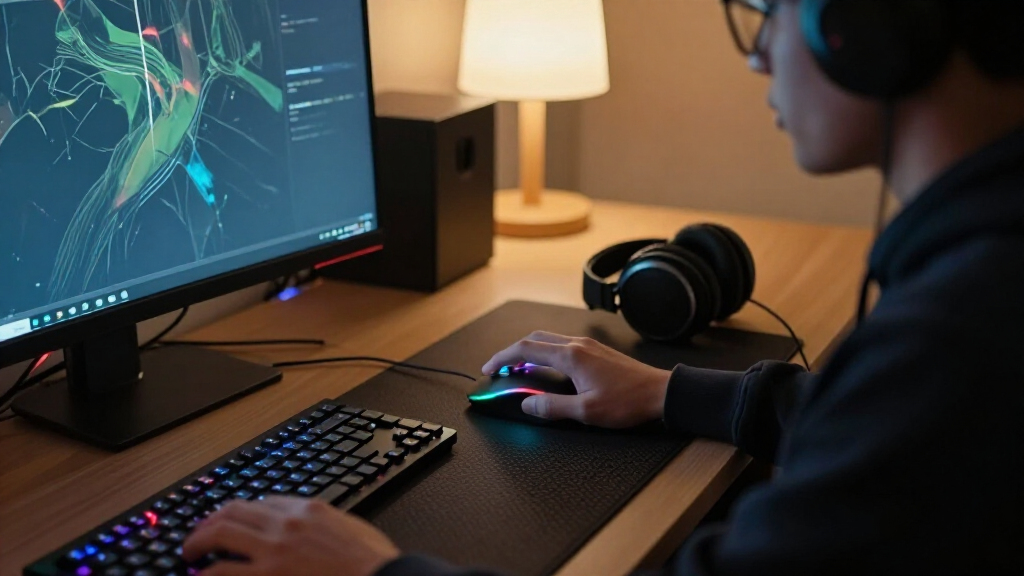

The Logitech G502 X Plus is my best overall pick for gaming mice because it pairs wireless freedom with a versatile control layout. For a simpler, lighter-feeling wireless choice, the Razer Viper V3 HyperSpeed stands out, while the wired Razer Basilisk V3 suits players who want an ergonomic shape and extra controls without wireless setup. The main tradeoffs are comfort versus weight, extra buttons versus a cleaner shell, and wireless convenience versus a cable-free setup’s charging and configuration needs. There is no single best shape or layout for every hand and game. Read on for the full comparison and advice on matching a mouse to your play style.

Get the latest gadgets delivered free with Prime
- Fast, free delivery on millions of items
- Prime Video, Amazon Music and more included
- Member-only deals all year
Complete the kit



Key Takeaways
- The G502 family offers the broadest control choices: the G502 X Plus and G502 Lightspeed bring wireless play, while the G502 HERO keeps the familiar shape in a wired design.
- Simple wireless mice make a different compromise: the G305 and Viper V3 HyperSpeed favor pared-back control layouts over the more button-heavy Basilisk and G502 designs.
- Basilisk models are the ergonomic-control picks: the wired Basilisk V3 avoids wireless setup, while the Basilisk V3 X HyperSpeed and V3 Pro add wireless options at different feature levels.
- Low-complexity options remain useful: the Redragon M612 and M810 PRO offer more accessible wired and wireless routes, but buyers should weigh their feature sets and fit against premium alternatives.
- The list spans very different priorities: the GravaStar Mercury M2 brings a distinctive design, while the Logitech G PRO X2 SUPERSTRIKE is a specialized pick rather than the safest choice for someone seeking a conventional all-rounder.
| Logitech G502 X Plus Wireless RGB Gaming Mouse, Black |  | Best for Button-Heavy Games | Connectivity: USB and wireless | Sensor: HERO 25K optical | Maximum sensitivity: 25,600 DPI | VIEW LATEST PRICE | See Our Full Breakdown |
| Logitech G305 LIGHTSPEED Wireless Gaming Mouse, White |  | Best Lightweight Value | Sensor: HERO optical | Sensitivity: 200–12,000 DPI | Wireless response time: 1 ms | VIEW LATEST PRICE | See Our Full Breakdown |
| Razer Basilisk V3 X HyperSpeed Wireless Gaming Mouse |  | Best for Dual-Wireless Flexibility | Connectivity: Razer HyperSpeed Wireless and Bluetooth | Sensor: 5G Advanced 18K optical | Maximum sensitivity: 18,000 DPI | VIEW LATEST PRICE | See Our Full Breakdown |
| Logitech G PRO X2 SUPERSTRIKE Wireless Gaming Mouse |  | Best for Custom Click Feel | Connectivity: LIGHTSPEED wireless and USB | Sensor: HERO 2 | Maximum sensitivity: Listing states both 44,000 DPI and 26,000 DPI | VIEW LATEST PRICE | See Our Full Breakdown |
| Logitech G703 Lightspeed Wireless Gaming Mouse – Black |  | Best Ergonomic All-Rounder | Sensor: HERO 25K | DPI range: 100–25,600 DPI | Connectivity: LIGHTSPEED wireless | VIEW LATEST PRICE | See Our Full Breakdown |
| Logitech G502 HERO Wired Gaming Mouse |  | Best for Button-Heavy Play | Connectivity: USB wired | Sensor: Optical | Maximum sensitivity: 25,600 DPI | VIEW LATEST PRICE | See Our Full Breakdown |
| Logitech G502 Lightspeed Wireless Gaming Mouse | 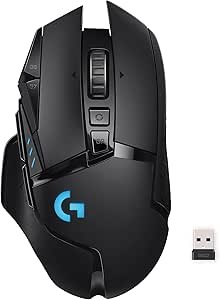 | Best Wireless Feature-Rich Pick | Connectivity: LIGHTSPEED wireless | Report rate: 1 ms | Sensor: HERO 25K | VIEW LATEST PRICE | See Our Full Breakdown |
| Logitech G305 LIGHTSPEED Wireless Gaming Mouse, Black |  | Best Compact Wireless Pick | Sensor: HERO optical | Sensitivity range: 200–12,000 DPI | Report rate: 1 ms | VIEW LATEST PRICE | See Our Full Breakdown |
| GravaStar Mercury M2 Wireless Gaming Mouse |  | Best Multi-Connection Lightweight Pick | Sensor: PAW3395 optical | Maximum sensitivity: 26,000 DPI | Polling rate: 1,000 Hz | VIEW LATEST PRICE | See Our Full Breakdown |
| Razer Basilisk V3 Wired Ergonomic Gaming Mouse |  | Best Ergonomic Wired Pick | Connectivity: USB wired | Design: Right-handed ergonomic with thumb rest | Sensor: Optical | VIEW LATEST PRICE | See Our Full Breakdown |
| Razer Basilisk V3 Pro Wireless Gaming Mouse |  | Best for Button-Rich Wireless Play | Connectivity: 2.4GHz wireless, Bluetooth, USB | Sensor: Razer Focus Pro 30K optical sensor | Switches: Razer Optical Mouse Switches Gen-3 | VIEW LATEST PRICE | See Our Full Breakdown |
| Razer Viper V3 HyperSpeed Wireless Gaming Mouse |  | Best for Claw and Fingertip Grips | Connectivity: HyperSpeed wireless | Sensor: Focus Pro 30K optical | Maximum sensitivity: 30,000 DPI | VIEW LATEST PRICE | See Our Full Breakdown |
| Razer Basilisk V3 Pro 35K Wireless Gaming Mouse |  | Best Premium Feature Set | Sensor: Razer Focus Pro 35K Optical Sensor Gen-2 | Maximum sensitivity: 35,000 DPI | Connectivity: 2.4GHz wireless, Bluetooth, wired USB-C | VIEW LATEST PRICE | See Our Full Breakdown |
| Redragon M612 Wired RGB Optical Gaming Mouse |  | Best Wired Button Value | Connectivity: USB wired | Sensor: Optical | DPI range: 500–8000 | VIEW LATEST PRICE | See Our Full Breakdown |
| Redragon M810 PRO Wireless RGB Gaming Mouse |  | Best Rechargeable Wireless Pick | Connectivity: 2.4GHz wireless, USB-C | Sensor: Pixart PAW3325 optical | Maximum sensitivity: 12,000 DPI | VIEW LATEST PRICE | See Our Full Breakdown |
| gaming mice | Connectivity | Sensor | Buttons | Battery life |
|---|---|---|---|---|
| Logitech G502 X Plus Wireless | USB and wireless | HERO 25K optical | 13 | Up to 120 hours |
| Logitech G305 LIGHTSPEED Wirel | USB wireless receiver | HERO optical | Six programmable | Up to 250 hours |
| Razer Basilisk V3 X HyperSpeed | Razer HyperSpeed Wireless and Bluetooth | 5G Advanced 18K optical | — | Up to 285 hours with HyperSpeed; up to 535 hours with Bluetooth |
| Logitech G PRO X2 SUPERSTRIKE | LIGHTSPEED wireless and USB | HERO 2 | Five | 60–90 hours |
| Logitech G703 Lightspeed Wirel | LIGHTSPEED wireless | HERO 25K | Six programmable | Up to 35 hours of continuous use |
| Logitech G502 HERO Wired Gamin | USB wired | Optical | 11 programmable | — |
| Logitech G502 Lightspeed Wirel | LIGHTSPEED wireless | HERO 25K | 11 programmable | Up to 60 hours |
| Logitech G305 LIGHTSPEED Wirel | LIGHTSPEED wireless with USB receiver | HERO optical | Six programmable | Up to 250 hours |
| GravaStar Mercury M2 Wireless | 2.4 GHz wireless, Bluetooth, USB wired | PAW3395 optical | Five programmable | 82 hours average |
| Razer Basilisk V3 Wired Ergono | USB wired | Optical | 11 programmable | — |
| Razer Basilisk V3 Pro Wireless | 2.4GHz wireless, Bluetooth, USB | Razer Focus Pro 30K optical sensor | 11 programmable | Up to 150 hours on Bluetooth; up to 110 hours on HyperSpeed Wireless |
| Razer Viper V3 HyperSpeed Wire | HyperSpeed wireless | Focus Pro 30K optical | 6 programmable | Up to 280 hours |
| Razer Basilisk V3 Pro 35K Wire | 2.4GHz wireless, Bluetooth, wired USB-C | Razer Focus Pro 35K Optical Sensor Gen-2 | 13 customizable controls | Up to 140 hours on 2.4GHz; up to 210 hours on Bluetooth |
| Redragon M612 Wired RGB Optica | USB wired | Optical | — | — |
| Redragon M810 PRO Wireless RGB | 2.4GHz wireless, USB-C | Pixart PAW3325 optical | — | Up to 45 hours in eco mode |
More Details on Our Top Picks
Logitech G502 X Plus Wireless RGB Gaming Mouse, Black
I’d choose the G502 X Plus when extra controls and a versatile scroll wheel matter more than keeping the mouse light. Its 13 programmable controls give players room to map abilities, macros, or utility without reaching for the keyboard as often. The dual-mode wheel adds a quick way to switch between precise scrolling and freer movement, while the HERO 25K sensor supports fine sensitivity adjustments. Compared with the Logitech G305, this is the more customizable, feature-rich option, but the G305 is much lighter and simpler to carry. The tradeoff is a listed weight of 13.44 oz, which may feel cumbersome for fast, repeated movements. RGB can also reduce battery life, and POWERPLAY charging requires a separate system. I’d favor it for players who want controls and convenience over a minimal setup.
Pros:- Thirteen programmable controls support varied game and productivity mappings
- HERO 25K sensor offers sensitivity up to 25,600 DPI
- Dual-mode scroll wheel includes tilt controls
- Customizable 8-LED RGB lighting
Cons:- Listed weight of 13.44 oz is substantial compared with lighter options such as the G305
- POWERPLAY wireless charging system is sold separately
- Battery life varies with lighting and use
Best for: PC or Mac players who use many in-game commands and want a programmable mouse with a versatile scroll wheel.
Not ideal for: Players who prioritize a lightweight mouse for rapid flicks, or anyone who wants wireless charging without buying a separate POWERPLAY system.
- Connectivity:USB and wireless
- Sensor:HERO 25K optical
- Maximum sensitivity:25,600 DPI
- Buttons:13
- Lighting:Customizable 8-LED RGB
- Battery life:Up to 120 hours
- Weight:13.44 oz
- Compatibility:Mac and PC
- Wireless charging:POWERPLAY compatible; charging system sold separately
Our verdict“Choose the G502 X Plus if you want abundant controls and a feature-rich scroll wheel, not if low weight is your priority.”
Logitech G305 LIGHTSPEED Wireless Gaming Mouse, White
The G305 is the straightforward pick for players who want responsive wireless play without a long feature list. Its 1 ms LIGHTSPEED response and HERO sensor with up to 12,000 DPI cover the needs of many competitive and casual games, while the 99 g weight makes it easier to move quickly than the much more control-heavy G502 X Plus. Six programmable buttons provide useful customization without crowding the shell. The long stated runtime—up to 250 hours from one AA battery—also suits players who prefer replacing a battery over frequent charging. That convenience has a cost: it needs a replaceable AA, and the listed wireless range is just one meter. Compared with the Razer Basilisk V3 X HyperSpeed, it is the simpler, ambidextrous choice, but offers fewer controls and no Bluetooth option.
Pros:- 99 g design is lighter than the G502 X Plus listed here
- 1 ms LIGHTSPEED wireless response
- Up to 250 hours of stated battery life from one AA battery
- Six programmable buttons and built-in USB receiver storage
Cons:- Requires a replaceable AA battery rather than built-in rechargeable power
- Listed wireless range is limited to one meter
Best for: Players seeking a light, uncomplicated wireless mouse for everyday PC or Mac gaming, especially those who value long battery life and receiver storage.
Not ideal for: Left- or right-handed players who need an ergonomic sculpted shape, Bluetooth connectivity, or more than six programmable buttons.
- Sensor:HERO optical
- Sensitivity:200–12,000 DPI
- Wireless response time:1 ms
- Battery life:Up to 250 hours
- Battery:One AA battery
- Weight:99 g
- Buttons:Six programmable
- Hand orientation:Ambidextrous
- Connectivity:USB wireless receiver
Our verdict“Pick the G305 for light, uncomplicated wireless gaming and long AA-battery runtime, but skip it if you need Bluetooth or extensive controls.”
Razer Basilisk V3 X HyperSpeed Wireless Gaming Mouse
The Basilisk V3 X HyperSpeed suits players who want one mouse to move between a gaming PC and another device. It pairs HyperSpeed wireless and Bluetooth, giving it more connection flexibility than the receiver-only Logitech G305. Its nine programmable controls and right-handed shape lean toward players who appreciate extra inputs and a more tailored grip, while the 18,000 DPI sensor provides plenty of adjustment for different games. Battery life is a particular strength: the listing states up to 285 hours over HyperSpeed or 535 hours over Bluetooth. Those figures come with a practical tradeoff: it runs on a replaceable AA battery, and the ergonomic right-handed design won’t suit every grip or left-handed player. The G502 X Plus offers more controls, but this Razer has Bluetooth and longer stated runtimes.
Pros:- HyperSpeed wireless and Bluetooth support flexible device connections
- Nine programmable controls offer more mapping options than the G305
- Long stated battery life on both wireless modes
- 18,000 DPI optical sensor and customizable Chroma RGB lighting
Cons:- Requires a replaceable AA battery
- Right-handed shape may not suit left-handed players
- Bluetooth runtime is longer, but it is not the same connection mode as low-latency HyperSpeed
Best for: Right-handed players who switch between a gaming PC and another Bluetooth device and want programmable controls with long stated battery life.
Not ideal for: Left-handed users, or players who prefer rechargeable built-in power and a lighter, more minimal mouse.
- Connectivity:Razer HyperSpeed Wireless and Bluetooth
- Sensor:5G Advanced 18K optical
- Maximum sensitivity:18,000 DPI
- Programmable controls:Nine
- Battery life:Up to 285 hours with HyperSpeed; up to 535 hours with Bluetooth
- Battery:One included AA battery
- Switches:Gen-2 mechanical, rated for up to 60 million clicks
- Hand orientation:Right-handed
- Lighting:Razer Chroma RGB
Our verdict“Choose the Basilisk V3 X HyperSpeed if you want Bluetooth flexibility and extra controls in a right-handed wireless mouse.”
Logitech G PRO X2 SUPERSTRIKE Wireless Gaming Mouse
The G PRO X2 SUPERSTRIKE is the specialist choice here: its selling point is not an abundance of buttons but the ability to adjust click actuation, rapid trigger settings, and haptic feedback. That gives players who care about click response more ways to tune how the mouse feels than the G305 or G703 offers. At 61 g, it is also lighter than those Logitech alternatives, and LIGHTSPEED wireless supports polling up to 8 kHz for players seeking high-speed input reporting. The tradeoff is a more demanding setup: advanced features require G HUB, and the listed battery life is 60–90 hours. The product data also gives conflicting maximum sensitivity figures—44,000 and 26,000 DPI—so I would verify the exact specification before buying. POWERPLAY 2 charging is a separate purchase.
Pros:- Adjustable click actuation, rapid trigger settings, and haptic feedback
- 61 g listed weight supports fast, repeated movements
- LIGHTSPEED wireless supports polling up to 8 kHz
- Large UHMWPE gliding feet and PC and Mac compatibility
Cons:- Advanced features require Logitech G HUB software
- Product data lists conflicting maximum sensitivity figures of 44,000 and 26,000 DPI
- POWERPLAY 2 wireless charging is sold separately
Best for: Competitive PC or Mac players who want a lightweight wireless mouse and value adjustable click actuation and haptic feedback.
Not ideal for: Players who want a simple plug-and-play mouse, many programmable buttons, or a clearly stated maximum DPI specification.
- Connectivity:LIGHTSPEED wireless and USB
- Sensor:HERO 2
- Maximum sensitivity:Listing states both 44,000 DPI and 26,000 DPI
- Tracking speed:Over 888 IPS
- Polling rate:Up to 8 kHz
- Buttons:Five
- Weight:61 g
- Battery life:60–90 hours
- Charging:USB-A to USB-C cable included; POWERPLAY 2 compatible, sold separately
Our verdict“Pick the G PRO X2 SUPERSTRIKE if adjustable click feel and low weight matter more to you than simplicity or an unambiguous DPI listing.”
Logitech G703 Lightspeed Wireless Gaming Mouse – Black
The G703 is a balanced option for players who want a shaped wireless mouse without the G502 X Plus’s many controls or the G305’s simpler, ambidextrous design. Its HERO 25K sensor reaches 25,600 DPI, and LIGHTSPEED wireless is aimed at responsive play without a cable across the desk. The rubber side grips and optional 10 g weight let buyers adjust grip and balance, while six programmable buttons keep customization manageable. This is a less feature-packed choice than the G502 X Plus, but its 95 g listed weight and more restrained control layout may suit players who prefer a familiar, uncomplicated setup. The main limitation is the up to 35-hour continuous-use battery life, shorter than the stated runtimes of the G305 and Basilisk V3 X. POWERPLAY charging is optional and sold separately.
Pros:- HERO 25K sensor offers sensitivity up to 25,600 DPI
- LIGHTSPEED wireless is suited to responsive gaming
- Rubber side grips and optional 10 g weight allow grip and balance adjustments
- Six programmable buttons and customizable LIGHTSYNC RGB
Cons:- Up to 35 hours of continuous-use battery life is shorter than the G305 and Basilisk V3 X stated runtimes
- POWERPLAY wireless charging system is sold separately
Best for: Players who want a grippy, shaped wireless mouse with a high-resolution sensor, a modest set of programmable buttons, and adjustable balance.
Not ideal for: Players who need long stretches between charges, want many side controls, or prefer a very light mouse such as the 61 g G PRO X2 SUPERSTRIKE.
- Sensor:HERO 25K
- DPI range:100–25,600 DPI
- Connectivity:LIGHTSPEED wireless
- Weight:95 g without optional weight
- Optional weight:10 g
- Battery life:Up to 35 hours of continuous use
- Buttons:Six programmable
- Lighting:LIGHTSYNC RGB, 16.8 million colors
- Charging compatibility:POWERPLAY wireless charging system; sold separately
Our verdict“Choose the G703 for a grippy, adjustable wireless all-rounder, but look elsewhere if battery runtime or a featherweight build comes first.”
Logitech G502 HERO Wired Gaming Mouse
I’d pick the G502 HERO when a game benefits from lots of commands close at hand. Its 11 programmable buttons give MMO, strategy, and productivity-minded players more shortcuts than the G305’s six, while the wired USB connection avoids battery management. The adjustable weights let me tailor the balance, a useful contrast with lighter, simpler mice such as the G305. A dual-mode wheel also switches between controlled scrolling and fast navigation, so the mouse can serve beyond gaming.
The tradeoff is a right-handed, feature-dense design that may feel bulky to players who favor compact shapes or quick, low-effort movements. Its cable limits freedom compared with the G502 Lightspeed, and RGB synchronization depends on Logitech Gaming Software. I’d choose it over the wireless G502 when wired play and extensive controls matter more than a cable-free setup.
Pros:- 11 programmable buttons support game commands and custom shortcuts.
- Up to five removable weights let users tune the mouse’s balance.
- Dual-mode scroll wheel switches between precise and fast scrolling.
- Optical sensor offers sensitivity up to 25,600 DPI.
Cons:- Wired USB connection restricts movement compared with the G502 Lightspeed.
- Right-handed shape excludes left-handed users.
- RGB synchronization requires Logitech Gaming Software.
Best for: Right-handed PC players who want many configurable commands, adjustable mouse balance, and no battery to manage.
Not ideal for: Left-handed players, wireless-first setups, or users who prefer a compact, lightweight mouse with few extra controls.
- Connectivity:USB wired
- Sensor:Optical
- Maximum sensitivity:25,600 DPI
- Buttons:11 programmable
- Weight adjustment:Up to five 3.6 g removable weights
- Scroll wheel:Dual-mode hyper-fast scroll
- Hand orientation:Right-handed
- Lighting:Customizable RGB
Our verdict“Choose the G502 HERO if you want a wired, right-handed mouse with plentiful controls and adjustable weight more than a lighter or wireless design.”
Logitech G502 Lightspeed Wireless Gaming Mouse
The G502 Lightspeed keeps the G502 HERO’s practical appeal—11 programmable buttons and adjustable weights—while removing the cable. Its LIGHTSPEED connection has a 1 ms report rate, making it a strong fit for players who want wireless freedom without giving up a responsive-feeling setup. Compared with the compact G305, it offers more controls and ways to tune its feel; compared with the wired G502 HERO, it buys unrestricted movement at the cost of battery upkeep.
The listed battery life reaches up to 60 hours, but charging is still part of ownership, and PowerPlay wireless charging requires a separate system. Its right-handed shape also rules out left-handed users. I’d favor this over the HERO when a cable-free desk matters, but the G305 is the simpler choice for someone seeking a smaller mouse and longer listed battery life.
Pros:- LIGHTSPEED wireless connection has a 1 ms report rate.
- 11 programmable buttons provide extensive control options.
- Six adjustable weights allow changes to the mouse’s feel.
- Listed battery life is up to 60 hours.
Cons:- PowerPlay wireless charging system is sold separately.
- Battery requires periodic charging, unlike the wired G502 HERO.
- Right-handed design does not suit left-handed users.
Best for: Right-handed PC gamers who want wireless play, numerous programmable buttons, and adjustable weight in one mouse.
Not ideal for: Left-handed players, buyers avoiding battery charging, or anyone seeking a compact mouse with fewer controls.
- Connectivity:LIGHTSPEED wireless
- Report rate:1 ms
- Sensor:HERO 25K
- Maximum sensitivity:25,600 DPI
- Buttons:11 programmable
- Battery life:Up to 60 hours
- Weight adjustment:Six adjustable weights
- Lighting:LIGHTSYNC RGB
Our verdict“Pick the G502 Lightspeed if you want the G502 HERO’s many controls and weight tuning without a cable, and accept charging as part of the tradeoff.”
Logitech G305 LIGHTSPEED Wireless Gaming Mouse, Black
The G305 is the straightforward choice for players who want responsive wireless gaming in a compact shape, rather than the extra controls and weight tuning of the G502 models. Its 1 ms LIGHTSPEED report rate pairs with a HERO optical sensor rated up to 12,000 DPI, while six programmable buttons cover common game commands without crowding the design. At 99 g, it is lighter than the 79 g Mercury M2? No—the Mercury M2 is lighter, so the G305 is better framed as compact and simple, not the lightest option here.
The standout practical benefit is up to 250 hours on one included AA battery, though replacing batteries differs from the rechargeable Mercury M2. The G305’s sensitivity ceiling is lower than the G502 HERO’s, and its listed operating system requirement is Windows 10. I’d choose it over the larger G502 Lightspeed for a more compact, less button-heavy setup, but skip it if you want rechargeable power or a higher maximum DPI.
Pros:- LIGHTSPEED wireless connection has a 1 ms report rate.
- Up to 250 hours of listed battery life from one AA battery.
- Compact 99 g design includes storage for the receiver.
- Six programmable buttons cover common game commands.
Cons:- Uses an AA battery rather than a rechargeable built-in battery.
- Maximum sensitivity is lower than the G502 HERO and Mercury M2.
- Listed operating system requirement is Windows 10.
Best for: Players seeking a compact wireless mouse with a simple button layout and long listed battery life for laptop or PC gaming.
Not ideal for: Buyers who prefer rechargeable batteries, need more than six programmable buttons, or want a sensitivity ceiling above 12,000 DPI.
- Sensor:HERO optical
- Sensitivity range:200–12,000 DPI
- Report rate:1 ms
- Connectivity:LIGHTSPEED wireless with USB receiver
- Buttons:Six programmable
- Weight:99 g (3.4 oz)
- Battery:One included AA
- Battery life:Up to 250 hours
Our verdict“Choose the G305 if compact wireless simplicity and long AA-battery life matter more than a rechargeable design or a large button array.”
GravaStar Mercury M2 Wireless Gaming Mouse
The Mercury M2 stands apart from Logitech’s G305 with three connection choices: 2.4 GHz wireless, Bluetooth, and USB wired. That flexibility suits a player who moves between a gaming PC and other devices, while its 79 g weight and ambidextrous shape make it a lighter, more inclusive alternative to the right-handed G502 mice. The PAW3395 sensor reaches 26,000 DPI and the polling rate is 1,000 Hz, giving it a higher listed sensitivity ceiling than the G305.
Its five programmable buttons are fewer than the G502’s 11, so it favors a clean, lighter control layout over command-heavy play. The hollowed-out shell is also a distinct style and feel that won’t suit people who want a solid body. Battery life is listed as 82 hours average, while product copy also says up to 85 hours; I’d treat that figure as less consistent than the G305’s stated maximum.
Pros:- Supports 2.4 GHz wireless, Bluetooth, and USB wired connections.
- 79 g weight is lighter than the G305 and G502 models listed here.
- Ambidextrous design suits either hand.
- PAW3395 sensor reaches 26,000 DPI with a 1,000 Hz polling rate.
Cons:- Hollowed-out shell may not appeal to users who prefer a solid body.
- Five programmable buttons offer fewer controls than either G502.
- Battery-life information varies between 82 hours average and up to 85 hours.
Best for: Ambidextrous users who want a lightweight mouse with multiple connection modes and a high sensor sensitivity ceiling.
Not ideal for: Players who want a solid-shell mouse, more than five programmable buttons, or a single clear battery-life figure.
- Sensor:PAW3395 optical
- Maximum sensitivity:26,000 DPI
- Polling rate:1,000 Hz
- Connectivity:2.4 GHz wireless, Bluetooth, USB wired
- Buttons:Five programmable
- Weight:79 g
- Battery life:82 hours average
- Hand orientation:Ambidextrous
- Dimensions:4.88 × 1.56 in
Our verdict“Pick the Mercury M2 if you value a light ambidextrous shape and flexible connections more than a solid shell or a large button count.”
Razer Basilisk V3 Wired Ergonomic Gaming Mouse
I’d point right-handed players seeking a pronounced ergonomic shape toward the Basilisk V3. Its thumb rest and 11 programmable buttons make it a more hand-supportive alternative to the ambidextrous Mercury M2, while the G502 HERO is its closest match for a wired, button-rich approach. The Basilisk adds a dual-mode HyperScroll tilt wheel, giving players a way to switch between controlled scrolling and faster movement through long lists or menus. Its 11 Chroma zones also allow more segmented lighting customization than a single lighting area.
The tradeoff is a USB cable, which gives up the freedom of the G502 Lightspeed and G305. The right-handed ergonomic shape is not a universal fit, and listed operating system support is limited to Windows 10 and 11. I’d select it over the G502 HERO when the thumb-rest shape, tilt wheel, and multi-zone lighting are the priorities; the Logitech is the better fit for users who want adjustable weights.
Pros:- Ergonomic right-handed shape includes a thumb rest.
- 11 programmable buttons support custom commands.
- Dual-mode HyperScroll tilt wheel offers varied scrolling control.
- 11 Chroma RGB zones allow segmented lighting customization.
Cons:- Wired USB connection limits movement compared with wireless options.
- Right-handed shape does not fit left-handed users.
- Listed operating system compatibility is limited to Windows 10 and Windows 11.
Best for: Right-handed Windows 10 or 11 gamers who want an ergonomic thumb rest, many programmable buttons, and a feature-rich scroll wheel.
Not ideal for: Left-handed players, wireless-first users, or buyers who need listed compatibility beyond Windows 10 and Windows 11.
- Connectivity:USB wired
- Design:Right-handed ergonomic with thumb rest
- Sensor:Optical
- Maximum sensitivity:26,000 DPI
- Buttons:11 programmable
- Scroll wheel:Dual-mode HyperScroll tilt wheel
- RGB lighting:11 Razer Chroma zones
- Switches:Gen 2 optical, rated up to 70 million clicks
- Operating systems:Windows 10 and Windows 11
Our verdict“Choose the Basilisk V3 if you want an ergonomic wired mouse with extensive controls and a versatile wheel, and do not need wireless play or left-handed support.”
Razer Basilisk V3 Pro Wireless Gaming Mouse
The Basilisk V3 Pro suits players who want a wireless mouse that can handle more than aiming and clicking. Its 11 programmable buttons and HyperScroll tilt wheel give MMO players and busy-action-game fans room for extra commands, while Bluetooth and HyperSpeed Wireless make it easier to move between setups. The Focus Pro 30K sensor, including glass-surface tracking, is more than enough for high-sensitivity play. Compared with the simpler Viper V3 HyperSpeed, this model prioritizes controls, scroll-wheel versatility, and RGB over a lighter, straightforward design. That flexibility comes with costs: its weight is unspecified, it is right-handed only, and the highest 8KHz polling rate needs an optional accessory. I’d choose it for customization, not for a minimal esports setup.
Pros:- 11 programmable buttons support varied game commands and shortcuts.
- HyperScroll tilt wheel offers more scrolling and control options than a basic wheel.
- Focus Pro 30K sensor supports tracking on glass and other surfaces.
- Bluetooth and HyperSpeed Wireless provide flexible connection choices.
Cons:- Right-handed shape excludes left-handed users.
- Reaching 8KHz polling requires an optional dock or dongle.
- Weight is not specified, making it harder to judge against lighter esports-oriented options.
Best for: Right-handed players who want many assignable controls, a versatile scroll wheel, and wireless connectivity for MMO or action games.
Not ideal for: Left-handed players and competitive players prioritizing a light, simple mouse or 8KHz polling without buying an extra accessory.
- Connectivity:2.4GHz wireless, Bluetooth, USB
- Sensor:Razer Focus Pro 30K optical sensor
- Switches:Razer Optical Mouse Switches Gen-3
- Buttons:11 programmable
- Lighting:13-zone Chroma RGB with underglow
- Battery life:Up to 150 hours on Bluetooth; up to 110 hours on HyperSpeed Wireless
- Polling rate:Up to 8KHz with optional dock or dongle
- Compatibility:PC, Mac
Our verdict“Choose the Basilisk V3 Pro if you want extensive controls and wireless flexibility more than a lightweight, stripped-back esports design.”
Razer Viper V3 HyperSpeed Wireless Gaming Mouse
The Viper V3 HyperSpeed puts the emphasis on a direct, uncomplicated feel for claw- and fingertip-grip players. At 82 g, it is lighter than the button-heavy Basilisk models in this roundup, while its Focus Pro 30K sensor and glass-surface tracking support precise movement across different desks. Its six programmable buttons keep extra controls available without the Basilisk V3 Pro’s denser layout. Battery life is a standout: the included AA battery is rated for up to 280 hours, so frequent charging is not part of the routine. The tradeoff is that this is not rechargeable, and its listed operating-system support is Windows 11. I’d pick it for a restrained wireless setup, but skip it if you want broad connectivity or a rechargeable battery.
Pros:- 82 g weight suits players who prefer a lighter mouse.
- Included AA battery is rated for up to 280 hours.
- Focus Pro 30K optical sensor supports tracking on glass.
- Six programmable buttons and on-mouse DPI control provide useful customization.
Cons:- Uses a replaceable AA battery rather than a rechargeable battery.
- HyperSpeed wireless is the listed connection, with no Bluetooth or wired option specified.
- Windows 11 is the listed operating-system requirement.
Best for: Claw- and fingertip-grip players who want a relatively light wireless mouse, long battery life, and a small set of programmable controls.
Not ideal for: Buyers seeking a rechargeable mouse, Bluetooth or wired connectivity, or compatibility beyond the listed Windows 11 requirement.
- Connectivity:HyperSpeed wireless
- Sensor:Focus Pro 30K optical
- Maximum sensitivity:30,000 DPI
- Weight:82 g
- Battery:One included AA battery
- Battery life:Up to 280 hours
- Buttons:6 programmable
- Compatibility:PC and Mac; Windows 11 listed
Our verdict“Pick the Viper V3 HyperSpeed for a light, focused wireless setup with long AA-battery life, not for rechargeable convenience or extra controls.”
Razer Basilisk V3 Pro 35K Wireless Gaming Mouse
The Basilisk V3 Pro 35K is the feature-heavy choice for players who want a broad control set and multiple ways to connect. Its Focus Pro 35K Gen-2 sensor offers fine sensitivity adjustment, while 13 customizable controls, a configurable HyperScroll wheel, and Smart-Reel mode make it more adaptable than the six-button Viper V3 HyperSpeed. Bluetooth, 2.4GHz wireless, and USB-C also suit players who switch between convenience and a wired connection. Battery life is rated up to 140 hours on 2.4GHz or 210 hours on Bluetooth. The published weight of 0.43 kg is a serious concern for fast, frequent mouse movement, and 8KHz polling requires an optional accessory. I’d choose it for features over low weight.
Pros:- Focus Pro 35K Gen-2 sensor offers up to 35,000 DPI sensitivity.
- 13 customizable controls and Smart-Reel wheel mode support varied play styles.
- 2.4GHz, Bluetooth, and USB-C connections offer useful flexibility.
- Battery life is rated up to 140 hours on 2.4GHz and 210 hours on Bluetooth.
Cons:- Listed weight of 0.43 kg is heavy for rapid, repeated movement.
- Maximum 8KHz polling needs an optional dongle or dock.
- Full feature access depends on Razer Synapse software.
Best for: Right-handed players who want extensive remapping, a configurable scroll wheel, multiple connection modes, and fine sensor adjustment.
Not ideal for: Players seeking a lightweight competitive mouse, or anyone who wants 8KHz polling without an optional dock or dongle.
- Sensor:Razer Focus Pro 35K Optical Sensor Gen-2
- Maximum sensitivity:35,000 DPI
- Connectivity:2.4GHz wireless, Bluetooth, wired USB-C
- Buttons:13 customizable controls
- Weight:0.43 kg
- Battery life:Up to 140 hours on 2.4GHz; up to 210 hours on Bluetooth
- Switches:Razer Optical Mouse Switches Gen-3
- Lighting:13-zone Chroma RGB with underglow
Our verdict“Choose the Basilisk V3 Pro 35K if you value its extensive controls and connection options above a lighter mouse.”
Redragon M612 Wired RGB Optical Gaming Mouse
The Redragon M612 is a practical fit for players who want assignable controls without relying on a wireless connection. Its 11 programmable buttons and adjustable DPI give action-game and MMO players room to customize, while the textured, right-handed grip is shaped for a more planted hold. Compared with the wireless Redragon M810 PRO, the M612 gives you more buttons but requires a USB cable and offers a lower maximum DPI. The wired connection avoids battery upkeep, though it can tug or limit movement depending on desk layout. Some features also need software, and its 126 g weight is not aimed at players who prize a very light mouse. I’d choose it for a straightforward, control-rich wired setup.
Pros:- 11 programmable buttons allow extensive custom keybinds.
- DPI adjusts from 500 to 8000 for different sensitivity preferences.
- Textured ergonomic grip gives the right hand added purchase.
- USB connection means no battery charging or replacement.
Cons:- USB cable restricts movement compared with the wireless M810 PRO.
- Right-handed design does not suit left-handed users.
- Some features require software, and the 126 g weight may feel heavy to some players.
Best for: Right-handed players who want many programmable buttons, adjustable sensitivity, and a wired mouse without battery management.
Not ideal for: Players who need wireless movement, a left-handed shape, or a lightweight mouse for fast, repeated flicks.
- Connectivity:USB wired
- Sensor:Optical
- DPI range:500–8000
- Programmable buttons:11
- Lighting:5 RGB backlit modes
- Hand orientation:Right-handed
- Weight:126 g
- Compatibility:Windows, macOS
Our verdict“Choose the M612 if you want a wired, right-handed mouse with many programmable controls and can accept its cable and weight.”
Redragon M810 PRO Wireless RGB Gaming Mouse
The Redragon M810 PRO makes sense for players who want wireless freedom and a rechargeable battery without stepping up to the feature-packed Basilisk V3 Pro. Its Pixart PAW3325 sensor reaches 12,000 DPI, and eight programmable buttons give macro-focused players more control than the six-button Viper V3 HyperSpeed. Five onboard DPI levels make it easy to switch sensitivity without digging into settings. The battery is rated for up to 45 hours in eco mode, a more modest runtime than the Viper’s AA-powered claim, and the mouse is right-handed only. A 1,000 Hz polling rate and software-dependent features also make it less suited to players chasing high-end competitive specifications. I’d favor it for customizable wireless play and USB-C charging.
Pros:- Rechargeable battery avoids replacing disposable cells.
- Eight programmable buttons support custom keybinds and macros.
- Five onboard DPI levels allow quick sensitivity changes.
- USB-C and 2.4GHz wireless provide charging and untethered use.
Cons:- Battery life is rated for up to 45 hours in eco mode.
- Right-handed design excludes left-handed players.
- Some features require Redragon software, and polling rate is limited to 1,000 Hz.
Best for: Right-handed players who want rechargeable 2.4GHz wireless, macro-capable buttons, and onboard sensitivity switching.
Not ideal for: Players who need a left-handed shape, longer stated battery life, or a higher polling rate than 1,000 Hz.
- Connectivity:2.4GHz wireless, USB-C
- Sensor:Pixart PAW3325 optical
- Maximum sensitivity:12,000 DPI
- Polling rate:1,000 Hz
- Programmable buttons:8
- Battery life:Up to 45 hours in eco mode
- Battery type:Rechargeable lithium polymer
- Compatibility:Gaming console, PC, tablet
Our verdict“Pick the M810 PRO for rechargeable wireless play and macros, but choose the Viper V3 HyperSpeed if longer stated battery life matters more.”
How We Picked
I compared these mice around the choices that most affect day-to-day gaming: shape and grip comfort, wired or wireless connection, button layout, control flexibility, and how much setup a buyer is likely to want. I also looked at whether each model serves a clear purpose—such as a straightforward wireless setup, an ergonomic body with more controls, a familiar wired design, or a distinctive alternative—rather than treating feature count as a stand-in for quality.
The ranking favors versatility and clear buyer fit. The G502 X Plus leads as the broadest all-round option, while mice with more specialized shapes, simpler controls, wired-only designs, or less conventional styling rank lower for general use but may be a better match for a particular player. Related models are separated by the practical tradeoffs between their connection and control approaches, not by brand alone. I treat the listed product names as the available evidence and avoid assuming that similar names mean identical features.
Factors to Consider When Choosing Best Gaming Mice
Before choosing, I would narrow the field by how a mouse fits your hand and games, then decide which features are worth accommodating. A long specification list can distract from the everyday basics: a comfortable grip, a useful button layout, and a connection that suits your desk.
Choose Shape Before Chasing Features
A mouse can have a long list of controls and still feel wrong after a full gaming session. Think about whether you rest your palm on the shell, arch your fingers, or hold the mouse with fingertips, then check whether its overall form supports that grip. Larger ergonomic designs such as the G502 and Basilisk families generally make more sense for players who want a shaped body and accessible side controls than for someone seeking a compact, stripped-down feel. A common mistake is choosing by appearance or button count without considering hand size and how far the thumb must reach. When possible, check dimensions and return terms before committing, since shape is hard to judge from a feature list. Comfort should be your first filter; software and extras come after.
Match Controls to the Games You Play
Extra buttons help when you will use them for abilities, push-to-talk, inventory, or work shortcuts, but they can also make a mouse feel busier. Players who switch between strategy, role-playing, and general desktop tasks may get more from the G502 or Basilisk layouts than from a simpler G305 or Viper-style approach. For fast games where a clean grip and quick repositioning matter most, a large cluster of side buttons may add little. Avoid assuming that more programmable controls automatically make a mouse better; the useful question is whether you can reach them naturally without shifting your grip. If you play several genres, a moderate number of reachable controls can be more versatile than either a bare shell or an elaborate layout. Prioritize buttons you can assign and use consistently.
Treat Wired and Wireless as Different Setups
Wireless removes cable drag from the desk, but it also adds charging or battery management and may involve a receiver or software setup. A wired option such as the Basilisk V3 or G502 HERO keeps the connection simple and avoids charging, which can be appealing for a fixed desktop setup. Wireless models make more sense if you value a less cluttered surface or move your mouse between locations. Check what power system and connection method a particular model uses rather than assuming every wireless mouse works the same way. A frequent buying mistake is focusing only on the word wireless while overlooking receiver placement, battery access, or charging habits. Choose the arrangement you will find convenient every week, not just the one that sounds more advanced.
Decide Whether Premium Extras Earn Their Place
Higher-end wireless models can appeal when you want an expanded feature set, but those extras only matter if they change how you play or use your setup. Compare the exact model names carefully: the Basilisk V3 Pro and Basilisk V3 Pro 35K are separate entries here, and a suffix alone is not a reason to assume the rest of their experience is identical. The same caution applies to the G502 X Plus, G502 Lightspeed, and G502 HERO, whose connection and feature choices differ. Before paying for a more elaborate model, identify the specific benefit you want—such as wireless use, added controls, or a particular configuration option. If you cannot name that benefit, a simpler mouse may be easier to live with. Premium features are most useful when they solve a real setup or play-style problem.
Set a Realistic Priority for Weight and Size
Weight and size can affect how quickly a mouse feels comfortable to move, but neither has a universal winning point. A compact, straightforward model may suit players who prefer fingertip control or a smaller shape, while a larger shell can offer more support and room for controls. Do not assume that every lightweight design is automatically easier to use; a mouse that feels too small can make a relaxed grip harder to maintain. Likewise, a substantial body is not a drawback if its shape supports your hand and the extra controls are useful. Check the published dimensions and weight where available, and compare them with a mouse you already find comfortable. The aim is a shape and feel that match your movement habits, not a number chosen in isolation.
Account for Software, Setup, and Long-Term Habits
Programmable buttons and lighting can depend on companion software, so think about whether you want to install and maintain another configuration app. If you prefer a plug-in-and-play setup, a simpler mouse may be more appealing than one whose main advantage comes from extensive customization. Buyers who switch computers should check whether settings can be saved to the mouse or need to be recreated in software, rather than assuming portability. Lighting also has practical tradeoffs: it may add visual character to a setup, but it is not a substitute for a comfortable shape or useful controls. Consider how often you will change assignments and whether you want separate profiles for different games. A mouse is easier to recommend when its useful features fit your habits without creating extra upkeep.
Frequently Asked Questions
Should I choose a G502 or Basilisk if I want a mouse with several controls?
Both families suit players who want more than a basic left, right, and scroll layout, so the deciding factor is the shape and the exact connection you want. The G502 range includes wired and wireless choices, while the Basilisk range in this list also spans wired and wireless models. Compare the specific versions rather than assuming all models in a family share the same features. Think about where your thumb rests and whether you will use the extra controls often enough to justify a more involved layout. If a simpler grip matters more than button access, a G305 or Viper V3 HyperSpeed may be a better fit.
Is a wired gaming mouse still a sensible choice?
Yes, if you want a straightforward connection and do not mind a cable at your desk. The Basilisk V3 and G502 HERO offer wired routes in this roundup, so you can avoid managing wireless power or a receiver. Cable movement can bother some players, especially if it catches on the desk, while others prefer not to think about charging. A mouse bungee or a clear cable path can reduce that annoyance, but it adds another desk accessory. Choose wired for simplicity, not because you assume it will suit every setup better.
Which type of gaming mouse makes sense for someone new to PC gaming?
A newcomer will usually benefit more from a comfortable, easy-to-understand shape than from a large set of features that needs time to configure. The G305 and Redragon M612 are examples in this roundup of more approachable directions: one is a straightforward wireless option, while the other is wired and offers a different control style. If you already know you want an ergonomic body with extra buttons, a Basilisk or G502 may be easier to grow into. Check grip comfort and connection needs before picking based on lighting or a high feature count. A good first mouse is one whose layout feels natural across the games you actually play.
How should I choose between the Logitech G305 models listed here?
The two G305 entries are listed in different colors, so the most visible distinction in this roundup is appearance rather than a stated change in model. If you are comparing them, verify the exact listing and included components before ordering instead of inferring a performance difference from color. The G305 is positioned as a simpler wireless alternative to the button-rich G502 and Basilisk options. That makes it a useful direction if you want fewer controls and a less elaborate design. If you need additional programmable inputs or a particular body shape, compare other models in the list before deciding.
Is the GravaStar Mercury M2 a practical pick, or should I choose a conventional shape?
The Mercury M2 is the most distinctive-looking option in this roundup, which may appeal if design is part of your setup. For a first gaming mouse, a more familiar shape such as a G305, Viper, or Basilisk is an easier place to start because its appeal is more clearly tied to a conventional control and grip style. A distinctive shell should still fit your hand and let you reach its controls without changing your grip. Look for clear dimensions and product details before deciding that its appearance suits your needs. Choose it for a deliberate design preference, not simply because it looks different from the rest.
Conclusion
For the broadest mix of wireless convenience and useful controls, I would start with the Logitech G502 X Plus as the best overall pick. For a more accessible route, compare the Logitech G305 and Redragon M612 as best-value directions, choosing between straightforward wireless and wired control needs rather than expecting either to match a premium feature set. Beginners who want a simple wireless setup should look at the G305; those who want a shaped body and more buttons can move up to a Basilisk or G502. For a premium, feature-oriented choice, consider the Razer Basilisk V3 Pro or G502 X Plus, checking the exact model details against the features you will use. If you want a pared-back wireless design, the Razer Viper V3 HyperSpeed is a better fit; if you want a wired ergonomic option, choose the Basilisk V3. The right choice comes down to the shape you can hold comfortably and the controls you will actually use.