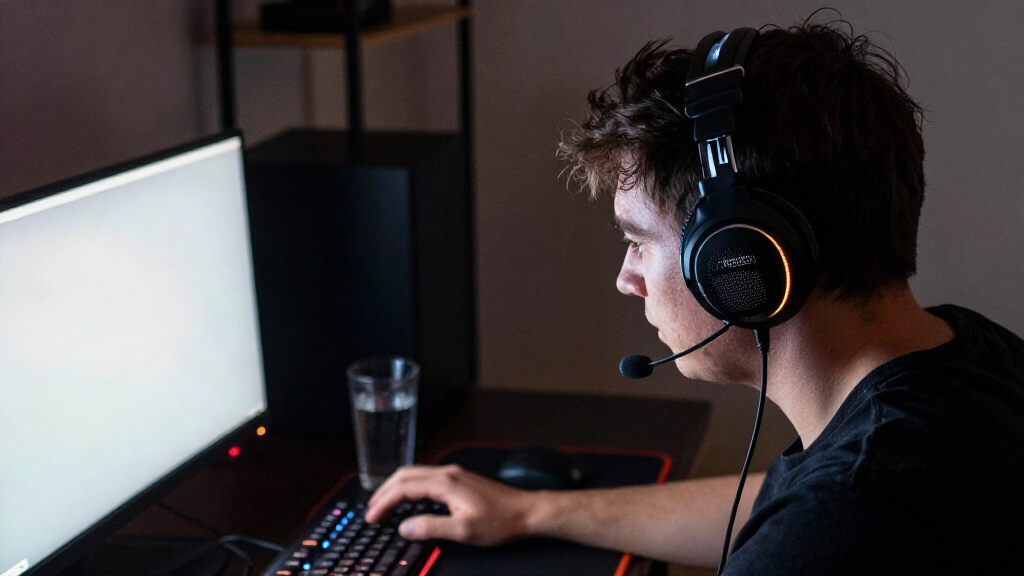

The best gaming headsets balance clear game audio, comfortable wear, and reliable chat without making you pay for features your setup cannot use. My best overall pick is the SteelSeries Arctis Nova Pro Wireless for its multi-system flexibility and feature-rich design; the HyperX Cloud III Wired is a simpler wired alternative, while the Logitech G Astro A50 X suits players who want a dedicated base station and multi-platform switching. The main tradeoffs are wired simplicity versus wireless freedom, broad compatibility versus platform-specific features, and premium controls versus a lower-complexity setup. Fit, microphone needs, and how many devices you use can matter more than surround-sound branding. Read on for the full breakdown and a guide to matching a headset to your play space.

Get the latest gadgets delivered free with Prime
- Fast, free delivery on millions of items
- Prime Video, Amazon Music and more included
- Member-only deals all year
Complete the kit


Key Takeaways
- Multi-system use separates the premium picks: the Arctis Nova Pro Wireless and Astro A50 X are aimed at players juggling devices, while simpler wired models avoid the setup overhead.
- Wireless does not mean one-size-fits-all: battery routines, connection options, and platform support should shape the choice as much as freedom from a cable.
- Wired headsets remain compelling for a fixed setup: the HyperX Cloud III Wired and Razer BlackShark V2 X keep the connection straightforward, though they limit movement.
- The lineup spans distinct levels of complexity: the Cloud II and Cloud III Wired make more sense for uncomplicated play, while base-station models suit buyers who will use their extra controls and switching.
- Do not assume a headset works identically everywhere: console compatibility, chat features, and wireless functions can vary by platform, so check support for each device before choosing.
| HyperX Cloud II Over-Ear Gaming Headset with Virtual 7.1 Surround Sound, Red | 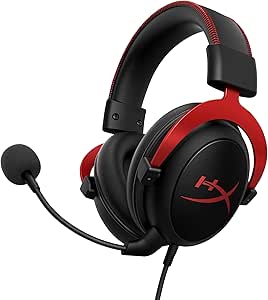 | Best Wired Comfort Pick | Type: Over-ear gaming headset | Driver size: 53 mm | Frequency response: 15–25 kHz | VIEW LATEST PRICE | See Our Full Breakdown |
| Logitech G Astro A50 Multi-Platform Wireless Gaming Headset with Base Station, Black |  | Best for Switching Between Systems | Connectivity: 24-bit LIGHTSPEED wireless, Bluetooth, USB-C | Platform compatibility: Xbox, PS5, PC/Mac, Nintendo Switch/Switch 2 | Audio drivers: 40 mm PRO-G GRAPHENE | VIEW LATEST PRICE | See Our Full Breakdown |
| Logitech G733 LIGHTSPEED Wireless Gaming Headset, Black |  | Best Lightweight Wireless Pick | Connectivity: 2.4 GHz LIGHTSPEED wireless | Wireless range: 20 meters | Battery life: Up to 29 hours | VIEW LATEST PRICE | See Our Full Breakdown |
| SteelSeries Arctis Nova Pro Omni Wireless Gaming Headset, Midnight Blue |  | Best for Audio Mixing and Long Sessions | Audio certification: Hi-Res Certified, 96 kHz/24-bit | Wireless connectivity: 2.4 GHz and Bluetooth 5.3 LE | Device connections: Up to 5 devices | VIEW LATEST PRICE | See Our Full Breakdown |
| SteelSeries Arctis Nova Pro Wireless Multi-System Gaming Headset, Black |  | Best Premium Multi-System Pick | Type: Wireless over-ear gaming headset | Audio: High-fidelity drivers and 360° spatial audio | Noise control: Active noise cancellation with Transparency Mode | VIEW LATEST PRICE | See Our Full Breakdown |
| Logitech G Astro A50 X Multi-Platform Wireless Gaming Headset – Black |  | Best for Multi-Console Setups | Connectivity: LIGHTSPEED wireless and Bluetooth | Supported systems: Xbox, PS5, and PC | Audio drivers: 40 mm PRO-G GRAPHENE | VIEW LATEST PRICE | See Our Full Breakdown |
| SteelSeries Arctis Nova Elite Wireless Gaming Headset |  | Best Premium for Multi-Source Audio | Connectivity: 2.4 GHz, Bluetooth, and line-in | Audio resolution: 96 kHz/24-bit | Driver material: Carbon fiber with brass surround | VIEW LATEST PRICE | See Our Full Breakdown |
| SteelSeries Arctis Nova 5 Wireless Multi-System Gaming Headset, Black |  | Best Battery Life for Everyday Gaming | Connectivity: 2.4 GHz wireless and Bluetooth 5.3 | Battery life: Up to 60 hours | Fast charging: 15 minutes provides up to 6 hours | VIEW LATEST PRICE | See Our Full Breakdown |
| Turtle Beach Stealth 700 Gen 3 Wireless Gaming Headset | 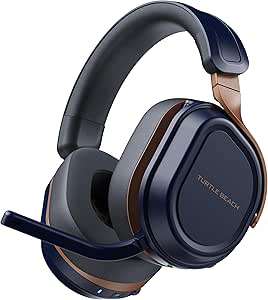 | Best for Console-and-Mobile Simultaneous Audio | Wireless connectivity: 2.4 GHz and Bluetooth 5.2 | Transmitters: Two USB wireless transmitters | Drivers: 60 mm Eclipse dual drivers | VIEW LATEST PRICE | See Our Full Breakdown |
| HyperX Cloud III S Wireless Gaming Headset | 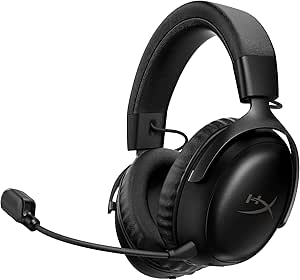 | Best for Marathon Battery Life | Connectivity: 2.4 GHz, Bluetooth, and Instant Pair | Battery life: Up to 120 hours on 2.4 GHz; up to 200 hours in Bluetooth mode | Driver size: 53 mm | VIEW LATEST PRICE | See Our Full Breakdown |
| AOC Captain 300 Wireless Gaming Headset |  | Best for Multi-Device Flexibility | Connectivity: 2.4GHz USB dongle, Bluetooth 6.0, 3.5mm audio cable | Battery life: Up to 45 hours; 20 hours with RGB lighting | Charging time: 3 hours | VIEW LATEST PRICE | See Our Full Breakdown |
| Razer BlackShark V2 X Wired Gaming Headset |  | Best Lightweight Wired Pick | Connection: 3.5mm audio jack | Driver size: 50mm titanium-coated drivers | Weight: 240g | VIEW LATEST PRICE | See Our Full Breakdown |
| Turtle Beach Stealth 600 Wireless Gaming Headset |  | Best for Long Battery Life | Connectivity: 2.4GHz wireless and Bluetooth | Bluetooth version: 5.2 in the product description; supplied information also lists 5.4 | Drivers: 50mm Nanoclear | VIEW LATEST PRICE | See Our Full Breakdown |
| Ozeino OW810 Wireless Gaming Headset |  | Best for Multiple Transmitter Types | Wireless connection: 2.4GHz USB and USB-C transmitter | Wireless latency: Less than 30ms | Bluetooth compatibility: Phones, laptops, and Switch | VIEW LATEST PRICE | See Our Full Breakdown |
| HyperX Cloud III Wired Gaming Headset |  | Best for Comfort and Durability | Connectivity: Wired; USB-C, USB-A, and 3.5mm connectivity listed | Driver size: Angled 53mm | Microphone: 10mm noise-canceling microphone with LED mute indicator | VIEW LATEST PRICE | See Our Full Breakdown |
| gaming headset | Microphone | Connectivity | Weight | Battery life |
|---|---|---|---|---|
| HyperX Cloud II Over-Ear Gamin | Detachable, noise-cancelling | — | 11.29 ounces | — |
| Logitech G Astro A50 Multi-Pla | 48 kHz full-bandwidth boom mic | 24-bit LIGHTSPEED wireless, Bluetooth, USB-C | 363 g | Up to 24 hours at 78 dB |
| Logitech G733 LIGHTSPEED Wirel | Blue VO!CE filters | 2.4 GHz LIGHTSPEED wireless | 278 g | Up to 29 hours |
| SteelSeries Arctis Nova Pro Om | ClearCast Pro, 32 kHz/16-bit, AI noise reduction | — | — | — |
| SteelSeries Arctis Nova Pro Wi | Retractable ClearCast Gen 2 with AI noise cancellation | 2.4 GHz wireless and Bluetooth; dual USB base station | 1.34 kg | — |
| Logitech G Astro A50 X Multi-P | 48 kHz full-bandwidth LIGHTSPEED wireless boom mic | LIGHTSPEED wireless and Bluetooth | 363 g | Up to 24 hours |
| SteelSeries Arctis Nova Elite | — | 2.4 GHz, Bluetooth, and line-in | — | Up to 30 hours per battery |
| SteelSeries Arctis Nova 5 Wire | Retractable ClearCast 2.X, 32 kHz/16-bit | 2.4 GHz wireless and Bluetooth 5.3 | — | Up to 60 hours |
| Turtle Beach Stealth 700 Gen 3 | Flip-to-mute, unidirectional, with AI noise reduction | — | — | Up to 80 hours |
| HyperX Cloud III S Wireless Ga | Detachable 10 mm boom mic with LED mute indicator | 2.4 GHz, Bluetooth, and Instant Pair | 356 g | Up to 120 hours on 2.4 GHz; up to 200 hours in Bluetooth mode |
| AOC Captain 300 Wireless Gamin | Detachable, omnidirectional, noise-canceling | 2.4GHz USB dongle, Bluetooth 6.0, 3.5mm audio cable | 360g | Up to 45 hours; 20 hours with RGB lighting |
| Razer BlackShark V2 X Wired Ga | Razer HyperClear cardioid | — | 240g | — |
| Turtle Beach Stealth 600 Wirel | Unidirectional flip-to-mute with AI noise reduction | 2.4GHz wireless and Bluetooth | — | Up to 80 hours |
| Ozeino OW810 Wireless Gaming H | — | — | 490g | — |
| HyperX Cloud III Wired Gaming | 10mm noise-canceling microphone with LED mute indicator | Wired; USB-C, USB-A, and 3.5mm connectivity listed | — | — |
More Details on Our Top Picks
HyperX Cloud II Over-Ear Gaming Headset with Virtual 7.1 Surround Sound, Red
The HyperX Cloud II makes the most sense for players who want a comfortable, durable headset without wireless charging or software setup. Its memory foam cushions, padded headband, and aluminum frame suit long sessions, while the detachable noise-cancelling mic lets you remove the boom when you are listening rather than chatting. Compared with the wireless Logitech G733, this is a simpler wired choice, but it gives up freedom of movement and the G733’s longer stated battery-powered portability. Virtual 7.1 sound is available on PC and Mac; on consoles and mobile, the headset uses stereo audio. Xbox One players also need a Microsoft headset adapter for USB surround sound. Choose it for comfort and straightforward gaming, not platform-wide surround features.
Pros:- Memory foam ear cushions and a padded leatherette headband are suited to extended sessions.
- Aluminum frame offers a more durable construction than a purely lightweight plastic design.
- Detachable noise-cancelling microphone supports chat and can be removed when not needed.
- Closed ear cups help reduce outside distractions.
Cons:- Virtual 7.1 surround sound is limited to PC and Mac; other listed platforms use stereo.
- Wired connection does not offer the mobility of the Logitech G733 or other wireless picks.
- Xbox One requires a Microsoft headset adapter for USB surround sound card use.
Best for: PC and Mac players who prefer a comfortable wired headset, detachable microphone, and sturdy frame over wireless convenience.
Not ideal for: Players who want wireless freedom, or console users specifically seeking virtual 7.1 surround sound across their devices.
- Type:Over-ear gaming headset
- Driver size:53 mm
- Frequency response:15–25 kHz
- Surround sound:Virtual 7.1 on PC and Mac; stereo on listed other platforms
- Frame:Aluminum
- Microphone:Detachable, noise-cancelling
- Weight:11.29 ounces
- Warranty:2 years
Our verdict“Choose the Cloud II if comfort and a sturdy wired build matter more to you than wireless convenience or surround sound on every platform.”
Logitech G Astro A50 Multi-Platform Wireless Gaming Headset with Base Station, Black
The Logitech G Astro A50 is a strong fit for players who regularly move between consoles and PC. Its PLAYSYNC switching handles up to three connected systems from the headset, so changing platforms is less of a cable routine than with a simpler wireless model such as the Logitech G733. The magnetic base station gives the A50 a dedicated home for charging, and Bluetooth mixing lets you hear mobile audio alongside game sound. Its 40 mm graphene drivers, configurable EQ, and stream mixing offer more adjustment than the Cloud II, but that flexibility brings more setup. Battery life is stated at up to 24 hours, and console audio is listed below 16-bit/48 kHz, so this is not the pick for buyers seeking the longest runtime or the highest listed console audio format.
Pros:- PLAYSYNC can switch between up to three connected systems using an on-ear control.
- Magnetic charging base station makes charging and headset storage part of the same routine.
- Bluetooth mixing combines mobile audio with game sound.
- 10-band parametric EQ and stream output mixing offer detailed audio control.
Cons:- Up to 24 hours of battery life is shorter than the Logitech G733’s stated maximum and far below the Nova Pro Omni’s total runtime.
- Console audio is listed as under 16-bit/48 kHz.
- The base station and advanced mixing controls add setup and desk space requirements.
Best for: Multi-platform players who keep several systems connected and want wireless game audio mixed with Bluetooth calls or media.
Not ideal for: Players who want a lightweight, simple headset with minimal setup, or those prioritizing the longest battery runtime in this group.
- Connectivity:24-bit LIGHTSPEED wireless, Bluetooth, USB-C
- Platform compatibility:Xbox, PS5, PC/Mac, Nintendo Switch/Switch 2
- Audio drivers:40 mm PRO-G GRAPHENE
- Microphone:48 kHz full-bandwidth boom mic
- Battery life:Up to 24 hours at 78 dB
- Charging:Magnetic charging base station
- Audio controls:10-band parametric EQ, mic settings, noise gate, stream output mixing
- Weight:363 g
Our verdict“Pick the Astro A50 if easy switching among several gaming systems and Bluetooth audio mixing outweigh longer battery life and simpler setup.”
Logitech G733 LIGHTSPEED Wireless Gaming Headset, Black
The Logitech G733 favors light wear and wireless ease over the system-switching hardware of the Astro A50. At 278 g, with a reversible suspension headband and memory foam earcups, it is the better match for players who want less weight on their head during long sessions. Its stated battery life of up to 29 hours also exceeds the A50’s listed 24 hours, though it lacks the A50’s base station, multi-system switching, and Bluetooth audio mixing. The G733 adds dual-zone RGB and Blue VO!CE microphone filters, but custom lighting and audio settings require G HUB software. Its compatibility spans PC, PlayStation, and Switch, while the listed stereo mode is for PS4. This is a comfort-and-style wireless pick, not the most flexible headset for a multi-device desk.
Pros:- Light 278 g build and reversible suspension headband support comfortable extended wear.
- Up to 29 hours of stated battery life and a 20-meter wireless range.
- Blue VO!CE microphone filters offer voice adjustments for supported setups.
- Dual-zone RGB lighting allows a more personalized look.
Cons:- Custom audio and lighting settings rely on G HUB software.
- Does not offer the Astro A50’s base-station charging or switching between multiple connected systems.
- The listed stereo mode is for PS4, so platform-specific audio details matter before buying.
Best for: PC, PlayStation, and Switch players who want a light wireless headset with a suspension headband, long stated runtime, and customizable lighting.
Not ideal for: Players who need Bluetooth audio mixing, convenient switching among several connected systems, or a headset that works without G HUB for customization.
- Connectivity:2.4 GHz LIGHTSPEED wireless
- Wireless range:20 meters
- Battery life:Up to 29 hours
- Driver size:40 mm PRO-G
- Weight:278 g
- Microphone:Blue VO!CE filters
- Compatibility:PC, PS5, PS4, Nintendo Switch
- Lighting:Dual-zone Lightsync RGB
Our verdict“Choose the G733 if a lightweight fit and wireless convenience matter more than multi-system controls or Bluetooth mixing.”
SteelSeries Arctis Nova Pro Omni Wireless Gaming Headset, Midnight Blue
The Arctis Nova Pro Omni is the most capable choice here for buyers who want several audio sources available at once. It can connect to up to five devices and mix up to four sources, while 2.4 GHz wireless and Bluetooth 5.3 LE serve different listening needs. That flexibility goes beyond the Astro A50’s switching among up to three systems, and the Omni adds hybrid active noise cancellation with Transparency Mode. Its dual hot-swappable batteries provide up to 60 hours of total runtime, reducing dependence on a charging break. The tradeoff is a more involved connection setup, and its microphone’s 32 kHz/16-bit mode may not work on every platform. Compared with the Arctis Nova Pro Wireless, this model lists broader source mixing and a longer total runtime, making it best for a busy, multi-device setup rather than a simple console station.
Pros:- Connects to up to five devices and mixes up to four audio sources.
- Dual hot-swappable batteries provide up to 60 hours of total runtime.
- Hybrid active noise cancellation includes a Transparency Mode.
- Supports 96 kHz/24-bit Hi-Res audio over 2.4 GHz and Bluetooth.
Cons:- The microphone’s 32 kHz/16-bit mode may not be supported on every platform.
- Connecting multiple systems uses USB, line-in, and Bluetooth connections, which calls for more setup than the G733.
- Its broad mixing feature set may be unnecessary for players using only one system.
Best for: Players and streamers who use several consoles or devices and want to mix game, mobile, and other audio while keeping sessions going with replaceable batteries.
Not ideal for: Buyers who want a straightforward single-console headset, or anyone whose platform does not support the microphone’s higher-bandwidth mode.
- Audio certification:Hi-Res Certified, 96 kHz/24-bit
- Wireless connectivity:2.4 GHz and Bluetooth 5.3 LE
- Device connections:Up to 5 devices
- Audio source mixing:Up to 4 sources
- Microphone:ClearCast Pro, 32 kHz/16-bit, AI noise reduction
- Noise cancellation:Hybrid active noise cancellation with Transparency Mode
- Battery runtime:Up to 60 hours total with dual hot-swappable batteries
- Compatibility:PC, Mac, PlayStation, Xbox, Switch, Steam Deck, ROG Ally, laptops, tablets, and phones
Our verdict“Choose the Nova Pro Omni if you need extensive multi-source mixing and long sessions, but skip it if a simple single-system setup is your priority.”
SteelSeries Arctis Nova Pro Wireless Multi-System Gaming Headset, Black
The SteelSeries Arctis Nova Pro Wireless is a premium multi-system option for players who want active noise cancellation, spatial audio, and a base station without the Nova Pro Omni’s listed five-device and four-source mixing scope. Its dual USB base station supports multiple gaming systems, while Bluetooth and two audio streams make it easier to keep calls or other audio in the mix. The hot-swappable battery system helps avoid a long interruption for charging, and the retractable ClearCast Gen 2 mic keeps the boom out of the way when not chatting. Compared with the Logitech G733, it offers more system and audio controls, but its listed 1.34 kg weight is a major tradeoff for long wear. Choose it for a feature-rich desk setup, not a lightweight headset.
Pros:- Dual USB base station supports multi-system gaming setups.
- Active noise cancellation includes adjustable Transparency Mode.
- Hot-swappable dual-battery system supports continued use while charging.
- Retractable ClearCast Gen 2 microphone includes AI noise cancellation.
Cons:- Listed weight of 1.34 kg is substantially heavier than the 278 g Logitech G733.
- Bluetooth may require toggling off and back on if connection issues occur.
- Its base station and control features are more involved than a basic wireless setup.
Best for: Players with several gaming systems who want a base station, active noise cancellation, spatial audio, and hot-swappable batteries.
Not ideal for: Buyers sensitive to headset weight or those who mainly need a light, uncomplicated wireless headset like the Logitech G733.
- Type:Wireless over-ear gaming headset
- Audio:High-fidelity drivers and 360° spatial audio
- Noise control:Active noise cancellation with Transparency Mode
- Connectivity:2.4 GHz wireless and Bluetooth; dual USB base station
- Compatible devices:Xbox, PC, Mac, PlayStation, Switch, mobile
- Microphone:Retractable ClearCast Gen 2 with AI noise cancellation
- Power:Hot-swappable dual-battery system
- Weight:1.34 kg
Our verdict“Pick the Arctis Nova Pro Wireless for a feature-rich multi-system desk setup, but choose the G733 if low weight is your priority.”
Logitech G Astro A50 X Multi-Platform Wireless Gaming Headset – Black
The A50 X is built for players who move between Xbox, PS5, and PC and want to switch without reconnecting cables. Its PLAYSYNC base handles all three systems, while HDMI 2.1 passthrough supports up to 4K at 120 Hz, making this a more integrated console setup than the SteelSeries Arctis Nova 5 Wireless. The graphene drivers and 48 kHz microphone uplink also target clear positional audio and voice chat, rather than just basic wireless convenience.
The tradeoff is that much of its appeal depends on owning several systems and making room for its base station. Its 24-hour battery life is shorter than the Nova 5’s stated 60 hours, and the headset is not water resistant. I’d choose it for a multi-console desk, but a single-platform player may get more practical value from a simpler wireless option.
Pros:- PLAYSYNC switches among Xbox, PS5, and PC through the base station
- HDMI 2.1 passthrough supports up to 4K at 120 Hz
- 48 kHz full-bandwidth LIGHTSPEED microphone uplink
- Wireless charging and up to 24 hours of playtime
Cons:- Base station and system connections make the setup more involved than a USB-dongle headset
- Stated battery life is shorter than the SteelSeries Arctis Nova 5 Wireless
- Not water resistant
Best for: Players who regularly switch among Xbox, PS5, and PC and want one headset-and-base setup to handle those systems.
Not ideal for: Single-platform players or anyone seeking the longest battery life, since the A50 X’s multi-system switching adds hardware while its stated 24-hour runtime trails the SteelSeries Arctis Nova 5 Wireless.
- Connectivity:LIGHTSPEED wireless and Bluetooth
- Supported systems:Xbox, PS5, and PC
- Audio drivers:40 mm PRO-G GRAPHENE
- Microphone:48 kHz full-bandwidth LIGHTSPEED wireless boom mic
- HDMI passthrough:HDMI 2.1; up to 4K at 120 Hz
- Battery life:Up to 24 hours
- Charging:Wireless charging
- Weight:363 g
Our verdict“Choose the A50 X if you want quick switching and HDMI passthrough across several gaming systems; skip it if you only play on one platform.”
SteelSeries Arctis Nova Elite Wireless Gaming Headset
The Arctis Nova Elite is the most feature-heavy pick here for players who want to combine several audio sources, with OmniPlay mixing up to four inputs alongside 2.4 GHz wireless and Bluetooth. Its 96 kHz/24-bit audio support, carbon-fiber drivers, and active noise cancellation aim at a more controlled listening setup than the SteelSeries Arctis Nova 5 Wireless, which favors long battery life and straightforward multi-platform use instead.
The Elite’s hot-swappable batteries are a practical advantage for long sessions: a depleted battery can be replaced rather than ending play for a charge. But this complexity is not a benefit for everyone. Full customization depends on companion software such as Sonar, and buyers who only need one wireless connection may find the Nova 5 a simpler fit. I’d pick the Elite for an audio-rich desk, not for uncomplicated console gaming.
Pros:- OmniPlay mixes up to four audio sources
- Hot-swappable dual-battery system supports continuous use
- Active noise cancellation and AI noise rejection
- 96 kHz/24-bit audio support over 2.4 GHz and Bluetooth
Cons:- Full audio customization relies on companion software such as Sonar
- Advanced mixing features may be unnecessary for single-source gaming
- The listed battery runtime is per battery, rather than a single fixed continuous runtime
Best for: PC and console players who regularly mix game audio with other sources and want ANC, app controls, and replaceable batteries.
Not ideal for: Players who want a simple plug-and-play headset or do not plan to use multi-source mixing, since many of its distinctive controls and sound options rely on software.
- Connectivity:2.4 GHz, Bluetooth, and line-in
- Audio resolution:96 kHz/24-bit
- Driver material:Carbon fiber with brass surround
- Battery system:Hot-swappable dual batteries
- Battery life:Up to 30 hours per battery
- Fast charging:15 minutes provides up to 4 hours
- Audio features:Active noise cancellation, AI noise rejection, and OmniPlay
- Compatibility:PC, PS5, Xbox, Switch, and mobile
Our verdict“Choose the Arctis Nova Elite for a multi-source gaming and listening setup; choose the Nova 5 if long battery life and simpler operation matter more.”
SteelSeries Arctis Nova 5 Wireless Multi-System Gaming Headset, Black
The Arctis Nova 5 is a strong everyday choice for players who want wireless flexibility without a base station. Its 2.4 GHz and Bluetooth 5.3 connections cover gaming and mobile listening, while the USB-C multi-platform dongle keeps setup practical across PC, PlayStation, Switch, and compatible handhelds. The standout is up to 60 hours of battery life, which outlasts the Logitech G Astro A50 X’s stated 24 hours and means fewer charging interruptions.
SteelSeries also includes more than 100 app-based game audio presets, giving players a quick way to adjust sound without building every EQ profile themselves. That flexibility has limits: some features, including Sonar AI noise cancellation, are PC-specific, and phone or tablet dongle use depends on USB-C compatibility. Its retractable mic is convenient, but the listed 32 kHz/16-bit mic spec is less ambitious than the A50 X’s 48 kHz uplink.
Pros:- Up to 60 hours of battery life
- 2.4 GHz wireless and Bluetooth 5.3
- More than 100 game audio presets in the companion app
- Retractable microphone and on-ear controls
Cons:- Some features, including Sonar AI noise cancellation, are PC-specific
- Using the USB-C dongle with phones and tablets requires USB-C compatibility
- Microphone supports 32 kHz/16-bit audio
Best for: Players who game across PC, PlayStation, Switch, and mobile devices and want long runtime with easy app-based sound presets.
Not ideal for: Buyers who need the same advanced software features on every platform or want a higher-spec microphone, as some tools are PC-only and the A50 X lists a 48 kHz mic uplink.
- Connectivity:2.4 GHz wireless and Bluetooth 5.3
- Battery life:Up to 60 hours
- Fast charging:15 minutes provides up to 6 hours
- Microphone:Retractable ClearCast 2.X, 32 kHz/16-bit
- Audio drivers:Neodymium magnetic
- Audio presets:100+ through the companion app
- Compatible platforms:PC, PlayStation, Switch, Meta Quest, phones, and tablets
- Included dongle:USB-C multi-platform dongle
Our verdict“Choose the Nova 5 for long-lasting, adaptable wireless gaming across several devices, but look elsewhere if you need every software feature on console.”
Turtle Beach Stealth 700 Gen 3 Wireless Gaming Headset
The Stealth 700 Gen 3 suits players who want game audio and phone audio at the same time. Its dual USB wireless transmitters connect to a console or PC, while Bluetooth 5.2 handles mobile audio, so switching between gaming and a call is less disruptive than with a single-connection headset. The up to 80-hour battery life also exceeds the SteelSeries Arctis Nova 5 Wireless’s stated 60 hours, making this a compelling option for long sessions between charges.
Comfort is another point of difference: memory foam cushions use glasses-friendly shaping, and the headset can lie flat for storage. A flip-to-mute mic with AI noise reduction and a 10-band EQ add useful control. The main compromise is setup: moving between console and PC requires the included transmitters, and wireless methods vary across supported devices. The Nova 5’s USB-C multi-platform dongle may suit buyers seeking a simpler connection path.
Pros:- Simultaneous console or PC wireless and Bluetooth mobile audio
- Up to 80 hours of battery life with quick charging
- Glasses-friendly memory foam cushions
- Flip-to-mute microphone with AI-based noise reduction
Cons:- Switching between console and PC requires the included USB transmitters
- Wireless connection methods vary by device
- The app is needed for 10-band EQ and audio customization
Best for: Console and PC players who also want to hear phone audio over Bluetooth, especially those who wear glasses or play for long stretches.
Not ideal for: Players seeking one universal wireless connection for every device, since switching between console and PC uses separate transmitters and device connection methods vary.
- Wireless connectivity:2.4 GHz and Bluetooth 5.2
- Transmitters:Two USB wireless transmitters
- Drivers:60 mm Eclipse dual drivers
- Microphone:Flip-to-mute, unidirectional, with AI noise reduction
- Battery life:Up to 80 hours
- Quick charge:15 minutes provides up to 3 hours
- Audio customization:Swarm II app with 10-band EQ and presets
- Compatibility:Xbox Series X|S, Xbox One, PS5, PS4, Windows PC, Steam Deck, and mobile
Our verdict“Choose the Stealth 700 Gen 3 if you want long battery life, glasses-friendly fit, and mobile audio alongside console or PC gaming.”
HyperX Cloud III S Wireless Gaming Headset
The Cloud III S is the battery-life pick for players who would rather charge less often than manage a feature-heavy headset. HyperX lists up to 120 hours over 2.4 GHz and up to 200 hours in Bluetooth mode, far beyond the SteelSeries Arctis Nova 5 Wireless’s 60-hour claim. Its 53 mm angled drivers, aluminum frame, and memory foam focus on sustained play, while the detachable boom mic gives players a choice between dedicated voice chat and a cleaner headset profile.
That simpler approach has clear limits. The Cloud III S is not compatible with Xbox, and its listed platform set is narrower than the Turtle Beach Stealth 700 Gen 3’s. Bluetooth runtime is also distinct from its 2.4 GHz gaming runtime, so buyers should match the connection mode to their use. I’d favor it for long PC, PlayStation, Switch, or mobile sessions, not for a mixed Xbox setup.
Pros:- Up to 120 hours over 2.4 GHz and 200 hours in Bluetooth mode
- 53 mm angled drivers tuned by HyperX
- Detachable 10 mm boom mic with LED mute indicator
- Aluminum frame and memory foam comfort
Cons:- Not compatible with Xbox
- Bluetooth and 2.4 GHz have different stated battery runtimes
- Removable earcup plates are sold separately
Best for: PC, PlayStation, Switch, Mac, and mobile players who want very long stated battery life and a detachable boom mic.
Not ideal for: Xbox players or buyers who need one headset for Xbox and other consoles, since this model is not Xbox compatible.
- Connectivity:2.4 GHz, Bluetooth, and Instant Pair
- Battery life:Up to 120 hours on 2.4 GHz; up to 200 hours in Bluetooth mode
- Driver size:53 mm
- Microphone:Detachable 10 mm boom mic with LED mute indicator
- Compatibility:PC, PS5, PS4, Nintendo Switch, Mac, and mobile
- Weight:356 g
- Frame:Aluminum
- Warranty:2 years
Our verdict“Choose the Cloud III S for marathon sessions on supported platforms and exceptional stated battery life, but skip it if Xbox compatibility is required.”
AOC Captain 300 Wireless Gaming Headset
The AOC Captain 300 suits players who move between consoles, computers, and phones but still want a low-latency connection for games. Its 2.4GHz dongle, Bluetooth, and 3.5mm wired option make it more adaptable than the wired Razer BlackShark V2 X, while the stated 45-hour battery life cuts down on charging interruptions. The detachable noise-canceling microphone is handy when you want a cleaner look away from gaming, and the memory-protein cushions are designed for longer sessions, including for glasses wearers.
The tradeoff is that this flexibility has platform limits: Xbox use is wired only, and PS5 and PS4 require the dongle or cable rather than Bluetooth audio. RGB lighting also reduces the stated battery life to 20 hours. I’d choose it over the BlackShark V2 X for wireless device-hopping, but skip it if Xbox wireless support is a must.
Pros:- Three connection options cover a broad range of devices.
- 2.4GHz wireless latency is specified at 20 ms or less.
- Up to 45 hours of battery life with RGB lighting off.
- Detachable microphone and memory-protein cushions support flexible, extended use.
Cons:- Xbox compatibility is limited to the 3.5mm wired connection.
- RGB lighting reduces stated battery life to 20 hours.
- PS5 and PS4 Bluetooth audio is not supported.
Best for: Players who alternate between PlayStation, PC, Switch, and mobile devices and want both wireless and wired listening options.
Not ideal for: Xbox players who want wireless console audio, or buyers who plan to keep RGB lighting on and expect the longest battery runtime.
- Connectivity:2.4GHz USB dongle, Bluetooth 6.0, 3.5mm audio cable
- Battery life:Up to 45 hours; 20 hours with RGB lighting
- Charging time:3 hours
- Driver size:50mm
- Wireless latency:20ms or less
- Weight:360g
- Microphone:Detachable, omnidirectional, noise-canceling
- Compatibility:PS5, PS4, PC, Mac, Switch, and mobile; Xbox via 3.5mm only
Our verdict“Choose the Captain 300 if you want one headset for several device types, but not if Xbox wireless play is a priority.”
Razer BlackShark V2 X Wired Gaming Headset
At 240g, the Razer BlackShark V2 X is the lightest straightforward pick in this group, making it a good fit for players who find heavier headsets tiring. Its 3.5mm wired connection avoids charging and wireless setup, while breathable foam cushions and closed earcups aim to balance comfort with sound isolation. The cardioid microphone focuses pickup toward the speaker, a useful detail for voice chat in a busy room. Compared with the wireless AOC Captain 300, this Razer is simpler and lighter, but it gives up device switching and untethered play.
The software-enabled 7.1 surround sound is limited to 64-bit Windows 10, so console users should not choose it for that feature. Xbox One may also need a separately sold stereo adapter. I’d favor it over the HyperX Cloud III when low weight and a basic analog connection matter more than the HyperX’s described aluminum frame and memory-foam construction.
Pros:- 240g weight is low compared with the wireless headsets in this selection.
- Breathable foam cushions and closed earcups support longer play and sound isolation.
- Cardioid microphone focuses on the speaker’s voice.
- 3.5mm connection avoids battery charging.
Cons:- 7.1 surround sound is available only through software on 64-bit Windows 10.
- Xbox One may require a separately sold stereo adapter.
- Wired-only design lacks the device-switching flexibility of the AOC Captain 300.
Best for: PC and console players who prefer a light, wired headset and do not need wireless connectivity or cross-device switching.
Not ideal for: Gamers who want wireless freedom, or console players seeking software-enabled 7.1 surround sound.
- Connection:3.5mm audio jack
- Driver size:50mm titanium-coated drivers
- Weight:240g
- Ear placement:Over-ear
- Microphone:Razer HyperClear cardioid
- Surround sound:Software-enabled 7.1 on 64-bit Windows 10
- Compatibility:PC, Mac, PS4, Xbox One, Nintendo Switch
- Warranty:2 years
Our verdict“Pick the BlackShark V2 X if a light, simple wired headset matters more than wireless convenience or console surround features.”
Turtle Beach Stealth 600 Wireless Gaming Headset
The Turtle Beach Stealth 600 is the strongest fit here for players who want wireless freedom without frequent charging. Its stated 80-hour battery life exceeds the AOC Captain 300’s 45 hours, and quick charge adds another practical option when the battery does run low. A QuickSwitch button makes it easier to move between 2.4GHz wireless and Bluetooth, while the flip-to-mute microphone and glasses-friendly memory foam address everyday comfort and chat needs.
Compared with the simpler wired Razer BlackShark V2 X, the Stealth 600 offers broader wireless use and more sound controls, including four EQ presets and a 10-band custom EQ. That tuning takes the Swarm II app, though, so players who want plug-and-play simplicity may prefer the Razer. The supplied information also gives conflicting Bluetooth versions, so I’m not treating that detail as a reason to choose it.
Pros:- Stated battery life of up to 80 hours, with quick-charge support.
- 2.4GHz wireless and Bluetooth connections with a QuickSwitch button.
- Memory foam cushions include glasses-friendly relief.
- Four EQ presets and 10-band custom EQ allow sound adjustments.
Cons:- Advanced EQ and microphone adjustments require the Swarm II app.
- Provided product information conflicts on the Bluetooth version.
- More app-dependent than the wired, no-battery Razer BlackShark V2 X.
Best for: Wireless console and PC players who play long sessions, switch between Bluetooth and gaming audio, and want adjustable EQ.
Not ideal for: Buyers who want advanced EQ and microphone adjustments without installing an app, or who need Bluetooth-version certainty before buying.
- Connectivity:2.4GHz wireless and Bluetooth
- Bluetooth version:5.2 in the product description; supplied information also lists 5.4
- Drivers:50mm Nanoclear
- Battery life:Up to 80 hours
- Charging:Quick charge
- Microphone:Unidirectional flip-to-mute with AI noise reduction
- Audio customization:Four EQ presets and 10-band custom EQ via Swarm II
- Compatibility:Xbox, PlayStation, Windows PC, Steam Deck, and mobile devices
Our verdict“Choose the Stealth 600 for long-running wireless sessions and customizable sound, provided you’re comfortable using its companion app.”
Ozeino OW810 Wireless Gaming Headset
The Ozeino OW810 makes the most sense for buyers who need both USB and USB-C wireless transmitters, particularly when moving between devices with different ports. Its 2.4GHz connection has latency below 30ms, and Bluetooth adds another way to connect to phones, laptops, and Switch. Compared with the AOC Captain 300, the OW810 is also listed with a 3.5mm connection, but that wired mode is limited to music and calls rather than a full gaming connection.
Compatibility is the main concern: Bluetooth does not directly support PS5, PS4, PC, or Mac, and Xbox support is not universal. At 490g, it is also substantially heavier than the 240g Razer BlackShark V2 X, which is a better choice if low weight is a priority. I’d pick the Ozeino for its included transmitter variety, not as a safe one-headset solution for every console.
Pros:- Includes both USB and USB-C transmitters for 2.4GHz wireless gaming.
- Wireless latency is specified as less than 30ms.
- Bluetooth and 3.5mm connections add options for compatible uses.
- On-headset controls and a flip microphone are included.
Cons:- Bluetooth does not directly support PS5, PS4, PC, or Mac.
- 3.5mm mode supports music and calls only.
- At 490g, it is heavier than the Razer BlackShark V2 X and other listed options.
- Compatibility is not guaranteed across all Xbox consoles.
Best for: Players who need USB and USB-C 2.4GHz transmitters for compatible devices and also want Bluetooth access to phones or laptops.
Not ideal for: PS5, PS4, PC, or Mac users expecting direct Bluetooth gaming, and Xbox owners who need guaranteed compatibility.
- Wireless connection:2.4GHz USB and USB-C transmitter
- Wireless latency:Less than 30ms
- Bluetooth compatibility:Phones, laptops, and Switch
- Wired connection:3.5mm; supports music and calls
- Driver size:50mm
- Weight:490g
- Design:Over-ear; black and white
- Warranty:3 years
Our verdict“Choose the OW810 if its USB and USB-C transmitters match your devices, but skip it if you need broad, predictable console support.”
HyperX Cloud III Wired Gaming Headset
The HyperX Cloud III is a sensible wired pick for players who value a cushioned fit and a build designed to handle travel and daily use. Its memory foam headband and ear cushions target comfort over long sessions, while the aluminum frame gives it a durability angle that the lightweight-plastic details in other entries don’t match. The angled 53mm drivers are tuned for gaming, and the 10mm noise-canceling microphone includes a mute indicator, so you can see when voice chat is off.
Compared with the Razer BlackShark V2 X, the Cloud III puts more emphasis on its frame and plush padding, while the Razer is much lighter at 240g. This HyperX is wired, so it cannot match the wireless convenience of the Turtle Beach Stealth 600 or AOC Captain 300. I’d choose it for a sturdy, comfortable setup across several platforms, but not for lightweight or cable-free gaming.
Pros:- Memory foam headband and ear cushions are aimed at extended-session comfort.
- Aluminum frame is designed to withstand travel and everyday mishaps.
- 10mm noise-canceling microphone includes a built-in mute indicator.
- Compatible with PC, PlayStation, Xbox, Switch, Mac, and mobile devices.
Cons:- Wired connection limits movement compared with the Stealth 600 and Captain 300.
- The listed 53mm drivers and plush construction do not make it as light as the 240g Razer BlackShark V2 X.
- The supplied product details do not give battery or wireless options because this is a wired headset.
Best for: Players seeking a comfortable, durable wired headset for long sessions across PC, PlayStation, Xbox, and Switch.
Not ideal for: Gamers who want wireless play or place the lowest possible headset weight above plush cushioning and a reinforced frame.
- Connectivity:Wired; USB-C, USB-A, and 3.5mm connectivity listed
- Driver size:Angled 53mm
- Microphone:10mm noise-canceling microphone with LED mute indicator
- Frame:Aluminum
- Cushions:HyperX memory foam headband and ear cushions
- Audio features:DTS Spatial Audio listed
- Compatibility:PC, PS5, PS4, Xbox Series X|S, Xbox One, Nintendo Switch, Mac, and mobile
Our verdict“Pick the Cloud III if comfort and a reinforced frame matter more than wireless freedom or the lightest fit.”

How We Picked
I compared these headsets around the decisions that affect everyday gaming: platform compatibility, connection type, comfort potential, microphone and chat usefulness, controls, and the complexity of setup and upkeep. I also considered whether a feature solves a real problem for a particular player—for example, a base station can simplify switching between devices, but it adds equipment and setup that a single-platform player may not need.
The order gives priority to versatility and practical usability, then weighs how much complexity a headset asks of its owner. Premium multi-system options rank highly for players who can use their broader feature sets; accessible wired and wireless models have clearer roles for simpler setups and tighter feature requirements. Because fit and platform support can vary by person and device, I treat those as purchase checks rather than universal claims, and I do not assume that a higher-end feature set makes a headset the right choice for everyone.
Factors to Consider When Choosing Best Gaming Headsets
Before choosing from this lineup, map the headset to your setup and habits rather than treating every advertised feature as equally useful. These broader checks can help avoid paying for unused functions or ending up with a connection that does not suit your devices.
Match Compatibility to Every Device You Use
Write down the exact platforms you want to connect before comparing features. A headset may support a console through one connection method and a PC through another, while chat, controls, or wireless functions can differ between them. Check the manufacturer’s compatibility details for each device, not just the broad platform names on the box. Also consider whether you need to switch between devices during a session or only use one at a time. Multi-system headsets can save hassle for mixed setups, but a single-platform player may be better served by a simpler model. This check matters especially when shopping across console generations or mixing a console with a computer.
Choose Wired or Wireless Around Your Routine
Wireless freedom helps if you move away from your desk, but it brings battery management and another connection to keep charged or paired. A wired headset avoids routine charging and can be a straightforward fit for a fixed gaming station, though the cable restricts movement and may snag around a chair or controller. Think about where the headset will live and how long your usual sessions last. Wireless models with a dock or base station may make charging and device switching easier, but they occupy space and add setup steps. Avoid choosing wireless solely because it sounds more advanced; choose it when the freedom or switching actually improves your routine.
Treat Fit as a Long-Session Requirement
Comfort is personal, and a headset that feels light at first can still create pressure during a long session. Head shape, glasses, ear size, clamping force, and heat all affect fit, so product names alone cannot settle the question. Look for clear information about adjustment, earcup design, and replaceable cushions, then check the return policy before buying when possible. A secure fit can help keep the headset in place, but excessive pressure may become distracting. If you wear glasses, pay special attention to how the ear cushions sit around the frames. Do not trade a comfortable fit for a feature you will rarely use.
Prioritize Chat and Controls for Your Play Style
Team players may care more about microphone clarity, easy muting, and independent chat adjustment than about extra sound modes. Solo players can give more weight to comfort, game-audio tuning, or simple volume controls. Consider whether you often adjust settings mid-match; physical controls are useful only when they are easy to reach and do not interrupt play. Software customization can offer more control, but it may require a computer or app and may not carry over to every console. Check which controls work on your intended platform before treating them as a deciding feature. The right balance depends on whether your headset is mainly for team communication, immersive single-player sessions, or both.
Pay for Features You Will Use, Not a Long Spec List
Premium headsets can add device switching, wireless options, software controls, or a dedicated base station, but each extra function adds complexity. If you use several systems and switch often, those features may replace a tangle of cables or repeated pairing. If you use one console and want a headset that is ready to play, a simpler design may be easier to live with. Surround-sound labels also do not guarantee that a feature will help you locate enemies; tuning, game support, and personal preference shape the result. Compare the everyday benefit of each feature with the setup and maintenance it requires. Spend more only when you can name the repeated problem that feature solves.
Check Maintenance and Replacement Details
Headsets take regular wear from sweat, travel, and repeated adjustment, so ownership details matter beyond sound. Find out whether cushions, cables, or other commonly worn parts can be replaced and whether the manufacturer offers support for your model. Wireless users should also think about how they will store and charge the headset between sessions. A dock can make that routine easier, while a basic wired headset has fewer charging tasks but still needs a safe place to avoid cable damage. Keep setup guides and compatibility notes, particularly if you change consoles or computers later. These practical details can matter more over time than a feature used only occasionally.
Frequently Asked Questions
Is a wireless gaming headset a good choice for both a console and a PC?
It can be, but wireless support is not identical across every headset and platform. Check the connection method and available functions for each device, including whether chat and controls work as expected. A model with multi-system switching can help if you move between a console and a PC often, while a simpler headset may require reconnecting or changing inputs. Also account for charging and where you will store the headset between sessions. If you mostly play on one device, broad compatibility may not justify extra setup complexity.
Should I choose a wired headset or a wireless one for long gaming sessions?
Choose based on how you play, not on session length alone. A wired headset removes battery management, which can be useful for long sessions at a fixed desk, but the cable can limit movement. A wireless headset gives you more freedom but needs a charging routine and may require attention to its connection or battery state. Comfort and fit can outweigh either connection type if the headset causes pressure over time. If possible, prioritize a purchase option that lets you check fit and return the headset if it does not suit you.
Do I need a base station for a gaming headset?
A base station is most useful when it solves a regular setup problem, such as switching between multiple devices or keeping a wireless headset ready to use. It can also add convenient controls, depending on the model. For someone who plays on one platform and rarely changes settings, it may take up space without changing the experience much. Check which connections the base station actually supports and whether the functions work with your specific devices. Treat it as a workflow feature, not an automatic sound-quality upgrade.
Will a gaming headset’s surround-sound feature work on every console?
Not always. Virtual surround features may rely on headset hardware, software, or platform-specific audio support, and the available options can differ between PC and console. Confirm compatibility for the exact headset and device combination you plan to use. A surround label also does not guarantee that you will prefer the effect; some players favor a more direct stereo presentation. If directional cues matter to you, look for platform-specific setup information and consider whether the feature can be adjusted or disabled.
What should I check if I wear glasses or need a clear microphone?
For glasses, focus on earcup shape, cushion softness, and clamping force, since pressure where the frames meet the headset can become uncomfortable. Product specifications cannot fully predict personal fit, so a flexible return policy can be useful. For microphone needs, check whether the mic can be muted quickly and whether its position is adjustable; these are practical advantages during team play. Confirm that microphone functions are supported on your intended platform, as controls can vary. If voice chat is central to your play, prioritize reliable communication and comfort over features aimed mainly at sound effects.
Conclusion
For the broadest feature set in a mixed-device setup, my best overall recommendation is the SteelSeries Arctis Nova Pro Wireless; the Logitech G Astro A50 X is another strong fit for players who want a base station and frequent platform switching. For best value through simplicity, I would start with the HyperX Cloud III Wired, while the HyperX Cloud II remains a straightforward option for buyers seeking a familiar wired approach. The Cloud III Wired is also my pick for beginners who want to avoid battery routines and a complex setup. For premium multi-device use, compare the Arctis Nova Pro Wireless, Astro A50 X, and SteelSeries Arctis Nova Elite against the features you will actually use. If you need a lighter, more basic wireless route, consider the Logitech G733 or SteelSeries Arctis Nova 5; if you prefer a wired connection or a particular platform fit, check the Razer BlackShark V2 X and the other lineup options against your exact compatibility needs. The best choice is the one that matches your devices, fits comfortably, and earns its place in your routine.