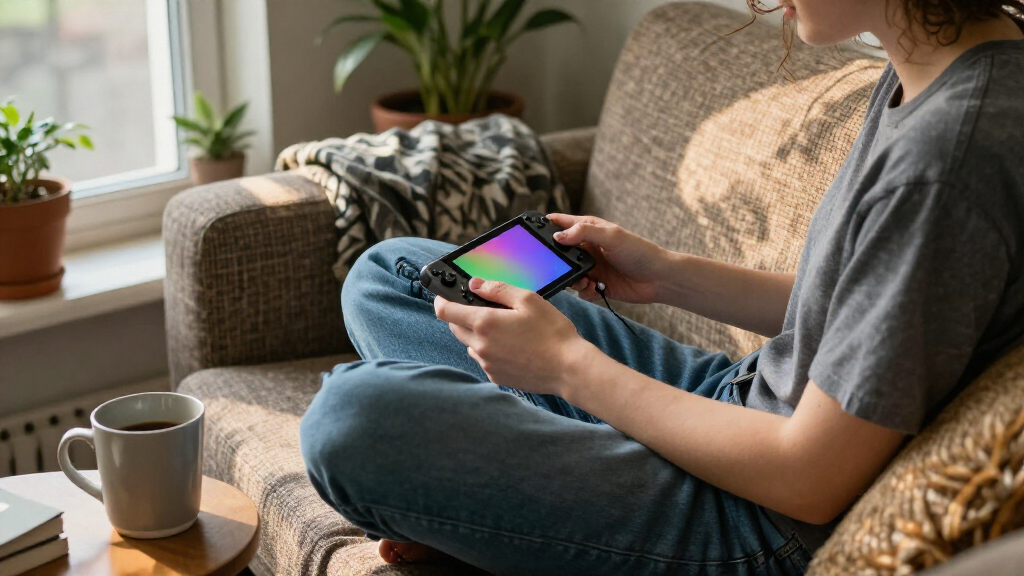
Gaming handheld consoles range from simple devices with built-in retro games to powerful systems that run modern PC or Android titles. I name the Lenovo Legion Go S my best overall pick for its large, high-refresh display and PC gaming focus; the Retroid Pocket 5 stands out for Android flexibility, while the PlayStation Portal suits PS5 owners who want remote play. The main tradeoff is between broad game access and a simpler, more focused experience, with size, controls, setup, and game compatibility shaping the choice. A preloaded retro device can be easy to start, but it does not offer the same flexibility as a full gaming platform. Read on for the full breakdown of all 15 options and a guide to choosing the right kind of handheld for you.

Get the latest gadgets delivered free with Prime
- Fast, free delivery on millions of items
- Prime Video, Amazon Music and more included
- Member-only deals all year
Complete the kit



Key Takeaways
- The Legion Go S leads this lineup for PC-style play: its 8-inch, 120Hz screen and 16GB of memory give it a different role from the smaller retro and Android handhelds.
- The ROG Xbox Ally is the other modern PC-focused choice: its 7-inch, 120Hz display trades some screen size for a more compact form, so buyers should compare ergonomics and platform needs rather than specs alone.
- The Retroid Pocket 5 and AYN Odin 2 Portal Base favor Android gaming: they make more sense for buyers who want app-based flexibility than for people seeking a plug-and-play retro toy.
- The PlayStation Portal is a PS5 companion, not a standalone console: its appeal depends on an existing PS5 setup and a suitable remote-play connection.
- Several retro entries share similar small-screen, preloaded-game positioning: compare the exact model, controls, storage, and included games before choosing between the RS36, RS36MAX, R36MAX, and R36MAX 2.
| WELLST·G P30S Handheld Game Console with 220 Retro Games |  | Best Simple Pick for Kids | Model: P30S | Preloaded games: 220 | Display: 3-inch LCD | VIEW LATEST PRICE | See Our Full Breakdown |
| Beijue 16-Bit Handheld Game Console for Kids, 220 Preloaded Games, Blue |  | Best for Travel-Friendly Kid Play | Game library: 220 preloaded games | Display: 3.04-inch LCD | Players: 1 | VIEW LATEST PRICE | See Our Full Breakdown |
| RS36 Retro Handheld Game Console, 4-Inch IPS Screen, 64GB, 35,000+ Games |  | Best for a Large Offline Retro Library | Model: RS36 | Display: 4-inch IPS | Preloaded games: 35,000+ | VIEW LATEST PRICE | See Our Full Breakdown |
| R36MAX 2 Retro Handheld Console, 4.5-inch IPS HD Portable Gaming Emulator, Detachable Grip, 20,000+ Classic Arcade Games |  | Best Ergonomic Retro Handheld | Display: IPS; listed as 4.5 inches in title and description, 4 inches in product information | Display resolution: 1024 × 768 | Preloaded games: 20,000+ | VIEW LATEST PRICE | See Our Full Breakdown |
| Lenovo Legion Go S Handheld Gaming Console, 8-inch 120Hz Display, AMD Ryzen Z2 Go, 16GB RAM, 512GB Storage, Glacier White |  | Best for Modern Windows Gaming | Platform: Windows | Processor: AMD Ryzen Z2 Go | Graphics: AMD Radeon | VIEW LATEST PRICE | See Our Full Breakdown |
| AYN Odin 2 Portal Base Handheld Game Console, 8GB RAM, 128GB Storage |  | Best for Premium Android Gaming | Processor: Qualcomm Snapdragon 8 Gen 2, 8 cores | GPU: Qualcomm Adreno 740 | Memory and storage: 8GB RAM; 128GB storage | VIEW LATEST PRICE | See Our Full Breakdown |
| PlayStation Portal Remote Player for PS5 | 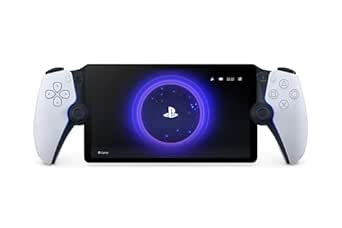 | Best for PS5 Remote Play | Compatible console: PlayStation 5 | Screen: 8-inch LCD, 1080p | Maximum frame rate: 60 fps | VIEW LATEST PRICE | See Our Full Breakdown |
| R36MAX Handheld Game Console, 4-Inch HD IPS Screen, 64GB Storage |  | Best Compact Retro-Style Pick | Screen: 4-inch IPS, 720 × 720 | Storage: 64GB | Controls: Dual joysticks | VIEW LATEST PRICE | See Our Full Breakdown |
| My Arcade Atari Pocket Player Handheld Console with 100 Games |  | Best for Simple Atari Nostalgia | Game library: 100 games: 80 Atari 2600 games and 20 bonus retro games | Screen: 2.75-inch full-color LCD | Controls: Button control | VIEW LATEST PRICE | See Our Full Breakdown |
| RG56PRO Retro Handheld Game Console with EVA Hard Case, 128GB |  | Best Feature-Rich Retro Handheld | Processor: Rockchip RK3562 quad-core, up to 2.0GHz | Operating system: Linux | Display: 5.5-inch IPS LCD, 1280 × 720 | VIEW LATEST PRICE | See Our Full Breakdown |
| Douddy 32-Bit Handheld Game Console for Kids, 139 Preloaded Games, Blue |  | Best for Kids and Simple Pick-Up Play | Games: 139 preloaded 32-bit games | Screen: 3-inch IPS | Controls: Buttons and arcade-style joystick | VIEW LATEST PRICE | See Our Full Breakdown |
| Retroid Pocket 5 Android Handheld Game Console, 128 GB, 5.5-inch 1080p Touchscreen, Black | 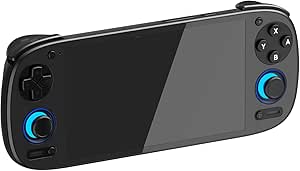 | Best for Android Flexibility and Emulation | Platform: Android 13 | Processor and graphics: Snapdragon 865; Adreno 650 | Memory: 8 GB | VIEW LATEST PRICE | See Our Full Breakdown |
| RS36MAX Retro Handheld Game Console, 4.0-Inch IPS Display, Purple |  | Best Retro Control Layout | Operating system: Linux | Processor: RK3326 64-bit quad-core | Display: 4-inch IPS, 720 × 720 | VIEW LATEST PRICE | See Our Full Breakdown |
| ASUS ROG Xbox Ally Handheld Gaming Console, 7-Inch 120 Hz Display, AMD Ryzen Z2 A, 16 GB RAM, 512 GB SSD |  | Best for Windows and PC Game Libraries | Operating system: Windows 11 Home | Processor and graphics: AMD Ryzen Z2 A; AMD RDNA 2 | Display: 7-inch 1080p IPS touchscreen, 120 Hz, 500 nits | VIEW LATEST PRICE | See Our Full Breakdown |
| RS36MAX Retro Handheld Game Console, 4-Inch IPS Display, Blue |  | Best Compact Retro Pick | Platform: Linux | Processor: RK3326 64-bit quad-core | Screen: 4-inch IPS, 720 × 720 | VIEW LATEST PRICE | See Our Full Breakdown |
| gaming handheld console | Display | Storage | Controls |
|---|---|---|---|
| WELLST·G P30S Handheld Game Co | 3-inch LCD | 2 GB | — |
| Beijue 16-Bit Handheld Game Co | 3.04-inch LCD | 512 MB | — |
| RS36 Retro Handheld Game Conso | 4-inch IPS | 64 GB | — |
| R36MAX 2 Retro Handheld Consol | IPS; listed as 4.5 inches in title and description, 4 inches in product information | 128 GB | Joystick; Hall-sensor 3D joysticks listed in description |
| Lenovo Legion Go S Handheld Ga | 8-inch PureSight IPS, 120Hz, 1080p | 512 GB | — |
| AYN Odin 2 Portal Base Handhel | 7-inch OLED touchscreen, 1080p, 120Hz | — | — |
| PlayStation Portal Remote Play | — | — | Remote controller; 15 buttons |
| R36MAX Handheld Game Console | — | 64GB | Dual joysticks |
| My Arcade Atari Pocket Player | — | — | Button control |
| RG56PRO Retro Handheld Game Co | 5.5-inch IPS LCD, 1280 × 720 | — | Hall-effect L1/L2/R1/R2 controls, dual 3D joysticks, button controls |
| Douddy 32-Bit Handheld Game Co | — | — | Buttons and arcade-style joystick |
| Retroid Pocket 5 Android Handh | 5.5-inch 1080p touchscreen | 128 GB, expandable by microSD | — |
| RS36MAX Retro Handheld Game Co | 4-inch IPS, 720 × 720 | — | Dual joysticks; L1/L2 and R1/R2 shoulder buttons |
| ASUS ROG Xbox Ally Handheld Ga | 7-inch 1080p IPS touchscreen, 120 Hz, 500 nits | 512 GB SSD | — |
| RS36MAX Retro Handheld Game Co | — | 64 GB TF card support | Dual joysticks; L1/L2 and R1/R2 shoulder buttons |
More Details on Our Top Picks
WELLST·G P30S Handheld Game Console with 220 Retro Games
The WELLST·G P30S is a straightforward choice for a child who wants a self-contained handheld rather than a platform for a large, expandable library. Its 220 preloaded games and button controls keep setup simple, while the 3-inch LCD and compact ABS body suit short play sessions and travel. The battery is rated for up to six hours, so it can cover a trip without frequent charging. Compared with the Beijue 16-Bit Handheld, this model has a similarly small screen and single-player focus, but Beijue specifies USB-C charging and a contoured grip. The P30S’s tradeoffs are its modest display, one-player limit, and limited 2 GB storage; it is a basic retro option, not a modern gaming system.
Pros:- 220 preloaded games provide variety without downloads or setup.
- Battery is rated for up to six hours of play.
- Compact 5.9-inch-long ABS body is easy to pack.
- Simple button controls suit casual play.
Cons:- The 3-inch LCD offers less viewing space than the screens on the RS36 and R36MAX 2.
- Single-player design rules out built-in multiplayer play.
- The 2 GB storage capacity limits room beyond its included content.
Best for: Parents seeking a compact, simple handheld with included games for a child who mainly plays solo.
Not ideal for: Players who want a larger screen, multiplayer sessions, or modern games and an expandable library.
- Model:P30S
- Preloaded games:220
- Display:3-inch LCD
- Players:1
- Battery:860 mAh lithium-ion
- Storage:2 GB
- Dimensions:5.9 x 2.8 x 0.7 inches
Our verdict“Choose the P30S for a child’s simple solo retro gaming; pick the Beijue instead if USB-C charging and a contoured grip matter more.”
Beijue 16-Bit Handheld Game Console for Kids, 220 Preloaded Games, Blue
The Beijue 16-Bit Handheld is a kid-focused travel pick: its 220 built-in games, contoured shape, and 182 g weight make it easy to carry and hold on the go. USB-C charging is a practical advantage over the similarly sized WELLST·G P30S, whose charging interface is not specified in the supplied details. Both are single-player handhelds with small LCD screens and batteries rated for up to six hours, so neither is a fit for shared-screen play or a more expansive retro setup. Beijue’s 3.04-inch display is only slightly larger than the P30S’s, and its 512 MB storage is limited. I’d choose it for straightforward travel play for younger children, not for someone seeking broad system support or a large display.
Pros:- 220 games span puzzle, action, arcade, and educational categories.
- USB-C charging makes it convenient to recharge with common compatible cables.
- 182 g weight and contoured design suit small hands and travel.
- Battery is rated for up to six hours of play.
Cons:- The 3.04-inch LCD is small for longer sessions or detailed games.
- Single-player controls do not support shared play.
- 512 MB storage is modest compared with the RS36’s 64 GB.
Best for: Families looking for a lightweight, USB-C rechargeable handheld with varied preloaded games for children ages 4–12.
Not ideal for: Older players or families wanting multiplayer, a large screen, or the storage and emulator options of a Linux retro console.
- Game library:220 preloaded games
- Display:3.04-inch LCD
- Players:1
- Charging interface:USB-C
- Storage:512 MB
- Weight:182 g
- Recommended age:4–12 years
Our verdict“Pick Beijue for a portable, child-oriented handheld with USB-C; choose the RS36 if a larger screen and broader retro library matter more.”
RS36 Retro Handheld Game Console, 4-Inch IPS Screen, 64GB, 35,000+ Games
The KOSWO RS36 is the retro-library choice here, pairing 35,000+ preloaded games with 12 built-in emulators and Linux. Since the supplied product details say it works without Wi-Fi, downloads, or subscriptions, it suits players who want a ready-to-play collection away from a network. Its 4-inch IPS screen gives more viewing room than the child-focused Beijue 16-Bit Handheld, and 64 GB of storage is a substantial step up from that model’s 512 MB. The tradeoff is a less clearly specified experience: the listing gives no battery runtime, and the console remains single-player. Its large game count may also matter less to buyers who want a smaller, more curated library. I’d favor it for offline retro variety, not for current PC games or shared play.
Pros:- More than 35,000 preloaded games and 12 built-in emulators offer broad retro variety.
- 4-inch IPS display provides more room than the 3-inch screens on the P30S and Beijue.
- 64 GB storage supports saves and favorites.
- Linux-based play is described as requiring no downloads, subscriptions, or Wi-Fi.
Cons:- The supplied product details do not specify battery runtime.
- Single-player design is a poor fit for shared gaming.
- A very large preloaded library may be less manageable than a smaller curated collection.
Best for: Retro fans who want a large preloaded selection and offline play in a handheld with a roomier screen than basic kids’ consoles.
Not ideal for: Players who need a stated battery runtime, multiplayer support, or a modern Windows game library.
- Model:RS36
- Display:4-inch IPS
- Preloaded games:35,000+
- Built-in emulators:12
- Operating system:Linux
- Storage:64 GB
- Battery capacity:4000 mAh
- Players:1
Our verdict“Choose the RS36 for offline retro breadth and a 4-inch IPS screen, but look to the Legion Go S for modern Windows gaming.”
R36MAX 2 Retro Handheld Console, 4.5-inch IPS HD Portable Gaming Emulator, Detachable Grip, 20,000+ Classic Arcade Games
The R36MAX 2 puts comfort and screen size ahead of the simpler, compact feel of the KOSWO RS36. Its 4.5-inch IPS display and detachable horizontal grip are aimed at longer sessions, while the listing specifies Hall-sensor joysticks and a 4000 mAh battery rated for up to six hours. The advertised library is 20,000+ games across more than 30 emulator formats, fewer games than the RS36 claims, but the grip and joysticks make this a more controller-like choice. The product details also list 128 GB of storage and a 1024 × 768 resolution. Buyers should note that the title and description call the screen 4.5 inches, while the information panel lists 4 inches; I would verify the listing before buying. It remains a single-player Linux retro device, not a replacement for a Windows handheld.
Pros:- Detachable horizontal grip is designed to make longer sessions more comfortable.
- Hall-sensor 3D joysticks provide analog control options.
- 128 GB storage and support for more than 30 emulator formats suit a broad retro setup.
- Battery is listed as 4000 mAh and rated for up to six hours.
Cons:- Screen size conflicts across the listing: 4.5 inches in the title and description, 4 inches in the information panel.
- Its 20,000+ advertised games are fewer than the RS36’s 35,000+.
- Linux retro focus does not offer the Windows game environment of the Legion Go S.
Best for: Retro players who prioritize a larger-feeling grip, joystick controls, and a sizeable preloaded library for longer handheld sessions.
Not ideal for: Buyers who want an unambiguous screen specification, modern PC games, or multiplayer as a core feature.
- Display:IPS; listed as 4.5 inches in title and description, 4 inches in product information
- Display resolution:1024 × 768
- Preloaded games:20,000+
- Storage:128 GB
- Operating system:Linux
- Controls:Joystick; Hall-sensor 3D joysticks listed in description
- Battery:4000 mAh lithium-ion polymer
Our verdict“Choose the R36MAX 2 for its grip, joysticks, and larger advertised display, but confirm the screen size if that measurement is a deciding factor.”
Lenovo Legion Go S Handheld Gaming Console, 8-inch 120Hz Display, AMD Ryzen Z2 Go, 16GB RAM, 512GB Storage, Glacier White
The Lenovo Legion Go S is the clear choice in this group for players who want a Windows handheld rather than a dedicated retro emulator. Its 8-inch 120Hz touchscreen, Ryzen Z2 Go processor, and 16 GB of memory are built for a different use case from the RS36 or R36MAX 2, whose appeal centers on preloaded classic libraries. The larger display offers more space for modern games and Windows interfaces, while the TrueStrike controllers and 55.5Wh battery support portable play. Rapid Charge Pro is useful when time near an outlet is limited. The tradeoff is bulk: an 8-inch screen is less pocket-friendly than the compact retro consoles, and the supplied details do not identify a software update support end date. I’d choose it for a broader PC-style experience, not for someone seeking a tiny, simple retro player.
Pros:- 8-inch 120Hz IPS touchscreen offers a large, smooth display for games and Windows navigation.
- Ryzen Z2 Go processor and 16 GB memory distinguish it from the retro-focused Linux consoles.
- 512 GB storage provides more room than the 64 GB RS36.
- 55.5Wh battery and Rapid Charge Pro support portable use and faster top-ups.
Cons:- The 8-inch display makes it less compact than the RS36 and R36MAX 2.
- Windows handheld gaming involves a more involved software environment than the preloaded retro consoles.
- The supplied product details do not specify an end date for software update support.
Best for: Players who want a Windows-based handheld for modern games, a large touchscreen, and built-in ergonomic controls.
Not ideal for: Travelers who prioritize pocketability or buyers who only want a small, simple console for preloaded retro games.
- Platform:Windows
- Processor:AMD Ryzen Z2 Go
- Graphics:AMD Radeon
- Display:8-inch PureSight IPS, 120Hz, 1080p
- Memory:16 GB
- Storage:512 GB
- Battery:55.5Wh
- Controllers:Legion TrueStrike
Our verdict“Choose the Legion Go S for modern Windows gaming on a large handheld screen; choose the RS36 or R36MAX 2 for simpler, retro-focused play.”
AYN Odin 2 Portal Base Handheld Game Console, 8GB RAM, 128GB Storage
The AYN Odin 2 Portal is the strongest fit here for buyers who want an Android handheld with a large, high-refresh display and modern mobile processing. Its 7-inch 1080p OLED at 120Hz gives supported games and apps a more vivid, fluid presentation than the PlayStation Portal’s 60Hz LCD, while the Snapdragon 8 Gen 2 and active cooling suit demanding Android games. Unlike the Portal, it does not depend on a PS5 for its main library, and Google Play access provides a route to games and apps, though no games are included. The tradeoff is a 430g body and just 128GB of base storage, so a microSD card may be useful for a growing collection. I’d choose this over the R36MAX for display quality and processing headroom, but the R36MAX includes a game card and case.
Pros:- 7-inch 1080p OLED touchscreen with a 120Hz refresh rate
- Snapdragon 8 Gen 2 processor and Adreno 740 graphics
- 8,000mAh battery, active cooling, and 27W USB-C charging
- Google Play support, microSD reader, and 3.5mm audio jack
Cons:- No games are preloaded, so buyers need to source their own library
- 128GB base storage may call for a microSD card
- At 430g, it is heavier than compact retro handhelds such as the R36MAX
Best for: Android gamers who want a large OLED touchscreen, high refresh rate, and access to Google Play without relying on a PS5.
Not ideal for: Buyers who want a ready-to-play library out of the box, a very compact device, or more than 128GB of built-in storage.
- Processor:Qualcomm Snapdragon 8 Gen 2, 8 cores
- GPU:Qualcomm Adreno 740
- Memory and storage:8GB RAM; 128GB storage
- Display:7-inch OLED touchscreen, 1080p, 120Hz
- Operating system:Android 13
- Battery and charging:8,000mAh; 27W USB-C
- Connectivity:Wi-Fi 7; Bluetooth 5.3
- Weight and dimensions:430g; 257 × 98.6 × 17.2mm
Our verdict“Choose the Odin 2 Portal for a powerful Android handheld and premium OLED screen, but skip it if you want games included or a lighter travel device.”
PlayStation Portal Remote Player for PS5
The PlayStation Portal makes the most sense as a way to take compatible PS5 games away from the television, not as a standalone gaming handheld. Its 8-inch 1080p screen and familiar DualSense controls, including supported haptics and adaptive triggers, bring PS5 play to a dedicated handheld format. That focused setup is simpler than the Android library choices on the AYN Odin 2 Portal, but it comes with a firm dependency: remote play of installed games requires a PS5 and a reliable broadband Wi-Fi connection. Select cloud-streaming games are another option with PlayStation Plus Premium, subject to game and feature support. At up to 60 fps, it also lacks the Odin’s 120Hz refresh rate. I’d pick it over the Odin only when the buyer’s priority is a PS5-linked control experience rather than a self-contained game platform.
Pros:- Large 8-inch 1080p LCD screen
- DualSense haptics and adaptive triggers in supported games
- Dedicated handheld controls for compatible PS5 remote play
- Cloud streaming is available for select games with PlayStation Plus Premium
Cons:- Remote play of installed games requires a PS5 console
- Gameplay depends on broadband Wi-Fi and can be affected by connection quality
- Compatibility varies, and the maximum frame rate is 60 fps
Best for: PS5 owners who want to play compatible games around the home without occupying the television.
Not ideal for: Players without a PS5 or dependable broadband Wi-Fi, and anyone seeking a standalone handheld library or unrestricted offline play.
- Compatible console:PlayStation 5
- Screen:8-inch LCD, 1080p
- Maximum frame rate:60 fps
- Connectivity:Wi-Fi
- Controls:Remote controller; 15 buttons
- Audio:PlayStation Link wireless or 3.5mm audio jack
- Weight:2.6 pounds
- Dimensions:14 × 3.88 × 6 inches
Our verdict“Buy the Portal if you already own a PS5 and want its compatible games on a handheld screen; choose the Odin 2 Portal for a more independent gaming device.”
R36MAX Handheld Game Console, 4-Inch HD IPS Screen, 64GB Storage
The R36MAX is a straightforward compact option for buyers who value portability over a large screen or a powerful modern-game platform. Its 4-inch square IPS display, dual joysticks, and built-in battery give it a more flexible control layout than the button-only My Arcade Atari Pocket Player, while the included case and screen protector are useful for carrying it around. The 64GB storage capacity is listed, but third-party game files are not pre-installed; buyers must obtain licensed game resources themselves. That makes setup less immediate than the Atari Pocket Player, which arrives with 100 games, though the R36MAX is the more versatile format for users supplying their own content. Its modest screen and unspecified processor details make it a poor match for buyers expecting premium visuals or a modern Android-style experience.
Pros:- Compact 4-inch IPS screen with 720 × 720 resolution
- Dual joysticks and responsive buttons
- 4000mAh rechargeable battery and ergonomic grip
- Includes a carrying case, screen protector, and headphone jack
Cons:- No third-party game files are pre-installed
- Users must obtain licensed game resources themselves
- The 4-inch display is small for buyers who prefer expansive handheld screens
Best for: Travelers seeking a small handheld with dual joysticks and accessories, who are comfortable sourcing licensed game files themselves.
Not ideal for: Buyers wanting preloaded games, a large high-resolution screen, or the Android gaming performance of the AYN Odin 2 Portal.
- Screen:4-inch IPS, 720 × 720
- Storage:64GB
- Controls:Dual joysticks
- Battery:4000mAh rechargeable
- Audio:Built-in speakers; 3.5mm headphone jack
- Included accessories:Carrying case, data cable, screen protector, instruction manual
- Weight:8 ounces
- Dimensions:3.27 × 1.38 × 6.02 inches
Our verdict“Choose the R36MAX for a portable dual-stick handheld with useful accessories, but pick the Atari Pocket Player if you want a game library ready to play.”
My Arcade Atari Pocket Player Handheld Console with 100 Games
The My Arcade Atari Pocket Player is the easiest pick in this group for someone who wants a fixed, ready-to-play collection rather than a configurable handheld. Its 100 included games—80 Atari 2600 titles plus 20 bonus retro games—make it more immediate than the R36MAX, which requires buyers to obtain licensed game resources. That convenience comes with a narrower experience: the 2.75-inch screen and button controls are built for simple solo play, not the larger display and dual-stick flexibility of the R36MAX or the Android gaming range of the AYN Odin 2 Portal. It can run on four AA batteries or USB-C, but neither power option is included. I’d recommend it for fans of classic Atari-style play, not for anyone looking to carry a broad modern handheld library.
Pros:- Includes 100 games: 80 Atari 2600 titles and 20 bonus retro games
- Lightweight 4-ounce design
- Built-in speaker with volume control and a 3.5mm headphone jack
- Can be powered by four AA batteries or USB-C
Cons:- Small 2.75-inch screen and button-only controls limit the play experience
- Four AA batteries and a USB-C cable are sold separately
- Standard non-rechargeable AA batteries are recommended
Best for: Atari fans and casual players who want a lightweight, single-player handheld with a built-in collection and simple controls.
Not ideal for: Players who want dual joysticks, a larger screen, a rechargeable battery included, or a broad modern game platform.
- Game library:100 games: 80 Atari 2600 games and 20 bonus retro games
- Screen:2.75-inch full-color LCD
- Controls:Button control
- Players:1
- Power:Four AA batteries or USB-C cable; sold separately
- Audio:Built-in speaker with volume control; 3.5mm headphone jack
- Weight:4 ounces
- Dimensions:5.8 × 1.5 × 2.8 inches
Our verdict“Pick this for uncomplicated Atari-focused play with games included, but choose the R36MAX for dual joysticks and a larger screen.”
RG56PRO Retro Handheld Game Console with EVA Hard Case, 128GB
The RG56PRO packs more retro-focused hardware into a small format than the R36MAX: it has a 5.5-inch 720p laminated IPS display, dual joysticks, Hall-effect shoulder controls, active cooling, and HDMI output. Those additions make it a stronger choice for players who want more control options or the ability to connect to a compatible display. Its 128GB game card is described as holding more than 31,000 games, so it is more immediately stocked than the R36MAX, which has no third-party game files pre-installed. The tradeoff is that Wi-Fi multiplayer depends on compatible games and devices, and the advertised battery runtime varies with use. Buyers should also follow the stated 5V/2A charging guidance. I’d favor it over the compact R36MAX for screen size and connections, but not for someone seeking a clearly documented standalone game platform.
Pros:- 5.5-inch laminated IPS display with 1280 × 720 resolution
- Hall-effect shoulder controls, dual joysticks, and vibration
- HDMI output and Wi-Fi for compatible play
- 128GB game card, active cooling, and included EVA hard case
Cons:- Wi-Fi multiplayer works only with compatible games and devices
- Battery runtime varies with settings and usage
- Charging guidance specifies a 5V/2A source and warns against higher-voltage sources
Best for: Retro handheld buyers who want a larger screen, extra shoulder controls, HDMI output, and a bundled hard case.
Not ideal for: Players who need guaranteed multiplayer compatibility, predictable battery runtime, or are uncomfortable following specific charging limits.
- Processor:Rockchip RK3562 quad-core, up to 2.0GHz
- Operating system:Linux
- Display:5.5-inch IPS LCD, 1280 × 720
- Storage and included library:128GB game card; more than 31,000 games stated
- Battery:5000mAh lithium-ion polymer; up to 8 hours advertised
- Controls:Hall-effect L1/L2/R1/R2 controls, dual 3D joysticks, button controls
- Connectivity:Built-in Wi-Fi, HDMI output, USB Type-C
- Weight:7.2 ounces
- Included accessory:EVA hard case
Our verdict“Choose the RG56PRO for a larger retro-focused screen and more hardware features than the R36MAX, provided its compatibility and charging limits fit your needs.”
Douddy 32-Bit Handheld Game Console for Kids, 139 Preloaded Games, Blue
Preloaded games and straightforward controls make the Douddy a low-fuss choice for a child who wants to start playing without setting up accounts or finding games. Its 3-inch IPS screen is larger than a basic novelty handheld’s, while the joystick adds an arcade-style option alongside the buttons. Compared with the Retroid Pocket 5, this is much simpler: it lacks Android apps, emulation setup, and expandable storage, but its 139 included games make it ready to use out of the box. That simplicity also limits its reach. The library is fixed, it supports one player, and the listed battery life is up to five hours. I’d choose it for casual solo play, not for someone seeking a broad or upgradeable gaming platform.
Pros:- Includes 139 preloaded games across casual, puzzle, and sports genres
- 3-inch IPS screen offers a clear, compact play area
- USB-C charging and rechargeable battery avoid disposable batteries
- Joystick and buttons give players more than one control style
Cons:- Single-player design rules out shared handheld play
- Battery life is listed at up to five hours, limiting longer sessions away from charging
- Preloaded-only library offers less flexibility than the Android-based Retroid Pocket 5
Best for: Parents seeking a compact, ready-to-play handheld with varied built-in games and simple controls for a child.
Not ideal for: Players who want multiplayer, access to new games, or a more capable platform for emulation and apps.
- Games:139 preloaded 32-bit games
- Screen:3-inch IPS
- Controls:Buttons and arcade-style joystick
- Battery life:Up to 5 hours
- Charging:USB-C
- Players:1
- Dimensions:5.3 × 3.46 × 0.7 inches
- Color:Blue
Our verdict“Choose the Douddy for a child who wants simple solo play and built-in games, rather than an expandable gaming platform.”
Retroid Pocket 5 Android Handheld Game Console, 128 GB, 5.5-inch 1080p Touchscreen, Black
The Retroid Pocket 5 is the lineup’s most adaptable compact handheld: Android 13, Wi-Fi, Bluetooth, microSD expansion, and a 5.5-inch 1080p touchscreen support emulators, apps, and cloud gaming. Its Snapdragon 865 processor and 8 GB of memory give it a broader role than the fixed-game Douddy, which is the easier pick for children who just want to switch on and play. The tradeoff is setup. No games are preloaded, so buyers need to source and configure their own content, and the product information says an initial charge of at least eight hours may be needed to exit battery protection mode. Its screen is also smaller than the 7-inch ASUS ROG Xbox Ally, though the Retroid’s Android focus and microSD slot make it a different kind of portable library. I’d pick it for tinkering and variety, not instant simplicity.
Pros:- 5.5-inch 1080p touchscreen provides a sharp display for handheld play
- Android 13 supports emulators, app stores, and cloud gaming
- 128 GB internal storage can be expanded with a microSD card
- Wi-Fi 6 and Bluetooth 5.1 support wireless connectivity
Cons:- No games are preloaded, so buyers must provide and set up content
- May need an initial charge of at least eight hours to exit battery protection mode
- Smaller 5.5-inch screen than the 7-inch ASUS ROG Xbox Ally
Best for: Android and emulation fans who are comfortable configuring games and want a compact touchscreen handheld with expandable storage.
Not ideal for: Beginners or parents looking for a ready-to-play device with games included and minimal setup.
- Platform:Android 13
- Processor and graphics:Snapdragon 865; Adreno 650
- Memory:8 GB
- Storage:128 GB, expandable by microSD
- Display:5.5-inch 1080p touchscreen
- Battery:5000 mAh
- Connectivity:Wi-Fi 6; Bluetooth 5.1
- Color:Black
Our verdict“Choose the Retroid Pocket 5 if you want an Android handheld to configure around your own games, not a ready-made library.”
RS36MAX Retro Handheld Game Console, 4.0-Inch IPS Display, Purple
For retro-style play that benefits from more than a basic button layout, the purple RS36MAX pairs dual joysticks with four shoulder buttons. Those controls give it more flexibility than the child-focused Douddy, while its 4-inch, 720 × 720 IPS display is roomier than the Douddy’s 3-inch screen. It runs Linux and supports 20+ game emulators, with a 64 GB TF card listed for storage; buyers should still check what content is supplied, since the product details describe emulator support rather than a confirmed built-in game library. The 4000 mAh battery is rated for up to 5–7 hours, and the 7.2-ounce body stays portable. Its single-player setup and specified 64 GB card support make it less flexible for expanding a large collection than a platform with broader storage options.
Pros:- Dual joysticks and L1/L2 and R1/R2 buttons suit a wider range of control layouts
- 4-inch 720 × 720 IPS display offers more screen area than the Douddy
- Supports more than 20 game emulators
- 7.2-ounce build and USB-C charging support portable use
Cons:- Designed for one player
- Storage card support is specified up to 64 GB
- Up to 5–7 hours of battery life may not cover extended sessions away from charging
Best for: Retro players who want dual sticks and shoulder buttons in a light Linux handheld with a square IPS display.
Not ideal for: Buyers who want multiplayer, a confirmed large preloaded library, or more storage headroom than the specified 64 GB card support.
- Operating system:Linux
- Processor:RK3326 64-bit quad-core
- Display:4-inch IPS, 720 × 720
- Emulator support:20+ game emulators
- Storage card:64 GB TF card
- Controls:Dual joysticks; L1/L2 and R1/R2 shoulder buttons
- Battery life:Up to 5–7 hours
- Weight:7.2 ounces
Our verdict“Choose the purple RS36MAX for a portable retro handheld with fuller physical controls, while accepting its single-player and 64 GB storage limits.”
ASUS ROG Xbox Ally Handheld Gaming Console, 7-Inch 120 Hz Display, AMD Ryzen Z2 A, 16 GB RAM, 512 GB SSD
The ASUS ROG Xbox Ally is the strongest fit here for players who want Windows PC games in a handheld form. Its 7-inch 1080p touchscreen, 120 Hz refresh rate, and FreeSync Premium set it apart from the smaller Linux retro models, while Windows 11 opens access to Xbox, Steam, Epic Games, and other PC platforms. The 512 GB SSD and 16 GB of memory also give it a more substantial PC-gaming setup than the Android-based Retroid Pocket 5, though that flexibility can bring more software management than a simple retro console. The 60 Wh battery supports fast charging, but the listed weight conflicts: the description says 1.47 lb while item details say 2 lb. The description also notes professionally upgraded storage, which may differ from the standard configuration. I’d verify both details before buying.
Pros:- Windows 11 supports games from Xbox, Steam, Epic Games, and other PC stores
- 7-inch 1080p display has a 120 Hz refresh rate and FreeSync Premium
- 16 GB LPDDR5 memory and a 512 GB SSD provide a substantial PC handheld configuration
- Fast charging is specified to reach 50% in 30 minutes
Cons:- Listed weight conflicts between 1.47 lb in the description and 2 lb in item details
- Description says storage was professionally upgraded, which may differ from the standard configuration
- Larger Windows handheld is less compact than the Retroid Pocket 5 and RS36MAX
Best for: PC and Xbox library owners who want access to multiple Windows game stores on a handheld with a large, high-refresh display.
Not ideal for: Buyers who prioritize a very light, simple retro device or who need clear confirmation of the exact weight and storage configuration before purchase.
- Operating system:Windows 11 Home
- Processor and graphics:AMD Ryzen Z2 A; AMD RDNA 2
- Display:7-inch 1080p IPS touchscreen, 120 Hz, 500 nits
- Memory:16 GB LPDDR5 6400 MHz
- Storage:512 GB SSD
- Battery:60 Wh
- Connectivity:Wi-Fi 6E; Bluetooth 5.4
- Listed weight:1.47 lb in description; 2 lb in item details
Our verdict“Choose the ROG Xbox Ally for broad Windows game-store access and a large 120 Hz screen, after confirming its weight and storage configuration.”
RS36MAX Retro Handheld Game Console, 4-Inch IPS Display, Blue
The blue RS36MAX makes the most sense for buyers who want a light, compact retro handheld with a useful range of physical controls. Its 4-inch 720 × 720 IPS screen, Linux platform, and support for 20+ emulators put it closer to the purple RS36MAX than to the ready-to-play Douddy. Both RS36MAX versions list the same processor, controls, battery capacity, and dimensions, so the choice between them is primarily color rather than capability. Dual joysticks and four shoulder buttons offer more control options than the Douddy, but the single-player design rules out shared play. The 64 GB TF card support and 5–7-hour battery rating also set limits for buyers with a large collection or long trips. I’d choose it as a portable retro-focused option, not as a general-purpose PC or Android handheld.
Pros:- Compact 7.2-ounce design is easy to carry
- 4-inch 720 × 720 IPS display provides a square screen for supported games
- Dual joysticks and four shoulder buttons offer varied control options
- USB-C charging and a 4000 mAh battery support portable play
Cons:- Single-player design does not support shared handheld play
- Battery life is rated for up to 5–7 hours per charge
- Specified TF card support is limited to 64 GB
Best for: Retro gaming fans who want a lightweight Linux handheld with dual sticks and shoulder buttons, and prefer the blue finish.
Not ideal for: Players who want multiplayer, a Windows or Android game library, or storage and battery capacity suited to very long sessions.
- Platform:Linux
- Processor:RK3326 64-bit quad-core
- Screen:4-inch IPS, 720 × 720
- Emulator support:20+
- Storage:64 GB TF card support
- Controls:Dual joysticks; L1/L2 and R1/R2 shoulder buttons
- Battery life:Up to 5–7 hours
- Color:Blue
Our verdict“Pick the blue RS36MAX for compact, single-player retro gaming; its hardware matches the purple version, so choose by color.”
How We Picked
I ranked these gaming handheld consoles by the kind of gaming each one can realistically serve, not by treating every device as a direct substitute. My main criteria were platform and game access, screen and control comfort, portability, setup effort, and practical features such as storage or battery capacity when listed. I gave stronger placement to devices with a clear use case and broader flexibility, while simple preloaded-game models were judged on ease of use and suitability for casual or younger players.
The order also reflects important limits: the PlayStation Portal requires a PS5, Android handhelds call for more app and compatibility choices, and PC handhelds are larger devices with a more involved software experience. Similar-looking retro consoles are grouped lower because the supplied details do not establish a decisive difference in performance or game quality. I avoid treating game-count claims as proof of compatibility or licensing, and buyers should verify the exact software, controls, and included accessories for the specific listing.
Factors to Consider When Choosing Gaming Handheld Consoles
Before choosing among these gaming handheld consoles, decide what you expect the device to play and how much setup you are willing to handle. A handheld built for PC games, one made for Android apps, and a preloaded retro device solve different problems. These checks can help you avoid buying a capable system that does not fit your library—or a simple device that cannot run the games you want.
Match the Platform to Your Game Library
Start with the games you already own or plan to play, then check how the handheld accesses them. A PC-oriented model is a better fit for PC libraries, while an Android handheld depends on app availability and compatibility. The PlayStation Portal is a companion for remote PS5 play, not a replacement for a PS5 or a general-purpose handheld. Preloaded retro consoles avoid storefront setup but limit you to the games and software supplied or supported by that particular model. Do not assume that a large advertised game count means every title will run well or that the console can add games easily. Check the platform, supported services, and connection requirements before judging a device by its headline specifications.
Choose Screen Size for the Way You Play
A larger screen can make menus, text, and detailed games easier to see, but it also makes a handheld bulkier to carry and hold for long sessions. Smaller devices suit pockets and quick play, though cramped controls and tiny text can become tiring. Refresh rate is only one part of screen quality; resolution, brightness, aspect ratio, and your typical viewing distance also affect comfort. Think about whether you mostly play at home, on a commute, or in short breaks, since those settings favor different sizes. A high-spec display is less useful if the device feels awkward in your hands. If possible, compare dimensions and control placement—not just screen measurements—before deciding.
Budget for Setup, Storage, and Ongoing Management
Some handhelds are ready for casual play soon after unboxing, while PC and Android systems may require accounts, updates, app installation, or library configuration. That setup can be worthwhile if you want flexibility, but it is a poor match for someone who wants a simple device for a child or occasional use. Storage capacity matters most when you intend to keep many large games installed; removable storage can help only if the specific model supports it. Also check how saves are backed up and whether your games need an internet connection or account access. Avoid choosing by capacity alone: a device with plenty of storage is not useful if it cannot run the games you want. Include a case, charger, or storage card in your planning if these are not supplied.
Treat Battery Life as a Use-Case Question
Battery capacity figures are not the same as real play time, because demanding games, screen brightness, wireless use, and performance settings all affect power draw. A device intended for demanding PC games may need more frequent charging than a simple retro handheld, even if both are described as portable. For travel, consider whether you can charge during the day and whether the console can resume a game quickly after a pause. Remote-play devices also depend on network quality, so battery planning alone will not solve interruptions away from a stable connection. Check independent, model-specific battery tests when available and look for the games and settings used in those tests. This gives a more useful estimate than comparing battery numbers across different platforms.
Decide How Much Flexibility You Actually Need
More capable systems offer more ways to play, but they can bring extra software choices, account management, and troubleshooting. A beginner or younger player may benefit more from straightforward controls and a clear game selection than from a wide platform library. On the other hand, a buyer who already manages a PC or Android game library may welcome that flexibility. Keep emulation claims separate from the device’s basic hardware: performance, setup, and legal game access can vary by title and region. Confirm what games are included and what the manufacturer permits before relying on a preloaded library. The best fit is the least complicated device that still supports the games you care about.
Check Ergonomics and Accessories Before Committing
Weight, grip shape, button spacing, and stick placement can matter more over a long session than a small difference in processing hardware. Large handhelds may offer roomier controls but can feel tiring to hold, while compact models are easier to carry and may feel cramped. Built-in or detachable grips can change the feel, so check whether they are included and how securely they attach. A protective case is useful for travel, but it adds bulk and may not solve problems with control comfort. Consider who will use the device and whether they can comfortably reach all buttons. If the console is a gift, a simpler layout and durable carry protection may matter more than extra storage or a faster screen.
Frequently Asked Questions
Which handheld here can play games without another console or computer?
The PC-oriented Lenovo Legion Go S and ASUS ROG Xbox Ally are designed as handheld gaming computers, while the Retroid Pocket 5 and AYN Odin 2 Portal Base use Android. The preloaded retro models offer games on the device itself, though their libraries and capabilities are more limited. The PlayStation Portal is different: it streams games from a PS5 and depends on that console and a suitable network connection. Before buying, check whether the specific games you want are supported locally or require another device, account, or connection. That distinction is more important than the word “handheld” in a product listing.
Is the PlayStation Portal a good choice if I do not own a PS5?
No; the PlayStation Portal is primarily a remote-play companion for a PS5, so it is not the right pick as a standalone gaming system. Without a PS5 and access to the games you want to stream, its core use case is missing. Remote play also relies on a sufficiently stable connection, which can affect responsiveness and image quality. If you want games to run directly on the handheld, look at the PC, Android, or self-contained retro options instead. Check current PlayStation requirements before buying, since service and feature support can change.
Should I choose a preloaded retro console or an Android handheld?
A preloaded retro console is usually the simpler direction if you want a small device with an included game selection and minimal setup. An Android handheld is better suited to buyers willing to install apps, manage accounts, and check game compatibility for more flexibility. Neither label guarantees that a particular title will work, so verify supported software and controls for the exact model. Preloaded-game counts do not tell you whether the included games match your tastes or are presented in a convenient interface. If the device is for a child or a casual player, simplicity may matter more than expandability.
Are the RS36, RS36MAX, R36MAX, and R36MAX 2 interchangeable?
They are similar in positioning as compact retro handhelds, but the supplied product details show differences in screen size, storage, color, grip design, and claimed game counts. Those details do not establish that their processors, software, controls, or game compatibility are identical. Compare the exact listing and confirm what is included rather than assuming that a shared name means the same hardware. Pay special attention to whether storage is included, whether a grip is detachable, and what battery or support information the seller provides. If the descriptions do not answer those questions, choosing a better-documented model is the safer route.
What should I prioritize when buying a handheld for a child?
Start with age-appropriate controls, comfortable size, durability, and a game selection the child can understand. Simple preloaded devices may be easier to hand over than a PC or Android handheld that needs accounts, updates, and supervision. Still, check the exact included games and whether parental controls, volume limits, or a protective case are available; do not infer these features from a product title. For an older child who wants specific modern games, verify compatibility before choosing a basic retro system. A device that is easy to manage and comfortable to hold is often a better fit than one with the longest feature list.
Conclusion
For most buyers seeking a capable all-purpose option in this lineup, I recommend the Lenovo Legion Go S as best overall, especially for PC-style gaming and a large screen. The RS36 and RS36MAX family offers the best value direction for shoppers who want a compact retro device, but compare exact specifications and included games rather than relying on model names. For a premium Android-focused choice, consider the AYN Odin 2 Portal Base; the Retroid Pocket 5 is a strong alternative when its 5.5-inch 1080p touchscreen and Android format better suit your needs. For beginners or younger players, the Beijue or Douddy can be easier to approach than a system that requires app and account setup. Choose the PlayStation Portal for a specific need: remote PS5 play around the home or wherever your connection supports it. If you want a compact retro device, compare the R36MAX variants; if you want modern games, start with the Legion Go S or ROG Xbox Ally instead.
Black Friday Picks

Sonos One (Gen 2) Two-Room Set Voice-Controlled Smart Speaker with Alexa (2-Pack, Black)
As an affiliate, we earn on qualifying purchases.