The best cloud gaming controllers balance reliable device compatibility, comfortable controls, and a connection that suits where you play. My best overall pick is the Xbox Wireless Gaming Controller for its familiar layout and broad usefulness across cloud gaming setups. The Amazon Luna Wireless Controller is a more focused choice for Luna players, while the GameSir X5 Lite suits mobile gaming with its phone-mounted design. The main tradeoff is between a dedicated mobile controller and a general-purpose gamepad: one can be easier to carry and hold with a phone, while the other can work across more screens. Read on for the full breakdown and help matching a controller to your devices and play style.

Get the latest gadgets delivered free with Prime
- Fast, free delivery on millions of items
- Prime Video, Amazon Music and more included
- Member-only deals all year
Complete the kit



Key Takeaways
- Broad compatibility beats a cloud-gaming label alone: the Xbox Wireless Controller is the strongest all-around fit here, while the Luna controller makes more sense for players centered on Amazon Luna.
- Phone-mounted designs solve a different problem than standard gamepads: GameSir X5 Lite and 8BitDo Ultimate Mobile are aimed at handheld-style play, not flexible use across a TV, PC, and phone.
- Wired and wireless options involve a practical tradeoff: RiotPWR’s iOS controllers avoid wireless pairing, while general wireless picks are easier to move between setups.
- Hall-effect controls are a durability feature, not a cloud-streaming upgrade: several GameSir, EasySMX, Crotrain, and AceGamer models offer them, but they do not improve network latency.
- Platform fit changes the ranking: iPhone users should compare the Lightning-specific RiotPWR model with the broader-use options, while PC and TV players have more reason to choose a conventional wireless pad.
| EasySMX X15 Wireless Gaming Controller | 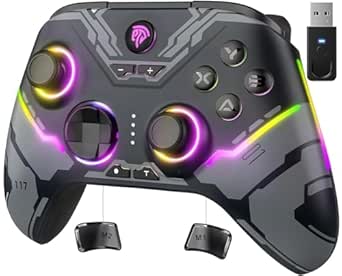 | Best Multi-Platform Value | Compatibility: Windows PC, Steam, Nintendo Switch, Android, iOS | Connectivity: 2.4G wireless, Bluetooth, USB-C wired | Stick and trigger technology: Hall Effect | VIEW LATEST PRICE | See Our Full Breakdown |
| GameSir X5 Lite Mobile Gaming Controller with Hall Effect Joysticks |  | Best for Phone-Based Cloud Gaming | Controller type: Mobile gamepad | Connectivity: USB-C | Compatible devices: Android and iOS phones; compatible tablets | VIEW LATEST PRICE | See Our Full Breakdown |
| EasySMX X05Pro Wireless Gaming Controller for PC, Switch, Android, and iOS |  | Best for Quiet Late-Night Sessions | Compatible devices: PC, Switch/Switch 2, Android, iOS | Connectivity: USB-C, 2.4 GHz wireless, Bluetooth | Joystick technology: 11-bit Hall Effect | VIEW LATEST PRICE | See Our Full Breakdown |
| 8Bitdo Ultimate 2 Wireless Controller for PC, Apple, Steam & Android, Black |  | Best Premium Feature Set | Compatible devices: Android, Windows | Connectivity: USB, 2.4GHz wireless | Joystick technology: TMR | VIEW LATEST PRICE | See Our Full Breakdown |
| Wireless Game Controller for Luna, Fire TV, PC, and Mobile Devices |  | Best for Luna and Fire TV Setups | Connectivity: Bluetooth | Compatible devices: Luna, Fire TV, PC, GeForce NOW, tablets, phones, Android | Joystick type: ALPS analog | VIEW LATEST PRICE | See Our Full Breakdown |
| Crotrain Wireless Gaming Controller with Hall Joysticks and Triggers |  | Best Cross-Platform Wireless Pick | Connectivity: Wireless Bluetooth | Compatible devices: Android, iOS, Nintendo Switch, PC, Mac | Stick and trigger technology: Hall Effect joysticks and triggers | VIEW LATEST PRICE | See Our Full Breakdown |
| RiotPWR Mobile Cloud Gaming Controller for Lightning iOS Devices |  | Best for Lightning iPhone Cloud Play | Model: RP1950X | Connectivity: Lightning | Compatible devices: iOS devices; iPhone with Lightning connection | VIEW LATEST PRICE | See Our Full Breakdown |
| SteelSeries Nimbus Cloud Dual-Mode Cloud Gaming Controller |  | Best for Multi-Device Home Setups | Model: Nimbus Cloud (69113) | Connectivity: Bluetooth wireless | Compatible devices: Android, iPhone, iPad, Mac, MacBook, Apple TV, Chromebook, PC, smart TVs | VIEW LATEST PRICE | See Our Full Breakdown |
| GameSir Nova Lite 2 Wireless Controller |  | Best for Control Customization | Compatible devices: PC, Nintendo Switch, Nintendo Switch 2, Android, iOS | Connectivity: Bluetooth, wired, 2.4 GHz wireless dongle | Stick technology: Hall Effect | VIEW LATEST PRICE | See Our Full Breakdown |
| 8BitDo Ultimate Mobile Gaming Controller for iPhone and Android (Black) |  | Best Phone-Mounted Cloud Gaming Pick | Compatible devices: Apple and Android devices | Connectivity: Bluetooth | Phone length compatibility: 100–170 mm | VIEW LATEST PRICE | See Our Full Breakdown |
| Amazon Luna Wireless Controller |  | Best for Amazon Luna | Connectivity: Cloud Direct Wi-Fi, Bluetooth Low Energy 5.0, USB-C | Wi-Fi bands: 2.4 GHz and 5 GHz | Dimensions: 156.4 x 107.6 x 58.5 mm | VIEW LATEST PRICE | See Our Full Breakdown |
| Xbox Wireless Gaming Controller with USB-C Cable, Carbon Black |  | Best for Xbox and PC Cloud Gaming | Connectivity: Bluetooth and USB-C | Included cable: 9-foot USB-C cable | Compatible devices: Android, iOS, Windows, Xbox One, Xbox Series S, Xbox Series X | VIEW LATEST PRICE | See Our Full Breakdown |
| PlayStation DualSense Wireless Controller – Cosmic Red |  | Best for Haptic Feedback | Color: Cosmic Red | Connectivity: Bluetooth and USB Type-C | Compatible devices: PlayStation 5, Windows PC, Mac, Android, and iOS | VIEW LATEST PRICE | See Our Full Breakdown |
| AceGamer Aurora II Wireless Bluetooth Controller with Hall Effect Joysticks | 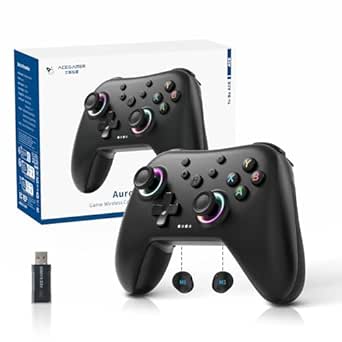 | Best for Hall Effect Sticks | Connectivity: Bluetooth and 2.4 GHz wireless | Joystick technology: Hall Effect sensors | Back buttons: 2 programmable buttons | VIEW LATEST PRICE | See Our Full Breakdown |
| RiotPWR Cloud Gaming Controller for iOS |  | Best Wired iOS Pick | Model: RP1950 | Compatible devices: iOS devices running iOS 7 or later | Connectivity: Corded USB | VIEW LATEST PRICE | See Our Full Breakdown |
| cloud gaming controller | Connectivity | Compatible devices |
|---|---|---|
| EasySMX X15 Wireless Gaming Co | 2.4G wireless, Bluetooth, USB-C wired | — |
| GameSir X5 Lite Mobile Gaming | USB-C | Android and iOS phones; compatible tablets |
| EasySMX X05Pro Wireless Gaming | USB-C, 2.4 GHz wireless, Bluetooth | PC, Switch/Switch 2, Android, iOS |
| 8Bitdo Ultimate 2 Wireless Con | USB, 2.4GHz wireless | Android, Windows |
| Wireless Game Controller for L | Bluetooth | Luna, Fire TV, PC, GeForce NOW, tablets, phones, Android |
| Crotrain Wireless Gaming Contr | Wireless Bluetooth | Android, iOS, Nintendo Switch, PC, Mac |
| RiotPWR Mobile Cloud Gaming Co | Lightning | iOS devices; iPhone with Lightning connection |
| SteelSeries Nimbus Cloud Dual- | Bluetooth wireless | Android, iPhone, iPad, Mac, MacBook, Apple TV, Chromebook, PC, smart TVs |
| GameSir Nova Lite 2 Wireless C | Bluetooth, wired, 2.4 GHz wireless dongle | PC, Nintendo Switch, Nintendo Switch 2, Android, iOS |
| 8BitDo Ultimate Mobile Gaming | Bluetooth | Apple and Android devices |
| Amazon Luna Wireless Controlle | Cloud Direct Wi-Fi, Bluetooth Low Energy 5.0, USB-C | — |
| Xbox Wireless Gaming Controlle | Bluetooth and USB-C | Android, iOS, Windows, Xbox One, Xbox Series S, Xbox Series X |
| PlayStation DualSense Wireless | Bluetooth and USB Type-C | PlayStation 5, Windows PC, Mac, Android, and iOS |
| AceGamer Aurora II Wireless Bl | Bluetooth and 2.4 GHz wireless | — |
| RiotPWR Cloud Gaming Controlle | Corded USB | iOS devices running iOS 7 or later |
More Details on Our Top Picks
EasySMX X15 Wireless Gaming Controller
The EasySMX X15 suits cloud gamers who want one gamepad for a mix of devices rather than a phone-mounted controller. It connects by Bluetooth, 2.4G wireless, or USB-C, giving it more setup flexibility than the USB-C-only GameSir X5 Lite. Its Hall Effect sticks and triggers are designed to resist drift, while two programmable rear buttons give you extra control without reaching across the face buttons. A battery rated for up to 20 hours is handy for sessions away from a charging cable. The tradeoff is a lack of both a headset jack and gyroscope, so it is less suited to voice chat or motion-focused games. Choose it for broad device support, not phone portability.
Pros:- Works with Windows PC, Steam, Switch, Android, and iOS
- Bluetooth, 2.4G wireless, and USB-C wired connections
- Hall Effect joysticks and triggers are designed to reduce drift
- Two programmable back buttons and up to 20 hours of listed battery life
Cons:- No audio jack for connecting a headset
- No gyroscope for motion-controlled games
- A separate gamepad is less compact for phone-based play than the GameSir X5 Lite
Best for: Cloud gamers who switch among Windows PCs, Android or iOS devices, and Nintendo Switch and want wireless and wired connection options.
Not ideal for: Players who need a built-in headset connection or gyroscope controls, or who want a controller that attaches directly to a phone.
- Compatibility:Windows PC, Steam, Nintendo Switch, Android, iOS
- Connectivity:2.4G wireless, Bluetooth, USB-C wired
- Stick and trigger technology:Hall Effect
- Programmable back buttons:2
- Battery capacity:1000mAh
- Listed battery life:Up to 20 hours
- Polling rate:1000Hz
- Audio jack and gyroscope:None
Our verdict“Pick the X15 if you want a versatile multi-device controller with Hall Effect controls, but skip it if your cloud setup depends on headset audio or motion input.”
GameSir X5 Lite Mobile Gaming Controller with Hall Effect Joysticks
For cloud gaming on a phone or compatible tablet, the GameSir X5 Lite offers a more direct setup than the standalone EasySMX X15: it connects through USB-C and holds the mobile device between its grips. At 135.4g, it is also built to keep the combined setup manageable during longer handheld sessions. Hall Effect sticks support smooth directional input, while textured grips and cushioned membrane controls aim for comfortable play. Pass-through charging can help keep a connected device powered during a session, but it does not give the controller a separate battery or wireless connection. That USB-C dependence may rule it out for some devices, and it is less adaptable than a multi-connection pad such as the X15. I’d choose it for phone-first play, not for a shared living-room controller.
Pros:- USB-C connection supports a direct phone or tablet setup
- Lightweight 135.4g design with textured ergonomic grips
- Hall Effect joysticks provide 360-degree control
- Customizable controls and pass-through charging
Cons:- USB-C-only connectivity limits device and setup flexibility
- Pass-through charging requires the connected device to be charging
- Unlike the EasySMX X15, it is not a standalone multi-platform wireless gamepad
Best for: Mobile cloud gamers who want to hold a compatible USB-C phone or tablet in a handheld controller setup.
Not ideal for: Players who need Bluetooth or 2.4G wireless, use a device without compatible USB-C support, or want a standalone controller for PC and console play.
- Controller type:Mobile gamepad
- Connectivity:USB-C
- Compatible devices:Android and iOS phones; compatible tablets
- Maximum extension:213 mm
- Weight:135.4 g
- Buttons:12
- Joystick technology:Hall Effect
- Additional features:Pass-through charging, customizable controls, Turbo function
Our verdict“Choose the X5 Lite for a lightweight, phone-centered cloud gaming setup, but choose a wireless gamepad if you also need a PC or living-room controller.”
EasySMX X05Pro Wireless Gaming Controller for PC, Switch, Android, and iOS
The EasySMX X05Pro is a strong fit for cloud gamers who want a conventional wireless controller with quieter controls. Its quiet buttons can suit shared spaces or late sessions, while adjustable dual-stage triggers let players tailor how much pull a game needs. Like the X15, it offers USB-C, Bluetooth, and 2.4 GHz connections, plus Hall Effect sticks and two programmable buttons. The listed 1000Hz polling rate applies to wired and 2.4 GHz modes; Bluetooth drops to 125Hz, so wireless mode choice matters for players who prioritize responsiveness. Compared with the more phone-focused GameSir X5 Lite, the X05Pro works as a standalone pad across several platforms. Its main boundary is platform support: it excludes Xbox, PlayStation, Luna, and GeForce.
Pros:- Quiet buttons suit shared rooms and late-night play
- Hall Effect joysticks and adjustable dual-stage triggers
- USB-C, 2.4 GHz wireless, and Bluetooth connections
- Two programmable buttons and rumble motors
Cons:- Not compatible with Xbox or PlayStation
- Product data excludes Luna and GeForce compatibility
- Bluetooth polling rate is 125Hz, below the listed 1000Hz wired and 2.4 GHz rate
Best for: PC, Switch, Android, or iOS cloud gamers who want quiet button presses, adjustable triggers, and several connection options.
Not ideal for: Players whose setup relies on Xbox, PlayStation, Luna, or GeForce compatibility, or who plan to use Bluetooth while prioritizing the highest listed polling rate.
- Compatible devices:PC, Switch/Switch 2, Android, iOS
- Connectivity:USB-C, 2.4 GHz wireless, Bluetooth
- Joystick technology:11-bit Hall Effect
- Polling rate:1000Hz wired/2.4 GHz; 125Hz Bluetooth
- Triggers:Dual-stage adjustable
- Programmable buttons:2
- Battery capacity:1000 mAh
- Compatibility exclusions:Xbox, PlayStation, Luna, GeForce
Our verdict“Choose the X05Pro for quieter play and adjustable controls on supported platforms, but look elsewhere if your cloud service depends on Luna or GeForce.”
8Bitdo Ultimate 2 Wireless Controller for PC, Apple, Steam & Android, Black
The 8Bitdo Ultimate 2 stands apart for players who want extra control options and a wireless setup built around a 2.4GHz connection. Its 1000Hz polling rate, high-sensitivity TMR sticks, and selectable Hall Effect or tactile trigger modes give competitive-minded PC and Android players more ways to tune input feel than the simpler EasySMX X15. Two back paddles, extra bumpers, motion controls, and a charging dock add flexibility for longer sessions and different game types. That feature set comes with practical limits: the supplied compatibility details name Android and Windows, not PlayStation, and battery life is not specified. I’d favor it over the X05Pro for its trigger choices and motion controls, but not if broad console compatibility or clear battery-runtime information is a priority.
Pros:- TMR joysticks and selectable Hall Effect or tactile trigger modes
- Listed 1000Hz polling rate and 2.4GHz wireless range up to 10m
- Two back paddles, extra bumpers, and 6-axis motion controls
- USB-C charging dock included
Cons:- Product compatibility details list Android and Windows, not PlayStation
- Battery life is not provided
- More controls and settings may be unnecessary for casual cloud gaming
Best for: PC or Android cloud gamers who want configurable triggers, back paddles, motion controls, and a dedicated 2.4GHz wireless connection.
Not ideal for: Players who need confirmed PlayStation support, want a detailed battery-life estimate, or prefer a simpler controller with fewer extra features.
- Compatible devices:Android, Windows
- Connectivity:USB, 2.4GHz wireless
- Joystick technology:TMR
- Polling rate:1000Hz
- Trigger modes:Selectable Hall Effect or tactile
- Motion controls:Customizable 6-axis
- Additional controls:Two back paddles and extra bumpers
- Included charging accessory:USB-C charging dock
Our verdict“Pick the Ultimate 2 if you want a highly configurable PC or Android controller, but choose a simpler option if broad platform support matters more than extra controls.”
Wireless Game Controller for Luna, Fire TV, PC, and Mobile Devices
This Bluetooth controller makes the most sense for buyers building around Luna or Fire TV, with PC, GeForce NOW, and mobile devices also listed as compatible. Two programmable back paddles and a turbo function add shortcuts that the phone-mounted GameSir X5 Lite does not emphasize, while motion sensing and a built-in speaker offer extra input and audio features. The tradeoff is that its ALPS analog joysticks lack the Hall Effect design found on the EasySMX X15 and X05Pro, so buyers specifically seeking that stick technology should favor those alternatives. Platform support also has limits: PS5 use is restricted to PS4 games, and Xbox and Nintendo Switch are excluded. Its 1200mAh battery capacity is listed, but no playtime estimate is provided.
Pros:- Compatibility listing includes Luna and Fire TV, plus PC and GeForce NOW
- Two programmable back paddles and a turbo function
- Motion sensing and a built-in speaker
- USB-C charging and a 1200 mAh battery
Cons:- ALPS analog joysticks do not offer the Hall Effect design of the EasySMX X15 or X05Pro
- PS5 support is limited to PS4 games
- Not compatible with Xbox or Nintendo Switch
Best for: Luna or Fire TV cloud gamers who also want one Bluetooth controller for listed PC, GeForce NOW, and mobile-device use.
Not ideal for: Players who need Nintendo Switch or Xbox compatibility, full PS5 game support, or Hall Effect joysticks.
- Connectivity:Bluetooth
- Compatible devices:Luna, Fire TV, PC, GeForce NOW, tablets, phones, Android
- Joystick type:ALPS analog
- Programmable back paddles:2
- Additional features:Turbo, motion sensing, built-in speaker
- Battery capacity:1200 mAh
- Charging port:USB-C
- PS5 support:Limited to PS4 games
Our verdict“Choose this Bluetooth pad for Luna or Fire TV and its programmable controls, but skip it if you need Switch or Xbox support or Hall Effect sticks.”
Crotrain Wireless Gaming Controller with Hall Joysticks and Triggers
The Crotrain makes the most sense for cloud gamers who want one Bluetooth controller for a phone, computer, and Switch rather than a phone-only grip. Its Hall Effect sticks and triggers are designed to resist wear-related drift, while gyro control and adjustable vibration give it more tuning options than the simpler mobile-focused RiotPWR Lightning controller. The 15–18-hour rated battery also suits sessions away from a charger. The tradeoff is that Bluetooth depends on each device and service supporting the controller properly, so listed compatibility does not guarantee every cloud gaming app will recognize every feature. Switch 2 wake-up and the C key are unsupported, and the RGB lighting may matter less than reliable service compatibility to cloud-first buyers.
Pros:- Bluetooth compatibility spans mobile devices, computers, and Nintendo Switch
- Hall Effect joysticks and triggers are designed for precise control and reduced drift risk
- Six-axis gyro and adjustable vibration provide more control options than a basic mobile pad
- Rated for 15–18 hours of play between charges
Cons:- Switch 2 wake-up function and C key are not supported
- Cloud service compatibility can depend on the host platform’s controller support
- Bluetooth may require more setup or introduce more latency than the RiotPWR’s direct Lightning connection
Best for: Cloud gamers who switch among Android or iOS phones, computers, and a Nintendo Switch and want wireless play with Hall Effect controls.
Not ideal for: Switch 2 owners who need wake-up and C-key functions, or cloud players who want guaranteed support across a particular service and device combination.
- Connectivity:Wireless Bluetooth
- Compatible devices:Android, iOS, Nintendo Switch, PC, Mac
- Stick and trigger technology:Hall Effect joysticks and triggers
- Additional controls:Six-axis gyro, adjustable vibration, RGB lighting
- Battery capacity:600mAh
- Charging:USB-C; 2–3 hours
- Buttons:15
Our verdict“Choose the Crotrain if you want one feature-rich wireless controller across mobile, computer, and Switch, but check your cloud service’s support first.”
RiotPWR Mobile Cloud Gaming Controller for Lightning iOS Devices
For a Lightning-equipped iPhone owner, the RiotPWR offers a straightforward alternative to wireless pads such as the Crotrain: its direct connection avoids Bluetooth pairing and keeps the phone attached to a full-size controller. That setup can suit longer cloud or remote-play sessions, and pass-through charging lets the phone stay powered while the controller is in use. A headphone socket with an audio DAC and a share button add useful phone-gaming touches. The clear limitation is device fit: this controller is built for iPhones with a Lightning connection, not USB-C iPhones or Android phones. Its cord also ties the phone to the controller, making positioning less flexible than with the Bluetooth 8BitDo Ultimate Mobile.
Pros:- Direct Lightning connection avoids Bluetooth pairing and its associated wireless latency
- Pass-through charging supports play while the iPhone charges
- Headphone socket with Audio DAC and a dedicated share button
- Supports cloud gaming and remote-play services
Cons:- Requires an iPhone with a Lightning connection
- Corded connection limits phone placement and movement
- Less flexible across devices than Bluetooth options such as the 8BitDo Ultimate Mobile
Best for: iPhone players with a Lightning port who want a full-size controller for cloud gaming or remote play without Bluetooth pairing.
Not ideal for: Owners of USB-C iPhones, Android users, or players who want to move their phone freely while playing.
- Model:RP1950X
- Connectivity:Lightning
- Compatible devices:iOS devices; iPhone with Lightning connection
- Controller type:Full-sized
- Buttons:18
- Additional features:Pass-through charging, headphone socket with Audio DAC, share button
- Dimensions:5.91 x 4.33 x 1.97 inches
- Warranty:Limited lifetime warranty
Our verdict“Pick the RiotPWR for a Lightning iPhone and a direct, full-size cloud gaming setup; skip it if you use USB-C or Android.”
SteelSeries Nimbus Cloud Dual-Mode Cloud Gaming Controller
The Nimbus Cloud is the lineup’s strongest fit for someone who wants a full-size Bluetooth gamepad shared between mobile devices and a home screen. Its compatibility list includes phones, tablets, computers, Chromebooks, and smart TVs, giving it a broader home-and-mobile role than the Lightning-only RiotPWR. Up to 20 hours of battery life also reduces charging interruptions during longer sessions. Hall Effect sensors add a durability-oriented feature, though the supplied details do not specify whether they apply to both sticks and triggers. This is less purpose-built for attaching a phone directly than the 8BitDo Ultimate Mobile, and Bluetooth still means pairing and platform support can vary. The listing also gives no detail about a stand or phone-mount arrangement.
Pros:- Works with a broad range of mobile, computer, Chromebook, and smart TV devices
- Bluetooth supports wireless play across compatible devices
- Up to 20 hours of rated battery life
- Hall Effect sensors are designed to reduce wear-related input drift
Cons:- Bluetooth compatibility and controller support can vary by device and cloud service
- No phone-mount or attached-mobile setup is specified
- Hall Effect sensor coverage is not detailed beyond the general sensor listing
Best for: Households or individual players who use cloud gaming on several Bluetooth-capable devices, including phones, computers, and smart TVs.
Not ideal for: Players who want a controller that grips a phone, or buyers who need a direct wired connection and clearly specified mobile mounting.
- Model:Nimbus Cloud (69113)
- Connectivity:Bluetooth wireless
- Compatible devices:Android, iPhone, iPad, Mac, MacBook, Apple TV, Chromebook, PC, smart TVs
- Sensors:Hall Effect
- Weight:1.1 pounds
- Dimensions:4.18 x 6.09 x 2.82 inches
- Warranty:1 year
Our verdict“Choose the Nimbus Cloud for a wireless full-size pad shared across mobile and home screens, not for a phone-mounted handheld setup.”
GameSir Nova Lite 2 Wireless Controller
The Nova Lite 2 is a good match for players who want to tune how a controller behaves across cloud gaming and other supported platforms. It offers Bluetooth, wired, and 2.4 GHz dongle connections, while the GameSir apps let players adjust dead zones, vibration, and button settings. A 1000 Hz polling rate, mechanical circular D-pad, trigger locks, and two remappable back buttons add options the more straightforward Nimbus Cloud does not list. Those features are useful only if a buyer values setup and control changes; some adjustments require the app, and battery runtime is not provided. Unlike the phone-attached 8BitDo Ultimate Mobile, this is a standalone pad, so the phone needs a separate place to sit during play.
Pros:- Bluetooth, wired, and 2.4 GHz dongle connections offer flexible setup choices
- Hall Effect sticks and triggers are designed for durable, precise input
- 1000 Hz polling rate and trigger modes suit players seeking responsive control
- Two remappable back buttons and app settings allow control customization
Cons:- Some control customization requires the GameSir app
- Battery capacity and runtime are not specified
- Does not attach a phone for handheld cloud gaming like the 8BitDo Ultimate Mobile
Best for: Players who move between PC, Switch, and mobile cloud gaming and want multiple connection methods plus app-based control adjustments.
Not ideal for: Buyers who want a phone-mounted controller or need a clearly stated battery runtime before choosing a wireless gamepad.
- Compatible devices:PC, Nintendo Switch, Nintendo Switch 2, Android, iOS
- Connectivity:Bluetooth, wired, 2.4 GHz wireless dongle
- Stick technology:Hall Effect
- Polling rate:1000 Hz
- Buttons:16
- Back buttons:2 remappable buttons with macro recording
- Triggers:Hall Effect with two-way trigger lock and hair trigger mode
- Vibration:Dual asymmetric motors
Our verdict“Choose the Nova Lite 2 if connection flexibility and adjustable controls matter more than a phone-mounted design or known battery runtime.”
8BitDo Ultimate Mobile Gaming Controller for iPhone and Android (Black)
The 8BitDo Ultimate Mobile is the clearest choice here for players who want their phone held between the controls rather than set on a desk. Its stretchable frame fits phones 100–170 mm long, and Bluetooth support for Apple and Android devices makes it more flexible across phones than the Lightning-only RiotPWR. Hall Effect joysticks and triggers, plus two rear paddles, give it a more configurable control layout than a basic mobile gamepad. The product is also officially licensed as an Xbox Bluetooth controller and supports Xbox Cloud Gaming. Its main compromise is fit: phones outside the stated length range are out, and its handheld form is less suited to sharing as a full-size pad across smart TVs or computers than the SteelSeries Nimbus Cloud.
Pros:- Stretchable design holds compatible phones between the controls for handheld play
- Works with Apple and Android devices over Bluetooth
- Hall Effect joysticks and triggers are designed for durable, precise input
- Two rear paddles and mobile software support add control customization
Cons:- Phone fit is limited to devices 100–170 mm long
- Bluetooth support and service compatibility can depend on the phone and cloud gaming app
- Less suited to shared home-screen play than a standalone pad such as the Nimbus Cloud
Best for: iPhone and Android players who want a phone-mounted controller for Xbox Cloud Gaming and other supported mobile services.
Not ideal for: Players with phones outside the 100–170 mm length range, or buyers seeking one full-size controller primarily for computers and smart TVs.
- Compatible devices:Apple and Android devices
- Connectivity:Bluetooth
- Phone length compatibility:100–170 mm
- Joysticks and triggers:Hall Effect
- Back buttons:2 Pro paddle buttons
- Buttons:16
- Weight:280 g
- Software support:8BitDo Ultimate Software V2 on mobile
Our verdict“Choose the 8BitDo Ultimate Mobile if you want a phone held in the controller for Xbox Cloud Gaming and your device fits its stated length range.”
Amazon Luna Wireless Controller
Cloud Direct Wi-Fi gives this controller a clear advantage for Luna players who want to move gameplay between compatible screens without relying on a Bluetooth connection. It can also connect over Bluetooth or USB-C, so it has more flexibility than the RiotPWR Cloud Gaming Controller for iOS, which is corded and designed for Apple mobile devices. Offset thumbsticks, vibration, and a headset jack cover familiar controller needs, while Alexa support adds a Fire TV-specific convenience. The tradeoff is its strong Luna focus: it does not work with gaming consoles, and a USB-C cable is not included. I’d choose it for a Luna-centered setup, but the Xbox controller is a better fit for buyers who need console compatibility.
Pros:- Cloud Direct Wi-Fi supports low-latency Luna gameplay and screen switching
- Also connects through Bluetooth Low Energy or USB-C
- Works with a broad range of listed computers, phones, tablets, and TVs
- Includes vibration feedback and a 3.5 mm headset output
Cons:- Does not work with gaming consoles
- USB-C cable is sold separately
- Cloud Direct Wi-Fi is most useful within the Amazon Luna ecosystem
Best for: Amazon Luna players who switch among compatible Fire TV, mobile, tablet, and computer screens
Not ideal for: Console owners or buyers seeking one controller for Xbox, PlayStation, and cloud gaming
- Connectivity:Cloud Direct Wi-Fi, Bluetooth Low Energy 5.0, USB-C
- Wi-Fi bands:2.4 GHz and 5 GHz
- Dimensions:156.4 x 107.6 x 58.5 mm
- Weight:235.5 g without batteries; 281.5 g with batteries
- Inputs:12 buttons, 4-way directional pad, 2 offset thumbsticks
- Haptics:Vibration motors
- Audio:3.5 mm stereo headset output; no speaker
- Compatibility:Compatible Windows PC, Mac, Fire TV, Fire Tablet, iPhone, iPad, Android phones, Chromebooks, and select Samsung Smart TVs
- In-box accessories:2 AA batteries and setup guide
Our verdict“Choose this if Amazon Luna is your main cloud gaming service and you want Wi-Fi play across compatible screens.”
Xbox Wireless Gaming Controller with USB-C Cable, Carbon Black
This bundle is the practical pick for players who stream Xbox games on a Windows PC but still want a controller that works with an Xbox console. The included 9-foot USB-C cable gives you a wired option when you want to avoid wireless setup or battery use; the Amazon Luna controller offers Wi-Fi for its own service, but it cannot connect to gaming consoles. Textured grips, a hybrid D-pad, and customizable button mapping add useful control choices across supported games. Wireless play runs on AA batteries, with up to 40 hours listed, so it is less convenient than a rechargeable design for players who dislike keeping spares. Compatibility also varies by device, operating system, and game. I’d favor it over the DualSense for Xbox-focused cloud play, not for PlayStation-specific features.
Pros:- Includes a 9-foot USB-C cable for wired play
- Compatible with Xbox One, Xbox Series consoles, and Windows PCs
- Textured grips and a hybrid D-pad support controlled play
- Lists up to 40 hours of wireless battery life with standard AA batteries
Cons:- Wireless use requires AA batteries
- Compatibility varies by device, operating system, and game
- Its wired option depends on the included cable rather than a wireless cloud-specific connection
Best for: Xbox owners who also use Windows PC cloud gaming and want both wireless and long-cable wired play
Not ideal for: Players who want a built-in rechargeable battery or PlayStation-focused adaptive trigger features
- Connectivity:Bluetooth and USB-C
- Included cable:9-foot USB-C cable
- Compatible devices:Android, iOS, Windows, Xbox One, Xbox Series S, Xbox Series X
- Button quantity:19
- Battery life:Up to 40 hours with standard AA batteries
- Audio:3.5 mm headset jack
- Weight:15.2 ounces
- Dimensions:6.91 x 5.61 x 2.76 inches
Our verdict“Pick this bundle if Xbox and Windows compatibility matter more to you than rechargeable power or service-specific Wi-Fi.”
PlayStation DualSense Wireless Controller – Cosmic Red
The DualSense stands apart from more conventional cloud controllers through adaptive triggers and haptic feedback, which can convey changing resistance and in-game actions when a title supports them. It connects by Bluetooth or USB-C to PS5, computers, and mobile devices, giving it broader device reach than the iOS-only RiotPWR. That breadth does not mean every feature carries over: the richer feedback depends on game and platform support, so cloud play on a phone may feel more like standard controller input. A built-in microphone, mute button, and headset jack provide useful chat options, while the Cosmic Red finish gives it a distinct look. Compared with the Xbox Wireless Controller, this is the pick for supported PlayStation experiences; the Xbox model is the more direct choice for Xbox console owners.
Pros:- Haptic feedback can convey in-game actions with more detail than basic vibration
- Adaptive triggers provide variable force and tension in supported games
- Built-in microphone, dedicated mute button, and 3.5 mm headset jack
- Connects to PS5, Windows PC, Mac, Android, and iOS through Bluetooth or USB-C
Cons:- Advanced feedback depends on game and platform support
- The listed compatibility does not include Xbox consoles
- Cloud play on mobile may not use the controller’s signature features
Best for: PS5 players who also stream supported games to a PC, Mac, Android device, or iPhone and value immersive feedback
Not ideal for: Cloud gamers who prioritize Xbox console compatibility or expect adaptive triggers to work fully across every device and game
- Color:Cosmic Red
- Connectivity:Bluetooth and USB Type-C
- Compatible devices:PlayStation 5, Windows PC, Mac, Android, and iOS
- Audio:Built-in microphone and 3.5 mm headset jack
- Feedback:Haptic feedback and adaptive triggers
- Mute control:Dedicated microphone mute button
Our verdict“Choose the DualSense if supported PlayStation games and richer feedback matter more than Xbox compatibility.”
AceGamer Aurora II Wireless Bluetooth Controller with Hall Effect Joysticks
Hall Effect joysticks are the Aurora II’s main reason to stand out: they use magnetic sensing, appealing to players who want precise stick input without relying on conventional contact-based sensing. Its Bluetooth and 2.4 GHz options suit different setups, and two programmable back buttons let players assign extra actions without moving their thumbs from the sticks. Compared with the Xbox Wireless Gaming Controller, the Aurora II brings those back buttons and Hall Effect sticks, but it gives up Xbox compatibility. It supports PC, Switch, Steam Deck, iOS, and Android, making it a flexible choice for mixed-device households. The tradeoffs are a 2.4 GHz pairing process that requires a specific button sequence and a 1000 mAh battery whose play time is not specified. I’d choose it for supported platforms, not an Xbox-based cloud setup.
Pros:- Hall Effect joystick sensors offer precise stick input
- Two programmable back buttons add customizable control options
- Bluetooth and 2.4 GHz wireless support a range of setups
- Compatible with PC, Switch, Switch 2, Steam Deck, iOS, and Android
Cons:- Not compatible with Xbox
- 2.4 GHz pairing requires a specific button sequence
- Battery capacity is listed, but play time is not specified
Best for: PC, Switch, Steam Deck, and mobile cloud gamers who want Hall Effect sticks and programmable rear controls
Not ideal for: Xbox owners or buyers who want a clearly specified battery runtime and uncomplicated 2.4 GHz setup
- Connectivity:Bluetooth and 2.4 GHz wireless
- Joystick technology:Hall Effect sensors
- Back buttons:2 programmable buttons
- Battery capacity:1000 mAh
- Compatible platforms:PC, Nintendo Switch, Nintendo Switch 2, iOS, Android, Steam Deck
- Xbox compatibility:Not compatible
- Color:Midnight Black
Our verdict“Pick the Aurora II for Hall Effect sticks and rear buttons on supported platforms, but skip it if Xbox support is a requirement.”
RiotPWR Cloud Gaming Controller for iOS
For iPhone and other supported iOS devices, the RiotPWR’s direct USB connection avoids Bluetooth pairing and makes the controller a straightforward fit for services such as Xbox Cloud Gaming, PS Remote Play, Steam Link, and Amazon Luna. Its Lightning and USB-C cables support different compatible device connections, while the removable support post turns the gamepad into a phone-mounted setup. Pass-through charging can keep play going, but the listed charging support is limited to Lightning-to-Lightning, so it is not a universal charging arrangement. Compared with the wireless Amazon Luna controller, this model offers a direct wired link and a wider stated range of services, but it is restricted to iOS and tethered play. I’d pick it for a dedicated iOS cloud gaming setup; Android and untethered players should look elsewhere.
Pros:- Direct USB connection avoids Bluetooth pairing
- Supports Xbox Cloud Gaming, PS Remote Play, Steam Link, and Amazon Luna
- Includes Lightning and USB-C cables
- Pass-through charging, audio DAC, and headphone socket add mobile-play conveniences
Cons:- Designed for iOS devices rather than broad cross-platform use
- Pass-through charging is specified for Lightning-to-Lightning only
- Corded connection limits freedom to play away from the connected device
Best for: iOS cloud gamers who want a phone-mounted controller, direct USB connection, and access to several remote-play services
Not ideal for: Android users or players who want a wireless controller and broad compatibility beyond iOS
- Model:RP1950
- Compatible devices:iOS devices running iOS 7 or later
- Connectivity:Corded USB
- Buttons:16
- Features:Touchpad, share button, pass-through charging, audio DAC, headphone socket
- Included cables:Lightning and USB-C
- Weight:0.43 kg
- Dimensions:6 x 4.75 x 2 inches
- Warranty:Limited lifetime warranty
Our verdict“Choose this for wired, phone-mounted cloud gaming on iOS, but look elsewhere for Android support or wireless play.”
How We Picked
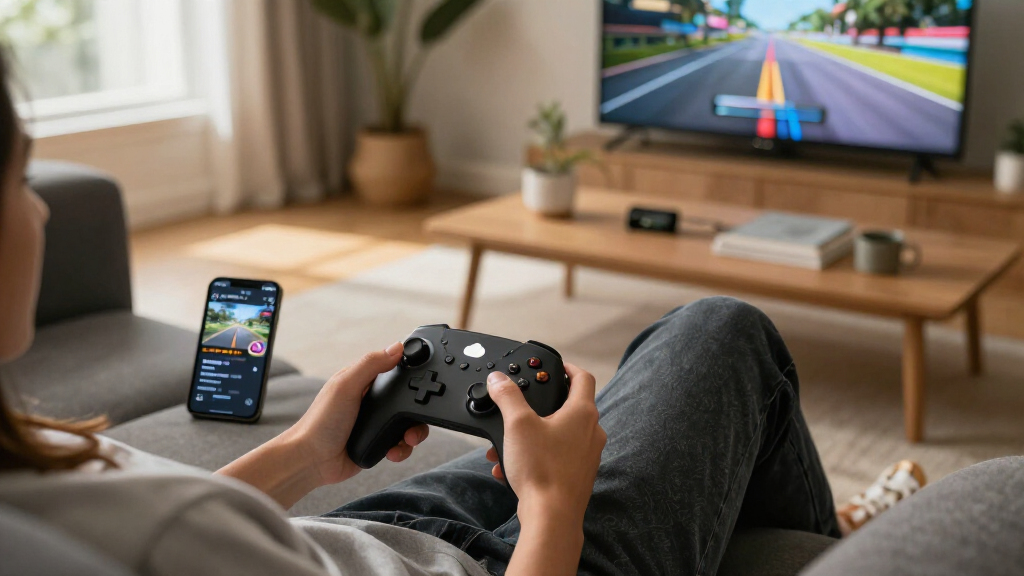
I ranked these controllers by how well they fit real cloud gaming setups, not by feature counts or platform branding alone. The main criteria were device and service compatibility, practical connection options, comfort for longer sessions, portability, and whether the design suits a phone, computer, or TV. I also weighed features such as Hall-effect sticks by their likely benefit to control longevity, while keeping them separate from cloud performance: a controller cannot fix lag caused by a network or streaming service.
That logic puts versatile, familiar controllers ahead for readers who want one pad across several devices, while specialized mobile and service-specific models rank higher for narrower needs. A dedicated phone grip can be a better handheld fit than a conventional gamepad, but it limits flexibility; a wired iOS model avoids pairing steps but ties play to a compatible connection. Since compatibility can vary by operating system, device connector, and cloud service, readers should confirm those details before buying.
Factors to Consider When Choosing Best Cloud Gaming Controllers
Before choosing, match the controller to the device you actually stream on and how you want to hold it. A controller that looks ideal on a feature list can be awkward or incompatible once a phone case, connector, or service enters the setup.
Match the controller to your screen and device
Start with where the game will appear most often: a phone, tablet, computer, or TV. A conventional gamepad can move between screens more easily, while a phone-mounted controller is built around a handheld setup and may be less useful elsewhere. Check the supported operating systems and device models rather than assuming that Bluetooth means universal compatibility. For mobile play, account for the phone’s width and whether your case must come off to fit the controller. A service-specific model can be a sensible fit if you mainly use that service, but it may offer less flexibility if your habits change. Choose for your regular setup, not an occasional device you rarely use.
Choose wired or wireless based on your setup
Wireless controllers reduce cable clutter and are convenient when playing from a couch or switching between devices. Wired connections can remove pairing steps and keep a phone controller physically connected, but they constrain movement and depend on the right port or adapter. Do not assume that a wired connection automatically means lower cloud gaming latency: the internet connection and streaming path remain major factors. For mobile use, check whether the controller connects directly to the phone and whether its connector matches your device. If you switch between a phone and a TV, a wireless gamepad may be the easier everyday choice. If you mainly play on one compatible phone, a wired mobile model may feel simpler.
Treat Hall-effect sticks as a longevity feature
Hall-effect sticks and triggers use magnetic sensing, which can reduce reliance on parts that wear through physical contact. That may appeal to players who use a controller heavily or want to limit the chance of stick drift over time. It does not make streamed games respond faster, improve a weak Wi-Fi connection, or guarantee that every other controller component will last longer. Compare the complete fit, including layout, grip, connection, and platform support, rather than choosing on this feature alone. A conventional controller with stronger compatibility can be a better cloud gaming choice than a specialized pad whose features do not match your setup. Think of Hall-effect controls as one durability consideration, not a performance shortcut.
Prioritize comfort and phone fit over compactness alone
Small controllers are easier to carry, but compact dimensions can mean shorter grips or tighter button spacing. Phone-mounted models also add the phone’s weight above the hands, which can feel different from holding a separate controller. Check whether the design accommodates your phone size and whether your case changes the fit; connector placement can matter as much as the controller’s listed compatibility. If you play long sessions, grip shape and button reach may matter more than how neatly the controller packs away. A standard gamepad paired with a phone stand can be more comfortable for some setups, though it is less portable as a single unit. Decide whether handheld convenience or relaxed posture matters more to you.
Check service support before buying around a label
Cloud gaming support depends on more than the controller’s name or wireless connection. The device, operating system, game service, and game can each affect whether controls are recognized as expected. A controller marketed for one cloud platform may still be useful elsewhere, but do not assume every button or feature will carry over. Before choosing a service-focused model, check the service’s current supported-controller information and the compatibility details for your device. This is especially relevant for mobile accessories tied to a specific connector or operating system. If you use several services, favor clear cross-platform support over a single-platform shortcut.
Spend for fit and flexibility, not a longer feature list
Extra modes and specialized features only add value when they solve a problem in your setup. Paying more can make sense for a premium build, a more comfortable shape, or a controller that serves several devices you regularly use. A less costly model can be the better value if its connection and layout already suit your main cloud gaming device. Avoid paying extra for features that cannot affect streamed-game performance, such as assuming enhanced stick hardware will lower network delay. Also account for adapters, phone cases, and charging needs when comparing what a setup requires. The best purchase is the one that removes friction from your routine, not the one with the longest spec list.
Frequently Asked Questions
Will any Bluetooth controller work with every cloud gaming service?
No. Bluetooth describes a connection method, not guaranteed compatibility with every phone, operating system, service, or game. Some services recognize common controller layouts readily, while others may have device or platform restrictions. Check the service’s current controller support and the controller’s compatibility notes for your exact device. If you play across several services, a widely supported conventional gamepad is usually a safer starting point than a model designed around one platform.
Should I choose a phone-mounted controller or a standard gamepad?
Choose a phone-mounted design if handheld play is your main use and you want the phone and controls held together as one unit. A standard gamepad is the more flexible choice if you also play on a computer, TV, or tablet, or prefer to rest your phone separately. Phone size, case thickness, connector position, and weight distribution can all change how a mobile controller fits. If you are unsure, decide whether your priority is a compact handheld setup or a controller that moves between screens.
Do Hall-effect sticks reduce lag in cloud gaming?
No. Hall-effect controls describe how stick or trigger movement is sensed; they do not improve the internet connection carrying a streamed game. They may be attractive as a durability consideration, but cloud response also depends on network quality, distance to the service, device performance, and streaming settings. A controller with Hall-effect components can still feel delayed when the connection is poor. Choose this feature for its potential control longevity, not as a solution to streaming latency.
Is a dedicated Amazon Luna controller a better choice than an Xbox controller?
It depends on how you play. The Amazon Luna Wireless Controller is the more focused option for someone whose cloud gaming centers on Luna, while the Xbox Wireless Controller is a more adaptable pick for players using multiple devices or services. Check each controller’s current compatibility with your device and preferred games before deciding. If you expect to change platforms or use local games as well, flexibility may matter more than a service-specific design.
What should I check before buying an iPhone cloud gaming controller?
Confirm the exact iPhone model, connector type, and operating system supported by the controller. Lightning-specific accessories are not interchangeable with USB-C models unless the product explicitly supports the connection, and adapters may not preserve every function. Check whether your case fits, whether the controller is wired or wireless, and whether your cloud gaming service supports it. If you plan to upgrade phones soon, a controller with broader device compatibility may be more useful than one tied to a particular connector.
Conclusion
For most readers, my best overall recommendation is the Xbox Wireless Gaming Controller, thanks to its familiar general-purpose format and flexibility across cloud gaming setups. The best value depends on your platform: compare the EasySMX X15 or GameSir Nova Lite 2 if you want a conventional wireless option, and confirm compatibility before choosing. For a best premium direction, consider the PlayStation DualSense if its layout and supported features fit your devices; its more specialized design is not automatically the right match for every service. Beginners who want a familiar control layout can start with the Xbox pad, while Luna-focused players should look closely at the Amazon Luna controller. For handheld phone play, compare the GameSir X5 Lite and 8BitDo Ultimate Mobile; for compatible Lightning iPhones, the RiotPWR option is a more targeted choice. Match the controller to your device and service first, then choose the design you will find comfortable for regular play.