
The best PS5 gaming accessories depend on what you want to improve: the Rysker Cooling and Charging Stand is my best overall pick for combining console organization, cooling, and controller charging, while the PowerA Twin Charging Station is a simpler choice for keeping two DualSense controllers ready. For aiming adjustments, KontrolFreek Galaxy thumbsticks stand out, and the Ozeino OW810 adds wireless audio without a wired headset connection. The tradeoff is between multifunction convenience and dedicated accessories that do one job with fewer compatibility or setup questions. Read on for the full breakdown, including picks for charging, comfort, audio, and entertainment.

Get the latest gadgets delivered free with Prime
- Fast, free delivery on millions of items
- Prime Video, Amazon Music and more included
- Member-only deals all year
Complete the kit



Key Takeaways
- Combination stands save desk space, but check console model and controller compatibility before buying; the Rysker stand has broader stated PS5 model support than a stand made for a narrower setup.
- Dedicated chargers are simpler than cooling stands: the PowerA and NEWDERY focus on charging controllers, while multi-function stands add fans and storage at the cost of more features to check.
- KontrolFreek accessories address different control preferences: Galaxy thumbsticks add height, the Aim Boost Kit offers an aiming-focused setup, and Precision Rings add resistance rather than changing stick height.
- Headset choice depends on connection preference: the Ozeino OW810 is wireless, while the BENGOO G9000 is a wired option; neither should be chosen on headset features alone without checking fit and connection needs.
- Small, inexpensive-feeling upgrades can be more personal than a stand: silicone grips and thumbsticks suit players who want a change in hand feel, while the Media Remote and PlayStation Icons Light serve entertainment and room setup rather than gameplay.
| Paladone PlayStation Icons Light with Sound-Reactive and Phasing Modes |  | Best PlayStation-Themed Display Accessory | Brand: Paladone | Model: PP4140PSV2 | Modes: Standard, color phasing, and sound-reactive | VIEW LATEST PRICE | See Our Full Breakdown |
| KontrolFreek FPS Freek Galaxy Black Performance Thumbsticks for PlayStation 4 and PlayStation 5 |  | Best for Aim and Movement Control | Brand: KontrolFreek | Compatible devices: PlayStation 4 and PlayStation 5 controllers | Set contents: One high-rise and one mid-rise thumbstick | VIEW LATEST PRICE | See Our Full Breakdown |
| PlayStation Media Remote for PS5 |  | Best for Streaming and Media Control | Brand: PlayStation | Model: 3005727 | Connectivity: Infrared | VIEW LATEST PRICE | See Our Full Breakdown |
| CCFREELIFE Silicone Thumb Grips for PS4, PS5, and Xbox Controllers, 24 Pieces |  | Best Value Grip and Wear-Protection Set | Brand: CCFREELIFE | Material: Silicone | Quantity: 24 grips; 12 color pairs | VIEW LATEST PRICE | See Our Full Breakdown |
| Rysker PS5, PS5 Slim, and PS5 Pro Cooling and Charging Stand |  | Best All-in-One Console Stand | Brand: Rysker | Model number: VG-P5328 | Manufacturer part number: RY-P5296 | VIEW LATEST PRICE | See Our Full Breakdown |
| PS5 Cooling Stand with Controller Charging Station and 3-Speed Fan |  | Best All-in-One Cooling and Storage Stand | Compatibility: PS5 standard, Slim, and Pro disc and digital consoles | Fan speeds: 3: high, medium, and low | Controller charging docks: 2 | VIEW LATEST PRICE | See Our Full Breakdown |
| NEWDERY Dual Controller Charging Station for PS5 and DualSense Edge |  | Best Compact Charger for Two Controllers | Compatibility: PS5 and DualSense Edge controllers | Charging time: About 2.5 hours with a 5V/3A adapter | Input: 5V, 3A | VIEW LATEST PRICE | See Our Full Breakdown |
| KontrolFreek Aim Boost Kit for PlayStation 4 and PlayStation 5 Controllers, Black Galaxy |  | Best Aim-Adjustment Kit | Brand: KontrolFreek | Compatible devices: PlayStation 4 and PlayStation 5 controllers | Color: Black | VIEW LATEST PRICE | See Our Full Breakdown |
| KontrolFreek FPS Freek Galaxy Thumbsticks for PS4 and PS5, Purple |  | Best Thumbsticks for Mixed Aiming and Movement | Brand: KontrolFreek | Compatible devices: PlayStation 4 and PlayStation 5 | Thumbstick configuration: 1 high-rise stick (10 mm) and 1 mid-rise stick (6.5 mm) | VIEW LATEST PRICE | See Our Full Breakdown |
| BENGOO G9000 Stereo Gaming Headset | 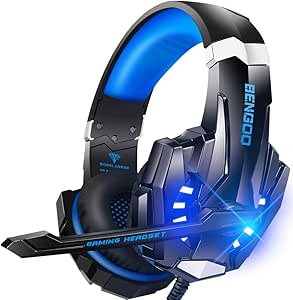 | Best Wired Multi-Platform Headset | Type: Over-ear stereo gaming headset | Driver size: 40 mm | Microphone: Omnidirectional, flexible, with noise-isolating feature | VIEW LATEST PRICE | See Our Full Breakdown |
| Ozeino OW810 Wireless Gaming Headset |  | Best for Multi-Device Wireless Audio | Model: OW810 | Drivers: 50 mm | Wireless connectivity: 2.4GHz USB and Type-C; Bluetooth | VIEW LATEST PRICE | See Our Full Breakdown |
| KontrolFreek Precision Rings for Gaming Controllers, 6-Pack |  | Best for Adjustable Aim Resistance | Model: 4005-MIX | Quantity: 6 rings | Resistance levels: Soft, medium, and hard | VIEW LATEST PRICE | See Our Full Breakdown |
| PS5, PS5 Slim, and PS5 Pro Stand with Cooling Fan and Dual Controller Charger |  | Best for All-in-One Console Organization | Compatible consoles: PlayStation 5, PS5 Slim, and PS5 Pro | Cooling fan: Three speeds; 3100–3500 RPM | Controller charging: Two controllers simultaneously; about 2.5 hours | VIEW LATEST PRICE | See Our Full Breakdown |
| PowerA Twin Charging Station for PlayStation 5 DualSense Controllers |  | Best Simple Officially Licensed Charger | Compatible device: PlayStation 5 | Charging capacity: Two DualSense controllers | Power source: AC adapter | VIEW LATEST PRICE | See Our Full Breakdown |
| PS5 gaming accessorie | Brand |
|---|---|
| Paladone PlayStation Icons Lig | Paladone |
| KontrolFreek FPS Freek Galaxy | KontrolFreek |
| PlayStation Media Remote for P | PlayStation |
| CCFREELIFE Silicone Thumb Grip | CCFREELIFE |
| Rysker PS5 | Rysker |
| PS5 Cooling Stand with Control | — |
| NEWDERY Dual Controller Chargi | — |
| KontrolFreek Aim Boost Kit for | KontrolFreek |
| KontrolFreek FPS Freek Galaxy | KontrolFreek |
| BENGOO G9000 Stereo Gaming Hea | — |
| Ozeino OW810 Wireless Gaming H | — |
| KontrolFreek Precision Rings f | — |
| PS5 | — |
| PowerA Twin Charging Station f | — |
More Details on Our Top Picks
Paladone PlayStation Icons Light with Sound-Reactive and Phasing Modes
I’d choose the Paladone PlayStation Icons Light for a gaming space that needs atmosphere more than added gameplay function. Its three modes cover steady illumination, color phasing, and sound-reactive effects, so it offers more visual variety than the PlayStation Media Remote, which is built for control rather than room decor. At about 12 inches wide, it suits a desk or shelf without taking up much depth, and USB power makes it easy to leave in place. Battery operation adds flexibility if an outlet is awkward, but the three AAA batteries are not included. This is a decorative indoor accessory, not a practical upgrade to play or navigation, and its plastic construction is not suited to wet spaces.
Pros:- Three modes include standard, color-phasing, and sound-reactive lighting
- USB power suits a permanent setup, while AAA batteries allow placement away from an outlet
- Officially licensed PlayStation design
- USB cable is included
Cons:- Three AAA batteries are not included
- Decorative lighting does not add gameplay or media-control functions
- Not waterproof
Best for: PS5 owners decorating a desk, shelf, or gaming room who want a licensed PlayStation accent with sound-reactive lighting
Not ideal for: Players seeking a functional controller, audio, or console upgrade, or anyone who needs a light for outdoor or damp areas
- Brand:Paladone
- Model:PP4140PSV2
- Modes:Standard, color phasing, and sound-reactive
- Power:USB or 3 AAA batteries
- Included:USB cable
- Dimensions:12 in wide × 4 in tall
- Material:Plastic
- Mounting and use:Tabletop; indoor decoration
Our verdict“Choose this light for a compact PlayStation-themed room accent, not for a functional PS5 upgrade.”
KontrolFreek FPS Freek Galaxy Black Performance Thumbsticks for PlayStation 4 and PlayStation 5
For players who want more thumbstick reach without replacing their controller, I’d put the KontrolFreek FPS Freek Galaxy Black ahead of the simpler CCFREELIFE Silicone Thumb Grips. This set pairs a 10 mm high-rise stick with a 6.5 mm mid-rise one, giving the aiming thumb more travel while keeping a shorter stick for movement. The concave, non-slip surfaces are intended to support grip and comfort during longer sessions, and they cover the original sticks against wear. The tradeoff is a changed controller feel: added height may take adjustment, and players who prefer the stock profile may find the extensions intrusive. It is also made for PS4 and PS5 controllers only, so it is not a universal thumbstick accessory.
Pros:- Mixed heights give the aiming stick more reach while retaining a shorter movement stick
- Concave shape and non-slip rubber surface support thumb placement and grip
- Designed to help reduce thumb fatigue
- Covers original thumbsticks to help limit wear
Cons:- Added height changes the controller’s familiar thumbstick feel
- Compatibility is limited to PlayStation 4 and PlayStation 5 controllers
Best for: PS5 shooter players who want extra aiming reach on one stick while keeping the other closer to its original height
Not ideal for: Players who prefer stock-height controls, dislike extensions on thumbsticks, or need grips for controllers outside PS4 and PS5
- Brand:KontrolFreek
- Compatible devices:PlayStation 4 and PlayStation 5 controllers
- Set contents:One high-rise and one mid-rise thumbstick
- High-rise height increase:10 mm
- Mid-rise height increase:6.5 mm
- Thumbstick shape:Concave
- Material and color:Plastic; black
- Model number:BLA-2807-PS5
Our verdict“Pick this set if you want a taller aiming stick and can adapt to a changed controller feel.”
PlayStation Media Remote for PS5
The PlayStation Media Remote is the clearest choice here for a PS5 used as a streaming hub: dedicated playback buttons make pausing or skipping easier than reaching for a DualSense controller. It can also navigate PS5 menus, power on the console, and control volume and power on compatible TVs. That gives it a more practical living-room role than the decorative Paladone PlayStation Icons Light, though it adds no lighting or gaming control benefits. Its infrared TV functions depend on television compatibility, and some PS5 features require an internet connection and PlayStation Network account. Streaming subscriptions may also be needed. Two AA batteries are included, and the listed maximum range is 10 meters, but buyers seeking one remote for every TV setup should check compatibility first.
Pros:- Dedicated play, pause, fast-forward, and rewind buttons simplify media playback
- Can power on and navigate the PS5
- Can control power and volume on compatible televisions
- Two AA batteries are included
Cons:- Television power and volume controls depend on compatibility
- Some features require an internet connection and PlayStation Network account
- Streaming services may require paid subscriptions
Best for: PS5 owners who regularly watch streaming services or other media and want dedicated playback controls from the couch
Not ideal for: Players who use the PS5 mainly for games, or buyers whose television is not compatible with the remote’s infrared controls
- Brand:PlayStation
- Model:3005727
- Connectivity:Infrared
- Button quantity:15
- Maximum range:10 meters
- Batteries:2 AA batteries, included
- Color:White
- Dimensions:7.44 × 3.29 × 1.54 inches
Our verdict“Choose this remote if you often watch media on PS5 and have a compatible TV for its extra controls.”
CCFREELIFE Silicone Thumb Grips for PS4, PS5, and Xbox Controllers, 24 Pieces
I’d pick the CCFREELIFE Silicone Thumb Grips for players who want a simple grip change and spare colors rather than the altered stick height of the KontrolFreek FPS Freek Galaxy Black. The caps stretch over existing thumbsticks without adhesive, adding texture and a layer against grime, scratches, and wear. With 24 grips in 12 color pairs, the set gives families or multi-controller households room to match different pads or replace misplaced caps. It does not offer the Galaxy’s mixed-height setup for aiming, so it is a protective and tactile accessory, not a precision-control upgrade. Compatibility is listed for PS4, PS5, and Xbox controllers, with no detail for other models; buyers should confirm their controller’s fit before relying on the set.
Pros:- Textured silicone adds grip to existing thumbsticks
- Helps guard sticks against scratches, grime, and wear
- Includes 24 grips in 12 color pairs
- Fits over thumbsticks without adhesive
Cons:- Does not provide the mixed-height aiming changes offered by KontrolFreek extensions
- Compatibility details are limited to PS4, PS5, and Xbox controllers
- Three-month warranty is limited in duration
Best for: PS5 households with multiple controllers that want inexpensive-feeling grip coverage and a choice of colors
Not ideal for: Competitive players looking for added thumbstick height or buyers with controller models outside the listed PS4, PS5, and Xbox families
- Brand:CCFREELIFE
- Material:Silicone
- Quantity:24 grips; 12 color pairs
- Compatible controllers:PS4, PS5, and Xbox
- Fit:Stretches over existing thumbsticks; no adhesive
- Item weight:1 g
- Model number:CC-GJM-CA24P
- Warranty:3 months
Our verdict“Choose these caps for basic grip, protection, and color options rather than a performance-focused thumbstick change.”
Rysker PS5, PS5 Slim, and PS5 Pro Cooling and Charging Stand
The Rysker Cooling and Charging Stand earns its place for buyers who want console organization, controller charging, and extra USB connections in one accessory. Unlike the NEWDERY Dual Controller Charging Station, which focuses on charging pads, this stand also adds a fan, RGB lighting, three USB hubs, and a slot for a media remote. It supports PS5, PS5 Slim, and PS5 Pro, with charging for both original PS5 and Edge controllers; the listed charging times are about 3.5 and 2.5 hours respectively. That breadth comes with more setup than a simple charger: the fan may make noise, and a separate compatible power source may be needed if the stand is not powered by the console. Its two-year warranty is a useful backstop, but does not remove those setup tradeoffs.
Pros:- Supports PS5, PS5 Slim, and PS5 Pro
- Charges original PS5 and Edge controllers
- Three USB hubs support charging and data transfer
- Combines a cooling fan, RGB lights, and media remote slot
Cons:- Cooling fan may produce noise
- May require a separate compatible power source rather than console power
- Combines multiple functions in a more involved setup than a dedicated charger
Best for: PS5 owners who want a single stand for console support, controller charging, added USB ports, and active cooling
Not ideal for: Players who want a quiet, minimal charging station or do not have a suitable separate power source when console power is insufficient
- Brand:Rysker
- Model number:VG-P5328
- Manufacturer part number:RY-P5296
- Compatibility:PS5, PS5 Slim, and PS5 Pro
- Fans:1
- USB hubs:3
- Controller charging time:About 3.5 hours for original PS5 controller; about 2.5 hours for PS5 Edge controller
- Warranty:2 years
Our verdict“Choose the Rysker if you want a multi-function PS5 stand and can accommodate its fan and power requirements.”
PS5 Cooling Stand with Controller Charging Station and 3-Speed Fan
I’d pick this Kammkonb stand for a setup where cooling, charging, and storage matter more than a minimal footprint. Its three fan speeds let you choose between quieter operation and stronger airflow, while the two charging docks and space for up to 13 game discs keep common accessories together. Compared with the NEWDERY Dual Controller Charging Station, it does considerably more than charge controllers, but it takes up more space and is a less focused choice if charging is all you need. It fits standard, Slim, and Pro PS5 consoles, and includes several charging and electrical protections. The main limitation for controller owners is compatibility: DualSense Edge controllers aren’t supported. I’d also treat the fan as an added airflow feature, not a replacement for a well-ventilated console position.
Pros:- Three fan speeds let buyers adjust airflow to their setup.
- Charges two controllers at once and indicates charging status with LEDs.
- Adds three USB ports, a headset holder, a remote slot, and storage for up to 13 discs.
- Includes multiple electrical protections and a safety screw.
Cons:- Does not support the DualSense Edge controller.
- The larger all-in-one design takes more room than a standalone charging dock.
- The PS5 console and accessories shown are not included.
Best for: PS5 owners who want a single stand for console airflow, two standard DualSense controllers, game discs, and headset storage.
Not ideal for: DualSense Edge owners or players who want a compact, charging-only dock without extra stand and storage features.
- Compatibility:PS5 standard, Slim, and Pro disc and digital consoles
- Fan speeds:3: high, medium, and low
- Controller charging docks:2
- Charging time:About 3 hours for two controllers
- USB ports:3
- Game disc storage:Up to 13 discs
- Additional storage:Headset holder and media remote slot
- Safety features:Overcharge, overheating, overcurrent, overvoltage, and short-circuit protection
Our verdict“Choose this stand if you want cooling and broad accessory storage alongside dual-controller charging, but skip it if you use a DualSense Edge or want a small dock.”
NEWDERY Dual Controller Charging Station for PS5 and DualSense Edge
The NEWDERY is a straightforward choice when I want two controllers charged and stored together without adding a console stand or cooling fan. It supports both standard PS5 controllers and the DualSense Edge, a useful contrast with the Kammkonb cooling stand, which does not support Edge controllers. LED indicators make charging status easy to check, and anti-slip mats help keep controllers in place on a tabletop. With a suitable 5V/3A adapter, charging takes about 2.5 hours; the adapter itself is not listed among the included items, so buyers need to supply one. The dock also requires cases or skins to be removed before charging. Compared with the PowerA Twin Charging Station, this is a simple tabletop alternative, but the supplied details don’t establish the same brand-specific charging design.
Pros:- Charges two PS5 or DualSense Edge controllers simultaneously.
- LED indicators show charging status.
- Anti-slip mats help keep controllers in position.
- Includes a USB Type-A to USB Type-C cable.
Cons:- Controller cases and skins must be removed before charging.
- A 5V/3A power adapter is required but is not listed as included.
- Adds no cooling, USB expansion, or accessory storage beyond the controllers.
Best for: Households with two PS5 controllers, including DualSense Edge owners, who want a tabletop dock and already have a 5V/3A adapter.
Not ideal for: Players who keep protective cases or skins on their controllers, or who need a charger with its power adapter included.
- Compatibility:PS5 and DualSense Edge controllers
- Charging time:About 2.5 hours with a 5V/3A adapter
- Input:5V, 3A
- Connector:USB Type-A to USB Type-C
- Cable length:3.3 ft
- Indicators:LED charging status
- Mounting type:Tabletop
- Weight:0.36 kg
- Warranty:12 months
Our verdict“Pick the NEWDERY if you need a compact dual-controller dock that supports DualSense Edge, provided you have a suitable adapter and charge controllers without cases.”
KontrolFreek Aim Boost Kit for PlayStation 4 and PlayStation 5 Controllers, Black Galaxy
This kit suits players who want to change both thumbstick height and aiming resistance, rather than only adding grip. It pairs mixed-height performance thumbsticks with precision rings in three strengths, giving buyers more ways to tune how the sticks feel in games that reward fine aim. Compared with the KontrolFreek FPS Freek Galaxy Thumbsticks, the Aim Boost Kit includes resistance rings as well as thumbsticks; that extra adjustability also means more setup choices and resistance that may not suit every player. The rings add force to the controller’s stock sticks, so buyers should expect a firmer feel rather than a universally easier aim. It’s a more specialized option than basic silicone thumb grips, and makes most sense for players willing to experiment with different stick and ring combinations.
Pros:- Combines performance thumbsticks with precision rings in one kit.
- Mixed thumbstick heights offer different control feels.
- Three ring strengths provide options for added resistance.
- Compatible with PS4 and PS5 controllers.
Cons:- Precision rings add resistance to the stock thumbsticks, which may feel restrictive.
- More setup variables than a thumbstick-only option like the FPS Freek Galaxy.
- The provided product details do not specify the individual thumbstick heights.
Best for: PS5 and PS4 players who want to experiment with both raised thumbsticks and added resistance for aiming.
Not ideal for: Players who prefer stock stick resistance, want only a simple grip cover, or don’t want to adjust their controller setup.
- Brand:KontrolFreek
- Compatible devices:PlayStation 4 and PlayStation 5 controllers
- Color:Black
- Material:Rubber
- Included components:Performance thumbsticks and precision rings
- Precision ring strengths:3
Our verdict“Choose this kit if you want to tune both stick height and resistance for aiming, but choose a simpler grip or thumbstick option if you prefer the controller’s original feel.”
KontrolFreek FPS Freek Galaxy Thumbsticks for PS4 and PS5, Purple
I’d choose these Galaxy thumbsticks for a simple control change without the resistance rings included in the KontrolFreek Aim Boost Kit. The pair uses one 10 mm high-rise stick for aiming and one 6.5 mm mid-rise stick for movement, so each thumb gets a different height suited to its role. Their concave shape and non-slip rubber surface are intended to add grip while helping shield the original sticks from wear. This is a more focused purchase than the Aim Boost Kit: it changes height and surface feel, but doesn’t let you adjust resistance. The tradeoff is that raised sticks alter the controller’s feel and may not suit players who prefer the standard profile. Compatibility is listed for PS4 and PS5, though packaging may not show updated compatibility.
Pros:- Pairs a 10 mm high-rise stick with a 6.5 mm mid-rise stick.
- Concave rubber surfaces add grip.
- Designed to help protect original thumbsticks from wear.
- Compatible with PS4 and PS5 controllers.
Cons:- Raised sticks change the controller feel and may not suit players who prefer stock height.
- Does not include precision rings or adjustable resistance like the Aim Boost Kit.
- Packaging may not reflect updated compatibility information.
Best for: PS5 players who want a higher aiming stick and a moderately raised movement stick without adding precision rings.
Not ideal for: Players who prefer stock-height controls, want adjustable aiming resistance, or rely on package labeling to confirm compatibility.
- Brand:KontrolFreek
- Compatible devices:PlayStation 4 and PlayStation 5
- Thumbstick configuration:1 high-rise stick (10 mm) and 1 mid-rise stick (6.5 mm)
- Shape:Concave
- Material:Rubber
- Color:Purple
- Item weight:6 g
- Dimensions:0.91 × 0.91 × 0.39 in
Our verdict“Pick these Galaxy thumbsticks for a straightforward mixed-height aiming and movement setup; choose the Aim Boost Kit if you also want resistance rings.”
BENGOO G9000 Stereo Gaming Headset
The BENGOO G9000 is a practical pick for players who want a wired over-ear headset with broad device compatibility rather than a wireless setup. Its 40 mm drivers, flexible noise-isolating microphone, and in-line volume and mute controls cover the basic needs of voice chat without requiring controls on the console. Compared with the Ozeino OW810 Wireless Gaming Headset elsewhere in this roundup, the G9000’s cable avoids wireless charging and connection-management needs, but its 49-inch lead can restrict movement. Breathable protein ear pads and an adjustable headband add fit flexibility, while the earcup lighting is a visual extra rather than a core PS5 benefit. Buyers should also check their connection needs across devices: an extra Microsoft adapter is required for older Xbox One controllers. This is the more suitable option for wired play across several platforms, not for cable-free gaming.
Pros:- Listed compatibility covers PS5, PS4, Xbox, PC, Nintendo 3DS, and several personal devices.
- Flexible omnidirectional microphone has a noise-isolating feature.
- In-line rotary volume control and microphone mute simplify adjustments.
- Adjustable headband and breathable over-ear pads support fit and comfort.
Cons:- The 49-inch wired cable can limit movement.
- Older Xbox One controllers require an extra Microsoft adapter.
- Earcup lighting is an added feature that does not improve PS5 gameplay.
Best for: PS5 players who prefer a wired headset with an adjustable microphone and in-line controls, and who also use other listed compatible devices.
Not ideal for: Players who want wireless freedom, a longer cable for moving around, or a plug-and-play fit with older Xbox One controllers without an extra adapter.
- Type:Over-ear stereo gaming headset
- Driver size:40 mm
- Microphone:Omnidirectional, flexible, with noise-isolating feature
- Connectivity:Wired USB cable
- Cable length:49 inches
- Controls:Rotary volume control and microphone mute
- Compatibility:PS4, PS5, Xbox, Xbox Series X|S, PC, Nintendo 3DS, laptops, tablets, and mobile phones
- Warranty:2 years
Our verdict“Choose the G9000 if you want a wired, multi-platform headset with in-line chat controls, but look at the Ozeino OW810 if avoiding a cable matters more.”
Ozeino OW810 Wireless Gaming Headset
The OW810 earns its place for players who want more connection options than a single-console headset offers. Its 2.4GHz USB and Type-C transmitters provide low-latency wireless audio for supported gaming setups, while the 3.5 mm cable offers another way to connect. Compared with the BENGOO G9000 Stereo Gaming Headset elsewhere in this roundup, the Ozeino adds wireless flexibility and a stated battery life of up to 40 hours, making it the better fit for players who move between compatible devices.
The tradeoff is that the connection modes are not interchangeable: Bluetooth does not directly support PS5, and the wired mode is described for music and calls rather than gaming. Bluetooth compatibility also varies by device, and Xbox support is not universal. Choose this for its 2.4GHz wireless gaming connection, not as a Bluetooth-first or all-platform headset.
Pros:- 2.4GHz USB and Type-C wireless connections are specified for low-latency gaming audio
- Up to 40 hours of stated battery life
- Includes Bluetooth and 3.5 mm connection options for compatible uses
- Listed compatibility covers PS5, PS4, PC, Mac, laptop, Switch, and mobile
Cons:- Bluetooth does not directly support PS5, PS4, PC, or Mac
- The 3.5 mm wired mode is specified for music and calls only
- Not compatible with all Xbox consoles
Best for: PS5 players who also use a PC, Switch, or mobile device and want a headset with 2.4GHz wireless plus a long stated battery life
Not ideal for: Players who need direct Bluetooth audio on PS5, reliable support across all Xbox consoles, or a 3.5 mm wired mode for gaming
- Model:OW810
- Drivers:50 mm
- Wireless connectivity:2.4GHz USB and Type-C; Bluetooth
- Wired connectivity:3.5 mm jack
- 2.4GHz latency:Less than 30 ms
- Battery life:Up to 40 hours
- Controls and microphone:Push-button volume control; flip microphone
- Listed compatibility:PS5, PS4, PC, Mac, laptop, Switch, and mobile; Bluetooth does not directly support PS5, PS4, PC, or Mac
Our verdict“Choose the OW810 if you want a long-lasting 2.4GHz wireless headset for PS5 and other compatible devices, but skip it if direct PS5 Bluetooth or wired gaming is a requirement.”
KontrolFreek Precision Rings for Gaming Controllers, 6-Pack
These rings target a different kind of aiming adjustment than the KontrolFreek FPS Freek Galaxy Black Performance Thumbsticks in this roundup. Rather than raising the thumbstick, they add resistance to its movement, which may help players make smaller corrections and avoid overshooting. The pack includes soft, medium, and hard strengths, so you can change the feel without committing to a single resistance level.
The rings are made from flexible, moisture-wicking rubber that resists oils and returns to shape after use. That makes them a useful experiment for players looking to refine stick control, but they do not automatically improve aim: the added force can feel restrictive, particularly if you prefer quick, loose movement. Compared with the Galaxy thumbsticks, these are better suited to players seeking resistance rather than extra thumbstick height. Skip them if you want the controller to feel unchanged.
Pros:- Six rings provide soft, medium, and hard resistance options
- Designed to add control that may reduce overshooting
- Moisture-wicking material resists hand and finger oils
- Flexible rubber returns to shape after use
Cons:- Added resistance may slow or restrict players who prefer quick stick movement
- The change in feel may not suit every controller or play style
Best for: PS5 players who tend to overcorrect their aim and want to try different levels of thumbstick resistance
Not ideal for: Players who prefer light, unrestricted stick movement or want taller thumbsticks rather than added resistance
- Model:4005-MIX
- Quantity:6 rings
- Resistance levels:Soft, medium, and hard
- Material:Rubber
- Compatible controllers:PS4, PS5, Xbox One, Xbox Series X, Switch Pro, and Scuf controllers
- Color:Black, purple, and green
Our verdict“Pick these rings if you want to experiment with adjustable aim resistance, but choose raised thumbsticks like the FPS Freek Galaxy if added stick height is your goal.”
PS5, PS5 Slim, and PS5 Pro Stand with Cooling Fan and Dual Controller Charger
This stand is the most feature-packed organization option in the group: it combines console support, a three-speed fan, dual-controller charging, and storage for a headset, remote, external drive, and up to 14 discs. Compared with the PowerA Twin Charging Station, it covers more of the gaming setup, while PowerA is a simpler choice if you only need to charge and display two DualSense controllers. The fan can also be turned off, so cooling does not have to be part of every session.
The extras bring practical compromises. Charging may not start when a controller battery is above 70%, and the listed dimensions look unusually small for a console stand, so verify fit and placement before buying. With a reported weight of 907 g and several stored accessories, this is a setup organizer rather than a minimal charging dock. Choose it to consolidate gear, not if you want the least complicated charger.
Pros:- Combines a fan, dual-controller charging, and accessory storage in one stand
- Stores up to 14 game discs, plus a headset, remote, and external hard drive
- Three fan speeds with the option to turn the fan off
- LED charge indicators and listed overcharge, overheat, overvoltage, and short-circuit protection
Cons:- Controller charging may not start when the battery is above 70%
- Listed dimensions appear unusually small for a console stand, so fit should be checked
- More features and storage make it less suited to buyers seeking a simple charging dock
Best for: PS5, PS5 Slim, or PS5 Pro owners who want one station for controller charging, disc storage, and accessory organization
Not ideal for: Players who only need a compact DualSense charger or who cannot verify that the stand’s listed dimensions fit their console setup
- Compatible consoles:PlayStation 5, PS5 Slim, and PS5 Pro
- Cooling fan:Three speeds; 3100–3500 RPM
- Controller charging:Two controllers simultaneously; about 2.5 hours
- Extra USB ports:3
- Disc storage:Up to 14 game discs
- Listed dimensions:4.02 × 1.02 × 4.33 inches
- Weight:907 g
- Protection:Overcharge, overheat, overvoltage, and short-circuit protection
Our verdict“Choose this stand to consolidate console accessories, cooling, and charging, but opt for the PowerA station if you only need a straightforward two-controller charger.”
PowerA Twin Charging Station for PlayStation 5 DualSense Controllers
PowerA keeps its job narrow: this officially licensed tabletop station charges and displays two DualSense controllers at once. Its straightforward design suits players who want a dedicated charging spot without the fan, disc storage, and accessory compartments found on the PS5, PS5 Slim, and PS5 Pro Stand with Cooling Fan and Dual Controller Charger. The controllers’ LEDs indicate when charging is complete, so there is no separate charge-status system to learn.
The main tradeoff is that this is a PS5-only, corded solution: it uses an AC adapter and is designed for DualSense controllers. It also does not organize other equipment or add cooling. Compared with the all-in-one stand, PowerA is easier to choose when charging is the only need, but offers less utility for a crowded gaming area. Pick it for a tidy controller dock, not as a broader console accessory hub.
Pros:- Charges and displays two DualSense controllers at once
- Controller LEDs indicate when charging is complete
- Officially licensed for PlayStation 5
- Focused tabletop design avoids the extra features of a cooling stand
Cons:- Designed for PS5 and DualSense controllers rather than broader device compatibility
- Requires a corded AC power connection
- Does not include cooling, disc storage, or broader accessory organization
Best for: PS5 owners with two DualSense controllers who want an officially licensed tabletop charging and display station
Not ideal for: Players who need to charge other controller models, reduce accessory clutter, or avoid an AC-powered charging dock
- Compatible device:PlayStation 5
- Charging capacity:Two DualSense controllers
- Power source:AC adapter
- Input voltage:240 V
- Output current:1.5 A
- Wattage:10 W
- Form factor and material:Tabletop; plastic
- Warranty:Two-year limited warranty
Our verdict“Choose PowerA for a dedicated, officially licensed DualSense charging dock; pick the all-in-one cooling stand if you also want storage and a fan.”

How We Picked
I ranked these accessories by how directly they solve common PS5 setup needs: controller charging, comfort and control, audio, cooling, and media use. I weighed stated compatibility, ease of use, build and maintenance considerations, and whether each accessory adds a clear benefit beyond the console and DualSense controller. A dedicated charger can be a better fit than a cooling stand for someone who only needs charging; the stand ranks higher when its extra functions suit the buyer’s setup.
The order also reflects how many buyers each item can serve and how clearly its role differs from the other picks. I separated similar products by their stated design and intended use rather than treating near-duplicates as interchangeable. Where details such as fit, connection, or console model support can affect the choice, I call those out as checks for buyers instead of assuming every accessory works with every setup.
| PS5 gaming accessorie | Brand |
|---|---|
| Paladone PlayStation Icons Lig | Paladone |
| KontrolFreek FPS Freek Galaxy | KontrolFreek |
| PlayStation Media Remote for P | PlayStation |
| CCFREELIFE Silicone Thumb Grip | CCFREELIFE |
| Rysker PS5 | Rysker |
| PS5 Cooling Stand with Control | — |
| NEWDERY Dual Controller Chargi | — |
| KontrolFreek Aim Boost Kit for | KontrolFreek |
| KontrolFreek FPS Freek Galaxy | KontrolFreek |
| BENGOO G9000 Stereo Gaming Hea | — |
| Ozeino OW810 Wireless Gaming H | — |
| KontrolFreek Precision Rings f | — |
| PS5 | — |
| PowerA Twin Charging Station f | — |
Factors to Consider When Choosing Best PS5 Gaming Accessories
Start with the problem you want to solve, not the number of features on the box. A PS5 accessory can improve comfort, reduce desk clutter, or make media use easier, but a multi-purpose device is only useful when its added functions fit your console and habits.
Match the accessory to your biggest friction point
List the annoyance you notice most during a normal play session: a controller that needs charging, slippery sticks, headset cables, or a crowded entertainment area. Choose one accessory that addresses that issue before adding secondary upgrades. This avoids buying overlapping products, such as a charging stand when you already have a convenient charging routine. A gaming-focused upgrade may have little value if your main use is streaming or Blu-ray playback, where a media remote may be more useful. If the issue is occasional, a simple solution can be easier to live with than a multi-function setup. My rule is to prioritize the accessory you will use every week over the one that merely adds the most features.
Check console and controller fit before choosing a stand
PS5, PS5 Slim, and PS5 Pro models can differ in shape and setup, and stands may not support every version in the same way. Confirm the exact console model and whether the stand is designed for horizontal or vertical placement before ordering. Check controller support too, especially if you use a DualSense Edge rather than a standard DualSense. A stand that combines charging and cooling can reduce clutter, but its added parts also take up space and may make cable access less convenient. Avoid assuming that a fan is necessary just because it is included; placement, airflow around the console, and room conditions matter as well. A dedicated charger is often the cleaner choice if you do not need the stand’s other functions.
Treat stick height, grip, and resistance as separate choices
Thumbsticks, silicone grips, and precision rings change different parts of the control experience, so they are not substitutes for one another. Taller sticks can alter leverage and feel, while grip covers focus on surface texture and rings add resistance to stick movement. Start with the smallest change that addresses your preference, particularly if you are still getting used to the standard DualSense. Check that covers fit your controller and do not interfere with the stick’s full range of motion. Added resistance or height may feel unfamiliar in games that rely on quick movement, so a control accessory is personal rather than a universal upgrade. Avoid installing several changes at once if you want to know which one helps.
Choose a headset by connection, fit, and daily use
Decide whether you value wireless freedom or prefer a wired connection before comparing headset features. Wireless models can reduce cable clutter, while wired models avoid the need to manage a separate headset charge; each choice comes with a different routine. Fit matters over long sessions, so check the headset’s adjustment range and comfort details rather than focusing only on sound claims. Consider where the microphone sits and whether you need it for regular party chat or only occasional play. A headset that works with multiple devices can be useful, but confirm the connection method for your PS5 and other devices. If you mostly play through speakers, a headset may be a lower priority than charging or controller comfort.
Pay for convenience only when you will use it
Multi-function accessories combine tasks, but extra functions can add setup steps, bulk, and more compatibility checks. A charging station has a narrow job and can be easier to position; a cooling stand may be worthwhile when its footprint and added features fit your room. Decorative lighting and a media remote solve different problems from gameplay accessories, so judge them by how often you use your entertainment setup. Avoid choosing an item just because it bundles several features if you only need one of them. For a first accessory, a straightforward charger or controller grip can be easier to assess than a device that changes several parts of your setup. Spend more only when the added convenience replaces something you already manage separately.
Plan for upkeep and desk space
Accessories become part of the room, so check where they will sit and how you will reach their controls and connections. Stands and charging stations need a stable surface and access to power; headsets need a place to rest between sessions. Fans can collect dust, while silicone grips and thumbstick add-ons may need occasional cleaning. A compact accessory that is easy to maintain may fit better in a shared living space than a larger stand with features you rarely use. Think about cable routing and whether you can still reach the console ports after installation. Before buying, measure the available space and compare it with the full accessory footprint, not just the console dimensions.
Frequently Asked Questions
Should I choose a PS5 cooling stand or a separate controller charger?
Choose a cooling stand if you want a combined console base, fan, and controller charging setup and have room for its larger footprint. A separate charger makes more sense when your main need is keeping controllers powered and you want fewer moving parts in the console area. Check that any stand fits your exact PS5 model and controller before choosing it. Also leave the console enough open space for airflow; a fan accessory is not a replacement for sensible placement. If your console is already well positioned and you do not need extra stand features, a dedicated charger is the more direct solution.
Are KontrolFreek thumbsticks, an Aim Boost Kit, and Precision Rings interchangeable?
No. They alter different aspects of controller feel: thumbsticks change stick height and contact, the Aim Boost Kit is an aiming-oriented control option, and Precision Rings add resistance to stick movement. Your preferred feel depends on the game and your own control habits, so one type may not suit every genre. If you are unsure, make one change at a time rather than combining accessories immediately. Check the product’s fit for your controller, including whether you use a standard DualSense or another model. Grip covers are another separate option when the main issue is surface feel rather than stick movement.
Can I use a PS5 accessory with a PS5 Slim or PS5 Pro?
Compatibility varies by accessory, so do not assume that a product described for PS5 fits every console revision. Stands are the most important category to verify because they must match the console’s shape and orientation. Controller accessories may have separate fit questions, especially when comparing DualSense and DualSense Edge support. Read the stated model list and check the manufacturer’s compatibility details before buying. If a listing names PS5, PS5 Slim, and PS5 Pro, confirm that the specific stand configuration you want is included rather than relying only on the product title.
Is a wireless gaming headset a better choice for PS5 than a wired one?
Wireless is more convenient when you want to move freely and reduce cables around your seat, while wired can be simpler if you prefer not to manage another device’s charge. Connection methods differ, so verify how the headset connects to PS5 and whether it supports the devices you plan to use. Fit and microphone placement can matter more to your daily comfort than the wireless label alone. If you play long sessions, check whether the headset’s charging routine suits your habits. Choose based on how you play and where the headset will be used, rather than assuming one connection type is always better.
What is the best first accessory if I am new to PS5?
Start with the inconvenience you already notice: a charger if your controller often runs low, a remote if you regularly use the PS5 for media, or a grip accessory if the sticks feel uncomfortable. The PowerA charging station is a straightforward option for charging two standard DualSense controllers, while a combined stand offers more functions but requires more compatibility checks. A headset is a stronger first purchase if chat or private audio is central to your play. Avoid buying several controller add-ons at once, since it can be difficult to tell which change suits you. A single useful upgrade is easier to evaluate and less likely to clutter your setup.
Conclusion
For the broadest setup upgrade, my best overall pick is the Rysker Cooling and Charging Stand, provided its console and controller support match your equipment. The PowerA Twin Charging Station is my best value choice for buyers who simply want a dedicated way to charge two DualSense controllers, while the KontrolFreek Galaxy thumbsticks are a strong fit for players seeking a more tailored stick feel. For a best premium direction, choose a multi-function cooling stand only if you will use its added features; the list does not make extra functions an automatic upgrade. My best for beginners pick is the PlayStation Media Remote for frequent media users, or a simple charger for players focused on gaming. For specific needs, choose the Ozeino OW810 for wireless headset use, the silicone grips for added surface coverage, or the Paladone PlayStation Icons Light for room ambience. Match the purchase to your main need, then confirm fit and connection details before deciding.
Fall Picks
fall essentials
As an affiliate, we earn on qualifying purchases.