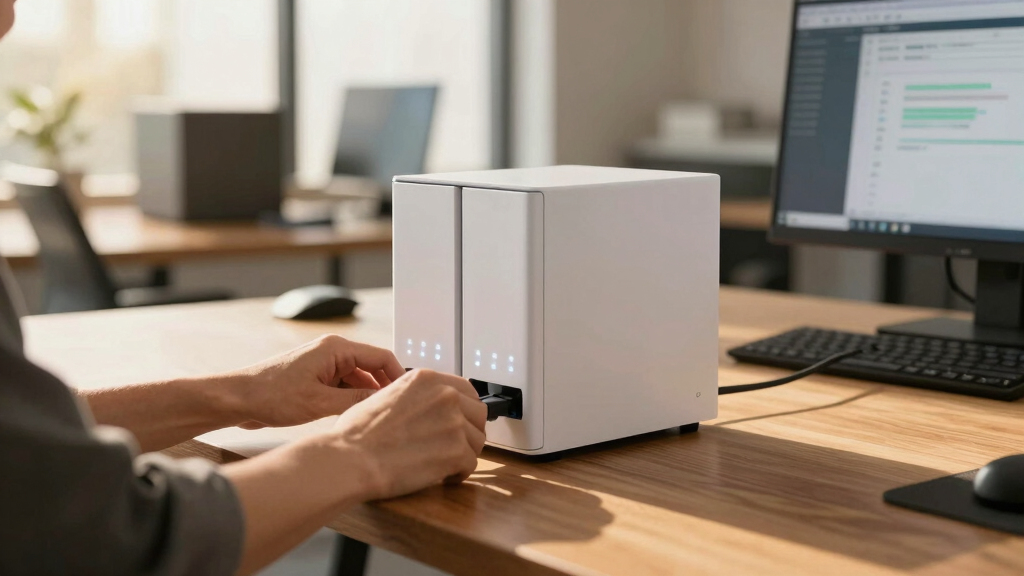

Finding the best NAS storage for small businesses involves balancing performance, capacity, ease of use, and budget. The Synology DS223+ stands out as the overall best for most small businesses due to its user-friendly interface and reliable features. For those needing larger capacity right out of the box, the BUFFALO TeraStation 3430DN offers robust storage with included hard drives. Meanwhile, the Ugreen NAS DXP6800 Pro caters to advanced users requiring high-end performance and expandability. Each option presents tradeoffs, often between cost, complexity, and scalability. Continue reading for an in-depth look at why these models made the cut and how to choose the right one for your business needs.
Key Takeaways
- The best NAS for small businesses balances ease of setup with reliable performance.
- Pre-populated models save time but limit flexibility; diskless units offer customization at the cost of initial setup.
- Higher-end options with faster CPUs and more RAM excel in multitasking but come at a premium price.
- Capacity needs vary; consider future growth when choosing storage size and expansion options.
- User-friendly interfaces and remote access features are critical for small teams managing data on the go.






More Details on Our Top Picks
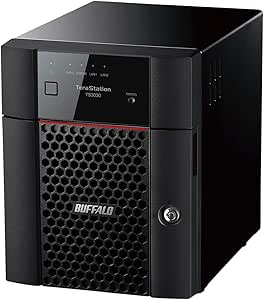
BUFFALO TeraStation 3430DN 4-Bay 32TB (4x8TB) Desktop Small-Med Business NAS w/Hard Drives Included
This TeraStation stands out for its solid balance of capacity, security features, and ease of deployment, making it the best choice for small businesses that prioritize data safety and straightforward management. Compared to the BUFFALO TeraStation 3430DN 4-Bay 16TB, this model offers double the storage without sacrificing reliability, though it requires more space and a higher upfront investment. Its included NAS-grade drives and pre-configured RAID options significantly reduce setup time, while security features like 256-bit encryption and 2FA provide peace of mind. The cloud sync capabilities with Dropbox, OneDrive, and Amazon S3 add flexibility for hybrid storage strategies. The main tradeoff is its larger physical footprint and slightly higher cost, which may not suit very tight spaces or budget-conscious buyers. This pick makes the most sense for small teams needing robust, secure, and expandable storage with minimal hassle.
Pros:- Pre-installed NAS-grade hard drives for immediate use
- Advanced security with 256-bit encryption and 2FA
- Flexible RAID configurations for redundancy or capacity
Cons:- Relatively bulky at nearly 15 inches in length
- Higher price point compared to smaller-capacity models
- Limited to environments with up to 40 users
Best for: Small businesses that require reliable, secure, and scalable storage with easy setup and management.
Not ideal for: Very tight office spaces or startups on a strict budget, as its size and cost might be prohibitive.
- Digital Storage Capacity:32 TB
- Hard Disk Interface:Serial ATA-600
- Connectivity Technology:Ethernet
- Form Factor:Desktop Ethernet NAS Device
- Security Features:256-bit drive encryption, 2FA, activity detection
- Cloud Sync:Dropbox, OneDrive, Amazon S3
Bottom line: Ideal for small businesses seeking a dependable, secure, and expandable NAS with hassle-free setup.
Synology 2-Bay NAS DS223 (Diskless)
This Diskless Synology DS223 makes a compelling choice for users new to NAS, offering an intuitive interface and powerful DSM tools for data sharing and backup. Unlike the BUFFALO TeraStation 3430DN, which comes with drives, this model’s diskless design provides flexibility in choosing drives and capacity, but requires additional setup time. It excels at multi-platform access, private cloud creation, and media sharing, making it perfect for small offices or home use. The 2-year warranty, combined with Synology’s reputation for user-friendly management and reliability, makes it a strong entry point. The tradeoff is its lower capacity—up to 40TB with drives—and limited expansion options compared to 4-bay models. This makes it suitable for those prioritizing ease of use and cost-effectiveness over maximum capacity.
Pros:- Diskless flexibility for custom drive selection
- Synology DSM interface is highly intuitive
- Supports multi-platform access and backup
Cons:- Limited to 2 bays, capping maximum storage at ~40TB
- Requires purchasing drives separately, increasing initial cost
- Not ideal for very high-volume data environments
Best for: Home offices or small teams seeking simple, reliable data management and sharing with minimal technical complexity.
Not ideal for: Larger teams or those needing extensive storage or advanced redundancy features.
- Digital Storage Capacity:Up to 40 TB (with drives)
- Hard Disk Interface:SATA
- Number of Bays:2
- Warranty:2 years
- Compatibility:Multi-platform
- Diskless:Yes
Bottom line: Perfect for beginners or small-scale users who want straightforward, reliable storage without pre-installed drives.
BUFFALO TeraStation 5420DN 4-Bay Business Desktop NAS 32TB (4x8TB) with Hard Drives Included RAID iSCSI Network Storage File Server
This TeraStation 5420DN offers impressive performance with native 10GbE ports and snapshot capabilities, ideal for medium-sized businesses needing high-speed data transfer and robust backup options. Compared with the BUFFALO TeraStation 3430DN, which emphasizes simplicity and security, the 5420DN provides more advanced hardware and enterprise features like iSCSI and near-instant recovery through snapshots. Its included drives and RAID options ensure redundancy, but its larger size and higher complexity may be overkill for smaller setups. The 3-year warranty adds confidence, especially for environments with critical data. The primary tradeoff is its higher cost and complexity, making it less suitable for small teams with limited IT resources. It’s best for small-to-medium businesses prioritizing performance and data integrity.
Pros:- Native 10GbE ports for ultra-fast data transfer
- Snapshot functionality for near-instant recovery
- Supports RAID and iSCSI for redundancy and flexible storage
Cons:- Bulkier and heavier than smaller NAS units
- Higher price point and more complex setup
- Overkill for small teams with basic needs
Best for: Growing businesses that need high-speed transfers, advanced backup, and enterprise-grade security.
Not ideal for: Very small offices or startups with minimal IT support, due to its complexity and size.
- Digital Storage Capacity:32 TB
- Hard Disk Interface:SATA
- Connectivity:10GbE ports
- RAID Support:RAID 0, 1, 5, 6
- Snapshot Backup:Yes
- Warranty:3 years
Bottom line: Designed for businesses that demand enterprise-level security, speed, and data protection in a compact NAS.
Asustor Lockerstor 6 Gen2+ AS6706T v2 6 Bay NAS Storage, Intel Quad-Core 2.0GHz CPU, Dual 5GbE Ports, 8GB RAM DDR4, 4 M.2 SSD Slots, HDMI, Network Attached Storage (Diskless)
This 6-bay NAS excels with its high-performance Intel quad-core CPU, dual 5GbE ports, and multiple M.2 slots, making it ideal for tech-savvy users needing versatile and powerful storage options. Compared to the BUFFALO models which focus on reliability and security, the Asustor Lockerstor offers more raw power and expandability, including support for SSD caching and 4K HDMI output. Its diskless design provides maximum flexibility for custom drive choices and future upgrades, but it requires more technical knowledge to configure effectively. The 8GB RAM supports intensive workflows, yet the unit’s size and complexity may be unnecessary for small businesses with basic storage needs. It’s best suited for those who want high performance and expandability in a NAS system.
Pros:- Powerful Intel quad-core CPU for demanding tasks
- Supports SSD caching and 4K HDMI output
- Six drive bays with expansion potential
Cons:- Requires technical knowledge to configure optimally
- Higher price due to advanced features
- Larger footprint may not suit small desks
Best for: Power users or small offices needing high performance, multiple SSD support, and multimedia capabilities.
Not ideal for: Small teams without technical expertise or those seeking plug-and-play simplicity.
- Number of Bays:6
- CPU:Intel Quad-Core 2.0GHz
- Memory:8GB DDR4
- Connectivity:Dual 5GbE ports
- M.2 Slots:4
- Supports:4K HDMI, SSD caching
- Diskless:Yes
Bottom line: Best for users needing high performance, expandability, and multimedia support in a NAS.
Synology 2-Bay DiskStation DS225+ (Diskless)
The DS225+ offers a balanced combination of performance, reliability, and affordability, making it a strong choice for small businesses needing dependable data storage without excessive complexity. Unlike the BUFFALO TeraStation 5420DN with built-in drives, this diskless model allows flexible drive choices and upgrades, but requires separate purchase of drives. Its support for up to 40TB total capacity and Synology’s DSM interface enables easy management, backups, and multi-platform access, similar to the DS223 but with slightly larger capacity potential. The 3-year warranty adds reassurance. The main drawback is its limited size—only two bays—so expansion options are constrained compared to larger RAID systems. This makes it ideal for small teams or remote offices focused on simple, cost-efficient storage solutions.
Pros:- Flexible drive choices with diskless setup
- User-friendly DSM interface for easy management
- Supports up to 40TB with two drives
Cons:- Limited to 2 bays, restricting maximum capacity
- Requires separate drive purchase, increasing initial setup cost
- Less suitable for very high throughput needs
Best for: Small teams or remote offices needing reliable, manageable storage with room for growth.
Not ideal for: Large-scale data environments or offices requiring extensive redundancy and capacity.
- Number of Bays:2
- Maximum Capacity:40 TB
- Hard Disk Interface:SATA
- Connectivity:Ethernet
- Warranty:3 years
- Diskless:Yes
Bottom line: Ideal for small businesses seeking straightforward, flexible, and cost-effective NAS storage.
BUFFALO TeraStation 3430DN 4-Bay 16TB (4x4TB) Desktop Small-Med Business NAS w/Hard Drives Included
This model stands out for its robust security features, including 256-bit encryption, two-factor authentication, and ransomware detection, making it a top choice for small businesses prioritizing data safety. Compared with the Synology DS223j, the Buffalo offers more enterprise-grade security, though it takes up more space and is less flexible in terms of software customization. Its pre-installed NAS-grade drives simplify setup, and the 3-year warranty adds peace of mind. The main tradeoff is that it’s bulkier and less feature-rich in multimedia or virtualization support than higher-end options like the UGREEN DXP4800 Plus. This NAS makes the most sense for small teams needing dependable, secure storage with easy deployment, especially in regulated industries.
Pros:- Business-class security with encryption and 2FA
- Pre-tested hard drives included for quick setup
- Hassle-free RAID configuration and management
Cons:- Relatively bulky, requiring more space
- Limited multimedia and virtualization capabilities
Best for: Small businesses that need secure, reliable data storage with minimal setup hassle
Not ideal for: Home users or creative professionals seeking multimedia or virtualization features
- Digital Storage Capacity:16 TB
- Hard Disk Interface:Serial ATA-600
- Connectivity Technology:Ethernet
- Form Factor:Desktop Ethernet NAS
- Hardware Platform:Buffalo
- Warranty:3 years
Bottom line: A solid choice for small firms demanding security and reliability out-of-the-box.
BUFFALO LinkStation 210 2TB 1-Bay NAS Network Attached Storage with HDD Hard Drives Included
This pick offers straightforward, plug-and-play network storage at an attractive price point, ideal for small offices or home setups. Compared to the Buffalo TeraStation 3430DN, it provides fewer advanced security features and less redundancy but is much easier to deploy and occupies less space. Its included drives make it a ready-to-use solution for simple backups and file sharing, with a 24/7 US-based support team for assistance. The main tradeoffs are its limited capacity and lack of RAID options, making it less suitable for larger or more security-sensitive environments. This NAS makes sense for small teams or individuals who need basic centralized storage without complex management needs.
Pros:- Affordable price with included drives
- Simple setup and operation
- Compatible with Windows and macOS
Cons:- Limited to 2TB capacity
- No RAID or advanced security features
Best for: Small offices or home users seeking easy, affordable storage for light data sharing
Not ideal for: Businesses requiring high security, redundancy, or large capacities
- Digital Storage Capacity:2 TB
- Hard Disk Interface:Serial ATA
- Connectivity Technology:Ethernet
- Form Factor:1-Bay NAS
- Hard Disk Rotational Speed:5400 RPM
- Warranty:2 years
Bottom line: Ideal for those needing basic, cost-effective network storage without complexity.
UGREEN NAS DH4300 Plus 4-Bay Desktop NASync, Support Capacity 128TB (Diskless), Remote Access, AI Photo Album, Beginner Friendly, 8GB LPDDR4X RAM, 2.5GbE, 4K HDMI, Network Attached Storage (Diskless)
This model excels for users transitioning from basic cloud or external storage, thanks to its user-friendly interface, robust hardware, and features like AI photo management and 4K HDMI output. Compared to the Synology DS223j, the UGREEN offers higher performance, more RAM, and better expansion options for future drives, though it requires purchasing drives separately. Its support for Docker and virtual machines makes it suitable for small offices or tech-savvy home users. The main tradeoff is that it’s diskless, requiring additional investment in drives, and it’s bulkier than simpler single-bay solutions. This NAS makes the most sense for users seeking an easy entry into private cloud with room to grow.
Pros:- Beginner-friendly setup with intuitive interface
- Supports Docker and virtual machines for flexibility
- High-performance hardware with 8GB RAM and 4K HDMI
Cons:- Requires separate purchase of drives
- Larger and heavier than basic models
Best for: Beginners or tech-savvy users who want an expandable, multimedia-capable NAS with easy setup
Not ideal for: Those seeking an all-in-one solution with built-in drives or minimal setup experience
- Digital Storage Capacity:128 TB (support, diskless)
- Hard Disk Interface:Serial ATA
- Connectivity Technology:Ethernet, HDMI
- Hard Disk Form Factor:3.5 Inches
- Support Capacity:128TB
- RAM:8GB LPDDR4X
Bottom line: A strong choice for users wanting an expandable, multimedia-ready NAS that’s easy to operate.
Synology 2-Bay DiskStation DS223j (Diskless)
This compact, energy-efficient NAS is ideal for small teams prioritizing data ownership and security, with Synology’s DSM offering straightforward management and multi-platform access. Compared to the UGREEN DXP4800 Plus, the DS223j is more focused on data protection and easier setup, but offers fewer advanced features like Docker or high-speed networking. Its two bays support RAID configurations, making it suitable for backups and small-scale media serving. The main tradeoff is its limited capacity and hardware flexibility, which may not support large or rapidly growing data needs. This NAS is best for small offices or personal use where data security and ease of use are paramount, rather than heavy multimedia or virtualization workloads.
Pros:- Reliable data security with multi-platform access
- Easy setup with Synology DSM interface
- RAID support for redundancy
Cons:- Limited capacity with only two bays
- Less suitable for intensive multimedia or virtualization
Best for: Small teams seeking a secure, easy-to-manage private cloud solution
Not ideal for: Power users requiring extensive virtualization, multimedia, or large capacity needs
- Item Details:2-Bay NAS, Diskless
- Model Number:DS223j
- Warranty:2 years
- Enclosure Material:Plastic
- Bays:2
- Global Rank:#3 in NAS Enclosures
Bottom line: Perfect for small businesses emphasizing data security and simple management.
UGREEN NAS DXP4800 Plus 4-Bay Desktop NAS, Intel Pentium Gold 8505 5-Core CPU, 8GB DDR5 RAM, Built-in 128G SSD, 1 * 10GbE, 1 * 2.5GbE, 2 * M.2 NVMe Slots, 4K HDMI, Network Attached Storage (Diskless)
This NAS combines high-end hardware like a 10GbE port, DDR5 RAM, and versatile connectivity, making it suitable for small offices that require fast data transfers and advanced features like Docker and virtual machines. Compared to the UGREEN DXP2800, it offers significantly better hardware for demanding workloads, but at a higher price and with more complexity. Its built-in SSD and dual network ports support high-speed remote access and efficient backups. The main tradeoff is that it’s diskless and requires additional investment in drives, and its advanced features may be overkill for basic storage needs. This model makes the most sense for small teams needing robust performance, virtualization, and multimedia capabilities in a compact form.
Pros:- High-speed 10GbE network port
- Powerful Intel Pentium Gold CPU and DDR5 RAM
- Supports Docker and virtual machines
Cons:- Requires additional drives, increasing total cost
- More complex setup and management
Best for: Small offices needing high-performance, flexible storage for virtualization and multimedia projects
Not ideal for: Less technical users or those on a tight budget seeking simple file sharing
- Digital Storage Capacity:Support, diskless
- Hard Disk Interface:SATA, NVMe
- Connectivity Technology:10GbE, HDMI
- Processor:Intel Pentium Gold 8505
- RAM:8GB DDR5
- Support Capacity:Supports expansion
Bottom line: Ideal for tech-savvy small teams demanding top-tier performance and virtualization support.
UGREEN NAS DXP2800 2-Bay Desktop All-Round Ideal for Content Creators and Enthusiasts, Intel N100 Quad-core CPU, 8GB DDR5 RAM, 2.5GbE, 2X M.2 NVMe Slots, 4K HDMI, Network Attached Storage (Diskless)
This NAS stands out for its balanced combination of high performance and user-friendly features, making it ideal for small teams and creative professionals seeking a versatile storage solution. Compared to the BUFFALO TeraStation 3430DN, which is designed more for straightforward business backups, the DXP2800 offers advanced multimedia support like 4K HDMI and AI-powered photo organization, catering to content creators needing both storage and media streaming. Its easy setup, comprehensive documentation, and robust app ecosystem make it accessible even for users transitioning from external drives or cloud storage. The main tradeoff is the absence of pre-installed drives, requiring an extra step for buyers, and its limited expansion options compared to larger enterprise models. Still, for small offices or creative teams looking for a reliable, all-in-one device, this model provides exceptional value.
Pros:- Impressive processing power with Intel N100 quad-core CPU.
- Supports AI-based photo organization and duplicate removal.
- User-friendly setup with detailed documentation and intuitive app ecosystem.
- Built-in 128GB SSD for fast system operations.
Cons:- Requires buyers to purchase compatible drives separately.
- Limited expansion options beyond initial configuration.
- Higher price point compared to basic NAS models like BUFFALO TeraStation 3430DN.
Best for: Content creators needing a powerful, easy-to-use NAS with multimedia features and high storage capacity.
Not ideal for: Small businesses focused solely on simple data backups without multimedia or creative workflows, as it may be overkill.
- Processor:Intel N100 Quad-core
- RAM:8GB DDR5
- Max Storage:80TB (diskless, with compatible drives)
- Network Ports:2x 2.5GbE
- M.2 NVMe Slots:2
- Video Output:4K HDMI
- Form Factor:Desktop
- System Storage:128GB SSD
- Warranty:2 years
Bottom line: This NAS is ideal for small teams or creative professionals seeking a high-performance, multimedia-ready storage device with user-friendly management.
BUFFALO TeraStation Essentials 2025 4-Bay Desktop NAS 32TB (4x8TB) with Hard Drives Included
This model makes sense for small businesses that prioritize straightforward, reliable data storage with minimal setup effort. Compared with the BUFFALO TeraStation 3430DN, which offers enterprise-grade security features, the Essentials 2025 provides a larger capacity out of the box with four pre-tested drives, ideal for teams needing a simple, expandable storage system. Its RAID pre-configuration and included drives mean you can be operational quickly, with robust security (256-bit encryption) and cloud sync options. The main tradeoff is the slightly slower 5400 RPM drives, which impact transfer speeds, and the absence of some advanced multimedia features found in higher-end models. For cost-conscious teams looking for hassle-free storage with a focus on data safety and ease, this offers excellent value.
Pros:- Includes four pre-tested 8TB drives for immediate use.
- RAID pre-configured for hassle-free setup.
- Supports cloud integration with Amazon S3, Dropbox, Azure, and OneDrive.
- Robust security with 256-bit encryption.
Cons:- Relatively slower transfer speeds due to 5400 RPM drives.
- Limited advanced multimedia features.
- Less scalable beyond initial capacity without replacing drives.
Best for: Small businesses seeking reliable, plug-and-play storage with included drives and basic security.
Not ideal for: Content creators or multimedia-heavy workflows that require high-speed transfers and media streaming capabilities.
- Capacity:32TB (4x 8TB drives)
- RAID Support:RAID 0, 5, 6, 10
- Network Speed:2.5GbE
- Hard Drive RPM:5400
- Connectivity:Ethernet
- Form Factor:Desktop
- Warranty:3 years
- Security:256-bit encryption
- Cloud Sync:Yes
Bottom line: This NAS delivers straightforward, reliable storage for small teams that want quick deployment and strong security without extra fuss.
BUFFALO TeraStation 3430DN 4-Bay 8TB (2x4TB) Desktop Small-Med Business NAS w/Hard Drives Included
This model earns the top spot for small businesses needing a dependable, secure, and easy-to-manage NAS solution. Compared to the BUFFALO TeraStation Essentials 2025, it offers enterprise-grade security features such as 256-bit encryption, two-factor authentication, and ransomware detection, making it suitable for sensitive data. Its robust hardware design, Japanese quality, and TAA compliance ensure durability and regulatory adherence. Its capacity of 8TB in RAID 1 (or 8TB in RAID 0) is sufficient for many small offices, with future expansion bays available. The included pre-tested drives and straightforward setup make it accessible for small IT teams. The tradeoff is a higher price point and less raw capacity out of the box than larger models, but overall, it balances security, reliability, and ease of use well for small business environments.
Pros:- Robust security features including 256-bit encryption and 2FA.
- Pre-tested hard drives for quick setup and reliability.
- Designed for 24/7 uptime with enterprise-grade hardware.
- Includes a 3-year warranty and US-based support.
Cons:- Limited maximum capacity in the base configuration.
- RAID 1 reduces usable capacity to 4TB unless changed to RAID 0.
- Higher cost compared to simpler NAS options.
Best for: Small businesses requiring secure, reliable, and easy-to-deploy storage with enterprise-grade features.
Not ideal for: Large-scale data centers or multimedia-heavy operations needing extensive storage and high transfer speeds.
- Capacity:8TB (RAID 1)
- Security:256-bit encryption, 2FA
- Hard Drive Speed:5400 RPM
- Network Interface:Ethernet
- Form Factor:Desktop
- Warranty:3 years
- Compliance:TAA
- Build Quality:Japanese hardware
- Usable Capacity:4TB (RAID 1)
Bottom line: This NAS is ideal for small businesses that value security and ease of management in a reliable, out-of-the-box package.
UGREEN NAS DXP6800 Pro 6-Bay Desktop NAS, Intel i5 1235u 10-Core CPU, 8GB DDR5 RAM, Built-in 128G SSD for System, 2X 10GbE, 2XM.2 NVMe Slots, 8K HDMI, 2XTBT4, Network Attached Storage (Diskless)
This NAS makes a compelling case for demanding small businesses or content-heavy operations that need massive storage and cutting-edge performance. Compared with the UGREEN DXP2800, which is geared toward general users and content creators, the DXP6800 offers a 6-bay configuration supporting up to 208TB, dual 10GbE ports for blazing-fast data transfer, and enterprise-grade hardware with a Core i5 10-core CPU and 8GB DDR5 RAM. Its robust feature set, including 4K HDMI, NVMe SSD slots, and multiple connectivity options, makes it suited for multimedia production, large-scale backups, and virtualization. The main tradeoff is the higher cost and complexity, which may be unnecessary for small offices with basic storage needs. For organizations needing serious performance and capacity, this model truly shines.
Pros:- Supports up to 208TB storage capacity with multiple RAID options.
- Dual 10GbE ports for ultra-fast transfer speeds.
- Powerful 10-core Intel i5 CPU and 8GB DDR5 RAM for multitasking.
- Includes 4K HDMI output and NVMe SSD slots for caching.
Cons:- Higher price point and increased complexity for setup.
- Overkill for basic backup or file sharing needs.
- Requires compatible drives, which are sold separately.
Best for: Small businesses or content production teams requiring massive storage, high transfer speeds, and advanced multimedia features.
Not ideal for: Smaller teams with simple backup needs or tight budgets, as its advanced features may be excessive.
- Processor:Intel i5 1235u 10-core
- RAM:8GB DDR5
- Max Storage:208TB (diskless, with drives)
- Network Ports:2x 10GbE
- M.2 NVMe Slots:2
- Video Output:8K HDMI
- Form Factor:Desktop
- Built-in Storage:128GB SSD
- Warranty:3 years
Bottom line: This NAS is best suited for small enterprises with large data demands and multimedia workflows that need top-tier performance and capacity.
How We Picked
I evaluated each NAS based on performance metrics like CPU power, RAM, and network speeds to ensure they can handle typical small business workloads. Usability was also key; models with intuitive interfaces and straightforward setup processes ranked higher, especially for less tech-savvy users. Build quality and reliability were assessed through manufacturer reputation and user reviews, since data loss or downtime can be costly. Cost-value balance was central—products offering solid features at reasonable prices earned higher spots, while high-end units were judged on their scalability and future-proofing. The ranking reflects a combination of these factors, prioritizing solutions that provide dependable, scalable, and easy-to-manage storage for small business environments.Factors to Consider When Choosing Best NAS Storage For Small Businesses
Choosing the right NAS storage for your small business hinges on several key considerations beyond just capacity. Understanding these factors helps prevent costly mistakes and ensures your investment aligns with your operational needs.Performance and Scalability
Look for NAS units with a capable CPU and sufficient RAM to handle your data loads smoothly. If your business involves frequent large file transfers, media editing, or running multiple applications, higher processing power becomes essential. Scalability is equally vital; consider models that support additional drives or expansion units, so your storage can grow with your business without requiring a costly upgrade too soon.
Ease of Use and Management
A straightforward setup process and an intuitive interface can save hours of frustration. Small teams often lack dedicated IT staff, so a NAS with automatic backups, simple firmware updates, and remote management features makes daily operations easier. Beware of overly complex systems that require extensive technical knowledge, as they can slow down your workflow and increase maintenance costs.
Capacity and Future Growth
Start with your current storage needs, but plan ahead for future expansion. Models with multiple drive bays or support for additional disks allow for incremental upgrades, which can be more cost-effective than replacing the entire unit. Also, consider the type and speed of drives supported—SSD cache options can boost performance for active files, providing a better experience as your data needs grow.
Network Connectivity and Speed
Fast network interfaces like 2.5GbE or 10GbE support transfer speeds that match your business’s data flow, reducing bottlenecks. For remote access or multiple users, gigabit Ethernet might suffice, but higher speeds benefit larger teams or multimedia workflows. Ensure your existing network infrastructure can support these speeds to maximize your NAS’s potential.
Budget and Total Cost of Ownership
While initial costs matter, consider ongoing expenses such as drive replacements, energy consumption, and maintenance. Diskless models offer flexibility but require additional investment in drives and setup time. Conversely, pre-populated units with included drives may cost more upfront but can simplify deployment. Weigh these factors carefully to find a solution that fits your budget without sacrificing key features.
Frequently Asked Questions
Should I buy a diskless NAS or one with drives included?
Choosing between diskless and pre-populated NAS units depends on your technical comfort and future plans. Diskless models provide the flexibility to select drives that match your performance needs and budget, but they require some setup knowledge. Units with drives included are ready to use immediately, which saves time but can be more expensive initially. For small businesses lacking dedicated IT staff, pre-installed drives often make deployment simpler, whereas tech-savvy owners might prefer customization with diskless options.
How much storage capacity do I need for my small business?
Your current storage needs provide a starting point, but it’s wise to plan for growth. Consider your typical data volume and future expansion plans—if you handle large files like videos or high-resolution images, opt for a higher initial capacity or a unit supporting expansion. Overestimating slightly can prevent the need for early upgrades, which can be disruptive and costly. Always factor in the potential for additional data as your business scales.
Is remote access secure for small business NAS devices?
Remote access is vital for small teams that work outside the office, but security must be a priority. Look for NAS units that support encrypted connections, VPN compatibility, and two-factor authentication. Regular firmware updates and strong password policies also improve security. Avoid exposing NAS devices directly to the internet without proper safeguards, as this can invite cyber threats. Properly configured, remote access can be both safe and convenient for your team.
What is the benefit of higher network speeds on a NAS?
Higher network speeds like 2.5GbE or 10GbE significantly reduce file transfer times, especially important for media-heavy workflows or multiple simultaneous users. They also provide headroom for future growth, ensuring your network doesn’t bottleneck your storage. However, to fully leverage these speeds, your network infrastructure—such as switches and cabling—must support higher bandwidths. Investing in faster network hardware can maximize the performance benefits of your NAS.
How important is the processor in a small business NAS?
The processor determines how well the NAS can handle multitasking, media serving, and running additional applications. For basic file sharing and backups, a modest CPU suffices. But for more demanding tasks like media streaming, virtualization, or hosting multiple services, a more powerful processor makes a noticeable difference. Choosing a NAS with an appropriate CPU ensures smooth operation without unnecessary delays, especially as your data needs grow.
Conclusion
For most small businesses seeking a reliable, easy-to-manage solution, the Synology DS223+ offers a balanced mix of performance, usability, and expandability, making it the best overall choice. Budget-conscious owners can consider the BUFFALO TeraStation 3430DN for straightforward capacity and included drives, while those with advanced needs or future-proofing in mind might prefer the UGREEN NAS DXP6800 Pro for its high-end specs. Beginners or smaller teams should prioritize models with simple interfaces, whereas growing businesses should look at scalable options to avoid early replacements. Matching the right NAS to your specific use case ensures a smooth, efficient data storage experience that supports your growth.