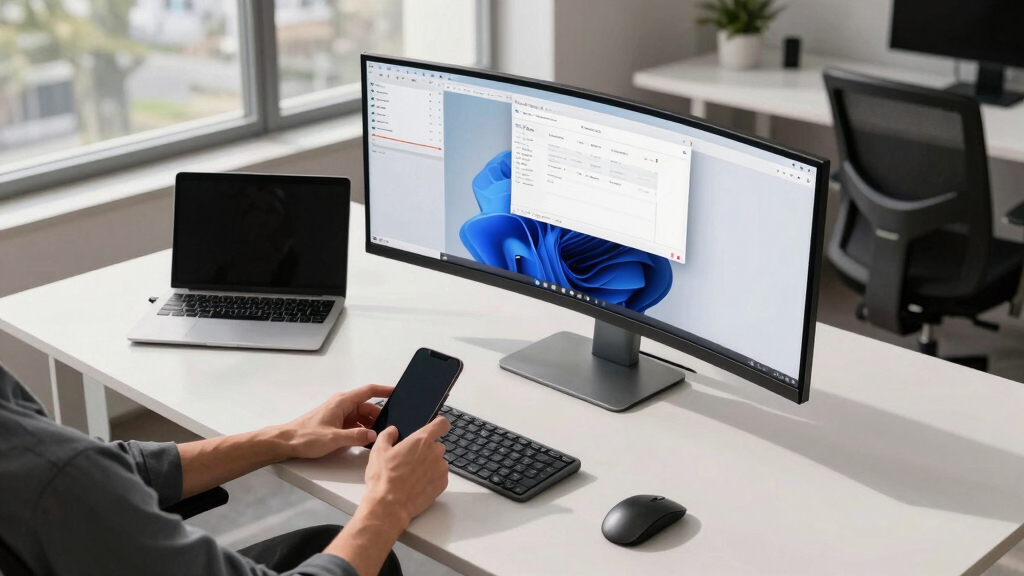

Finding the best ultrawide monitor for multitasking means balancing screen real estate, image quality, and usability. The LG 34U530A-W offers a great starting point with its versatile IPS panel and HDR support, ideal for productivity. For gamers or power users seeking extreme curves and high refresh rates, the SAMSUNG Odyssey G9 delivers immersive visuals and speed. Meanwhile, the SAMSUNG 49″ Ultra-WQHD provides a vast workspace suited for multi-application setups. However, larger screens often come with tradeoffs like higher price and space requirements. Continue reading for a detailed breakdown of these options and more to find your best fit.
Key Takeaways
- The most effective ultrawide monitors for multitasking balance size, resolution, and refresh rate to optimize productivity without overwhelming space.
- Curved screens, especially at 1000R or 1500R, improve immersion but may not suit all desk setups or preferences for flat displays.
- Higher refresh rates (120Hz and above) benefit fast-paced workflows and gaming, but often increase costs significantly.
- Budget options like the LG 34U530A-W provide decent performance but lack advanced features like high refresh or HDR; premium models like Alienware offer top-tier visuals and speed.
- Multi-function monitors with built-in streaming, speakers, or webOS can reduce clutter but may compromise on display quality or upgradeability.



More Details on Our Top Picks
LG 34U530A-W 34-inch UltraWide WFHD (2560 x 1080) IPS Wide Computer Monitor, 100Hz, VESA DisplayHDR 400, HDMI, DisplayPort, USB Type-C, Tilt/Height/Swivel Stand, White
This LG model stands out for its expansive 21:9 IPS display, making it ideal for multitaskers who need to keep multiple windows visible simultaneously. Compared to the Samsung 34WR55QK-B, it offers a higher refresh rate of 100Hz, ensuring smoother visuals during fast-paced tasks or streaming. Its vibrant HDR 400 support and 99% sRGB coverage deliver richer, more accurate colors, which is a plus for creative work. The built-in speakers add convenience, though their sound quality is modest. Connectivity via USB Type-C simplifies cable management, and the adjustable stand supports ergonomic positioning. However, the 2560×1080 resolution is lower than the QHD options on others like the Samsung or LG 34SR60QC, which could be a tradeoff for sharper detail. It’s best suited for professionals who prioritize workspace size over ultra-high resolution but want vibrant visuals and versatile connectivity.
Pros:- Expansive 21:9 IPS display for multiple windows and seamless multitasking
- VESA DisplayHDR 400 and 99% sRGB coverage for vivid, accurate colors
- USB Type-C connectivity reduces cable clutter and supports data transfer
Cons:- Lower resolution at 2560×1080 compared to QHD options, limiting sharpness
- Built-in speakers are modest in audio quality
Best for: Creative professionals and multitaskers who need a wide workspace and vibrant color accuracy.
Not ideal for: Gamers expecting high refresh rates for competitive play or users needing 1440p resolution for detailed visuals.
- Display Size:34 Inches
- Resolution:2560 x 1080
- Refresh Rate:100Hz
- Display Technology:IPS
- HDR Support:VESA DisplayHDR 400
- Ports:HDMI, DisplayPort, USB Type-C
Bottom line: This monitor is ideal for professionals seeking a large, vibrant display with versatile connectivity, though resolution limits detail slightly.
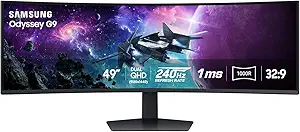
This Samsung Odyssey G9 excels at providing an ultra-wide, curved 49-inch screen, wrapping around your peripheral vision for immersive multitasking and gaming. Its 240Hz refresh rate and 1ms response time surpass the LG 34U530A-W, making it perfect for fast-paced gaming and smooth transitions between applications. The peak HDR 1000 brightness and 1,000,000:1 contrast ratio deliver stunning visuals with deep shadows and bright highlights, ideal for creative tasks or media consumption. Its extensive connectivity options, including HDMI, DisplayPort, and USB-C, support multiple devices effortlessly. The curved design, with a 1000R radius, enhances immersion but may not suit users with limited desk space or those preferring flat screens. Slightly higher price and larger footprint are tradeoffs. This monitor makes the most sense for users who need both high-performance gaming and large-scale multitasking in a single display.
Pros:- Vast 49-inch ultra-wide curved screen for immersive multitasking
- 240Hz refresh rate and 1ms(GtG) for ultra-smooth gaming and fast workflows
- Peak HDR 1000 and high contrast for exceptional visual depth
Cons:- Large size may be impractical for small desks
- Higher price point and potentially higher power consumption
Best for: Gamer and power multitaskers who want an immersive, high-refresh-rate experience.
Not ideal for: Office workers with limited desk space or those seeking a more traditional, flat monitor for productivity only.
- Display Size:49 Inches
- Resolution:5120 x 1440
- Refresh Rate:240Hz
- Response Time:1ms(GtG)
- HDR:DisplayHDR 1000
- Curvature:1000R
Bottom line: This monitor is best for gamers and multitaskers who crave an expansive, immersive display with top-tier performance, accepting its size and cost as tradeoffs.
SAMSUNG 34″ ViewFinity S50GC Series Ultra-WQHD Monitor, 100Hz, 5ms, HDR10, AMD FreeSync, Eye Care, Borderless Design, PIP, PBP, LS34C502GANXZA, 2023
This Samsung ViewFinity S50GC offers a 34-inch ultra-wide QHD display with a 21:9 aspect ratio, making it a solid choice for users who need a balance of multitasking space and sharp detail. Its 3440×1440 resolution provides a clearer image than the LG WFHD, beneficial for detailed work like photo editing or CAD. The 100Hz refresh rate and AMD FreeSync support ensure smooth visuals during video editing or light gaming. Its borderless design maximizes screen real estate, and the multiple ports (HDMI, DisplayPort, USB-C) facilitate easy device connection. The inclusion of Eye Care features helps reduce eye strain during long sessions. However, it lacks the high HDR brightness of some competitors, and the slightly lower contrast ratio may affect deep blacks in media. This monitor is best suited for professionals who want a versatile, color-accurate workspace without sacrificing size or features.
Pros:- Ultra-WQHD resolution for detailed visuals and sharp multitasking
- Borderless design maximizes workspace
- Multiple ports including USB-C for flexible connectivity
Cons:- HDR brightness is lower than HDR 400 or 1000 certified displays
- Contrast ratio less than some VA panels, affecting deep blacks
Best for: Creative professionals and multitaskers requiring high resolution and accurate colors.
Not ideal for: Heavy gamers or users needing the highest HDR brightness for media production.
- Display Size:34 Inches
- Resolution:3440 x 1440
- Refresh Rate:100Hz
- Response Time:5ms
- HDR:HDR10
- Ports:HDMI, DisplayPort, USB-C
Bottom line: Ideal for creative professionals seeking a high-resolution, color-accurate ultra-wide monitor for multitasking and detailed work, with balanced features.
LG 34WR55QK-B 34-inch UltraWide WQHD (3440 x 1440) Curved Computer Monitor, 100Hz, 5ms, HDR10, Reader Mode, HDMI, DisplayPort, USB Type-C, Tilt/Height Adjustable Stand, Black
This LG 34WR55QK-B provides a 34-inch curved WQHD display with a 21:9 aspect ratio, making it suitable for both work and leisure. Its 3440×1440 resolution offers crisp visuals, and the 100Hz refresh rate ensures smooth motion for video editing or casual gaming. HDR10 support enhances picture quality, while the curved design improves immersion and reduces eye strain. The stand’s tilt and height adjustments allow ergonomic use, and the USB Type-C port facilitates single-cable connection for data and power. OnScreen Control features support multitasking with PIP and PBP, making it easier to handle multiple applications. However, the monitor’s color gamut is slightly lower at 99% sRGB, and its contrast ratio, while decent, isn’t as high as premium VA panels. It’s a solid choice for users wanting a stylish, versatile display for both productivity and entertainment.
Pros:- Curved 34-inch WQHD display for immersive viewing
- Adjustable stand for ergonomic comfort
- Supports multitasking with PIP and PBP features
Cons:- Color gamut slightly below 100% sRGB, limiting color precision
- Contrast ratio not as high as some VA panels
Best for: Office workers and multimedia users who want a balanced display for work and casual use.
Not ideal for: High-end color grading or professional photography where color accuracy is critical.
- Display Size:34 Inches
- Resolution:3440 x 1440
- Refresh Rate:100Hz
- Response Time:5ms
- HDR:HDR10
- Curvature:1800R
Bottom line: This monitor is well-suited for users seeking a stylish, versatile display that balances work and entertainment with ergonomic features.
This LG 34SR60QC-W combines a 34-inch curved ultrawide display with built-in smart features, making it a unique choice for users who want both productivity and streaming capabilities. The 3440×1440 resolution and 100Hz refresh rate provide clear, smooth visuals suitable for multitasking, media consumption, and light gaming. Its webOS platform offers access to popular streaming apps like Netflix, Prime Video, and Disney+ directly on the monitor, reducing the need for additional devices. The AirPlay2 support allows seamless casting from iOS devices, adding convenience for Apple users. The monitor’s adjustable stand and multiple ports support ergonomic and flexible setups. However, since it’s a smart monitor, its primary strength lies in entertainment and casual multitasking, not professional color grading or high-end graphics work. It’s perfect for home offices integrated into a smart home ecosystem, but less so for demanding creative workflows.
Pros:- Built-in webOS platform with streaming app access
- AirPlay2 and Bluetooth support for device casting
- Curved 34-inch ultrawide display for immersive multitasking
Cons:- Lower color accuracy compared to dedicated professional monitors
- Smart features may slow down basic productivity tasks
Best for: Home users who want a stylish, smart monitor with streaming and multimedia features.
Not ideal for: Professional photographers or video editors needing top-tier color accuracy and calibration.
- Display Size:34 Inches
- Resolution:3440 x 1440
- Refresh Rate:100Hz
- HDR:HDR10
- Smart Platform:webOS
- Connectivity:AirPlay2, Bluetooth
Bottom line: This monitor offers a compelling combination of work and entertainment features ideal for smart home integration, with some compromises on professional color work.
Sceptre 34-Inch Curved Ultrawide WQHD Monitor (3440 × 1440), R1500, up to 180Hz/165Hz, DisplayPort x2, 99% sRGB, 1ms, Built-in Speakers, Machine Black, 2025 (C345B-QUT168)
This Sceptre model stands out for delivering a large, curved 34-inch ultrawide experience with a high refresh rate up to 165Hz, making it a solid choice for multitaskers who need screen real estate without breaking the bank. Compared to the Gawfolk GF490B, it offers a more refined design and slightly better response time, but it lacks the advanced gaming features like VRR support found in the Gawfolk. The ultra-wide 3440×1440 resolution ensures sharp images across multiple windows, and the 1ms MPRT reduces ghosting during fast action, ideal for both work and gaming. Its built-in speakers add convenience, though they aren’t premium quality, and the monitor’s brightness is respectable but not stellar. This pick makes the most sense for budget-conscious users who want ample screen space and decent color accuracy, but it might fall short for professional color grading or in very bright rooms.
Pros:- High refresh rate up to 165Hz for smooth multitasking and gaming
- 99% sRGB coverage ensures good color fidelity for most tasks
- 1ms MPRT minimizes ghosting during fast scenes
- Affordable price point for a 34-inch ultrawide
Cons:- Brightness of 280 cd/m² may be insufficient in very bright environments
- Build quality and design are somewhat basic and less premium
- Speakers are functional but not high quality
Best for: Budget-conscious multitaskers who want a large, curved ultrawide for both work and casual gaming.
Not ideal for: Professional color editors or users needing exceptional brightness and color accuracy for HDR content.
- Display Size:34 inches
- Resolution:3440 x 1440
- Refresh Rate:165Hz
- Response Time:1ms MPRT
- Ports:2 x HDMI, 2 x DisplayPort
- Color Gamut:99% sRGB
Bottom line: This monitor is ideal for users seeking a budget-friendly, high-refresh ultrawide for multitasking and casual gaming, with some compromises on brightness and design.
Samsung 49” Business Curved Ultrawide Dual QHD Computer Monitor, USB-C, DisplayPort, HDMI, 120Hz, VESA DisplayHDR 400, Built-in Speakers, Height Adjustable Stand, Eye Care, LS49C954UANXZA, 2024
This 49-inch Samsung monitor makes a bold statement with its expansive 32:9 aspect ratio, ideal for professionals who need the equivalent of dual monitors in a single display. It surpasses the Gawfolk GF490B in sheer size, providing an immersive workspace that minimizes window switching, and its 120Hz refresh rate offers smooth performance for multitasking and media consumption. Its VESA DisplayHDR 400 support enhances contrast and color depth, making it suitable for detailed visual work. The stand’s height adjustment and eye care features improve long-term comfort, while the multiple ports—including USB-C with 90W charging—reduce desktop clutter. However, its size demands substantial desk space and can be overwhelming for smaller setups, and color accuracy, though decent, isn’t calibrated for high-end professional editing. This monitor is perfect for users who prioritize screen real estate for multitasking but can accommodate its size and weight.
Pros:- Extremely wide 32:9 aspect ratio for multiple windows
- VESA DisplayHDR 400 for improved contrast
- Height adjustable stand and eye care features for comfort
- Multiple connectivity options including USB-C with 90W charging
Cons:- Requires a large desk or mounting solution due to size
- Color accuracy not calibrated for professional editing
- Very high resolution can demand a powerful GPU
Best for: Professionals who need a massive, single-screen workspace for multitasking, content creation, and media consumption.
Not ideal for: Users with limited desk space or those needing precise color accuracy for high-end editing.
- Display Size:49 inches
- Resolution:5120 x 1440
- Refresh Rate:120Hz
- HDR:VESA DisplayHDR 400
- Ports:HDMI, DisplayPort, USB-C
- Brightness:400 cd/m²
Bottom line: This monitor is a top choice for those who need extensive multitasking real estate and can manage its size but falls short for color-critical professional work.
SANSUI 34 Inch 240Hz Ultrawide Curved Gaming Monitor UWQHD 3440×1440, 21:9 2K Curved Monitor 1500R,HDR400,Fast VA, PIP/PBP,AI Crosshair,AIPQ(Visual Enhance),MPRT 1ms,HDMI2.1 * 2,DP1.4 * 2
The SANSUI 34-inch 240Hz curved monitor targets gamers and fast-paced multitaskers with its rapid 1ms MPRT and high refresh rate. It offers a 3440×1440 resolution on a 21:9 curved VA panel, providing immersive visuals and vibrant colors, especially with HDR400 support. Its AI features, like Crosshair and Visual Enhance, improve gaming precision and image quality, making it ideal for competitive play and streaming. The inclusion of HDMI 2.1 and DisplayPort 1.4 ensures compatibility with the latest hardware, and the curved design enhances immersion for both gaming and multitasking. However, the focus on gaming features means it may lack some professional color accuracy and brightness for high-end editing or office work. The monitor suits users who prioritize speed and immersion over color calibration for professional tasks.
Pros:- High refresh rate of 240Hz for smooth gaming and multitasking
- 1ms MPRT reduces motion blur
- HDR400 support for vibrant visuals
- HDMI 2.1 and DP 1.4 for latest hardware compatibility
Cons:- Color accuracy and brightness are optimized more for gaming than professional editing
- Relatively high power consumption at 36.7W
- Limited stand adjustability
Best for: Gamers and fast-paced multitaskers who want ultra-smooth visuals and immersive curved screens.
Not ideal for: Professional color editors or users seeking high brightness for HDR production or daylight environments.
- Display Size:34 inches
- Resolution:3440 x 1440
- Refresh Rate:240Hz
- Response Time:1ms MPRT
- HDR:HDR400
- Ports:HDMI 2.1, DP 1.4
Bottom line: This monitor excels at fast, immersive visuals for gaming and rapid multitasking, with some compromises on color accuracy and brightness for professional use.
The Alienware AW3425DW offers a premium ultrawide experience with its 34.2-inch QD-OLED panel, delivering stunning color accuracy and contrast thanks to DCI-P3 99.3% coverage and true blacks. Its 0.03ms response time and 240Hz refresh rate combine to create exceptionally smooth visuals, making it ideal for high-speed multitasking, gaming, and content creation. The 1800R curved display enhances immersion, and its HDR TrueBlack 400 support provides vibrant, deep blacks for cinematic quality. The monitor’s ergonomic stand with height, tilt, and swivel adjustments ensures comfort during long sessions, while AMD FreeSync Premium Pro and VESA AdaptiveSync keep visuals tear-free. Despite its high price, it’s suited for enthusiasts who demand top-tier performance and image quality, though it requires a powerful GPU to maximize its capabilities.
Pros:- QD-OLED panel with 99.3% DCI-P3 coverage for vibrant colors
- 0.03ms response time and 240Hz for ultra-smooth motion
- Deep blacks with VESA DisplayHDR TrueBlack 400
- Ergonomic stand with full adjustability
Cons:- Premium price limits accessibility for casual users
- Requires a high-end GPU to fully utilize 4K and high refresh rates
- Size and weight demand a sturdy, spacious desk
Best for: High-end gamers, content creators, and multitaskers seeking the best image quality and responsiveness in an ultrawide format.
Not ideal for: Budget users or those needing a monitor primarily for office work without high color or speed requirements.
- Display Size:34.2 inches
- Resolution:3440 x 1440
- Refresh Rate:240Hz
- Response Time:0.03ms
- HDR:DisplayHDR TrueBlack 400
- Color Gamut:DCI-P3 99.3%
Bottom line: This monitor is an outstanding choice for those who want the ultimate combination of color, speed, and multitasking in an ultrawide, with a correspondingly high price tag.
Alienware 34 Curved Gaming Monitor – AW3425DWM
This monitor stands out for combining high-refresh-rate gaming features with a spacious 34-inch ultrawide display, making it ideal for multitasking while enjoying immersive gameplay. Compared with the Samsung ViewFinity S50GC, it offers a sharper 180Hz refresh rate and a 1ms response time, which benefits fast-paced tasks and gaming. Its curved 1500R screen enhances immersion, but this could be less ideal for detailed multitasking or professional work that benefits from flatter screens. The DCI-P3 95% coverage and VESA DisplayHDR 400 certification deliver vibrant visuals, supporting both entertainment and productivity. The inclusion of AMD FreeSync Premium and VESA Adaptive Sync ensures smooth visuals during gaming, though these features add complexity and slightly increase the price. Eye care features like low blue light help reduce eye strain during marathon sessions, but the monitor’s gaming focus means it might lack some color calibration options preferred for professional creative work.
Pros:- 180Hz refresh rate for ultra-smooth motion
- 1ms response time minimizes lag during fast-paced tasks
- Expansive 34-inch curved screen enhances immersion
- Vibrant colors with DCI-P3 95% coverage and HDR400
Cons:- Designed primarily for gaming, less suitable for color-critical work
- Curved screen may distort multitasking layouts for some users
- Higher price point compared to non-gaming ultrawides
Best for: Gamers and multitaskers who prioritize fast response times and immersive visuals without sacrificing screen real estate.
Not ideal for: Professional colorists or users needing precise color accuracy for photo editing, as the monitor is optimized more for gaming than color calibration.
- Display Size:34 Inches
- Resolution:3440 x 1440 (WQHD)
- Refresh Rate:180 Hz
- Response Time:1 ms
- Color Coverage:DCI-P3 95%
- HDR:VESA DisplayHDR 400
- Ports:HDMI, DisplayPort, USB
- Curvature:1500R
- Speakers:No
Bottom line: This monitor is ideal for gamers who want a large, immersive display that also supports productive multitasking with fast visuals.
Samsung 34″ ViewFinity S50GC Series Ultrawide QHD Monitor
This monitor makes a strong case for multitasking with its ultra-wide 21:9 aspect ratio and a feature set tuned for prolonged use, such as Eye Care and adaptive brightness. It offers a slightly lower 100Hz refresh rate and a 5ms response time, which still handles routine multitasking and media consumption smoothly, but may fall short for fast-paced gaming compared with the Alienware AW3425DWM. Its HDR10 support with over a billion colors enhances visual depth, making it suitable for creative tasks as well as productivity. The minimal bezels and PBP/PIP features maximize screen space, allowing split-screen multitasking without clutter. While it excels in providing a bright, eye-friendly display, the slightly reduced refresh rate and lack of high-end gaming features make it less ideal for competitive gaming or rapid motion tasks. The focus on eye care, including ambient light sensing and flicker-free technology, makes it a comfortable all-day monitor for professionals.
Pros:- Ultra-wide 21:9 aspect ratio for extensive multitasking
- HDR10 with over a billion colors for vibrant visuals
- PBP and PIP features for viewing multiple inputs simultaneously
- Eye Care technology reduces fatigue during long work sessions
Cons:- Limited 100Hz refresh rate for fast-paced gaming
- Response time of 5ms is less optimal for quick action games
- Not as sharp or responsive as high-end gaming monitors
Best for: Professionals and multitaskers seeking a bright, color-rich display for long hours of productivity and media work.
Not ideal for: Fast-paced gamers or users needing ultra-responsive displays for competitive gaming, due to its 100Hz refresh rate and 5ms response time.
- Display Size:34 Inches
- Resolution:3440 x 1440 (WQHD)
- Refresh Rate:100 Hz
- Response Time:5 ms
- Color Depth:Over 1 Billion Colors (HDR10)
- Contrast Ratio:3000:1
- Features:PBP, PIP, Eye Care
- Connectivity:HDMI, DisplayPort
- Design:Slim Bezel, Minimalist
Bottom line: This monitor is well-suited for users prioritizing large, bright screens and multitasking capabilities over ultra-fast gaming performance.
How We Picked
These monitors were selected based on their suitability for multitasking—prioritizing wide aspect ratios, high resolutions, and versatile features. Performance factors like color accuracy, refresh rate, and HDR support mattered, as they directly impact productivity and visual comfort. Usability considerations, such as ergonomic stands and connectivity options, also influenced rankings. Price-to-value ratios were evaluated to recommend options suitable for different budgets, ensuring that each pick offers meaningful advantages over alternatives. Our ranking emphasizes real-world utility, build quality, and how well each monitor balances multiple tasks without unnecessary compromises.Factors to Consider When Choosing Best Ultrawide Monitors For Multitasking
Choosing the best ultrawide monitor for multitasking involves understanding several key factors that influence daily use. Beyond screen size, resolution and curvature significantly affect how comfortably you can view multiple windows or applications simultaneously. Connectivity options like USB-C can streamline your setup, while ergonomic stands improve long-term comfort. Considering your primary use—whether productivity, gaming, or multimedia—helps narrow down the ideal specifications. Being aware of potential pitfalls, such as overspending on features you don’t need, ensures you get the best value for your investment.Size and Aspect Ratio
Screen size and aspect ratio determine how much workspace you get and how comfortable it feels to manage multiple windows. Ultrawide monitors typically range from 34 to 49 inches, with aspect ratios from 21:9 to 32:9. Larger screens like 49 inches offer immense space but require substantial desk real estate and can be overwhelming if your workspace is limited. A 34-inch monitor with a 21:9 ratio strikes a good balance for most multitaskers, providing ample room without dominating your desk. Always consider your desk size and viewing distance to avoid cramped setups or excessive head movement.
Resolution and Screen Quality
Resolution impacts how sharp and detailed your images appear. While 1080p ultrawides are common, they may fall short for extensive multitasking or high-resolution workflows. QHD (3440×1440) and UWQHD (3440×1440) offer crisp visuals without demanding excessive GPU power, making them popular choices. For professionals needing precise color or HDR content, high-end models with 4K support and wide color gamuts are worth considering. Keep in mind that higher resolutions require more powerful hardware to drive the display smoothly, especially at higher refresh rates.
Refresh Rate and Response Time
While refresh rate is often associated with gaming, it also benefits multitasking by providing smoother scrolling and window movements. Rates of 100Hz or higher reduce eye strain during extended use and make interactions feel more fluid. Response time matters if you plan to use the monitor for fast-paced tasks or gaming; 1-3ms response times minimize motion blur. Premium gaming-focused models like the Alienware or Samsung Odyssey G9 excel here but typically come at a premium. For standard productivity, 60-100Hz is sufficient, but investing in higher refresh rates adds future-proofing and enhanced comfort.
Connectivity and Ergonomics
Multiple ports, especially USB-C, allow for easy connection to laptops and peripherals, reducing cable clutter. Ergonomic stands that support height, tilt, and swivel adjustments are vital for ergonomic comfort during long work sessions. Some monitors include built-in speakers or streaming apps, which can simplify your setup but might compromise on audio or display quality. Always check compatibility with your existing hardware and consider your workspace layout to choose features that truly add value without unnecessary extras.
Price and Value
Ultrawide monitors span a broad price range, from budget-friendly options to high-end models. Cheaper monitors often sacrifice features like high refresh rates, HDR, or build quality, making them suitable for casual multitasking. Premium models, such as those with OLED screens or 120Hz+ refresh rates, deliver superior image quality and responsiveness but at a higher cost. Balancing your needs against your budget is key. Investing in a slightly more expensive model with better ergonomics and future-proof features can pay off in terms of longevity and overall experience.
Frequently Asked Questions
Is a curved ultrawide monitor better for multitasking?
Curved ultrawide monitors can enhance the multitasking experience by providing a more immersive and natural viewing angle, reducing distortion at the edges. They help keep all parts of the screen within your peripheral vision, which can reduce eye strain during prolonged use. However, personal preference plays a role—some users prefer flat screens for precise straight-line work or when multiple monitors are already in use. Larger curves, like 1000R or 1500R, tend to be more comfortable for extended periods, but the choice ultimately depends on your desk setup and workflow.
Do I need a high refresh rate for multitasking?
While high refresh rates like 120Hz or 144Hz are primarily aimed at gamers, they can also benefit multitaskers by making window movements and scrolling appear smoother. This reduces flicker and eye fatigue, especially during long hours of work. For standard productivity tasks, a 60Hz or 75Hz refresh rate is typically sufficient. However, if you frequently switch between applications rapidly or do creative work involving fast visuals, opting for a higher refresh rate can improve overall comfort and responsiveness.
What is the best resolution for multitasking on an ultrawide monitor?
Most multitaskers find that a resolution of 3440×1440 (QHD ultrawide) strikes a good balance between clarity and hardware demands. It provides enough pixel density for crisp images while remaining accessible for most modern GPUs. Higher resolutions like 4K ultrawides offer even sharper visuals but require more powerful graphics cards and can reduce performance in tasks like gaming or video editing. For general productivity and multiple window management, QHD ultrawides are the most practical and cost-effective choice.
Are built-in speakers on ultrawide monitors sufficient for daily use?
Built-in speakers on ultrawide monitors are convenient and save desk space, but they often lack depth and clarity compared to dedicated speakers or headphones. For casual listening or video conferencing, they can suffice, but for high-quality audio or critical listening, investing in external speakers or headphones is advisable. If audio quality is a priority, check reviews for speaker performance before choosing a monitor, and consider models with dedicated audio outputs for flexibility.
How important is ergonomics when choosing an ultrawide monitor?
Ergonomics play a vital role in maintaining comfort during long work sessions. Monitors with adjustable height, tilt, and swivel stands help prevent neck and eye strain, especially on large ultrawide screens. Poor ergonomics can lead to discomfort and fatigue, reducing productivity. It’s worth investing in a monitor with good ergonomic features or pairing it with an adjustable arm if your workspace allows. Comfort should always be a priority when selecting a monitor for multitasking, as it directly impacts your ability to work efficiently over time.
Conclusion
The best overall choice for most users seeking a balance of size, resolution, and features is the LG 34U530A-W. For those prioritizing immersive experiences with gaming or creative work, the SAMSUNG Odyssey G9 or Alienware 34 are excellent premium options. Budget-conscious buyers will find the LG 34WR55QK-B a solid entry-level pick. If space is limited or you want a simple upgrade, a 34-inch model offers great value, while 49-inch options suit multi-application multitasking at a glance. Consider your workspace, intended use, and budget to select the monitor that aligns best with your needs.