
Finding the best all-in-one printer for a home office involves balancing cost, functionality, and ease of use. The HP Color LaserJet Pro MFP 3301sdw stands out as the best overall, thanks to its fast color printing and robust office features. For those prioritizing affordability, the Canon PIXMA TS6520 offers reliable performance in a compact design. Meanwhile, the HP OfficeJet Pro 8125e strikes a strong balance between speed and smart features for busy households. The main tradeoffs often revolve around print quality versus cost of consumables, or multifunction depth versus simplicity. Continue reading for a detailed breakdown that helps match each printer to your specific needs.
Play games included with Prime
Start a Prime free trial and play with Amazon Luna on your devices.
Start playingAs an affiliate, we earn on qualifying purchases.
Key Takeaways
- Laser printers generally offer faster, more cost-efficient color printing suitable for busy home offices.
- Inkjet models excel at photo printing and color accuracy but tend to have higher ongoing ink costs.
- Features like duplex printing and automatic document feeders significantly improve workflow efficiency.
- Compact designs are ideal for limited spaces but may sacrifice some multifunction capabilities.
- AI-enabled smart features are increasingly common, but they add to the initial cost and complexity.




More Details on Our Top Picks
HP Color LaserJet Pro MFP 3301sdw Wireless All-in-One Color Laser Printer, Office Printer, Scanner, Copier, ADF, Duplex, Best-for-Office
This HP LaserJet model stands out for small teams needing professional-quality color documents quickly and reliably. It offers a high print speed of 26 ppm, with vivid color output thanks to next-gen TerraJet toner, making it ideal for reports and marketing materials. Compared to the HP Envy 6155e, which excels in home photo printing, the LaserJet prioritizes speed and durability over photo finesse. Setup over Wi-Fi is straightforward, and features like auto duplex and 250-sheet input tray boost productivity. The performance is consistent, with reliable scanning and copying, suited for frequent use. The main tradeoff involves ongoing toner costs—laser cartridges are more expensive than inkjet replacements, and the initial toner yields are modest. This pick makes the most sense for small offices or busy home workspaces that need sharp, fast color printing without fuss. Pros: Vivid color output, fast print speed, reliable performance, high paper capacity. Cons: Expensive toner replacements, higher initial cost, less suitable for photo printing.
Verdict: Ideal for small teams that require high-volume, professional color printing with dependable performance.
Specs: Printer Type: Laser, Connectivity: Wireless/Ethernet, Output Type: Color, Input Tray: 250 sheets, Print Speed: 26 ppm, Resolution: 1200×1200 dpi, Weight: 37.7 lbs.Pros:- Vivid, professional color output
- Fast printing speeds of 26 ppm
- High paper capacity of 250 sheets
- Reliable scanning and copying
Cons:- High ongoing toner costs
- Moderate initial purchase price
- Not suitable for photo-heavy printing
Best for: Small offices or busy home workspaces needing durable, high-quality color laser printing.
Not ideal for: Home users focused on photo printing or those with very tight budget constraints due to toner costs.
- Printer Type:Laser
- Connectivity:Wireless/Ethernet
- Output Type:Color
- Input Tray Capacity:250 sheets
- Print Speed:26 ppm
- Resolution:1200×1200 dpi
- Weight:37.7 pounds
Bottom line: Best suited for small businesses or offices that prioritize speed and professional quality over photo printing capabilities.
HP Envy 6155e Wireless All-in-One Color Inkjet Printer, Portobello, Print, scan, copy, Duplex printing
This compact HP Envy 6155e makes a strong case for home users who want vibrant color printing for everyday documents and photos. It offers decent speeds of 7 ppm color and 10 ppm black, with true-to-screen print quality enabled by HP’s AI tech, perfect for photos, schoolwork, and casual projects. Compared with the Epson EcoTank ET-2800, which emphasizes ink cost savings and high page yields, the Envy leans into convenience and premium photo output, though at a potentially higher long-term ink cost. Setup is simple, especially with the 2.4″ touchscreen, and the device supports wireless printing from multiple devices. The main drawback is its slower print speeds and reliance on HP’s ink subscription, which can be costly if not managed carefully. This makes sense for families or hobbyists who prioritize photo quality and ease of use over speed or low ink costs. Pros: Excellent photo quality, easy Wi-Fi setup, compact design, intuitive touchscreen. Cons: Slower print speeds, higher ongoing ink costs, subscription required for best value.
Verdict: Perfect for home users who want high-quality photos and simple wireless operation, willing to manage ink subscriptions.
Specs: Printer Type: Inkjet, Connectivity: Wireless, Output Type: Color, Print Speed: 7 ppm color, Resolution: 4800×1200 dpi, Input Tray: 100 sheets, Weight: 11.3 lbs.Pros:- Vibrant, true-to-screen photo prints
- User-friendly 2.4″ touchscreen
- Compact and stylish design
- Wireless mobile printing support
Cons:- Slower print speeds
- Expensive ink subscriptions
- Limited photo paper capacity
Best for: Home users prioritizing photo quality and ease of wireless printing.
Not ideal for: Heavy-volume printing or users concerned about ongoing ink costs and subscriptions.
- Printer Type:Inkjet
- Connectivity:Wireless
- Output Type:Color
- Print Speed:7 ppm color
- Resolution:4800×1200 dpi
- Input Tray:100 sheets
- Weight:11.3 lbs
Bottom line: Best for home hobbyists and families who want beautiful photos and simple, wireless operation, accepting higher ink costs.
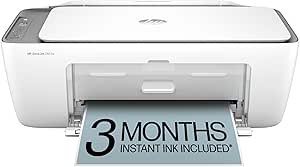
HP DeskJet 2855e Wireless All-in-One Color Inkjet Printer, Scanner, Copier, Best-for-home
This HP DeskJet 2855e offers a straightforward, affordable solution perfect for casual home printing needs. It handles basic documents, to-do lists, and occasional photos with a speed of 5.5 ppm color and 7.5 ppm black, which is adequate for light use. It features HP’s AI tech to optimize web page and email prints, reducing waste, and includes a 3-month Instant Ink trial. Compared to the Epson EcoTank ET-2800, which is more economical long-term, the DeskJet is cheaper upfront but may cost more in ink over time. Setup is simple, with Wi-Fi connection and a user-friendly app. The main limits are slower speeds and small paper capacity—better suited for light, casual use rather than high-volume tasks. This is an ideal choice for students or small families with minimal printing demands. Pros: Low initial cost, easy setup, compact design, AI tech for smarter printing. Cons: Slow printing speeds, limited paper capacity, higher ink costs over time.
Verdict: A solid, budget-friendly printer for light home use where speed and volume are less critical.
Specs: Printer Type: Inkjet, Connectivity: Wireless, Output Type: Color, Print Speed: 5.5 ppm color, Resolution: 4800×1200 dpi, Input Tray: 60 sheets, Weight: 7.6 lbs.Pros:- Affordable upfront cost
- Simple Wi-Fi setup
- Compact and lightweight
- AI tech reduces waste in printing
Cons:- Slower print speeds
- Small paper capacity
- Higher ink costs if printing frequently
Best for: Casual home users and students with low-volume, basic printing needs.
Not ideal for: Heavy or photo printing and households with frequent large print jobs due to speed and capacity limits.
- Printer Type:Inkjet
- Connectivity:Wireless
- Output Type:Color
- Print Speed:5.5 ppm color
- Resolution:4800×1200 dpi
- Input Tray:60 sheets
- Weight:7.6 lbs
Bottom line: Ideal for casual, budget-conscious households with minimal printing demands.
Epson EcoTank ET-2800 Wireless Color All-in-One Cartridge-Free Supertank with Scan and Copy, The Ideal Basic Home Printer – Black
This Epson EcoTank ET-2800 is a standout choice for households that print frequently and want to minimize ongoing ink costs. It uses refillable ink tanks, which are equivalent to about 80 cartridges, offering significant savings—up to 90% less on ink. It can produce roughly 4,500 pages in black and 7,500 in color, making it ideal for high-volume printing without frequent cartridge replacements. Compared to the HP DeskJet 2855e, which is cheaper initially, the EcoTank saves money over time with its high page yields. Setup involves filling the tanks, and the device supports wireless printing and scanning. The main limitation is slower initial setup, and it’s physically larger, so it’s better for dedicated home offices or serious print-intensive households. Pros: Cost-effective for high-volume printing, refillable ink tanks, high page yields, low maintenance. Cons: Larger footprint, slower initial setup, higher upfront cost.
Verdict: Best for cost-conscious households with high-volume printing needs and space for a larger device.
Specs: Printer Type: Inkjet, Connectivity: Wireless, Output Type: Color, Page Yield: approx. 4,500 black pages, 7,500 color pages, Resolution: 5760×1440 dpi, Input Tray: 100 sheets, Weight: 16.8 lbs.Pros:- Massive ink savings over time
- Refillable ink tanks with high yield
- Low cost per page
- Reliable wireless connectivity
Cons:- Requires larger space
- Slower initial setup
- Higher upfront price
Best for: High-volume households seeking to cut long-term ink costs and manage frequent printing.
Not ideal for: Small spaces or households with minimal printing needs due to its size and initial cost.
- Printer Type:Inkjet
- Connectivity:Wireless
- Output Type:Color
- Page Yield:4,500 black / 7,500 color pages
- Resolution:5760×1440 dpi
- Input Tray:100 sheets
- Weight:16.8 lbs
Bottom line: Best suited for households with frequent printing and a focus on minimizing ongoing ink expenses.
Brother Work Smart 1360 Wireless Color Inkjet All-in-One Printer with Automatic Duplex Printing and 1.8” Color Display | Includes Refresh Subscription Trial(1) (MFC-J1360DW)
This Brother MFC-J1360DW combines affordability, ease of use, and cloud connectivity, making it perfect for home offices. It features automatic duplex printing, a 20-sheet single-sided ADF, and a 1.8″ color display, all supporting fast printing at up to 16 ppm black and 9 ppm color. Compared with the HP DeskJet 2855e, which is more basic, the Brother offers faster speeds and a larger paper tray (150 sheets). It supports printing from cloud apps like Google Drive and Dropbox, plus mobile printing, making it versatile for remote work. Its ink system is designed for high-yield, cost-effective printing, and the device’s compact size fits well in small home spaces. The main downside is that it lacks a dedicated photo mode, and the initial setup involves managing subscription ink plans. It’s ideal for home professionals focused on productivity and cost savings. Pros: Fast print speeds, cloud app integration, automatic duplex, large paper capacity. Cons: No dedicated photo printing mode, subscription ink management, slightly larger footprint.
Verdict: Perfect for home offices needing reliable, fast, and affordable color printing with cloud features.
Specs: Printer Type: Inkjet, Connectivity: Wireless, Output Type: Color, Print Speed: 16 ppm black, 9 ppm color, Resolution: 1200×6000 dpi, Input Tray: 150 sheets, Weight: 8.8 lbs.Pros:- Fast print speeds
- Cloud app integration
- Automatic duplex printing
- Large 150-sheet paper tray
Cons:- No dedicated photo mode
- Subscription management needed
- Slightly larger than basic models
Best for: Home professionals seeking fast, reliable, and cost-effective color printing with cloud connectivity.
Not ideal for: Photo enthusiasts or households with very high photo printing demands due to lack of dedicated photo modes.
- Printer Type:Inkjet
- Connectivity:Wireless
- Output Type:Color
- Print Speed:16 ppm black / 9 ppm color
- Resolution:1200×6000 dpi
- Input Tray:150 sheets
- Weight:8.8 lbs
Bottom line: Ideal for home-based professionals who want quick, affordable color printing with cloud access and duplex features.
Canon PIXMA TR8620a – All-in-One Printer Home Office|Copier|Scanner|Fax|Auto Document Feeder | Photo, Document | Airprint (R), Android, Black, Works with Alexa
The Canon PIXMA TR8620a stands out for its exceptional versatility, combining high-quality printing with scanning, copying, faxing, and a robust automatic document feeder. Its ability to connect with Alexa and support for AirPrint and Android makes it highly convenient for mixed device environments. Compared with the HP OfficeJet Pro 8125e, it offers a more comprehensive feature set and better photo quality, though it involves a slightly larger footprint and higher initial cost. The five individual ink tanks ensure cost-effective maintenance, but the model’s complexity can lead to a steeper learning curve for beginners. This printer is ideal for users who need all-in-one functionality with photo printing and voice control, especially in busy home offices.
Pros:- Supports voice commands with Alexa for hands-free operation
- High-quality borderless photo printing up to square formats
- Auto duplex printing reduces paper use
Cons:- Higher price point compared to basic inkjet printers
- Complex setup process may be daunting for novices
- Size and weight make it less ideal for very tight spaces
Best for: Home office users who require a multifunction device with excellent photo quality and smart home integration.
Not ideal for: Small spaces or users seeking a simple, budget-friendly printer for occasional printing, as it is bulkier and more expensive than basic models.
- Printer Type:Inkjet
- Maximum Paper Size:8.5 x 14 inch
- Print Speed:10 ppm color
- Auto Document Feeder:20-sheet
- Connectivity:Wireless, AirPrint, Alexa
- Display:LCD
Bottom line: This model is best suited for those needing a feature-rich, all-in-one printer with excellent photo and voice control capabilities.
Canon PIXMA TS6520 Wireless Color Inkjet Printer Duplex Printing, White – Home Printer with Copier/Scanner, 1.42” OLED Display, Intuitive Control Panel, Compact Design
The Canon PIXMA TS6520 offers a reliable, compact all-in-one solution ideal for families and students who want straightforward printing, scanning, and copying. Its 1.42-inch OLED display and simple controls make setup and daily use intuitive, especially compared to the more complex HP OfficeJet Pro 9135e. While it lacks an auto document feeder, its auto duplex printing helps save paper, and the multiple media sizes support creative projects. However, its print speed is modest, and photo quality, while good, isn’t comparable to higher-end models. This printer makes the most sense for light to moderate use in small households or dorm rooms that prioritize affordability and ease of use.
Pros:- Compact and stylish design fits small spaces
- Easy setup with intuitive control panel
- Supports automatic double-sided printing
Cons:- No automatic document feeder for multi-page copying
- Slower print speeds compared to more advanced models
- Limited photo print capabilities
Best for: Students and small families needing a dependable, affordable all-in-one for occasional printing and scanning tasks.
Not ideal for: High-volume or photo-focused printing needs, as it lacks speed and advanced photo features.
- Printer Type:Inkjet
- Maximum Paper Size:8.5 x 11 inch
- Print Speed:9 ppm color
- Display:OLED
- Auto Duplex:Yes
- Media Support:Various sizes including borderless
Bottom line: This printer is perfect for budget-minded households seeking a straightforward, space-saving all-in-one device for light use.
Brother DCP-L2640DW Wireless Compact Monochrome Multi-Function Laser Printer with Copy and Scan, Duplex, Mobile, Black & White | Includes Refresh Subscription Trial(1), Works with Alexa
The Brother DCP-L2640DW is a powerhouse for users who prioritize speed and volume in black-and-white printing. Its laser technology ensures sharp text quality at impressive speeds of up to 36 ppm, making it ideal for small businesses or home offices with heavy document needs. The built-in duplex capability and 50-page auto document feeder improve workflow efficiency compared to inkjet models like the HP OfficeJet Pro 9135e. While it lacks color printing, its cost per page and quick scan speeds are compelling advantages. The compact footprint is a plus for tight spaces, but the monochrome-only output limits its versatility for color projects. This model is best for users who mostly print text and need rapid, high-volume output.
Pros:- Extremely fast printing speeds for high volume
- Compact design fits small office spaces
- Automatic duplex printing reduces paper costs
Cons:- Limited to monochrome printing only
- No color scanning or copying
- Higher upfront cost compared to basic inkjet models
Best for: Small business owners or home workers focusing on large quantities of black-and-white documents.
Not ideal for: Users requiring color printing or photo quality, as this model is monochrome only.
- Printer Type:Laser
- Maximum Paper Size:8.5 x 14 inch
- Print Speed:36 ppm
- Auto Document Feeder:50 pages
- Connectivity:Wireless, Ethernet, USB
- Display:LCD
Bottom line: This laser multifunction is best for users needing rapid, high-volume monochrome document processing.
HP OfficeJet Pro 9125e Wireless All-in-One Color Inkjet Printer, Print, scan, copy, fax, ADF, Duplex printing best-for-office, 3 month Instant Ink trial included, AI-enabled (403X0A)
The HP OfficeJet Pro 9125e is tailored for busy offices that demand high-volume color printing combined with multifunctionality. Its 20 ppm color speed and 25 ppm black, paired with a 500-sheet paper capacity, make it ideal for large workloads. The inclusion of a dual 250-sheet tray and an automatic document feeder streamline daily tasks, while AI features help optimize workflows. It’s more affordable than high-end laser models but still offers excellent print quality and security. The setup can be intricate, and the size may be challenging for very small spaces. This printer is best for offices that need fast, reliable color output with low operational costs.
Pros:- High-volume paper capacity (up to 500 sheets)
- Fast, high-quality color printing
- Includes duplex printing, scanning, and faxing
Cons:- Setup can be complex for less tech-savvy users
- Larger footprint and higher price than entry-level models
- Color cartridges can be costly to replace
Best for: Mid-sized offices or work-from-home setups with high-volume color printing requirements.
Not ideal for: Users who primarily print in black-and-white or have limited space, as it is relatively large and more costly than basic models.
- Printer Type:Inkjet
- Maximum Paper Size:8.5 x 11 inch
- Print Speed:20 ppm color
- Input Tray Capacity:500 sheets
- Connectivity:Wireless, USB, Ethernet
- Display:Touchscreen
Bottom line: This model is best for small to medium offices needing high-volume, reliable color printing with multifunction features.
HP OfficeJet Pro 9125e Wireless All-in-One Color Inkjet Printer, Print, scan, copy, fax, ADF, Duplex printing best-for-office, 3 month Instant Ink trial included, AI-enabled (403X0A)
The HP OfficeJet Pro 9125e stands out for its ability to handle professional-quality color documents with speed and efficiency, making it a strong contender against the HP OfficeJet Pro 8125e. Compared to the 8125e, the 9125e offers a larger paper capacity and more advanced AI features that help optimize print layouts and content, which benefits busy offices needing polished outputs. However, it involves a higher price point and slightly more complex setup, which might be a hurdle for less tech-savvy users. Its 250-sheet tray and duplex scanning streamline high-volume tasks while the 2.7-inch touchscreen simplifies operation. The inclusion of a 3-month Instant Ink trial adds value, especially for those printing frequently, but the ongoing subscription costs are something to weigh. Overall, this model makes the most sense for small to medium offices that need reliable, high-quality color printing with robust security features, and are willing to invest in a more feature-rich device.
Pros:- High-speed color printing up to 18 ppm
- Large 250-sheet input tray reduces refill frequency
- AI-enabled features improve print layout accuracy
- Built-in security with HP Wolf Pro Security
Cons:- Higher initial cost compared to basic inkjet models
- Complex setup process for less experienced users
- Ongoing subscription fee after the trial period
Best for: Small office teams that prioritize professional-quality color documents and efficient workflow integration.
Not ideal for: Home users with minimal printing needs or those seeking a straightforward, budget-friendly printer.
- Printer Type:Inkjet
- Print Speed (Color):18 ppm
- Print Speed (Black):22 ppm
- Input Capacity:250 sheets
- Connectivity:Wi-Fi, Ethernet, USB
- Touchscreen:2.7-inch color
- ADF:Yes
- Duplex Printing:Yes
- Warranty:One-year limited
Bottom line: This printer is best suited for small offices requiring professional quality, security, and efficiency, despite its higher price and setup complexity.
How We Picked
These printers were evaluated based on their overall performance, usability, build quality, and value for a home office setting. I considered print speed, color accuracy, multifunction capabilities, ease of setup, and ongoing costs such as ink or toner. Priority was given to products that balance these factors effectively, providing a reliable experience without excessive expense or complexity. The ranking reflects which models excel in everyday home office tasks, with a focus on versatility, cost-efficiency, and user-friendliness.Factors to Consider When Choosing Best All In One Printers For Home Office
Choosing the right all-in-one printer for a home office requires understanding your specific needs. Consider how much printing you’ll do, whether color or monochrome is sufficient, and if features like scanning or faxing are necessary. Budget constraints also influence whether you should prioritize initial cost or long-term savings. Additionally, connectivity options like Wi-Fi and mobile printing can streamline your workflow. Being aware of common tradeoffs helps prevent overspending on features you won’t use or buying a model that doesn’t meet your daily demands.Printing Speed and Volume
If your home office involves frequent printing, especially large volumes, choosing a model with higher pages per minute (PPM) and a large input tray reduces interruptions. Laser printers tend to be faster and more cost-effective for volume-heavy tasks, but inkjet models may suffice if your printing volume is moderate. Consider your typical workload to avoid spending extra on unnecessary speed or capacity that you won’t utilize regularly.
Color vs. Monochrome Printing
Deciding between color and monochrome depends on your primary tasks. Color printers are essential for marketing materials, presentations, or photo printing, but they usually come with higher running costs. Monochrome models excel at document printing and are more budget-friendly over time. Understand your typical use case to avoid paying for unnecessary color capabilities or sacrificing quality where it matters most.
Multifunction Features
Features like duplex printing, automatic document feeders (ADF), and fax capabilities enhance productivity but may increase initial costs. If your workflow involves scanning or copying large batches or sending faxes regularly, prioritize models with these features. However, if your needs are basic, opting for a simpler, less expensive model can save money without sacrificing essential performance.
Ease of Use and Connectivity
Wireless setup, mobile printing, and touchscreen interfaces simplify daily use and improve flexibility. Look for models that support multiple devices and operating systems seamlessly. Keep in mind that more advanced connectivity options may add to the complexity and cost, so assess whether these features align with your comfort level and needs.
Cost of Consumables
Ongoing expenses like ink or toner significantly impact total cost of ownership. Laser printers typically have higher upfront costs but lower per-page expenses, making them suitable for high-volume use. Inkjet models often have cheaper initial prices but costly ink refills. Carefully consider your expected printing volume to choose a model that won’t become prohibitively expensive over time.
Frequently Asked Questions
Should I choose a laser or inkjet all-in-one printer for my home office?
Laser printers generally provide faster printing speeds and lower per-page costs, making them ideal for high-volume document printing. Inkjet printers are better suited for vibrant color printing, such as photos or marketing materials, but tend to have higher ongoing ink costs. Your choice should depend on your typical print volume and whether color accuracy or speed is more critical for your tasks.
Is duplex printing worth the extra cost in a home office printer?
Automatic duplex printing significantly reduces paper use and manual effort, making it a valuable feature if you print frequently. While it can add to the initial price, the long-term savings on paper and time often justify the expense, especially in a busy home office environment where efficiency matters.
What’s the best way to manage ongoing ink or toner costs?
Choosing a printer with high-yield cartridges or toner can lower per-page costs and extend periods between refills. Laser models generally have more cost-effective toner options for high-volume printing, while inkjet models with refillable tanks or XL cartridges can also reduce ongoing expenses. Consider your expected volume to determine which option saves you money over time.
Are all-in-one printers suitable for photo printing in a home office?
While many all-in-one printers can handle photo printing, inkjet models typically deliver better color accuracy and detail. If photo quality is a priority, opt for a dedicated photo inkjet or a model with specialized photo printing features. Keep in mind that photo printing can be more costly and slower than standard document printing.
How important is mobile printing support for my home office?
Mobile printing support, via Wi-Fi, AirPrint, or Google Cloud Print, adds significant convenience if you frequently print from smartphones or tablets. Most modern all-in-one printers include these features, but verifying compatibility with your devices can prevent frustration. This support streamlines workflows and minimizes the need for wired connections.
Conclusion
The best overall pick, HP Color LaserJet Pro MFP 3301sdw, is ideal for those who need fast, reliable color printing with robust office features. For budget-conscious users, the Canon PIXMA TS6520 offers a compact, versatile solution suitable for light home use. The HP OfficeJet Pro 8125e makes a strong case as a mid-range, smart-feature-rich option for families balancing work and personal printing needs. Beginners or those with minimal space might prefer simpler, more straightforward models like the Brother DCP-L2640DW. Ultimately, your choice should depend on your workload, budget, and feature priorities—this guide helps you match your needs with the right printer. As an affiliate, we earn on qualifying purchases.NFL season / tailgating Picks
team gear