If you’re looking for the best multi-camera HDMI switchers of 2025, I’ve curated a top list featuring devices like the Osee GoStream Deck, Quad Multi Viewer, and UGREEN HDMI Switch, all offering seamless video *changeovers* and versatile input options. These models support high resolutions up to 4K@60Hz, with easy control via remote or touchscreen, making live streaming or multi-camera setups straightforward. Keep going to discover the full details on features, performance, and usability for your specific needs.
Key Takeaways
- Top models support 4K resolution at 30Hz or 60Hz, ensuring high-quality, seamless video switching for professional and streaming setups.
- Features like multi-view, picture-in-picture, and overlay effects enhance live production and multi-source monitoring.
- Connectivity options include HDMI, SDI, USB-C, Ethernet, and NDI HX, providing versatile device compatibility and expandability.
- User-friendly controls via touchscreens, remote, or software make setup and operation straightforward for various skill levels.
- Designed for live streaming, gaming, security, and virtual studios, these switchers deliver reliable, low-latency switching for diverse applications.
Osee GoStream Deck HDMI Pro Live Streaming Video Mixer Switcher

If you’re looking for a versatile and portable switcher that handles multi-camera live streams with ease, the Osee GoStream Deck HDMI Pro is an excellent choice. It offers four HDMI inputs, dual outputs, and USB-C ports for flexible connectivity, plus Ethernet for streaming and NDI HX input. With features like dual video windows, graphics overlay, chroma key, and PIP effects, it adapts to various live production needs. Its compact design makes it easy to set up and transport, while intuitive controls and multi-platform streaming capabilities ensure smooth operation. Overall, it’s a powerful, reliable device that elevates your live streaming and recording experience.
Best For: content creators, live streamers, and small production teams seeking a portable, multi-camera switcher with versatile connectivity and professional features.
Pros:
- Extensive input/output options including 4 HDMI inputs, dual outputs, and USB-C ports for flexible connectivity
- Supports multi-view, graphics overlay, chroma key, and PIP effects for dynamic live production
- Compact, portable design with easy setup and intuitive control panel for on-the-go use
Cons:
- Runs very hot, which may impact long-term durability and device longevity
- Lacks dedicated desktop control software, relying on an on-screen menu that some users find less intuitive
- Does not support 4K or higher resolution inputs, limiting future-proofing for higher-quality streams
Quad Multi Viewer 4 in 1 HDMI Switcher with IR Remote

The Quad Multi Viewer 4 in 1 HDMI Switcher with IR Remote is an ideal choice for anyone needing to manage multiple HDMI sources seamlessly, especially in setups like gaming rooms, live streaming stations, or security monitoring. It supports four HDMI inputs with real-time, smooth switching up to 1080p resolution. The switcher offers versatile display options, including five modes and VGA output. You can easily select sources using the IR remote or front panel buttons. With compatibility for gaming consoles, streaming devices, media players, and security cameras, it’s a reliable, straightforward solution for professional and casual users alike. Plus, it comes with a one-year warranty for added peace of mind.
Best For: home entertainment setups, gaming enthusiasts, and security monitoring requiring seamless management of multiple HDMI sources.
Pros:
- Supports 4 HDMI inputs with real-time switching up to 1080p resolution.
- Offers versatile display modes including VGA output and easy source selection via IR remote or front panel buttons.
- Compatible with a wide range of devices such as gaming consoles, streaming devices, media players, and security cameras.
Cons:
- Limited to 1080p resolution, not supporting 4K or higher resolutions.
- Requires external power supply for operation.
- No mention of additional audio features beyond PCM 2.0 stereo audio.
HDMI Multiviewer Switch 4×1

The HDMI Multiviewer Switch 4×1 is an excellent choice for users who need multiple sources displayed simultaneously, such as security professionals, broadcasters, or home theater enthusiasts. It supports four HDMI inputs and one output, offering seamless multi-viewing with zero lag. It displays up to four sources in nine different modes, including split-screen and PBP. Compatible with most HDMI devices, it supports 4K@30Hz and 1080P@60Hz resolutions, ensuring clear visuals. Control is straightforward via IR remote or DIP switches. While it’s perfect for real-time monitoring and multi-source viewing, some users find its 4K support limited to 30Hz.
Best For: users who need to monitor multiple HDMI sources simultaneously, such as security professionals, broadcasters, or home theater enthusiasts.
Pros:
- Supports 4 HDMI inputs with seamless switching and zero lag for real-time multi-viewing.
- Offers nine display modes including split-screen and PBP, providing versatile viewing options.
- Compatible with most HDMI devices and supports 4K@30Hz and 1080P@60Hz resolutions for clear visuals.
Cons:
- Limited true 4K support to 30Hz, which may not meet all high-end 4K viewing needs.
- Some users experience initial resolution mismatches or black screens that require adjustments.
- Remote control is small and may be less convenient for extended use or precise navigation.
UGREEN HDMI Switch 5 in 1 Out 4K@60Hz

Designed for gamers and home entertainment enthusiasts, the UGREEN HDMI Switch 5 in 1 Out supports multiple devices simultaneously, allowing seamless switching between up to five HDMI sources on a single display. It works with gaming consoles like PS5, Xbox Series X, Nintendo Switch, and streaming devices such as Roku and Fire TV Stick. Supporting 4K@60Hz resolution and backward compatibility, it guarantees crisp visuals and smooth gameplay. The switch features manual operation with LED indicators and a remote control for easy access. Powered via USB, it delivers stable, high-bandwidth transmission up to 18Gbps, providing reliable, high-quality audio and video without frame loss.
Best For: gamers and home entertainment enthusiasts who need to switch between multiple HDMI devices seamlessly on a single display.
Pros:
- Supports 4K@60Hz resolution for crisp, high-quality visuals and smooth gameplay.
- Remote control and manual button for easy, convenient switching between sources.
- Compatible with a wide range of devices including gaming consoles, streaming devices, and Blu-ray players.
Cons:
- Does not include an HDMI cable or power adapter, requiring additional purchases.
- Manual switching means automatic source switching is not supported.
- Requires connection to a USB power source for stable operation, which may limit placement options.
HDMI Multiviewer Switch 4×1 with IR Remote

If you need a versatile switcher that makes managing multiple HDMI sources effortless, the HDMI Multiviewer Switch 4×1 with IR Remote is an excellent choice. It supports four HDMI inputs with seamless switching, allowing you to view all sources simultaneously or switch to full-screen mode. It delivers high-quality video up to 4K@30Hz and no driver installation is required, making setup quick and easy across Windows, Mac, Linux, or Unix systems. The remote control simplifies operation, letting you switch inputs or change display modes from a distance. Perfect for gaming, surveillance, or video conferences, it ensures smooth transitions and clear images every time.
Best For: users who need to easily manage multiple HDMI sources simultaneously, such as gamers, security operators, and conference room setups.
Pros:
- Supports seamless switching between four HDMI inputs with high-quality 4K@30Hz output
- No driver installation needed, compatible with Windows, Mac, Linux, and Unix systems
- Includes remote control for convenient operation from a distance
Cons:
- Limited to 4K@30Hz, not supporting higher refresh rates for advanced gaming or video editing
- Battery for the remote is not included, requiring an additional purchase
- May require careful placement to avoid signal interference when multiple devices are connected
OREI 4K HDMI Switcher with 4 Ports

For anyone needing a reliable solution to connect multiple HDMI devices to a single display, the OREI 4K HDMI Switcher with 4 Ports stands out. It supports four HDMI inputs and seamlessly switches between them with real-time performance up to 4K @ 60Hz. Compatible with gaming consoles, streaming devices, media players, and security cameras, it offers flexible viewing modes and all-encompassing audio support, including Dolby Digital and DTS. Easy to operate via remote or front buttons, it provides versatile audio outputs like optical and analog. Plus, it comes with a full year warranty, making it a solid choice for smooth multi-camera setups.
Best For: individuals or setups needing to connect multiple HDMI devices to a single display with seamless 4K @ 60Hz switching and versatile audio options.
Pros:
- Supports four HDMI inputs with real-time 4K @ 60Hz switching for smooth performance
- Compatible with a wide range of devices including gaming consoles, streaming devices, and security cameras
- Offers multiple audio outputs including optical and analog, along with pass-through support for various audio formats
Cons:
- Limited to four input sources, which may not suffice for very large setups
- Requires external power supply for operation
- May have a slight delay during switching, affecting real-time applications
FEELWORLD LIVEPRO L1 V1 Multi Camera Video Mixer Switcher

The FEELWORLD LIVEPRO L1 V1 stands out as an ideal choice for small-scale live productions and individual operators thanks to its lightweight, compact design and user-friendly interface. It offers four HDMI inputs supporting 1080p resolution, a single HDMI output, and a USB 3.0 port that turns it into a webcam compatible with streaming platforms like OBS. Its small size and built-in LCD monitor make setup and monitoring simple, even for beginners. Designed for easy operation, it’s perfect for social media streams, presentations, or church services. While it runs hot and has some limitations, its affordability and versatility make it a practical, reliable tool for small productions.
Best For: small-scale live streamers, individual operators, and beginners seeking an affordable, portable multi-camera switcher for social media, presentations, or church services.
Pros:
- Compact, lightweight design with easy setup and operation
- Supports 1080p HDMI inputs and functions as a webcam via USB 3.0 for streaming platforms like OBS
- Multi-screen preview with real-time switching, suitable for beginners and small productions
Cons:
- Runs hot, requiring external cooling solutions for extended use
- Lacks a dedicated “take” button; switching is done via a fader lever
- Limited advanced features and API support, with potential audio synchronization issues and sparse documentation
Osee GoStream Duet Video Mixer Switcher with SD Record & NDI HX Support
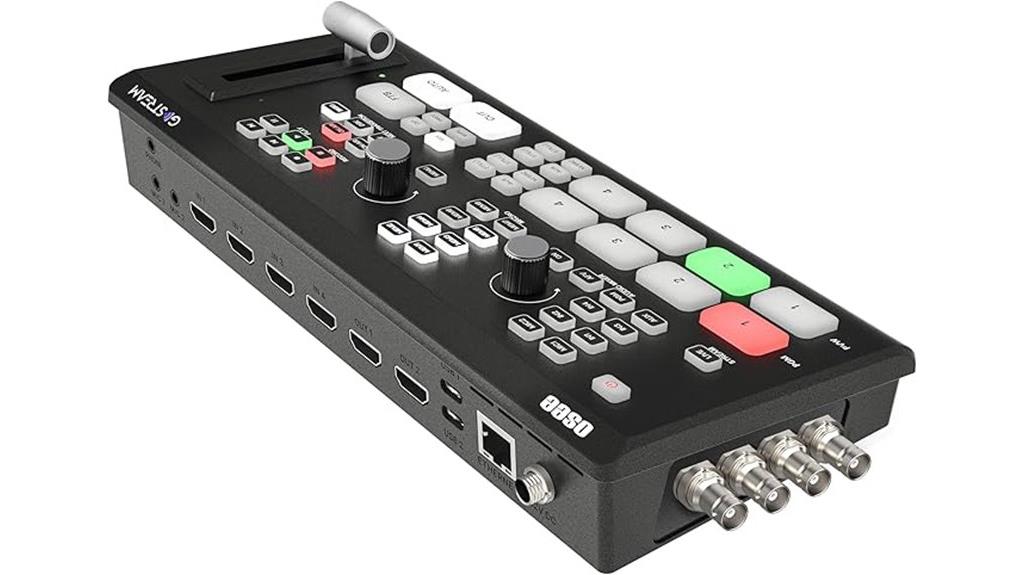
Designed for live streamers and content creators seeking professional-grade versatility, the Osee GoStream Duet Video Mixer Switcher stands out with its impressive support for unlimited inputs, including 4 SDI, 4 HDMI, USB-C, and NDI HX sources. It allows seamless switching between multiple video feeds with advanced effects like Chroma, Luma, and Pattern Keys, plus PIP and DSK overlays. You can record directly to SD or SSD storage, and stream to three platforms simultaneously via Ethernet, USB, or streaming software like OBS. Its compatibility with various control methods, including a built-in GUI and Bitfocus Companion, makes it a flexible and cost-effective solution for professional productions.
Best For: live streamers and content creators seeking a versatile, professional-grade video switching and recording solution with extensive input options and multi-platform streaming capabilities.
Pros:
- Supports unlimited inputs including SDI, HDMI, USB-C, and NDI HX sources for maximum flexibility
- Features advanced effects such as Chroma, Luma, Pattern Keys, PIP, and DSK overlays for professional production quality
- Allows simultaneous streaming to three platforms via Ethernet, USB, or software integration, plus direct recording to SD/SSD
Cons:
- May require firmware updates to unlock full NDI HX licensing features
- Complex setup might be challenging for beginners without prior experience with professional video switchers
- Limited information on supported resolutions and frame rates could impact certain high-end production needs
Osee GoStream Deck Pro Live Streaming Video Mixer with 14-Inch Monitor

If you need a portable, all-in-one live streaming solution, the Osee GoStream Deck Pro Live Streaming Video Mixer stands out with its integrated 14-inch monitor and extensive connectivity options. It features 4 HDMI inputs, 2 HDMI outputs, and 2 USB ports supporting cameras and streaming software like OBS and Vmix. Its lightweight design (under 5kg) makes it perfect for mobile use, and it supports multiple power sources—AC, DC, or USB power bank—for outdoor flexibility. The built-in monitor enables real-time multiview and program output, giving me control during live productions. Its expandability via cheese plates allows customization, making it a versatile choice for dynamic streaming setups.
Best For: content creators, live streamers, and mobile video production teams seeking a portable all-in-one mixing solution with real-time monitoring.
Pros:
- Compact and lightweight design under 5kg, ideal for mobile use and outdoor events
- Multiple connectivity options including 4 HDMI inputs, 2 HDMI outputs, and USB ports for cameras and streaming software
- Built-in 14-inch monitor providing seamless multiview and program control during live streams
Cons:
- Occasional hardware issues reported, such as screen damage upon arrival and freezing during live streams
- Durability concerns, with some users experiencing minor damage after falls or rough handling
- Limited internal storage options and potential challenges with recording recovery if power is lost
Movmagic M4E 5CH Multi Camera Video Mixer Switcher

For content creators and live streamers seeking professional-grade flexibility, the Movmagic M4E 5CH Multi Camera Video Mixer Switcher stands out with its versatile input options and advanced overlay capabilities. It features 2 HDMI (4K/60P) and 2 HDMI (1080/60P) inputs, supporting multi-format setups. With support for 8 overlay layers, 30 transition effects, and Picture-in-Picture channels, it offers dynamic visual options. The switcher includes downstream keying, chroma/luma keying, and virtual studio effects for polished broadcasts. Its remote control, multi-mode operation, and NDI compatibility make it ideal for live streaming, virtual studios, and professional productions, delivering seamless multi-camera switching with ease.
Best For: content creators and live streamers seeking professional-grade multi-camera switching with advanced overlay and streaming capabilities.
Pros:
- Supports multi-format inputs including 4K/60P and 1080/60P for versatile setups
- Features up to 8 overlay layers, multiple transition effects, and Picture-in-Picture channels for dynamic content
- Equipped with remote control, web server, and NDI compatibility for flexible, remote operation
Cons:
- Some users report challenges linking to social media platforms like Facebook
- Limited troubleshooting documentation may require extra technical support
- Slightly higher price point compared to basic switchers, which might be a consideration for budget-conscious users
RGBlink Mini-pro Video Switcher with 4 HDMI Inputs and 1 HDMI/USB3.0 Output

The RGBlink Mini-pro Video Switcher stands out with its compact design and multi-camera support, making it ideal for live streamers and small production teams. It offers four 4K HDMI inputs and a single HDMI/USB3.0 output, allowing seamless switching between multiple sources. Its 2-inch full-color touchscreen simplifies control, including layer movement, image adjustments, and PTZ camera management. Despite its portability and sturdy build, some users report software setup challenges and connectivity issues. Still, it delivers stable performance for live switching and recording, making it a versatile choice for small-scale productions, though it’s worth noting potential software and reliability limitations.
Best For: small live streamers and production teams seeking a portable, easy-to-use switcher with multi-camera support and professional features.
Pros:
- Compact, lightweight design with sturdy build quality for portability and durability
- Intuitive 2-inch full-color touchscreen for straightforward control and camera management
- Supports 4K HDMI inputs and seamless live switching, making it suitable for professional broadcasts
Cons:
- Software setup can be challenging, with connectivity and detection issues reported by users
- Limited ability to perform chroma keying simultaneously with PIP overlays due to menu restrictions
- Short USB 3.0 cable and potential reliability concerns, including software bugs and hardware malfunctions
Live Streaming Video Mixer with 4 HDMI Inputs and 2 Outputs

A live streaming video mixer with 4 HDMI inputs and 2 outputs is an essential tool for content creators and broadcasters who need seamless, real-time switching between multiple sources. It supports HDMI signals up to 4K/30Hz, ensuring high-quality visuals at 1080p@60Hz. The two outputs provide real-time previews, making switching accurate and smooth. It also includes a digital audio mixer for managing multiple audio sources, with volume and effects controls. With features like various switching modes and Picture-in-Picture, it offers flexibility for professional live streams, recordings, and broadcasts. This device guarantees high-definition, synchronized video and audio for professional, seamless production.
Best For: content creators, live streamers, and broadcasters seeking professional-grade multi-source video mixing with high-quality visuals and synchronized audio.
Pros:
- Supports 4 HDMI inputs and 2 outputs for versatile source switching and real-time previewing
- Capable of handling HDMI signals up to 4K/30Hz, ensuring high-definition quality at 1080p@60Hz
- Includes a digital audio mixer with volume, effects, and synchronization features for enhanced sound management
Cons:
- May require technical knowledge to operate complex switching modes and audio settings
- Limited to HDMI signals up to 4K/30Hz, not supporting higher resolutions like 4K/60Hz
- The device might be bulky or require substantial setup space for professional environments
4K HDMI Multiviewer Switch 4×1

If you’re looking to monitor multiple HDMI sources simultaneously, the K HDMI Multiviewer Switch 4×1 offers a versatile solution with five different viewing modes. It connects up to four HDMI devices—like gaming consoles, cameras, or streaming gear—to a single display, supporting resolutions up to 4K@30Hz. The device features intuitive LED indicators and can be operated via panel buttons or IR remote. While it provides seamless switching and multi-view options, some users report image quality issues at higher resolutions or with aspect ratios, especially on Macs. Overall, it’s a solid choice for multi-source monitoring, with the flexibility to display multiple feeds at once.
Best For: users seeking to monitor multiple HDMI sources simultaneously with flexible multi-view display options, suitable for gaming, security, or professional monitoring setups.
Pros:
- Supports 4K@30Hz resolution with multiple viewing modes for versatile display arrangements
- Easy to operate via panel buttons or IR remote control for quick source switching
- Compact, lightweight design with solid build quality and low heat output
Cons:
- Image quality may degrade at higher resolutions or with aspect ratio issues, especially on Macs
- Multi-view modes can compress images to around 1080P, reducing clarity
- Using a 3.5mm jack for power instead of USB can be inconvenient for some users
OREI Quad HDMI Multi Viewer (HDS-402MV)

For anyone seeking versatile multi-viewing options, the OREI Quad HDMI Multi Viewer (HDS-402MV) stands out with its seamless 4-in-2-out switching and Picture-in-Picture (PIP) capabilities. It supports four HDMI inputs and two outputs, allowing real-time 4K @ 30Hz switching. The PIP feature lets you place smaller windows anywhere on the screen, perfect for monitoring multiple sources simultaneously. Controlled via remote, front buttons, or RS-232, it’s flexible and easy to operate. With support for various resolutions and audio formats, it’s ideal for home entertainment, gaming, or security setups, offering high-quality video and audio transmission.
Best For: home entertainment enthusiasts, gamers, and security professionals needing flexible multi-viewing and seamless HDMI switching.
Pros:
- Supports real-time 4K @ 30Hz switching with PIP functionality for enhanced multi-source monitoring
- Multiple control options including remote, front panel buttons, and RS-232 for versatile operation
- Compatible with a wide range of devices and audio formats, ensuring high-quality video and audio transmission
Cons:
- Limited to 4K @ 30Hz, which may not meet the needs of higher-refresh-rate applications
- No mention of network-based control or integration with smart home systems
- Physical size and mounting options may be restrictive for certain installation environments
Osee GoStream Duet Kit All-in-One Live Streaming Multi-Camera Video Mixer

The Osee GoStream Duet Kit stands out for its portability and all-in-one design, making it an ideal choice for live streamers and content creators who need a compact, versatile solution. It combines a multi-camera video mixer, switcher, recorder, and player with 4 HDMI and SDI inputs, plus dual HDMI outputs and USB ports. Its 14-inch monitor offers clear visuals, and it supports multiple power options, including USB power banks, for mobile use. Lightweight at just over 12 pounds, it’s easy to transport and set up. Users praise its user-friendly interface, quick setup, and expandability, making it perfect for professional streaming on the go.
Best For: content creators, live streamers, and broadcasters seeking a portable, all-in-one multi-camera streaming solution for professional-quality productions on the go.
Pros:
- Compact, lightweight design weighing just over 12 pounds, ideal for mobile use and travel.
- Multiple connection options including HDMI, SDI, and USB, with support for various power sources like AC, DC, and USB power banks.
- User-friendly interface with quick setup, expandability, and high customer satisfaction reflected in a 5-star rating.
Cons:
- Limited to 14-inch monitor size, which may not suit users needing larger displays for detailed editing.
- Requires compatible streaming software and devices for full functionality, possibly adding complexity for beginners.
- Availability begins December 13, 2024, so immediate purchase may not be possible for urgent needs.
Factors to Consider When Choosing Multi‑Camera HDMI Switchers

When selecting a multi-camera HDMI switcher, I look at how well it’s compatible with my devices and what resolution it supports. I also consider the number of inputs and the available control options to guarantee it fits my setup. Understanding these factors helps me choose a switcher that’s reliable and easy to use.
Compatibility With Devices
Selecting a multi-camera HDMI switcher requires careful attention to compatibility with your devices to guarantee seamless operation. First, check that it supports your preferred resolution and refresh rate, like 4K@60Hz or 1080p@60Hz, for smooth visuals. Make sure it’s compatible with your device types—gaming consoles, media players, security cameras, or computers—so everything connects effortlessly. Confirm that it supports HDCP compliance to play protected content from streaming services or Blu-ray discs without issues. It’s also essential to verify input and output port types, such as HDMI, USB-C, or SDI, to match your existing equipment. If you need extra features like audio embedding or multi-view modes, ensure the switcher supports those functions too, for a fully integrated setup.
Resolution Support Limits
Understanding the resolution support limits of multi-camera HDMI switchers is essential because these devices often have restrictions that can impact your overall experience. Most support a maximum of 4K at 30Hz, with some limited to 4K at 60Hz or lower refresh rates. Many switchers only support 1080p or 1080i in multi-view mode, which can reduce image clarity when displaying multiple sources simultaneously. Higher resolution support usually comes with lower refresh rates, like 4K at 30Hz, which might not be ideal for fast-paced gaming or high-frame-rate applications. Some models downscale lower-resolution inputs to match the maximum output resolution, affecting picture quality. Additionally, support for resolutions beyond 4K, such as 8K, is typically unavailable, limiting future-proofing options.
Number of Inputs
The number of inputs on a multi-camera HDMI switcher directly impacts how many video sources you can connect at once, shaping the complexity and flexibility of your setup. Common configurations include 2, 4, 6, or more HDMI inputs, allowing you to tailor your system to different production needs. Having enough inputs guarantees you can connect all your cameras and devices without constantly unplugging or adding additional switchers, streamlining your workflow. Some models also offer extra input options like SDI or USB-C, boosting compatibility. When choosing a switcher, consider future growth—opting for a device with extra inputs means you can upgrade or expand your setup without replacing equipment. This foresight helps maintain smooth, scalable live productions.
Input/Output Options
When choosing a multi-camera HDMI switcher, it’s essential to contemplate its input and output options to meet your production needs. Make sure it has enough HDMI input ports to connect all your cameras and devices simultaneously, avoiding the hassle of constant unplugging. Check for multiple HDMI outputs so you can monitor, stream, or record without extra equipment. Consider if the switcher supports audio embedding or de-embedding, which simplifies managing sound alongside video sources. It’s also helpful to see if it offers auxiliary outputs like SDI or USB for compatibility with different workflows. Features like multi-view, PIP, or picture-in-picture outputs can considerably enhance live production and monitoring, giving you versatile options for professional, seamless switching.
Control and Interface
Choosing a multi-camera HDMI switcher with an intuitive control interface is crucial for smooth live production. I look for options with physical buttons, remote controls, or user-friendly software, ensuring quick and reliable source switching. Dedicated control panels with features like T-Bar, macros, and preview/program buses help me manage multiple sources seamlessly in real time. Compatibility with third-party control protocols such as RS-232 or IP-based systems is essential for integrating with existing automation setups. Clear indicator lights and straightforward mode switching minimize errors during high-pressure events. Some models offer touchscreens or customizable software dashboards, providing advanced control options and scene presets that streamline operation. Prioritizing these control features ensures efficient, error-free switching, making my live productions more professional and stress-free.
Transition Effects
Smooth control over how camera shots switch is key to maintaining a professional look during live productions. Shift effects like wipes, dissolves, and fades create visual continuity and help the flow feel seamless. The availability of multiple styles allows me to customize the presentation and match the tone of the event. Advanced switchers often let me adjust shift durations and effects, giving me precise control over timing and appearance. This flexibility helps minimize visual disruptions, keeping viewers engaged and focused. When selecting a switcher, I look for those with customizable shift parameters, as they enhance production quality and deliver a polished viewing experience. Ultimately, good shift effects are essential for making my live broadcasts look professional and cohesive.
Power and Portability
Selecting a multi-camera HDMI switcher that is both powerful and portable requires careful consideration of its power options and size. I look for devices that support multiple power sources like AC, DC, or USB power banks, giving me flexibility during mobile shoots. The switcher’s weight and size matter too—I prefer lightweight, compact units that are easy to carry and set up in different environments. Features like silent fans and sturdy mounting options help maintain portability without adding noise or bulk. I also check if the switcher can run on battery power or portable sources, enabling outdoor or remote use. Finally, expandable connectivity options, such as extra USB or HDMI ports, are essential for adapting to various portable streaming configurations.
Budget and Value
When evaluating multi-camera HDMI switchers, I focus on how their features align with their price to guarantee I get the best value for my budget. I compare the overall cost to the features offered, ensuring I don’t overspend on unnecessary functions. Balancing the number of input and output ports with the price helps me find models with the connectivity I need without paying for extras I won’t use. I also consider durability and build quality, as investing in a reliable switcher saves money long-term. Additional features like recording, streaming compatibility, and remote control can justify higher prices if they enhance my workflow. Finally, I compare similar models to ensure I get a competitive price without sacrificing essential performance or quality.
Frequently Asked Questions
How Does Latency Affect Live Streaming Quality?
Latency directly impacts live streaming quality by creating delays between the camera feed and what viewers see. If latency is high, my audience might experience lag or synchronization issues, making interactions awkward. To keep my stream smooth and engaging, I prioritize low-latency switchers that ensure real-time video switching. This way, I can deliver seamless, professional broadcasts without frustrating delays that could diminish viewer engagement.
Can Multi-Camera Switchers Support 4K or Higher Resolutions?
Yes, multi-camera switchers can support 4K or higher resolutions, allowing me to capture stunning, crystal-clear footage that brings my productions to life. Imagine switching seamlessly between cameras, each delivering vibrant, detailed images that captivate my audience. With advanced switchers, I can handle high-res signals effortlessly, ensuring every scene, every shot, remains sharp and professional. It’s like having a cinema-quality setup right at my fingertips.
Are There Compatibility Issues With Different HDMI Versions?
Yes, there can be compatibility issues with different HDMI versions. I’ve found that older switchers might struggle with newer HDMI standards like 2.0 or 2.1, leading to resolution or refresh rate problems. To avoid this, I always check the switcher’s supported HDMI version and guarantee it matches or exceeds your device’s capabilities. This way, you’ll get seamless switching without unexpected glitches or quality loss.
What Are the Best Features for Remote Control Convenience?
I believe remote control convenience is vital for smooth operation. The best features include a user-friendly remote with backlit buttons, wide range connectivity, and programmable presets for quick switching. I look for models with smartphone app control, so I can manage settings remotely. A reliable remote guarantees I don’t interrupt my workflow, making video switching effortless. These features truly enhance the overall experience, especially during live events or complex setups.
How Easy Is It to Upgrade or Expand the System Later?
Upgrading or expanding my system is pretty straightforward because modern switchers are designed with scalability in mind. I look for models that support additional inputs and outputs, and many have modular components or software updates that make it easy to add new cameras or features later. I also appreciate user-friendly interfaces and clear documentation, which help me make upgrades without needing extensive technical knowledge.
Conclusion
Choosing the right multi-camera HDMI switcher feels like wielding a magic wand that transforms your streaming setup into a cinematic masterpiece. With the top options I’ve shared, you’re equipped to create seamless, professional-quality videos effortlessly. Whether you’re a beginner or a seasoned pro, these switchers turn chaos into clarity—making your live productions look as smooth as silk and twice as impressive. Elevate your content today and watch your audience’s jaws drop!