
If you’re looking for affordable audio interfaces that deliver professional sound, I’ve found some great options under $150. They offer high-resolution audio, versatile inputs, and durable build quality, perfect for musicians, streamers, or podcasters on a budget. Many support Mac, Windows, or mobile devices and come with useful software. Keep in mind their limitations, like limited inputs, but if you want a reliable, budget-friendly setup, there’s plenty to choose from. Keep exploring for more details.
Key Takeaways
- Many affordable audio interfaces offer 24-bit/96kHz or higher resolution for professional-grade sound quality.
- Compact, portable designs make these interfaces ideal for mobile recording and live streaming.
- They support versatile input/output options, including XLR, TRS, and MIDI, suitable for various recording setups.
- Most models are plug-and-play with broad compatibility for Windows, macOS, iOS, and Android devices.
- They often include bundled software and features like low-latency monitoring, enhancing usability for beginners and pros alike.
Focusrite Scarlett Solo 3rd Gen USB Audio Interface
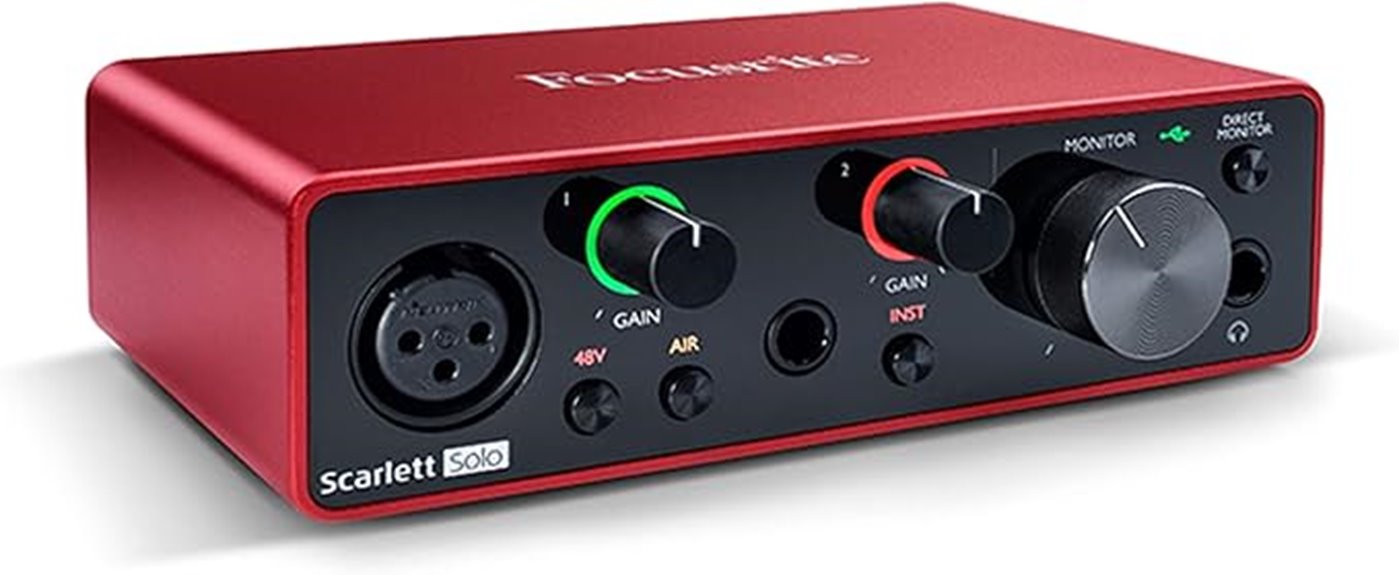
If you’re looking for a professional-quality audio interface that won’t break the bank, the Focusrite Scarlett Solo 3rd Gen is an excellent choice. Its compact, durable design weighs just 12.3 ounces and features a sleek red exterior with physical volume knobs. Connecting via USB-C, it works seamlessly with Mac, Windows, or iOS devices without needing external power. Equipped with high-performance 24-bit/192kHz converters and a premium third-gen mic preamp with Air mode, it delivers crystal-clear recordings. The interface supports both microphone and instrument inputs, making it versatile for vocals and guitars. Its intuitive design and included software bundle make it perfect for beginners and pros alike.
Best For: musicians, podcasters, and content creators seeking a portable, high-quality audio interface for professional recordings on a budget.
Pros:
- Compact, lightweight, and durable design for easy portability
- High-performance 24-bit/192kHz converters deliver studio-quality sound
- User-friendly interface with included professional software bundle
Cons:
- Requires balanced TRS cables for optimal sound quality
- Driver stability may vary with certain software setups
- Limited input options, with only one microphone and one instrument input
M-AUDIO M-Track Solo USB Audio Interface for Recording and Streaming
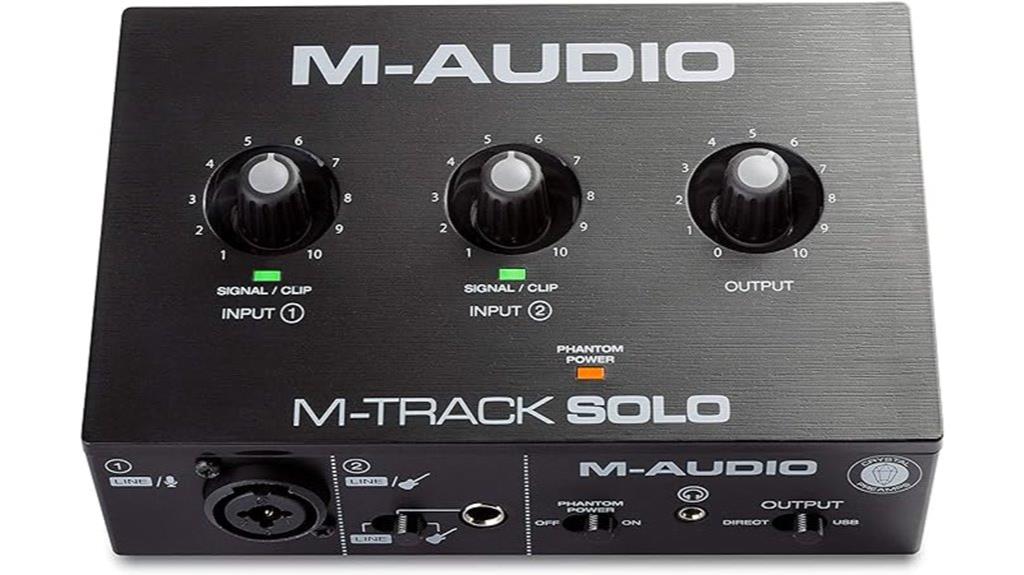
The M-Audio M-Track Solo USB Audio Interface stands out as an excellent choice for beginners and solo artists who need reliable, high-quality audio on a budget. It offers crisp 48 kHz resolution, perfect for recording, streaming, or podcasting. Its compact, portable design is powered via USB, so no external power is needed. It features a combo XLR/Line input with phantom power for microphones and condenser mics, plus a switchable Line/Instrument input for guitars or line devices. Supporting 2-channel stereo recording, RCA outputs, and headphone monitoring, it’s versatile and easy to use. The included software bundle helps users start creating right away, making it a standout budget-friendly option.
Best For: beginners, solo artists, and podcasters seeking a reliable, affordable USB audio interface for high-quality recording and streaming.
Pros:
- Crystal-clear 48 kHz audio resolution suitable for professional-quality recordings
- Compact, portable design with USB power, ideal for on-the-go use
- Versatile inputs including XLR with phantom power and switchable Line/Instrument input
Cons:
- Plastic casing may feel less durable compared to metal units
- Knobs are located on top, which can be slightly inconvenient for adjustments during use
- Slightly complex setup for complete novices, though AI-guided setup can help
XTUGA USB Audio Interface for PC and Recording Studio (Q-12)

Designed for both beginners and budget-conscious musicians, the XTUGA USB Audio Interface (Q-12) offers a straightforward, plug-and-play setup that’s ideal for small home studios or portable recording. Its compact design, weighing just over 10 ounces, makes it easy to transport, while its durable plastic enclosure guarantees durability. It supports high-quality audio recording up to 16-bit/48 kHz and features two inputs, including a microphone preamp with phantom power and a 3.5mm mic jack. With independent volume controls, gain halos, and real-time monitoring, it’s perfect for vocals, instruments, and podcasts, providing reliable, studio-quality sound at an affordable price.
Best For: budget-conscious beginners and small home studio owners seeking portable, easy-to-use audio recording solutions.
Pros:
- Simple plug-and-play setup with driverless operation for quick use on Windows and Mac
- Compact, lightweight design makes it highly portable for on-the-go recording
- Capable of recording clear, studio-quality sound up to 16-bit/48 kHz with reliable performance
Cons:
- Limited to 16-bit/48 kHz, lacking support for higher bit-depth and sample rates
- Only two inputs, which may restrict multi-mic or instrument setups
- Functions more as a basic mixer than a full-featured professional audio interface
EBXYA 2i2 USB Audio Interface for PC Recording
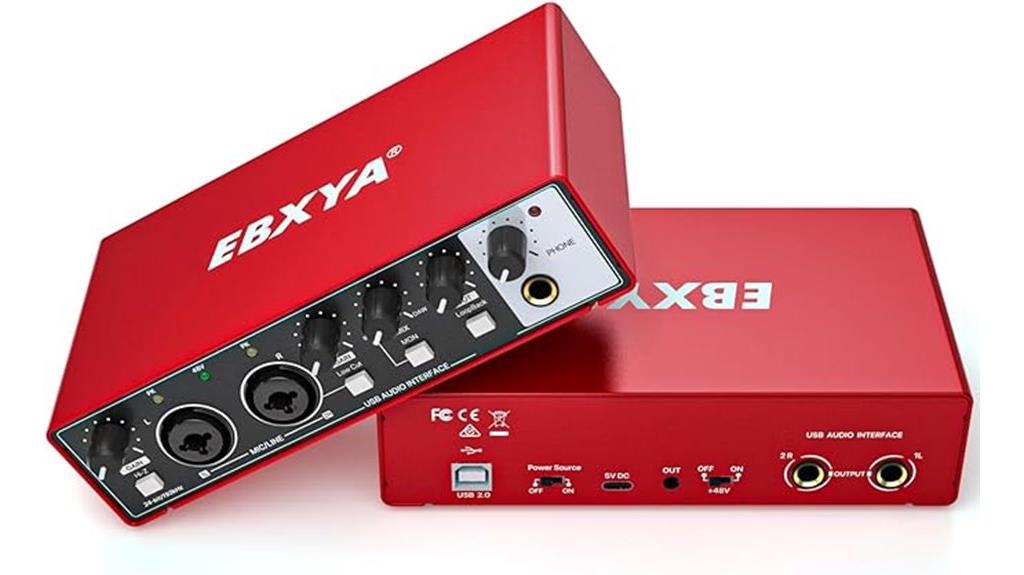
Looking for a reliable, portable audio interface that offers professional sound quality without breaking the bank? The EBXYA 2i2 USB Audio Interface is perfect for on-the-go recording, whether you’re using a Mac, PC, or mobile device. It’s plug-and-play, with no complicated drivers needed, and works seamlessly with popular software like Logic Pro, Cubase, and Pro Tools. It delivers studio-quality sound at 24-bit/192kHz, with ultra-low latency for real-time monitoring. Equipped with 2 combo inputs, phantom power, and balanced outputs, it’s versatile enough for vocals, instruments, podcasts, or streaming—all in a compact, lightweight design.
Best For: musicians, podcasters, and content creators seeking portable, high-quality audio recording on Mac, PC, or mobile devices.
Pros:
- Plug-and-play compatibility with multiple devices and software, no driver installation needed
- Professional 24-bit/192kHz audio quality with ultra-low latency for real-time monitoring
- Compact, lightweight design ideal for on-the-go recording and live sessions
Cons:
- Limited to two inputs, which may not suit complex recording setups
- No built-in effects or processing capabilities
- May require additional accessories for certain connection types or setups
FIFINE Gaming Audio Mixer with XLR Microphone Interface

If you’re seeking an affordable mixer that enhances your gaming, streaming, or podcasting setup, the FIFINE SC3 Gaming Audio Mixer is a standout choice. It features an XLR microphone input with 48V phantom power, ideal for condenser mics (not USB). The mixer supports dual PC setups with multiple input/output options, including headphone and line connections, all powered via USB-C. It offers independent volume controls, mute buttons, and RGB lighting for style. Plus, it supports sound effects, voice modes, and auto-tune. While some static issues and slider quirks exist, overall, it provides solid, professional sound quality at a budget-friendly price.
Best For: budget-conscious gamers, streamers, and podcasters seeking an easy-to-use mixer with professional-sounding XLR microphone support.
Pros:
- Affordable price point with a range of features suitable for beginners and casual users.
- Supports dual PC setups with multiple input/output options and independent controls.
- Attractive RGB lighting and customizable sound effects enhance aesthetic appeal and user engagement.
Cons:
- Static noise issues during music playback can affect audio clarity.
- Non-linear slider response may require adjustments for precise control.
- Limited effects quality, especially for voice changing and auto-tune, may not meet professional standards.
MAONO USB Audio Interface with XLR Input for Recording and Streaming
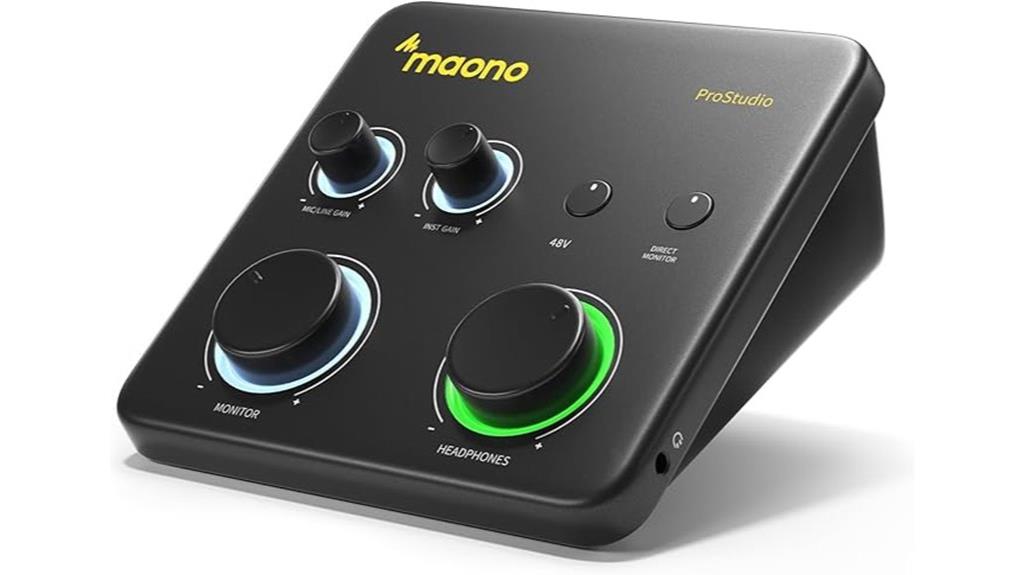
The MAONO PS22 Lite USB Audio Interface stands out as an excellent choice for content creators and musicians on a budget, thanks to its high-resolution recording capabilities. It offers 24-bit/192kHz audio with a dynamic range of 106dB, ensuring clear, realistic sound. It handles condenser and dynamic microphones with up to 56dB preamp gain and 48V phantom power, making it versatile for podcasts, voice-overs, and music recording. Its dedicated instrument input with impedance adjustment suits guitars and vocals. Compact and user-friendly, it’s compatible with multiple devices and DAWs. The robust build, combined with features like LOOPBACK for streaming, makes it a solid, affordable option for professional-quality audio.
Best For: content creators, musicians, and streamers seeking an affordable yet high-quality USB audio interface for recording and streaming.
Pros:
- High-resolution audio recording at 24-bit/192kHz with a dynamic range of 106dB for clear sound.
- Versatile connectivity with XLR, instrument input, and compatibility with multiple devices and DAWs.
- Compact, durable design with user-friendly controls and visual indicators like clipping alert.
Cons:
- Some users experience crackles and pops, often requiring driver updates or connection adjustments.
- Limited build options, such as lack of metal casing or additional power sources, may affect durability.
- Support can be limited via the website, making troubleshooting more challenging for some users.
PreSonus AudioBox 96 USB Audio Interface with DAW Software

For anyone starting out in home recording or podcasting, the PreSonus AudioBox 96 USB Audio Interface offers an impressive combination of affordability and professional features. It’s a portable, bus-powered device with two combo inputs, MIDI I/O, and high-quality Class-A mic preamps, supporting 24-bit/96 kHz recording. Compatible with macOS, Windows, iOS, and iPadOS, it requires no driver installation thanks to its class-compliant design. The included software bundle—featuring Studio One Artist, Ableton Live Lite, and more—makes it a complete package. Durable and lightweight, the AudioBox 96 delivers crisp sound and easy setup, perfect for beginners and mobile recording.
Best For: beginners, home recording enthusiasts, podcasters, and mobile musicians seeking an affordable, portable audio interface with professional features.
Pros:
- Easy plug-and-play setup with no driver installation required
- High-quality Class-A mic preamps and 24-bit/96 kHz audio resolution for clear sound
- Durable metal chassis combined with compact, lightweight design for portability
Cons:
- Limited to 2 inputs, which may restrict complex recording setups
- No built-in DSP or advanced onboard effects
- Some users may find the bundled software options basic for professional production
Ueteto Audio Interface for Guitar, Portable Sound Card for Live Streaming

The Ueteto Audio Interface for Guitar stands out as an ideal choice for beginners and casual musicians seeking an affordable, portable solution for live streaming and direct audio recording. It’s lightweight, weighing just 3.2 ounces, and doesn’t require charging, making it perfect for on-the-go use. Compatible with iPhone, iPad, and Android devices, it supports high-quality guitar recordings with minimal latency. The device features a simple plug-and-play setup, with indicator lights to prevent distortion and a 3.5mm headphone jack for monitoring. While it’s great for straightforward recording, it’s not suitable for complex setups or apps like GarageBand, so keep that in mind.
Best For: casual musicians and beginners seeking an affordable, portable audio interface for live streaming and direct guitar recording on iOS and Android devices.
Pros:
- Easy plug-and-play setup with no drivers required
- Compact, lightweight design ideal for portability
- Supports high-quality audio recording with minimal latency
Cons:
- Not compatible with GarageBand or complex audio setups
- May experience connectivity issues or device malfunction over time
- Lacks input control and preamp features necessary for professional use
MAONO Audio Interface and Podcast Mixer (AME2)
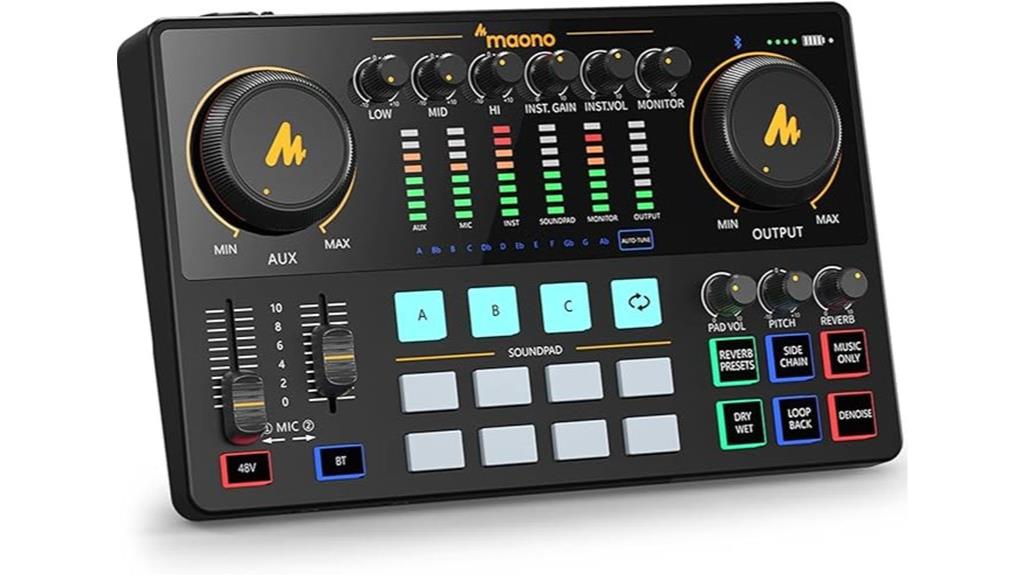
If you’re looking for a versatile and feature-rich audio interface under $150, the MAONO Audio Interface and Podcast Mixer (AME2) stands out as an excellent choice. It offers high-quality built-in preamps with phantom power for condenser mics, supporting a wide range of analog microphones like XLR, 6.35mm, and 3.5mm options from brands like Shure and Rode. With ultra-low noise gain up to 60dB, multiple sound customization features—including effects, equalizers, and sound pads—and support for instruments, live streaming, and podcasting, it’s perfect for content creators. Its USB-C connection, compatibility with PCs, Macs, and smartphones, plus bundle accessories, make it a comprehensive, user-friendly solution.
Best For: content creators, streamers, and podcasters seeking a versatile, feature-rich audio interface under $150 for high-quality recording and live streaming.
Pros:
- Supports a wide range of analog microphones and instruments with high-quality preamps and phantom power.
- Offers extensive sound customization options including effects, sound pads, and equalization.
- Compatible with PCs, Macs, and smartphones via USB-C, with multiple output options for versatile use.
Cons:
- Does not support USB microphones, limiting some users’ microphone choices.
- May require some setup and learning for optimal use of advanced features.
- Slightly larger footprint compared to basic audio interfaces, which might be a consideration for limited space.
TONOR 202 Audio Interface for Recording and Streaming

Looking for a budget-friendly audio interface that doesn’t compromise on sound quality? The TONOR TX510 delivers studio-grade sound with clear, faithful reproduction. Its sleek, colorful design with vibrant lights makes it visually appealing for content creators. Compact and portable, it features user-friendly controls, a mono/stereo switch, loopback for real-time mixing, and dedicated on/off buttons. Equipped with 2 XLR inputs, multiple combo jacks, phantom power, and USB connectivity, it supports various devices and software. Users praise its low noise, high fidelity, and intuitive interface, making it a reliable, professional-grade option for streaming, podcasting, and music recording on a budget.
Best For: content creators, streamers, and home studio musicians seeking professional sound quality on a budget.
Pros:
- Delivers studio-grade, clear, and faithful sound reproduction with minimal noise
- Compact, sturdy, and portable design with visually appealing colorful LED lights
- User-friendly controls including a mono/stereo switch, loopback function, and dedicated on/off button
Cons:
- Limited input gain, which may require additional preamps for certain microphones
- No digital input options like coaxial or optical connections
- Stereo/mono switching can affect USB recording tracks, potentially limiting workflow flexibility
2×2 USB Audio Interface with Phantom Power and High-Fidelity for Musicians and Podcasters
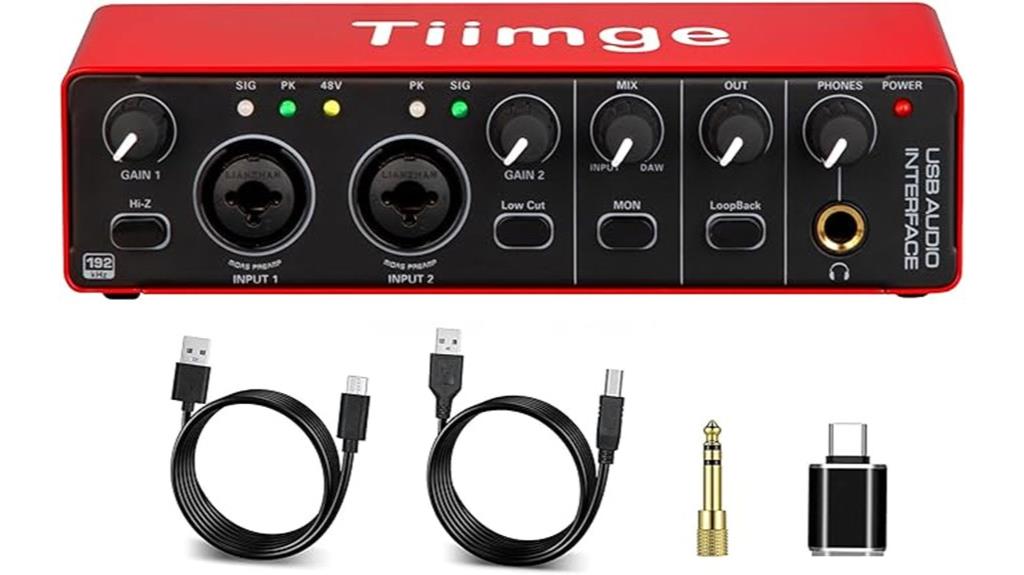
A 2×2 USB audio interface with phantom power and high-fidelity capabilities offers an excellent solution for musicians and podcasters who need professional-quality sound without breaking the bank. It delivers 24-bit/192kHz recording, capturing detailed, clear audio perfect for vocals, guitars, or external devices. With 48V phantom power, it supports condenser microphones seamlessly. Its plug-and-play design works with Windows and Mac, supporting popular software like Pro Tools and Ableton. The two multifunctional inputs accommodate microphones and instruments, while the two main outputs connect to monitors or speakers. Versatile and straightforward, this interface provides high-quality audio in an affordable, user-friendly package.
Best For: musicians, vocalists, and podcasters seeking high-quality, easy-to-use audio recording solutions with versatile connectivity options.
Pros:
- High-fidelity 24Bit/192kHz recording ensures professional sound quality.
- Includes 48V phantom power for condenser microphones.
- Plug-and-play design compatible with Windows and Mac without driver installation.
Cons:
- Limited to two input channels, which may not suit multi-mic recording setups.
- No built-in monitoring controls or headphone output.
- May require additional equipment for advanced mixing or live performances.
Behringer U-PHORIA UMC404HD Audio/MIDI Interface
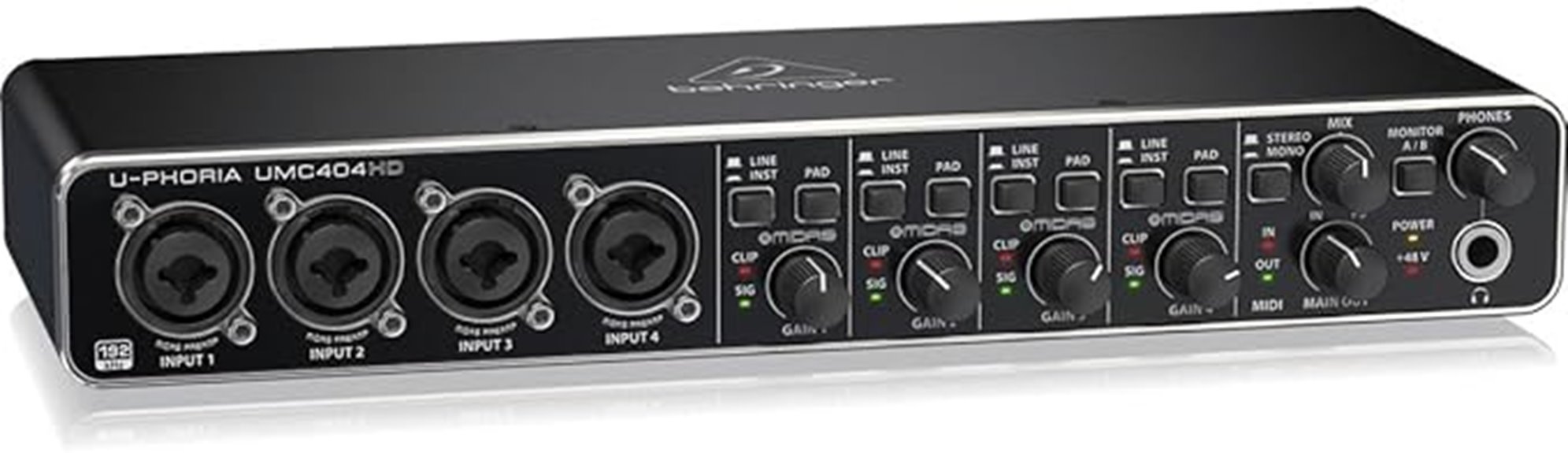
The Behringer U-PHORIA UMC404HD stands out as a top choice for budget-conscious musicians and home studio owners who need professional-grade sound without breaking the bank. It offers 24-bit/192 kHz resolution and four MIDAS-designed mic preamps with +48V phantom power, ensuring clear, high-quality audio. Built with a durable metal chassis and compact design, it’s reliable for both studio and mobile use. With four inputs, four outputs, and MIDI I/O, it supports versatile recording setups. Easy to set up and compatible with popular DAWs, the UMC404HD provides excellent value, making it ideal for those wanting pro sound on a tight budget.
Best For: budget-conscious musicians and home studio owners seeking professional-quality sound without a high price tag.
Pros:
- Excellent 24-bit/192 kHz audio resolution for high-quality recordings
- Durable metal chassis suitable for mobile and studio use
- Four MIDAS-designed mic preamps with phantom power for versatile recording
Cons:
- Lack of individual phantom power switches for each input
- Limited monitor control options with only output pair selection
- Front headphone output supports only two channels at once, restricting monitoring flexibility
BOMGE 2-Channel USB Audio Interface for Recording and Streaming
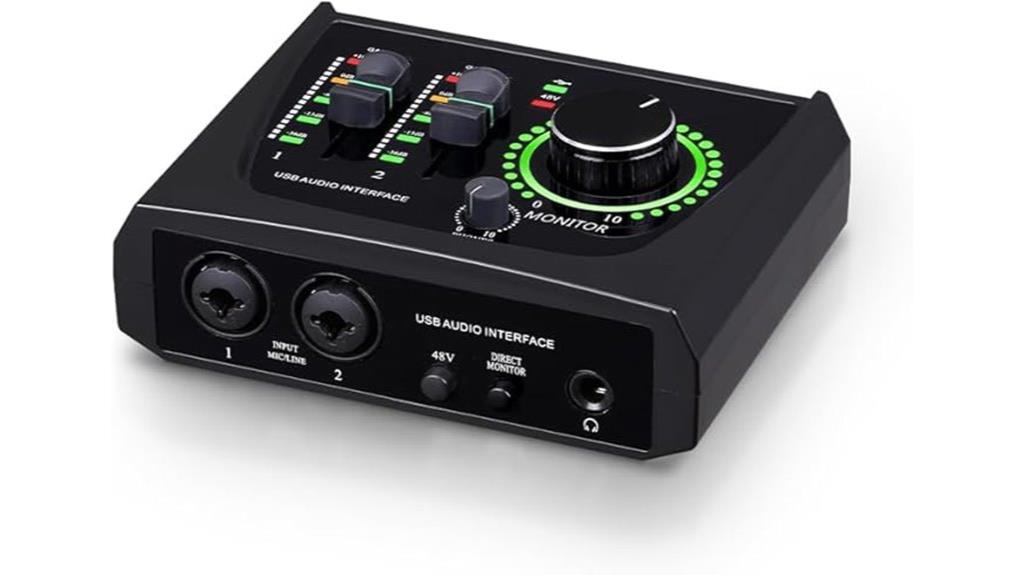
If you’re just starting out with recording or streaming on a budget, the BOMGE 2-Channel USB Audio Interface offers an excellent entry point. It supports Mac and PC with 48 kHz audio resolution, ensuring high-quality sound. The device features 2 combo XLR/LINE inputs with phantom power, perfect for microphones and instruments. It also includes RCA stereo outputs and a 1/4” headphone jack with zero-latency monitoring. Compact and portable, it’s powered via Type-C and compatible with popular DAWs like Ableton, GarageBand, and Pro Tools. While some users report minor noise or driver issues, it’s a solid, affordable choice for beginners and hobbyists.
Best For: beginners, hobbyists, and small-scale content creators seeking an affordable, portable audio interface for recording and streaming on Mac or PC.
Pros:
- Easy plug-and-play setup with no drivers needed, compatible with major DAWs like Ableton and GarageBand.
- Compact, lightweight design makes it highly portable for on-the-go recording and streaming.
- Supports 48 kHz high-quality audio resolution with phantom power for microphones and instruments.
Cons:
- Some users experience minor noise issues or interference during use.
- Driver limitations and connectivity problems have been reported by certain users.
- Lacks advanced features found in higher-end interfaces, making it less suitable for professional studio use.
Pyle USB Audio Interface with Effects and Multiple Inputs
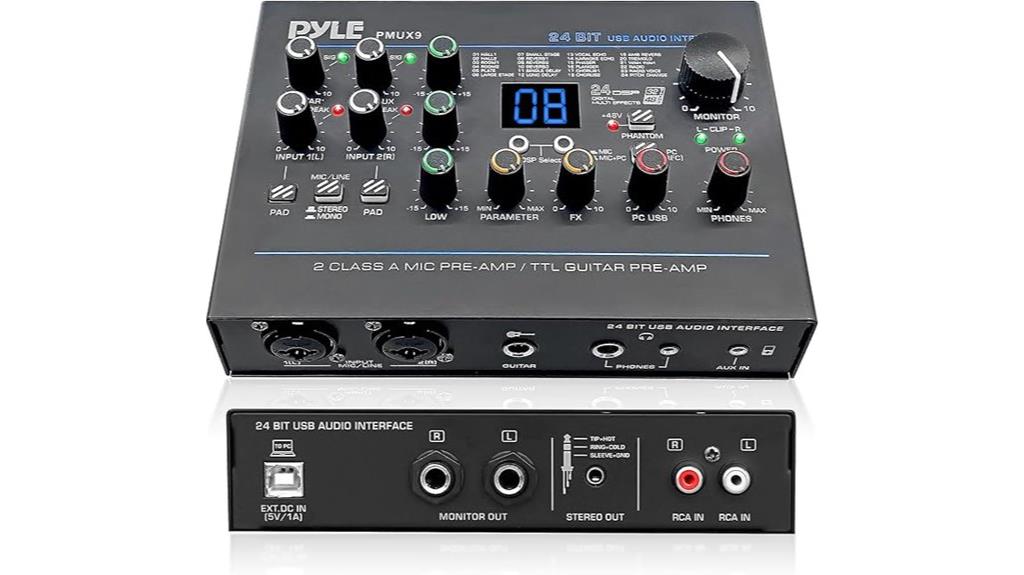
For beginners and intermediate users seeking versatile recording options without breaking the bank, the Pyle PMUX9 USB Audio Interface offers an impressive array of features. Its rugged metal housing and compact size make it portable and durable, perfect for studio or live use. With 24-bit, 48kHz resolution, it delivers high-fidelity sound with ultralow noise and high headroom. The interface includes two combo inputs, line, stereo, and RCA jacks, plus two headphone outputs. It offers 24 preset effects like reverb, delay, and chorus, plus EQ and level controls. Overall, it’s a flexible, solid choice for recording guitars, vocals, or streaming content at an affordable price.
Best For: beginners and intermediate users seeking versatile, high-quality recording and streaming options on a budget.
Pros:
- Rugged metal housing and compact, portable design for durability and mobility
- 24-bit, 48kHz resolution with ultralow noise and high headroom for high-fidelity sound
- Multiple inputs and outputs, including combo, line, stereo, RCA, and dual headphone jacks, plus 24 digital effects
Cons:
- Effects only monitored during playback, not recorded directly onto tracks
- Limited control over recorded sound balance, as high/mid/low knobs only affect headphone output
- May require external preamps for dynamic microphones with insufficient gain
PUPGSIS Gaming Audio Mixer with 4 Channels and Voice Effects
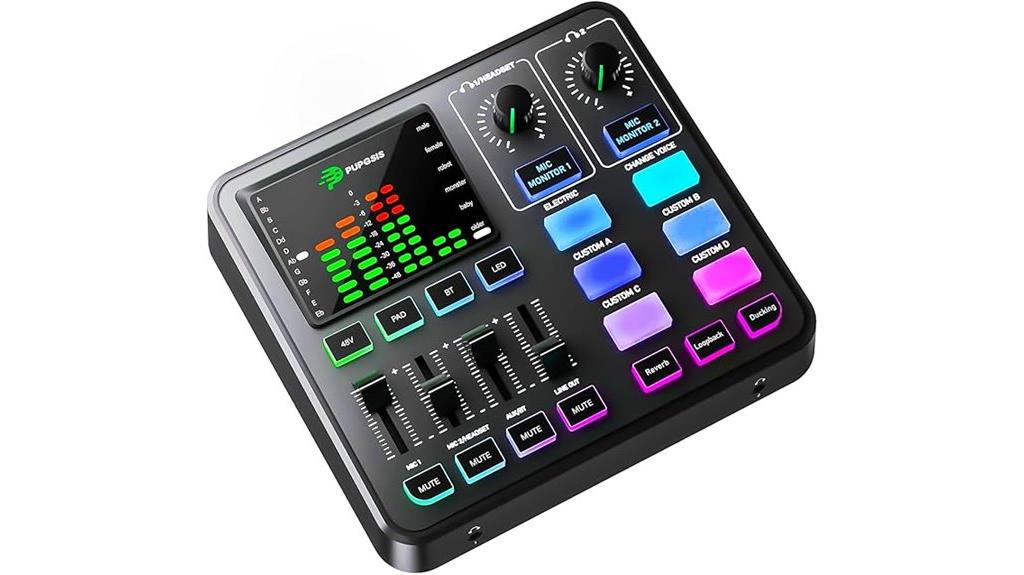
With its versatile 4-channel design and built-in voice effects, the PUPGSIS Gaming Audio Mixer stands out as an excellent choice for streamers and content creators looking to add creativity and clarity to their audio. It supports multiple microphones, Bluetooth connectivity, and seamless platform integration with OBS, Discord, Twitch, and more. The mixer offers professional preamps, individual controls, and six voice-changing modes, making it easy to customize sound on the fly. Its compact, sleek design, RGB lighting, and intuitive controls make it user-friendly, whether you’re recording, streaming, or gaming. Overall, it provides professional-quality audio features at an affordable price point.
Best For: streamers, podcasters, and gamers seeking a versatile, professional-grade audio mixer with creative voice effects and easy platform integration.
Pros:
- Supports multiple microphones and Bluetooth connectivity for flexible setup
- Includes six voice-changing modes and customizable sound effects for creative audio options
- Compact, user-friendly design with RGB lighting and intuitive controls
Cons:
- May produce faint background buzz or background noise in some environments
- Limited port options could restrict connection flexibility for advanced setups
- Slightly smaller size might be less suitable for complex or multi-device configurations
Factors to Consider When Choosing Audio Interfaces Under $150

When selecting an audio interface under $150, I focus on sound quality and compatibility to make certain it meets my needs. I also consider input and output options, along with build quality and portability, to get the best value. Finally, I look at the software features to make sure it offers the tools I need for my projects.
Sound Quality and Clarity
Achieving high sound quality and clarity in an audio interface under $150 depends on several key factors. High-resolution audio, like 24-bit/192kHz, ensures detailed and accurate sound reproduction for recording and playback. Low total harmonic distortion (THD), ideally below 0.5%, minimizes background noise and coloration, preserving the audio’s integrity. Quality preamps and high-grade analog-to-digital converters (ADCs) are essential for maintaining clarity and preventing signal loss. Proper input gain management, with visual indicators such as gain halos or LEDs, helps optimize levels without distortion. Additionally, balanced outputs and noise-reduction features reduce electromagnetic interference, resulting in cleaner, crisper sound during monitoring and mixing. Paying attention to these elements guarantees professional-quality audio within a budget.
Compatibility With Devices
Choosing the right audio interface under $150 means making sure it works smoothly with your device. First, check that it supports your operating system, whether Windows, macOS, iOS, or Android, to avoid compatibility issues. Look at the connection type—USB-C, USB-A, Lightning, or other ports—and verify your device has the matching port. Some interfaces require drivers, so confirm if you need to install them and if they’re compatible with your OS version. Also, validate that the sample rates and bit depths, like 24-bit/96kHz or 192kHz, meet your recording needs. Ultimately, consider power requirements; some interfaces are bus-powered via USB, while others need an external power source. Confirming these factors match your device guarantees seamless operation and reliable performance.
Input and Output Options
Selecting an audio interface under $150 requires careful attention to its input and output options to guarantee it fits your recording setup. You need to make certain it offers the right input types, like XLR, TRS, or combo jacks, for your microphones and instruments. Check the output options too—balanced or unbalanced connections such as TRS, RCA, or headphone jacks—so you can accurately monitor your recordings. If you plan to connect multiple speakers, headphones, or external devices, verify that the interface supports multiple outputs. Additionally, consider whether it provides MIDI or digital I/O if you work with controllers or digital gear. Confirming that the input and output configurations align with your existing equipment ensures a smooth, efficient recording experience.
Build Durability and Portability
When shopping for an audio interface under $150, prioritizing build durability and portability can make a significant difference in your setup’s reliability and convenience. Look for models with sturdy construction, such as metal or impact-resistant plastic, to withstand transport and everyday use. Opt for compact, lightweight designs—ideally under 12 ounces—for easier portability without sacrificing performance. Verify the device has secure connection ports and reinforced cable inputs to prevent wear over time. Features like rubberized edges or shock absorption can help the interface endure accidental bumps or drops. Additionally, check reviews for proven longevity and solid build quality. A durable, portable interface not only protects your investment but also ensures you’re ready to record or perform anytime, anywhere.
Software and Feature Set
Many affordable audio interfaces come bundled with or support popular digital audio workstations (DAWs) like Ableton Live Lite, Pro Tools Intro+, or FL Studio Producer Edition, which can substantially enhance your recording and editing workflow without extra costs. When choosing an interface, look for features like virtual audio routing, real-time effects, and direct monitoring options that expand your creative possibilities within the software environment. It’s also important to verify if the interface supports advanced functions such as multi-channel recording, effects processing, or MIDI integration, adding versatility to your setup. Additionally, confirm compatibility with your operating system—Windows, macOS, iOS, or Android—to guarantee smooth operation. Finally, consider interfaces that offer software updates or free trials, maximizing your investment with extra plugins, effects, and virtual instruments.
Budget and Value
Finding the right audio interface under $150 means balancing features, performance, and value to get the most out of your budget. I look for models that offer the best mix of essential inputs like XLR, TRS, or combo jacks, so I can connect microphones and instruments without extra costs. It’s important to choose interfaces that support at least 24-bit/96kHz sampling rate for professional-quality recordings. I also consider the included software bundle and whether it’s compatible with my digital audio workstation to maximize value. Reading user reviews and ratings helps me identify reliable models with solid build quality that won’t let me down. Ultimately, I aim for an interface that offers the best combination of features and durability without exceeding my budget.
Frequently Asked Questions
Can Budget Audio Interfaces Support Professional-Grade Music Production?
Yes, budget audio interfaces can support professional-grade music production. I’ve used models under $150 that deliver clear, high-quality sound, and reliable performance. While they might lack some advanced features, they handle essential tasks like recording vocals, instruments, and mixing effectively. With the right choice, you don’t need to spend a fortune to produce professional-sounding music. I recommend researching user reviews and specifications to find the best fit for your needs.
Do These Interfaces Work Seamlessly With All DAW Software?
I’ve found that most budget audio interfaces work pretty well with popular DAWs like Ableton, FL Studio, and Logic. While some minor compatibility issues can pop up, they’re usually easy to fix with updated drivers or software settings. I recommend checking the manufacturer’s website for compatibility info before buying. Overall, I’ve had a smooth experience, and these interfaces seamlessly integrate into my workflow, delivering professional sound without hassle.
Are There Significant Sound Quality Differences Among Under-$150 Models?
Yes, there are some sound quality differences among models under $150, but they’re often subtle. I’ve found that most affordable interfaces deliver clear, professional sound for home recording. Higher-end models might offer slightly better preamps or lower latency, but for most users, budget options provide excellent quality. It really depends on your specific needs, but generally, you won’t notice major differences unless you’re a professional audio engineer.
What Is the Typical Latency Range for Budget Audio Interfaces?
Think of latency like a ripple in a pond—usually, budget audio interfaces keep it between 5 to 20 milliseconds. I’ve found that most under-$150 models hover around 10ms, which is pretty smooth for recording and mixing. While some tiny delay might still sneak in, it’s hardly noticeable during normal use. So, if you’re aiming for tight, real-time sound, these interfaces generally do the job without breaking the bank.
Can These Interfaces Handle Multiple Microphone and Instrument Inputs Simultaneously?
Yes, many budget audio interfaces can handle multiple microphone and instrument inputs simultaneously. I’ve used models with two to four inputs, and they perform well for recording sessions. Just make sure to check the specific input count before purchasing. These interfaces typically support simultaneous recording, which is perfect for multi-instrument setups or capturing vocals and instruments at the same time, all without breaking the bank.
Conclusion
Choosing an audio interface under $150 proves you don’t need to overspend for professional sound. Whether it’s the sleek simplicity of the Focusrite Scarlett Solo or the versatile features of the Pyle interface, each offers great value. Budget doesn’t mean sacrificing quality — it’s about finding the right fit for your needs. So, go ahead, pick one, and start creating. Because great sound doesn’t have to break the bank.