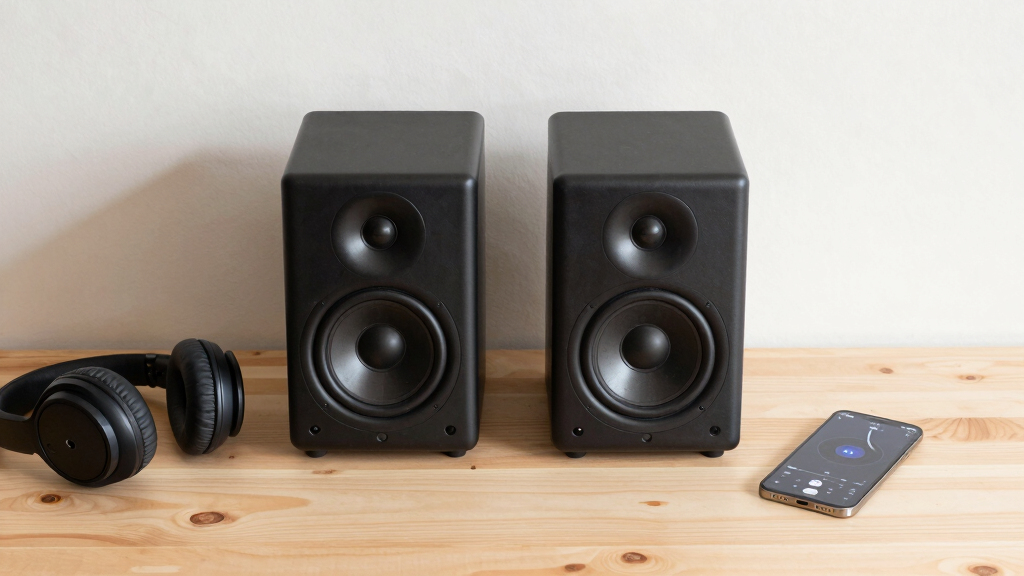

Finding the best studio monitor speakers for creators means balancing sound quality, affordability, and usability. The ideal monitors deliver accurate audio reproduction, helping you make precise mixing decisions, whether for music, video, or streaming. The M-AUDIO BX3 stands out as the best overall choice for its clear sound and versatile features, while options like the JBL 305P MkII excel in providing professional-grade accuracy at a mid-range price. However, many monitors involve tradeoffs between size, connectivity, and audio fidelity. Continue reading for a full breakdown that helps you find the perfect fit for your creative needs.
Key Takeaways
- Top monitors balance accurate sound reproduction with ease of use for creators at all levels.
- Larger driver sizes generally provide fuller bass, but may compromise on space and placement flexibility.
- Connectivity options like Bluetooth add convenience but can sometimes affect audio fidelity.
- Entry-level monitors often prioritize affordability but may lack the precision needed for professional work.
- Premium models tend to offer better build quality and more detailed sound, ideal for critical mixing.




More Details on Our Top Picks
M-AUDIO BX3 Pair 3.5″ Studio Monitors, HD PC Speakers for Recording and Multimedia with Music Production Software
This pair stands out for delivering studio-quality sound in a compact, affordable package, making them ideal for creators who need flexible, detailed audio monitoring at their desktop. Compared with the Mackie CR3.5, the BX3 offers a more neutral sound profile suited for precise editing, but it lacks the tone shaping controls that make the Mackie versatile for casual listening and gaming. The premium components, like Kevlar drivers and a bass reflex design, provide rich lows and clear highs, though they can sometimes sound slightly flat if you’re used to more colored speakers. These are best suited for content creators focused on mixing or editing at a desk, but less ideal for those who want a loud, bass-heavy experience for gaming or multimedia. The inclusion of multiple input options (3.5mm, RCA, and 1/4″) adds to their flexibility, and they come with a full set of cables, making setup straightforward.
Pros:- Accurate, studio-grade sound suitable for mixing and editing
- Multiple input options for versatile connectivity
- Premium components like Kevlar drivers for durability and clarity
- Complete accessory set included for easy setup
Cons:- Lacks deep bass and high volume levels for large rooms or immersive gaming
- No tone controls or EQ adjustments for personal sound shaping
Best for: Creators needing accurate, detailed sound for editing, mixing, and multimedia at a desktop setup.
Not ideal for: Gamers or multimedia consumers seeking loud, bass-heavy sound or immersive audio experiences, as these prioritize neutrality over punch.
- Power Output:120W
- Drivers:3.5″ Kevlar low frequency, 1″ silk dome tweeters
- Inputs:3.5mm, RCA, 1/4″
- Cabinet Material:Acoustically-inert MDF
- Design:Bass reflex
- Dimensions:Not specified
- Weight:Not specified
- Built-In Features:High/Low EQ
Bottom line: This pick is ideal for creators who prioritize precise, balanced sound over volume and bass for desktop content creation.
JBL 305P MkII 5″ 2-Way Active Powered Studio Reference Monitors Speakers
The JBL 305P MkII excels at delivering wide, immersive stereo imaging with detailed clarity, making them ideal for music producers and podcasters who need an accurate soundstage. Compared with the Mackie CR3.5, the 305P offers superior imaging thanks to its patented Image Control Waveguide, which creates a broad sweet spot, though it doesn’t have a tone control or room mode switches. The 5″ woofer provides deeper bass than the smaller Mackie CR3.5, but the overall volume might be less suited for large spaces or loud playback. These monitors are well-suited for small studios or nearfield use, especially when accurate imaging is essential, but less so for high-volume listening or bass-heavy genres. They feature boundary EQ and HF trim, allowing room tuning, and are built with a rugged MDF enclosure for durability.
Pros:- Exceptional stereo imaging and wide sweet spot
- Room tuning options via Boundary EQ and HF Trim
- Robust MDF enclosure for durability
- High reliability with 100-hour testing
Cons:- Limited maximum volume for large spaces or loud playback
- No tone controls for personal sound adjustments
Best for: Producers or creators needing precise imaging and room tuning in small, controlled environments.
Not ideal for: Users seeking loud, bass-driven sound for parties or large room listening, as these focus on accuracy over volume.
- Power Output:2 x 41W Class-D
- Drivers:5″ woofer
- Inputs:XLR, TRS
- Frequency Response:Not specified
- Build Material:MDF
- Dimensions:Not specified
- Weight:Not specified
- Special Features:Room tuning, Wide imaging
Bottom line: These monitors suit creators demanding precise spatial accuracy and room tuning in compact setups.
Ortizan C7 Dual-Mode 2.0 Studio Monitors, Active Monitor Speakers for Near Field Music Production, Bluetooth 5.3 Wireless Computer PC Monitor Gaming Bookshelf Speakers
The Ortizan C7 pair offers a surprising blend of studio accuracy and wireless convenience, making them ideal for creators who want versatile connectivity and decent sound quality without sacrificing space. Compared to the Mackie CR3.5, the Ortizan C7 provides Bluetooth 5.3, allowing quick pairing with smartphones and tablets, and dual-input options including RCA and AUX for wired connections. Their 3.5″ drivers deliver clear mids and surprisingly robust bass for their size, but they won’t match the depth or volume of larger studio monitors. These are perfect for content creators who need a compact, wireless setup that still supports accurate audio monitoring, though they are less suited for mixing critically or producing bass-heavy music. The sturdy ABS and metal build add to their durability, and the included DAC ensures high fidelity for digital sources.
Pros:- Wireless Bluetooth 5.3 connectivity for quick pairing
- Multiple wired inputs including RCA, AUX, and USB DAC
- Compact, space-efficient bookshelf design
- Decent sound with clear mids and punchy bass
Cons:- Limited bass depth and volume for large or bass-heavy projects
- Not suitable for critical mixing or high-volume applications
Best for: Content creators who value wireless flexibility and space-saving design for multimedia and light production tasks.
Not ideal for: Professional audio engineers or bass-heavy music producers, as these prioritize convenience over critical sound accuracy and volume.
- Power Output:60W
- Drivers:3.5″ carbon fiber mid-bass, 0.75″ silk dome tweeter
- Inputs:RCA, AUX, USB
- Connectivity:Bluetooth 5.3
- Build Material:ABS, Metal
- Frequency Response:20 KHz
- Dimensions:Not specified
- Weight:Not specified
Bottom line: This monitor set is perfect for creators prioritizing wireless convenience and versatile small-space setup for multimedia use.
OHAYO 60W Computer Speakers for Music and Gaming, Active Bluetooth 5.3, Stereo 2.0, 3.5mm Aux RCA USB Input
The OHAYO speakers excel at providing high-quality sound in a small form factor, making them a strong choice for creators who want clarity and power without sacrificing space. Compared with the Ortizan C7, the OHAYO offers slightly higher power at 60W, with a more traditional 3.5″ driver setup that produces surprisingly rich lows and clear highs, especially for multimedia and casual editing. The build quality feels sturdy, thanks to MDF construction, and the included cables and Bluetooth 5.3 make setup quick and hassle-free. These are best suited for small studios, desks, or gaming setups where space is limited but good sound is still a priority. They’re less suited for critical mixing or bass-driven music production, but excel at delivering a balanced, engaging listening experience.
Pros:- Powerful 60W output with clear, balanced sound
- Multiple inputs including Bluetooth, USB, RCA, and Aux
- Sturdy MDF enclosure for durability and resonance reduction
- Easy pairing and setup with Bluetooth 5.3
Cons:- Limited bass depth for bass-heavy music or mixing
- Not designed for critical studio use or high-volume environments
Best for: Creators who need a compact, powerful, and easy-to-connect desktop speaker for multimedia and light production.
Not ideal for: Professional sound engineers or those needing deep bass and volume for large or bass-heavy projects, as these focus more on clarity than volume.
- Power Output:60W
- Drivers:3.5″ full-range, 0.75″ silk dome tweeter
- Inputs:Bluetooth, RCA, AUX, USB
- Connectivity:Bluetooth 5.3
- Build Material:MDF
- Frequency Response:20 KHz
- Dimensions:Not specified
- Weight:Not specified
Bottom line: These speakers suit creators seeking a space-efficient, versatile desktop solution with strong sound for everyday multimedia tasks.
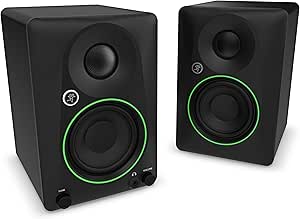
Mackie CR3.5 3.5″ Creative Reference Powered Studio Monitors with Tone Knob and Location Switch
The Mackie CR3.5 offers a flexible, user-friendly experience with a tone knob and a switchable mode for desktop or bookshelf placement, making it ideal for creators who want to tailor their sound environment. Compared to the JBL 305P MkII, the Mackie provides more control over tone, allowing users to boost bass or add high-end sparkle, which can be useful for casual listening or gaming. Its 3.5″ woven woofer and silk dome tweeter deliver clear, articulate sound, though it doesn’t quite match the accuracy of the JBL or JBL’s imaging capabilities. This monitor is perfect for multimedia, streaming, or light editing in versatile spaces, but it may fall short for critical mixing tasks. The inclusion of a headphone jack and tone control makes it highly adaptable for various uses.
Pros:- Adjustable tone control for bass and treble
- Switchable between desktop and bookshelf modes
- Includes a headphone output for private listening
- Good articulation for multimedia and light editing
Cons:- Less precise imaging compared to the JBL 305P MkII
- Limited volume for large or loud environments
Best for: Creators who want versatile, adjustable monitors suitable for both production and casual listening in small spaces.
Not ideal for: Professional audio engineers or those requiring flat, uncolored sound for mixing or mastering, as these are more geared toward general use.
- Power Output:50W
- Drivers:3.5″ woven woofer, 1″ silk dome tweeter
- Inputs:TRS, RCA, 3.5mm, Headphone
- Features:Tone knob, Mode switch
- Build Material:Plastic, Metal
- Frequency Response:Not specified
- Dimensions:Not specified
- Weight:Not specified
Bottom line: This monitor set offers great flexibility and control for creators needing adaptable sound in small, multi-purpose setups.
Edifier MR3 Powered Studio Monitor Speakers, Hi-Res Audio Certified Bluetooth V5.4 Active Bookshelf Loudspeakers, 2.0 Computer Speaker with Headphone Output RCA AUX Balanced TRS Input – Black (Pair)
This Edifier MR3 stands out for its ability to deliver high-quality, detailed sound across a wide frequency range, thanks to its Hi-Res Audio certification. Compared with the Edifier R1280T, it offers a more refined stereo image and better control at high volumes, making it ideal for creators who need accurate monitoring without sacrificing volume or clarity. The rich connectivity options—including Bluetooth V5.4 with multi-point pairing, RCA, AUX, and balanced TRS inputs—make it highly adaptable to different setups. The powerful 18W*2 RMS output and full-range drivers ensure full, controlled sound, while the sleek black finish adds a modern aesthetic. A key tradeoff is its larger size and higher price point, which might be less suitable for very tight spaces or budget-conscious setups. Nonetheless, for creators who prioritize sound fidelity and flexibility, this model offers a compelling package.
Pros:- Exceptional clarity and detailed sound reproduction across the full frequency spectrum
- Rich connectivity including Bluetooth V5.4, RCA, AUX, and balanced TRS inputs
- Powerful output with minimal distortion at high volumes
- Elegant copper and black finish enhances aesthetic appeal
Cons:- Larger size may not fit in very compact or space-constrained environments
- Higher price compared to entry-level monitors
- Designed primarily for near-field use, less ideal for distant listening
Best for: Producers, video editors, and musicians needing precise, versatile studio monitoring in a compact yet powerful package.
Not ideal for: Minimalists or those with very limited space who require ultra-compact monitors or budget solutions, as these are relatively large and pricier.
- Frequency Response:52Hz – 40kHz
- Power Output:18W*2 RMS
- Drivers:3.5″ mid-low, 1″ tweeters
- Connectivity:Bluetooth V5.4, RCA, AUX, TRS
- Dimensions:6.9″D x 12.1″W x 16.2″H
- Weight:9.9 pounds
Bottom line: This pick makes the most sense for creators seeking high fidelity, flexible connectivity, and a stylish design for focused workspaces.
Edifier R1280T Powered Bookshelf Speakers – 2.0 Active Near Field Studio Monitor Speaker – Wooden Enclosure – 42 Watts RMS Power
The Edifier R1280T offers a balanced, natural sound with its 13mm silk dome tweeter and 4-inch full-range driver, making it a favorite for those starting out or working within a tight budget. Compared to the more advanced Edifier MR3, it provides a more straightforward, warm sound signature that’s well-suited for casual listening and basic editing tasks. Its classic wood enclosure adds a touch of elegance and helps reduce unwanted resonance, while side panel controls for volume, bass, and treble give easy room tuning. The dual AUX inputs allow seamless switching between devices, which is useful for multimedia setups. However, its lower power output (42W RMS) limits headroom at higher volumes, and it lacks Bluetooth, so wireless streaming isn’t an option. Still, for entry-level creators or those seeking reliable, room-filling sound on a budget, this model hits the mark.
Pros:- Warm, natural sound with good tonal balance
- Elegant wooden enclosure reduces resonance and enhances aesthetics
- Side panel controls for easy EQ adjustment
- Dual AUX inputs for multi-device connection
Cons:- Limited power output for very loud or large-room use
- No Bluetooth connectivity for wireless streaming
- Less suited for critical studio monitoring or high-volume scenarios
Best for: Beginners, home hobbyists, and creators who want solid audio quality without breaking the bank.
Not ideal for: Professional producers or those needing advanced connectivity like Bluetooth or higher power headroom, as it’s more suited for casual use.
- Power:42W RMS
- Frequency Response:80Hz – 20kHz
- Drivers:4″ full-range, 13mm silk dome
- Inputs:Dual AUX, RCA
- Finish:Wood veneer
- Dimensions:5.7″W x 6.9″D x 9.5″H
Bottom line: This model offers a reliable, affordable option for those new to audio production or seeking quality sound for everyday listening.
PreSonus Eris 3.5 Studio Monitors, Pair — Powered, Active Monitor Speakers for Near Field Music Production, Desktop Computer, Hi-Fi Audio
The PreSonus Eris 3.5 excels in delivering studio-quality, accurate sound within a highly compact form factor, making it ideal for desktop producers and multimedia creators. Its 50W dual Class AB amplification provides ample volume without sacrificing tonal fidelity, and the woven-composite woofers produce tight, punchy bass that’s surprisingly full for their size. Compared with the Edifier R1280T, the Eris 3.5 offers a more neutral, transparent sound signature, perfect for critical listening and mixing. The wide stereo imaging and high-frequency response enable precise spatial placement, even from nearly any angle. On the downside, its smaller size means limited low-end extension, and it lacks Bluetooth, which might be a drawback for casual multimedia use. Still, for creators working in tight spaces who need honest, detailed audio, these monitors deliver excellent performance.
Pros:- Accurate, transparent sound suitable for critical listening
- Powerful 50W dual Class AB amplification
- Wide stereo image and high-frequency response
- Versatile connectivity including TRS, RCA, and front-panel aux input
Cons:- Limited bass extension due to small size
- No Bluetooth or wireless streaming
- Designed primarily for near-field use, not large spaces
Best for: Home studio owners, podcasters, and multimedia creators who prioritize accurate sound in a small, desktop-friendly package.
Not ideal for: Those needing high volume for large rooms or Bluetooth streaming, as these are oriented toward near-field, wired use.
- Power:50W dual Class AB
- Frequency Response:70Hz – 20kHz
- Drivers:1″ silk dome, 8″ woven-composite woofer
- Inputs:TRS, RCA, ⅛-inch aux
- Dimensions:4″W x 6.9″D x 9.5″H
- Weight:4.9 kg
Bottom line: This pick is perfect for creators who need honest, detailed audio in a compact, near-field setup, emphasizing accuracy over loudness.
How We Picked
To select these monitors, I evaluated performance based on sound clarity, frequency response, and transparency, ensuring they deliver accurate audio essential for creators. Usability factors such as connectivity options, size, and setup ease were also considered, as these impact day-to-day workflow. Build quality and durability played a role, especially for those with limited space or on a budget. Finally, I balanced value against cost, highlighting options that offer the best performance for their price. The products are ranked to reflect a combination of professional utility, affordability, and user versatility, with the top picks excelling across these areas.Factors to Consider When Choosing Best Studio Monitor Speakers For Creators
Choosing the right studio monitor speakers involves understanding several key factors that influence both performance and suitability. Beyond basic features, it’s important to consider how each monitor’s characteristics align with your room size, workflow, and budget. Making an informed choice helps avoid common pitfalls like overpaying for features you don’t need or selecting monitors that don’t accurately reflect your audio environment.Size and Driver Compatibility
Monitor size, especially driver diameter, directly affects the sound profile, particularly bass response. Larger drivers (like 5” or 6”) generally produce fuller low frequencies, which benefits music producers working with bass-heavy genres. However, bigger monitors can be less ideal for small spaces or near-field setups, where smaller models like 3.5” or 4” drivers provide more clarity without overwhelming the room. Matching driver size to your space and needs is a key consideration.Sound Accuracy and Frequency Response
For creators, accuracy is paramount. Look for monitors with flat frequency response, meaning they reproduce sound faithfully without boosting bass or treble. This allows for better mixing decisions, especially in post-production or sound design. Models with high-resolution audio certification or wider frequency ranges tend to deliver more detailed sound, but they also tend to cost more. Be wary of monitors that exaggerate certain frequencies, as they can mislead your mixing process.Connectivity and Compatibility
Consider how your monitors connect to your setup. Wired options like RCA, TRS, or XLR provide stable, high-quality audio, essential for critical work. Bluetooth and wireless models offer convenience, especially for casual listening or multi-device setups, but often at the expense of slight latency or reduced fidelity. Think about your workflow and whether you need features like multiple input options or wireless connectivity, and choose accordingly.Build Quality and Durability
High-quality materials and solid construction ensure your monitors last over time, especially if you move them frequently or work in demanding environments. Wooden enclosures, for example, can reduce vibrations and improve sound clarity, but they may be bulkier. Plastic or composite builds are lighter and more portable but might sacrifice some acoustic stability. Weigh your space constraints and longevity needs when selecting a model.Budget and Value
While it’s tempting to go for the most advanced monitors, many creators find excellent performance in mid-range models that offer good accuracy at a reasonable price. Entry-level monitors can serve well for beginners, but often lack the finesse needed for professional mixing. Conversely, premium monitors deliver detailed sound and superior build quality but come at a higher cost. Evaluating your specific needs and budget is essential in making the right investment.Frequently Asked Questions
Are Bluetooth studio monitors suitable for critical mixing?
Bluetooth monitors are generally designed for convenience and casual listening rather than critical mixing. Wireless signals can introduce slight latency and may not provide the same level of sound fidelity as wired monitors. If accuracy is your priority, especially for professional work, wired options like XLR or TRS-connected monitors tend to deliver more precise and reliable audio reproduction. However, Bluetooth can be useful for quick reference checks or casual playback, not detailed mixing sessions.
What is the ideal size for a beginner’s studio monitor?
For beginners, compact monitors with 3.5” to 4” drivers often provide a good balance of sound clarity and space efficiency. These smaller speakers are easier to position in limited rooms and can still deliver accurate audio for learning the basics of mixing and listening. As your skills grow, upgrading to larger monitors with bigger drivers can enhance low-end performance, but starting with a smaller size helps build understanding without overwhelming your space or budget.
Should I prioritize power or sound quality when choosing monitors?
While sufficient power ensures your monitors can fill your space, sound quality should always be the primary concern for creators. A monitor with high wattage but poor accuracy may produce a loud, but misleading, sound. Look for models that balance power with flat frequency response and clarity. Overestimating power can sometimes lead to distortion at high volumes, so choose a monitor that offers clean, precise sound at your typical listening levels.
Can I use regular speakers for music production?
While regular speakers can serve in a pinch, they typically lack the flat frequency response necessary for accurate mixing. Studio monitors are designed to reproduce sound as transparently as possible, which is essential for making precise adjustments. Using consumer-grade speakers or multimedia speakers might lead to misjudging your mix, especially in bass and treble balance. Investing in dedicated studio monitors generally improves your mixing accuracy over time.
How important is room treatment when using studio monitors?
Room acoustics significantly influence how monitors sound. Without proper treatment, reflections, standing waves, and other acoustic issues can color your audio, making it difficult to judge true sound quality. Even high-end monitors will struggle to provide accurate results in untreated spaces. Adding bass traps, diffusers, and acoustic panels can dramatically improve your monitoring environment, ensuring your sound decisions are based on true audio rather than room artifacts.
Conclusion
The choice of the best studio monitor speakers for creators ultimately depends on your specific needs. For those seeking the best overall performance, the M-AUDIO BX3 offers a balanced mix of clarity and affordability. Beginners or casual creators will benefit from models like the Edifier R1280T for straightforward use, while professionals aiming for precision might lean toward the JBL 305P MkII. If space is limited, compact options such as the PreSonus Eris 3.5 deliver solid performance without bulk. Consider your workflow, room size, and budget carefully to select the monitor that enhances your creative process most effectively.