If you’re starting out with 3D printing, choosing the right beginner-friendly machine can make all the difference. The FLASHFORGE Adventurer 5M stands out for its fully auto-leveling system and high-speed capabilities, making it a top overall pick. The AOSEED 3D Printer offers excellent value with its kid-friendly design and extensive model library, ideal for home or school use. Meanwhile, the FLASHFORGE AD5X excels in multi-color printing and precision, suited for those wanting to explore more complex projects. The main tradeoffs in this category involve balancing ease of setup, print quality, and price. Keep reading to see how these options compare and find the best fit for your needs.
Key Takeaways
- Auto-leveling and user-friendly interfaces are common features in top beginner models, reducing setup frustration.
- High-speed printing is available on several options but can sometimes compromise print quality for speed.
- Multi-color and multi-material capabilities are increasingly accessible but often come with higher prices and complexity.
- Compact and fully assembled units are favored for ease of use, especially for kids or small spaces.
- Price remains a key factor; the best value models balance affordability with features that support learning and experimentation.






More Details on Our Top Picks
FLASHFORGE Adventurer 5M 3D Printer with Fully Auto Leveling, Max 600mm/s High Speed Printing, 280°C Direct Extruder with 3S Detachable Nozzle, CoreXY All Metal Structure, Print Size 220x220x220mm
The FLASHFORGE Adventurer 5M stands out for its remarkable combination of speed and accuracy, making it ideal for users who need rapid prototypes without sacrificing quality. Compared to the Creality Ender 3, which is more affordable and customizable, the AD5M offers automated bed leveling and higher print speeds—up to 600mm/s—reducing setup time and increasing productivity. Its all-metal CoreXY structure and 280°C direct extruder enable consistent, detailed prints across diverse materials like PETG and ABS. However, this speed comes with increased noise levels, especially from the motors and fans, which might be disruptive in quiet environments. Also, lacking native Wi-Fi support could hinder seamless remote control for some users. This pick makes the most sense for hobbyists or small workshops seeking a reliable, high-speed printer that minimizes manual calibration while maintaining top-tier quality.
Pros:- Exceptional printing speed up to 600mm/s for rapid prototyping
- Automated bed leveling ensures consistent first layers
- Supports a wide range of materials including PETG and ABS
- All-metal CoreXY structure provides stability and durability
Cons:- High noise levels from motors and fans may be disruptive
- Limited built-in Wi-Fi support; remote control requires additional setup
Best for: Hobbyists and small business owners who prioritize high speed and precision without manual calibration.
Not ideal for: Quiet office environments or users seeking budget-friendly options, as noise levels and price are higher than entry-level models.
- Build Volume:220x220x220mm
- Max Speed:600mm/s
- Extruder Temperature:280°C
- Nozzle Options:3S Detachable Nozzle
- Structure:CoreXY All Metal
- Auto Leveling:Yes
- Filament Compatibility:PLA, PETG, ABS, more
- Weight:23.8 pounds
- Connectivity:Mobile App Monitoring (additional setup needed)
Bottom line: This is ideal for creators who need fast, accurate prints with minimal manual setup and are willing to accept some noise and higher cost.
AOSEED 3D Printer for Kids, AI-Powered Fully Assembled 3D Printer with Up to 400mm/s Speed, Auto Leveling, 1500+ Models & 17+ Modules, Includes 8 PLA Filaments for Home and School Use, X-MAKER JOY AI+
The AOSEED X-MAKER JOY AI+ is designed for young creators, making 3D printing accessible through AI-driven features like voice commands and automatic model generation. Unlike the fully manual setup of the Creality Ender 3, this model emphasizes ease of use with a one-tap start via a smart app, making it perfect for beginners and children. Its AI tools such as Doodle and MiniMe allow kids to create personalized models without design skills, fostering creativity and learning. The enclosed design and auto-leveling platform enhance safety and reliability, while the inclusion of 8 filaments and over 1,500 models provides endless entertainment. However, the tradeoff is a lower maximum speed of 400mm/s, which, while faster than basic models, still lags behind high-speed industrial printers. Also, its focus on ease of use may limit advanced customization options for more experienced hobbyists. This makes it ideal for families, schools, or beginners seeking an engaging, all-in-one creative starter kit.
Pros:- Intuitive one-tap start with smart app compatibility
- AI features enable voice, text, and image-based model creation
- Enclosed, safe design suitable for kids and classrooms
- Includes 8 PLA filaments and 1500+ models for immediate use
Cons:- Maximum printing speed of 400mm/s may be insufficient for large projects
- Limited customization compared to traditional DIY printers
- Potentially less suitable for detailed or industrial-grade prints
Best for: Parents, teachers, and young makers new to 3D printing who want a safe, easy-to-use, and highly creative device.
Not ideal for: Experienced hobbyists or professional prototypers who require higher speeds, more material options, or advanced control features.
- Build Volume:150x150x150mm
- Max Speed:400mm/s
- Filament Types:PLA
- Included Filaments:8 rolls
- Auto Leveling:Yes
- Connectivity:Wi-Fi, App Control
- Model Library:1500+ models
- Age Range:Kids & Beginners
- Material Compatibility:PLA only
Bottom line: This is perfect for families and educators seeking a fun, safe, and educational introduction to 3D printing with minimal setup.
FLASHFORGE AD5X Multi-Color 3D Printer, CoreXY 600mm/s High-Speed, 1-Click Auto Leveling, 300°C Direct Drive Extruder, 220x220x220mm Build Volume, Ideal for Precision and Efficiency
The FLASHFORGE AD5X excels in multi-color printing, supporting up to four colors simultaneously, making it a great choice for detailed, vibrant models. Unlike the single-color Ender 3, the AD5X offers 1-Click auto leveling and high-speed capabilities—up to 600mm/s—combined with a 300°C direct extruder for versatile material use, including ABS and PETG. Its multi-nozzle system allows for complex color transitions and intricate designs, ideal for artistic projects. The vibration compensation system and stable CoreXY structure help maintain precision at high speeds. Nevertheless, multi-color printing adds complexity and cost, which might be excessive for simple hobby projects. Its large build volume and advanced features are better suited for dedicated makers or educational environments rather than casual users. This printer makes sense for creators wanting vibrant, multi-color models with efficient workflow and high-quality results.
Pros:- Supports up to 4 colors simultaneously for vibrant prints
- Fast printing speeds up to 600mm/s for efficiency
- 1-Click auto leveling for quick setup
- Supports a variety of filaments including ABS and PETG
Cons:- Multi-color features increase complexity and cost
- Potentially overkill for simple, single-color projects
- Requires more maintenance and calibration
Best for: Artists, educators, and advanced hobbyists focused on multi-color and detailed prints needing quick setup and reliable operation.
Not ideal for: Beginners or those with limited budgets, as multi-color and high-speed features come with a higher price point and complexity.
- Build Volume:220x220x220mm
- Max Speed:600mm/s
- Extruder Temperature:300°C
- Color Support:Up to 4 colors
- Auto Leveling:Yes
- Nozzle Sizes:Multiple, up to 0.8mm
- Material Compatibility:PLA, ABS, PETG, others
- Weight:24.2 pounds
- Connectivity:Mobile App, Remote Control
Bottom line: Perfect for creators who want colorful, detailed models with high speed and minimal manual calibration, but not for casual or budget-conscious users.
FLASHFORGE Adventurer 5M 3D Printer,600mm/s Max High-Speed FDM 3D Printers with Fully Auto Leveling, 280°C Direct Extruder with Quick Detachable Nozzle, Effective Cooling, Core XY Structure
The Adventurer 5M offers an impressive maximum speed of 600mm/s, making it suitable for rapid prototyping and functional parts. Compared to the more affordable Mini 3D Printer kits, the 5M’s fully automatic leveling and high-temperature extruder support a broad range of materials, including composite filaments like CF-reinforced plastics. Its dual-channel cooling and vibration compensation ensure stability even at high speeds, resulting in smoother, more detailed models. Its large build volume and multiple nozzle options provide versatility. Nonetheless, the high speed and complexity may be unnecessary for simple educational projects or basic hobbies, and the cost reflects its advanced capabilities. It’s better suited for users who need quick turnaround times and durable, precise prints—such as small workshops or professional hobbyists—rather than casual beginners.
Pros:- Maximum speed up to 600mm/s for rapid prototyping
- Fully automatic bed leveling for quick setup
- Supports a wide range of materials including composites
- Dual-channel cooling system ensures stability
Cons:- High price point may be prohibitive for casual users
- Speed overkill for simple projects or learning purposes
- Complex setup could be daunting for absolute beginners
Best for: Prototypers, educators, or small businesses needing fast, multi-material, high-quality models with minimal manual calibration.
Not ideal for: Beginners or budget-conscious hobbyists who do not require ultra-fast speeds or multi-material support.
- Build Volume:220x220x220mm
- Max Speed:600mm/s
- Extruder Temperature:280°C
- Nozzle Options:Multiple, quick detach
- Structure:Core XY All Metal
- Auto Leveling:Yes
- Filament Compatibility:PLA, ABS, PETG, CF
- Connectivity:App remote monitoring
- Weight:22 pounds
Bottom line: Ideal for advanced users or small workshops needing quick, reliable, multi-material high-speed printing, but not for newcomers on a tight budget.
FLASHFORGE Adventurer 5M Pro 3D Printer with 1 Click Auto Printing System, 600mm/s High-Speed, Quick Detachable 280°C Nozzle, Core XY All-Metal Structure, Multi-Functional 220x220x220mm 3D Printer
The Adventurer 5M Pro combines high-speed performance with extensive material support and smart features, making it suitable for serious hobbyists and small-scale professionals. Its capacity to print at 600mm/s and support for materials like ABS, PETG-CF, and ASA-CF set it apart from basic models like the Mini 3D Printer kits. The auto-leveling system employs pressure sensing for precise first layers without manual calibration, while the dual circulation and vibration compensation systems enhance quality at high speeds. The 280°C extruder and multiple nozzle sizes (0.25mm to 0.8mm) provide versatility for detailed or durable parts. While its advanced features come at a higher price, it offers a rare combination of speed, material flexibility, and ease of use for demanding projects. This makes it a strong choice for dedicated makers and small labs who want professional-grade results.
Pros:- Speed up to 600mm/s for fast production
- Automatic pressure sensing for flawless first layers
- Supports multiple materials, including CF-reinforced filaments
- User-friendly app for remote monitoring and control
Cons:- Higher cost may be a barrier for casual users
- Complex features may require a learning curve
- Not ideal for simple, single-material projects
Best for: Experienced hobbyists, educators, or small-scale professionals seeking high-speed, multi-material printing with smart automation.
Not ideal for: Absolute beginners or those with limited budgets, as the feature set and price are geared toward more advanced users.
- Build Volume:220x220x220mm
- Max Speed:600mm/s
- Extruder Temperature:280°C
- Nozzle Sizes:0.25/0.4/0.6/0.8mm
- Auto Leveling:Yes
- Material Support:PLA, ABS, PETG, ASA, CF
- Connectivity:Mobile App
- Weight:32.1 pounds
- Structure:Core XY All Metal
Bottom line: This is a strong choice for advanced users who need fast, versatile, and easy-to-manage professional-quality prints, but not for absolute beginners or budget shoppers.
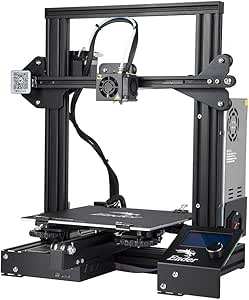
Official Creality Ender 3 3D Printer Fully Open Source with Resume Printing Function DIY Printers Build Volulme 8.66×8.66×9.84 inch
The Creality Ender 3 stands out as the most versatile and approachable choice for those new to 3D printing, especially because it balances affordability with a strong community-supported open-source platform. Unlike the Mini 3D Printer, which is more plug-and-play but less expandable, the Ender 3 offers a larger build volume and the ability to upgrade components over time, making it ideal for learners eager to grow their skills. The resume printing feature adds peace of mind during power outages, though this comes with the tradeoff of a more complex assembly process compared to fully assembled models. Its upgraded extruder reduces common filament jams, but the need for some technical setup may challenge absolute beginners. This printer makes the most sense for hobbyists or students wanting a reliable, customizable machine that can evolve with their skills.
Pros:- Larger build volume for diverse projects
- Open-source design with extensive community support
- Resume printing function increases reliability during outages
- Upgradable extruder reduces filament jams
Cons:- Requires about 2 hours of assembly which may intimidate some beginners
- Limited to SD card or computer connection, no phone app control
- Manual calibration needed for optimal results
Best for: Beginners who are interested in learning about 3D printer mechanics and plan to upgrade parts over time.
Not ideal for: Users seeking an entirely plug-and-play experience or a completely silent, hassle-free setup without assembly.
- Build Volume:8.66 x 8.66 x 9.84 inches
- Open Source:Yes
- Power Resume:Yes
- Assembly Required:Yes
- Supported Files:SD card, PC
- Extruder:Upgraded V-shape with POM wheels
Bottom line: This is an excellent choice for beginners willing to invest time in setup to benefit from long-term flexibility.
Fully Assembled Mini 3D Printer for Kids & Beginners – Complete Starter Kit with Auto Leveling 3D Printing Machine, 1 Roll of Filament, and SD Card, High-Speed 250mm/s, High Precision, for School Home
The Mini 3D Printer for Kids & Beginners makes a compelling case as an accessible, ready-to-use device perfect for young learners or complete novices. Unlike the Creality Ender 3, which requires assembly and some technical knowledge, this model arrives fully assembled, allowing immediate printing out of the box. Its high speed of 250mm/s paired with a consistent 0.01mm precision demonstrates that beginners can achieve professional-quality results quickly, though this speed may challenge the machine’s durability over many prints. The one-touch auto-leveling and filament loading simplify user experience, but the small build volume limits larger projects. The included starter kit, with filament and pre-sliced files, makes it ideal for educational settings or family use, but it sacrifices some expansion potential compared to more advanced models. It’s best suited for kids or absolute beginners who want a straightforward, low-maintenance introduction to 3D printing.
Pros:- Fully assembled, ready to print immediately
- High speed with professional-level precision
- Auto-leveling and filament loading simplify setup
- Includes a complete starter kit with filament and files
Cons:- Limited build volume restricts larger projects
- Speed may reduce component lifespan over frequent use
- Less room for upgrades or modifications
Best for: Parents, teachers, or beginners seeking an easy-to-operate, all-in-one starter printer for educational or hobby purposes.
Not ideal for: Users wanting to print large models or who prefer a machine they can upgrade or modify extensively over time.
- Build Volume:10.63 x 10.12 x 15.94 inches
- Print Speed:Up to 250mm/s
- Precision:0.01mm
- Assembly:Fully assembled
- Features:Auto-leveling, one-touch filament loading
- Included Filament:1 roll of PLA
- Connectivity:SD card
Bottom line: This compact, user-friendly printer is perfect for beginners and kids who want instant results with minimal setup effort.

How We Picked
These products were evaluated based on several criteria crucial for beginners: ease of setup and use, print quality, reliability, safety features, and overall value. We prioritized models that offer auto-leveling and minimal calibration requirements, as these reduce common beginner frustrations. Durability and build quality were also considered, ensuring the printers can withstand regular use by newcomers. Our ranking reflects a balance between affordability and features that foster learning, with a focus on models that simplify the printing process without sacrificing essential capabilities.Factors to Consider When Choosing 3d Printers For Beginners
When selecting a 3D printer for beginners, it’s important to focus on features that reduce the learning curve and increase confidence. First, consider auto-leveling and easy setup, as these features eliminate common hurdles for newcomers. Next, evaluate print volume to match your project ambitions—larger isn’t always better if it complicates operation. Safety features, such as enclosed designs or filament sensors, help prevent accidents, especially for younger users. Price should align with your budget, but investing a little more can often lead to better reliability and support. Finally, consider available support and community resources, which can be invaluable when troubleshooting or learning new skills.Ease of Use and Setup
Beginners benefit most from printers that come ready to print out of the box, with minimal calibration required. Auto-leveling beds and straightforward interfaces reduce setup time and frustration, making the learning process smoother. An intuitive touchscreen or simple controls help newcomers navigate printing options without a steep learning curve. Avoid models with complex wiring or manual bed adjustments unless you’re interested in learning the technical details. Ease of use often correlates with higher initial cost, but it pays off in faster, more successful prints for new users.
Print Quality and Reliability
While beginners might prioritize simplicity, consistent print quality is still essential to keep motivation high. Look for printers with proven reliability, good layer adhesion, and minimal warping. Features like heated beds and enclosed chambers can improve quality for certain filament types. Keep in mind that initial print failures are common, so choosing a model with strong support resources and a good community can help troubleshoot issues quickly. Balancing ease of use with decent print results is key—cheaper models might struggle with detail, while more advanced units can handle complex designs better.
Safety and Maintenance
Safety features are often overlooked but are vital, especially for younger users. Auto-shutdown functions, enclosed designs, and filament sensors help prevent accidents and damage. Maintenance should be simple—easily accessible print heads and user-replaceable parts reduce downtime. Regular cleaning and occasional calibration are typical, but beginner-friendly models minimize these tasks through design. Understanding the maintenance needs before purchasing ensures the machine remains safe and functional over time.
Budget and Future Growth
Price plays a significant role in choosing a beginner 3D printer. Entry-level models are more affordable but might lack advanced features or durability. Investing a bit more can unlock better print quality, faster speeds, and longer-lasting components, which is beneficial if you plan to grow your skills. Consider whether the model can handle more complex projects or upgrades over time, as this extends its usefulness. Avoid extremely cheap models that compromise safety or reliability, as these can lead to frustration and wasted money.
Community and Support Resources
A strong user community and accessible customer support can dramatically improve your experience. Look for brands with active forums, tutorial videos, and responsive customer service. These resources help solve common issues, share tips, and inspire new projects. Some printers have dedicated apps or online platforms for troubleshooting and firmware updates, simplifying maintenance. Selecting a well-supported model can make your entry into 3D printing more enjoyable and less intimidating.
Frequently Asked Questions
Is auto-leveling necessary for a beginner 3D printer?
Auto-leveling is highly recommended for beginners because it automates the bed calibration process, saving time and reducing setup errors. Manual leveling can be tricky and often leads to failed prints if not done correctly, which can be frustrating for new users. An auto-leveling feature allows you to focus more on designing and printing rather than troubleshooting bed adhesion issues. While some experienced users prefer manual adjustments for precision, auto-leveling significantly lowers the barrier to successful printing for beginners.
Can I print with different filament types as a beginner?
Yes, many beginner 3D printers support multiple filament types, such as PLA, ABS, and PETG. However, compatibility varies, so it’s important to choose a model with a heated bed and suitable extruder temperature range if you want flexibility. PLA is the easiest to start with due to its low printing temperature and minimal warping, making it ideal for beginners. As you gain experience, exploring other filaments becomes possible, but starting with a versatile model ensures you won’t outgrow your machine too quickly.
How much maintenance does a beginner 3D printer require?
Most beginner models require moderate maintenance, including regular cleaning of the print bed and nozzle, firmware updates, and occasional calibration. Simple tasks like replacing the filament or cleaning the extruder are straightforward, but neglecting basic upkeep can lead to print failures. Choosing a printer with accessible parts and clear user instructions makes maintenance easier. Over time, staying attentive to maintenance ensures consistent print quality and prolongs the lifespan of your machine.
Is it better to buy an assembled or DIY 3D printer for a beginner?
For most beginners, an assembled 3D printer is preferable because it saves time and reduces the risk of assembly errors that could affect print quality. Fully assembled models often come with user-friendly interfaces and tested setups, making the initial learning process smoother. DIY kits can be rewarding for those interested in the technical aspects, but they typically require more time, patience, and technical know-how. Unless you have a specific interest in building and troubleshooting, an assembled printer offers a more straightforward start.
What features should I prioritize if I plan to learn advanced 3D printing later?
If you aim to develop more advanced skills, look for printers with higher temperature capabilities, multi-material support, and larger build volumes. Features like multi-color printing or dual extrusion can open more creative possibilities. Additionally, choosing a model with open-source firmware and upgrade options allows for customization and experimentation. Starting with a versatile, upgradeable machine prevents the need to replace your printer as your skills grow, making it a smart investment for long-term learning.
Conclusion
For newcomers seeking a straightforward, reliable introduction, the FLASHFORGE Adventurer 5M offers excellent value with easy setup and dependable performance, making it ideal for beginners and casual users. The AOSEED 3D Printer suits families or educators looking for affordability and extensive learning resources. Those wanting to explore multi-color or more complex printing should consider the FLASHFORGE AD5X for its precision and versatility. If budget is a primary concern, the fully assembled mini printer provides a simple, ready-to-go experience. Ultimately, your choice depends on your specific needs—whether it’s ease of use, project scope, or future growth potential.