
For flight simulator enthusiasts, choosing the right yoke and throttle system can significantly enhance realism and immersion. The Honeycomb Alpha Flight Controls Yoke stands out as the overall best for its durability and authentic feel, while the Logitech G PRO Flight Yoke System offers an excellent balance of features and affordability. The Turtle Beach VelocityOne Flight System is ideal for console users needing a versatile setup. However, buyers face tradeoffs between build quality, customization options, compatibility, and price. Continue reading for a detailed breakdown to help you find the perfect fit for your flying adventures.
Key Takeaways
- The Honeycomb Alpha Yoke offers unmatched build quality and realism, making it the top choice for serious sim pilots.
- The Logitech G PRO Flight Yoke System balances features and affordability, making it ideal for intermediate users.
- Throttle and pedal bundles are often better value than standalone components, especially for beginners.
- Compatibility varies: some systems are PC-only, while others work across consoles and PC.
- Customization options, such as programmable controls and modular components, differ widely and impact long-term usability.
| Honeycomb Alpha Flight Controls Yoke & Switch Panel — Flight Simulator Yoke w/ 180° Rotation, Steel Shaft, Ignition Switch, Fully-Equipped Handles, Dual Mounting — Compatible w/PC & Mac |  | Best Overall for Realism and Complete Cockpit Feel | Rotation angle: 180° | Handle material: Durable plastic with metal components | Switch panel: Multiple switches with LED backlighting | VIEW LATEST PRICE | See Our Full Breakdown |
| Logitech G PRO Flight Yoke System, Professional Simulation Yoke and Throttle Quadrant, 3 Modes, 75 Programmable Controls, Configurable Throttle Knobs, Steel Shaft, USB, PC – Black |  | Best Value for High-Quality Controls at a Reasonable Price | Controls: 75 programmable buttons | Throttle knobs: Configurable | Shaft material: Steel | VIEW LATEST PRICE | See Our Full Breakdown |
| Logitech G Pro Flight Yoke System + Pro Flight Rudder Pedals Bundle |  | Best for Complete Control and Enhanced Realism | Yoke controls: Self-centering, programmable | Pedals: Rudder with toe brakes | Control surface: Multiple programmable buttons | VIEW LATEST PRICE | See Our Full Breakdown |
| Thrustmaster T-Flight Hotas X (Compatible with PC) | 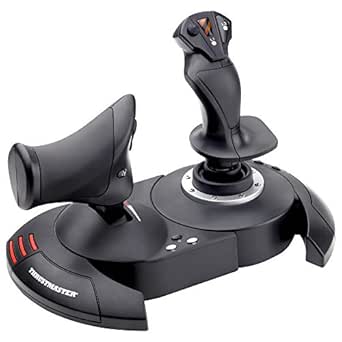 | Best Budget HOTAS for Versatile Flight Control | Buttons: 12 programmable | Axes: 5 | Throttle: Detachable, programmable | VIEW LATEST PRICE | See Our Full Breakdown |
| Honeycomb Alpha Flight Controls Yoke with Honeycomb Aeronautical Bravo Throttle Quadrant Bundle |  | Best Overall Flight Control Bundle | Cockpit Components: Throttle, yoke, switch panel | Configuration: Multi-engine, configurable | Indicators: LED landing gear indicator | VIEW LATEST PRICE | See Our Full Breakdown |
| PC Joystick, USB Gaming Flight Simulator Game Controller with Vibration Function and Throttle Control, PXN 2113 Wired Gamepad |  | Best Budget PC Flight Stick | Controls: 12 programmable buttons, 4 axes | Vibration: Yes | Compatibility: PC, Windows 7/8/10/11 | VIEW LATEST PRICE | See Our Full Breakdown |
| Turtle Beach VelocityOne Flight Universal Control System | 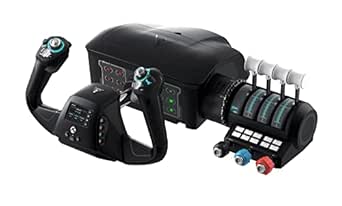 | Best Premium All-in-One System | Rotation: 180° yoke | Controls: Throttle, trim wheel, rudder, brake | Display: Color Flight Management | VIEW LATEST PRICE | See Our Full Breakdown |
| Logitech G PRO Flight Yoke System, Professional Simulation Yoke and Throttle Quadrant |  | Best for Beginners and Intermediate Pilots | Controls: 75 programmable, knobs, switches | Build: Steel shaft, robust | Connectivity: USB | VIEW LATEST PRICE | See Our Full Breakdown |
| Logitech G Pro Flight Rudder Pedals |  | Best Pedals for Realistic Ground Control | Axes: 9-bit rudder, 7-bit toe brake | Features: Self-centering, adjustable tension | Compatibility: Windows 7-10 | VIEW LATEST PRICE | See Our Full Breakdown |
| Thrustmaster TCA Yoke PACK Boeing Edition – Yoke & Quadrant Bundle for Xbox Series X|S & PC – Realistic Flight Simulator Controls |  | Best Overall for Authentic Boeing Experience | Yoke Material: Metal | Range of Motion: 8.3 inches | Additional Axes: 2 | VIEW LATEST PRICE | See Our Full Breakdown |
| Honeycomb Alpha Flight Controls Yoke with Honeycomb Aeronautical Bravo Throttle Quadrant Bundle (2 Items) |  | Best Value for Versatile and Customizable Setup | Yoke Rotation: 180 degrees | Throttle Quadrant: Configurable with multiple levers | Cockpit Components: Autopilot, gear, flap, annunciator | VIEW LATEST PRICE | See Our Full Breakdown |
More Details on Our Top Picks
Honeycomb Alpha Flight Controls Yoke & Switch Panel — Flight Simulator Yoke w/ 180° Rotation, Steel Shaft, Ignition Switch, Fully-Equipped Handles, Dual Mounting — Compatible w/PC & Mac
This Honeycomb Alpha Flight Controls Yoke stands out for offering a genuine simulation experience with 180° rotation and a steel shaft that rivals premium setups like the Logitech G PRO Yoke. Compared to simpler controllers, it provides a more detailed and immersive cockpit feel, especially with its multi-function handles and integrated switch panel. The dual mounting options and durable construction make it ideal for dedicated sim pilots. While its size and complexity suit serious enthusiasts, it might be overkill for casual users or beginners who prefer lightweight, plug-and-play solutions. The self-centering mechanism and night-flight lighting enhance usability, but the product’s high price and size could be drawbacks for space-limited setups. Best suited for enthusiasts seeking authentic controls and comprehensive cockpit simulation, willing to invest in durability and realism.
Pros:- Highly realistic 180° rotation and smooth control via steel shaft and linear bearings
- Integrated multi-function switch panel with night-flight LED backlighting
- Flexible dual mounting options for various tabletop setups
Cons:- High price point may be prohibitive for casual users
- Size and weight require dedicated space and sturdy mounting solutions
Best for: Aviation enthusiasts and professional sim pilots who want a fully equipped, durable yoke with switch panels for immersive realism.
Not ideal for: Casual gamers or newcomers who prefer simple, budget-friendly controls without extensive cockpit features.
- Rotation angle:180°
- Handle material:Durable plastic with metal components
- Switch panel:Multiple switches with LED backlighting
- Mounting options:Heavy-duty clamps or micro-suction pads
- Compatibility:PC & Mac
- Build quality:Steel shaft, durable materials
Bottom line: This product makes the most sense for serious flight sim enthusiasts demanding a fully immersive and durable cockpit experience.
Logitech G PRO Flight Yoke System, Professional Simulation Yoke and Throttle Quadrant, 3 Modes, 75 Programmable Controls, Configurable Throttle Knobs, Steel Shaft, USB, PC – Black
This Logitech G PRO Flight Yoke makes a compelling case for those seeking professional-grade controls without the premium cost of brands like Honeycomb or Thrustmaster. Its steel shaft and 75 programmable controls offer precise, customizable input, comparable to more expensive setups but at a more accessible price. Its multi-mode system and configurable throttle knobs make it versatile for various aircraft types. Unlike the Honeycomb yoke, it doesn’t feature a full 180° rotation, but its ergonomic design and construction suit both beginners and intermediate sim pilots well. The inclusion of a USB hub adds extra convenience. However, it might lack some of the ultra-realistic tactile feedback of high-end models, and its size may not fit all desk spaces. This pick is ideal for sim enthusiasts who want professional features without the cost or complexity of premium options.
Pros:- Robust steel shaft and high-precision construction
- 75 programmable controls for customization
- Includes a USB hub for additional peripherals
Cons:- Limited to 3 control modes, less versatile for some aircraft types
- Rotation angle less than 180°, which may reduce realism for some users
Best for: Intermediate flight sim users or hobbyists who want a reliable, programmable yoke with good build quality and flexible controls.
Not ideal for: Complete beginners or casual players who do not need extensive customization or professional features, and space-constrained setups.
- Controls:75 programmable buttons
- Throttle knobs:Configurable
- Shaft material:Steel
- Connectivity:USB
- Rotation:Less than 180°
- Compatibility:PC
Bottom line: This system balances quality and value, making it perfect for users seeking a professional-grade yoke at a more affordable price point.
Logitech G Pro Flight Yoke System + Pro Flight Rudder Pedals Bundle
This bundle pairs the Logitech G PRO Flight Yoke System with Pro Flight Rudder Pedals, offering a well-rounded setup for serious simulation. The yoke provides smooth, self-centering control and a full suite of programmable buttons, similar to the Logitech standalone but with added value in the bundle. The included rudder pedals introduce a new level of realism, especially for aircraft requiring precise yaw and toe-brake control. While it doesn’t feature the same rotation as Honeycomb’s setup, it offers a balanced mix of durability and functionality suitable for both beginners and intermediate pilots. The main tradeoff is the slightly less extensive control surface options compared to premium models, but for most users, this bundle covers all essential flight controls effectively. Ideal for users aiming for a comprehensive, cost-effective flight simulation experience with both yoke and pedal controls.
Pros:- High-quality self-centering yoke with programmable controls
- Includes realistic rudder pedals with toe brakes
- Provides a complete control setup for immersive flight experience
Cons:- Rotation less than 180°, which might limit realism for some aircraft
- Pedals may feel less sturdy over long sessions compared to high-end alternatives
Best for: Flight sim enthusiasts wanting a complete, integrated setup that includes yoke and rudder pedals for enhanced realism.
Not ideal for: Casual players or those with limited space who prefer simpler, more compact control systems.
- Yoke controls:Self-centering, programmable
- Pedals:Rudder with toe brakes
- Control surface:Multiple programmable buttons
- Rotation angle:Less than 180°
- Connectivity:USB
- Compatibility:PC
Bottom line: This bundle offers a balanced, all-in-one control setup ideal for users seeking an immersive, coordinated flight experience.
Thrustmaster T-Flight Hotas X (Compatible with PC)
The Thrustmaster T-Flight Hotas X offers an affordable yet feature-rich option for flight enthusiasts on a budget. Its full-size joystick with adjustable resistance and a detachable throttle provide versatility that rivals higher-end HOTAS systems like the Logitech G X56. The 12 programmable buttons and 5 axes make it highly customizable for a range of aircraft and combat scenarios. Its plug-and-play setup simplifies installation, making it suitable for newcomers and casual players. However, the build quality isn’t quite on par with premium models, and its limited rotation angles may impact the realism for advanced flight sim pilots. Still, for its price, it delivers strong performance and flexibility. Perfect for beginners or casual users who want a capable HOTAS without breaking the bank.
Pros:- Full-size, adjustable resistance joystick
- Detachable throttle for flexible setup
- Easy to install with plug-and-play design
Cons:- Limited rotation angles may reduce realism for high-fidelity simulations
- Build quality is less durable compared to premium HOTAS systems
Best for: Entry-level flight sim enthusiasts or casual gamers looking for a versatile, budget-friendly HOTAS system.
Not ideal for: Advanced pilots or those seeking highly realistic, rugged controls for long, demanding sessions.
- Buttons:12 programmable
- Axes:5
- Throttle:Detachable, programmable
- Resistance:Adjustable
- Compatibility:PC
- Plug-and-play:Yes
Bottom line: This HOTAS offers excellent value for newcomers and casual players seeking flexible control options at an accessible price.
Honeycomb Alpha Flight Controls Yoke with Honeycomb Aeronautical Bravo Throttle Quadrant Bundle
This bundle stands out for its comprehensive cockpit setup, combining the versatile Bravo Throttle Quadrant with the durable Alpha Flight Controls Yoke and Switch Panel. The Bravo Throttle offers a customizable, multi-engine configuration with multiple cockpit components, making it suitable for a wide range of aircraft types. Compared with the Logitech G PRO Yoke, it provides more physical controls and a sturdier build, though it requires more space and setup time. The inclusion of LED indicators and multiple levers enhances immersion, but the overall cost and complexity may be a barrier for beginners. Tradeoffs include higher price and larger footprint, but for serious simmers wanting a complete cockpit experience, this bundle is unmatched. Best suited for dedicated flight enthusiasts seeking a realistic, all-in-one setup.Pros:- Includes both yoke and throttle for a complete setup
- Highly configurable with multiple cockpit controls
- Durable construction with quality materials
Cons:- Expensive compared to standalone controls
- Requires significant space and assembly time
Best for: Aviation hobbyists who want a full cockpit experience and are prepared for a more involved setup
Not ideal for: Casual users or those with limited space who prefer a plug-and-play solution
- Cockpit Components:Throttle, yoke, switch panel
- Configuration:Multi-engine, configurable
- Indicators:LED landing gear indicator
- Build Quality:Steel shaft, durable controls
- Compatibility:PC & Mac
- Price Range:Premium
Bottom line: Ideal for serious flight simmers who want a realistic, all-encompassing cockpit system despite the higher investment.
PC Joystick, USB Gaming Flight Simulator Game Controller with Vibration Function and Throttle Control, PXN 2113 Wired Gamepad
The PXN 2113 offers a surprisingly solid experience at a low price point, with a realistic feel and multiple controls, making it a good entry-level choice. It features a 4-axis control system, 12 programmable buttons, and a vibration function that adds immersion. Compared with the Logitech G PRO Flight Yoke, it’s less precise and lacks the physical realism of a yoke, but it is much more affordable and easier to set up. The inclusion of a throttle control is a bonus for casual flight sims, though build quality and durability may not match higher-end options. Tradeoffs involve less realism and fewer premium features, but it provides excellent value for beginners or budget-conscious users. Best suited for newcomers or casual pilots testing the waters of flight simulation.Pros:- Affordable price point
- Vibration feedback enhances immersion
- Includes throttle control for added realism
Cons:- Lower build quality compared to premium joysticks
- Less precise control and feel
Best for: Beginners or budget-focused users wanting a functional control with basic features
Not ideal for: Advanced or professional flight enthusiasts who demand high precision and durability
- Controls:12 programmable buttons, 4 axes
- Vibration:Yes
- Compatibility:PC, Windows 7/8/10/11
- Connectivity:USB
- Size & Weight:7.28 x 7.28 x 8.86 inches, 0.5 kg
- Price Range:Budget
Bottom line: A practical, budget-friendly choice for newcomers eager to start flying without a hefty investment.
Turtle Beach VelocityOne Flight Universal Control System
The VelocityOne consolidates yoke, throttle, trim wheel, and rudder controls into a single, authentic platform, making it suitable for serious simmers. Its true 180° yoke rotation and non-contact hall effect sensors deliver smooth, realistic control, while the full-color flight management display offers customization and real-time system info. Compared with the Logitech G PRO Yoke, it provides a more integrated, all-encompassing experience with dedicated rudder and brake controls, but it’s also bulkier and more costly. The modular throttle and customizable levers add flexibility, though setup and learning curve can be steep. Tradeoffs include higher price and complexity in exchange for a highly immersive experience. Best for advanced users seeking a comprehensive, realistic control system compatible with Xbox and PC.Pros:- All-in-one design with yoke, throttle, and rudder
- Authentic 180° yoke rotation
- Full-color flight management display
Cons:- High cost and large footprint
- Complex setup and calibration
Best for: Experienced flight sim enthusiasts wanting a unified, professional-grade system
Not ideal for: Beginners or those with limited space who prefer simpler controls
- Rotation:180° yoke
- Controls:Throttle, trim wheel, rudder, brake
- Display:Color Flight Management
- Compatibility:Xbox Series X/S, Xbox One, Windows
- Sensors:Hall effect
- Additional Features:Modular throttle, customizable levers
Bottom line: Perfect for seasoned pilots seeking a high-fidelity, integrated control system that bridges Xbox and PC simulation worlds.
Logitech G PRO Flight Yoke System, Professional Simulation Yoke and Throttle Quadrant
The Logitech G PRO Flight Yoke System offers a realistic and customizable setup with 75 programmable controls, making it ideal for both newcomers and intermediate users. Its robust steel shaft provides smooth, precise control, and the modular throttle quadrant allows for flexible configurations. Compared with the Honeycomb Alpha bundle, it’s easier to set up and more compact, though it may lack some of the depth of physical cockpit controls. The extensive control options and solid build make it a versatile choice, but it is less suitable for those seeking a full cockpit experience or dedicated rudder pedals. Tradeoffs involve a balance between realism and space-saving design. Best for users seeking a reliable, realistic yoke with room to grow in complexity.Pros:- 75 programmable controls
- Steel shaft for durability and smooth control
- Modular throttle quadrant
Cons:- Less immersive than full cockpit bundles
- No dedicated rudder pedals included
Best for: Pilots new to flight sims or those upgrading from basic controllers
Not ideal for: Hardcore enthusiasts wanting a complete cockpit with all physical controls
- Controls:75 programmable, knobs, switches
- Build:Steel shaft, robust
- Connectivity:USB
- Compatibility:PC, Windows 7/8.1/10/11
- Size:18.9 x 15.8 x 9.1 inches
- Price Range:Mid-tier
Bottom line: A solid, beginner-friendly yoke that balances realism and ease of use, perfect for those starting their flight sim journey.
Logitech G Pro Flight Rudder Pedals
The G Pro Flight Rudder Pedals enhance realism with smooth, accurate self-centering rudder control and differential toe brakes, making them a key addition to any serious setup. The adjustable tension dial allows customization for different aircraft types, from light planes to jets. Compared to standalone yokes or throttle systems, these pedals provide essential ground control fidelity, though some users may find the size and weight a bit cumbersome for smaller desks. The build quality is solid, but they lack advanced features like brake force feedback or programmable functions. Tradeoffs involve size and cost versus authentic pedal feel. Best for users wanting precise, realistic ground handling controls to complement their yoke or joystick.Pros:- Smooth, accurate self-centering action
- Adjustable tension dial
- Differential toe brakes
Cons:- Relatively large and heavy
- No programmable features
Best for: Dedicated flight simmers needing accurate rudder and brake control for a realistic experience
Not ideal for: Casual users or those with limited space who prefer simpler control solutions
- Axes:9-bit rudder, 7-bit toe brake
- Features:Self-centering, adjustable tension
- Compatibility:Windows 7-10
- Dimensions:31x41x17 cm
- Weight:2.3 kg
- Price Range:Premium
Bottom line: A vital upgrade for pilots aiming to replicate real ground handling with authentic, responsive pedals.
Thrustmaster TCA Yoke PACK Boeing Edition – Yoke & Quadrant Bundle for Xbox Series X|S & PC – Realistic Flight Simulator Controls
The Thrustmaster TCA Yoke PACK Boeing Edition stands out for its high degree of realism, specifically designed around the Boeing 787 with a 1:1 scale replica yoke and a sophisticated quadrant. Compared to the Honeycomb Alpha bundle, this pack offers a more immersive Boeing-specific feel, thanks to its pendular motion and adjustable tension, which closely mimics real cockpit controls. The metal internal structure ensures durability for long-term use, and the inclusion of extra axes and magnetic technology provides precise control for complex maneuvers. However, the focus on Boeing design may limit versatility if you’re seeking a more generic or multi-aircraft setup. Its premium build and authentic feel make it ideal for dedicated Boeing enthusiasts or serious sim pilots, but the higher price and limited compatibility with other aircraft styles may be drawbacks for casual users. This yoke is best suited for those wanting an authentic, professional-grade Boeing experience.
Pros:- Authentic Boeing 787 replica with 1:1 scale design
- Pendular motion provides realistic flight feedback
- Heavy-duty, all-metal construction for durability
- Includes a detailed throttle quadrant with autopilot functions
Cons:- Higher price point compared to less specialized yokes
- Limited compatibility with non-Boeing aircraft models
Best for: Aviation enthusiasts and serious flight sim players who want a highly realistic Boeing cockpit replica.
Not ideal for: Casual users or those seeking a versatile, multi-aircraft control system, as the Boeing-specific design may feel restrictive.
- Yoke Material:Metal
- Range of Motion:8.3 inches
- Additional Axes:2
- Buttons & Switches:35
- Compatibility:PC, Xbox Series X|S
- Construction:Durable metal
Bottom line: This yoke pack excels for pilots seeking a highly realistic Boeing experience, though it comes at a premium and with some versatility tradeoffs.
Honeycomb Alpha Flight Controls Yoke with Honeycomb Aeronautical Bravo Throttle Quadrant Bundle (2 Items)
The Honeycomb Alpha Flight Controls Yoke with Bravo Throttle Quadrant bundle offers a flexible, well-rounded flight sim experience suitable for both casual and serious pilots. Unlike the Boeing-specific Thrustmaster pack, this combo provides a more generalist approach, with a yoke that features 180° rotation and a switch panel that enhances realism across a wide range of aircraft types. The Bravo Throttle Quadrant is highly configurable, accommodating everything from small general aviation planes to four-engine jets, making it more adaptable for different flight scenarios. Its multiple cockpit components, including autopilot and gear controls, add depth without locking you into a single aircraft style. However, while the build quality is excellent, it may lack some of the ultra-smooth motion or advanced feedback found in more expensive setups. This bundle makes the most sense for hobbyists who want a comprehensive, upgradeable system without breaking the bank. It’s ideal for those seeking versatility and value in a single package.
Pros:- Highly configurable throttle quadrant with multiple cockpit controls
- Wide 180° yoke rotation for realistic handling
- Includes switch panel and autopilot functions for added immersion
- Good build quality at an accessible price point
Cons:- Motion feedback and force feedback are limited compared to premium setups
- Some users may find the switch panel layout less intuitive initially
Best for: Flight sim enthusiasts who want a flexible, multi-aircraft compatible yoke and throttle setup at a reasonable price.
Not ideal for: Pilots seeking a highly specialized, ultra-realistic Boeing or Airbus cockpit, as this system prioritizes versatility over specific aircraft authenticity.
- Yoke Rotation:180 degrees
- Throttle Quadrant:Configurable with multiple levers
- Cockpit Components:Autopilot, gear, flap, annunciator
- Compatibility:PC, Mac
- Build Material:High-quality plastic and metal
- Additional Features:LED landing gear indicator
Bottom line: This bundle offers a versatile and comprehensive flight control system ideal for those wanting a broad range of aircraft and scenarios without significant extra cost.
How We Picked
These products were evaluated based on a combination of realism, build quality, compatibility, ease of use, and value. We prioritized systems that offer precise control, durable construction, and versatile features suited for both casual and dedicated flight sim enthusiasts. Products with extensive customization options or multi-platform support received higher scores, while affordability and ease of setup also played key roles. Our ranking reflects a balance between premium quality and accessible entry points, ensuring options for different budgets and experience levels.Factors to Consider When Choosing Best Flight Simulator Yokes And Throttle Systems
When selecting the best flight simulator yokes and throttle systems, it’s important to consider several key factors that influence both performance and long-term satisfaction. Understanding these considerations can help avoid common pitfalls, such as overpaying for unnecessary features or choosing incompatible hardware. The right setup depends on your specific needs, whether you’re a casual gamer or a professional pilot. Here are the main factors to keep in mind:Compatibility and Platform Support
Before making a purchase, verify whether the system supports your preferred platform—PC, Xbox, or PlayStation. Some yokes are designed exclusively for PC, while others are cross-compatible with consoles. Choosing a system that matches your setup prevents frustration and ensures seamless integration. Consider future upgrades too; if you plan to switch platforms, look for versatile options that support multiple devices.
Build Quality and Realism
Durability and authentic feel matter significantly, especially if you spend long hours flying. Metal shafts, high-quality plastics, and precision engineering contribute to a more realistic experience. Cheaper plastic units may feel flimsy or wear out quickly, whereas premium models often feature full metal construction and detailed controls. Keep in mind that higher build quality usually correlates with increased price, but it pays off in longevity and immersion.
Control Customization and Features
Look for systems offering programmable buttons, switches, or rotary dials, which enhance realism and usability. Modular components, such as separate throttle quadrants or rudder pedals, allow for tailored setups that match your flying style. However, more complex systems may require more setup time and learning curve. Decide which features are essential for your experience to avoid overspending on bells and whistles you won’t use.
Ease of Setup and Use
Some systems are plug-and-play, while others demand extensive configuration or mounting. If you lack technical skills or prefer a quick setup, opt for models known for straightforward installation. Compatibility with your desk or flight cockpit is also important; adjustable clamps and mounting options can save space and improve stability during intense sessions.
Price and Long-term Value
High-end options deliver superior realism but come at a premium cost. Lower-priced models may suffice for casual use but might lack durability or advanced features. Consider your budget alongside your intended frequency of use. Sometimes, investing a bit more upfront can extend the lifespan of your equipment and enhance your overall experience, while budget options might require eventual upgrades.
Frequently Asked Questions
Should I buy a yoke and throttle system separately or as a bundle?
Buying as a bundle often provides better value and ensures compatibility between components, especially for beginners. Bundles typically include a yoke, throttle, and sometimes pedals, offering a cohesive setup that’s easier to configure. However, if you have specific preferences or want to upgrade one component later, purchasing separately allows for more customization. Consider your budget and long-term plans to decide which approach suits you best.
Is a more expensive flight yoke worth it?
Higher-priced yokes generally feature better build quality, more realistic controls, and advanced customization options. If you’re a serious flight simmer or professional pilot, investing in a premium model can significantly enhance realism and durability. For casual users, a mid-range or budget model might suffice, but be aware that cheaper options may wear out faster or lack detailed feedback. Balance your budget against your expectations for long-term use.
Can I use a flight yoke with my gaming console?
Many high-end yokes are designed for PC only, but some, like the Turtle Beach VelocityOne, support Xbox Series X|S and Xbox One. Always check compatibility before purchasing, as not all yokes work across all platforms. Console-specific models may have limited features or different mounting options compared to PC-oriented systems. Confirming support for your console ensures a smoother setup and better overall experience.
How important is it to have a full-motion setup?
Full-motion simulators deliver an unparalleled sense of immersion but are complex and costly to set up. For most home users, a quality yoke and throttle system provide sufficient realism without the expense and space requirements of motion platforms. If you’re training professionally or aiming for the most authentic experience, a motion setup can be worthwhile, but for casual or intermediate pilots, a stable, well-designed yoke often offers the best value.
What should I prioritize if I am a beginner?
Beginners should look for a user-friendly, affordable yoke and throttle system that offers good build quality and straightforward setup. Models with adjustable clamps or easy mounting options help prevent frustration. While it might be tempting to buy high-end gear right away, starting with a mid-range system allows you to learn and upgrade gradually as your skills develop. Focus on systems that balance durability, ease of use, and compatibility with your existing setup.
Conclusion
For those new to flight simulation, the Logitech G PRO Flight Yoke System offers excellent value and user-friendly features. Serious enthusiasts or professionals should consider the Honeycomb Alpha Flight Controls Yoke for its unmatched realism and durability. Budget-conscious buyers will find the Thrustmaster T-Flight Hotas X or similar models sufficient for entry-level flying, while console users benefit from the Turtle Beach VelocityOne system. Ultimately, your choice depends on your budget, platform, and how immersive you want your experience to be. Prioritize quality and compatibility for long-term satisfaction, and don’t hesitate to invest in a bundle if you’re just starting out.