
Choosing the best flight sim control panels can significantly enhance your simulation experience, whether you’re a casual gamer or a serious enthusiast. The top picks vary from highly realistic, professional-grade panels to budget-friendly options that still deliver solid immersion. The Meza-Ignition Panel stands out for versatility, while the Logitech G Pro Flight Multi Panel offers a compact, plug-and-play solution. The main tradeoffs involve balancing realism, complexity, and cost. Continue reading for a detailed breakdown of the best options and how to find the perfect fit for your setup.
Key Takeaways
- The best flight sim control panels balance realism with usability, with professional-grade options offering more features but also higher complexity.
- Compatibility with popular flight sim platforms like MSFS2020 and X-Plane is a key factor, especially for those with specific hardware preferences.
- Size and form factor vary widely, so consider whether a compact panel fits your workspace or if a full cockpit setup is desired.
- Price ranges from budget-friendly to premium, with significant tradeoffs in features and build quality at each tier.
- Ease of setup and software integration are often overlooked but crucial for a smooth, immersive experience.




More Details on Our Top Picks
Meza-Ignition Panel for Flight Simulator game MSFS2020, X-Plane for a Home Cockpit or Standalone use on a Desk
This ignition panel stands out for its authentic design based on Cessna aircraft, offering a tactile experience that closely mimics real cockpit controls. Compared with the WINGFLEXSIM overhead panel, it focuses specifically on engine and electrical system controls, making it ideal for users seeking detailed system management. Its plug-and-play USB setup is straightforward, but the limited scope means it doesn’t cover broader cockpit functions. Perfect for virtual pilots who want to enhance system realism without a full cockpit setup. It’s less suited for those looking for comprehensive instrument panels or night lighting features. Pros: Highly authentic switch layout, easy USB connectivity, complete control over engine and electrical systems, compatible with Windows and Mac. Cons: Narrow focus on engine/electrical controls, lacks visual feedback or lighting, limited to specific aircraft models. Verdict: Best for pilots who want precise engine and electrical system controls in their sim setup.Pros:- Authentic Cessna-style switch layout
- Plug-and-play USB connection
- Complete control over aircraft electrical and ignition systems
- Compatible with both Windows and Mac OS
Cons:- Limited to engine and electrical controls, no broader cockpit functions
- No visual or lighting feedback
- Design may feel basic for advanced simulation setups
Best for: Virtual pilots who focus on detailed aircraft systems and want realistic engine controls.
Not ideal for: Users seeking full cockpit panels or comprehensive instrument sets for a complete flight experience.
- Compatibility:Windows & Mac
- Connection:USB
- Switches:5 magneto, 2 rocker, 7 toggle
- Design basis:Cessna 152/172/182/206
- Cable length:2 meters
- Material:Heavy-duty plastic
MiYee Wingflex A320 FCU CUBE Flight Simulator Control Unit A320 Panel Game Simulator Plug-and-Play Real Aircraft Feel
This control unit excels in delivering a true aircraft cockpit experience, with full mold design and industry-first real-time dimmer knobs that simulate the A320’s FCU. It compares favorably against simpler panels like the 1Set Mini Cockpit by offering tactile push-pull knobs that replicate real aircraft controls. Its seamless plug-and-play setup makes it accessible for most users, but the complexity of the controls might be overwhelming for beginners. This pick suits serious sim enthusiasts aiming for an authentic A320 cockpit feel, especially with its realistic lighting and control feedback. Less suitable for users seeking a basic or budget-friendly panel. Pros: Full-mold aircraft look, realistic push-pull controls, adjustable lighting, highly compatible across platforms. Cons: Slightly complex setup for beginners, higher price point, limited to A320-specific functions. Verdict: Best for dedicated simmers wanting a highly realistic A320 FCU control experience.Pros:- Highly realistic mold and look of aircraft FCU
- Tactile push-pull knobs for authentic feel
- Adjustable dimmer controls for lighting realism
- Supports both data-driven and stream modes
Cons:- Requires some familiarity with aircraft systems
- Higher price for premium craftsmanship
- Limited to A320 models, less flexible for other aircraft types
Best for: Aviation enthusiasts seeking true-to-life cockpit controls for A320 simulation.
Not ideal for: Beginners or those looking for a versatile panel supporting multiple aircraft types.
- Compatibility:Windows
- Connection:USB-C
- Control knobs:Push-pull with tactile feedback
- Lighting:Adjustable dimmer
- Material:Aviation aluminum
- Display:Customizable backlit screen
Flight Simulator Instrument Panel Six Pack – Includes Software and Integrated Monitor
The Six Pack panel provides the most comprehensive set of full-sized gauges, ideal for simmers who want a visual, tactile, and functional instrument cluster. It outperforms basic panels by including software and an integrated monitor, making it suitable for serious flight training or immersive home cockpits. The panel mounts easily onto Logitech or Honeycomb yokes, with flexible VESA options, but its size and setup complexity could be challenging for limited desk space. It’s perfect for those who prioritize realistic instrument operations and visual feedback, but less suited for casual users or small setups. Pros: Complete set of six full-sized gauges, includes software and monitor, flexible mounting options, enhances realism. Cons: Large footprint, higher cost, requires external power and space, less portable. Verdict: Ideal for dedicated flight simmers wanting a full instrument cluster with software integration.Pros:- Complete six-gauge instrument set
- Includes dedicated software and integrated monitor
- Flexible mounting options for various cockpits
- Enhances visual and tactile realism
Cons:- Size and weight may limit space
- Higher price point
- Requires external power source
Best for: Enthusiasts who want an immersive, full-instrument panel for serious flight simulation.
Not ideal for: Casual users or those with limited space seeking basic or portable panels.
- Compatibility:PC
- Display:Integrated monitor
- Mounting:VESA & yoke mount
- Included software:Yes
- Size:Full-sized gauges
- Power:External power supply
WINGFLEXSIM Flight Simulator A320 Overhead Panel Featuring IRS & Lighting Panels, Overhead Simulation Designed for PC Flight Sim Platforms, Delivering Professional-Level Simulation
This overhead panel offers meticulous replication of A320 cockpit elements, covering IRS, lighting, and other essential controls with detailed accuracy. It surpasses simpler overhead panels like the Goekhyrani A106 by providing comprehensive, full-functionality, and professional-level realism. The concealed buttons and dual-mode lighting add to the immersion, while the adjustable mounting options allow for customization in custom cockpits. However, its complexity and detailed setup may be intimidating for casual users or beginners. It is well-suited for experienced simmers and professional cockpit builders seeking an authentic overhead experience. Less appropriate for those needing quick, plug-and-play solutions. Pros: Fully detailed cockpit replication, complete overhead functions, stealth-printed legends, customizable mounting. Cons: Complex installation, higher learning curve, premium price.
Verdict: Best for advanced users desiring a highly accurate and complete overhead cockpit panel.Pros:- Highly detailed cockpit replication
- Full suite of overhead cockpit functions
- Stealth-printed legends for realism
- Adjustable mounting for ergonomic setup
Cons:- Installation complexity may deter casual users
- Higher cost for detailed construction
- Requires familiarity with aircraft systems
Best for: Experienced flight simmers and professional cockpit builders seeking full overhead control replication.
Not ideal for: Beginners or casual players looking for simple plug-and-play panels.
- Compatibility:PC
- Controls:IRS, lighting, fuel, APU
- Mounting:Includes adjustable desktop stand
- Material:Aluminum alloy + acrylic
- Lighting:Full external lighting controls
- Special features:Legends stealth-printed
Rowsfire A112 Flight Simulation Panel, CKPT-LT+WXR-Radar Panel for MSFS 2020/2024 & X-Plane, Compatible with A32X/A33X/A35X, Windows Flight Sim Home Cockpit
This CKPT-LT+WXR-Radar panel offers a precise, full-scale replica with a backlit display, making it perfect for enhancing cockpit realism, especially with its compatibility with multiple aircraft models. It outperforms less detailed panels by providing accurate lighting and weather radar controls, supporting full button and knob programmability via Mobiflight or RowsfireApp. Its aluminum shell and reliable PCB architecture ensure durability, but setup may require some familiarity with flight sim software and configuration tools. It suits dedicated flight enthusiasts who want a cohesive, visually authentic cockpit element, though it’s less ideal for casual users or those with limited space. Pros: Accurate full-scale replica, backlit illuminated panel, supports multiple aircraft, durable build with reliable PCB. Cons: Requires software configuration, some technical setup needed, limited to MSFS and X-Plane.
Verdict: Best for advanced users needing a realistic, customizable lighting and radar panel for detailed cockpit simulation.Pros:- Full-scale replica with detailed lighting
- Supports multiple aircraft models via software
- Durable aluminum alloy construction
- Programmable controls for customization
Cons:- Requires software setup and configuration
- Limited compatibility outside MSFS/X-Plane
- Technical knowledge needed for optimal use
Best for: Experienced flight simmers seeking a highly realistic, customizable cockpit lighting and radar control panel.
Not ideal for: Beginners or users seeking an easy, plug-and-play panel without software setup.
- Compatibility:MSFS 2020/2024, X-Plane
- Display:Backlit illuminated panel
- Material:Aluminum alloy
- Connectivity:USB Type-C
- Programmability:Full button/knob support
- Size:Compact
1Set 0.85inch Mini Flight Instrument Display Simulator Cockpit with Panel Parts for RC Fixed-Wing Airplane/FPV Drone/Car Model
This mini instrument display stands out for its small size—just 0.85 inches—making it ideal for adding simple cockpit elements to RC models or drone projects. Compared with larger simulation panels like the ConsoleXpress Flight Simulator Cockpit, this module offers a lightweight, space-saving option but sacrifices the detailed functionality of full-size displays. Its installation requires some technical foundation in model aircraft or RC assembly, and proper placement is critical to avoid magnetic interference, which can impair compass accuracy. The module’s primary advantage is affordability and size, but it’s limited in scope and not suitable for serious PC flight sim setups. This choice makes the most sense for hobbyists looking to add authentic instrument elements to RC or drone projects.Pros:- Extremely compact, ideal for limited space projects
- Simple installation with clear orientation instructions
- Affordable entry point for adding instrument realism
Cons:- Limited functionality—only a basic attitude indicator
- Requires a stable power supply within 4.8~5.2V
- Installation can be tricky near magnetic fields, affecting accuracy
Best for: Hobbyists building RC aircraft, FPV drones, or small-scale models requiring basic flight instrument displays.
Not ideal for: Serious flight sim enthusiasts or those needing full cockpit control panels, as this is a small, specialized component for model projects.
- Supply Voltage:4.8~5.2V
- Screen size:0.85 inch
- Cable length:20cm
- Application:RC fixed wing, drone, car models
- Installation note:Gyroscope must be horizontal, avoid magnetic interference
Bottom line: This mini display suits hobbyists focused on RC or drone projects needing basic attitude indication without the complexity of full-size panels.
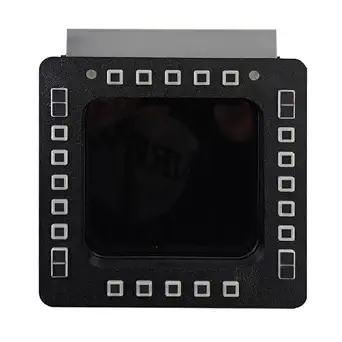
ConsoleXpress Flight Simulator Cockpit Panel, 5-Inch 2K 24-Key Fighter Jet MFD-Panel for PC Flight Sims
This 5-inch 2K display makes a compelling case for immersive cockpit realism, especially with its detailed naval-style DDI layout. Unlike the simpler, smaller attitude indicators like the mini module, this panel provides a full multi-function display experience with high-resolution visuals and tactile control via 24 backlit keys, making it perfect for flight enthusiasts who want authentic fighter jet controls. It’s designed to be plug-and-play, with an adjustable stand for easy setup, but its size and complexity may be overkill for casual simmers or those with limited desk space. The high-resolution screen offers clear, detailed visuals, yet the panel’s size and 24-key layout could be intimidating for beginners. This panel is ideal for serious PC flight sim fans seeking cockpit-like controls and detailed visual feedback.Pros:- High-resolution 2K display for clear visuals
- Tactile 24-key backlit controls for fast input
- Plug-and-play setup with adjustable stand
Cons:- Relatively large footprint, requiring ample desk space
- Premium price point compared to simpler panels
- May be overwhelming for novices new to cockpit controls
Best for: Dedicated flight simers who want a realistic, multi-function display with tactile controls for PC-based jet simulations.
Not ideal for: Casual users or those with limited desk space, as the panel’s size and complexity demand a stable setup and some familiarity with flight controls.
- Screen size:5 inch
- Resolution:2K
- Key count:24
- Connectivity:USB, HDMI
- Compatibility:PC flight sims including JF-17, F/A-18, F16
- Additional features:Adjustable stand, backlit keys
Bottom line: This panel offers a high-fidelity experience for advanced PC flight enthusiasts who prioritize visual clarity and tactile control in their cockpit setup.
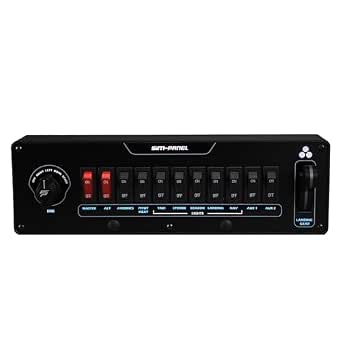
SIM-PANEL Aero Series FlightMate Simulation Panel (Dual Mag)
The Aero Series FlightMate’s dual magneto controls excel for sim pilots aiming for twin-engine aircraft realism, with independent controls and spring-back START positions that mirror real-world operations. Compared to the single magneto panel like the SIM-PANEL Aero Series FlightMate (Single Mag), the dual system offers greater authenticity for multi-engine aircraft, making it a favorite for those seeking more complex engine management. Its fully configurable toggle switches with backlit labels enhance visibility during intense flights, but the panel’s PC-only design and detailed setup might be daunting for newcomers. The professional-grade build and dual-magneto realism come with a higher learning curve and price, yet deliver unmatched engine management authenticity. This makes sense for serious multi-engine sim pilots craving accuracy in engine procedures.Pros:- Authentic dual magneto controls with spring-back start
- Fully configurable toggle switches with backlit labels
- High durability and professional-grade construction
Cons:- PC-only compatibility limits use with consoles
- Complex setup process for beginners
- Higher cost compared to simpler single-magneto panels
Best for: Advanced flight sim users focused on twin-engine aircraft who want true-to-life engine and system controls.
Not ideal for: Beginners or single-engine pilots who don’t need dual-magneto functionality, as the complexity and cost may be unnecessary.
- Magneto controls:Dual independent
- Toggle switches:11 with backlighting
- Build quality:Professional-grade
- Connectivity:PC only
- Special features:Spring-back START positions
- Dimensions: unspecified
Bottom line: This control panel is best suited for seasoned multi-engine pilots who want a detailed, authentic engine management experience in their sim cockpit.
Goekhyrani Flight Simulator Control Panel, A106 A35X/A32X mini Light OVERHEAD Panel for MSFS 2020/2024 (Backlit Edition)
This overhead panel offers a compact, backlit control surface designed specifically for MSFS 2020/2024, providing a realistic overhead cockpit experience. Its sturdy 3D-printed housing and backlit controls make it appealing for home cockpit builders seeking a space-efficient yet immersive control set. Unlike larger, more complex panels such as the WINGFLEXSIM Overhead Panel, this model emphasizes simplicity and compatibility, making it suitable for home enthusiasts rather than professional simulators. The adjustable brightness enhances usability in different lighting conditions, and its Mobiflight-driven software ensures broad aircraft compatibility. However, being a mini panel, it won’t replace full overhead control suites, and setup may require some software configuration. This is ideal for sim builders wanting a realistic overhead component without the bulk or cost of full panels.Pros:- Compact, space-saving design
- Adjustable backlighting for visibility
- Compatible with MSFS 2020/2024 via Mobiflight
Cons:- Limited number of controls—less comprehensive than full overhead panels
- Requires setup and software configuration
- Minor surface imperfections due to 3D printing process
Best for: Home cockpit builders focused on MSFS who need a space-efficient overhead control panel with backlit features.
Not ideal for: Professional or multi-panel cockpit setups requiring extensive overhead controls, as this is a compact, simplified module.
- Housing material:PLA-CF 3D-printed
- Backlit:Yes, adjustable brightness
- Compatibility:MSFS 2020/2024
- Application:Home cockpit overhead control
- Size:Compact
- Software:Mobiflight
Bottom line: This overhead panel delivers a realistic, backlit control experience for MSFS enthusiasts seeking a compact, integrated solution.
SIM-PANEL Aero Series FlightMate Simulation Panel (Single Mag)
The Single Mag version of the FlightMate panel provides a precise rotary magneto control with spring-back start, perfect for solo-engine aircraft simulations. Compared to the dual magneto model, this panel simplifies engine management but retains the critical realism of ignition and run-up procedures. Its fully configurable toggle switches with backlit labels enhance visibility and customization, making it a reliable choice for those focusing on single-engine aircraft. While it’s PC exclusive and demands some setup, the build quality and authentic engine controls make it appealing for dedicated sim pilots. Its straightforward design makes it less intimidating than dual-magneto systems but still very immersive. This panel is best suited for single-engine aircraft enthusiasts seeking realistic ignition controls.Pros:- Authentic rotary magneto control with spring-back start
- Configurable toggle switches with backlit labels
- Durable, professional-grade construction
Cons:- Limited to single-engine aircraft only
- PC-only compatibility restricts use with consoles
- Setup may be complex for newcomers
Best for: Serious PC flight sim pilots flying single-engine aircraft who want authentic ignition and engine procedures.
Not ideal for: Multi-engine pilots or those seeking more complex engine control options, as this is designed specifically for single-engine aircraft.
- Magneto control:Single rotary with spring-back start
- Toggle switches:11 with backlit labels
- Build quality:Professional-grade
- Connectivity:PC only
- Application:Single-engine aircraft
- Dimensions:11 x 3.25 x 3.25 inches
Bottom line: This control panel is perfect for single-engine aircraft simulation enthusiasts who want authentic ignition controls in their cockpit.
Logitech G USB G Pro Flight Multi Panel

Best Overall — Versatile autopilot control panel with extensive software compatibility
View Latest PriceThe Logitech G Pro Flight Multi Panel stands out for offering a comprehensive set of switches and an LED display that cover a wide range of flight controls, making it a flexible choice for serious flight sim enthusiasts. Compared to the Saitek Pro Flight Multi Panel, this model benefits from Logitech’s robust build quality and seamless integration with major flight simulation software, including Microsoft Flight Simulator, X-Plane, and Prepar3D. Its USB connectivity ensures straightforward setup, and the ability to mount onto a Pro Flight Yoke System or your own cockpit setup provides customization options. The tradeoff comes in its size—at roughly 11 x 2.2 x 3.3 inches, it requires dedicated space, and some users might find the controls less tactile than dedicated hardware like the Meza Ignition Panel. Overall, this panel makes the most sense for users who want a versatile, plug-and-play autopilot interface that can adapt to different sims and cockpit configurations.
Pros:- Extensive compatibility with major flight simulation software
- Full autopilot with adjustable settings and LED display
- Robust build quality and reliable USB connection
- Flexible mounting options for custom cockpit setups
Cons:- Size may be bulky for smaller desks or limited space environments
- Controls may feel less tactile compared to dedicated aircraft hardware
Best for: Flight sim enthusiasts seeking a full autopilot control panel with broad software support and mounting flexibility.
Not ideal for: Casual users or those with limited space who prefer simpler, more compact controls or are only using basic flight simulators.
- Connectivity:USB
- Number of switches:10
- Display type:LED
- Mounting options:Pro Flight Yoke System or custom
- Supported software:FSX, X-Plane, Prepar3D
- Item dimensions:11.1 x 2.24 x 3.31 inches
Bottom line: This panel is best suited for serious flight simmers who need a versatile, all-in-one autopilot interface compatible with multiple software platforms.

How We Picked
For this roundup, I focused on control panels that are widely compatible with leading flight simulation platforms like MSFS2020 and X-Plane. Key criteria included build quality, ease of installation, feature set, and user interface responsiveness. I also considered value for the price, ensuring options are suitable for different budgets. Panels offering realistic controls, durability, and software support ranked higher, while those with limited features or questionable compatibility were placed lower. The ranking reflects a combination of performance, usability, and overall value, aiming to guide both newcomers and seasoned sim pilots.
Factors to Consider When Choosing Best Flight Sim Control Panels
When selecting a flight sim control panel, it’s essential to understand what factors influence both your experience and your investment. The right panel depends on your simulation goals, space constraints, and budget. Carefully evaluating these aspects can prevent costly mistakes and ensure your setup provides the immersion and functionality you seek.
Compatibility and Platform Support
Before purchasing, verify that the panel is compatible with your preferred flight sim software, whether MSFS2020, X-Plane, or others. Some panels are optimized for specific platforms, which can affect software integration and control responsiveness. Choosing a versatile panel that supports multiple platforms reduces the risk of future upgrades or software conflicts.
Build Quality and Durability
Flight sim panels are often used intensively, so durability is vital. Look for panels with sturdy construction, quality switches, and reliable connectors. Cheaper options might save money upfront but could wear out quickly or feel flimsy during extended use. Investing in well-built hardware ensures a more immersive experience and longer lifespan.
Feature Set and Realism
Consider what controls are most important for your setup—overhead panels, instrument displays, or multi-function controllers. Panels with authentic switches, knobs, and backlit displays enhance realism. However, more features can mean increased complexity; weigh whether you want a plug-and-play experience or a detailed cockpit replica.
Size and Space Requirements
Measure your available workspace before choosing a panel. Compact options suit limited spaces, but may lack some controls found on larger panels. Conversely, full-sized control panels provide extensive controls but require significant room and possibly custom mounting. Balance your space constraints with your desired level of immersion.
Price and Value
Higher-priced panels often deliver superior build quality and more controls, but may be overkill for casual users. Conversely, budget options might lack durability or detailed controls. Consider what features are essential versus optional, and aim for a product that offers the best value given your budget and needs.
Frequently Asked Questions
Can I use these control panels with multiple flight sim platforms?
Many panels support multiple platforms like MSFS2020 and X-Plane through compatible software and drivers. However, some are specifically optimized for certain software, which can impact control responsiveness or feature support. Always check the manufacturer specifications to ensure cross-platform compatibility if you plan to switch between simulators.
Are more expensive panels worth the extra cost?
Higher-priced panels typically offer more authentic controls, better build quality, and greater durability, which can significantly enhance your experience if you’re a serious simmer. However, for casual users, a mid-range or budget panel might provide sufficient functionality. Consider your level of commitment and how much realism matters to you before investing heavily.
How difficult is it to set up these panels?
Setup varies widely; some panels are plug-and-play with minimal software installation, ideal for beginners. Others may require driver configuration or custom mounting, which can be more involved. Reading user reviews and manufacturer instructions can help gauge the complexity before purchase, ensuring you select a panel suited to your technical comfort level.
Do I need additional hardware or software to use these panels effectively?
Most panels are designed to work directly with flight sim software, but some may require additional drivers or configuration software. For advanced setups, you might need additional controllers or custom mappings to maximize functionality. Ensuring compatibility and understanding the setup process can save time and frustration later.
What are common mistakes to avoid when choosing a flight sim control panel?
A common mistake is prioritizing features over compatibility or build quality, which can lead to frustration and frequent replacements. Another is underestimating space requirements, resulting in a panel that doesn’t fit your setup. Finally, ignoring software support and driver updates can cause connectivity issues; always verify these aspects before purchasing.
Conclusion
If you seek the best overall experience, the Meza-Ignition Panel offers exceptional versatility and realism for a wide range of users. For those on a budget, the Logitech G Pro Flight Multi Panel provides reliable performance and plug-and-play ease. Serious enthusiasts or professionals should consider premium options like the WINGFLEXSIM A320 Overhead Panel for authentic cockpit immersion. Beginners or casual users will find smaller, simpler panels adequate, while those with space and budget for a full cockpit should look at larger, feature-rich solutions. Carefully match your needs with the right panel to maximize your flight sim experience in 2026.