The best PS5 Pro accessories depend on whether you want simpler charging, a tidier setup, or added airflow. My best overall pick is the PS5 Cooling Stand with Controller Charging Station, which combines console support and controller charging in one setup. For focused airflow, the KiwiHome 4-fan cooler adds automatic speed control and a USB hub, while the PowerA Twin Charging Station is a straightforward choice if you only need to charge controllers. The tradeoff is that all-in-one stands save space but add bulk, while standalone accessories are easier to place but do less. Read on for the full breakdown of all 15 options and how to choose among them.

Get the latest gadgets delivered free — and shop member deals
- Fast, free delivery on millions of items
- Access to Prime Big Deal Days deals on October 6–7
- Prime Video, Amazon Music and more included
Complete the kit



Key Takeaways
- The PS5 Cooling Stand with Controller Charging Station is the best all-round match for buyers who want console support and controller charging together, rather than a single-purpose accessory.
- Cooling add-ons vary more in extras than in purpose: the KEPLUG and KiwiHome four-fan models pair airflow with USB connectivity, while the JUSPRO is a more focused fan option.
- PowerA’s Twin Charging Station is the clearest choice for charging alone. It avoids adding a cooling unit or console stand when those functions are not needed.
- Setup space changes the ranking. The wall mount and Monzlteck under-desk mount solve placement problems that desktop stands cannot, but they require more planning and a suitable mounting location.
- Compatibility and fit deserve attention across this lineup: several products cover multiple PS5 generations or console orientations, but buyers should check their Pro model, disc or digital version, and available ports before choosing.
| KEPLUG PS5 Pro Cooling Fan with 4 Fans and USB 3.0 Hub |  | Best Dedicated Cooling Add-On | Brand: KEPLUG | Model: DSP-885 | Compatibility: PS5 Pro Disc and Digital Editions | VIEW LATEST PRICE | See Our Full Breakdown |
| PS5 Cooling Stand with Controller Charging Station |  | Best All-in-One Stand for Everyday Setups | Brand: Kammkonb | Compatibility: PS5 Standard, Slim, and Pro Disc/Digital consoles | Fan speeds: 3: High, Mid, and Low | VIEW LATEST PRICE | See Our Full Breakdown |
| PS5 Slim Pro Stand with Cooling, RGB Lights and Adjustable Fan |  | Best Stand for DualSense Edge Owners | Brand: Rysker | Model number: VG-P5328 | Manufacturer part number: RY-P5296 | VIEW LATEST PRICE | See Our Full Breakdown |
| GRAUGEAR PS5 Pro/Slim Cooling and Dust Protection Kit |  | Best for Dust Prevention and Maintenance | Brand: GRAUGEAR | Model: G-PS5M2F-DF+ | Part number: 18146 | VIEW LATEST PRICE | See Our Full Breakdown |
| PlayStation DualSense Edge Wireless Controller | 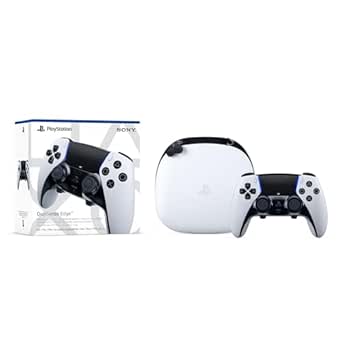 | Best Premium Gameplay Upgrade | Compatible device: PlayStation 5 | Controller type: Gamepad | Connectivity: Wireless and USB | VIEW LATEST PRICE | See Our Full Breakdown |
| PS5 Horizontal Stand with Cooling Fan & Dual Controller Charger, Scalable Design for All PS5 Models, White |  | Best All-in-One Horizontal Stand | Form factor: Desk stand | Compatible consoles: Original PS5 Disc and Digital, PS5 Slim, PS5 Pro | Mounting type: Tabletop | VIEW LATEST PRICE | See Our Full Breakdown |
| PowerA Twin Charging Station for PlayStation 5 DualSense Controllers |  | Best Simple DualSense Charger | Compatible device: PlayStation 5 | Capacity: Two DualSense controllers | Form factor: Tabletop | VIEW LATEST PRICE | See Our Full Breakdown |
| JUSPRO Cooling Fan for PS5 Pro |  | Best Pro-Only Automatic Cooler | Compatibility: PS5 Pro Disc and Digital editions only | Number of fans: Four | Speed settings: Two | VIEW LATEST PRICE | See Our Full Breakdown |
| Tokluck PS5 Cooling Station with Automatic Fan, Controller Charger, and RGB Lighting |  | Best Feature-Rich Tower Station | Compatible devices: PS5, PS5 Slim, PS5 Pro, PS5 and Edge controllers | Form factor: Tower | Fan modes: High, medium, low, automatic, and off | VIEW LATEST PRICE | See Our Full Breakdown |
| PS5 Wall Mount Kit with Cooling Fan & Charging Station – Floating Shelf for All PlayStation 5 (Slim/Pro) Disc & Digital Consoles | 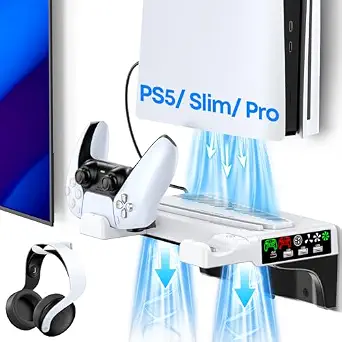 | Best Wall-Mounted Space Saver | Brand: Tokluck | Model number: VG-P5326 | Compatible consoles: Original PS5, PS5 Slim, PS5 Pro, Disc and Digital | VIEW LATEST PRICE | See Our Full Breakdown |
| KiwiHome Cooling Fan for PS5 Pro – 4-Fan 36-Blade with Auto Speed and USB 3.0 |  | Best for Broad Airflow Coverage | Compatibility: 2024 PS5 Pro | Fan count: 4 | Total blades: 36 | VIEW LATEST PRICE | See Our Full Breakdown |
| AQIDAP 5-Port USB Hub for PS5 Pro |  | Best for Adding Ports | Compatibility: PS5 Pro | USB 2.0 ports: 3 | Type-C ports: 2 | VIEW LATEST PRICE | See Our Full Breakdown |
| Monzlteck Under-Desk Mount for PlayStation 5 |  | Best for Clearing Desk Space | Compatible devices: PlayStation 5, PS5 Slim, and PS5 Pro | Mounting type: Under-desk | Material: Metal | VIEW LATEST PRICE | See Our Full Breakdown |
| KIWIHOME Cooling Fan for PS5 Pro | 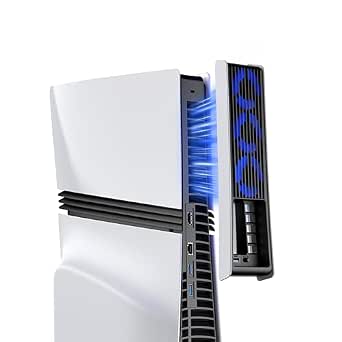 | Best Quiet Cooling Pick | Compatibility: PS5 Pro Disc and Digital Editions | Fan count: 3 hydraulic fans | Cooling method: Forced air | VIEW LATEST PRICE | See Our Full Breakdown |
| OIVO Horizontal Stand for PS5, PS5 Slim, and PS5 Pro Disc and Digital Consoles |  | Best Multi-Generation Stand | Compatible consoles: PS5, PS5 Slim, and PS5 Pro; disc and digital editions | Orientation: Horizontal | Material: ABS | VIEW LATEST PRICE | See Our Full Breakdown |
| PS5 Pro accessorie | Compatibility |
|---|---|
| KEPLUG PS5 Pro Cooling Fan wit | PS5 Pro Disc and Digital Editions |
| PS5 Cooling Stand with Control | PS5 Standard, Slim, and Pro Disc/Digital consoles |
| PS5 Slim Pro Stand with Coolin | PS5, PS5 Slim, and PS5 Pro |
| GRAUGEAR PS5 Pro/Slim Cooling | PS5 Pro and PS5 Slim |
| PlayStation DualSense Edge Wir | — |
| PS5 Horizontal Stand with Cool | — |
| PowerA Twin Charging Station f | — |
| JUSPRO Cooling Fan for PS5 Pro | PS5 Pro Disc and Digital editions only |
| Tokluck PS5 Cooling Station wi | — |
| PS5 Wall Mount Kit with Coolin | — |
| KiwiHome Cooling Fan for PS5 P | 2024 PS5 Pro |
| AQIDAP 5-Port USB Hub for PS5 | PS5 Pro |
| Monzlteck Under-Desk Mount for | — |
| KIWIHOME Cooling Fan for PS5 P | PS5 Pro Disc and Digital Editions |
| OIVO Horizontal Stand for PS5 | — |
More Details on Our Top Picks
KEPLUG PS5 Pro Cooling Fan with 4 Fans and USB 3.0 Hub
For a PS5 Pro owner who wants cooling without replacing the console stand, the KEPLUG’s four-fan clip-on design is the most focused option here. Its automatic control starts at 39°C and steps up to Turbo at 43°C, while manual speed control gives you another way to manage airflow. Compared with the Kammkonb Cooling Stand, it takes up less of the setup’s footprint and doesn’t bundle charging or disc storage; the tradeoff is that it won’t tidy up controllers and accessories. A USB 3.0 passthrough helps preserve a port for peripherals or charging, and installation is tool-free. It fits PS5 Pro Disc and Digital models only, so owners of the original 2020 PS5 or PS5 Slim should skip it. Warranty details also conflict: item details list two years, while the description claims three.
Pros:- Four fans with automatic temperature-based speed adjustment
- Manual fan-speed control offers an alternative to automatic operation
- USB 3.0 passthrough can keep a port available for a peripheral or charging
- Tool-free clip-on installation
Cons:- Compatible only with PS5 Pro Disc and Digital consoles
- Adds cooling but does not include controller charging or accessory storage
- Warranty duration is inconsistent between the item details and description
Best for: PS5 Pro owners who want a clip-on cooling accessory with automatic fan control and a USB passthrough, without adding a full charging stand.
Not ideal for: PS5 Slim and 2020 PS5 owners, or anyone seeking controller charging, disc storage, or a stand that organizes several accessories.
- Brand:KEPLUG
- Model:DSP-885
- Compatibility:PS5 Pro Disc and Digital Editions
- Fan count:4
- Power connector:USB
- USB hub:USB 3.0 passthrough port
- Temperature control:Activates at 39°C; increases to Turbo at 43°C
- Maximum rotational speed:4500 RPM
- Noise level:28 dB
Our verdict“Choose the KEPLUG if you want a dedicated, tool-free cooling add-on for a PS5 Pro and don’t need the broader organization of a charging stand.”
PS5 Cooling Stand with Controller Charging Station
The Kammkonb combines several practical jobs in one base: console cooling, charging for two standard DualSense controllers, and storage for up to 13 game discs. That makes it a stronger organization pick than the KEPLUG clip-on fan, which focuses on PS5 Pro cooling and a USB passthrough but leaves controllers and discs elsewhere. Three fan speeds let you choose between low, mid, and high, while three USB ports, a headset holder, and a media remote slot suit a shared entertainment setup. The tradeoff is that this is a larger, more involved accessory than a simple fan, and the controllers and other accessories are not included. It supports PS5 Standard, Slim, and Pro consoles, but the charging contacts do not support the DualSense Edge.
Pros:- Combines console cooling with charging for two standard PS5 controllers
- Three selectable fan speeds
- Stores up to 13 game discs and includes a headset holder and media remote slot
- Three USB ports and a safety screw to secure the console to the stand
Cons:- Does not charge the DualSense Edge controller
- Controllers and other accessories must be supplied separately
- Combines more functions and storage than buyers seeking a simple cooling accessory may need
Best for: PS5 households with standard DualSense controllers that want one stand for console cooling, dual-controller charging, disc storage, and small accessories.
Not ideal for: Players who use a DualSense Edge, want only a compact cooling add-on, or already have a preferred controller charging setup.
- Brand:Kammkonb
- Compatibility:PS5 Standard, Slim, and Pro Disc/Digital consoles
- Fan speeds:3: High, Mid, and Low
- Controller charging:2 standard controllers simultaneously; approximately 3 hours
- USB ports:3
- Game disc storage:Up to 13 discs
- Additional storage:Headset holder and media remote slot
- Protection:Overcharge, overheating, overcurrent, overvoltage, and short-circuit protection
- Controller compatibility:Standard PS5 controllers; not compatible with Edge controller
Our verdict“Pick the Kammkonb if you want a single stand to cool a compatible PS5, charge two standard controllers, and reduce accessory clutter.”
PS5 Slim Pro Stand with Cooling, RGB Lights and Adjustable Fan
The Rysker earns its place for players who want a stand that can charge both original and Edge controllers, a useful distinction from the Kammkonb, which excludes the Edge. Its adjustable three-level fan includes an auto mode, and the three side USB hubs give the setup room for extra devices. RGB lighting adds a visual feature rather than the broader disc storage found on the Kammkonb, so the Rysker suits a more compact accessory mix than a game collection that needs a home. There are real setup tradeoffs: installation requires removing screws and cables from the console base, and the stand adds noticeable bulk. Its single fan may also be a less compelling fit for users who specifically want the four-fan arrangement of the KEPLUG. It supports PS5, Slim, and Pro models.
Pros:- Built-in charging supports original and Edge PS5 controllers
- Three-level fan includes an auto mode
- Three side USB hubs can connect or charge additional devices
- Compatible with PS5, PS5 Slim, and PS5 Pro
Cons:- Installation requires removing screws and cables from the console base
- Single fan may not suit buyers seeking a multi-fan cooling setup
- Adds noticeable bulk to the gaming area
Best for: PS5 Pro players with both standard and Edge controllers who want a charging stand with adjustable cooling, USB hubs, and RGB lighting.
Not ideal for: Buyers who want a quick, tool-free installation, a low-profile setup, or a multi-fan cooling attachment rather than a full stand.
- Brand:Rysker
- Model number:VG-P5328
- Manufacturer part number:RY-P5296
- Compatibility:PS5, PS5 Slim, and PS5 Pro
- Number of fans:1
- USB hubs:3
- Controller charging:Supports original and Edge controllers
- Warranty:2 years
Our verdict“Choose the Rysker if charging a DualSense Edge alongside an original controller matters more than tool-free installation or a four-fan design.”
GRAUGEAR PS5 Pro/Slim Cooling and Dust Protection Kit
Unlike the active fan stands in this roundup, the GRAUGEAR kit focuses on dust management and heat dissipation rather than powered cooling. It pairs four breathable fan filters with silicone port plugs and a metal M.2 SSD heatsink cover, then includes a brush, screwdriver, and cloth for installation and cleaning. That makes it a more maintenance-oriented choice than the KEPLUG, which actively moves air but does not provide filters or port plugs. The distinction matters: filters need regular cleaning, and this kit does not add a fan, USB ports, or controller charging. Its compatibility covers PS5 Pro and PS5 Slim, not the original 2020 PS5. For owners who want to limit dust entry and protect the M.2 area without adding a bulky stand, its small parts are a focused alternative to all-in-one stations.
Pros:- Combines a metal M.2 SSD heatsink cover with four fan dust filters
- Silicone port plugs help limit dust entering unused ports
- Includes a brush, screwdriver, and cloth for installation and cleaning
- Compatible with PS5 Pro and PS5 Slim
Cons:- Does not include a powered fan or provide active cooling
- Filters require cleaning to maintain airflow
- Not compatible with the original 2020 PS5
Best for: PS5 Pro or Slim owners in dusty spaces who want passive dust protection, an M.2 heatsink cover, and included tools for upkeep.
Not ideal for: Players looking for active fan cooling, controller charging, USB expansion, or compatibility with the original 2020 PS5.
- Brand:GRAUGEAR
- Model:G-PS5M2F-DF+
- Part number:18146
- Compatibility:PS5 Pro and PS5 Slim
- Included components:M.2 SSD heatsink cover, 4 fan dust filters, silicone port plugs, brush, screwdriver, and cloth
- Heatsink material:Metal
- Dimensions:3.9 × 0.9 × 0.4 in
- Weight:70 g
- Warranty:12 months
Our verdict“Choose the GRAUGEAR kit if dust control and M.2 coverage matter more to you than active cooling or charging features.”
PlayStation DualSense Edge Wireless Controller
The DualSense Edge is the only pick here that changes how games feel and control rather than adding cooling, storage, or charging to the console. Remappable buttons, adjustable trigger travel, interchangeable stick caps, and back buttons let players tailor controls for different games, while saved profiles make those layouts easy to switch. Compared with the Rysker stand, which is notable for charging an Edge controller, this is the accessory that delivers the customization itself; the stand is a separate purchase. Haptics and adaptive triggers retain the standard DualSense features when a game supports them. The tradeoffs are practical: replaceable stick modules are sold separately, and the advertised haptic and adaptive effects depend on game support. For casual players happy with a standard controller, these extra adjustments may not justify adding another gamepad.
Pros:- Remappable buttons and switchable control profiles
- Adjustable trigger travel and stick settings
- Interchangeable stick caps and back buttons
- Includes haptic feedback and adaptive triggers in supported games
Cons:- Replaceable stick modules are sold separately
- Haptic feedback and adaptive triggers depend on game support
- Customization may be unnecessary for players content with a standard DualSense
Best for: PS5 Pro players who want tailored control layouts, adjustable trigger response, and physical control options for different game genres.
Not ideal for: Casual players satisfied with the standard DualSense, or anyone who expects replacement stick modules or every game to use adaptive triggers and haptics.
- Compatible device:PlayStation 5
- Controller type:Gamepad
- Connectivity:Wireless and USB
- Power source:Battery powered
- Weight:2.6 pounds
- Dimensions:8 × 8 × 4.2 in
- Color:White
- Package quantity:1
- Replaceable stick modules:Available separately
Our verdict“Choose the DualSense Edge if control customization is your main PS5 Pro upgrade, and skip it if a standard DualSense already suits your games.”
PS5 Horizontal Stand with Cooling Fan & Dual Controller Charger, Scalable Design for All PS5 Models, White
This stand combines three useful jobs—horizontal support, adjustable cooling, and dual-controller charging—without taking over a separate outlet for its charging dock. Its scalable fit covers the original PS5, Slim, and Pro, giving it broader use across console generations than the JUSPRO Cooling Fan for PS5 Pro, which only fits the Pro. The tool-free assembly and EVA foam inserts also make setup less involved than a wall-mounted option such as the Tokluck PS5 Wall Mount Kit. The tradeoff is that charging power comes from the console itself, so the dock cannot run independently, and the high fan setting may be audible. I’d choose it for a tidy horizontal setup, but skip it if you want a vertical stand or a neutral color other than white.
Pros:- Scalable design fits original, Slim, and Pro PS5 models
- Combines a dual-controller charger and three-speed fan with the stand
- Tool-free assembly with EVA foam inserts
- Powered from the console, avoiding a separate charging adapter
Cons:- Charging dock depends on the PS5 for power
- Fan noise may be noticeable at the highest setting
- White is the only listed color
Best for: PS5 owners who keep the console horizontal and want cooling plus charging for two controllers in one compact tabletop accessory.
Not ideal for: Players who need a vertical console setup, want an independently powered charging dock, or prefer a color other than white.
- Form factor:Desk stand
- Compatible consoles:Original PS5 Disc and Digital, PS5 Slim, PS5 Pro
- Mounting type:Tabletop
- Cooling:Three adjustable speed settings
- Controller charging:Two original or Edge controllers; approximately 3–3.5 hours
- Power source:Connected to the PS5 with the included cable
- Color:White
Our verdict“Choose this if you want one tool-free horizontal stand for multiple PS5 generations that also charges two controllers.”
PowerA Twin Charging Station for PlayStation 5 DualSense Controllers
If your main annoyance is finding charged controllers, the PowerA Twin Charging Station keeps the solution focused: it charges and displays two DualSense controllers without adding fans, lights, or a console stand. That makes it a simpler desk accessory than the Tokluck PS5 Cooling Station, which adds cooling, USB ports, and RGB lighting but takes up more space and requires more setup choices. PowerA is also officially licensed and includes a two-year limited warranty. The tradeoff is equally clear: it needs its own corded power source and does not hold or cool the PS5. I’d pick it when dependable controller storage matters more than consolidating accessories; buyers seeking a single station for both the console and controllers should look at the Tokluck instead.
Pros:- Charges two DualSense controllers at once
- Keeps controllers displayed and easy to reach
- Officially licensed for PlayStation 5
- Includes a two-year limited warranty
Cons:- Requires a corded power source and AC adapter
- Does not provide console cooling or console support
- Designed for DualSense controllers rather than a broader accessory setup
Best for: DualSense owners who want a straightforward tabletop dock to charge and display two controllers separately from their PS5.
Not ideal for: Players trying to reduce accessory clutter with one combined console stand, cooling fan, and charger.
- Compatible device:PlayStation 5
- Capacity:Two DualSense controllers
- Form factor:Tabletop
- Power source:Corded electric, AC adapter
- Output current:1.5 A
- Wattage:10 W
- USB ports:One
- Warranty:Two-year limited warranty
Our verdict“Pick PowerA for a dedicated, licensed dual-DualSense dock when you do not need a cooling stand or extra USB ports.”
JUSPRO Cooling Fan for PS5 Pro
The JUSPRO is the most focused cooling pick here: its four fans, temperature-based speed control, and automatic on/off behavior are aimed specifically at PS5 Pro owners who want cooling without adding a controller dock or full stand. Unlike the PS5 Horizontal Stand with Cooling Fan & Dual Controller Charger, it supports both vertical and horizontal placement, but it gives up that model’s charging convenience. It also includes a USB 3.0 port for another accessory, a useful addition when the console’s ports are already occupied. Compatibility is the hard limit: it does not fit the original PS5 or Slim. The product description gives no independent performance or noise measurements, so I’d treat its cooling claims as features rather than proof of a temperature improvement.
Pros:- Four-fan design with automatic temperature-based speed adjustment
- Auto mode switches the fan on and off with the console
- Works with vertical or horizontal PS5 Pro placement
- Adds a USB 3.0 port for another device
Cons:- Not compatible with original PS5 or PS5 Slim
- Does not include controller charging or a full console stand
- Cooling effectiveness and noise are not independently substantiated in the supplied product details
Best for: PS5 Pro owners who want a dedicated cooler that can follow automatic temperature control and work with either console orientation.
Not ideal for: Owners of the original PS5 or PS5 Slim, or buyers who want a combined controller charger and console stand.
- Compatibility:PS5 Pro Disc and Digital editions only
- Number of fans:Four
- Speed settings:Two
- Cooling method:Air
- Power connector:USB
- Additional port:USB 3.0
- Power:5 V DC, 5 W
- Orientation:Vertical or horizontal
Our verdict“Choose JUSPRO if you own a PS5 Pro and want a compact, orientation-flexible cooler rather than an all-in-one charging stand.”
Tokluck PS5 Cooling Station with Automatic Fan, Controller Charger, and RGB Lighting
Tokluck brings the most extras to a tabletop tower: automatic fan control, controller charging, three USB ports, and nine RGB effects all sit in one station compatible with PS5, Slim, and Pro. That makes it a broader accessory hub than the JUSPRO Cooling Fan for PS5 Pro, which focuses on cooling and fits only the Pro, while the Tokluck also charges both standard and Edge controllers. Its temperature thresholds and manual fan modes give buyers more control than a basic fixed-speed cooler. The compromises are practical: the controller needs careful placement for a stable charging connection, and the product details contain an inconsistent reference to PS4 adapters. At 0.83 kg, this is also a substantial tower, so it suits a permanent tabletop setup better than a minimal one.
Pros:- Compatible with PS5, PS5 Slim, and PS5 Pro
- Charges standard PS5 and Edge controllers
- Three USB ports add connection options for accessories
- Offers automatic and manual fan modes plus nine RGB effects
Cons:- Controllers may need repositioning to maintain a stable charging connection
- Product details inconsistently refer to PS4 adapters
- Tower form and 0.83 kg weight may not suit compact setups
Best for: PS5 owners who want a vertical station with controller charging, several USB ports, selectable fan modes, and customizable lighting.
Not ideal for: Players with limited desk or TV-console space, or anyone seeking a simple cooler without lighting and charging accessories.
- Compatible devices:PS5, PS5 Slim, PS5 Pro, PS5 and Edge controllers
- Form factor:Tower
- Fan modes:High, medium, low, automatic, and off
- Automatic fan thresholds:High above 98.6°F (37°C); medium at 95–98.6°F (35–37°C); low below 95°F (35°C)
- Controller charging time:About 2.5 hours
- USB ports:Three
- RGB lighting:Nine effects with memory function
- Weight:0.83 kg
Our verdict“Choose Tokluck if you want a multi-function vertical station and have room for its charging, USB, cooling, and lighting features.”
PS5 Wall Mount Kit with Cooling Fan & Charging Station – Floating Shelf for All PlayStation 5 (Slim/Pro) Disc & Digital Consoles
This kit is the strongest fit for a setup where clearing the TV stand matters more than keeping the PS5 on a tabletop. Its wall-mounted bracket holds original, Slim, and Pro consoles, while the package adds dual-controller charging, a headset holder, an extra USB port, and cooling fans. Compared with the Tokluck PS5 Cooling Station, it moves the console off the furniture instead of adding another tower beside it; compared with the PowerA Twin Charging Station, it combines controller charging with console storage and cooling. The cost of that space-saving layout is installation: you need a suitable wall location and a nearby power source. Its stated 8.86 × 7.28 × 3.35-inch dimensions also mean it still projects into the room, so I’d check clearance before choosing it.
Pros:- Fits original, Slim, and Pro PS5 Disc and Digital models
- Combines console mounting, dual-controller charging, cooling, and a headset holder
- Charging indicators show controller status
- Includes an extra USB port
Cons:- Requires wall installation and a nearby power source
- Projects into the TV area and needs adequate clearance
- Less portable and adjustable than a tabletop stand
Best for: Players with a suitable wall and nearby power who want to free TV-console space while keeping the PS5 and accessories together.
Not ideal for: Renters or anyone unable to drill or mount hardware, and buyers who want a portable tabletop accessory with minimal installation.
- Brand:Tokluck
- Model number:VG-P5326
- Compatible consoles:Original PS5, PS5 Slim, PS5 Pro, Disc and Digital
- Mounting type:Wall mount
- Dimensions:8.86 × 7.28 × 3.35 inches
- Weight:0.75 kg
- Cooling:Dual fans with three speed settings
- Additional features:Dual-controller charger, headset holder, extra USB port, charging indicators
Our verdict“Pick this wall kit if freeing furniture space is your priority and you can securely mount it near power.”
KiwiHome Cooling Fan for PS5 Pro – 4-Fan 36-Blade with Auto Speed and USB 3.0
For PS5 Pro owners who want active cooling with automatic speed control, this KiwiHome model stands out for its four fans and 36 blades. Its temperature-based adjustment means fan speed can respond to console heat without requiring manual changes. The stated noise level is around 40 dB, so it may be audible in a quiet room; the three-fan KIWIHOME PX10 is specified at a lower 22 dB. This model also draws power from the console and offers a USB 3.0 passthrough, which helps keep an extra accessory connected without another adapter. The tradeoff is its narrow compatibility: it is made for the 2024 PS5 Pro, not earlier or Slim consoles. I’d choose it over a basic stand when airflow is the priority, but skip it if your console model is uncertain or quiet operation matters most.
Pros:- Four fans and 36 blades provide broad forced-air circulation
- Automatic temperature-based speed adjustment avoids manual fan settings
- USB 3.0 passthrough can power or connect another device
- Draws power from the console rather than requiring a separate adapter
Cons:- Only compatible with the 2024 PS5 Pro
- Its stated 40 dB noise level is higher than the 22 dB figure for the KIWIHOME PX10
- Adds an accessory to the console’s USB connection
Best for: 2024 PS5 Pro owners seeking temperature-responsive airflow and a USB passthrough for another accessory
Not ideal for: Owners of earlier PS5 or PS5 Slim models, or players who prioritize the lower stated noise level of the three-fan KIWIHOME PX10
- Compatibility:2024 PS5 Pro
- Fan count:4
- Total blades:36
- Cooling method:Forced air
- Power connector:USB 3.0
- Wattage:15 watts
- Noise level:Around 40 dB
- Maximum rotational speed:3400 rpm
- Dimensions:14.57 × 4.72 × 1.97 inches
Our verdict“Choose this fan for automatic, multi-fan cooling on a 2024 PS5 Pro, but pick the quieter KIWIHOME PX10 if noise is your main concern.”
AQIDAP 5-Port USB Hub for PS5 Pro
The AQIDAP hub is the straightforward choice when a PS5 Pro setup has more wired accessories than available connections. It adds three USB 2.0 ports and two Type-C ports in a compact, plug-and-play unit, without an external power supply. That makes it better suited to controllers, keyboards, mice, and other modest-power accessories than to fast storage workflows. Its stated data rate is 480 megabits per second, so it is less appealing for frequent large-file transfers than a faster data hub would be. Unlike the KiwiHome cooling fans in this roundup, it does not change console airflow or temperature; its value is purely in connectivity. I’d pick it when convenience and extra ports matter more than speed, but anyone connecting several power-hungry devices should check the per-port current limits first.
Pros:- Adds five ports, including two Type-C connections
- Plug-and-play setup requires no drivers
- Works without a separate power supply
- Compact form helps keep an accessory setup contained
Cons:- USB 2.0 data rate is limited to 480 megabits per second
- Port current limits may not suit multiple power-hungry accessories
- Designed specifically for PS5 Pro compatibility
Best for: PS5 Pro owners who need extra connections for controllers, a headset, and low-demand USB accessories
Not ideal for: Players who regularly transfer large files or need an externally powered hub for several high-demand devices
- Compatibility:PS5 Pro
- USB 2.0 ports:3
- Type-C ports:2
- Data transfer rate:480 megabits per second
- USB 2.0 port current:500 mA per port
- Type-C port current:1000 mA
- External power supply:Not required
- Setup:Plug and play; no drivers required
Our verdict“Choose the AQIDAP hub to expand everyday PS5 Pro connections, not to speed up storage transfers or power demanding devices.”
Monzlteck Under-Desk Mount for PlayStation 5
For a PS5 Pro setup where the console takes up valuable surface area, the Monzlteck mount moves it beneath the desk rather than adding another stand beside it. Its metal bracket and security screw provide a more fixed installation than the OIVO horizontal stand, which is better suited to a console that needs to remain accessible on a shelf. The mount’s hollow design leaves room for airflow, while silicone covers help protect the console from direct contact with the bracket. The main cost is installation effort: this mount requires drilling and securing it with six screws, so it is not a quick, tool-free option. It also suits only the listed PlayStation console family. I’d choose it for a stable, concealed placement, but not for a rental desk or a setup that gets rearranged often.
Pros:- Moves the console beneath a desk to reclaim surface space
- Metal construction and a security screw support a fixed installation
- Silicone covers help protect the console from scratches
- Hollow design leaves space for airflow around the console
Cons:- Installation requires drilling and six screws
- Less convenient to access or reposition than the OIVO horizontal stand
- Includes one mount and is limited to compatible PlayStation consoles
Best for: PS5 Pro owners with a permanent desk setup who want the console off the desktop and secured beneath it
Not ideal for: Renters, frequent room rearrangers, or anyone unwilling to drill and fasten a mount with six screws
- Compatible devices:PlayStation 5, PS5 Slim, and PS5 Pro
- Mounting type:Under-desk
- Material:Metal
- Fastening:Screws
- Security feature:Security screw
- Protective details:Silicone covers
- Weight:1.6 pounds
- Included components:1 mount
Our verdict“Pick the Monzlteck mount for a secure, space-saving fixed setup, but choose the OIVO stand if you need easy placement without drilling.”
KIWIHOME Cooling Fan for PS5 Pro
The KIWIHOME PX10 is the quieter cooling option in this group, with a stated 22 dB noise level and three hydraulic fans. It adjusts speed based on temperature and can switch on and off with the console in Auto or Constant mode, so there is less need to manage it separately. Compared with the four-fan KiwiHome PX10U, this model has fewer fans but a much lower listed noise level and supports both vertical and horizontal placement. Its USB 3.0 passthrough also leaves a connection available for another device. The tradeoffs are PS5 Pro-only compatibility and a blue light that stays on while the fan runs, which may bother players in a dark room. I’d favor it for quieter everyday cooling, while the PX10U may appeal more to buyers focused on fan count.
Pros:- Three hydraulic fans use automatic temperature-based speed adjustment
- Stated 22 dB noise level is lower than the four-fan KiwiHome PX10U’s listed 40 dB
- Works with vertical or horizontal PS5 Pro placement
- USB 3.0 passthrough and console-linked operation add convenience
Cons:- Not compatible with 2020 PS5 or 2023 PS5 Slim models
- Blue operating light may distract in a dark gaming space
- Three fans provide fewer fan units than the KiwiHome PX10U
Best for: PS5 Pro Disc or Digital owners who want automatic cooling, flexible placement, and a lower stated noise level
Not ideal for: Owners of the 2020 PS5 or 2023 PS5 Slim, and players who do not want an illuminated blue light in a dark room
- Compatibility:PS5 Pro Disc and Digital Editions
- Fan count:3 hydraulic fans
- Cooling method:Forced air
- Noise level:22 dB
- Maximum rotational speed:5000 rpm
- Power:USB, 15 watts
- Placement:Vertical or horizontal
- Passthrough:USB 3.0
- Dimensions:9.92 × 2.95 × 2.95 inches
Our verdict“Choose the PX10 for quieter, orientation-flexible PS5 Pro cooling, provided its blue running light will not distract you.”
OIVO Horizontal Stand for PS5, PS5 Slim, and PS5 Pro Disc and Digital Consoles
The OIVO stand is the practical pick for PS5 Pro owners who want a stable horizontal setup without committing to an under-desk mount. Its two-piece design, support rods, screw, and anti-slip pads help hold the console in place, while the layout leaves space beneath it for airflow. That makes it more adaptable to a shelf or media unit than the Monzlteck mount, which needs drilling and fixes the console below a desk. OIVO also lists compatibility with PS5, PS5 Slim, and PS5 Pro, across disc and digital editions, making it useful for households with different console versions. It does require assembly and only supports horizontal placement, so it is not the right choice for a vertical console layout. I’d choose it for flexible model compatibility and a secured shelf setup, not for cooling or storage.
Pros:- Compatible with PS5, PS5 Slim, and PS5 Pro disc and digital consoles
- Support rods, a securing screw, and anti-slip pads help stabilize the console
- Leaves space beneath the console for airflow
- Includes EVA foam pieces for digital editions
Cons:- Requires assembly before use
- Supports horizontal placement only
- Does not provide active cooling like either KIWIHOME fan
Best for: Households with multiple PS5 generations that want a secured horizontal stand for a shelf or media unit
Not ideal for: Players who need vertical placement, active cooling, or a permanently concealed under-desk installation
- Compatible consoles:PS5, PS5 Slim, and PS5 Pro; disc and digital editions
- Orientation:Horizontal
- Material:ABS
- Fastening:Screw
- Included stands:2
- Support rods:3
- Digital edition padding:2 EVA foam pieces
- Other included hardware:1 screw
Our verdict“Choose the OIVO stand for a stable, cross-generation horizontal setup; choose Monzlteck instead if getting the console off the desk matters more.”
How We Picked
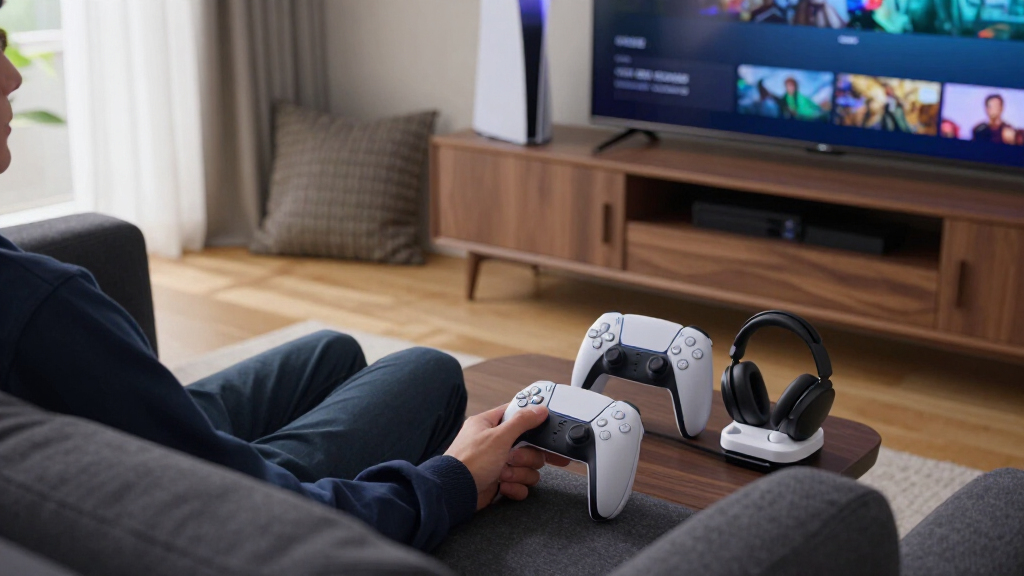
I ranked these accessories by how directly they solve common PS5 Pro setup needs: cooling, charging, cable expansion, dust protection, and space management. I weighed practical usability, compatibility claims across PS5 versions, the number of functions bundled together, and whether those extras add convenience or unnecessary bulk. Because an accessory can only help if it suits the console’s placement and the owner’s routine, fit and setup demands also shaped the order.
The ranking favors versatile options that offer a useful combination of functions without making one feature do all the work. Standalone products rank well when a focused job—such as charging two controllers or adding USB ports—is their clear strength. Cooling fans are not treated as automatic upgrades: their controls, placement, and bundled features matter, and buyers should not assume an add-on fan guarantees lower console temperatures. Mounts and protection kits suit narrower needs, so they rank according to how well they solve those needs and how much installation or compatibility checking they require.
Factors to Consider When Choosing Best PS5 Pro Accessories
Before choosing an accessory, start with the problem in your setup rather than the longest feature list. A fan, stand, charger, mount, and hub each solve different inconveniences, and combining them can add clutter as easily as it can reduce it.
Choose cooling based on placement, not fan count
First check whether your console has open space around its intake and exhaust areas; a crowded shelf may be a placement problem that an add-on fan cannot fix. Fan count and blade count alone do not tell you how useful a cooler will be in your setup. Look at where the accessory directs air, how it attaches, and whether its controls let you manage noise or speed. A fan that draws power from the console may also use a port you want for a headset dongle or storage accessory. Avoid treating cooling accessories as a substitute for keeping vents clear and dust under control. If your console is already well placed, a charger or hub may bring more everyday value than another fan.
Check the exact console version and orientation
PS5 accessories can describe compatibility broadly while still differing in fit across console generations, disc drives, and digital editions. Confirm that a stand or mount supports your PS5 Pro configuration, including whether the console has a disc drive attached. Horizontal supports and vertical stands are not interchangeable just because both list several PS5 models. Also check whether the accessory blocks buttons, ports, vents, or access to the drive. For a wall or under-desk mount, verify the mounting surface and the space needed to reach cables before installation. A few minutes spent matching the product to your console can prevent a return or a cramped setup.
Decide whether an all-in-one stand really saves space
Charging stands with fans, lighting, or storage can consolidate several accessories, but they may take up more room than a basic stand. Measure the shelf or desk footprint, including the space needed to remove controllers and connect cables. Think about which bundled features you will use every week; decorative lighting or an extra fan may not justify added wiring if your main goal is charging. A standalone charger offers less consolidation but can sit wherever controller access is easiest. Choose an all-in-one unit when reducing separate devices matters more than keeping each function independent. If you may change your console layout, separate accessories can be easier to reposition.
Count ports and check how each accessory gets power
A built-in USB hub can be useful when the console’s available ports are already occupied, but not every hub serves the same devices equally well. Check the port types and number, then list what you plan to connect, such as a headset receiver, controller cable, or other low-power accessory. Some accessories draw power from the PS5 itself, so several connected devices can make port availability and cable routing more complicated. Do not assume a hub provides the power or transfer performance required by every peripheral. If you mainly need extra connections, a dedicated hub may be a cleaner choice than buying a cooling stand for its ports. Keep high-priority devices connected directly when their requirements call for it.
Treat dust protection and mounting as setup decisions
Dust covers and protection kits help with storage and exposed surfaces, but they should not obstruct ventilation while the console is running. Check whether any cover is intended for use during operation or only when the system is off. Wall and under-desk mounts can free up valuable surface area, though they make cable access and repositioning less convenient. Before mounting, account for the console’s weight, airflow clearance, nearby outlets, and the route cables will take. A mount is a better fit for a fixed setup than a console that moves between rooms. Buyers who want quick access may prefer a conventional horizontal stand instead.
Pay for functions you will use, not feature count
Bundled accessories can look like better value, but unused functions still occupy space and may add setup steps. Decide whether your main frustration is controller charging, cable shortage, console placement, or airflow, then prioritize products that solve that issue directly. A premium controller such as the DualSense Edge is a different kind of upgrade from a stand or fan: it changes how you play rather than how the console is arranged. Consider whether its customizable controls suit the games you play and whether you want a more involved controller setup. For routine convenience, a focused charger or hub may be a better match than a multi-feature station. Spending more makes sense when the added function fits a real part of your routine.
Frequently Asked Questions
Do I need an extra cooling fan for my PS5 Pro?
Not every setup needs an add-on fan. Start by checking that the console has clear space around its vents and is not enclosed in a tight cabinet. A fan accessory adds hardware and may use a console USB port, so it is most appealing when you have a specific airflow or setup concern. The four-fan models in this roundup also add extras such as a hub or automatic speed control, which may matter more than fan count alone. Keep vents clear and follow Sony’s placement guidance regardless of whether you add a cooler.
Should I choose a charging stand or a separate controller charger?
Choose a charging stand if you also want the console supported or want several setup functions gathered in one place. A dedicated charger, such as the PowerA Twin Charging Station, makes more sense when charging two DualSense controllers is the only problem you need to solve. Compare the footprint and cable routing before deciding, since a combined unit can be less convenient if your controllers are used far from the console. Also check which controller models the charger supports. If your setup changes often, a standalone charger is generally easier to relocate.
Will accessories listed for PS5 and PS5 Slim fit the PS5 Pro?
Some accessories in this roundup claim support for multiple PS5 versions, but that does not make every stand or mount a guaranteed fit. Check the exact compatibility list and match it to your Pro’s orientation and disc-drive configuration. Pay special attention to mounts and shaped stands, where dimensions and attachment points matter. Also look for possible interference with vents, ports, or buttons. If the listing does not clearly name your configuration, confirm fit with the manufacturer before buying.
Is a wall mount or under-desk mount a good choice for a PS5 Pro?
A mount can free desk or shelf space and keep the console in a fixed location, but it is less convenient to move or access than a standard stand. Check the mounting surface, console support, ventilation clearance, and cable route before installing it. A wall-mounted unit may also put the console farther from the ports you use often. If you regularly move your PS5 or switch between display setups, a desktop stand is likely simpler. Choose a mount when reclaimed space matters more than quick repositioning.
Can I connect a USB hub, cooling fan, and charger to the PS5 Pro at the same time?
Possibly, but the right arrangement depends on each accessory’s power source, connector, and port needs. Check whether the fan or charger draws power from the console, and identify which ports your headset receiver, storage, or other peripherals need. A hub can expand connectivity, but it does not automatically supply every device with the power or performance it requires. Avoid stacking adapters or forcing connectors into crowded spaces. Plan the cable layout first, and reserve direct console connections for devices whose requirements call for them.
Conclusion
For most buyers, I recommend the PS5 Cooling Stand with Controller Charging Station as the best overall because it combines console support and charging in one setup. For a more focused purchase, the PowerA Twin Charging Station is my best value choice when controller charging is the main need, while the DualSense Edge is the best premium pick for players who want customizable controls rather than another console add-on. Beginners who want a simple way to organize charging and the console can start with the all-in-one stand, then add accessories only if a real need appears. For airflow, compare the KEPLUG and KiwiHome four-fan options; for tight rooms, look at the wall mount or Monzlteck under-desk mount; and for more connections, choose the AQIDAP hub. Match the purchase to your space and routine, and skip bundled features you will not use.
Fall Picks
fall essentials
As an affiliate, we earn on qualifying purchases.