Wireless gaming mice have closed the latency gap with wired models, which means the real decision now comes down to battery life, sensor quality, weight, and price. The Logitech G502 Lightspeed earns the best overall spot for its premium HERO sensor, extensive button layout, and wireless charging compatibility, making it the most complete package here. For tighter budgets, the Logitech G305 Lightspeed delivers tournament-grade performance at a fraction of the price, while the Razer Orochi V2 wins on portability with its astonishing 950-hour battery. The main tradeoff you will face in this category is between feature-rich heavyweight mice and lightweight models built for fast-paced competitive play. Keep reading for the full breakdown of all 14 picks.

Get the latest gadgets delivered free — and shop member deals
- Fast, free delivery on millions of items
- Access to Prime Big Deal Days deals on October 6–7
- Prime Video, Amazon Music and more included
Complete the kit



Key Takeaways
- The Logitech G502 Lightspeed leads the lineup because it is the only pick combining a 25,600 DPI HERO sensor, 11 programmable buttons, and optional PowerPlay wireless charging — but it is also among the heaviest mice here.
- Battery life varies more than any other spec: the Razer Orochi V2 lasts up to 950 hours on a single AA battery, while budget rechargeable models with 7-color LEDs can drain in a single long gaming session.
- Four color variants of the G305 appear in this lineup because its price-to-performance ratio is nearly unbeatable — it is the default recommendation unless you specifically need MMO buttons or charging convenience.
- Redragon dominates the MMO and remapping niche: the M913’s 16000 DPI sensor and 12-button side array undercut name-brand MMO mice by half, at the cost of heavier weight and clunkier software.
- Cheap generic wireless mice with silent click buttons are better suited to office work than gaming — their 2400 DPI sensors and input lag become a liability in fast competitive titles.
| Razer Orochi V2 Wireless Gaming Mouse |  | Best Battery Life | Battery Life: Up to 950 hours (Bluetooth), 425 hours (HyperSpeed) | Connectivity: Bluetooth, Razer HyperSpeed Wireless | DPI: 18,000 | VIEW LATEST PRICE | See Our Full Breakdown |
| Wireless Gaming Mouse with Rechargeable Battery and Type-C Fast Charging |  | Best Ultra-Budget Pick | Connectivity: 2.4G wireless | DPI: 800 / 1200 / 1600 | Battery Type: Lithium Polymer, rechargeable | VIEW LATEST PRICE | See Our Full Breakdown |
| Logitech G305 Lightspeed Wireless Gaming Mouse – White |  | Best Value | Sensor: HERO 12K optical | DPI: 200–12,000 | Response Time: 1 ms | VIEW LATEST PRICE | See Our Full Breakdown |
| Logitech G502 Lightspeed Wireless Gaming Mouse | 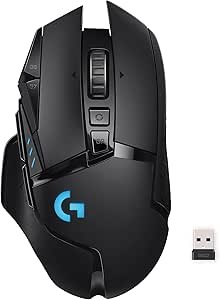 | Best Premium Feature-Packed Pick | Sensor: HERO 25K | Max DPI: 25,600 | Wireless Technology: Lightspeed (1 ms, 1000 Hz) | VIEW LATEST PRICE | See Our Full Breakdown |
| Logitech G305 Lightspeed Wireless Gaming Mouse – Black |  | Best for Beginners | Sensor: HERO 12K optical | DPI: 200–12,000 | Wireless Technology: Lightspeed wireless | VIEW LATEST PRICE | See Our Full Breakdown |
| Redragon M810 PRO Wireless RGB Gaming Mouse 10000 DPI with Remapping Keys |  | Best Budget RGB Workhorse | DPI: 10,000 | Polling Rate: 1000Hz | Programmable Buttons: 8 | VIEW LATEST PRICE | See Our Full Breakdown |
| Logitech G305 Lightspeed Wireless Gaming Mouse – Blue |  | Best Battery Life and Portability | Sensor: HERO 12K optical | DPI Range: 200–12,000 | Wireless Technology: Lightspeed (1 ms response) | VIEW LATEST PRICE | See Our Full Breakdown |
| Redragon M656 Wireless Optical Gaming Mouse 4000 DPI Remapping Keys |  | Best Ultra-Cheap Entry Point | Sensor: Optical, 4000 DPI max | Connectivity: 2.4GHz wireless | Buttons: 7 (remappable) | VIEW LATEST PRICE | See Our Full Breakdown |
| INPHIC A9 V2 Explorer Wireless Gaming Mouse, 12800 DPI Silent Mouse |  | Best for Gaming and Office Dual Duty | DPI: Up to 12,800 | Connectivity: Bluetooth, 2.4GHz wireless, USB-C wired | Buttons: 7 | VIEW LATEST PRICE | See Our Full Breakdown |
| Logitech G703 Lightspeed Wireless Gaming Mouse – Black |  | Best Premium Pick | Sensor: HERO 25K | Connectivity: LIGHTSPEED wireless | Weight: 95 g (plus 10 g optional weight) | VIEW LATEST PRICE | See Our Full Breakdown |
| Wireless Gaming Mouse with 7-Color LED, Rechargeable, Ergonomic Design, Silent Click Buttons, 2400 DPI |  | Best Budget Quiet Pick | Connectivity: 2.4GHz wireless (USB receiver) | Sensor: Optical | Max DPI: 2400 | VIEW LATEST PRICE | See Our Full Breakdown |
| Redragon M913 Wireless RGB MMO Gaming Mouse 16000 DPI Remapping Keys |  | Best for MMO Players | Connectivity: 2.4GHz wireless and wired USB-C | Sensor: Pixart 3335 optical | Max DPI: 16,000 (5 adjustable levels) | VIEW LATEST PRICE | See Our Full Breakdown |
| Logitech G305 Lightspeed Wireless Gaming Mouse – Lilac |  | Best Compact Esports Pick | Sensor: HERO optical | Max DPI: 12,000 | Connectivity: Lightspeed wireless, 1 ms report rate | VIEW LATEST PRICE | See Our Full Breakdown |
| Razer Basilisk V3 X HyperSpeed Wireless Gaming Mouse, Black |  | Best All-Round Performer | Sensor: Razer 5G Advanced 18K optical | Connectivity: HyperSpeed wireless and Bluetooth | Buttons: 9 customizable | VIEW LATEST PRICE | See Our Full Breakdown |
| wireless gaming mice | Battery Life | Connectivity | Weight | Buttons |
|---|---|---|---|---|
| Razer Orochi V2 Wireless Gamin | Up to 950 hours (Bluetooth), 425 hours (HyperSpeed) | Bluetooth, Razer HyperSpeed Wireless | Under 60g excluding battery | — |
| Wireless Gaming Mouse with Rec | Over 21 days per charge | 2.4G wireless | 90 g | 6 |
| Logitech G305 Lightspeed Wirel | Up to 250 hours | — | 99 grams | 6 programmable |
| Logitech G502 Lightspeed Wirel | Up to 60 hours | — | — | 11 programmable |
| Logitech G305 Lightspeed Wirel | Up to 250 hours on one AA | — | 3.4 oz (99 grams) | 6 programmable |
| Redragon M810 PRO Wireless RGB | Up to 45 hours | 2.4GHz wireless (nano receiver) | — | — |
| Logitech G305 Lightspeed Wirel | Up to 250 hours on 1 AA | — | 99 g (3.4 oz) | — |
| Redragon M656 Wireless Optical | — | 2.4GHz wireless | 2.88 oz | 7 (remappable) |
| INPHIC A9 V2 Explorer Wireless | — | Bluetooth, 2.4GHz wireless, USB-C wired | 106 g | 7 |
| Logitech G703 Lightspeed Wirel | Up to 35 hours | LIGHTSPEED wireless | 95 g (plus 10 g optional weight) | 6 programmable |
| Wireless Gaming Mouse with 7-C | — | 2.4GHz wireless (USB receiver) | 90 g | 6 |
| Redragon M913 Wireless RGB MMO | Up to 80 hours (lighting off), 45 hours (on) | 2.4GHz wireless and wired USB-C | — | 16, including 12-button thumb grid |
| Logitech G305 Lightspeed Wirel | 250 hours standard, up to 9 months Endurance mode (AA) | Lightspeed wireless, 1 ms report rate | 3.4 oz (~96 g) | — |
| Razer Basilisk V3 X HyperSpeed | Up to 285 hours (HyperSpeed), 535 hours (Bluetooth) | HyperSpeed wireless and Bluetooth | — | 9 customizable |
More Details on Our Top Picks
Razer Orochi V2 Wireless Gaming Mouse
No other mouse in this lineup comes close on endurance. The Orochi V2’s 950-hour Bluetooth battery life dwarfs the Logitech G502 Lightspeed’s 60 hours, and that gap changes how you use the mouse — this is a device you can toss in a laptop bag and forget about charging for months. The sub-60g weight (battery excluded) also makes it lighter than the G305 Lightspeed, which sits at 99 grams. The tradeoff is the power source: a swappable AA or AAA cell means no built-in recharging, and depending on which battery you choose, the weight balance shifts noticeably. Bluetooth mode also introduces more latency than a dedicated dongle, so competitive players should stick to Razer HyperSpeed Wireless, which cuts battery life to 425 hours — still excellent. This model makes the most sense for travelers and hybrid workers who game casually rather than esports hopefuls.
Pros:- Best-in-class battery life of up to 950 hours over Bluetooth
- Dual connectivity (Bluetooth + HyperSpeed dongle) adds genuine versatility
- Under 60g before battery, lighter than most rivals at this price
- 18K DPI sensor handles everything from office work to fast gaming
Cons:- No built-in rechargeable battery — you’re buying AA/AAA cells indefinitely
- Battery choice affects weight distribution, so the feel varies by setup
- Bluetooth mode adds latency that competitive gamers will notice
Best for: Travelers and laptop gamers who want months of battery life without carrying a charging cable
Not ideal for: Esports players who need every gram accounted for — the swappable battery adds unpredictable weight and balance changes
- Battery Life:Up to 950 hours (Bluetooth), 425 hours (HyperSpeed)
- Connectivity:Bluetooth, Razer HyperSpeed Wireless
- DPI:18,000
- Weight:Under 60g excluding battery
- Switch Durability:Up to 60 million clicks
- Battery Type:Single AA or AAA
Our verdict“Buy the Orochi V2 if battery anxiety is your biggest frustration — skip it if you want a rechargeable mouse with a consistent weight.”
Wireless Gaming Mouse with Rechargeable Battery and Type-C Fast Charging
This is the cheapest path into wireless gaming in the roundup, and the Type-C fast charging with play-while-charging is something even the Logitech G305 Lightspeed can’t offer — that mouse runs on disposable batteries with no charging at all. The 21-day battery per charge is respectable for a built-in cell, and the six-button layout covers the basics of FPS and MOBA play. Where the price shows is performance: a maximum DPI of 1600 is far below the Orochi V2’s 18,000 or the Redragon M810 PRO’s 10,000, and there’s no way to tune lighting or remap buttons through software. Side buttons also produce an audible click that quieter options like the INPHIC A9 V2 avoid. This option stands out for casual and younger gamers who want RGB flair and a rechargeable battery without spending more than a pizza night.
Pros:- Rechargeable battery with 21+ days of use and Type-C fast charging
- Charges while in use, so gaming never has to pause
- Works across Windows, Mac, Linux, consoles, phones, and tablets
- RGB lighting can be switched off to stretch battery further
Cons:- DPI tops out at 1600, the lowest in this lineup by a wide margin
- No software customization for buttons or lighting colors
- Side buttons click audibly, which some will find distracting
Best for: Casual gamers, kids, or backup-desk setups where a low price and rechargeable battery matter more than raw specs
Not ideal for: Competitive FPS players — the 1600 DPI ceiling and fixed settings won’t keep up with titles demanding fast, precise tracking
- Connectivity:2.4G wireless
- DPI:800 / 1200 / 1600
- Battery Type:Lithium Polymer, rechargeable
- Battery Life:Over 21 days per charge
- Charging:Type-C fast charging, usable while charging
- Buttons:6
- Weight:90 g
- Compatibility:Windows, Mac, Linux, Chrome OS, consoles, mobile
Our verdict“A sensible floor-price pick for casual play — but anyone serious about gaming should spend the extra money on a G305 or Orochi V2 instead.”
Logitech G305 Lightspeed Wireless Gaming Mouse – White
This is the pick that hits the sweet spot between price and proven performance. The HERO 12K sensor and 1 ms Lightspeed connection deliver tracking that feels wired, and the 250-hour battery life on a single AA easily outlasts the Logitech G502 Lightspeed’s 60 hours while costing a fraction of the price. Compared with the budget Type-C mouse elsewhere in this roundup, the G305’s sensor and response time are in a different league, which is why it earns the value crown despite the higher sticker. The drawbacks are real but manageable: there’s no rechargeable cell, and six programmable buttons limit macro-heavy MMO players — the Redragon M913 exists precisely for that crowd. The built-in USB receiver storage inside the body is a small touch that makes a genuine difference for anyone moving between a desk and a laptop bag.
Pros:- HERO 12K sensor with 1 ms response feels indistinguishable from wired
- Up to 250 hours of battery life on one AA battery
- Built-in storage compartment keeps the USB receiver from getting lost
- Trusted Logitech build quality at a competitive price
Cons:- Disposable AA batteries mean ongoing cost and no recharge option
- Only six programmable buttons limits complex game macro setups
- 99-gram weight is heavier than dedicated lightweight esports mice
Best for: Value-focused FPS players who want a trusted sensor, 1 ms response, and months of battery life under a mid-range budget
Not ideal for: MMO and MMO-adjacent players who need 10+ programmable buttons — six won’t cover complex ability rotations
- Sensor:HERO 12K optical
- DPI:200–12,000
- Response Time:1 ms
- Battery Life:Up to 250 hours
- Battery:1 AA
- Weight:99 grams
- Buttons:6 programmable
- Compatibility:Windows, macOS
Our verdict“The safest buy in this roundup — pay a little more than the no-name budget picks and get performance that rivals mice twice its price.”
Logitech G502 Lightspeed Wireless Gaming Mouse
The G502 Lightspeed is the heavyweight of this batch — literally and figuratively. With 11 programmable buttons, a HERO 25K sensor up to 25,600 DPI, and six adjustable weights, it offers a level of tailoring that the G305 Lightspeed simply can’t match with its six buttons and fixed feel. MMO and productivity power users will find the button count transformative. The other headline feature is PowerPlay compatibility, a charging mousepad that keeps the battery perpetually topped up — though it’s sold separately and pushes the real cost well past everything else here, including the Razer Orochi V2. That’s the central tradeoff: battery life is just 60 hours with RGB lighting running, and without the PowerPlay pad you’re plugging in weekly. The G HUB software also has a learning curve that casual buyers may not want to climb. This model suits enthusiasts who treat their mouse as a configurable tool rather than a peripheral.
Pros:- 11 programmable buttons handle complex MMO rotations and macros
- HERO 25K sensor with 25,600 DPI and 1000 Hz report rate
- Six adjustable weights let you dial in the exact feel
- PowerPlay compatibility enables true never-charge gaming
Cons:- PowerPlay charging pad sold separately and expensive
- Only 60 hours of battery life, the shortest among premium picks here
- Deeper software customization adds setup complexity
Best for: Enthusiasts and MMO players who want maximum programmable buttons, tunable weight, and ideally pair it with a PowerPlay charging pad
Not ideal for: Budget-conscious buyers or anyone wanting a plug-and-play experience — the full feature set costs extra and demands software tinkering
- Sensor:HERO 25K
- Max DPI:25,600
- Wireless Technology:Lightspeed (1 ms, 1000 Hz)
- Battery Life:Up to 60 hours
- Buttons:11 programmable
- Lighting:Light Sync RGB, 16.8 million colors
- Weight Adjustment:6 adjustable weights
- Compatibility:Windows 7+, macOS 10.11+, Chrome OS
Our verdict“The most capable mouse in this lineup if you’ll actually use its buttons and weights — overkill for everyone else, especially at its price with the charging pad factored in.”
Logitech G305 Lightspeed Wireless Gaming Mouse – Black
Identical hardware to the white G305 elsewhere in this roundup, but I’m giving this one a different job: the default first wireless gaming mouse. It works out of the box with no software required, the HERO sensor and 1 ms Lightspeed link mean a newcomer will never blame lag on the mouse, and the compact 99-gram body suits smaller hands and claw grips better than the bulkier Logitech G502 Lightspeed. Compared with cheaper starters like the budget Type-C model in this guide, the step up in tracking precision is immediately obvious, and the 250-hour AA battery removes the charging habit entirely — when it dies, swap a battery in ten seconds. The limitations are the same as its sibling: no recharging, and six buttons won’t grow with you into MMOs. For a first serious mouse, though, this pick makes more sense than almost anything else at the price, and the black finish hides desk grime better than the white version.
Pros:- Plug-and-play setup with no mandatory software
- 1 ms wireless response and HERO sensor rival far pricier mice
- 250-hour battery life with a simple AA swap
- Compact shape suits smaller hands and travel use
Cons:- No rechargeable battery option
- Six programmable buttons cap its usefulness for MMO players
- No RGB or premium extras to grow into
Best for: First-time wireless gaming mouse buyers, students, and players with smaller hands who want proven performance with zero setup fuss
Not ideal for: Gamers who already know they need extensive macros or rechargeable convenience — the button count and disposable battery will feel limiting fast
- Sensor:HERO 12K optical
- DPI:200–12,000
- Wireless Technology:Lightspeed wireless
- Response Time:1 ms
- Battery Life:Up to 250 hours on one AA
- Weight:3.4 oz (99 grams)
- Buttons:6 programmable
- Receiver:Nano receiver with on-board storage
Our verdict“The low-risk entry point into wireless gaming — if you’re buying your first mouse, start here and upgrade to a G502 only if you outgrow it.”
Redragon M810 PRO Wireless RGB Gaming Mouse 10000 DPI with Remapping Keys
For buyers who want maximum customization per dollar, the Redragon M810 PRO delivers a package that pricier mice often gate behind upgrades. Its 10,000 DPI sensor and eight programmable buttons make it a strong fit for MMO and MOBA players who map abilities to the mouse, something the six-button Logitech G305 Lightspeed simply can’t match. Compared to the Redragon M656, the M810 PRO doubles the sensor ceiling and adds full RGB lighting rather than a single red LED. The tradeoff is battery management: with lighting effects cranked up, the rated 45 hours shrinks considerably, far short of the G305’s 250-hour claim. It also leans large, so smaller hands may find the grip fatiguing over long sessions.
Pros:- Eight programmable buttons rival mice at twice the price
- 10,000 DPI sensor handles fast-paced shooters and precision aiming
- Low-latency 2.4GHz connection suitable for competitive play
- Full RGB customization for a cohesive desk setup
Cons:- Battery life drops sharply when RGB lighting is enabled
- Bulky shell uncomfortable for smaller hands
- Full feature set requires downloading and learning Redragon’s software
Best for: Budget-conscious MMO and MOBA players who need lots of programmable buttons and flashy lighting without spending premium prices
Not ideal for: Players with small hands or anyone who prioritizes battery life over lighting effects, since RGB drains the battery fast
- DPI:10,000
- Polling Rate:1000Hz
- Programmable Buttons:8
- Battery Life:Up to 45 hours
- Connectivity:2.4GHz wireless (nano receiver)
- Lighting:Customizable RGB
Our verdict“This pick makes the most sense for button-hungry gamers on a tight budget who accept shorter battery life as the cost of full RGB and remapping freedom.”
Logitech G305 Lightspeed Wireless Gaming Mouse – Blue
The G305 Lightspeed stands out for one number no competitor in this lineup touches: 250 hours of battery on a single AA. That endurance comes from Logitech’s efficient HERO sensor, which also delivers the 1 ms response competitive players demand. Compared with the Redragon M810 PRO, the G305 trades RGB flash and extra buttons for reliability and a featherweight 99-gram frame with built-in receiver storage, making it the better travel companion for LAN events. The Logitech G703 offers more comfort features and wireless charging, but at a much higher price. The G305’s compromises are real: no wired fallback when the battery dies, and only six programmable buttons limits its appeal for MMO players.
Pros:- Up to 250 hours of battery life on one AA battery
- HERO 12K sensor with 1 ms Lightspeed response for competitive gaming
- Lightweight 99 g design with internal storage for the USB receiver
- Logitech’s proven reliability and G HUB software support
Cons:- AA batteries must be replaced rather than recharged
- Only six programmable buttons limits macro-heavy gameplay
- No wired mode for continuous power or charging
Best for: Competitive FPS players and frequent travelers who want months of battery life and a light, durable mouse they never have to charge
Not ideal for: MMO and productivity users who need more than six programmable buttons or anyone who dislikes swapping AA batteries
- Sensor:HERO 12K optical
- DPI Range:200–12,000
- Wireless Technology:Lightspeed (1 ms response)
- Battery Life:Up to 250 hours on 1 AA
- Weight:99 g (3.4 oz)
- Programmable Buttons:6
Our verdict“This model is better suited to gamers who value battery endurance and portability above button count and lighting, making it the dependable baseline pick of the roundup.”
Redragon M656 Wireless Optical Gaming Mouse 4000 DPI Remapping Keys
At the bottom of the price ladder sits the Redragon M656, and it earns its spot by being an honest, no-frills option. Its 4000 DPI ceiling is modest next to the M810 PRO’s 10,000 or the INPHIC A9 V2‘s 12,800, but for everyday gaming and general desktop work, that range is plenty. Where it differentiates itself is weight: at 2.88 ounces, it’s one of the lightest mice in this lineup, lighter even than the G305. The single red backlight keeps power draw minimal, which suits its marathon AA battery life. Buyers should know the battery isn’t in the box, the scroll wheel light turns off to save power, and the software feels clunkier than Logitech’s G HUB.
Pros:- Extremely light 2.88 oz build reduces fatigue during long sessions
- Seven remappable buttons and adjustable DPI for a budget mouse
- 10-meter wireless range for couch or living-room setups
- Single AA power keeps running costs near zero
Cons:- 4000 DPI ceiling limits high-sensitivity play styles
- Battery not included out of the box
- Software setup is less polished and can confuse beginners
Best for: First-time wireless mouse buyers, students, or casual gamers who want a light, cheap, functional mouse for mixed gaming and schoolwork
Not ideal for: Serious FPS players chasing high-sensitivity headroom or anyone wanting RGB styling, since its sensor and lighting are basic
- Sensor:Optical, 4000 DPI max
- Connectivity:2.4GHz wireless
- Buttons:7 (remappable)
- Weight:2.88 oz
- Wireless Range:10 meters
- Power:1 AA battery (not included)
- Backlight:Red LED
Our verdict“This option stands out for spendthrift buyers who want a dependable featherweight mouse and don’t care about RGB or elite sensor specs.”
INPHIC A9 V2 Explorer Wireless Gaming Mouse, 12800 DPI Silent Mouse
The INPHIC A9 V2 Explorer solves a problem pure gaming mice ignore: it works everywhere. With Bluetooth, 2.4GHz wireless, and USB-C wired modes, it pairs to a gaming PC, a work laptop, a tablet, or even a phone, something neither the Logitech G305 nor the G703 can do. Its silent click technology makes it genuinely usable in shared offices or late-night sessions where the G305’s standard clicks would draw complaints. The 12,800 DPI sensor covers gaming needs, though latency over Bluetooth won’t match Logitech’s Lightspeed connection for competitive shooters. Extras like the battery indicator light are helpful for some and a distraction for others, and Windows users need a driver download for the full button-mapping feature set.
Pros:- Triple connectivity (Bluetooth, 2.4GHz, USB-C wired) across Windows, macOS, Android, and iOS
- Silent clicks suit shared offices and late-night play
- 12,800 DPI sensor provides generous sensitivity headroom
- Fast USB-C recharging keeps downtime short
Cons:- Bluetooth mode adds latency unsuitable for competitive gaming
- Driver download required on Windows for full customization
- Battery indicator light can be visually distracting
Best for: Hybrid users who split time between gaming and quiet office work across multiple devices, including Mac and mobile
Not ideal for: Esports-focused players who need the lowest possible latency, since Bluetooth mode lags behind dedicated 2.4GHz gaming connections
- DPI:Up to 12,800
- Connectivity:Bluetooth, 2.4GHz wireless, USB-C wired
- Buttons:7
- Weight:106 g
- Battery:1 AA (included), rechargeable via USB-C
- Range:33 feet
- Compatibility:Windows, macOS, Android, iOS
Our verdict“This pick makes the most sense for multi-device users who want one quiet, flexible mouse for both spreadsheets and after-hours games.”
Logitech G703 Lightspeed Wireless Gaming Mouse – Black
Sitting at the top of this price bracket, the Logitech G703 justifies its premium with the HERO 25K sensor, Logitech’s most refined tracking, plus an optional 10-gram weight for players who like to tune heft. Its killer feature is Powerplay compatibility: paired with the separately sold charging pad, the mouse never runs dry, effectively making its 35-hour battery rating irrelevant. Compared with the G305, the G703 adds LIGHTSYNC RGB, a more sculpted comfortable shell, and that charging ecosystem, but shares the same six-button layout. Against the Redragon M810 PRO, it wins on sensor quality and build polish but loses badly on button count and price. Buyers should budget honestly, because the wireless-charging dream requires a meaningful extra spend.
Pros:- HERO 25K sensor offers flagship-level tracking precision
- Powerplay compatibility enables continuous wireless charging
- Optional 10 g weight lets players customize feel
- Comfortable sculpted design suited to long sessions
Cons:- Powerplay wireless charging system sold separately at substantial cost
- Premium price without including charging hardware
- Only six programmable buttons despite the high cost
Best for: Enthusiast gamers willing to invest in the Powerplay ecosystem for a charge-forever setup with flagship-grade tracking
Not ideal for: Budget buyers or MMO players, since the high price and six-button layout don’t justify the spend without the optional charging pad
- Sensor:HERO 25K
- Connectivity:LIGHTSPEED wireless
- Weight:95 g (plus 10 g optional weight)
- Battery Life:Up to 35 hours
- Lighting:LIGHTSYNC RGB
- Buttons:6 programmable
- Charging:Powerplay compatible (system sold separately)
Our verdict“This model is better suited to committed gamers building a never-charge setup around Powerplay than anyone buying a mouse on a budget.”
Wireless Gaming Mouse with 7-Color LED, Rechargeable, Ergonomic Design, Silent Click Buttons, 2400 DPI
For anyone who wants a quiet, colorful wireless mouse without spending serious money, this option covers the basics and adds a few flourishes. The silent click buttons are the real selling point here — none of the other picks in this lineup, including the Redragon M913 or Razer Basilisk V3 X, prioritize quiet operation, which makes this a smarter choice for shared rooms, late-night sessions, or dorm setups. The 7-color LED strip adds atmosphere, and the rechargeable battery spares you from buying AAs, unlike the Logitech G305.
The tradeoffs are real: a 2400 DPI ceiling puts it far below the 12,000–18,000 DPI sensors elsewhere in this roundup, so competitive players will feel the limits quickly. Still, for casual titles and everyday browsing, it gets the job done at a fraction of the price.
Pros:- Silent clicks make it ideal for quiet environments
- Rechargeable battery eliminates AA replacement costs
- 7-color RGB backlighting adds style cheaply
- Broad OS compatibility including macOS and Android
Cons:- 2400 DPI maximum is low for serious gaming
- Requires a USB receiver, using up a port
Best for: Budget-conscious casual gamers and students who need a quiet mouse for shared spaces
Not ideal for: Competitive or FPS players — the 2400 DPI sensor can’t keep up with fast, low-sensitivity aiming styles
- Connectivity:2.4GHz wireless (USB receiver)
- Sensor:Optical
- Max DPI:2400
- Buttons:6
- Battery:Rechargeable lithium-ion, up to 30 days
- Weight:90 g
- OS Compatibility:Windows, macOS, Android, iOS
Our verdict“A sensible low-cost choice for casual gamers who value quiet clicks over raw performance.”
Redragon M913 Wireless RGB MMO Gaming Mouse 16000 DPI Remapping Keys
Where most mice in this roundup offer 6–9 buttons, the Redragon M913 goes all-in with 12 side buttons aimed squarely at MMO and MOBA players who live on macros and ability rotations. Compared with the Razer Basilisk V3 X, which spreads its 9 controls across the whole body, the M913 clusters its thumb grid like a classic MMO layout — that’s the deciding factor if your games demand dozens of remappable commands.
The Pixart 3335 sensor and 16,000 DPI put it in legitimate esports territory, and the dual wireless and USB-C wired modes mean a dead battery never ends a raid. The catch: this is a big, busy mouse. Players with smaller hands will find it unwieldy next to the compact Logitech G305, and the software needed to unlock the remapping takes patience to learn.
Pros:- 12 side buttons with full remapping for complex game commands
- Pixart 3335 sensor delivers true esports-grade tracking
- Switches to wired USB-C when the battery runs dry
- Up to 80 hours of battery with lighting off
Cons:- Software setup is involved and occasionally clunky
- Large chassis uncomfortable for smaller hands
Best for: MMO and MOBA players who need a full 12-button thumb grid for macros and abilities
Not ideal for: Players with small hands or anyone who wants a simple plug-and-play mouse — the size and button count are overkill
- Connectivity:2.4GHz wireless and wired USB-C
- Sensor:Pixart 3335 optical
- Max DPI:16,000 (5 adjustable levels)
- Buttons:16, including 12-button thumb grid
- Battery Life:Up to 80 hours (lighting off), 45 hours (on)
- Lighting:16.8 million color RGB
Our verdict“The clear choice for ability-heavy games, as long as your hands are big enough and you’re willing to wrestle the software.”
Logitech G305 Lightspeed Wireless Gaming Mouse – Lilac
The Logitech G305 remains the benchmark for small, fast wireless mice, and the lilac colorway proves performance gear doesn’t have to look boring. Its HERO sensor and 1 ms Lightspeed report rate deliver the kind of lag-free response competitive shooters demand, while the 99-gram frame makes it flick-friendly. Against the Redragon M913, it’s the opposite philosophy: minimal buttons, maximum speed and portability.
Battery life is the headline number — 250 hours standard, up to 9 months in Endurance mode — which outlasts the Razer Basilisk V3 X’s 285-hour figure once you factor in that mode. The catch is that it runs on a disposable AA battery rather than built-in rechargeable cells like the budget LED mouse in this lineup, and the compact shape leaves palm-size hands hanging off the back.
Pros:- HERO sensor with 12,000 DPI tracks flawlessly at competitive speeds
- 1 ms Lightspeed wireless rivals wired latency
- Up to 9 months of battery in Endurance mode
- Lightweight, compact body ideal for travel and claw grips
Cons:- Runs on a replaceable AA battery instead of rechargeable cells
- Ambidextrous-looking but effectively right-hand oriented
Best for: Competitive FPS players and laptop gamers who want a lightweight, tournament-capable mouse that travels well
Not ideal for: Palm-grip players with large hands — the compact shell cramps bigger grips, and MMO players will find 6 buttons limiting
- Sensor:HERO optical
- Max DPI:12,000
- Connectivity:Lightspeed wireless, 1 ms report rate
- Battery Life:250 hours standard, up to 9 months Endurance mode (AA)
- Weight:3.4 oz (~96 g)
- Design:Compact, lightweight
Our verdict“The best small-format pick here for fast-paced shooters, provided you accept the AA battery and cramped fit for larger hands.”
Razer Basilisk V3 X HyperSpeed Wireless Gaming Mouse, Black
The Razer Basilisk V3 X threads the needle between the extremes in this roundup. It’s more versatile than the button-heavy Redragon M913, more feature-rich than the compact Logitech G305, and its 18K optical sensor is the highest-resolution tracker of the entire batch. Nine customizable controls hit the sweet spot for shooters and general gaming without demanding a macro manual.
What pushes it ahead as an everyday flagship is dual-connectivity flexibility: HyperSpeed for low-latency play and Bluetooth for up to 535 hours of battery — the longest runtime here by a wide margin. Ergonomics are another strength, with a sculpted right-handed shape that suits long sessions better than flatter rivals. Drawbacks exist: it leans gaming-first, so office users may find the software and RGB overkill, and Razer’s Synapse requirement adds setup friction the G305 skips entirely.
Pros:- 18K optical sensor offers the sharpest tracking in this lineup
- Up to 535 hours of battery via Bluetooth mode
- 9 customizable buttons balance capability and simplicity
- Sculpted ergonomic shape excels over long sessions
Cons:- Requires Razer Synapse software for full customization
- Battery life drops sharply in HyperSpeed mode with RGB on
Best for: Enthusiast gamers who want one comfortable, high-spec mouse for shooters and everything else
Not ideal for: Productivity-first buyers — the gaming-centric software and RGB emphasis are wasted on office-only use
- Sensor:Razer 5G Advanced 18K optical
- Connectivity:HyperSpeed wireless and Bluetooth
- Buttons:9 customizable
- Switches:Razer Mechanical Gen-2
- Battery Life:Up to 285 hours (HyperSpeed), 535 hours (Bluetooth)
- Lighting:Razer Chroma RGB, 16.8 million colors
Our verdict“If you want a single do-everything wireless mouse with flagship specs, this is the strongest all-around pick of the bunch.”

How We Picked
I ranked these 14 wireless gaming mice against four buyer-relevant criteria. Performance came first: sensor DPI range, polling consistency, and whether the wireless connection introduced noticeable input lag in fast games. Battery and power mattered next, because a mouse that dies mid-match defeats the point of going wireless — I favored models with long-rated battery life, convenient charging, or user-swappable batteries. Ergonomics and weight were judged by how each mouse suits different grip styles and hand sizes, and whether the shape supports long sessions without fatigue.
Finally, I weighed value: what each mouse costs relative to the features it delivers, and whether cheaper options genuinely compete with premium ones. This is why the Logitech G502 Lightspeed takes the top spot despite its price — nothing else here matches its feature set — and why the G305 variants rank highly as the value benchmark. Generic budget mice rank lower not because they are unusable, but because their sensors and build quality fall short of what gamers actually need.
Factors to Consider When Choosing Wireless Gaming Mice
Before picking a wireless gaming mouse, it helps to understand what actually separates a great one from a mediocre one. These are the factors that shaped my ranking, and the mistakes I see buyers make most often.Latency and Sensor Quality
Modern 2.4GHz wireless connections from Razer and Logitech are fast enough that most players cannot feel a difference versus wired — but this does not apply equally across price tiers. Premium mice use proprietary protocols like Lightspeed or HyperSpeed with tuned sensors, while some budget models rely on generic receivers that introduce perceptible delay in twitch shooters. A high DPI number alone tells you little; sensor consistency, tracking accuracy at high speeds, and polling stability matter far more than the marketing figure on the box. A common mistake is buying a mouse for its 16000 DPI headline when you will realistically play between 800 and 3200 DPI. Spend your money on a proven sensor platform, not a big number.
Battery Life vs. Rechargeable Convenience
There are two power philosophies, and the right one depends on your habits. Mice running on AA or AAA batteries, like the Orochi V2 and G305, can last many months and be revived instantly with a fresh cell — great if you hate charging cables. Rechargeable models are more convenient day to day and often lighter, but budget versions with bright RGB lighting can drain in hours and degrade over years of charge cycles. My advice: if a mouse claims RGB and costs under $25, assume the quoted battery life assumes the lights are off. Also check whether it charges while in use or becomes a paperweight during charging — this detail is easy to miss before purchase.
Weight and Grip Style
Weight shapes your entire experience more than most specs suggest. Lightweight mice under 85 grams suit claw and fingertip grips and fast, low-sensitivity play; heavier models like the G502 Lightspeed suit palm grippers who want stability and lots of buttons. Shape matters just as much: symmetrical smaller mice work for both hands but can cramp large hands over long sessions, while sculpted right-handed shells lock you into one grip. A frequent buyer mistake is choosing based on appearance and discovering the shape fights their grip within a week. If possible, measure your hand length and compare it against the mouse dimensions before ordering rather than guessing.
Button Count and Programmability
More buttons are only an advantage if your games actually use them. MMO and MOBA players get real value from a 12-button side array like the Redragon M913, where mapped abilities shave reaction time. Shooters, strategy, and general use benefit far less — most players need six well-placed buttons, not sixteen. Software quality is the hidden variable: Logitech G HUB and Razer Synapse are mature and reliable, while some budget remapping software feels buggy and may not remember profiles between PCs. Check that the software supports your operating system, because several budget brands have weak or missing Mac support.
When to Pay More (and When Not To)
Premium mice justify their price through sensors, build materials, and longevity — a G502 Lightspeed or G703 will likely outlast two or three budget mice, which changes the real cost per year. That said, the performance ceiling between a $50 G305 and a $150 flagship is small for most players; the extra money mostly buys comfort features, more buttons, and wireless charging. Beginners and casual players should almost never start at the top of the price range. The buyers who genuinely benefit from premium spending are competitive players sensitive to gram-level weight differences, or MMO players needing deep button customization. Everyone else gets 90% of the experience from mid-range options.
Avoiding the Generic-Mouse Trap
Unbranded wireless mice with long feature lists — silent clicks, rainbow LEDs, 2400 DPI — are tempting at their low prices, but they are usually office mice dressed up in gaming language. Silent click switches use a different mechanism that feels mushy for rapid clicking, and 2400 DPI sensors struggle with fast flick movements. That does not make them bad purchases: they are genuinely fine for work, browsing, and slow-paced games. The mistake is buying one expecting competitive performance. A better rule of thumb: if a wireless mouse does not name its sensor or wireless protocol, treat it as an office peripheral first and a gaming device second.
Frequently Asked Questions
Are wireless gaming mice actually as fast as wired ones now?
For mice using dedicated 2.4GHz protocols like Logitech Lightspeed, Razer HyperSpeed, or similar tuned receivers, the latency difference versus wired is under a few milliseconds — below what virtually anyone can perceive in gameplay. The catch is that this applies to reputable brands, not all wireless mice equally. Generic models using basic receivers or Bluetooth-only connections can lag noticeably in fast shooters. Bluetooth itself is fine for productivity but adds delay that competitive players will feel. If esports-level responsiveness is your priority, choose a mouse with a named wireless protocol and a USB receiver rather than Bluetooth pairing.
Should I buy the Logitech G305 or spend more on the G502 Lightspeed?
The G305 makes sense for most people: it uses the same HERO sensor family as its pricier siblings, weighs under 100 grams, and runs roughly a year on a single AA battery. What you give up is button count, the sculpted right-handed shape, adjustable weights, and PowerPlay wireless charging compatibility. If you play MMOs, use lots of macros, or have a larger palm-grip hand, the G502’s extra buttons and shape justify the price jump. For shooters and general gaming with a claw or fingertip grip, the G305 is arguably the better tool despite costing a third as much. Buy the G502 for features, not for raw performance — the sensor difference is negligible in practice.
Do RGB lights and silent clicks matter for gaming?
RGB lighting is purely aesthetic, and it actively hurts battery life on wireless mice — some budget models lose half their runtime with lights enabled. If you value battery above looks, turning RGB off is one of the easiest performance wins available. Silent clicks are a different story: they use dampened switches designed to reduce noise, which produces a softer, mushier feel that many gamers dislike for rapid clicking. They are excellent for shared offices or late-night quiet play, but for competitive titles where click feedback timing matters, standard switches are the better choice. Decide whether silence or click feel serves your actual environment before picking a silent model.
Is a rechargeable mouse better than one that uses AA batteries?
Neither is universally better — it depends on how you handle maintenance. Rechargeable mice are convenient, lighter in many cases, and cost nothing in batteries, but they tether you to a charging routine and the battery degrades over a few years. AA-powered mice like the Orochi V2 and G305 can run for many months and be refreshed in ten seconds with a fresh cell, which is why they dominate the battery-life rankings here. The downside is occasional battery cost and slightly more weight from the cell. If you are the type who forgets to charge devices, battery-swappable models will save you repeated frustration.
How much DPI do I realistically need for gaming?
Far less than marketing suggests. Most competitive players use settings between 400 and 1600 DPI, and even high-sensitivity players rarely exceed 3200. A sensor rated for 25000 DPI matters for its tracking quality at high speeds, not because you will ever use the maximum setting. Where higher sensor ceilings help is when you run a low DPI in-game combined with high in-game sensitivity, or use multiple monitors for work. A 2400 DPI ceiling on a generic mouse is not automatically disqualifying for casual play, but those sensors often lose tracking accuracy during fast flicks, which is the real limitation. Prioritize sensor quality over the DPI number.
Conclusion
Matching the right mouse to your situation is easier than it looks once you sort by buyer type. For the best overall pick, the Logitech G502 Lightspeed is the most complete package in this lineup, pairing a top-tier sensor with eleven buttons and premium build. The best value choice is clearly the Logitech G305 Lightspeed — available here in white, black, blue, and lilac — because it delivers flagship sensor performance at a budget price. Best for beginners is a close call between the G305 and the Redragon M810 PRO, but the G305’s simple software and reliable wireless give it the edge for a first gaming mouse.
For premium buyers, the Logitech G703 Lightspeed adds wireless charging compatibility and a more sculpted shape over the G305 for those wanting a step up in comfort. The Razer Basilisk V3 X HyperSpeed is the pick for shooters and hybrid productivity, thanks to its precise scroll wheel and versatile button layout. MMO players should go straight to the Redragon M913 with its 12-button side panel, while the Razer Orochi V2 is the obvious choice for travel and laptop gaming with its 950-hour battery and compact shell. If your budget is under $20, treat the generic silent-click and 7-color LED mice as office peripherals that can handle casual gaming — just do not expect competitive performance from them.
Fall Picks
fall essentials
As an affiliate, we earn on qualifying purchases.