Choosing a beginner 3D printer that supports various filaments, offers easy calibration, and has user-friendly features helps you produce high-quality, consistent prints with less frustration. Durable, reliable construction and a supportive ecosystem keep you confident and motivated as you learn. These qualities make it easier to enjoy long-term success and creativity. Keep exploring, and you’ll discover how these features can help you grow more skilled and inspired over time.
Key Takeaways
- Compatibility with various filaments allows continuous experimentation and growth without needing new machines.
- Guided or automatic calibration ensures consistent, high-quality prints with minimal setup effort.
- User-friendly controls and clear displays make operation simple and reduce frustration for beginners.
- Durable construction and reliable components provide long-term performance and ease of maintenance.
- Access to a supportive community and learning resources fosters ongoing skill development and confidence.
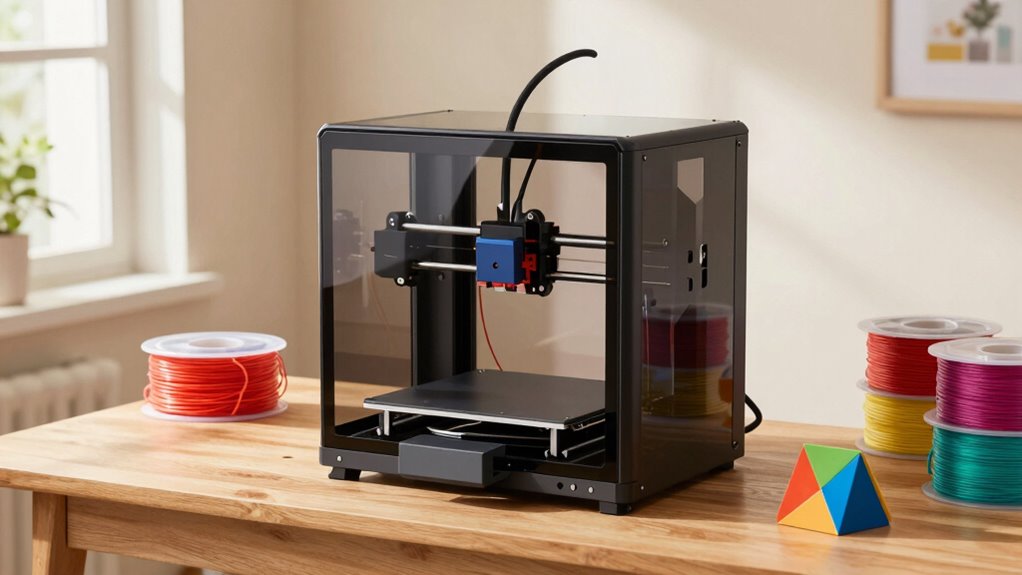
Getting started with 3D printing can seem intimidating, but it’s more accessible than ever for beginners. The key to making your experience enjoyable and sustainable lies in choosing the right printer and understanding how to keep it running smoothly. When evaluating 3D printers for beginners, one of the most important factors is material compatibility. A good beginner printer supports a variety of filaments like PLA, ABS, and PETG, giving you flexibility to experiment and learn. If your printer can handle different materials, you won’t need to buy new machines as you advance, which saves money and frustration. It also allows you to explore different projects, from simple prototypes to more durable or flexible parts.
Choosing a beginner-friendly 3D printer with versatile filament support ensures easy experimentation and long-term growth.
Another essential aspect that makes these printers easier to love long term is proper printer calibration. Calibration is the foundation of quality prints, helping your machine produce accurate and consistent results. When your printer is well-calibrated, you’ll notice fewer failed prints, less warping, and a smoother finish. Most beginner-friendly printers come with intuitive calibration processes, often with guided steps or automatic features that make the setup straightforward. This reduces the learning curve and keeps you motivated. Supporting features like material compatibility and automatic calibration are often designed to make maintenance easier, which is crucial for long-term enjoyment. Additionally, having a reliable power supply can help prevent interruptions and protect your investment over time. Ensuring that your printer has easy access to components can also simplify troubleshooting and routine maintenance. Furthermore, selecting a printer with robust construction can significantly extend its lifespan by resisting wear and tear during regular use.
Beyond material compatibility and calibration, these printers often feature user-friendly interfaces, which make it easier to navigate settings and monitor progress. A clear display and simple controls mean you spend less time figuring out how to start or pause a print and more time creating. Ease of operation and intuitive controls can significantly impact your overall experience, especially when troubleshooting or making quick adjustments. Durability and reliability are also essential; a sturdy build ensures your printer withstands regular use without frequent breakdowns, fostering confidence over time. Plus, a supportive user community can be a huge help, providing tips, troubleshooting advice, and inspiration for new projects.
Ultimately, what makes 3D printers for beginners easier to love long term is their ability to evolve with your skills. A machine that’s versatile in material handling and easy to calibrate encourages experimentation without constant frustration. When you find a printer that works well right out of the box and simplifies maintenance, you’re more likely to stick with it, hone your skills, and enjoy the endless creative possibilities 3D printing offers. It’s about setting yourself up with tools that are forgiving, adaptable, and designed with ease of use in mind—because the more confident you are in your equipment, the more you’ll love your 3D printing journey.

AOSEED AI 3D Printer for Kids, Fast 400mm/s, 8000+ Models, Enclosed Safe
- Color Support: Supports single-color printing only
- Endless DIY Fun: Access to 8,000+ models for creative projects
- Educational Toy Factory: Encourages creativity and learning at home
As an affiliate, we earn on qualifying purchases.
As an affiliate, we earn on qualifying purchases.
Frequently Asked Questions
How Much Maintenance Do 3D Printers Require Over Time?
3D printers need regular maintenance, but it’s manageable with simple calibration tips and proper filament storage. You’ll want to regularly check and calibrate the bed for consistent prints, and keep your filament dry and stored in a sealed container to prevent jams. Cleaning the nozzle and inspecting moving parts every few weeks also helps. With consistent care, your printer stays reliable, making it easier to enjoy long-term, frustration-free printing.
Are There Safety Concerns for Beginners Using 3D Printers?
Safety concerns for beginners are real but manageable when you follow safety protocols and wear protective gear. Always operate your 3D printer in a well-ventilated area, keep hands away from moving parts and hot surfaces, and use safety glasses and gloves when handling materials. Staying cautious and following these simple precautions guarantees you can enjoy 3D printing safely, making it easier to love your printer long term.
Can 3D Printers Be Used for Professional or Industrial Purposes?
Yes, you can use 3D printers for professional or industrial purposes. With advanced materials and design software, you can produce high-quality, durable parts suited for various industries. These printers handle complex designs and larger projects efficiently, making them ideal for prototyping, manufacturing, or custom production. As you gain experience, you’ll find that upgrading features and materials helps you meet professional standards and expand your capabilities.
What Are Common Troubleshooting Issues for New Users?
When troubleshooting your 3D printer, you might face issues like poor print quality or filament jams. To prevent these, follow calibration tips regularly to guarantee accurate prints. Also, store filament properly in a dry, sealed container to avoid moisture-related problems. If you encounter clogging or uneven layers, recheck calibration and filament condition. These simple steps help you enjoy consistent, successful prints and keep your 3D printer running smoothly over time.
How Do I Choose the Right Filament for My Projects?
They say “you get what you pay for,” but choosing the right filament isn’t just about price. Focus on material compatibility with your printer and project needs. For vibrant, detailed models, go for colorful filaments that match your design. Always check the filament’s specifications to guarantee it works with your printer. Selecting the right filament makes your prints easier and more satisfying, turning beginners into confident creators.

FLASHFORGE AD5M 3D Printer Fully Auto Calibration Print with 1-Click Max 600mm/s Speed, All-Metal CoreXY Structure Precise Printing, Easy-Maintenance Quick-Swap Nozzle, Print Size 220x220x220mm
- Ideal for All Skill Levels: Suitable for beginners and experts
- Automatic Bed Leveling: One-click precise calibration
- High-Speed Printing: Max 600mm/s speed
As an affiliate, we earn on qualifying purchases.
As an affiliate, we earn on qualifying purchases.
Conclusion
Starting with a 3D printer might seem intimidating at first, but with the right choice and patience, it becomes a rewarding creative outlet. Remember, mistakes are just part of learning, and each project improves your skills. Don’t worry about perfect results right away—enjoy the process and celebrate your progress. Long-term love for 3D printing grows when you embrace the journey, not just the finished product. So, keep experimenting and have fun creating!

FLASHFORGE AD5X Multi-Color 3D Printer, CoreXY 600mm/s High-Speed, 1-Click Auto Leveling, 300°C Direct Drive Extruder, 220x220x220mm Build Volume, Ideal for Precision and Efficiency
- Multi-Color Printing: Supports up to 4 colors simultaneously
- Auto Bed Leveling: One-click automatic calibration
- High-Speed Printing: Up to 600mm/s with rapid acceleration
As an affiliate, we earn on qualifying purchases.
As an affiliate, we earn on qualifying purchases.

FLASHFORGE Adventurer 5M Pro 3D Printer with 1 Click Auto Printing System, 600mm/s High-Speed, Quick Detachable 280°C Nozzle, Core XY All-Metal Structure, Multi-Functional 220x220x220mm 3D Printer
- High-Speed Printing: Up to 600mm/s with fast nozzle heat
- Versatile Nozzle Sizes: 0.25/0.4/0.6/0.8mm options
- Stable All-Metal Structure: Core XY design for stability
As an affiliate, we earn on qualifying purchases.
As an affiliate, we earn on qualifying purchases.